Endpoint Security vs Antivirus: The SMB Guide
A Southside logistics company running legacy antivirus may block yesterday's malware yet miss a fileless attack using legitimate tools. Traditional antivirus primarily matches known threats against signatures, while modern endpoint security adds behavioral monitoring, centralized management, device controls, and automated response for unknown or suspicious activity. That difference can determine whether a Johnson County business keeps shipping or loses a workday.
A growing operation in a Greenwood business park often has a familiar mix: aging server hardware, cloud applications, remote workers, warehouse laptops, and Wi-Fi that was designed for a smaller team. The antivirus icon is green, so everyone assumes the environment is protected. Then a compromised credential launches PowerShell, a user opens a malicious document, or ransomware begins moving toward shared files without presenting a recognizable malware signature.
The Core Difference for Indiana Businesses
The practical difference in the endpoint security vs antivirus discussion is not whether antivirus still has value. It does. Known malware should be blocked before it runs. The issue is what happens when the attack doesn't look like a known file, uses a legitimate Windows utility, or starts with stolen credentials rather than a downloadable virus.
Traditional antivirus scans files and processes for recognized patterns. Modern endpoint security adds a wider control plane, including behavioral detection, centralized policy management, device control, exploit prevention, telemetry, investigation, and response. That broader model reflects the fact that endpoints now include laptops, desktops, servers, mobile devices, and connected equipment across on-premises and cloud environments, not just office PCs. Microsoft's endpoint security overview describes endpoint protection as a combination of preventive and detective controls, with antivirus serving as one component.
For a business along the I-65 corridor, the distinction affects continuity more than terminology. A distribution company can tolerate neither a locked dispatch workstation nor a disconnected warehouse scanner. A medical practice near Greenwood needs access controls and audit evidence, not only a malware scanner. A contractor serving defense customers needs a defensible process for detection and response, not a screenshot showing that an antivirus subscription is active.
| Question | Traditional antivirus | Modern endpoint security |
|---|---|---|
| What does it primarily stop? | Known malware and suspicious files | Known and unknown threats, suspicious behavior, and attack chains |
| How is activity managed? | Often device by device | Central console with policies and fleet-wide visibility |
| What happens after detection? | Quarantine, delete, or alert | Isolate, investigate, terminate, remediate, and document |
| What does it protect? | Usually the individual computer | Endpoints, applications, devices, identities, and connected controls |
| Who benefits most? | Low-risk, simple environments | Businesses with multiple users, compliance needs, or downtime exposure |
A useful external comparison is this Houston SMB cybersecurity comparison, particularly for owners who want to see how the same buying question affects smaller businesses outside Indiana. For a local perspective, this Indiana SMB guide to endpoint protection services focuses on the operational side, including management and support.
The central question is simple: can your team identify and contain an attack before it reaches shared systems? If the answer depends on someone manually checking every laptop, the business has a visibility problem, even if every device has antivirus installed.
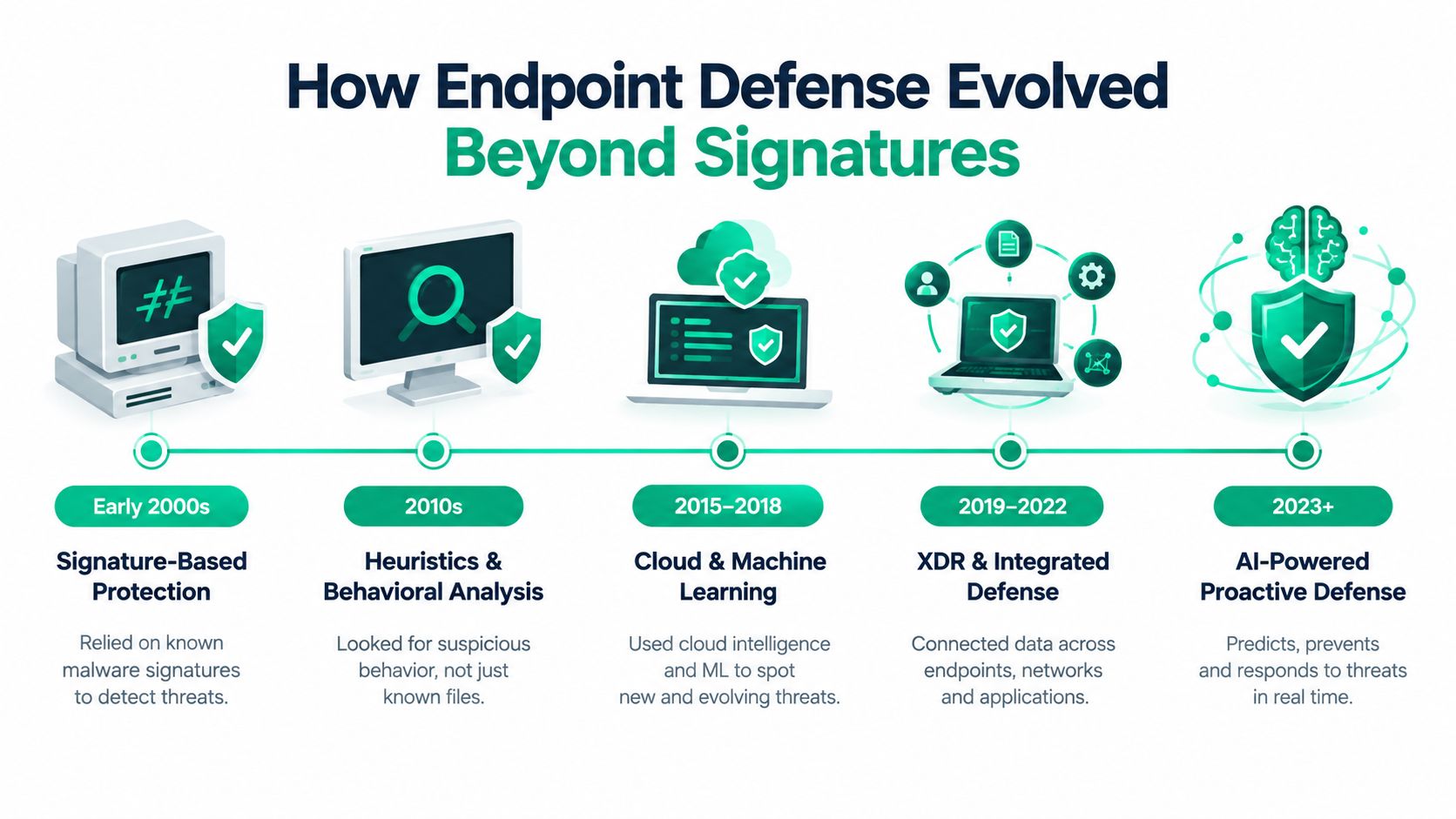
A short visual overview can help frame the distinction:
How Endpoint Defense Evolved Beyond Signatures
Early desktop antivirus solved a specific problem well. It compared files against a database of known malware signatures and blocked a match. That approach suited on-premises infrastructure with relatively predictable devices, applications, and traffic. It also gave IT administrators a straightforward answer to a straightforward question: does this file resemble something already identified as malicious?
The problem changed as businesses adopted cloud services, remote access, mobile work, and larger software estates. An attacker might use a legitimate administrator tool, inject code into a trusted process, scrape credentials from memory, or operate entirely in memory. A file-based scanner has less to inspect when the harmful behavior comes from a trusted executable or never creates a conventional malicious file.
By the late 2000s and 2010s, endpoint platforms began adding firewalling, behavior analysis, application controls, vulnerability management, and endpoint detection and response, or EDR. Modern stacks commonly combine antivirus with firewall, device control, application control, data loss prevention, browser security, anti-ransomware, and centralized administration. EDR adds continuous telemetry, incident investigation, threat hunting, and automated response from a shared console, as outlined in this overview of endpoint security capabilities.
What behavioral monitoring actually watches
Behavioral analytics don't need to recognize a specific malware file. They examine relationships between events, such as a document spawning a script interpreter, a process injecting code into another process, a user account accessing unusual systems, or a program reading credential material from memory.
That doesn't mean every unusual action is automatically malicious. A good platform adds context, policy, reputation, user identity, device role, and the sequence of events. It can then assign risk, create an incident timeline, and take a configured action. The technical value is the connection between events. A single PowerShell launch may be legitimate, while a browser download followed by encoded PowerShell, credential access, and unusual network connections deserves immediate attention.
Practical rule: If your security product can only tell you which file was quarantined, it may be protecting the endpoint without explaining the incident.
The market movement supports the operational shift. Independent research places the global endpoint security market at US$40.30 billion in 2025, with a projection of US$119.04 billion by 2035 and a 12.8% CAGR, according to DataM Intelligence's endpoint security market analysis. Those figures don't prove that every SMB needs the most expensive platform, but they do show that businesses increasingly buy layered prevention, detection, response, and policy controls rather than antivirus alone.
The U.S. Endpoint Protection Platform market was valued at $5,218.8 million in 2024 and is projected to reach $8,167.8 million by 2029, a 9.4% CAGR, according to MarketsandMarkets. For an owner in Hamilton County growth areas or a downtown Indy tech hub, the takeaway is less about market size and more about procurement: endpoint protection has become an operational security platform.
A practical discussion of machine-assisted detection for Indiana organizations appears in this guide to AI threat detection for Indiana businesses. The right question isn't whether a vendor uses the word “AI.” Ask what the agent observes, what it blocks locally, what the console records, and what happens when nobody is watching.
Comparing Detection Management and Response
A small office can install antivirus on every computer and still lack a usable incident response process. The software may detect an infected file, but an administrator still needs to determine whether the user opened it, whether credentials were exposed, whether another device shows the same behavior, and whether shared storage remains safe.
Modern endpoint security changes that workflow by collecting endpoint events centrally. The difference is especially important for businesses with hybrid staff, multiple sites, or a server room that supports daily operations.
Antivirus vs Endpoint Security Feature Matrix
| Capability | Traditional Antivirus | Modern Endpoint Security (EDR/XDR) |
|---|---|---|
| Detection method | Signature matching, reputation checks, and basic heuristics | Behavioral analytics, telemetry correlation, exploit prevention, threat intelligence, and signatures |
| Management | Local settings or basic cloud administration | Central policies, role-based access, fleet inventory, and incident dashboards |
| Response | Quarantine or delete a detected item | Isolate the device, terminate processes, block indicators, investigate, and coordinate remediation |
| Visibility | Individual device alerts | Cross-endpoint timelines, related events, and historical investigation data |
| Device controls | May be limited or absent | USB policy, application control, browser security, firewall policy, and vulnerability visibility |
| Scope | Primarily the protected workstation | Workstations, servers, mobile devices, connected equipment, and broader security telemetry |
| Best fit | Low-complexity, lower-risk environments | Businesses that need response workflows, compliance evidence, or managed monitoring |
Consider two tools with very different roles. Windows Defender Offline can scan a Windows device outside the normal operating environment, which is useful when persistent malware interferes with regular startup. It doesn't by itself provide a complete fleet-wide EDR workflow. Bitdefender GravityZone, by contrast, is a centrally managed security platform that can apply policies across enrolled devices and present administrators with a consolidated view.
A practical containment workflow
When an alert appears on a finance laptop, a managed endpoint process should look something like this:
- Validate the alert. Confirm the device owner, hostname, user, process tree, detection reason, and time of activity. Don't delete evidence before reviewing the event chain.
- Contain the device. Use the EDR console's isolate action to restrict network communication while preserving approved management access. This limits movement toward file servers and other workstations.
- Review related activity. Search for the same hash, command pattern, account behavior, parent process, or network destination across the endpoint fleet.
- Protect identities and data. Disable or reset affected credentials according to policy, review privileged access, and check whether sensitive files were opened or transferred.
- Remediate and recover. Remove persistence, patch the exploited application, restore affected files if needed, and document the timeline for management and compliance records.
- Verify before release. Reconnect the laptop only after the security team confirms that the original behavior has stopped and required controls are active.
With legacy antivirus, the same event may require a technician to visit the laptop, run a local scan, remove a file, and repeat the process on every suspected device. That can work for a single isolated infection. It doesn't scale well during a coordinated incident.
Patch management remains part of the equation. A useful operational reference is Monro Cloud's Patch Tuesday advice, which reinforces the need to treat vulnerabilities and endpoint defenses as connected tasks rather than separate checkboxes. The Indiana guide to managed detection and response also addresses the staffing question, because an EDR console is only useful when someone reviews alerts and acts on them.
The independent test perspective matters too. In AV-TEST's June 2026 Windows business evaluation, 15 endpoint protection products were tested under real-world threat scenarios, along with a large reference set. Multiple products achieved 100% detection in both the nearly 1,400-sample zero-day test and the nearly 19,000-sample malware set, while the evaluation also measured office-PC performance and false alarms. AV-TEST's business Windows evaluation is useful because protection quality must be balanced against system impact and usability.
Calculating the ROI of Preventing Downtime
Security spending is easier to defend when the conversation starts with operations. A ransomware incident doesn't only create a cleanup bill. It can stop dispatch, block scheduling, delay payroll, interrupt patient services, and leave staff waiting for systems that normally work without thought.
One industry source cites average cyberattack-related downtime at about $5,600 to $9,000 per minute, while another cites $6,130 per minute for DDoS-related downtime. These figures come from Flowtriq's discussion of the cost of DDoS attacks, and they should be treated as industry estimates rather than a forecast for every Johnson County company. The business lesson still holds: even a short outage can become financially serious when many employees, customers, and systems are affected.
Where endpoint security changes the calculation
Suppose a suspicious process begins encrypting local files. A basic antivirus tool may act if the file matches a known signature. An endpoint platform can evaluate the behavior, block the process, isolate the laptop, and alert an administrator while the incident is still contained. The precise outcome depends on product configuration, attack method, and response speed, but the control objective is clear: stop the event before it reaches shared business systems.
That prevention converts unproductive recovery work into normal work. Employees can continue serving customers instead of waiting for a file server rebuild. IT staff can spend time improving systems instead of manually cleaning every workstation. Management gets a predictable monthly service cost rather than an emergency project with an uncertain scope.
Business continuity test: Ask how many minutes your operation can run without email, shared files, line-of-business software, or access to customer records. Then ask whether your current antivirus can isolate the first compromised device without a technician touching it.
A managed platform can include SOC-as-a-Service monitoring, where a security team reviews alerts outside normal office hours and follows documented escalation rules. That matters for a Greenwood business whose suspicious activity begins overnight. The objective isn't to promise that every threat will be stopped automatically. It is to reduce the time between detection, containment, investigation, and recovery.
Compliance adds another return. A clinic may need evidence of access controls and monitoring for HIPAA. A defense supplier may need a documented process aligned with CMMC expectations. A general business can use the NIST CSF functions to organize identification, protection, detection, response, and recovery. A security investment that supports both operations and evidence collection has more value than an isolated antivirus license.
For a practical connection between monitoring and continuity planning, see this guide to proactive system monitoring. The strongest ROI argument is not that endpoint security eliminates risk. It is that it gives the business a better chance of containing risk before it becomes downtime.
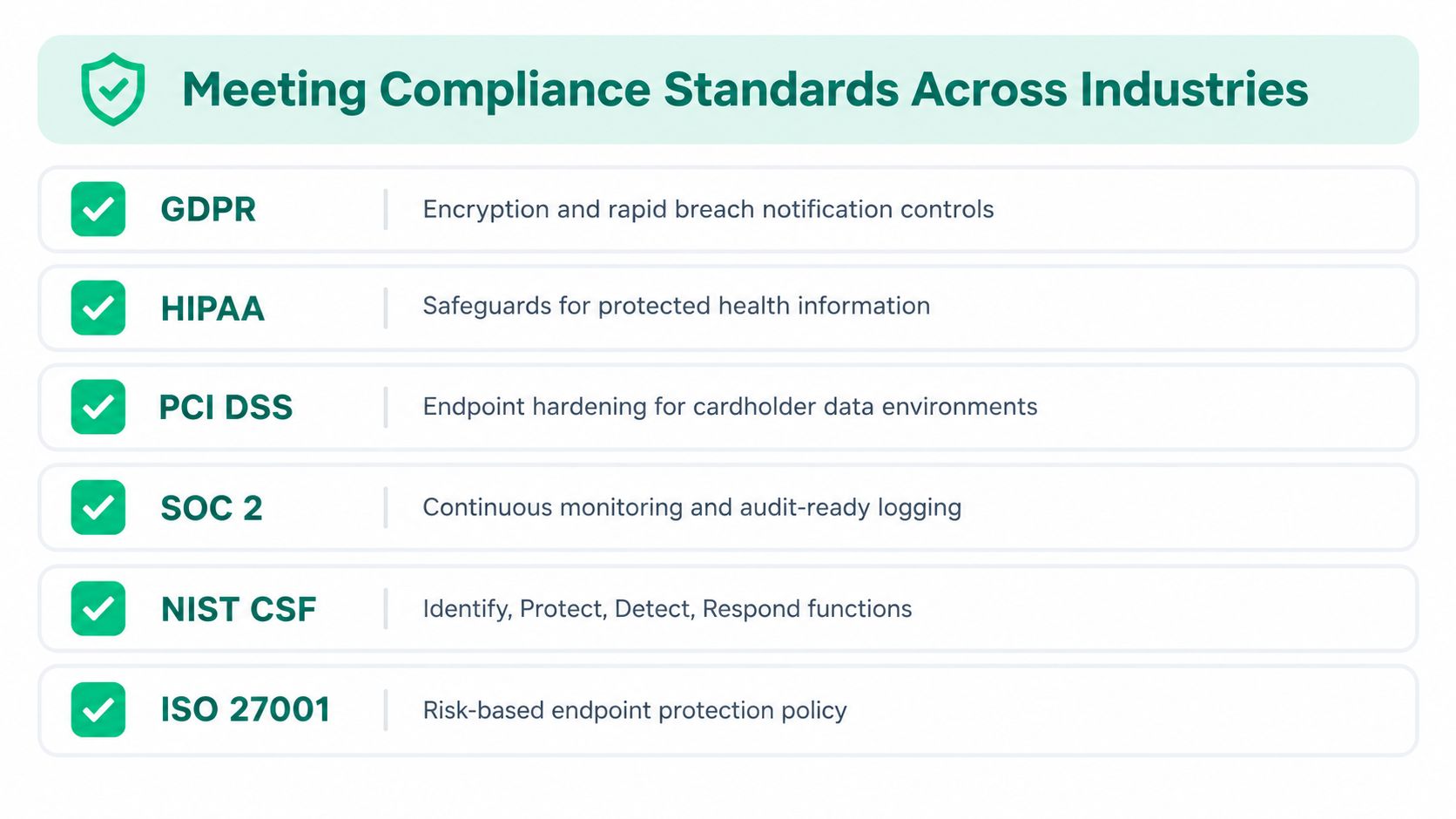
Meeting Compliance Standards Across Industries
Compliance doesn't make a weak security program strong. It gives the organization a set of obligations that should shape its controls, evidence, and response procedures. Antivirus may contribute to prevention, but regulated businesses usually need more visibility than a device-level “protected” status.
A healthcare practice in the Indy metro area should connect endpoint policies to HIPAA safeguards for protected health information. That means controlling who can access data, limiting removable media, recording relevant security events, and reviewing alerts. EDR telemetry and centralized policy management can support those activities, but the organization still needs written procedures, appropriate access decisions, and documented review.
A contractor serving defense customers near Hamilton County growth hubs should map controls to CMMC requirements and its contractual scope. Endpoint security can help with malware prevention, centralized logging, device control, vulnerability visibility, and incident response. It doesn't certify the organization by itself, and a vendor dashboard isn't a substitute for a properly managed compliance program.
A workable configuration sequence
- Inventory endpoints and data roles. Separate executive laptops, accounting systems, file servers, production equipment, mobile devices, and IoT or medical devices. A single policy for every device usually creates unnecessary exceptions.
- Set least-privilege access. Use a Zero Trust architecture that verifies users, devices, and requests instead of assuming that anything inside the office network is safe.
- Enable device control. Start with USB storage restrictions, approved exceptions, and logging for sensitive systems. This reduces the chance of unauthorized copying and gives reviewers a record of policy events.
- Route alerts to people. Send high-severity endpoint alerts to the managed security team or designated administrator. Define escalation for ransomware behavior, credential theft, and disabled agents.
- Retain useful evidence. Keep incident timelines, policy changes, remediation actions, and access records according to business and regulatory requirements.
- Test response. Run a controlled exercise that confirms the team can isolate a device, contact the owner, preserve evidence, recover data, and document what happened.
Compliance is an operating rhythm, not a binder. Policies matter only when the endpoint agent, network controls, backup system, and people follow them during a real incident.
NIST CSF gives general businesses a practical structure. Identify the devices and risks. Protect them with policy, patching, access controls, and data safeguards. Detect suspicious activity through endpoint and network telemetry. Respond with isolation, investigation, and communication. Recover with verified restoration and lessons learned.
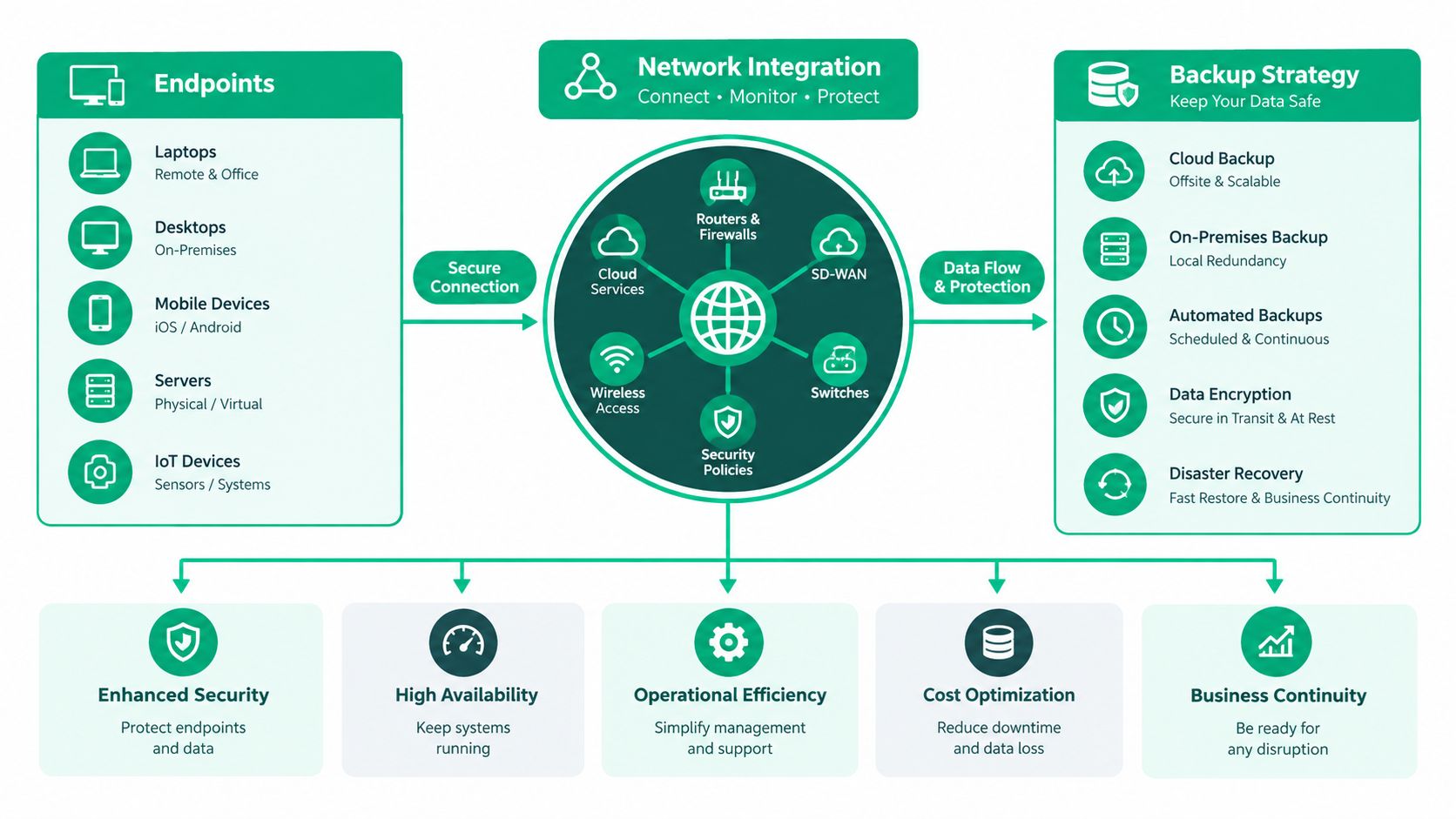
The integration matters because one control rarely answers every audit question. The endpoint integration diagram illustrates how endpoint agents connect with network security, SIEM telemetry, segmentation, and immutable backups. That approach is more credible than claiming antivirus alone satisfies HIPAA, CMMC, or NIST CSF obligations.
Integrating Endpoints with Network and Backup Strategy
An endpoint agent can't compensate for a flat network, weak identity controls, or backups that ransomware can reach. It should feed useful telemetry into a broader design where a compromised laptop has fewer paths to sensitive systems.
In a Zero Trust architecture, the network doesn't grant broad trust because a device is connected to the office Wi-Fi. Endpoint health, user identity, application need, and access context influence the decision. If an agent reports suspicious behavior, the system can quarantine the device from its internal VLAN while approved management traffic remains available for investigation.
The physical network still matters in a Southside office. An old brick building may have dead zones, interference, and inconsistent roaming. Latency-optimized mesh nodes can improve coverage when they are designed around walls, device density, and backhaul rather than placed wherever a power outlet happens to be. Enterprise UniFi networking can then support separate networks for staff, guests, cameras, printers, IoT equipment, and medical devices.
Build the recovery layer before the incident
Endpoint security aims to prevent encryption and contain the first compromised machine. It can't guarantee that a novel exploit won't bypass a preventive control. Immutable off-site backups and, where appropriate, an air-gapped recovery copy provide a separate path back to operations.
A sound design should answer practical questions:
- What is protected? Identify file servers, cloud data, application databases, configurations, and critical endpoints.
- Can an attacker alter the backups? Use immutable retention and separate administrative credentials.
- Can the business restore? Test recovery rather than assuming that a successful backup job equals a usable recovery.
- Who decides? Document the order of restoration for dispatch, finance, clinical, production, and communications systems.
For a small business evaluating cloud options, this guide to cloud backup solutions for small business provides useful context for comparing storage, recovery, and management requirements. Backup isn't a replacement for detection. It is the recovery control that limits the consequences when prevention fails.
A complete continuity plan may also include bit-level data recovery for failed drives, secure migration from aging servers, and documented restoration priorities. Those capabilities matter when a hardware failure and a security event arrive close together, which is exactly when improvised recovery plans tend to fail.
Choosing the Right Path for Your Business
A solo professional with one well-managed device, minimal sensitive data, reliable patching, and no shared server may be able to use a lightweight, cloud-managed antivirus product. That choice still needs automatic updates, strong account security, tested backups, and someone responsible for reviewing alerts.
A growing company along the I-65 corridor usually needs more. Multiple users, remote access, accounting systems, customer records, file shares, compliance obligations, and connected devices create a case for managed endpoint protection with EDR or XDR capabilities. A downtown Indy tech hub shouldn't assume that a free legacy tool is enough just because the office is small.
Use endpoint security when you need centralized oversight, behavioral detection, rapid isolation, device control, audit-ready records, or after-hours monitoring. Keep antivirus as a foundational layer, not as the entire strategy.
For businesses in Greenwood and Indianapolis, a Free Network Assessment or Security Risk Audit can identify unsupported endpoints, weak segmentation, exposed administrative access, missing device controls, and backup gaps before they become an outage.
Finchum Fixes IT provides endpoint protection, managed IT support, cybersecurity, networking, data recovery, and backup planning for Indiana businesses. Visit Finchum Fixes IT to schedule a Free Network Assessment or Security Risk Audit and determine whether your current endpoint strategy can protect daily operations.