How Long Does Data Recovery Take? 2026 Guide

For most business hard drive failures, a professional lab recovery takes 3 to 10 business days, but it can range from a few hours to several weeks depending on the failure. That wide spread comes down to four separate clocks: triage, diagnosis, parts sourcing, and active recovery.
If you're reading this because a server just died in Greenwood, a QuickBooks drive stopped mounting in Franklin, or a project share vanished at a shop off the I-65 corridor, the hard part isn't just the data loss. It's the uncertainty. You need to know whether your team is down for the morning, the week, or long enough that the business starts feeling it in payroll, missed orders, and idle staff.
That matters because business continuity isn't an abstract IT phrase. Downtime can cost up to $9,000 per minute. For most small and midsize Indiana businesses, the practical cost shows up as stopped billing, delayed scheduling, compliance headaches, and employees waiting on technology instead of doing paid work. Good recovery work isn't only about getting files back. It's about getting people productive again, with a predictable plan instead of panic.
Your Server Is Down When Will You Get Your Data Back
A server goes down at 8:15 on a Monday. By 9:00, the owner is asking the only question that counts. How long until the files are back and the team can work again?
For a Johnson County business, that question is rarely about the drive alone. It is about payroll going out on time, customer orders getting processed, and whether the office in Greenwood or Franklin is losing a morning, a week, or more. Recovery timelines swing so widely because the work happens in separate phases. Triage, diagnosis, parts sourcing, and active recovery each run on their own schedule.
[!NOTE]
- Most standard lab recoveries land in 3 to 10 business days for common business cases.
- The timer usually does not start with file extraction. It starts with intake, triage, and diagnosis.
- Logical problems are often faster than physical drive damage.
- Parts delays change everything. An old server drive or failed RAID can stretch a case well beyond the normal window.
- Rush service exists, but not every case can be rushed equally.
- Backups beat recovery every time. The fastest restore is the one you can do from a clean, tested backup.
- Indiana SMBs should ask one question first: what phase are we in right now?
That phase-based view is what business owners usually need in the first call. A deleted folder, a corrupted virtual machine, and a clicking RAID member can all produce the same symptom. Files are unavailable. The timeline, cost, and odds of a clean recovery are completely different.
I do not like giving blanket promises for cases like these. A fair estimate starts with identifying where the delay sits. Sometimes the hold-up is diagnosis. Sometimes it is finding a compatible donor drive for an older server. Sometimes the lab has already started imaging, but the media is degrading fast enough that recovery has to proceed in controlled passes instead of one straight read.
For businesses that want more context on failing media before a total outage, this Indiana business guide to failed hard drive recovery covers the warning signs and what to do first.
The better question to ask
Ask this instead: What failed, and what phase are we in right now?
That question gets you closer to a usable answer. If a healthy server volume was deleted by mistake, the path is usually shorter. If an aging file server in a Greenwood business park dropped out of the RAID after audible clicking, the work can slow down fast because hardware condition, donor availability, and read stability all start controlling the schedule.
Downtime is not an abstract IT concern for small and midsize companies in Indiana. When accounting, scheduling, project files, or customer records are offline, staff shift into workarounds. Billing gets delayed. Orders wait. People who should be serving customers end up standing around a dead system.
Practical rule: If the lost data affects payroll, invoicing, customer commitments, HIPAA records, or CMMC-controlled documentation, treat recovery as a business continuity event, not a repair ticket.
The Critical First 24 Hours Diagnostic Triage
When a failed device reaches a lab, recovery doesn't begin with "pull the files off." It begins with triage. That's where a lot of the confusion comes from.
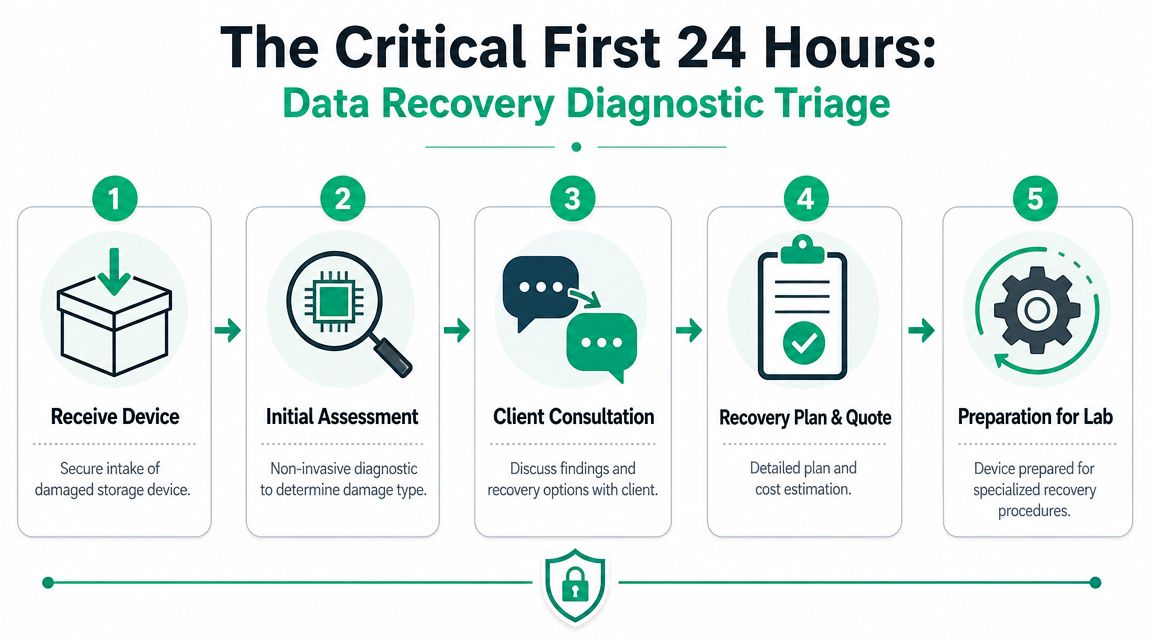
Triage is not the same thing as recovery
Independent guidance summarized by Data Recovery's explanation of triage, diagnosis, parts procurement, and actual recovery time makes an important point. Recovery time is highly contingent on whether data can be restored from backups and on the need to preserve evidence, which can delay true recovery work.
This has practical implications. If a healthcare practice in Hamilton County has patient records on a failed workstation, HIPAA concerns may require tighter chain-of-custody handling. If a defense supplier suspects tampering or intrusion, CMMC expectations and incident handling discipline may mean you don't just plug the drive into a random dock and start poking around. You preserve the original state first.
What happens during intake
A proper first-day workflow usually looks more like this:
- Secure intake: The drive, SSD, phone, or RAID member gets logged and isolated.
- Non-invasive assessment: The tech checks whether the issue looks logical, electrical, firmware-related, or mechanical.
- Backup decision point: If a clean backup exists, restore may beat physical recovery by a mile.
- Clone first when possible: The goal is to create a stable working copy at the bit level so the original media isn't stressed more than necessary.
- Client approval: Once the likely path is known, the business decides whether to proceed with standard or rush handling.
That clone-first approach isn't busywork. It's the difference between disciplined recovery and making a bad drive worse. On spinning disks, every extra read attempt can matter. On SSDs, unstable firmware and controller issues can turn a borderline case into a dead one fast.
Why the first day can feel slow
Business owners sometimes hear "we've had it all day" and assume no one is touching it. That's usually not what's happening. The first several hours are where the team figures out whether the safest path is imaging, component-level work, or referral to cleanroom procedures.
Preserve first. Read second. Repair only when the diagnosis justifies it.
If you're building internal response procedures, this incident response plan template for cybersecurity events is worth keeping next to your disaster recovery runbook. The first calls and first actions shape everything that follows.
Logical vs Physical Failures Why One Takes Days and the Other Weeks
A logical failure is like a library with all the books still on the shelves, but the card catalog is scrambled. The data may still exist. The system just can't find or interpret it properly.
A physical failure is the library with water damage, a broken front door, and half the shelves collapsed. The information may still exist, but now the medium itself is damaged.
Logical failure timeline
Logical failures often involve accidental deletion, formatting, corrupted file systems, damaged partitions, or software-level problems. In many cases, the underlying media is still readable enough to image and reconstruct.
According to Hi Tech Data Group's breakdown of recovery timelines by failure type, logical failures can often be completed in about 1 to 4 days, while physical failures commonly take 3 to 7+ days because they may require donor parts and repeated read attempts.
For a business owner, that usually means this:
| Failure type | What it often looks like | Typical path |
|---|---|---|
| Logical | Deleted folder, corrupt partition, bad file system, inaccessible volume | Imaging, file-system reconstruction, selective extraction |
| Physical | Clicking drive, dropped laptop, failed heads, damaged enclosure, power event | Hardware diagnostics, donor matching, controlled imaging, repeated read strategies |
Physical recovery slows down for a reason
Physical recovery takes longer because the lab has to fight the hardware before it can even get to the files. That can involve clean environment work, donor drives, firmware issues, controller swaps, or careful read attempts to capture weak sectors before they disappear.
People often get misled by capacity when considering recovery timelines. A large drive with a simple software issue may come back faster than a small drive with mechanical damage. The bottleneck isn't just "how many files." It's whether the device can still present readable sectors at all.
A healthy 4 TB drive with a logical issue can be easier than a much smaller drive with head or platter damage.
What works and what doesn't
A few practical rules save cases.
- What works: Powering down a clicking drive, documenting symptoms, and getting it assessed quickly.
- What doesn't: Rebooting it over and over, trying random freeware, or opening a drive outside controlled conditions.
- What helps on SSDs: Stopping writes immediately. SSD garbage collection and wear-leveling can make deleted data harder to recover after continued use.
- What helps on business endpoints: Keeping BitLocker recovery keys, admin credentials, and device history available so the lab doesn't lose time chasing basic access questions.
If you're planning refresh cycles, this SSD vs. HDD comparison for Indy businesses helps frame the reliability, speed, and recovery trade-offs between modern solid-state storage and traditional disks.
Key Factors That Extend Data Recovery Time
Two server failures can look identical at 8:00 a.m. to a business owner in Franklin or Greenwood. By noon, one case is waiting on a file-system repair path, and the other is stalled because the lab needs a matching donor part from an older drive revision. That difference is why recovery timelines swing so widely.
Severity changes every phase of the job
The timeline is shaped by four phases. Triage confirms whether the device should stay powered off. Diagnosis identifies the failure type and the safest path. Parts sourcing only applies in some hardware cases, but it can dominate the schedule. Active recovery begins only after those earlier steps stop changing.
A drive that still presents readable sectors may move from diagnosis into extraction fairly quickly. A mechanically damaged unit follows a different path. Aeson Labs' discussion of turnaround expectations shows the spread clearly, from short logical recoveries to mechanical jobs that stretch for months, especially when donor parts are hard to find.
That long wait usually is not the copy process. It is the time spent getting the case stable enough to attempt recovery without making it worse.
Device architecture changes the bottleneck
Different storage types fail in different ways, and each one creates its own delays.
HDDs
Hard drives slow down recovery when the media cannot be read cleanly. Head damage, platter scoring, weak sectors, and unstable firmware all force careful imaging passes. In those cases, speed is the enemy. The lab may need multiple low-stress read attempts just to secure a partial image before sorting files.
SSDs
SSDs remove motors and heads, but they add controller behavior, translation-layer mapping, and encryption complications. A failed SSD can turn into a controller or firmware case fast. The work is often less visible than a clicking hard drive, but the diagnosis can take longer because the failure does not always announce itself in an obvious way.
RAID and NAS
For Indiana SMBs, timelines often get stretched. A small business server near the I-65 corridor might have a failed RAID member, stale array metadata, a prior rebuild attempt, and several virtual machines sitting on top of the same storage pool. Before anyone copies data out, the recovery team has to determine the correct disk order, stripe size, parity rotation, and file-system state. If the volume holds accounting data, shared folders, and line-of-business apps, validation takes time because an incomplete handoff can put the business right back into downtime.
Parts sourcing can add days or weeks
Older hardware is a common problem in small and midsize businesses. I still see aging office workstations, legacy NAS appliances, and server drives that stayed in service because replacing them never made it to the top of the budget.
When one of those devices fails physically, the hold-up may be finding a compatible donor board, firmware revision, or head stack. The recovery procedure itself may be straightforward once the match is in hand. The delay comes from availability.
That is one reason business continuity planning matters before a failure. A simple business impact analysis template for Indiana small businesses helps identify which systems need faster replacement options and which ones can tolerate a longer lab cycle.
Data volume matters later in the process
Capacity still affects the clock, but usually in the active recovery phase rather than the first diagnosis phase.
Once a device is stable enough to read, large datasets take time to image, verify, and transfer to clean storage. That matters for Indiana companies with heavy QuickBooks archives, CAD repositories, surveillance exports, or multi-user file shares. Even after the lab gets usable access, copying several terabytes is still a real task, especially if the source media reads slowly or drops in and out.
Security requirements create deliberate checkpoints
Some delays are intentional and appropriate.
A Hamilton County medical office may need controlled handling for protected health information. A manufacturer serving regulated customers may require documented chain of custody, restricted access, or evidence preservation before restored data goes back into production. Those checks add time, but they reduce the chance that a recovery creates a compliance problem on top of an outage.
The delay drivers I check first
- Media condition: Unstable drives require slower, safer imaging.
- Failure type: Logical issues usually move faster than mechanical or controller-level failures.
- Parts availability: Legacy hardware can sit idle while a compatible donor is located.
- Storage complexity: RAID, NAS, and virtualized systems need reconstruction before extraction.
- Access readiness: Missing encryption keys, admin credentials, or a clean restore target can stop delivery.
Realistic Turnaround Times for Indiana Businesses
A Greenwood office can lose access to shared files at 9 a.m. and still have no reliable ETA by noon. That does not mean the recovery is off track. It usually means the case is still moving through the early phases that determine the definitive timeline.
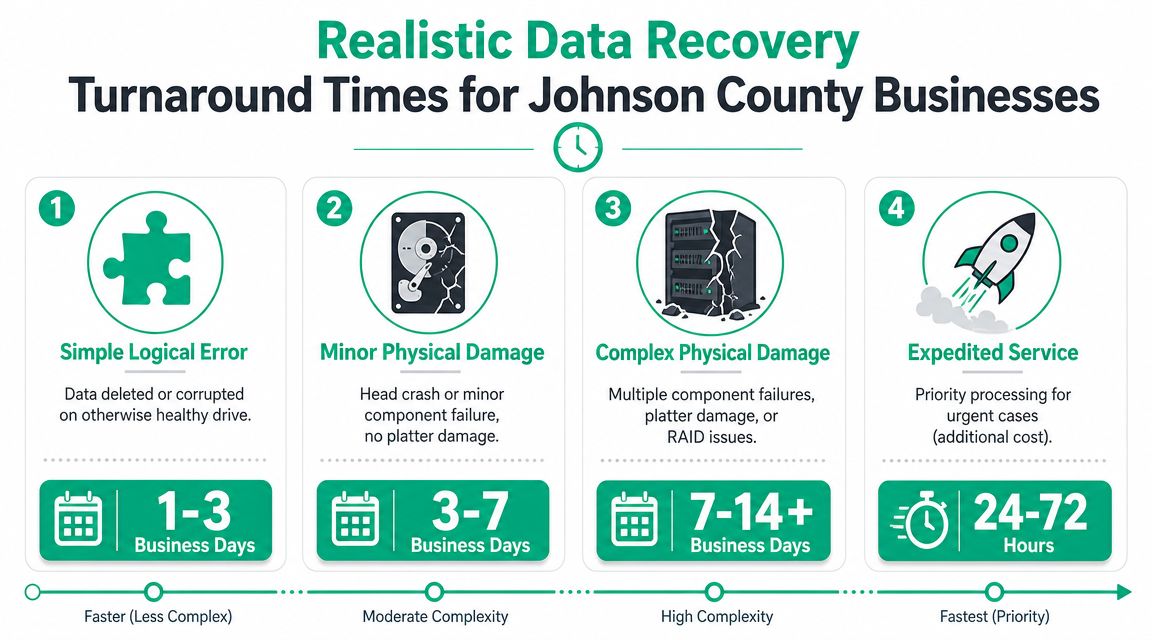
For Indiana SMBs, the practical range is wide. A simple logical recovery from a healthy drive may wrap up quickly once diagnosis confirms the file system is intact. A failed server array, damaged SSD, or drive that needs donor parts can stretch much longer because the work is not just "recover the files." It is triage first, diagnosis second, parts or equipment coordination if needed, then active recovery and file validation.
That phase-by-phase reality matters for business continuity. If a Carmel accounting firm is waiting on QuickBooks data before payroll runs, the first useful question is not "How fast can you recover it?" The better question is "Which phase are we in, and what still has to happen before files can be returned?"
Common scenarios and what to expect
These are the ranges I would treat as reasonable planning assumptions, not promises:
- Deleted folder on a healthy laptop or desktop drive: Often one of the shorter cases if the system was shut down quickly and the storage itself is stable.
- Single external drive with client records that starts clicking: Often slower because the first job is preserving readable sectors without making the damage worse.
- Failed SSD in a production workstation: Timing varies more than owners expect. Some cases are logical. Others involve controller failure, firmware issues, or encryption barriers that change the path completely.
- RAID or NAS failure in a small office server: Usually measured in longer blocks of time because the array has to be understood and rebuilt correctly before useful extraction starts.
- Water-damaged phone holding jobsite photos, texts, or notes: Hard to predict early. Board condition and corrosion usually matter more than file count.
A business owner does not need lab jargon. They need enough detail to decide whether to reroute work, notify customers, use a backup, or approve rush handling.
A cleaner way to ask for an ETA
Good ETA questions tie directly to the recovery phase, not just the calendar.
| Ask this | Why it helps |
|---|---|
| Are we still in triage, or has diagnosis confirmed the failure type? | It separates early uncertainty from actual recovery work |
| Has active recovery started yet? | You learn whether engineers are extracting data or still preparing the device |
| Are replacement parts, donor media, or special equipment required? | Sourcing delays often affect physical cases |
| Do you need credentials, encryption keys, or a clean destination to return data? | Missing access or restore targets can stop delivery at the end |
| What is the earliest realistic point we can review recovered file integrity? | It helps leadership plan operations around usable data, not just lab progress |
If your leadership team needs a way to decide which systems deserve emergency handling before an outage hits, this business impact analysis template for prioritizing business systems is a practical place to start.
If the lost system affects invoicing, scheduling, purchasing, or regulated records, set the priority before the quote lands. In Johnson County, the companies that recover cleanly are usually the ones that decide early what must come back first and what can wait.
How Finchum Fixes IT Expedites Business Recovery
A Greenwood office loses access to a file server at 9:10 a.m. The owner does not need vague reassurance. They need to know what can happen today, what has to wait on parts, and how fast staff can get back to quoting jobs, sending invoices, or pulling customer records.
The fastest recoveries usually come from reducing delays between phases. Triage has to start quickly. Diagnosis has to identify whether the problem is logical, physical, or a storage system issue. If parts or donor media are needed, sourcing starts early instead of after a day of waiting. Then active recovery can begin on the right path.
Local handling helps because it cuts out shipping time and extra handoffs. For Indiana businesses, that often means a failed workstation, NAS, or server can be assessed sooner and returned to service planning sooner. That does not make every case fast, but it shortens the dead time where nothing useful is happening.
Speed comes from fewer delays between phases
Rush service only helps when the workflow behind it is disciplined. Queue priority matters. So does getting engineering attention on the device early, confirming the failure type, and identifying any blocker before the business loses another day.
In practice, the cases that move fastest usually have a few basics ready:
- A decision-maker can approve work quickly. Recovery stalls when quotes sit in someone's inbox for half a day.
- Credentials and encryption keys are available. BitLocker, admin access, and line-of-business app details often affect both validation and restore.
- A destination is ready for recovered data. A clean server, workstation, NAS, or cloud repository prevents delays at the finish line.
- Business priorities are clear. If accounting needs QuickBooks first and operations needs shared PDFs later, the work can be staged around what keeps the company running.
Finchum Fixes IT handles business diagnostics, data recovery, cybersecurity, backup planning, and infrastructure support for companies around Greenwood and Indianapolis. The practical advantage is continuity between the early triage call, the technical diagnosis, and the restore plan. A local SMB does not have to explain the same outage three different times to three different vendors.
Recovery speed is tied to business continuity, not just lab work
Some delays happen before extraction even starts. A RAID set may need member-drive analysis and rebuild strategy. A physically damaged drive may need compatible donor parts. An encrypted laptop may be technically recoverable, but still unusable until the client provides the key material needed to verify results.
That is why we focus on shortening the whole business interruption, not just the lab portion. If a Johnson County company has a current backup image, a spare workstation, or a documented restore target, operations can resume on one track while recovery continues on another. Businesses comparing enterprise backup options that improve business uptime usually find the same lesson. The shortest outage often comes from a good restore plan, not from trying to force every damaged device through emergency recovery.
A lot of Indiana SMBs also clear up the side problems that slow restores down. Aging switches, unstable Wi-Fi in older brick buildings, poor endpoint hygiene, and untested backup jobs can turn a recoverable incident into a week of avoidable rework.
This video covers the broader business side of moving from panic to process.
Recovery is a last line of defense. Business continuity starts earlier, with tested backups, monitoring, hardware replacement planning, and a written incident path.
Take Control of Your Data Before Disaster Strikes
If you're still asking how long does data recovery take, the most honest answer is this. It takes as long as the failure type, storage design, and preparation allow.
The good news is that preparedness is much more controllable than failure. A business can choose to keep immutable off-site backups. It can choose to test restores. It can replace aging drives before they become donor-part scavenger hunts. It can document BitLocker keys, system ownership, and recovery contacts before anyone is standing in a server closet under stress.
What smart Indiana SMBs do next
Most of the Southside pain points are predictable. Aging server hardware in a Greenwood business park. Wi-Fi dead spots in an older brick building. A neglected NAS in a back office that somehow became mission-critical. None of those problems fix themselves, and none of them get cheaper during an outage.
A solid backup and disaster recovery plan turns chaotic downtime into a managed event. It also keeps your staff working, protects regulated data, and gives ownership a predictable monthly budget instead of a surprise emergency invoice. If you're reviewing that stack, these enterprise backup approaches for business uptime are a good place to compare what "recoverable" really looks like.
The shortest recovery is the one you never need
You can't guarantee every drive survives. You can make sure one failed device doesn't stop the business.
That means aligning backup policy, retention, restore testing, endpoint security, and incident response with how your company operates. For healthcare, that includes HIPAA-aware handling. For manufacturers and contractors, that can include CMMC discipline. For everyone else, NIST CSF is still a useful backbone for reducing avoidable risk.
Before you face a data crisis, find the weak spots in your environment. Finchum Fixes IT offers a Free Network Assessment and Security Risk Audit for businesses in the Greenwood and greater Indianapolis area, so you can verify your backups, tighten security, and build a recovery plan that keeps downtime from hijacking your operation.