How Much Does It Cost to Repair a Laptop in 2026

Most laptop repairs in 2026 fall between $100 and $450, with a national average around $140, but complex board-level or liquid-damage jobs can climb past $600 once diagnostics, proprietary parts, and labor are factored in. For an Indiana business, the repair ticket is only part of the cost. The larger question is how quickly the employee, data, and workflow return to service.
A laptop failure in a Greenwood office rarely happens at a convenient time. It shows up during payroll, tax preparation, shipping, or a client deadline, often in a business park along the I-65 corridor where a replacement device still needs configuration, security enrollment, and access to line-of-business software. A repair that looks expensive on paper may be the cheaper business decision if it restores a trained employee's workstation quickly.
The Real Cost to Repair a Laptop in 2026
A broad 2026 benchmark places common laptop repair work in the low hundreds. Thumbtack's laptop repair pricing data reports a national average of about $140, while HomeAdvisor places typical work between $100 and $250. Other 2026 pricing guidance puts common repairs around $75 to $450, depending on the part and labor involved. Simple battery or keyboard work tends to stay near the lower end. Screens, motherboards, and liquid damage can push the bill much higher.
That range answers the consumer question, but it doesn't fully answer the business question. A Johnson County business owner needs to price downtime, data exposure, employee productivity, replacement setup, and turnaround time, not just the part on the invoice. A major IT-operations benchmark estimates unplanned downtime at up to $9,000 per minute (BadgerLayer's laptop repair cost analysis). That figure isn't a promise about every Indiana company's losses, but it shows why a fast, well-scoped repair can have a strong return on investment.
Practical rule: Ask for the total path back to productive work, not only the price of the replacement part.
What changes the quote
A routine service call may land near $100 to $150, while involved hardware failures can quickly double or triple that amount, according to the benchmark data summarized by Thumbtack. The key variables are straightforward:
- Model and age: A Dell Latitude or Lenovo ThinkPad usually has more accessible replacement parts than a thin consumer ultrabook.
- Part availability: A commonly stocked LCD costs less to source than a proprietary display assembly or rare motherboard.
- Diagnostic depth: A failing charger may be a port, adapter, charging circuit, or board fault. Testing determines which.
- Turnaround requirement: Same-day work can require stocked parts, bench prioritization, or expedited shipping.
- Data risk: A failed storage device can turn a repair into a data recovery and migration project.
| Repair Category | Typical Cost Range | Average Turnaround |
|---|---|---|
| Software troubleshooting | Lower end of common repair pricing | Often faster than hardware work |
| Battery, keyboard, or fan service | Lower end of common repair pricing | Usually shorter when parts are available |
| Screen or charging-port repair | Mid-range common repair pricing | Depends on panel or port availability |
| Motherboard or liquid damage | $250 to $800 or more for major cases | Longer because testing is deeper |
| Data recovery | $300 to $1,500 or more for failing or damaged storage | Depends on drive condition and recovery method |
For a second perspective on premium Apple hardware, the myhalo MacBook repair cost overview is useful because MacBook display assemblies, batteries, and logic boards can follow a different parts-and-labor pattern than modular business laptops. For business-focused pricing context, compare that with computer repair costs for businesses in 2026, especially when several employees depend on the same support process.
Price Ranges by Common Laptop Repair Type
The failed component sets the starting point, but the invoice also reflects diagnosis, parts availability, labor, and the business cost of downtime. The ranges below are planning figures from the pricing data reported by common repair-pricing sources, not approval for work without a model-specific estimate. For a full overview of service options, see our computer repair services.
| Repair Type | Low-End Cost | High-End Cost | Key Price Drivers |
|---|---|---|---|
| Screen or LCD replacement | $150 | $400 | Resolution, touch capability, OLED or standard panel, assembly design |
| Keyboard or trackpad swap | $80 | $250 | Key-level service versus full assembly, liquid exposure, model design |
| Battery replacement | $60 | $180 | Internal or removable battery, adhesive, OEM availability |
| SSD or RAM upgrade | $50 | $200 | Parts capacity, compatibility, labor, encryption and migration needs |
| Charging port or DC jack | $90 | $220 | Modular jack versus board-level USB-C repair |
| Fan and thermal-paste service | $75 | $175 | Teardown depth, dust buildup, cooling assembly |
| Motherboard component repair | $250 | $600 or more | Micro-soldering, fault isolation, board complexity |
| Liquid-damage remediation | $200 | $700 or more | Corrosion, cleaning, failed assemblies, repeat-failure risk |
Where the low and high ends come from
A standard non-touch screen with an available aftermarket panel may fall near the lower end. A high-resolution touchscreen, OLED panel, or complete display assembly costs more because the component is specialized. Installation may also involve hinges, bezel pieces, cable routing, and calibration. The Steel City IT guide to fixing a laptop screen provides useful context for judging how much to fix a laptop screen based on panel type and assembly design.
Keyboard repairs depend on construction. A removable keyboard is a different job from a top case that includes the keyboard, trackpad, and other integrated parts. A stuck key may require a straightforward replacement, while a keyboard that failed after a spill can point to corrosion beneath the board. That difference can change both testing time and the recommended repair.
Battery service also varies by chassis. Some laptops use accessible modules. Others use glued batteries, custom brackets, or assemblies that require careful removal to prevent puncture and board damage. Opening the machine may reveal swelling or heat damage that must be documented before it returns to service.
Business models usually have better repair economics
Lenovo ThinkPads and Dell Latitudes often benefit from modular construction, established parts channels, and familiar service procedures. That can reduce uncertainty compared with a rare consumer ultrabook containing soldered memory, integrated storage, or a proprietary display. A lower headline price is not automatically the better choice if sourcing delays leave an employee without a working system.
The repair decision should also account for configuration work after the part is installed. Replacing a failed SSD may require secure imaging, BitLocker recovery-key handling, user-profile migration, Microsoft 365 sign-in, VPN setup, and endpoint-protection validation. A technician supporting regulated work should verify controls relevant to HIPAA, CMMC, or the NIST CSF, rather than returning only a laptop that boots.
For an Indiana small business, compare the repair total with the value of restored work time. A modest component repair can make sense when parts are available and the existing configuration is stable. A board-level fault or liquid-damaged system may deserve a closer ROI review because diagnosis, repeat-failure risk, and downtime can outweigh the part price.
Hidden Fees That Change Your Final Bill
Two repair shops can examine the same laptop and produce very different totals without either one acting dishonestly. The difference usually comes from what each quote includes. The diagnostic step deserves particular attention because public pricing shows fees ranging from about $39 to $89.99, while Cornell's Dell repair program charges $99 for non-warranty diagnostics with the first hour of labor included (Cornell's Dell repair information).
A reputable shop charges for diagnosis because testing takes skilled labor, tools, and bench time. The important question is whether that fee is applied to the repair, waived when you approve the work, or charged separately from labor and parts.

Read the estimate line by line
The invoice can also change because of:
- OEM part selection: A manufacturer component may cost more than a quality aftermarket equivalent, but compatibility and warranty coverage can justify it.
- Expedited sourcing: A rare board or display may require rush shipping, especially for a critical user.
- Bench labor: Full teardown, board inspection, corrosion cleaning, and post-repair testing take longer than a modular swap.
- Data services: An operating-system reload may require backup, profile migration, application setup, and secure data handling.
- Contingency work: Liquid damage often hides corrosion under shielding or around connectors. A shop should explain what happens if the initial repair reveals additional failure.
The final hidden cost is time. A low repair price doesn't help much if an employee spends days using a loaner with no access to specialized software, local files, certificates, or peripherals. For a healthcare office, a device may also require HIPAA-conscious handling. For a defense contractor, CMMC obligations can affect how storage, accounts, and backups are managed.
Ask whether the estimate includes post-repair testing, data transfer, encryption verification, and return-to-user configuration. If those items appear only after approval, the initial headline price isn't a complete comparison. A business evaluating recovery work can also review this SMB data recovery pricing guide before authorizing a drive teardown.
Repair vs Replace Decision for Business Laptops
The familiar 50% rule is a useful starting point, but it isn't a business continuity policy. A company doesn't replace only a piece of hardware. It provisions Windows, rejoins the device to its domain or identity platform, enrolls MFA, restores applications, validates security controls, and absorbs the employee's lost time.
Consider a $1,200 ThinkPad with a $380 motherboard repair. The repair quote is clear. Replacement requires a new device, Windows provisioning, domain rejoin, MFA re-enrollment, application checks, user migration, and coordination with the employee. A same-day board swap may preserve the existing configuration and reduce operational interruption, provided the machine has no other serious condition.
| Cost Factor | Repair, $380 Motherboard Swap | Replace, New $1,200 Laptop |
|---|---|---|
| Core hardware | $380 repair | $1,200 device |
| Existing configuration | Preserved if storage and board compatibility allow | Must be rebuilt or migrated |
| User access | Potentially restored after testing | Requires provisioning and validation |
| Data handling | Existing storage remains, subject to diagnosis | Data migration and secure disposal required |
| Downtime exposure | Often lower when the part is available | Includes deployment and user transition |
| Long-term risk | Depends on age and remaining components | New warranty and newer platform |
A defensible decision matrix
Repair usually deserves serious consideration when the laptop is under three years old, the failure is isolated, the quote is comfortably below replacement cost, and the device remains supported by the manufacturer. Replacement becomes more attractive when the chassis has multiple developing faults, the battery is swollen, the processor can't run Windows 11, or liquid has reached a corroded multilayer board.
The data supports caution around the expensive outliers. Motherboard and liquid-damage work can fall roughly within the $250 to $800 or more range, while data recovery for failing or physically damaged storage can reach $300 to $1,500 or more (AllProcs' laptop repair service pricing guide). Those figures don't automatically mean replace. They signal that the technician must identify the business value of the data and the probability of a durable repair.
Premium systems can justify repair even when the percentage looks uncomfortable because their deployment is specialized. Conversely, a low-cost laptop with an obsolete processor and several physical issues may not justify continued labor. For additional replacement signals, Technovation LLC's device upgrade guidance provides a useful checklist without replacing a device-specific assessment.
Businesses along the I-65 corridor should also consider standardization. A fleet built around a serviceable ThinkPad or Latitude, protected by Bitdefender GravityZone and backed by immutable off-site backups, is easier to repair and recover than a collection of unrelated consumer devices.
How to Lower Your Laptop Repair Cost
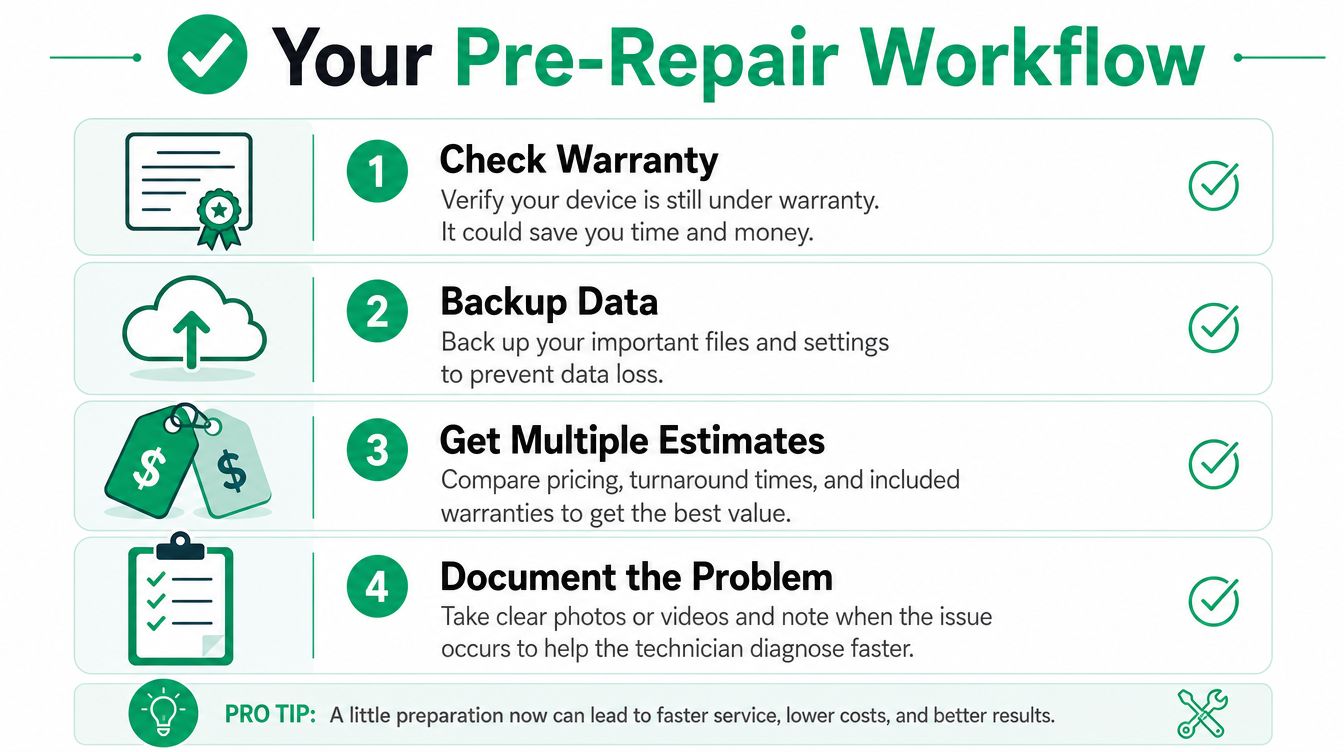
Good preparation cuts wasted diagnostic time and reduces the chance of authorizing the wrong fix. Use this workflow before a broken laptop reaches a repair bench.
-
Check the warranty first. Use the manufacturer's serial-number lookup for Dell, Lenovo, or HP. An active Dell ProSupport or Lenovo Premier plan may change who should perform the work and can reduce or eliminate an out-of-pocket repair bill.
-
Protect the data before testing further. If the laptop still starts, copy business files to an approved destination. If the storage device is failing, stop repeated boot attempts. A technician may need bit-level data recovery rather than a routine file copy, and continued use can complicate recovery.
-
Document symptoms precisely. Record when the failure began, whether it occurs on battery or AC power, the exact error code, unusual sounds, recent updates, and any spill or drop. A short video of a flickering display or intermittent charging port can save guesswork.
-
Request a written estimate. Insist on separate lines for parts, labor, diagnostic work, data migration, shipping, and post-repair testing. Ask whether the replacement is OEM or aftermarket and what warranty covers the part and labor.
-
Bundle service when it makes sense. If several office laptops have failing batteries, slow SSDs, or damaged hinges, one scheduled service visit can be more efficient than repeated emergency dispatches. Ask whether the provider offers batch pricing or a fleet maintenance plan.
DIY has a narrow lane
RAM upgrades, SSD swaps, and fan cleaning can be reasonable on a documented, user-serviceable chassis. Use the manufacturer's service manual, disconnect power, protect against static discharge, and verify that the replacement part is compatible before opening the device.
DIY becomes a poor choice when the laptop has a sealed chassis, glued battery, soldered memory, liquid exposure, warranty coverage, or board-level symptoms. A damaged connector or punctured battery can turn a contained upgrade into a more serious repair.
Before authorization, ask five direct questions:
- What exactly did you test? Request the observed failure, not only a part recommendation.
- Is the diagnostic fee refundable or included? Get the rule in writing.
- What could increase the estimate? Pay attention to liquid damage, corrosion, and data work.
- What warranty covers the repair? Clarify whether it covers parts, labor, or both.
- What happens to the data? Confirm backup, encryption, retention, and secure disposal procedures.
For practical maintenance steps before a failure occurs, see these expert tips for improving computer performance. A little preparation won't fix a dead motherboard, but it can prevent a routine service call from becoming a confused and expensive rebuild.
How Finchum Fixes IT Handles Estimates and Fast Response
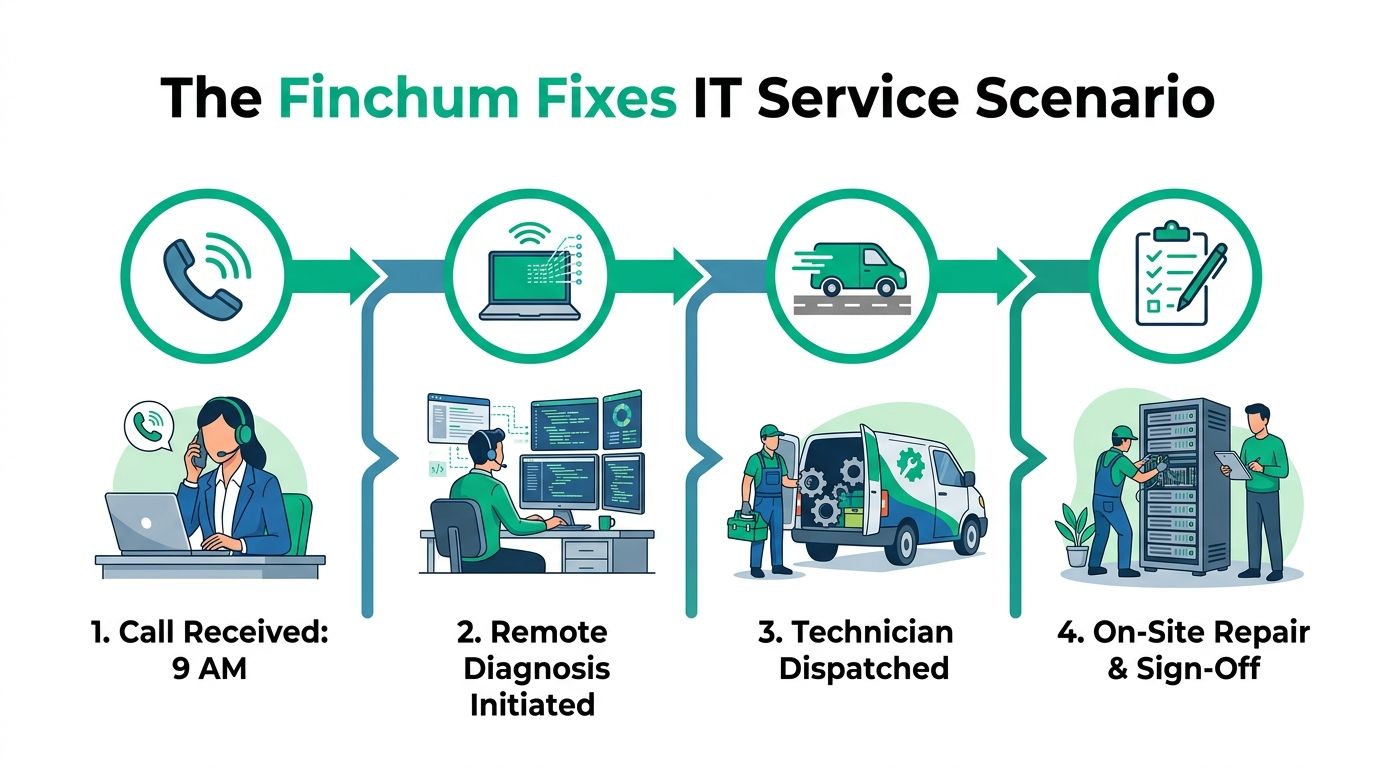
A Greenwood accounting firm calls at 9 a.m. during tax season. A laptop won't boot, and the employee has client files, accounting software, and a scheduled meeting. The first move shouldn't be a blind part order. It should be remote triage, checking power behavior, boot symptoms, encryption status, and whether the failure is isolated to the device.
In this service scenario, remote diagnosis starts within 30 minutes. If the client declines the repair, the diagnostic fee applies. If the client proceeds, the fee is applied according to the estimate policy, and a written line-item quote arrives by noon with parts and labor separated.
The useful estimate is the one that tells a manager what happens next, not just what a component costs.
For Indiana SMBs, the response plan can include next-business-day on-site service for Greenwood and greater Johnson County, same-day depot service for critical failures, and loaner units when a board-level repair will take multiple days. A flat-rate diagnostic can cover full teardown, thermal imaging, and board-level voltage tracing, so the client isn't surprised by separate bench-time charges for each test.
A Franklin manufacturing client provides a practical example. Their screen and hinge repair was quoted at $290 and completed in under four hours, keeping the shipping manager online during a production run. That kind of outcome depends on the exact model, available parts, and technician capacity, so it shouldn't be treated as a promise for every repair.
In our 17 years of local service, the repair bill is only one part of the result. We also check whether the device returns with working Bitdefender GravityZone protection, correct Microsoft 365 access, intact encryption, and a backup path that meets the client's needs. For a larger environment, that may include Zero Trust architecture, SOC-as-a-Service monitoring, UniFi networking, or immutable off-site backups. Finchum Fixes IT provides computer repair and related IT support for Indiana organizations that need those pieces handled together.
Your Next Step for Indiana IT Support
For a business laptop under three years old with an isolated repair quote below half the cost of replacement, repair is often the practical first choice. If the device has an aging processor, swollen battery, repeated failures, or a major liquid-damage problem, schedule replacement planning instead of repeatedly funding emergency work.
Johnson County and greater Indianapolis businesses can request a transparent diagnostic, a same-day estimate when service capacity and parts allow, or a broader review of aging laptops across the fleet. A Free Network Assessment or Security Risk Audit can also expose weak Wi-Fi in an old brick building, unsupported endpoints, missing immutable off-site backups, or gaps against HIPAA, CMMC, or the NIST CSF.
Proactive planning beats emergency repair bills. A short conversation now can protect billable hours and reduce the operational shock of the next failed device.
Finchum Fixes IT provides laptop diagnostics, repair, data recovery, secure migration, and managed IT support for businesses in Greenwood and the Indianapolis area. Visit Finchum Fixes IT to request a Free Network Assessment or Security Risk Audit and get a clear plan before a laptop failure becomes expensive downtime.