Data Recovery Services Cost 2026: SMB Pricing Guide
TL;DR
Your server dies at 9:12 a.m. By 9:30, staff is idle, invoices are stuck, and somebody is asking for a recovery quote before anyone knows what failed. That is the wrong order.
- Data recovery services cost is driven by the kind of failure, the hardware involved, and how fast you need results. Recovery labs price the work based on difficulty and risk, not on how badly you want the files back.
- Logical problems usually cost far less than physical drive damage or RAID/server recovery. Once clean-room work, donor parts, or array reconstruction enter the picture, the bill rises fast.
- Rush service costs more because you are buying priority access to senior engineers, extended lab time, and a compressed turnaround.
- For Central Indiana SMBs, the decision is simple. Compare the recovery quote to the cost of a day of downtime, missed revenue, payroll disruption, and compliance exposure tied to patient data, defense contracts, or regulated records.
- If your business depends on shared files, line-of-business apps, or regulated data, treat recovery as part of your business continuity and disaster recovery planning, not as a one-off panic purchase.
Your file server goes dark at 9:12 on a Tuesday.
The Greenwood office cannot open estimates. Accounting cannot reach QuickBooks exports. The front desk starts stacking sticky notes because the system of record is gone for the moment. Before anyone has a diagnosis, the owner asks the question every IT person hears in a crisis. What will this cost?
Here is the straight answer. Data recovery can be a few hundred dollars or it can turn into a five-figure problem. The spread is wide because the work is wide. Deleted data on a healthy drive is one kind of job. A failed RAID, damaged SSD, or mechanically failing hard drive is another. One takes software skill. The other can require lab work, specialized tools, parts, and a lot of time from people who do this every day.
The first hour matters most.
A lot of SMBs around Greenwood, Franklin, and the south side of Indy make the same expensive mistake. They keep rebooting the server, run free tools on unstable storage, or let a well-meaning staffer "see what they can pull off it." That is how a recoverable case gets harder, slower, and more expensive.
The smart move is simple. Stop using the device, get a real diagnosis, and weigh the quote against downtime and compliance risk, not just the invoice. If your shop handles healthcare records, controlled technical data, or contract files tied to HIPAA or CMMC, the cost of not recovering cleanly can beat the lab bill in a hurry.
That Awful Silence When a Server Dies
A lot of business owners in Johnson County have lived some version of this already. An aging tower server in a business park starts throwing odd errors for a week. Then one morning it stops. No hum. No login screen. No shared folders. Just silence.
That silence is expensive.
The market for recovery work keeps growing because incidents like this aren't rare anymore. The global data recovery services market is estimated at $5.2 billion in 2025 and projected to reach $10.3 billion by 2030, with North America as the largest region, according to Research and Markets' global recovery services forecast. That lines up with what local IT teams already know. Businesses depend on data more than ever, and when storage fails, operations stop with it.
The first mistake owners make
They ask for a price before asking for a diagnosis.
That's backwards. A deleted folder on a healthy drive and a failed RAID controller don't belong in the same conversation. One is software-level triage. The other may require bit-level data recovery, donor parts, array reconstruction, and a lot of hands-on labor.
Practical rule: If the device is making unusual noises, disappears from the system, or was dropped, stop touching it and get a real diagnostic before anyone “tries a few things.”
Cost matters, but downtime matters more
The distinction between business continuity and disaster recovery is clear. Recovery is about getting data back. Continuity is about keeping the company moving while you do it. If you haven't sorted out that difference, this breakdown on business continuity vs disaster recovery is worth your time.
A recovery invoice can sting. A stalled business hurts more.
Healthcare offices have HIPAA exposure. Defense shops face CMMC pressure. Everybody else still has payroll, vendor obligations, customer trust, and deadlines. If your team sits idle while a dead server dictates the pace of your day, the recovery bill is only one line item in a much bigger loss.
So yes, we're going to talk numbers. But the smart way to look at data recovery services cost is this: not “How cheap can I get it?” but “What's the least expensive path back to working systems, intact records, and a normal business day?”
Decoding the Diagnosis Logical vs Physical Failure
Before anyone can quote this correctly, they need to know what failed.
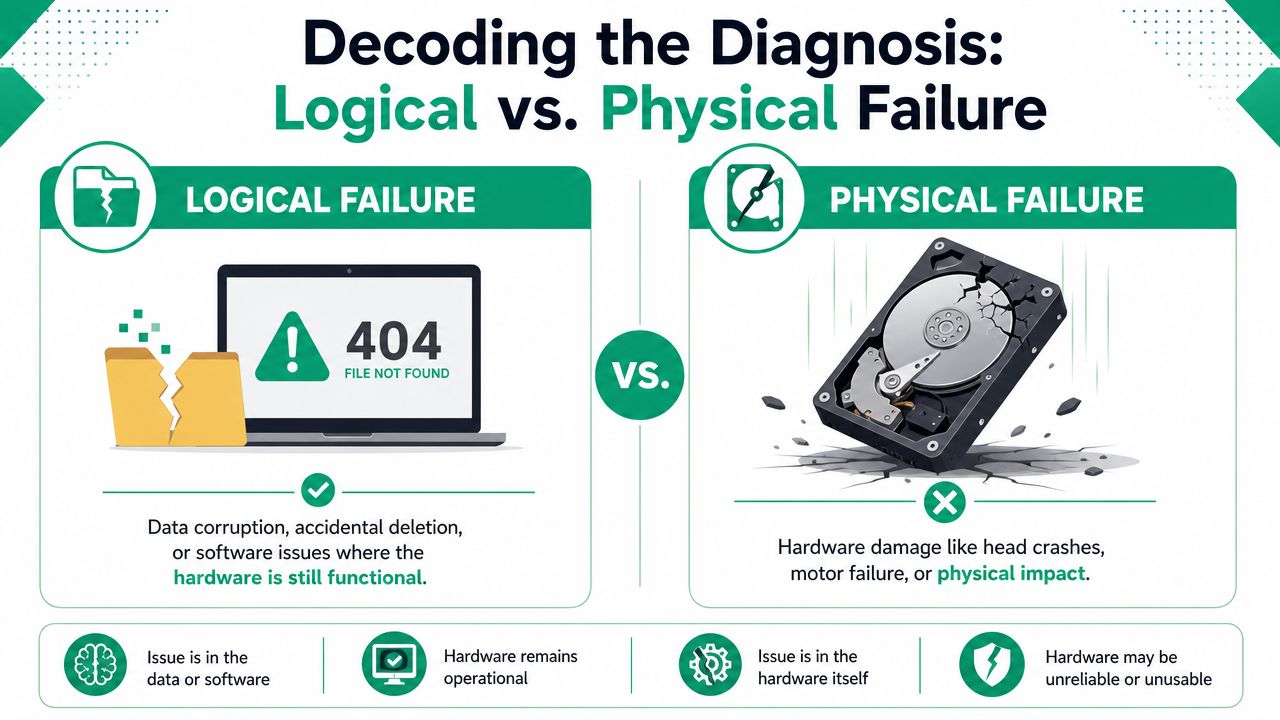
In our local work around Greenwood and Indianapolis, most incidents fall into two buckets. Logical failure means the storage hardware is still readable, but the data structure is broken. Physical failure means the hardware itself is damaged, unstable, or dead.
What logical failure looks like
Think of a logical failure as a filing cabinet with every folder still inside, but the labels are scrambled.
Common examples include accidental deletion, corrupted partitions, bad file tables, or an operating system crash that leaves the data inaccessible. The drive may spin up just fine. The controller may still respond. The issue is that the map to your data is damaged.
That's often recoverable without opening the drive. The work centers on software analysis, file system repair logic, sector-by-sector imaging, and careful extraction.
What physical failure looks like
Physical failure is different. The cabinet itself is broken.
That can mean failed read/write heads in a hard drive, damaged NAND behavior in an SSD, controller failure, electrical damage, impact damage, or media degradation. If you hear clicking, grinding, or repeated spin-up and spin-down, that's bad news. If the drive vanished after a power event, that's also bad news.
Physical jobs often need lab work, not shop-bench tinkering.
A logical failure is an IT puzzle. A physical failure is surgery.
Why this matters for your budget
Business owners usually ask whether SSDs are cheaper or harder than hard drives. The honest answer is that SSDs remove moving parts, but they can still be nasty recovery cases because of firmware behavior, wear leveling, and controller design. This comparison of SSD vs hard drive choices for Indy businesses gives useful background if you're deciding what should sit in your next server or workstation fleet.
Here's the practical takeaway.
- If it's logical: pricing usually stays lower because the hardware is still accessible.
- If it's physical: costs rise because the job gets slower, riskier, and more specialized.
- If it's a server array: assume complexity until proven otherwise.
That distinction drives nearly every serious data recovery quote.
The Price Tag Breakdown Data Recovery Cost Ranges
A Greenwood business owner usually asks one question first. “What's this going to cost me?”
Fair question. The honest answer is that data recovery pricing spans a wide range because the job itself can range from file repair on one office PC to lab work on a damaged server array that runs payroll, scheduling, billing, or patient records. The invoice reflects risk, labor, equipment, and how much has to be reconstructed before anyone can even start pulling data out.
Estimated Data Recovery Costs by Failure Type 2026
| Device / Failure Type | Typical Cost Range |
|---|---|
| Single drive, logical failure | Low hundreds |
| Single drive, physical failure | High hundreds to several thousand |
| Enterprise server or RAID recovery | Several thousand to five figures |
Use that table as a budgeting baseline. Do not treat it like a quote.
A single-drive recovery often lands lower because there are fewer moving parts in the process, even when the drive itself is unstable. Server and RAID jobs get expensive fast because the lab is not just recovering files. They are often rebuilding the storage logic first, then extracting the data.
That distinction matters for Central Indiana companies. If your QuickBooks file is down for one person, the math is annoying. If your line-of-business server is down for ten employees in Greenwood, Franklin, or the south side of Indy, the cost conversation changes in a hurry. Downtime payroll, missed jobs, delayed invoicing, and potential compliance exposure can outrun the recovery bill faster than most owners expect.
Where single-device jobs usually land
For one hard drive, SSD, or external device, expect the lower end only if the media is still readable and the problem stays on the logical side. Once the device has hardware damage, electrical damage, firmware trouble, or signs of media degradation, the quote climbs because the work gets slower and the failure risk goes up with every handling step.
That is why cheap flat-rate promises deserve skepticism.
A reputable provider will usually want the device in hand before giving you a firm number. If someone prices your failed server in five minutes without asking what storage it uses, what happened before failure, or whether anyone already tried recovery software, that number is guesswork.
Why server and RAID jobs get ugly
RAID helps with uptime in some failure scenarios. It does not save you from expensive recovery after controller problems, bad rebuilds, accidental initialization, corruption, or multiple disk failures.
Here is what a serious RAID recovery can involve:
- identifying the correct disk order
- determining stripe size and parity layout
- imaging weak drives before they deteriorate further
- rebuilding damaged metadata
- extracting data without altering the source media
That is specialized labor. It also explains why business recovery costs sit in a different category than standard repair work. If you are comparing budgets, this guide on how much business computer repair costs in 2026 helps frame the difference. Repair restores hardware function. Recovery tries to save the business data, even when the hardware is already a lost cause.
For regulated shops, the consequences are more profound. A medical office dealing with HIPAA exposure or a defense contractor handling CMMC requirements is not just buying labor. They are buying a chance to restore records, preserve chain of custody, and reduce the business fallout from extended data loss. In that context, a four-figure or five-figure recovery bill can be the cheaper outcome.
If you want a plain-English outside perspective, IT Cloud Global's recovery guide explains why pricing rises sharply once hardware damage, server complexity, and business urgency show up together.
Why Prices Fluctuate Key Factors Driving Your Quote
A Greenwood shop can bring in two failed drives that look identical on the counter and get two very different quotes. That is not price padding. It is the reality of recovery work.
What determines cost is the failure path, the hardware involved, and the risk of making the problem worse during extraction. The amount of data you want back matters far less than business owners expect.
What actually moves the quote
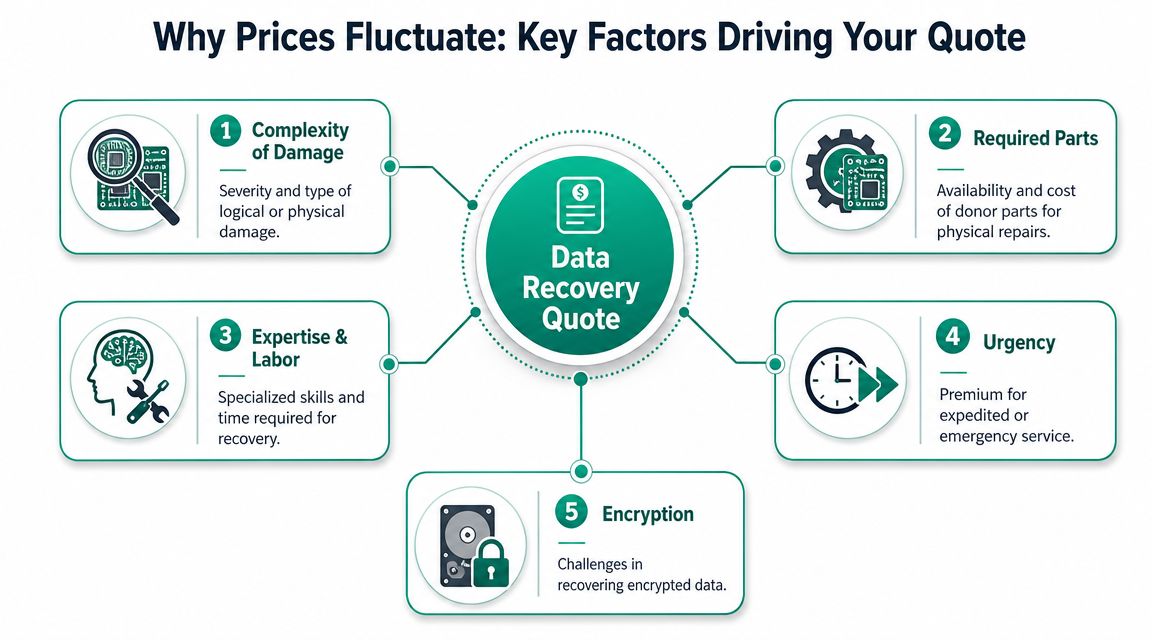
Start with the device itself. A standard hard drive, a failing SSD, an NVMe stick, and a multi-disk business array each fail in different ways and require different tools, handling, and lab time. SSDs and encrypted devices often look simple from the outside and turn ugly fast once firmware, controller behavior, or translation layers are involved.
Then look at damage level. Deleted files or light logical corruption usually cost less because the media still responds. Physical damage, unstable sectors, electrical failure, water exposure, or previous recovery attempts push the price up because the engineer has less room for error and fewer chances to get a clean image.
Capacity also affects pricing, but not for the reason many owners think. A larger drive usually means longer imaging, more verification, and more stress on unstable hardware. A 4 TB drive with a small amount of critical data can still be a larger recovery job than a smaller drive packed full of files.
The factors that change your bill
- Storage technology: Hard drives, SSDs, flash media, NAS units, and RAID sets require different recovery methods.
- Failure type: Logical corruption is cheaper than mechanical damage or board-level issues.
- Drive stability: A device that stays online long enough to image is cheaper than one that drops out, freezes, or degrades during reads.
- Parts and tooling: Some jobs need donor parts, firmware work, or cleanroom labor.
- Security layers: BitLocker, volume encryption, and access controls add handling requirements and reduce shortcuts.
- Compliance exposure: HIPAA and CMMC environments often require documented handling, tighter chain of custody, and more careful decision-making.
That last point gets missed all the time. For a medical office, manufacturer, or defense subcontractor in Central Indiana, the bill is not just about whether the files come back. It is also about whether you can restore records without creating a second problem around protected data, audit trails, or contractual controls. If the failed system touched Microsoft 365, file shares, or collaboration data, this SharePoint DR migration guide is a useful reminder that recovery planning and recovery execution are related, but they are not the same job.
Why the diagnostic step matters
A real diagnostic is required because nobody can accurately price risk from a phone call alone. The lab needs to determine whether the failure is logical, electronic, mechanical, or layered across several issues. That is what separates a realistic quote from a bait-and-switch number.
For Indiana SMBs, the smart question is not “Why is this recovery expensive?” Ask, “What does another day of downtime cost my business?” If your scheduling data is down, your accounting files are locked up, or your compliance records are offline, the recovery quote has to be compared against lost labor, delayed billing, missed production, and regulatory exposure.
If you also need to weigh timing against cost, this guide on how long data recovery takes in 2026 explains why slower, safer work can be cheaper, and why unstable media often forces a more expensive path.
The blunt version is simple. You are paying for difficulty, risk, and the business consequences of getting it wrong.
The Emergency Room When You Need Data Back Yesterday
It's 8:10 a.m. on a Tuesday. Payroll is due, the file server is dark, nobody can open the shared drive, and your front office has already started asking who can still work. At that point, you are not buying a repair. You are buying time.
What you're really paying for
Rush recovery costs more because the lab drops normal scheduling and puts engineers on your case right away. That often means after-hours bench work, faster parts sourcing, immediate imaging attempts, and tighter handling to avoid making unstable media worse.
The price jump is real. So is the reason for it.
If the failed system runs accounting, scheduling, production, inventory, or patient records, waiting several business days can cost more than the recovery bill. Greenwood and Indianapolis area businesses feel that fast. Staff sit idle, invoices stop, shipments slip, and customers start calling. If the outage touches protected health data or controlled technical information, the problem is no longer just operational. It becomes a compliance exposure under HIPAA or CMMC expectations too.
Emergency service makes sense when delay is more expensive than the premium.
Decide like an owner, not a shopper
Do not compare an emergency recovery quote to the cost of a new drive. Compare it to one day of disruption in your business.
Ask three direct questions:
-
What stops right now?
Payroll, dispatch, scheduling, quoting, CAD work, billing, and shared files all have different downtime costs. -
What does one lost day cost in labor and revenue?
Count idle staff, delayed orders, missed billings, penalties, and the cleanup work that follows. -
What risk grows if the data stays unavailable?
Medical practices, defense suppliers, law firms, and manufacturers usually have more at stake than inconvenience.
That is the right frame. Sticker shock is the wrong one.
There is also a practical lesson here. If part of your environment already lives in Microsoft 365, cloud collaboration can reduce how much of the company goes down with one failed box. This practical SharePoint DR migration guide is useful if you need to reduce dependence on a single on-prem server after the immediate crisis is under control.
A short explainer helps if you want to see what urgent recovery work looks like in practice:
If your core system just failed somewhere along the I-65 corridor, make the call based on downtime, contractual obligations, and compliance risk. Price matters. Business interruption matters more.
The Bottom Line An ROI Framework for Indiana Businesses
A recovery bill only makes sense in context.
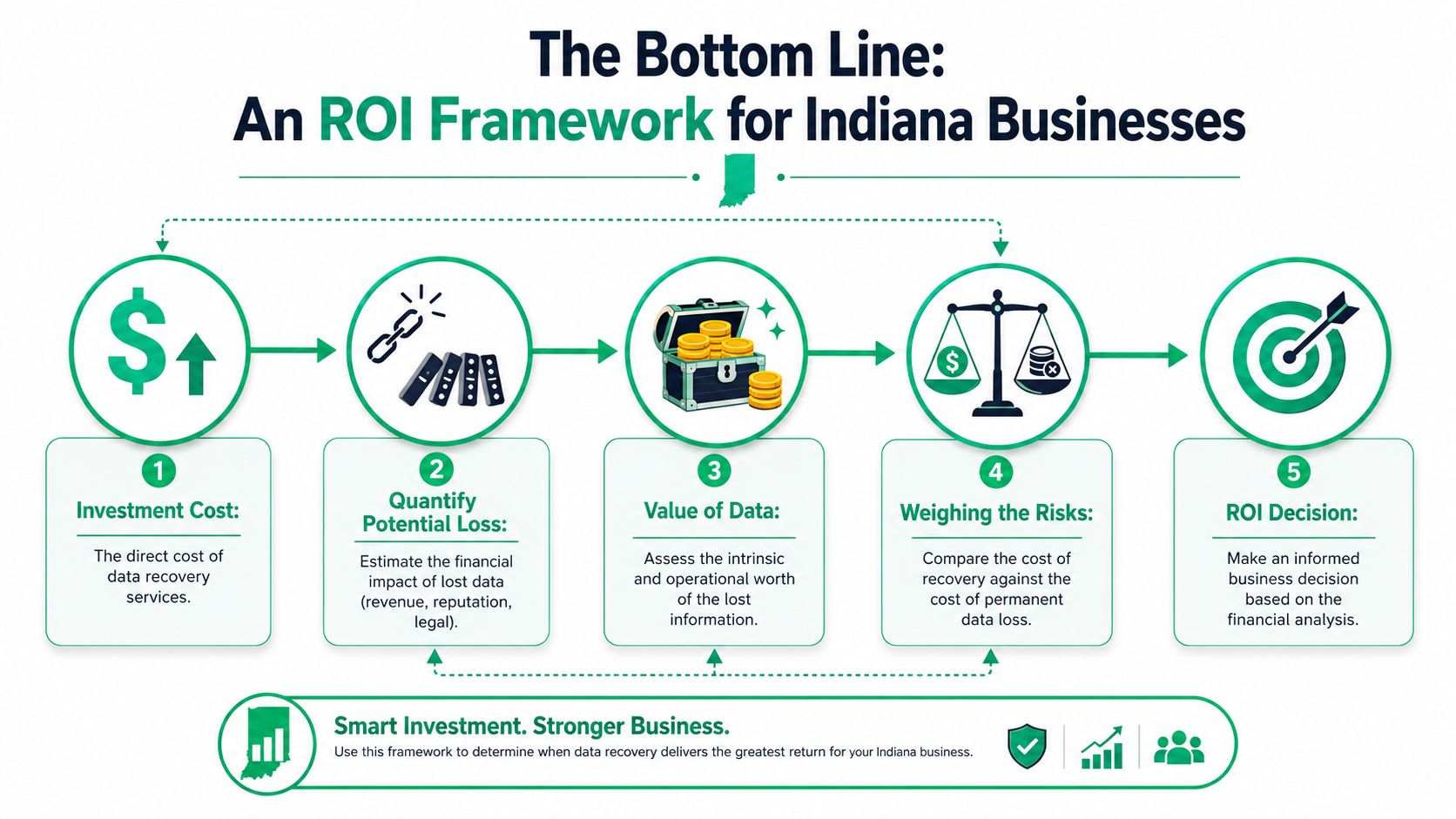
If someone tells you the quote is high, my first question is always the same. High compared to what? Compared to a fresh hard drive from a distributor? Sure. Compared to recreating years of accounting records, patient files, CAD drawings, signed contracts, or audit trails? Usually not.
Start with the real value of the data
The drive itself has almost no value. The data on it may run your company.
For a medical office, lost records create HIPAA headaches and operational chaos. For a machine shop doing defense work, data integrity matters under CMMC expectations. For a law firm or accounting practice, lost client records become a trust problem fast. Even under a general NIST CSF mindset, availability and recoverability aren't optional. They're basic operational discipline.
Ask the three hard questions
Use this framework before approving or rejecting a quote.
-
Can the data be recreated?
If the answer is yes, who's doing it and how long will it take? Internal rework burns payroll and pulls staff off billable work. -
What stops if the data stays unavailable?
Some files are archived history. Others run dispatch, invoicing, EMR access, inventory, or customer service. -
What happens if the loss becomes permanent?
That includes compliance issues, contract exposure, customer churn, and plain old embarrassment.
Recovery is often the cheaper option
At this point, owners need to stop thinking like consumers and start thinking like operators.
If the company loses a few hundred dollars of replaceable files, skip the expensive recovery and restore from backup if you have one. If the company loses critical records, customer deliverables, or systems that keep the lights on, a serious recovery invoice may be the low-cost path.
The right question isn't “Do I like this price?” It's “Is permanent loss cheaper?” Most of the time, it isn't.
That's especially true in Central Indiana businesses with lean teams. One office manager, one controller, one operations lead. If those people spend days rebuilding data from paper, email threads, and memory, you didn't save money. You just moved the loss to payroll, delay, and customer friction.
How to Avoid This Mess and Choose the Right Partner
Monday, 8:07 a.m. The server stays dark, QuickBooks will not open, and the front desk starts asking who can still work. That is the moment most owners learn whether they bought a backup system or just paid for backup software.
Avoiding a recovery bill starts with one rule. Build for restore, not for appearances. A proper small-business setup has to survive ransomware, bad hardware, human error, and the ugly stuff like power events or theft. For Central Indiana companies, that also means protecting records that trigger HIPAA or CMMC headaches if they disappear or get exposed.
What prevention actually looks like
A setup worth paying for usually includes:
- Local backup for fast restores: Good for deleted folders, botched updates, and single-machine failures.
- Off-site copy for site-level problems: Fire, theft, flooding, and ransomware can wipe out anything that only lives in the office.
- Immutable storage: Backups attackers and insiders cannot easily alter or encrypt.
- Regular verification and test restores: If nobody has restored from it, you do not know if it works.
- Backup security controls: MFA, limited admin access, alerting, and retention rules that match how your business operates.
If you want a plain-English outside reference on choosing the right backup solution, that guide does a solid job of showing where local, cloud, and hybrid backups fit.
What to ask a recovery provider before you hand over a device
Price matters. Process matters more.
Ask how they diagnose the failure and what they do first. A capable shop should clearly explain the difference between logical corruption, firmware trouble, and physical damage. They should also tell you whether they image the drive before working on it, how they handle SSDs, NVMe, RAID, and encrypted devices, and what "expedited" service buys you.
Then ask about chain of custody. If the data includes patient records, financials, CAD files, or defense-related documentation, sloppy handling creates a second problem after the hardware problem. Indiana SMBs dealing with HIPAA or CMMC should treat secure return media, documented handling, and access controls as part of the buying decision, not a footnote.
What a capable IT partner should bring
You are not hiring someone to "see what they can do." You are hiring a team to reduce business risk.
That means storage knowledge, recovery discipline, and prevention work all in one place. A provider should be able to recover damaged file systems at the bit level when needed, harden backups so one stolen credential does not wipe them out, monitor for ransomware behavior early, and fix the infrastructure issues that caused the failure in the first place. If they only talk about tools and never about restore testing, ownership, or downtime impact, keep looking.
Finchum Fixes IT works with businesses in Greenwood and the Indianapolis area on data recovery, diagnostics, managed IT support, and backup planning. If you are comparing firms, this guide on how to choose a managed service provider in 2026 is a useful filter for separating proven process from polished sales talk.
My recommendation
If a device already failed, stop touching it. Disconnect it, write down the symptoms, and get a proper diagnostic before anyone in the office starts guessing. Every extra reboot, scan, or DIY fix raises the chance of making recovery harder and more expensive.
If nothing has failed yet, spend the money now on tested backups, aging hardware replacement, and a written restore plan with names on it. That cost is predictable. Emergency recovery is not. For a small business in Central Indiana, that difference shows up fast in payroll drag, missed revenue, customer frustration, and compliance exposure.