How to Automate Customer Service: An Indiana SMB Playbook
TL;DR
- Start with the boring stuff first. Automate the repeat questions, not the messy ones.
- Use a hybrid model. Let automation handle routine requests, then hand off to a real person without issues for technical, urgent, or sensitive issues.
- Audit before you buy. Review emails, tickets, calls, and walk-ins to find the jobs that waste staff time every week.
- Keep your stack simple. For most Indiana SMBs, a help desk, a knowledge base, basic workflows, and a small AI layer beat a giant enterprise platform.
- Tie automation to uptime. Every delayed answer can turn into stalled work, missed revenue, or avoidable downtime that can cost significant amounts per minute.
- Secure the connections. If your chatbot, CRM, PSA, or endpoint tools don’t share context safely, you create risk instead of savings.
- Measure what matters. Track response speed, resolution quality, escalations, and reclaimed staff time.
A lot of Indiana business owners are living the same week on repeat.
The office manager in Greenwood answers the same password reset question before lunch. The dispatcher in Franklin gets another call about spotty Wi-Fi in an old brick building. Someone in accounting forwards a customer email because nobody knows who owns the inbox. By Friday, your best people have spent a chunk of the week doing work that should’ve been handled automatically.
That is not annoying. It eats margin, slows response times, and drags good employees into low-value tasks. If your team supports customers, patients, tenants, drivers, or internal users, every delay can ripple into real downtime. And downtime can cost significant amounts per minute. Even when the issue isn’t a full outage, wasted tech time still pulls people off billable work and turns your monthly budget into guesswork.
Automation fixes this when you use it the right way.
Used poorly, it gives you a robotic chatbot that traps people in loops and makes your business sound like a phone company from 2008. Used effectively, it becomes a force multiplier. It handles the repeatable stuff quickly, routes the hard stuff correctly, and gives your team room to work on cybersecurity, networking, cloud issues, software rollouts, and the kind of support that needs a trained human.
That matters even more for businesses along the I-65 corridor. Most companies here don’t have enterprise call centers, giant support departments, or time for a six-month software rollout. They need something practical. Something that works with the tools they already have. Something that maintains a local feel.
In our 17 years of local service, one pattern has stayed consistent. Businesses don’t need more noise. They need fewer bottlenecks, cleaner handoffs, and systems that keep operations moving when staff is stretched thin.
If you’re trying to connect automation to a bigger operational plan, this guide on digital transformation frameworks for Indiana businesses is a useful companion read.
Your Introduction to Automated Customer Service
A Johnson County business owner usually notices the problem long before they call it “customer service automation.” They notice that one employee has become the human answer desk: That person knows where the invoices are, how to reset the app login, who handles new orders, why the printer won’t scan to email, and which vendor still insists on faxing things. The business runs because that employee catches everything.
Then that person takes a day off.
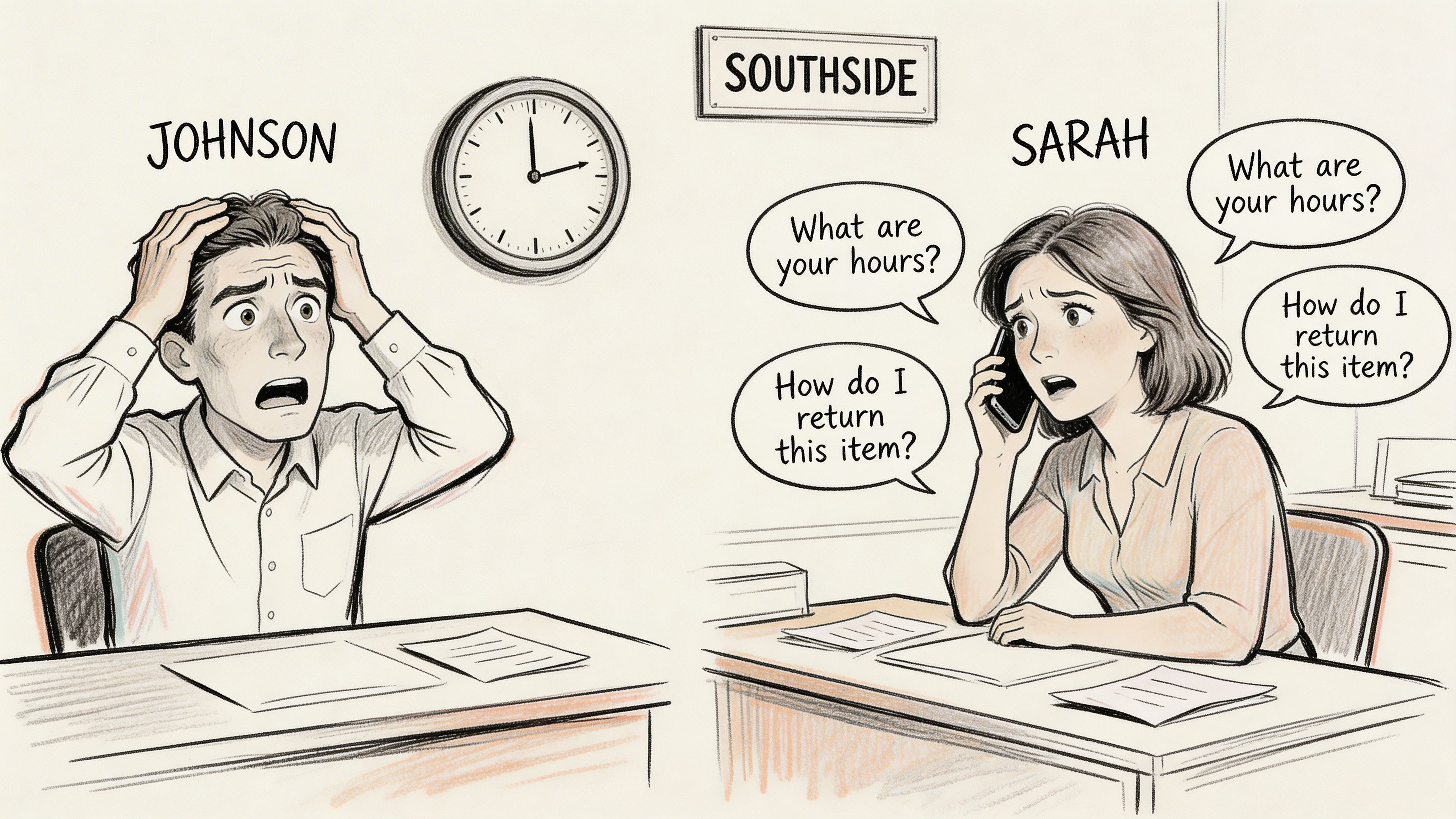
That’s the moment the weakness shows up. Customers wait. Internal tickets pile up. Calls bounce between desks. A basic Wi-Fi problem turns into a half-day productivity hit because nobody had a standard intake flow, a knowledge base article, or an automatic triage rule.
Automation should remove friction, not personality
For a small or midsize business, the phrase how to automate customer service can sound larger than needed. People picture a big-bang platform migration, a voice bot that mispronounces Greenwood, and a monthly invoice that belongs in a Fortune 500 budget.
That’s not the approach that works best for local shops, medical offices, field service teams, manufacturers, or professional firms.
A practical setup is smaller. You automate acknowledgment emails, intake forms, password reset flows, appointment confirmations, status updates, simple knowledge answers, and ticket routing. Then you keep your trained people focused on exceptions, escalations, and judgment calls.
Practical rule: If the issue needs empathy, root-cause analysis, or a compliance decision, a person should own it.
That’s why the market has moved hard in this direction. Typedef’s roundup of customer support automation ROI data notes that Gartner predicts conversational AI will slash contact center labor costs by $80 billion globally by 2026, and a Forrester study reported 210% ROI over three years with payback in under 6 months for similar technology.
For Indiana businesses, that doesn’t mean “replace the staff.” It means you can scale support without scaling headcount at the same rate.
Where local businesses feel the gain first
The first payoff isn’t flashy. It shows up in ordinary places:
- Front desk stability: Staff stop answering the same location, hours, and status questions all day.
- Faster triage: Issues reach the right queue before they turn into bottlenecks.
- Better continuity: Support doesn’t collapse when one key employee is out.
- Cleaner budgeting: You shift wasted labor into a more predictable operating cost.
- More useful human time: Your team spends less time on repetition and more on revenue, compliance, and uptime.
For a healthcare office, that can mean more consistent patient communication without stepping outside HIPAA guardrails. For a defense supplier, it can mean tighter handling around CMMC-sensitive workflows. For a general business, it means stronger process discipline that aligns better with NIST CSF and a more resilient operation overall.
Designing Your Automation Blueprint
Most failed automation projects start with shopping.
Someone gets excited about a chatbot, an inbox AI add-on, or a phone tree tool before anybody has done the unglamorous work of figuring out what customers ask, where requests come in, and which issues waste time.
That’s backward.
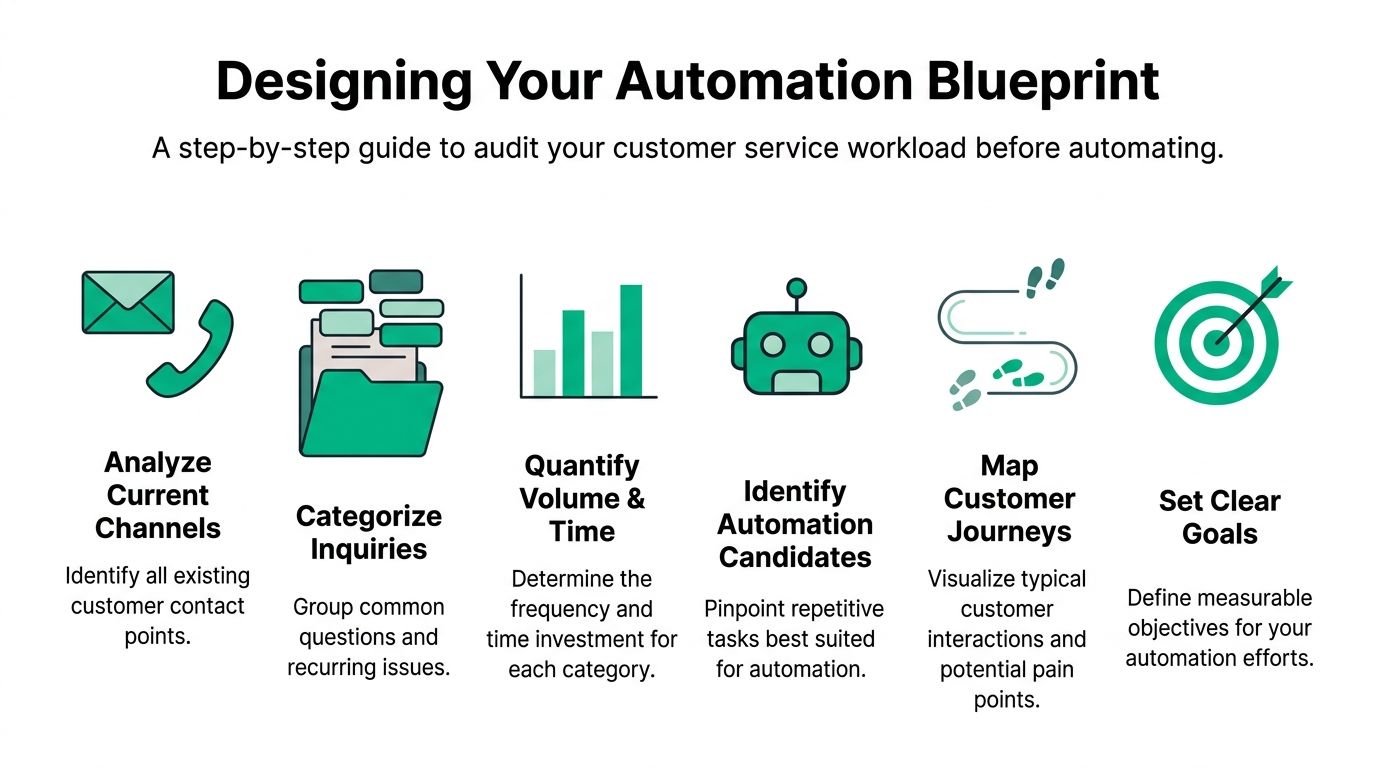
Start with contact channels, not software demos
Pull a few weeks of real activity from every place customers contact you.
That means shared email inboxes, phone logs, web forms, chat transcripts, text messages, ticket systems, and the hallway conversations that somehow become work. If you’re a Southside business with a front office, those frequently reveal the same repeat issues you’ll want to automate digitally.
A clean audit should answer these questions:
- Where do requests enter? Email, phone, web form, text, chat, in person.
- What repeats constantly? Password resets, order status, appointment changes, “is the system down,” and location questions are common.
- Which requests are simple but time-hungry? These are your first automation candidates.
- Which requests are high risk? Security incidents, billing disputes, protected data, and anything compliance-heavy should stay human-led.
- What breaks continuity? Look for requests that sit untouched when one person is unavailable.
If you want examples beyond service workflows, this roundup of business process automation examples for Indiana companies helps show where these same habits improve other departments too.
Find the low-complexity work with the highest drag
Most SMBs get quick wins by focusing on these areas.
You’re looking for requests with three traits. They happen often. They follow a repeatable pattern. They don’t need judgment from a senior person.
A Carmel healthcare clinic might automate routine appointment-related questions in a HIPAA-conscious workflow while keeping anything involving medical detail or protected records in the hands of staff. A contractor near the I-65 corridor might automate estimate request intake and route emergency calls directly to dispatch. A business with older buildings and UniFi networking might send a self-help checklist for common Wi-Fi issues before a technician gets involved.
Gorgias reports that automating simple requests can reduce first response time by 37% and overall resolution time by 52%, and that one team resolved 27% of all tickets using just two automated workflows.
That matters because the first batch of automation doesn’t need to be clever. It needs to be dependable.
Don’t automate the hardest problem in your business first. Automate the most repeated one.
Set goals that tie back to operations
A lot of companies say they want to “save time.” That is excessively vague to manage.
Tie your goals to business continuity and support quality. You’re not automating for the sake of novelty. You’re trying to reduce preventable delays that pull staff away from productive work.
A simple planning table helps.
| Focus area | Weak sign | Better target |
|---|---|---|
| Intake | Emails sit unassigned | Route requests to the correct queue automatically |
| Repetitive questions | Staff answer the same thing daily | Deflect routine requests with self-service or auto-replies |
| Technical bottlenecks | Simple issues reach senior staff | Push basic troubleshooting to guided workflows |
| Customer updates | People ask for status repeatedly | Send automatic confirmations and progress updates |
| Continuity | One employee holds the process together | Standardize response paths so coverage is easier |
Map the customer journey in plain English
You don’t need a giant wall chart for this.
Write down what happens from the moment someone asks for help to the moment the issue is resolved. Note where people wait, where information gets lost, and where staff have to ask the same follow-up questions every time.
That’s also the point where you’ll spot obvious integration needs. If your contact form collects no useful context, your automation can’t route accurately. If your ticketing system doesn’t talk to your CRM, your team won’t have history at hand. If your help articles are outdated, an AI assistant will make stale guidance faster.
Decide what should never be automated
This is as important as choosing what should be.
Keep humans in front of:
- Security-sensitive events: suspected phishing, endpoint alerts, and privilege issues
- Compliance-heavy requests: HIPAA, CMMC, and record-handling exceptions
- Financial disputes: refunds, contract questions, or anything with legal weight
- Complex troubleshooting: outages, recurring failures, or issues that touch multiple systems
- Emotionally tense situations: angry customers, escalations, and service failures
Once you know where the low-hanging fruit sits and where the guardrails belong, your tool choices get a lot easier.
Choosing the Right Automation Tools for Your Business
Most SMBs don’t need a giant suite. They need a stack that solves one real problem at a time.
The mistake I see most often is buying a platform designed for a national support center, then trying to force a Greenwood or Indianapolis business into that shape. You end up paying for channels you don’t use, dashboards nobody checks, and workflows so complex that the team falls back to email.
Start with the cheapest reliable layer
The lowest-cost automation is typically present in tools you own.
Shared inbox rules, canned responses, form routing, scheduling triggers, and ticket categories can eliminate a surprising amount of waste. If customers keep asking where to send files, when you’re open, whether a device is ready, or how to begin a support request, those answers should be immediate and consistent.
A basic first layer includes:
- Email rules: Auto-acknowledgments, category routing, and internal notifications.
- Ticket workflows: Assign by issue type, urgency, or location.
- Forms with required fields: Force the customer to provide enough context up front.
- Knowledge base articles: Publish short answers to your most common questions.
- SMS or email updates: Reduce status check calls.
This isn’t glamorous, but it works. It also gives you a clean process before you introduce AI.
Rule-based bot or AI assistant
Many owners get stuck at this point. They hear “chatbot” and assume every bot is the same. It isn’t.
Here’s the practical distinction:
| Tool type | Best for | Weak spot | Good local example |
|---|---|---|---|
| Rule-based chatbot | Simple FAQs and form capture | Breaks when wording varies | Office hours, service area, scheduling intake |
| AI assistant | More flexible language and knowledge lookups | Needs strong source content and controls | Guided troubleshooting, ticket triage, policy answers |
| Agent-assist AI | Internal help for staff during live support | Doesn’t replace frontline process | Suggested responses, knowledge retrieval, next-step prompts |
| IVR and call routing | Directing phone traffic quickly | Can annoy callers if menus are sloppy | Route billing, urgent support, sales, and after-hours emergencies |
A small business with predictable request types can perform effectively with a rule-based bot at first. If your customers ask varied technical questions, an AI assistant becomes more useful, but only if your documentation is in decent shape.
A common example is a UniFi networking issue. If the request is “guest Wi-Fi portal isn’t loading,” a rule-based workflow can ask location, site, and outage scope, then create a clean ticket. An AI assistant can go further by searching your help content, suggesting a likely fix path, and collecting more context before handing it off.
Why the knowledge base matters more than the bot
If your documentation is thin, outdated, or written like internal shorthand, your automation will feel dumb rapidly.
The strongest setups put effort into the knowledge layer first. Use plain language. Keep articles short. Break procedures into steps. Separate user-facing help from technician-only notes. If you run managed environments, build articles for the issues customers face, not just the systems you prefer to maintain.
Kapture’s five-step methodology is solid on this point. It starts with auditing repetitive issues, then improving the knowledge base for AI readability before deploying agent-assist tools. It also notes that this structured approach can automate up to 20% of tickets quickly and drive a 30% to 50% reduction in average handling time.
That sequence matters. If you skip the content cleanup and jump straight to AI, the tool makes bad answers faster.
Phone systems still matter in Indiana
A lot of enterprise content treats phone support like old news. That’s not how many Indiana SMBs operate.
Manufacturing shops, clinics, property managers, logistics businesses, and older customer bases still call first. If your main line becomes a bottleneck, customer service suffers before email automation ever gets a chance to help.
A smart IVR setup should do three things:
- Identify urgent issues quickly
- Route non-urgent calls to the right queue
- Capture enough detail so staff don’t have to restart the conversation
Don’t bury people in endless menus. If someone has a security incident, an internet outage, or a line-of-business app failure, the path to a human should be obvious.
A phone tree should sort traffic, not punish the caller.
Keep the stack compatible with what you already run
Many SMB decisions get expensive at this stage.
Before you add a new tool, check whether it can connect without issues to your current help desk, CRM, scheduling app, endpoint platform, or collaboration suite. If not, you’ll create another island. Then staff will have to swivel-chair between systems, copy notes manually, and clean up mistakes later.
For most local businesses, a sensible stack looks something like this:
- Core help desk or PSA
- Shared knowledge base
- Basic workflow automation
- Web chat or intake bot
- Optional AI layer for triage or agent assist
- Phone routing with clear escalation paths
If you’re exploring where AI fits into that stack, this guide to AI automation for small business efficiency and growth is worth a look.
The best tool choice isn’t the smartest one on paper. It’s the one your team will use every day without creating more support debt.
Integrating Systems and Securing Your Data
Automation that doesn’t connect to the rest of your environment is a prettier silo.
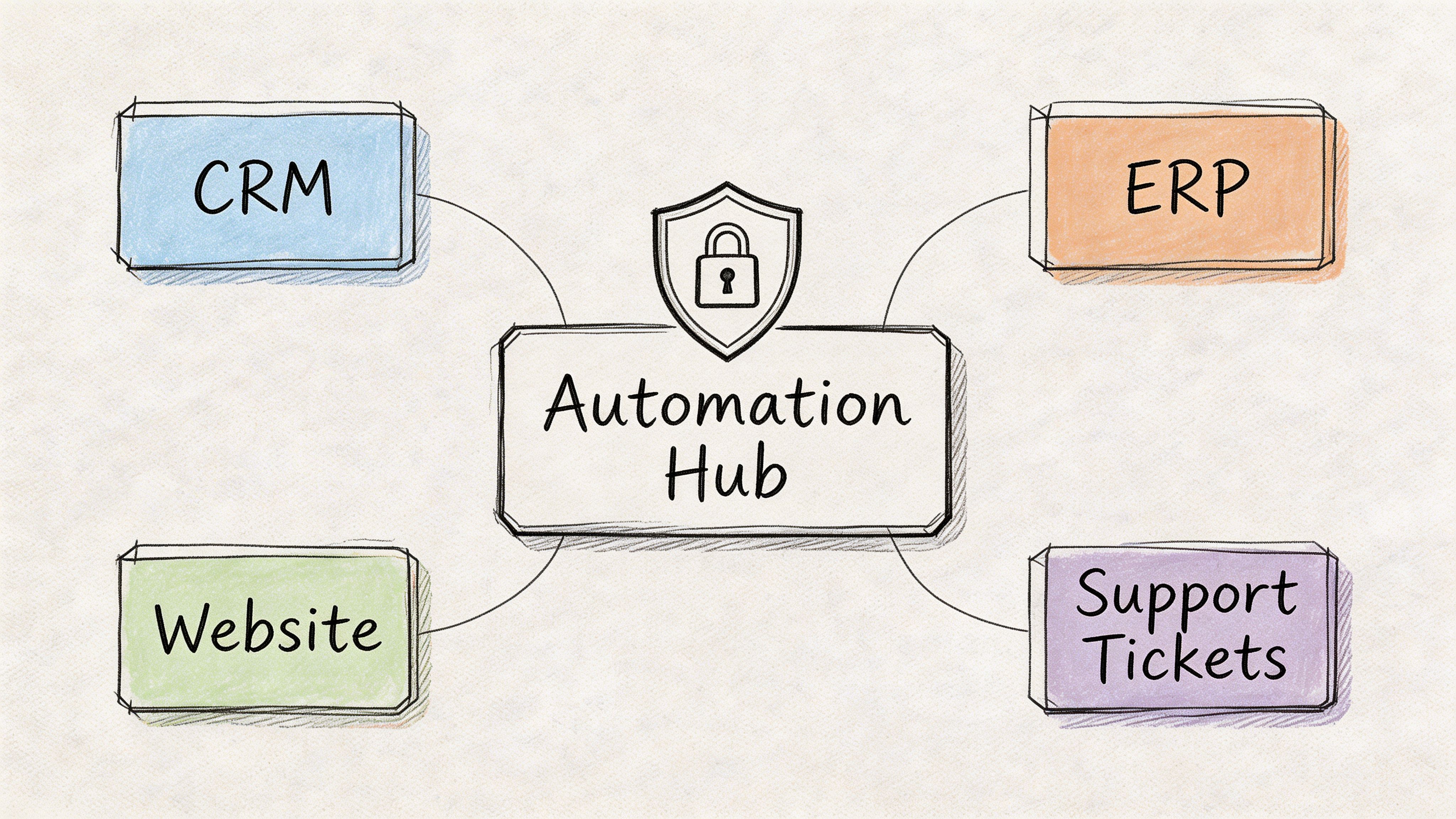
That’s the part many businesses miss. They put a chat widget on the website, wire up a few autoresponders, and call it a day. Meanwhile, the CRM has no record of the conversation, the technician never sees the intake details, and the security stack has no awareness of what the automated system touched.
What good integration looks like
A solid setup passes context between systems without making staff retype the story.
If a customer starts with a web form, the ticket should open with the issue type, asset or device details, urgency, and contact information already attached. If that customer has a history of previous issues, your support platform should show it. If the problem is security-related, the workflow should notify the right people and follow a stricter path.
In practical terms, that might mean connecting:
- Chat or form intake to your help desk
- Help desk to CRM or client records
- Phone system to ticket creation
- Support workflows to endpoint tools such as Bitdefender GravityZone
- Alerting systems to on-call notifications
- Documentation to agent-assist AI
- Backup or disaster recovery workflows to incident response steps
This matters for business continuity. If your systems share the right information, your staff can act more quickly during outages, account lockouts, suspicious email events, and connectivity failures.
Why SMBs get tripped up here
Enterprise guides frequently assume you have a dedicated integration team. Most businesses in Greenwood, Franklin, Whiteland, or downtown Indy do not.
That gap is real. Kapiche notes that over 90% of generic automation guides ignore SMB implementation barriers, including basic CRM integration and niche local queries. It also reports that SMBs using a hybrid AI-local agent model via flexible tools see 40% faster resolutions for technical support issues without sacrificing the customer experience.
That lines up with what works in the field. SMB automation succeeds when it fits the systems already in place and respects the fact that local businesses need quick answers, not architecture diagrams for their own sake.
Security can’t be bolted on later
IT support automation crosses into serious infrastructure work at this point.
If your automation platform can read customer records, open tickets, trigger emails, or touch internal data, it needs the same discipline you’d apply to any other business system. Use Zero Trust architecture principles. Limit permissions. Separate roles. Log actions. Review which data the bot or workflow can access. Keep integrations specific and narrow instead of broad and sloppy.
For regulated environments, the stakes go up:
| Environment | Security focus |
|---|---|
| Healthcare | HIPAA-safe handling of communications and records |
| Defense supply chain | CMMC-aligned access control and audit discipline |
| General business | NIST CSF-style controls around identity, logging, response, and recovery |
| Professional services | Client confidentiality, retention, and clean access boundaries |
If your automation touches files, make sure your storage and recovery model is mature too. That includes immutable off-site backups for critical data and tested recovery procedures if a workflow misfires, a user deletes the wrong records, or a ransomware event interrupts operations.
A good companion read here is this practical guide to secure data transfer for Indiana businesses.
Bad integration creates extra clicks. Bad secure integration creates liability.
Don’t ignore the building-level reality
Local infrastructure quirks matter more than vendors admit.
A business in an old Southside building with thick walls and patchy coverage might need automation that reports signal complaints by location so your team can distinguish between a user issue and a wireless dead zone. A multi-site company in Hamilton County growth corridors may need location-aware routing so the right branch staff get the request first. A company with custom internal apps might need workflows that query internal status before telling customers whether there’s a system issue.
Technical depth also matters in this context. If your support operation depends on latency-optimized mesh nodes, cloud identity, SOC-as-a-Service monitoring, or custom software hooks, your automation shouldn’t pretend those complexities don’t exist. It should gather the right context so your team can solve the problem faster.
Mastering the Human Handoff to Maintain Quality
Most automation failures aren’t caused by the bot answering one simple question wrong.
They happen when the customer is stuck. They’ve already explained the issue, the system keeps circling, and when a human finally joins, that person has no context. The customer starts over, gets irritated, and now a routine support request has become a relationship problem.
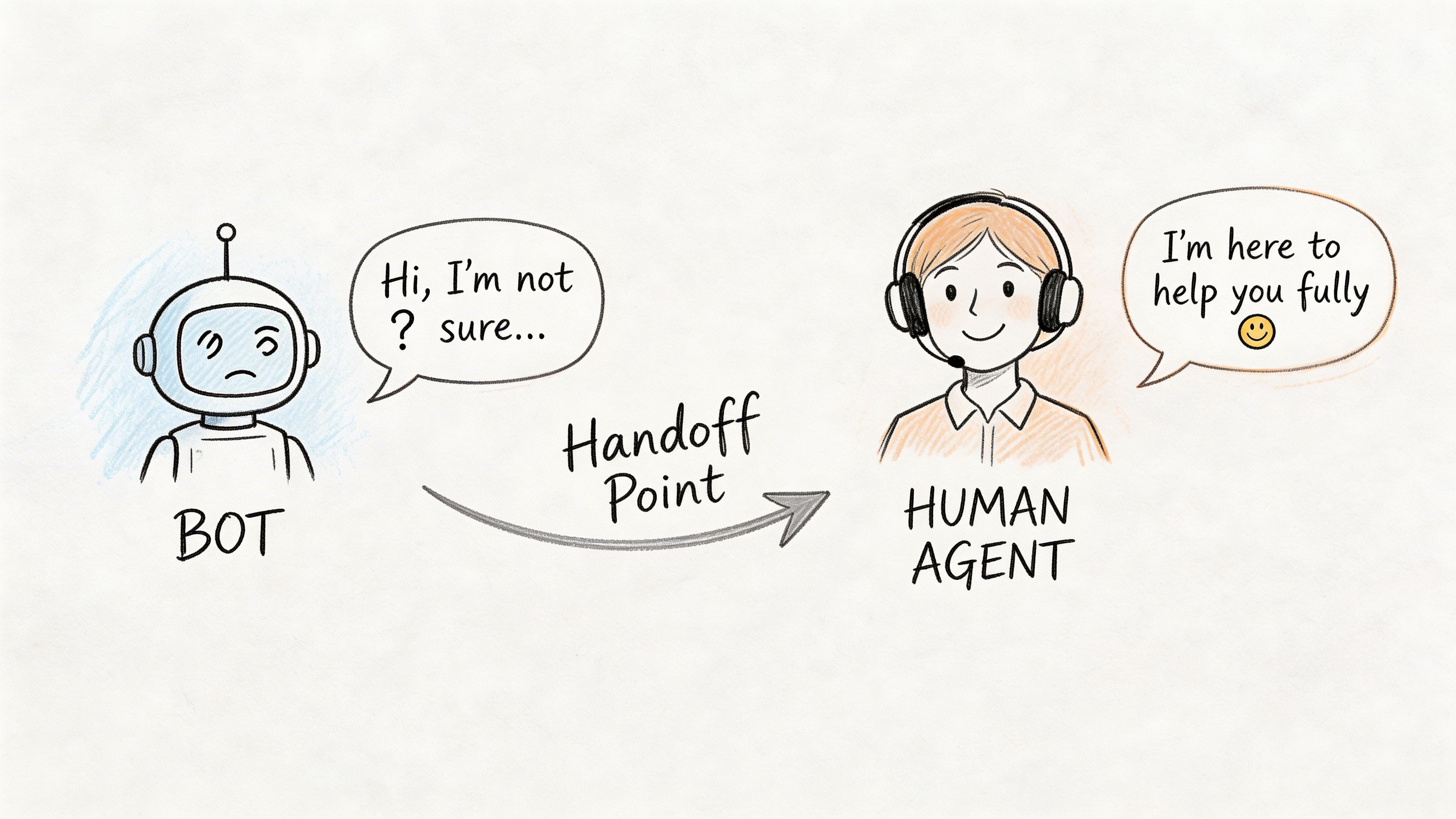
The handoff is the product
A lot of business owners think the automation is the product. It isn’t.
The full support experience is the product. That includes the moment automation stops and a person takes over. If that transition is clumsy, customers don’t care how nice your workflow builder looked in the demo.
Alhena reports that 98% of CX leaders admit flawed AI-to-human handoffs are a major point of failure, and that over-automation in technical support can drop CSAT by 15% to 20% unless paired with AI-assisted agents and clear escalation paths that transfer the full customer context.
That’s especially true for IT-heavy environments. Cybersecurity alerts, data migration issues, failed backups, cloud access problems, and network outages all need nuance.
What should trigger a human takeover
Your handoff rules should be blunt enough to work in real life.
Good triggers include:
- Emotion cues: angry, complaint, unacceptable, furious, cancel
- Repeated failure: the user has tried the guided flow and still isn’t resolved
- Security language: phishing, hacked, breach, malware, suspicious login
- Complexity flags: multiple systems involved, recurring outage, data issue
- High-value situations: VIP client, regulated account, contract risk
- Time sensitivity: production down, internet outage, patient-facing failure, payroll impact
When we cleaned up a similar setup for a downtown Indy business, the biggest fix wasn’t a smarter bot response. It was a stricter escalation rule. Once the system recognized repeated confusion and sent the entire transcript, device details, and prior ticket history to a human, the friction dropped quickly. Customers stopped feeling trapped.
What the human must receive
A handoff without context is just a transfer.
The receiving person should get a packet, not a blank screen. At minimum, that includes:
| Handoff item | Why it matters |
|---|---|
| Customer identity | Prevents repeat verification |
| Conversation history | Stops the customer from starting over |
| Intent or issue category | Helps the agent triage instantly |
| Relevant asset or system info | Speeds technical diagnosis |
| Previous related tickets | Shows patterns and recurring failures |
| Sentiment or urgency notes | Helps the agent adjust tone and priority |
If the issue is technical, include the diagnostic clues the automation already gathered. For example, whether the issue affects one device or a whole office, whether the problem started after a password change, whether the user is on guest Wi-Fi or corporate Wi-Fi, or whether endpoint protection logged a recent alert.
That’s where agent-assist tools earn their keep. They don’t replace the technician. They tee up the technician.
Customers will forgive automation. They won’t forgive having to explain the same outage three times.
Keep the local touch without making every request manual
There’s a myth that automation and personal service can’t coexist. That’s only true when the automation is designed to block access.
A hybrid model works because it keeps the tone and speed of a local business while removing repetitive drag. The customer gets instant acknowledgment and a useful first step. Your team gets structure and context. When the issue becomes nuanced, the person taking over can respond like a human who already knows the situation.
This is also where staffing models matter. If you’re weighing when to automate, when to outsource, and when to add people, this comparison of managed service versus staff augmentation for Indy business owners gives a practical lens.
A short walkthrough makes the handoff design easier to visualize:
Keep score on quality, not just deflection
If you only measure how many tickets the bot deflects, you’ll eventually optimize for the wrong thing.
Watch for signs that quality is slipping:
- Escalations arrive angry
- Agents ask customers to repeat everything
- Security or compliance issues get misrouted
- Customers bypass your system and call direct lines
- The same issue reopens because the first response was shallow
A good automation program protects trust. That means quick answers on routine requests and quick access to real expertise when the issue carries risk.
Deployment Checklist and Measuring Your ROI
A rollout usually fails in ordinary ways.
A form sends requests to the wrong queue. A chatbot answers a billing question well enough, then mishandles an access request that should have gone straight to a person. Staff assume the new workflow performs one action when it does another. For a Greenwood or Indianapolis small business, that kind of mistake does not stay contained in a lab. It hits the front desk, the owner’s phone, and the customer relationship you spent years building.
Keep the launch controlled, narrow, and easy to verify.
Use a phased launch
Start with one or two request types that are frequent, low-risk, and easy to judge. Password reset intake, appointment confirmations, order status questions, and basic account updates are common first wins. Leave anything with security exposure, payment disputes, or contract interpretation in a human-led path until the routing and context capture are proven.
A practical sequence looks like this:
- Confirm intake paths for email, chat, web forms, and phone
- Clean up knowledge articles so the automation is pulling from current answers
- Test routing, alerts, and ownership with internal users first
- Launch one pilot for a single queue, team, or issue type
- Review misses such as bad classifications, weak replies, and edge cases
- Expand carefully after handoffs and reporting are working as expected
That approach costs less, causes fewer surprises, and fits how Indiana SMBs operate. You do not need an enterprise change-management project to automate customer service effectively. You need a workflow your staff trusts and can correct quickly.
Customer Service Automation Deployment Checklist
| Phase | Task | Status | |---|---| | Planning | Audit repeat requests across all channels | ☐ | | Planning | Mark which issues must stay human-led | ☐ | | Planning | Define success metrics for speed, quality, and continuity | ☐ | | Content | Update FAQ and knowledge base articles for plain-language use | ☐ | | Content | Create canned replies and intake prompts | ☐ | | Systems | Connect forms, chat, phone, help desk, and CRM | ☐ | | Systems | Apply role-based access and logging controls | ☐ | | Security | Review HIPAA, CMMC, or NIST CSF implications if applicable | ☐ | | Testing | Run sample tickets through every workflow | ☐ | | Testing | Verify escalation to a real human with full context | ☐ | | Training | Train staff on override rules and exception handling | ☐ | | Launch | Roll out to one queue or issue type first | ☐ | | Review | Check response speed, reopen patterns, and user feedback | ☐ | | Improvement | Adjust prompts, routing, and articles based on real usage | ☐ |
Sample workflows that fit Indiana SMB reality
These examples are intentionally plain. Plain is easier to support.
Automated Wi-Fi troubleshooting for an old brick building
A user submits, “internet is down.”
The system asks a short set of questions: building, suite, whether wired devices also fail, whether both guest and internal Wi-Fi are affected, and whether the issue appears limited to one person or several. If the answers suggest a site problem, the ticket gets marked urgent and routed to the network queue. If it looks isolated, the user gets a basic first-step article and the ticket opens at a lower priority.
That works well in older offices where signal problems, retrofits, and dead zones are common. It helps the team sort out whether the issue belongs with the device, the building network, or the ISP without wasting a technician’s first ten minutes on intake.
New client onboarding through automated emails and forms
A new client signs an agreement.
The system sends a welcome sequence, gathers site contacts, device counts, tenant details, and approval paths, then opens the onboarding checklist in the help desk or PSA. Staff stop chasing the same information through scattered email threads. The client gets a cleaner start. The team gets enough structure to move without losing the local touch.
Security alert triage with a hard human stop
A user reports a suspicious email or failed login.
The workflow collects screenshots, device details, and urgency, then routes the case straight to a human security queue. Automation handles intake and labeling. A person handles the incident. That trade-off matters because speed helps, but judgment matters more when the issue could affect accounts, data, or audit records.
How to calculate ROI without turning it into a finance project
Keep the math tied to your operation.
Value gained = staff time recovered + fewer delays + fewer repeat contacts + better service continuity
Investment = software cost + setup time + integration work + monthly tuning
Start with the request types you automated. Measure how many come in each month, how long they used to take, and how often they now close without extra back-and-forth. Then compare that against what you spent to set up and maintain the system.
For example, if your office manager or service coordinator used to spend hours each week answering the same status questions, collecting missing details, or routing requests manually, that time is now available for work that needs a person. If fewer tickets reopen and fewer customers call back for clarification, the gain is not just labor savings. It is less interruption, steadier service, and fewer dropped balls when someone is out sick or on vacation.
For a local SMB, the practical point is straightforward. Businesses keep putting money into automation because it can absorb repetitive support work without forcing headcount to rise at the same pace. The hybrid model works best for smaller Indiana companies because it keeps labor focused on exceptions, relationships, and revenue-impacting issues instead of repetitive intake.
Measure the right signals after launch
Deflection rate is only one number. It is rarely the most useful one.
Track the signals that show whether the system is helping customers and helping staff:
- Response speed: Are routine issues getting a useful first response faster?
- Resolution quality: Are customers getting an answer, or are they delayed?
- Escalation quality: Does the human who receives the handoff have enough context to act?
- Reopen rate: Do automated resolutions hold up, or do the same issues return?
- Staff capacity: Are experienced employees spending more time on exceptions and less on repetitive sorting?
- Service continuity: Does the queue stay stable when a key employee is out?
- Cost predictability: Are support costs easier to plan month to month?
I usually tell business owners to review these numbers at 30, 60, and 90 days. Early problems frequently come from content gaps, bad routing logic, or one workflow that looked effective in testing but falls apart with real customer language. Those are fixable if you catch them early.
Field note: The best automation projects feel ordinary after launch. Tickets arrive cleaner. Customers get faster first responses. Staff spend less time repeating themselves.
That is the return most small businesses care about. Better process control, fewer interruptions, and a customer experience that still feels local.
If your business in Greenwood or the Indianapolis area wants help building customer service automation that fits your current environment, Finchum Fixes IT can help. We build practical, secure workflows that work with the tools you already use, protect uptime, and keep the local human touch intact. If you want to start with a solid foundation, ask for a Free Network Assessment or a Security Risk Audit for your Greenwood or Indianapolis business.