How to Automate Business Processes: An Indy SMB Guide
If you run a business in Greenwood, Franklin, or up the I-65 corridor, there's a good chance at least one core process still depends on inbox triage, spreadsheet copying, paper approvals, or somebody remembering to “circle back.” That works until it doesn't. One missed invoice, one skipped follow-up, one approval stuck in a manager's inbox, and the whole day starts sliding sideways.
That's where automation helps. Not as a shiny software project. As a way to keep work moving when phones ring, staff get busy, and systems don't talk to each other. Done right, automation protects business continuity, cuts waste, and turns repetitive tech time back into billable hours. Done wrong, it just makes a messy process fail faster.
Stop Drowning in Paperwork Your Indy Automation Blueprint
TL;DR
- Start with pain, not software: Pick a process that's slowing cash flow, service delivery, or staff productivity.
- Fix the workflow first: If steps are unclear or exception-heavy, clean them up before automating.
- Match the tool to the problem: Cloud app connections, legacy desktop workflows, and compliance-heavy approvals need different approaches.
- Roll out in phases: Pilot, test in parallel, refine, then expand.
- Measure what changed: Track cycle time, error rate, rework, and whether your team got time back.
- Treat automation like infrastructure: Secure it, assign ownership, and build it to survive outages and staff turnover.
A familiar scene around Johnson County looks like this. A business owner in an older brick building has decent people, decent software, and a terrible process. Quotes are built in one system, invoices in another, customer updates happen by email, and somebody retypes the same information three times because the apps don't sync. Add spotty Wi-Fi in the back office and aging hardware in the closet, and now simple admin work eats half the afternoon.
That's usually when owners start asking how to automate business processes. Good question. The better question is which process is costing you the most every week.
Automation is no longer a fringe IT experiment. The business process automation market was valued at $8 billion in 2020 and is projected to reach $19.6 billion by 2026, while over 66% of organizations have already automated at least one process according to Kissflow's business process automation market summary. That matters because it tells you two things. First, this is mainstream. Second, companies are putting real budget behind it because manual handoffs are expensive.
What smart automation looks like in an Indy SMB
For most Indiana SMBs, the first wins aren't glamorous.
- Invoice follow-up: Send reminders, flag overdue accounts, and route exceptions to accounting.
- Service ticket routing: Move requests from email into a proper queue with ownership and status tracking.
- Approval chains: Push purchase requests, access requests, or client signoffs to the right person without hallway chasing.
- Reporting cleanup: Pull data from standard systems into one repeatable report instead of rebuilding it by hand every Monday.
Those fixes matter because downtime isn't just a server issue. Operational downtime counts too. When work stalls, revenue stalls. That's why automation should sit alongside your broader digital transformation framework for Indiana businesses, not off in a side project no one owns.
Where the ROI really comes from
Most owners first look for labor savings. Fair enough. But the bigger payoff often comes from consistency. Jobs stop waiting on memory. Customer requests stop living in one person's inbox. Teams stop recreating the same status updates by hand.
That's how you build a more predictable monthly IT budget. You remove recurring chaos. You reduce avoidable interruptions. You give the business a process that still runs when someone's out sick, the office is slammed, or the network needs maintenance.
First Fix Whats Broken Before You Automate
A lot of automation advice starts with “find repetitive tasks.” That's incomplete. Repetitive doesn't always mean ready. In our 17 years of local service, the ugliest automation failures haven't come from the wrong software. They've come from automating confusion.
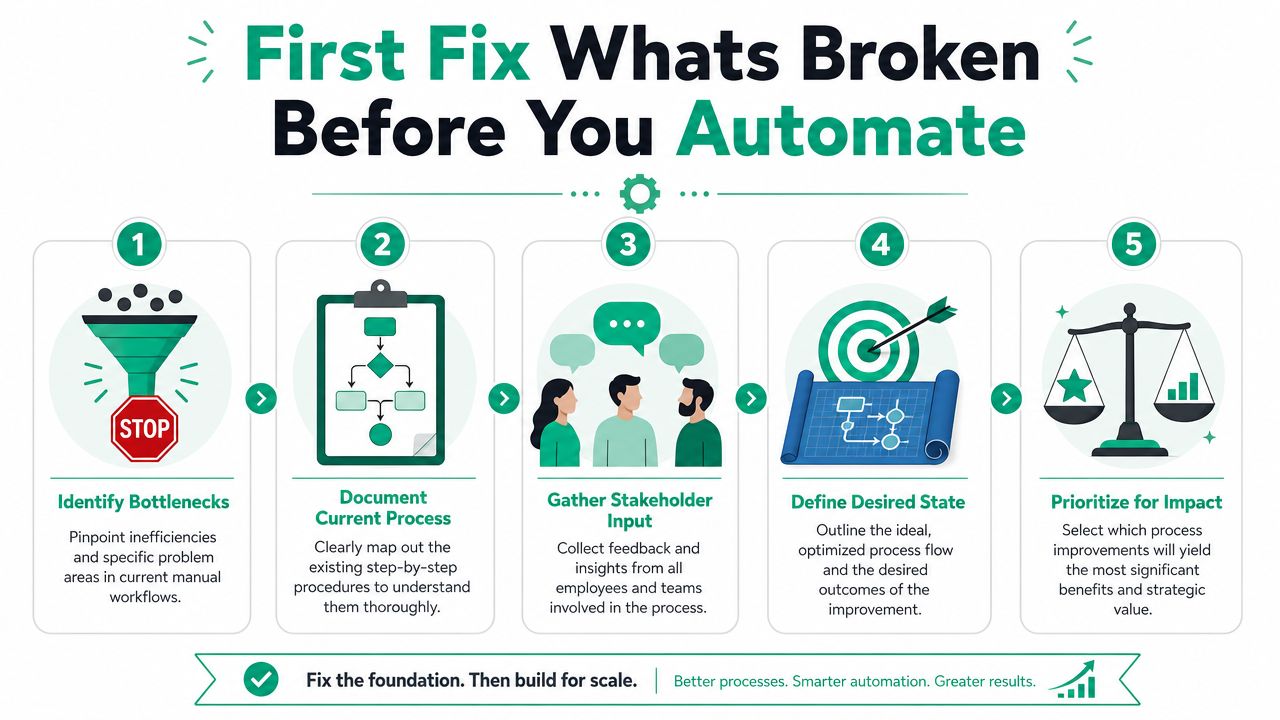
NetSuite's guidance puts it plainly. You “can't automate what you don't understand,” and businesses need to analyze the entire workflow, including upstream and downstream steps, before deciding the improvement justifies automation, as explained in NetSuite's guide to automating business processes.
Bad candidates for automation
Some workflows should be redesigned before a single bot, flow, or script touches them.
- Exception-heavy work: If staff constantly say “well, usually, unless...” the process probably needs standardization first.
- Unowned approvals: If nobody knows who makes the final call, automation won't fix the politics.
- Dirty source data: If names, dates, SKUs, or account codes are inconsistent, the automation will spread bad data faster.
- Side-channel work: If key decisions happen by text message, hallway chat, or sticky note, your official process map is fiction.
Automating a flawed process doesn't remove friction. It hardens it.
A Greenwood business park client once wanted to automate order handling from intake through invoicing. On paper, it looked straightforward. In practice, three departments used different naming conventions, sales reps handled exceptions their own way, and accounting had a manual “sanity check” nobody had documented. If we had automated the visible steps only, they would've created faster errors and bigger cleanup work.
What to map before you build
Before you choose any platform, document the process at a working level. Not a conference-room level.
Map these pieces:
-
Trigger
What starts the process? A form submission, an email, a signed quote, a phone call logged by staff? -
Inputs
What data arrives, and where does it come from? CRM, ERP, shared mailbox, scanner, spreadsheet? -
Decision points
Where does somebody choose yes or no, route left or right, approve or reject? -
Handoffs
Which person, team, or system takes over next? -
Outputs
What should happen at the end? Ticket created, invoice sent, report updated, client notified?
If you can't answer those clearly, don't automate yet. First clean up the workflow, then pick the tech. That discipline fits the same logic used when prioritizing IT projects for Indiana businesses. Fix the work that causes the most drag and has the clearest path to improvement.
A simple readiness test
Ask four blunt questions:
| Check | If the answer is no | What it means |
|---|---|---|
| Is the process documented? | People explain it differently | You're automating assumptions |
| Are exceptions limited? | Staff improvise often | Redesign first |
| Is the data reliable? | Teams correct records manually | Clean data before automation |
| Is there one owner? | Responsibility is fuzzy | Governance problem first |
If a process passes those checks, it's a strong candidate. If it fails two or more, pause. Rebuild the process before you try to speed it up.
Picking the Right Tools for the Job
A Greenwood shop owner gets tired of staff retyping order details from email into QuickBooks, then into a scheduling sheet, then into a customer update. The temptation is to buy the flashiest automation platform on the market and hope it fixes the mess. In practice, the better move is simpler. Match the tool to the process, the risk, and the systems you already have.
For most Indiana SMBs, the goal is not to build an enterprise automation stack. The goal is to remove repetitive work without creating a maintenance headache six months from now.
A cloud workflow between Microsoft 365, QuickBooks, and a CRM calls for one kind of tool. Pulling data out of an older desktop application with no API calls for another. A medical office handling approvals tied to protected health information has a different bar for logging, permissions, and traceability than a contractor routing website leads.
Automation Tooling Comparison for SMBs
| Tool Type | Best For | Example | Typical Cost |
|---|---|---|---|
| No-code workflow platforms | Connecting common cloud apps and simple approvals | Zapier, Microsoft Power Automate | Subscription-based |
| Low-code automation platforms | Multi-step workflows with branching logic and broader visibility | Microsoft Power Automate with deeper flows, Appian-style workflow platforms | Subscription-based, often higher than basic no-code tools |
| Custom scripts and API integrations | Unique business logic, old systems, or specialized data handling | Python scripts, direct API connectors | Project-based or managed service cost |
| RPA tools | Interacting with software that lacks clean integrations | Desktop automation tools that mimic user actions | Usually higher setup and support cost |
When simple tools are enough
No-code and low-code platforms handle a lot of day-to-day SMB work just fine. If the job is mostly passing clean data between common business systems, keep it simple.
These tools are a good fit for:
- Form to ticket workflows
- Approval routing
- Reminder sequences
- Basic reporting handoffs
They also make handoff easier later. If an office manager or internal admin needs to own the workflow after launch, a clear visual builder is usually easier to support than custom code.
When you need something sturdier
Some automations break down fast if the tool is too light for the job.
- Legacy systems: Older desktop software often has no modern API.
- Security requirements: Businesses working under HIPAA, CMMC, or NIST CSF controls may need tighter logging, access control, and data handling.
- Network-dependent operations: If your workflow spans local devices, shared storage, scanners, or on-prem systems, weak Wi-Fi and unstable switching can interrupt an otherwise sound design.
- Exception handling: If one failed record can create accounting or compliance problems, you need stronger error trapping and alerting.
Practical rule: Use the lightest tool that can handle the process reliably, securely, and with clear error handling.
Infrastructure also matters here. If the office has dead wireless zones, old switches, or unstable VPN paths between locations, fix that before you automate around it. I have seen businesses blame the workflow platform when the underlying problem was a scanner dropping off the network or an on-prem file share timing out.
That is why smart automation decisions come back to ROI and business continuity. Speeding up a bad process is expensive. Speeding up a fragile process on shaky infrastructure is worse.
If you want a broader look at tool choices and use cases, AI automation for small business efficiency and growth covers where automation fits and where it does not.
Your Phased Rollout Plan for a Successful Launch
The rollout is where good automation projects stay sane. You do not want your first live run to happen on payroll day, month-end close, or the first Monday after a holiday weekend.
A safer method is to start small, validate against the existing manual process, and expand only after the workflow proves it can survive daily use. That approach lines up with a phased rollout of pilot, parallel validation, gradual expansion, and full deployment, as described in this beginner's guide to automating business processes.
A simple visual helps teams see the rollout sequence before anybody flips the switch.
Phase one with low-risk work
Pick a process that matters, but won't sink the week if it hiccups.
Good pilot candidates usually have these traits:
- Clear start and finish
- A limited user group
- Repeatable steps
- Visible business value
A healthcare office in the Carmel area is a good example of where caution matters. Patient reminders sound simple, but once protected data enters the picture, HIPAA rules, audit trails, and access boundaries matter fast. Starting with one department lets you prove the logic, check permissions, and train staff without creating confusion across the whole practice.
Run old and new side by side
This step saves headaches. Keep the manual process running while the automation runs in parallel. Compare outputs. Watch for mismatched records, skipped exceptions, duplicate actions, and weird edge cases.
Look at:
- Cycle time
- Error rate
- Rework
- User complaints
- Failed runs or stuck approvals
If the automated path can't match or beat the manual baseline consistently, it isn't ready.
A lot of cloud-first automation also depends on where your data lives and how it moves. If systems are split between local servers and cloud apps, cloud migration best practices for Indiana businesses often come into play before broader rollout.
Here's a short explainer that gives a useful visual overview of automation thinking and rollout patterns:
Expand only after people trust it
Once the pilot is stable, widen the circle. Add a team. Then another. Document what changed each time.
That expansion should include:
-
Updated SOPs
Staff need written rules for normal runs, exceptions, and fallback steps. -
Training
People should know what the automation does, what it doesn't do, and when to escalate. -
Fallback procedure
If the automation stalls, the team needs a clean manual backup path. -
Monitoring
Someone should know when flows fail, queue up, or process incomplete data.
The best launch is usually quiet. Work just starts moving faster, and nobody has to babysit it.
That's the target. Not applause. Reliability.
Managing and Measuring Your Automation for Long Term ROI
The launch isn't the finish line. It's the start of ownership. If nobody owns the workflow after go-live, it turns into shelfware at best and a hidden liability at worst.
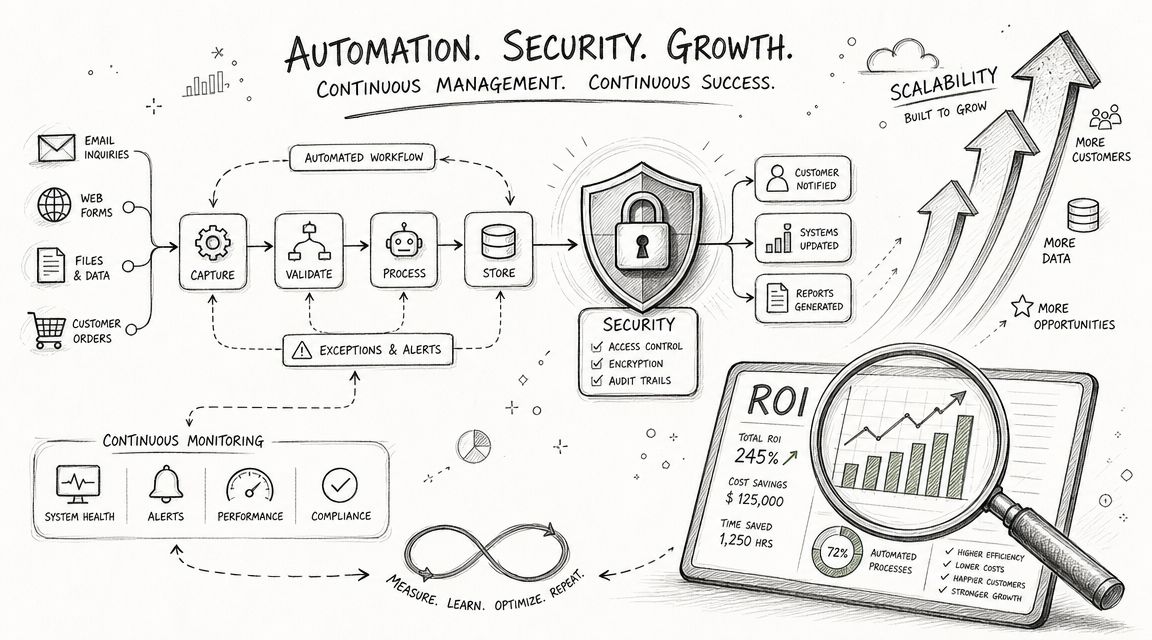
Appian's guidance is useful here. Successful automation requires governance for scaling, including clear roles for exceptions, an automation center of excellence, and executive sponsorship to avoid unsupported isolated bots, as outlined in Appian's process automation planning guidance.
Who owns the automation
Every workflow needs named responsibility.
| Role | What they own |
|---|---|
| Process owner | Business rules, approvals, and outcome quality |
| Technical owner | Integrations, credentials, monitoring, and updates |
| Department lead | Training, SOP use, and escalation path |
| Executive sponsor | Budget, cross-team alignment, and priority calls |
That doesn't mean a small business needs a formal committee with fancy binders. It means somebody must answer four questions fast. What does this automation do? Who fixes it? Who approves changes? What happens if it fails?
Secure the digital worker
Automations touch systems the same way staff do. Sometimes they touch more systems, faster. That makes security paramount.
For Indiana SMBs, the practical baseline looks like this:
- Zero Trust architecture: Give the workflow only the access it needs.
- Credential control: Don't bury shared passwords in a spreadsheet or a former employee's notes.
- Log visibility: Every action should be traceable.
- Exception alerts: Failed approvals, broken integrations, and odd input patterns should trigger review.
- Resilience planning: Immutable off-site backups, clean recovery paths, and documented rollback procedures matter when workflows affect finance, records, or operations.
If you operate in healthcare, defense supply, or any regulated environment, line these controls up with HIPAA, CMMC, or NIST CSF expectations. The point isn't to make a small automation project bureaucratic. The point is to avoid creating a quiet compliance problem.
SOC-as-a-Service monitoring can also help watch these new digital workers the same way you watch endpoints, servers, and identity events. If an automation account starts behaving oddly or processing records at the wrong time, you want visibility before users notice damage.
Measure the return without fooling yourself
ROI on automation gets distorted when owners count only the happy path. Measure the reclaimed labor, sure. Also include the less obvious wins.
Track things like:
- Time returned to staff for billable or customer-facing work
- Fewer delays in approvals, invoicing, or service delivery
- Lower rework from duplicate entry or missed handoffs
- More predictable monthly support effort
- Reduced operational downtime
A stable automated workflow also supports continuity. Work doesn't stop because one admin is on vacation or because a paper form is sitting on the wrong desk. That matters in any office, warehouse, clinic, or field operation across Greenwood and greater Indianapolis.
For teams wrestling with ownership and adoption, change management in IT that boosts Indiana business ROI is often the missing piece. A technically solid automation can still fail if nobody trusts it, follows it, or knows what changed.
Ready to Automate Start with a Clear Picture
If you're serious about learning how to automate business processes, don't start by shopping for software. Start by looking at the work itself. Find the choke point. Map the actual steps. Fix the broken handoffs. Then choose the lightest tool that can do the job without creating a support mess six months later.
That's the difference between automation that helps and automation that haunts your staff. The first one reduces wasted tech time, keeps operations moving, and supports a steadier IT budget. The second one hides bad assumptions inside scripts and dashboards until something breaks during a busy week.
A good outside reference is this guide to efficient processes. It's useful for owners who want a plain-English way to think about process discipline before turning to tooling. That order matters. Process first. Automation second.
Around downtown Indy tech hubs, Johnson County medical offices, and shops along the I-65 corridor, the pattern is the same. Businesses don't need more digital clutter. They need workflows that survive staff changes, network hiccups, compliance pressure, and the usual daily rush. That means looking at the whole environment, including servers, Wi-Fi reliability, endpoint security, backup strategy, and whether the new workflow can fail safely.
When that picture is clear, automation becomes a practical business tool. Not a gamble.
If your business in Greenwood or the Indianapolis area is dealing with manual bottlenecks, shaky workflow handoffs, or aging infrastructure that keeps getting in the way, the next smart step is a Free Network Assessment or Security Risk Audit from Finchum Fixes IT. We'll help you identify which processes are ready for automation, which ones need cleanup first, and what has to be fixed in your network, security stack, or backup plan so the result is stable, secure, and worth the investment.