How to Create a Business Continuity Plan: 2026 Guide

A business continuity plan keeps critical operations running when normal systems, people, facilities, or vendors fail. Build it by identifying priority processes, mapping dependencies, setting recovery time and data-loss targets, assigning decision-makers, documenting workarounds, protecting backups, and testing the procedures with the people who must execute them.
A Greenwood office manager may recognize the scene. The server is still humming in a locked closet, but nobody can reach the files. The accounting software won't open, the phones depend on the same network, and the person who knows the backup password is driving on I-65. A plan existed somewhere, but nobody knows which version is current or who can activate it.
Why Business Continuity Planning Matters Now
An outage rarely arrives as a neat disaster scenario. It may begin with a failed storage array in an aging server, a ransomware infection on one workstation, a cloud application outage, or a construction crew cutting a communications line near an Indianapolis office. The result is similar: employees stop working, customers wait, and managers start making expensive decisions without reliable information.
Unplanned downtime is commonly estimated at about $9,000 per minute, or $540,000 per hour, according to TechTarget's analysis of downtime costs. That figure isn't a forecast for every Indiana company. It is a useful way to measure exposure. If a staff member spends a morning rebuilding a workstation, chasing a vendor, and searching for an old password, that wasted technical time also becomes lost production and lost billable work.
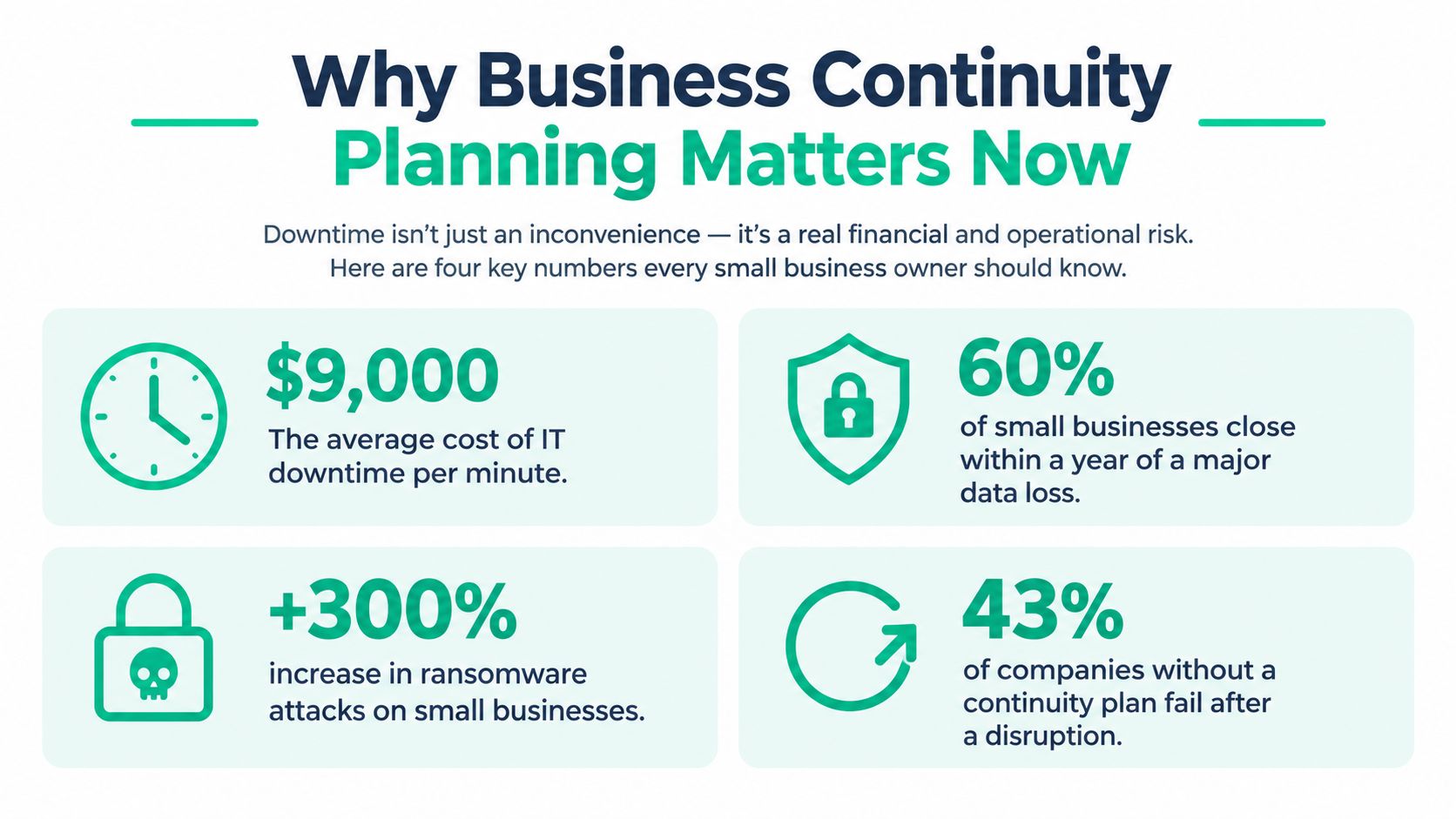
A business continuity plan is the operating playbook for keeping priority work moving during disruption. It covers people, facilities, communications, suppliers, applications, data, and decision rights. A disaster recovery plan is usually one technical component inside that broader program.
The plan must protect revenue, not just equipment
The practical question isn't, “Can IT restore the server?” It is, “Which customer commitments can the company still meet while the server is unavailable?” A manufacturer near the I-65 corridor may need production scheduling before email. A healthcare practice may need access to ePHI and patient records. A professional firm may prioritize document management, timekeeping, and secure remote access.
ISO describes ISO 22301 as the key international standard for business continuity planning. It was first published in 2012 as the world's first International Standard for implementing and maintaining effective continuity plans, systems, and processes, then revised in 2019 as the field changed, as explained in ISO's history of ISO 22301. That history matters because continuity is now a management discipline, not a binder assembled after a storm.
Practical rule: If your plan doesn't tell a specific person what to do in the first hour of an outage, it isn't ready for the first hour of an outage.
Scoping Your Risk Assessment and Critical Systems
Start with scope, not software. List the services the company must continue, then map the technology, facilities, employees, suppliers, credentials, and communications each service depends on.
A useful assessment follows this sequence:
- Name priority work. Include order intake, scheduling, payroll, patient care, shipping, customer support, and any contractual service that cannot pause safely.
- Map dependencies. Record the applications, databases, network paths, cloud subscriptions, vendors, utilities, devices, and skilled people supporting each process.
- Identify failure modes. Include power loss, water damage, hardware failure, cyberattack, cloud outage, telecom interruption, supplier failure, and the loss of a key employee.
- Compare requirements with capability. Ask whether the business can restore each process within its required window using the current staff, backups, licenses, and alternate workspaces.
- Assign a gap owner. Every serious weakness needs a person with authority to resolve it, not a vague note that “IT should review.”
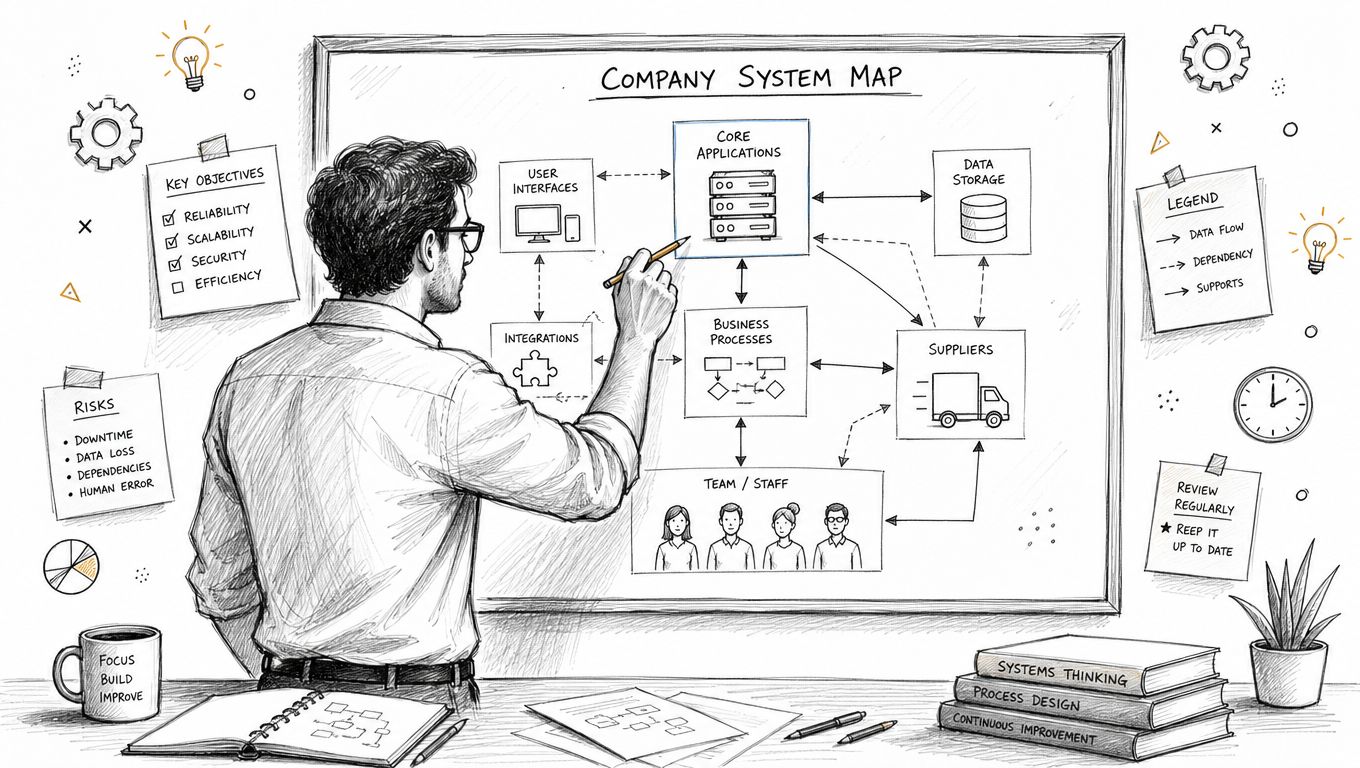
The old approach focused on a flooded office or a fallen server. Those risks still matter in an old brick building downtown, but many Indiana businesses now depend on third parties, software subscriptions, hosted identity, payment processors, logistics platforms, and remote access. The BCI reported that 95% of organizations were moving toward incident-agnostic planning, while only 45.5% treated resilience as a standalone function, according to its 2025 continuity and resilience report. Planning for the type of incident matters less than understanding the dependencies that fail across several incidents.
Keep the map usable. A shared spreadsheet can work for a small company, but it must have an owner, version control, and an offline access method. A searchable knowledge system can help staff find recovery instructions, vendor contacts, and application notes during a stressful event. Pebb's knowledge base solution is one example of the kind of structured repository teams can evaluate for that purpose.
A Business Impact Analysis turns the map into priorities. Use a business impact analysis template for Indiana SMBs to document what happens when each process stops, who is affected, what information is needed, and which dependency creates the first bottleneck.
Use the following diagnostic workflow before approving a recovery project:
- Run
hostnameandsysteminfoon Windows servers to confirm the machine and operating system. - Use PowerShell
Get-Serviceto identify important services andGet-Volumeto inspect storage visibility. - Check backup job status in the backup console, not only the presence of backup files.
- Restore a representative file to a separate location and open it with the application that normally uses it.
- Record the result, the person responsible, and the unresolved gap in the continuity register.
Setting Recovery Objectives and Compliance Standards
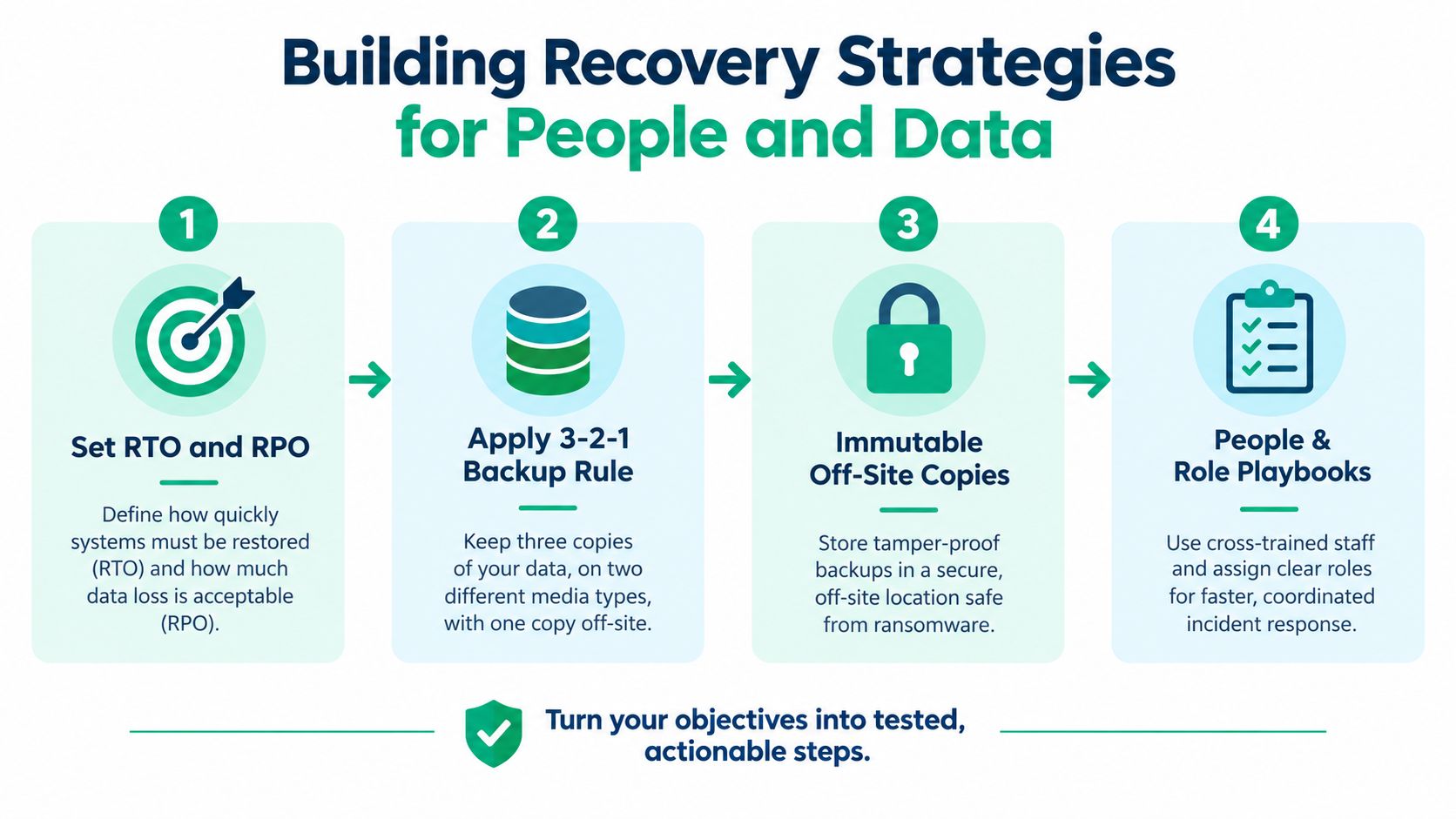
Recovery objectives turn general concern into engineering decisions. The Recovery Time Objective, or RTO, states how long a process can remain unavailable. The Recovery Point Objective, or RPO, states how much recent data the business can afford to lose.
A company that can tolerate a day without a reporting system may choose a different architecture from a clinic that needs current patient information. Don't choose an RTO because a vendor's brochure uses a fast number. Choose it after the process owner explains the operational and financial consequence of waiting.
Connect the target to the backup design
The backup schedule must support the RPO. A widely used 3-2-1 backup rule means keeping three copies of data, on two different storage types, with one copy off-site. The same backup and disaster recovery guidance explains that a one-hour RPO requires at least hourly backups, while a zero RPO requires continuous replication.
That distinction prevents a common mistake: buying a backup product and assuming it automatically meets the business requirement. A nightly backup may be reasonable for a low-change archive, but it won't meet an hourly recovery point. Replication may reduce data loss, but it can also replicate corruption or encrypted files, so retention and recovery testing still matter.
For general business security, map the plan to the NIST CSF. NIST contingency guidance calls for backups of user-level information, system-level information, and system documentation at organization-defined intervals, with protection for the confidentiality, integrity, and availability of backup information. NIST guidance also expects restoration to be verified for resiliency, as summarized in the NIST contingency-planning controls.
Healthcare organizations need a more specific treatment. The HIPAA Security Rule requires contingency planning for systems containing electronic protected health information and procedures to restore lost data. It also calls for a retrievable exact copy of ePHI when needed, which makes immutable or off-site design a concrete recovery decision rather than a generic compliance sentence.
Defense contractors should map relevant controls to CMMC, including access control, incident response, system and communications protection, and recovery practices. A useful compliance file should show the requirement, the control owner, the evidence location, and the last validation. Teams that need a clearer documentation process can review mastering compliance documentation as a complementary reference.
Document the business reason beside every target. That keeps an auditor, an owner, and an IT technician focused on the same outcome. A recovery time objective guide for Indiana SMBs can help translate technical recovery language into operational decisions.
Building Recovery Strategies for People and Data
A recovery strategy fails when it assumes the same people, network, credentials, and vendors will all be available. Build alternate paths before an incident, then test whether ordinary employees can follow them without relying on one technical specialist.
Protect the recovery path
Use immutable off-site backups for critical systems. Immutability prevents routine administrator access or ransomware from altering the protected recovery copy during its retention period. Keep backup administration separate from ordinary user accounts, require multifactor authentication, and limit who can delete jobs or change retention.
A practical restoration workflow looks like this:
- Isolate the event. Disconnect affected endpoints or systems according to the incident procedure. Don't restore into an environment that may still contain the attacker.
- Validate the source. Check backup health, timestamps, malware status, and the intended recovery point.
- Restore in dependency order. Recover identity, networking, databases, applications, and user access in the sequence documented by the BIA.
- Verify at the bit level. Compare hashes where appropriate, open restored files in their native applications, and have the process owner confirm that the data is usable.
- Reconcile new work. Capture transactions handled manually during the outage before normal processing resumes.
Bit-level data recovery is different from copying a folder and hoping for the best. When a failing RAID array or damaged disk is involved, repeated power cycles and amateur recovery attempts can make the media harder to read. Preserve the source, document the condition, and use a controlled recovery workflow before writing changes back to it.
Design for people and suppliers
Write a communication tree that works when email is unavailable. Include an incident lead, technical recovery lead, business process owners, a communications contact, and alternates. Store current contact information in a protected online location and an offline format that authorized staff can access.
Third-party dependencies deserve their own recovery questions:
- Does the vendor publish service status and incident notifications?
- Can the business export essential data in a usable format?
- Who can authorize emergency support or a temporary replacement?
- Does the vendor's identity system become a single point of failure?
- Has the vendor's recovery promise been tested against the company's RTO?
Recent resilience research identifies cyber events as the top risk, with IT disruption, financial conditions, natural disasters, human-resource issues, and power shortages also ranking highly. The DRI International risk and resilience report also reports that 40% of BCDR professionals cited lack of automation as their greatest pain point, while only 17% of less-efficient firms felt confident about third-party risk visibility. The lesson is practical: a vendor list isn't a dependency map.
For the network, use segmented Zero Trust architecture rather than assuming that an employee or device inside the office is safe. Apply least-privilege access, endpoint verification, multifactor authentication, and separate administrative paths. UniFi networking can support a well-managed small-office design, while latency-optimized mesh nodes may help in difficult buildings, but neither replaces a documented failover plan.
A managed approach may combine Bitdefender GravityZone for endpoint protection, monitored backups, secure remote access, and SOC-as-a-Service monitoring. The right choice depends on the environment and the recovery targets. For a practical review of backup design and restoration workflows, use this SMB backup and recovery playbook, alongside broader data availability best practices.
Assigning Ownership and Testing the Plan
The ownership gap is where many SMB plans fail. “IT owns continuity” sounds efficient, but IT can't decide which customer commitments outrank payroll, which manual process is acceptable, or when executives should notify customers. A business owner must retain decision authority while operational leaders own the processes they understand.
Use a simple role model:
| Role | Decision or action |
|---|---|
| Executive sponsor | Approves funding, priorities, and major business trade-offs |
| Incident lead | Evaluates the event and activates the appropriate response |
| Technical lead | Directs containment, restoration, access, and infrastructure work |
| Process owner | Confirms whether the recovered function actually works |
| Communications lead | Coordinates employee, customer, supplier, and regulatory messages |
| Alternate owners | Take over when the primary person is unavailable |
In a small Greenwood company, one person may hold more than one role. That's acceptable if the plan names an alternate and separates approval from execution where possible. A documented escalation rule might say that the incident lead activates the plan when a critical process cannot operate normally, while the executive sponsor approves customer-facing commitments and extraordinary spending.
Testing should move from conversation to evidence. Start with a tabletop exercise involving the people named in the plan. Give them a scenario such as ransomware on a file server or a cloud identity outage, then ask who calls whom, where the current plan lives, and which process starts first.
Next, conduct a technical failover or restore test in a controlled window. Restore a selected application, validate permissions, confirm the network path, and have an actual user complete a normal task. Record every missing credential, unclear instruction, and dependency that wasn't available.
A successful test isn't one where nobody finds a problem. It's one where the team finds the problem before customers do.
Track each finding with an owner, a due date, and evidence of closure. A business continuity and IT disaster recovery template for Indiana businesses can provide a starting structure, but a template can't assign authority for you.
Maintaining Your Continuity Program Long-Term
A continuity plan becomes inaccurate as soon as the business changes. New software, office moves, hires, resignations, vendor replacements, network upgrades, and cloud migrations all change the recovery path.
Review the plan after every incident and exercise. Update contact lists quarterly, then reassess risks annually or whenever a major operational change occurs. Keep the current plan in a controlled repository, but maintain an offline copy for a situation where identity, internet access, or the normal office is unavailable.
A useful maintenance rhythm looks like this:
- After an incident: Capture what failed, what worked, and which decision took too long.
- Quarterly: Confirm contacts, alternates, vendor escalation paths, backup notifications, and emergency access.
- Annually: Revisit the BIA, RTOs, RPOs, dependencies, compliance obligations, and recovery budget.
- After major change: Test the affected process before assuming the old procedure still applies.
Local support earns its place here. A remote dashboard may show that a device is online, but it won't always reveal the failing UPS, overheated closet, weak Wi-Fi coverage, or improvised switch sitting behind a desk in a Johnson County office. A consultant who understands the physical site, the cloud stack, and the business priority can close those gaps before they become an expensive outage.
The Indiana business continuity planning checklist can help schedule recurring reviews. For companies handling healthcare information, defense data, or customer records, maintenance should also preserve evidence that controls were tested and recovery succeeded.
A continuity program earns its budget when it converts emergency improvisation into prepared action. Managed IT, cybersecurity, reliable networking, cloud recovery, and data recovery aren't separate purchases when they protect the same operating promise. They reduce wasted tech time, preserve billable work, and make monthly technology costs easier to plan.
For a Greenwood or Indianapolis business, Finchum Fixes IT can perform a Free Network Assessment or Security Risk Audit, review backups and recovery dependencies, and turn the findings into an actionable continuity plan. Schedule an assessment before the next server failure, ransomware incident, or vendor outage puts your I-65 corridor operation on hold.