How to Recover from a Ransomware Attack: An SMB Guide
You walk into the office on a Monday in Greenwood, coffee in hand, and someone meets you at the door with that look. Shared folders won't open. The accounting server has a ransom note on the screen. A warehouse PC near the shipping station is throwing file extension errors. Your Carmel satellite office says they can't reach line-of-business apps either.
That's the moment when bad decisions happen fast.
The good news is that how to recover from a ransomware attack is not guesswork if you handle it in the right order. The first job is not negotiating. It's not rebooting. It's not restoring last night's backup because everybody wants to “just get back online.” The first job is to stop the spread, preserve evidence, and rebuild only from systems and data you trust.
Ransomware recovery is a business continuity problem first and a cleanup problem second.
TL;DR
- Isolate immediately: Unplug affected devices from network and storage. Disable Wi‑Fi and Bluetooth. Don't reboot.
- Preserve evidence: Leave infected systems powered on but offline so responders can investigate what happened.
- Check scope fast: Figure out which servers, PCs, shares, cloud apps, and backups might be touched.
- Treat backups carefully: Don't assume they're safe. Validate and scan backup data in an isolated recovery environment first.
- Call the right people: IT response, forensics, legal, cyber insurance, and leadership all have jobs here.
- Rebuild clean: Wipe compromised systems, restore only from known-clean backups, patch everything, then reconnect in phases.
- Harden after recovery: MFA, segmentation, Zero Trust controls, SOC monitoring, and offline or immutable off-site backups reduce repeat damage and downtime.
Your Worst Monday Morning Just Happened
A lot of Indiana businesses still run with one weak link they already know about. It might be an aging Windows server in a Greenwood business park. It might be a flat network in an old brick building off Main Street where the Wi‑Fi, printers, desktops, and server all talk too freely. It might be a neglected VPN appliance serving users up and down the I-65 corridor.
That weak link is usually manageable right up until the day it isn't.
What panic gets wrong
When owners call in the first few minutes, they usually ask one of three questions.
- Should we pay?
- Should we shut everything off?
- Can we just restore from backup right now?
All three questions are understandable. None of them should be your first move.
The fastest way to make this worse is to treat ransomware like a normal outage. It isn't a failed switch, a dead RAID card, or a corrupted QuickBooks file. It's an active security incident. If you move too fast on the wrong step, you can spread the infection, destroy forensic evidence, or restore malware right back into production.
The Southside way to handle it
For Johnson County business owners, the practical approach is simple. Handle the crisis in this order:
| Priority | What you do | Why it matters |
|---|---|---|
| First | Isolate affected systems | Stops spread to file shares, servers, and backup targets |
| Second | Assess scope and backup trust | Tells you whether recovery is straightforward or messy |
| Third | Bring in specialists | Covers forensics, legal obligations, insurance, and compliance |
| Fourth | Restore in a clean environment | Prevents reinfection |
| Fifth | Harden the environment | Reduces the chance of a second hit |
If you're in healthcare, this also touches HIPAA obligations. If you're a defense-adjacent manufacturer, it can affect CMMC reporting and control maturity. For everybody else, the baseline still applies. NIST CSF thinking works here because it forces you to identify, protect, detect, respond, and recover in a disciplined way instead of improvising under pressure.
A ransomware event feels chaotic. Recovery shouldn't.
The First 60 Minutes Containment and Isolation
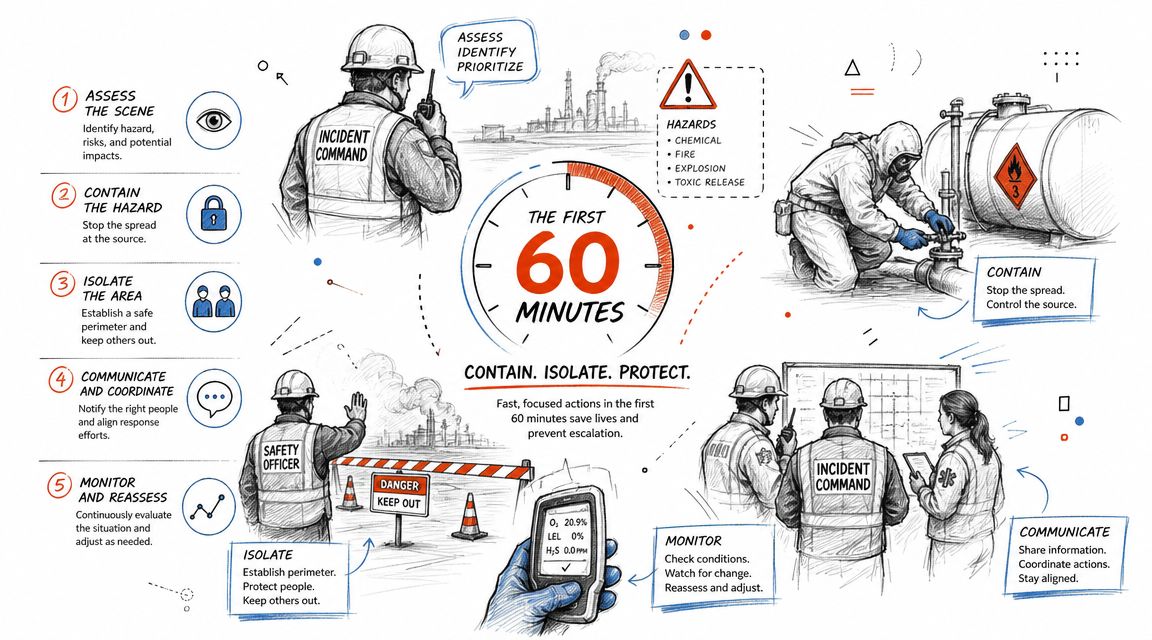
If you remember one thing from this article, remember this. Containment comes before recovery. IBM's ransomware response guidance says a foundational recovery principle is to isolate infected systems immediately because ransomware often spreads laterally, and advises taking devices offline without powering them down so evidence can be preserved for investigation in IBM's ransomware response guidance.
What to do right now
In the first hour, give your staff plain instructions. No debate. No freelancing.
- Disconnect infected devices from the network. Unplug Ethernet. Disconnect attached storage if it's directly connected.
- Disable wireless radios. Shut off Wi‑Fi and Bluetooth on affected endpoints.
- Do not reboot or power down infected systems. Leave them on, but isolated.
- Stop users from logging into suspicious systems. Curiosity causes damage.
- Protect backup systems from contact with the infected environment. Keep backup copies offline before any restore begins.
- Start a written timeline. Note which machine showed symptoms first, who saw it, and what they clicked or opened if known.
Practical rule: If a machine shows encryption, a ransom note, or abnormal file behavior, pull it off the network first and ask questions second.
What not to do
Owners and office managers often make these moves because they sound sensible.
- Don't restart the server to “see if it clears.”
- Don't run random cleanup tools from the internet.
- Don't reconnect a machine after it “seems fine.”
- Don't kick off a restore job from backups you haven't verified.
- Don't rely on email inside the affected network for sensitive coordination if you think the attacker may have access.
A contained incident is survivable. A roaming incident isn't.
Where managed detection helps
This is also where mature monitoring earns its keep. If your business already has endpoint telemetry, alerting, and response playbooks, you'll spot lateral movement and isolate faster than a shop relying on antivirus popups and somebody yelling across the office. That's the practical difference explained in this guide to managed detection and response for Indiana businesses.
A Greenwood warehouse, a Franklin front office, and an Indy satellite location can all be on the same logical blast path if the network is flat. Fast isolation keeps one bad workstation from becoming an all-sites event.
Assess the Blast Radius and Your Backup Lifeline
Once the spread is stopped, you need a clear answer to a harder question. What exactly is damaged, and what do you still trust?
A lot of businesses skip straight to “we have backups.” That's not enough. The key issue is whether those backups are clean, reachable, and safe to restore. Canada's Cyber Centre is more specific than most vendor checklists. Its guidance warns that ransomware increasingly targets backup systems and says businesses should scan backup files in an isolated environment before restoration in the Cyber Centre's ransomware recovery guidance.
Build the scope without touching too much
Start by mapping business function, not just hardware.
Ask these questions:
- Which systems are down: File server, ERP, EMR, accounting, print server, warehouse scanner station, line-of-business app?
- Which users are affected: One department, one office, or every location?
- Which shared resources changed: File shares, NAS volumes, cloud sync folders, mapped drives?
- What still works: Phones, internet, line-of-business apps, local-only workstations?
- What's sensitive: Patient records, employee files, design data, controlled technical information?
For a healthcare clinic in Carmel, this assessment has to include systems holding protected health information. For a machine shop supporting defense work, include systems that could involve controlled data tied to CMMC responsibilities. Don't guess. Inventory.
Backups are a lifeline only if they're trustworthy
At this point, experienced responders slow the room down.
If the attacker reached backup credentials, touched the backup console, or encrypted mapped repositories, your “good backup” may be poisoned, incomplete, or staged for reinfection. That's why immutable off-site backups matter so much. They reduce the chance that the same attacker session that hit production also altered your recovery path.
A practical validation path looks like this:
| Check | What you're looking for | Safe move |
|---|---|---|
| Backup age | A restore point from before malicious activity | Favor the last known clean copy, not the newest copy |
| Storage type | Offline, offsite, or immutable protection | Prefer copies separated from production access |
| Malware scan result | No indicators in restored backup set | Scan in isolation before any production restore |
| System dependency | App data matches required database or service versions | Restore related systems together in a clean room |
| Credential exposure | Backup admin access may be compromised | Rotate credentials before reconnecting backup infrastructure |
This short resource on enterprise data backup solutions that guarantee business uptime gives a useful business view of why backup design matters long before the crisis.
When we've seen backup trouble locally, the pattern is predictable. Somebody had backups, but they were always online, joined to the same trust boundary, and never tested in isolation. That's not resilience. That's optimism with storage attached.
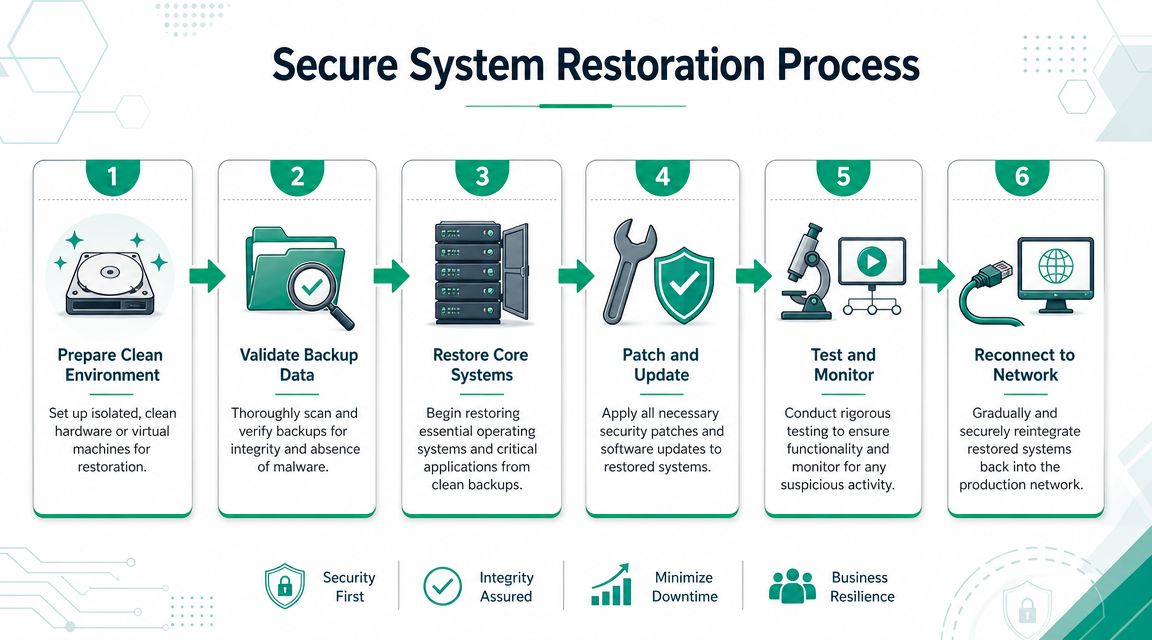
Here's a quick visual on what secure restoration should look like before systems go back to work:
If you aren't confident that both the backup and the target system are clean, you are not ready to restore.
Engage Experts and Fulfill Your Obligations
A ransomware incident creates two kinds of pressure at once. Technical pressure and decision pressure. The worst outcomes usually happen when one exhausted internal person tries to carry both.
The economics alone explain why discipline matters. Varonis reports that the global average cost to recover from a ransomware attack, excluding ransom, fell 44% to $1.53 million in 2025, while the median ransom payment was $115,000 in Varonis ransomware statistics. That gap says something important. Recovery is not a simple buyout problem. The expensive part is rebuilding operations safely.
Who needs to be on the call
Different experts solve different risks.
- Incident response and infrastructure team handles containment, system triage, backup validation, and restoration sequencing.
- Forensics specialists preserve evidence, identify the entry point, and help determine what the attacker touched.
- Legal counsel guides notification decisions, privilege, contracts, and regulatory obligations.
- Cyber insurance carrier needs early notice if your policy requires approved vendors or specific response steps.
- Executive leadership decides operational priorities, communications, and business trade-offs.
- Compliance stakeholders weigh HIPAA, CMMC, client contract language, and retention requirements.
If you're a medical office near Community South or a specialty clinic serving Johnson County, legal and compliance counsel should be looped in early because patient data questions change the response. If you build for the defense supply chain, delayed reporting and sloppy evidence handling can create a second problem after the ransomware itself.
Why paying the ransom is not a recovery plan
Owners often say, “If the ransom is smaller than the downtime, why not just pay?”
Because payment doesn't remove backdoors, doesn't prove the attacker is gone, doesn't validate your systems, and doesn't rebuild trust in the environment. You still have to investigate, wipe, restore, rotate credentials, patch, test, and document. Even if a decryptor appears, business continuity still depends on your recovery process.
That's why a written response plan matters more than bravado. This cybersecurity incident response plan template is a useful starting point if your current plan lives in somebody's head.
The ROI view owners actually care about
For a business owner, “call experts” can sound like open-ended cost. In practice, it's the opposite. You're buying speed, cleaner decisions, and fewer expensive mistakes.
Compare the trade-off:
| Decision | Short-term feeling | Likely business effect |
|---|---|---|
| Wing it internally | Feels cheaper | More downtime, more confusion, higher reinfection risk |
| Pay quickly | Feels fast | Still leaves restoration, forensics, and compliance work |
| Use coordinated experts | Feels heavier up front | Better containment, clearer reporting, cleaner rebuild |
That's especially true for SMBs along the south side and downtown Indy tech hubs where one prolonged outage can freeze billing, shipping, scheduling, and payroll all at once.
Executing a Secure System Restoration
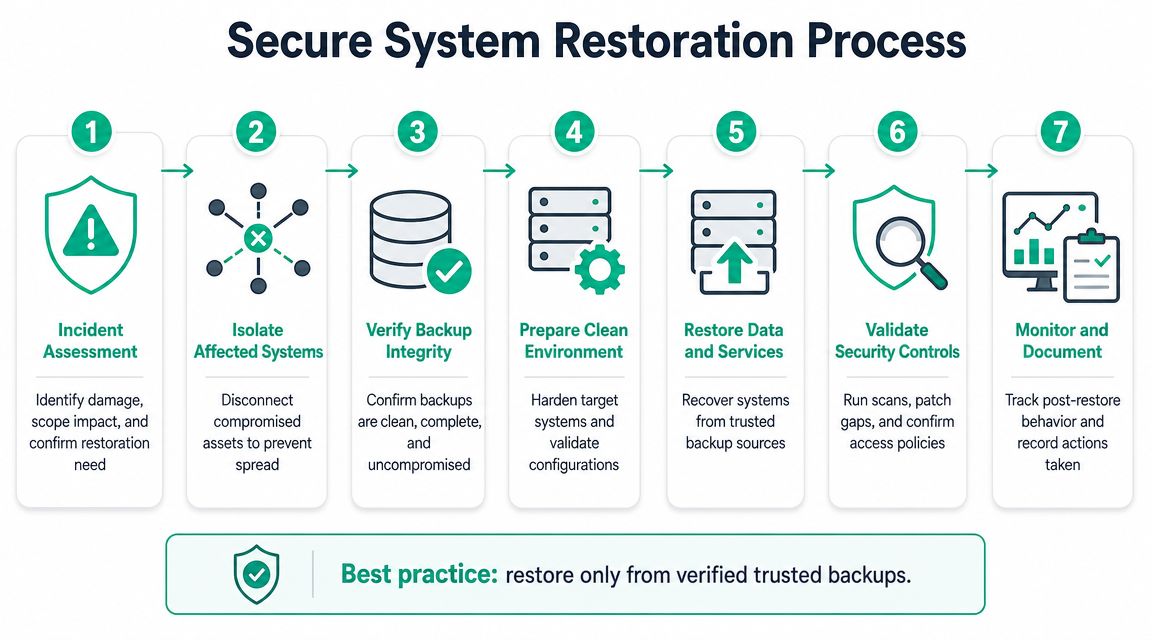
Recovery only starts after you know what's infected, what's clean, and where the attacker got in. SentinelOne describes a sound sequence as isolating endpoints, preserving evidence, identifying the access vector, and only then restoring from a known-clean backup after scanning it in an isolated recovery environment such as a quarantined VLAN in SentinelOne's ransomware recovery overview.
Rebuild, don't “clean up”
At this point, people get tempted to save time by disinfecting an infected server and putting it back into service. Don't.
A compromised machine should be treated as untrusted at the operating system level. Reformat it. Reimage it from a known-good source. Rebuild the application stack. Then restore only the data you've already validated. That applies to file servers, Hyper-V guests, line-of-business app hosts, and user workstations.
In practical terms, a clean restoration room often looks like this:
- A quarantined VLAN with no broad production access
- Fresh virtual machines or wiped hardware
- Known-good OS images
- Endpoint scanning before data import, often with tools such as Bitdefender GravityZone
- Tight firewall rules and temporary credentials
- Logging turned on from the first boot
The order matters
Restoration should follow business dependency, not who shouts the loudest.
- Identity and access basics come first, but only after credentials are rotated and the environment is considered clean enough to support them.
- Core infrastructure follows, such as critical application servers, databases, and secure file services.
- Department systems come next, prioritized by operational impact.
- User endpoints return in controlled batches.
- Nonessential systems wait until monitoring shows stability.
Restore the minimum needed to operate. Then test. Then expand.
Patch before reconnect
A lot of organizations think of patching as a maintenance task. During ransomware recovery, it's part of eradication.
Before a rebuilt machine rejoins production, update the OS, patch the application stack, verify security tooling, and review local admin rights. If your network design allows it, segment restored systems by function with tighter ACLs, especially in environments running mixed workloads like VoIP, warehouse handhelds, desktops, and server traffic on the same switching fabric.
This is also the right time to revisit network design. On the south side, I still see old flat networks in buildings that have grown far beyond their original cabling and server closet plan. Better segmentation with business-grade gear like UniFi networking or equivalent managed switching won't erase today's crisis, but it will make the next one far easier to contain.
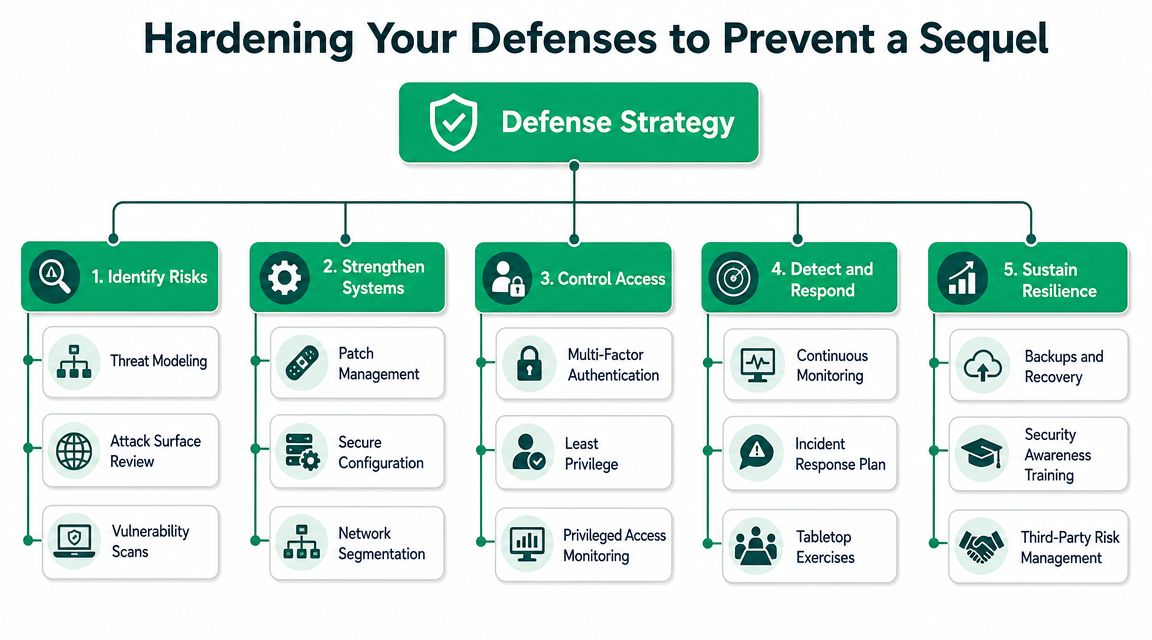
Hardening Your Defenses to Prevent a Sequel
A recovered business that returns to the same weak controls is just waiting for a repeat performance. Real recovery includes hardening. Otherwise, you're restoring into the same conditions that let the attacker in.
The controls that change the outcome
The most effective post-incident improvements usually aren't flashy. They're disciplined.
- Zero Trust architecture limits implicit trust between users, devices, apps, and network segments.
- Multi-factor authentication reduces the value of stolen credentials, especially for admin access, remote access, and cloud control planes.
- Immutable off-site backups give you a recovery path the attacker has a harder time tampering with.
- SOC-as-a-Service monitoring catches suspicious behavior before encryption becomes your first alert.
- Network segmentation keeps one compromised endpoint from reaching everything else.
- Patch management with enforcement closes common holes on servers, endpoints, hypervisors, and edge gear.
Technology choices matter. A well-planned environment with segmented switching, centrally managed endpoint security, better identity controls, and tested recovery workflows produces fewer ugly surprises than a pile of old exceptions and forgotten local admin passwords.
Downtime is the real invoice
Every owner understands labor, scheduling, and missed revenue. That's why cybersecurity spending makes more sense when tied to continuity instead of fear. Downtime can cost up to $9,000 per minute, and that's exactly why mature security controls should be treated as operational infrastructure, not optional overhead.
For a broader business view, this write-up on the financial impact of cyber attacks is worth reading because it frames cyber incidents in the language owners, CFOs, and operations leaders use.
Turn wasted tech time into a predictable budget
Reactive IT burns time in the worst way. Your staff sits idle. Your managers chase updates. Your internal tech person does emergency triage instead of planned improvements. That's all wasted motion.
A hardened environment shifts that cost profile:
| Reactive model | Managed model |
|---|---|
| Surprise outages | Predictable monthly spend |
| Emergency rebuilds | Planned patching and lifecycle work |
| Panic during incidents | Documented response workflows |
| Broad user access | Least privilege and role-based controls |
| Flat networking | Segmented networks and cleaner blast boundaries |
One practical place to start is stronger identity. This guide to multi-factor authentication best practices is a straightforward next step for Indiana SMBs that still have gaps around remote access, admin accounts, or cloud apps.
Good hardening doesn't just stop attacks. It gives your team fewer reasons to stop working.
If you're in healthcare, align these upgrades to HIPAA safeguards. If you support defense contracts, map them to CMMC expectations. If you're a general SMB in Greenwood, Franklin, or Indy, use NIST CSF as the plain-English framework for making steady progress instead of buying random tools.
Your Path Back to Business as Usual
Ransomware recovery isn't one heroic fix. It's a sequence of calm decisions. Isolate first. Preserve evidence. Figure out the scope. Validate backups carefully. Rebuild in a clean environment. Then tighten the controls that should have been in place before the crisis.
That approach works whether you're running a small medical office in Johnson County, a distributor off the I-65 corridor, or a growing company with users in Greenwood, Carmel, and downtown Indy. The tools may differ. The order doesn't.
If you're serious about learning how to recover from a ransomware attack, don't stop at this checklist. Build the supporting pieces now. Inventory your critical systems. Review backup isolation. Confirm who makes decisions. Test whether your recovery plan works when people are stressed and the clock is moving.
A practical place to start is a real continuity review. This business continuity planning checklist for Indiana companies helps turn broad intentions into something your team can execute.
Business owners in Central Indiana don't need theatrics from their IT partner. They need clear answers, clean recovery work, and an environment that's harder to knock over next time.
If your business is in Greenwood, Indianapolis, or the surrounding area, Finchum Fixes IT can help you pressure-test your backup strategy, network segmentation, endpoint security, and incident response readiness before a bad Monday forces the issue. Schedule a Free Network Assessment or Security Risk Audit and get a practical view of where your environment is exposed, how recovery would work, and what to fix first.