Your Cybersecurity Incident Response Plan Template
TL;DR: Key Takeaways
- A Cybersecurity Incident Response Plan is a playbook that prevents panic and minimizes downtime, which can cost up to $9,000 per minute.
- Your plan should be built on the six phases of the NIST framework: Preparation, Identification, Containment, Eradication, Recovery, and Post-Incident Activities.
- Key roles (Incident Commander, Technical Lead) must be assigned before an attack to avoid chaos and wasted time.
- The plan must be customized for your specific business, identifying "crown jewel" assets and building playbooks for common threats like ransomware.
- Regular testing through tabletop exercises and continuous employee training are critical for the plan to be effective. For businesses in regulated industries like healthcare (HIPAA) or defense (CMMC), this is non-negotiable.
Think of a good cybersecurity incident response plan template as your "break glass in case of emergency" kit. It’s the playbook that turns a full-blown panic into a calm, methodical recovery. Having one ready means you’ve already figured out the roles, communication, and technical steps before the alarm bells start ringing.
Your Business Is a Target—Here’s What It Costs
Let's get straight to it. You think your Indiana business is too small to be on a hacker's radar? Imagine a manufacturing firm in Greenwood with aging server hardware grinding to a halt, its operations along the I-65 corridor completely frozen by a ransomware pop-up. This isn't some made-up scare tactic; it’s a daily reality for businesses just like yours.
Attackers aren’t just gunning for the big fish. They’re looking for easy wins, and that "too small to matter" mindset is exactly what makes you a prime target. We’ve seen it time and again—every business owner in Johnson County is in their crosshairs.
That gut-punching cost of downtime—which can soar to $9,000 per minute—is what turns a simple tech problem into a fight for survival. Every second you waste figuring out who to call is money flying out the window, time that should be billable hours.
The Real Price of Winging It
A documented plan is the only thing standing between you and chaos. It stops the frantic scrambling and kicks off a predictable recovery. Without one, your team is left making critical decisions under insane pressure, and that's when costly mistakes happen, turning "wasted tech time" into a budget-breaking disaster.
A solid cybersecurity incident response plan template is your defense. It gives you a clear framework for:
- Immediate Action: Knowing precisely who to call and which systems to shut down. Think of it like using your UniFi network controls to instantly quarantine a compromised computer before the infection spreads.
- Clear Communication: Having pre-written messages ready for employees, clients, and regulators. This isn't just good practice; for standards like HIPAA or CMMC, it's a requirement.
- Efficient Recovery: Following a step-by-step guide to restore your systems from clean, immutable off-site backups instead of just hoping for the best.
The Threat Is Real and Getting Worse
Attacks are happening more and more. The United States alone recently saw over 3,200 data breaches in a single year, hitting more than 278.83 million people. This surge is a wake-up call, especially for small and medium-sized businesses that often lack the massive security budgets of larger corporations.
As we cover in our guide on how to prevent data breaches, being proactive is everything.
In our 17 years of local service, we've seen the difference firsthand. The prepared businesses bounce back. The unprepared ones? They struggle, sometimes for weeks. This guide is your first step from "what if?" to "what's next."
Your Go-To Incident Response Team Roles
When a crisis hits, confusion is your worst enemy. The last thing you need is people wondering who's in charge or what they're supposed to be doing. That’s why defining your Incident Response Team (IRT) roles ahead of time is non-negotiable.
This table clearly outlines who does what, so everyone can jump into action without a moment's hesitation.
| Role | Primary Responsibility | Example Team Member |
|---|---|---|
| Incident Commander | Leads the response effort, makes key decisions, and coordinates the team. | CEO or Operations Manager |
| Technical Lead | Manages all technical aspects: containment, eradication, and recovery. | IT Manager or Lead Technician |
| Communications Lead | Handles all internal and external messaging to stakeholders, clients, and media. | Marketing Director or HR Manager |
| Legal/Compliance Lead | Advises on legal obligations, reporting requirements, and potential liability. | External Legal Counsel or CFO |
With these roles assigned, your team won’t be tripping over each other. They’ll be a well-oiled machine, ready to tackle whatever comes their way.
Your Ready-to-Use Incident Response Plan
Alright, let's get down to brass tacks. When a cyberattack hits, the last thing you want is to be scrambling, trying to figure out what to do. That's where a solid plan comes in. Think of this as your "break glass in case of emergency" playbook—a clear, editable cybersecurity incident response plan template designed to turn chaos into a calm, controlled process.
We didn't just pull this out of thin air. It’s built on the proven NIST CSF, giving you a rock-solid foundation. Forget winging it; this is your step-by-step guide to navigating the storm. It’s all about shifting from panic to a pre-approved, logical set of actions.
This simple flow says it all:
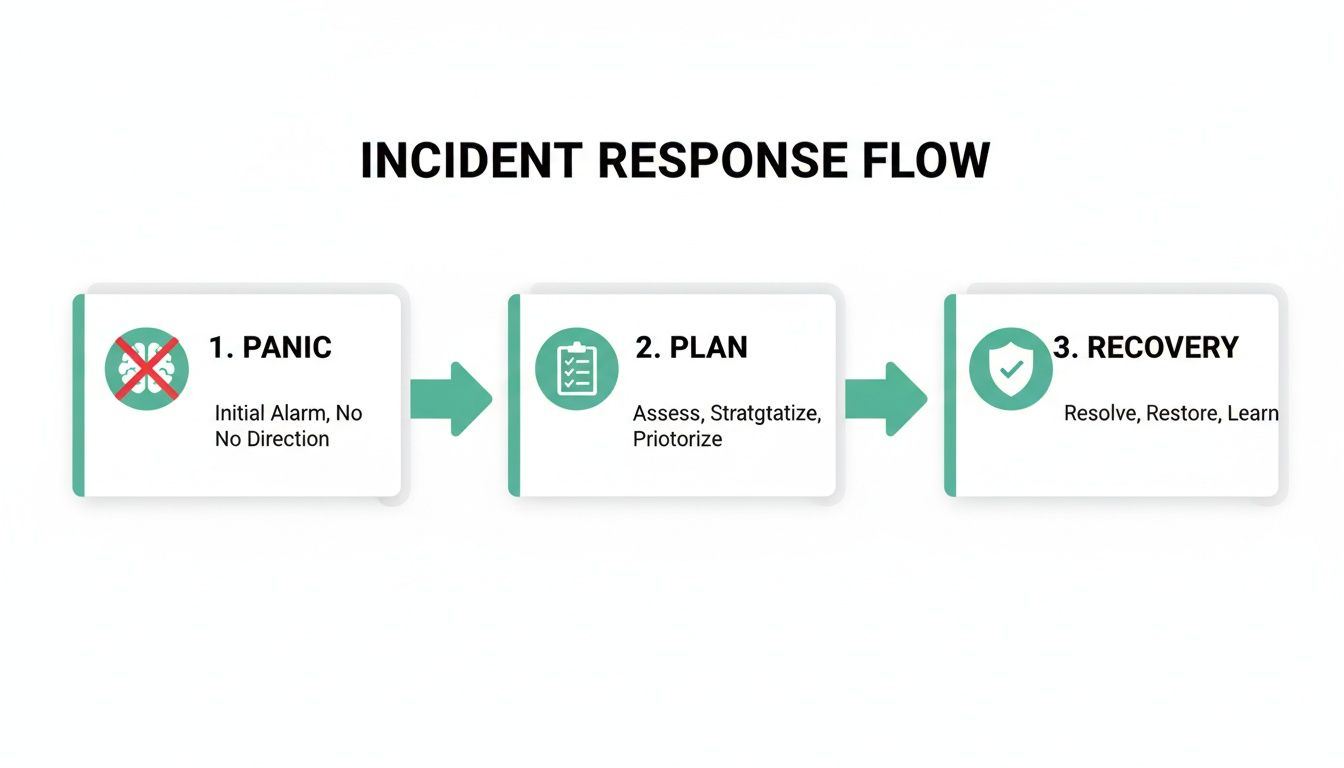
The difference is staggering. Having a plan turns a costly, reactive mess into an efficient, proactive recovery. It's the difference between hemorrhaging money every minute your system is down and getting your business back on its feet, fast.
The Six Phases of a Solid Response
Our template walks you through six critical phases. Each part is loaded with straightforward instructions and placeholder text you can quickly tailor to your business. Whether you’re a healthcare provider in Hamilton County juggling HIPAA or a defense contractor on the south side meeting CMMC requirements, this plan is for you.
Phase One: Preparation
This is your homework. It’s all the work you do before an incident ever happens. First, you'll need to pinpoint your most critical assets—the servers, software, and data that your business absolutely cannot function without. What happens if that one aging server in your Greenwood office finally gives up the ghost? Knowing the answer now saves you a world of hurt later.
Preparation also means doing a thorough risk assessment and getting your team trained and ready to act. You can get a huge head start by checking out our guide on creating a cyber security risk assessment template for Indiana businesses.
Phase Two: Identification
How do you even know you've been hit? This phase is about defining what an "incident" looks like for your business. It also lays out the specific tools and methods you'll use to spot trouble, like an alert from your Bitdefender GravityZone console or weird traffic patterns flagged by our SOC-as-a-Service team.
In our 17 years of local service, we've seen it time and again: a fast, accurate identification is what separates a minor headache from a full-blown catastrophe. The quicker you know what you’re up against, the faster you can shut it down.
From Containing the Threat to Full Recovery
Once a threat is spotted, the clock is ticking. These next steps are all about swift, decisive action to stop the bleeding and get back to business as usual.
Phase Three: Containment
Your immediate goal here is to stop the damage from spreading. You need to isolate the compromised systems from the rest of your network—it’s the digital equivalent of quarantining a sick patient. This might mean yanking a server offline, blocking a user account, or shutting down a specific network segment. The actions are fast, and their purpose is clear: limit the blast radius.
Phase Four: Eradication
With the threat cornered, it’s time to get rid of it for good. This goes way beyond just deleting a malicious file. True eradication means digging in to find the root cause—that sneaky vulnerability the attacker exploited—and patching it up so they can't waltz right back in. This takes real technical skill, like bit-level data recovery or combing through logs to retrace the attacker's every move.
Phase Five: Recovery
Now for the final boss: bringing your systems back to life. The hero of this story is your set of clean, immutable off-site backups. This is your ultimate get-out-of-jail-free card. Instead of even thinking about negotiating with ransomware crooks, you simply restore your data from a safe copy and get everyone back to work. Suddenly, all that wasted tech time becomes billable hours again.
Phase Six: Post-Incident Activities
Just because the fire is out doesn't mean you can walk away. This "lessons learned" phase is arguably one of the most important. Your team needs to huddle up and review what happened.
- What went right?
- What went horribly wrong?
- How can we do better next time?
This feedback loop is what turns a painful experience into a stronger, more resilient security posture.
As you build out your own strategy, it helps to understand these foundational elements inside and out. For a deeper dive, this article on creating a cybersecurity incident response plan is a great resource. Each phase builds on the one before it, giving you a complete framework that ensures nothing gets missed in the heat of the moment. Our template is the perfect place to start.
So, How Do You Make This Template Your Own?
Alright, you've got the template. That's a huge first step, but let's be real—a generic document won't save you when things get chaotic. You need to breathe life into it and mold it to fit your business like a glove. Otherwise, it’s just a piece of paper.
Think about it this way: a firefighter doesn't show up to a blaze and start reading a "How to Fight Fires 101" manual. They have a pre-plan for that specific building, knowing exactly where the hydrants are and the fastest way to the stairwell. Your incident response plan needs that same level of custom-tailored detail to be worth anything under pressure.
Figure Out Your "Crown Jewels"
First things first: you can't protect what you don't know you have. Before you do anything else, you have to identify what's truly mission-critical. I remember a call we got from a law firm here in downtown Indy. They'd been hit with a nasty phishing attack. Our first move wasn't chasing the hacker; it was locking down their "crown jewels"—all their confidential case files and client financial data.
Get your team in a room and start asking the tough questions:
- What data would be absolutely catastrophic to lose or have stolen? We're talking client lists, financial records, secret recipes, or proprietary designs.
- What systems keep the lights on? This could be your main server, a critical piece of software, or your point-of-sale system.
- What hardware is non-negotiable? For a manufacturing client out in a Greenwood business park, it was the specific controller for their main production line. Without it, they were dead in the water.
This isn't just some techie checklist; it's a fundamental business continuity conversation. When you know what's most valuable, you know exactly where to point your shields and what to rescue from the fire first.
This inventory is also the bedrock for more sophisticated security measures. If you want to dive deeper, our guide on 10 IT asset management best practices for Indiana businesses in 2026 is a fantastic next read.
Build Your "Bat-Phone" Contact List
A crisis is the absolute worst time to be frantically scrolling through your phone, trying to remember who to call. Your plan needs a dedicated, up-to-date contact list for your Incident Response Team (IRT). And don't just save it on the server—print out hard copies and stash them in a few secure, accessible spots.
Make sure your list includes:
- Your Internal Crew: The designated Incident Commander, Technical Lead, and Communications Lead.
- The Cavalry: Your managed IT partner (like us at Finchum Fixes IT) who can jump in with technical muscle.
- Legal & Compliance: Your business attorney is a must-call, especially if you handle sensitive data governed by HIPAA or CMMC.
- The Insurance Line: The direct contact for your cyber liability insurance provider.
In our 17 years of local service, I can tell you this: the companies that bounce back fastest are the ones who can assemble their team in minutes, not hours. A clean, printed contact list makes that happen.
Create Mini-Guides for Major Mayhem
A general plan is great, but specific playbooks for the most common attacks are even better. Think of these as quick-action checklists for the threats you're most likely to face. You don't need a playbook for a meteor strike, but you definitely need one for these two.
- Ransomware Attack: This playbook should map out exactly how to yank infected machines off the network, figure out what strain of ransomware you're dealing with, and—critically—walk through the process of restoring from your immutable off-site backups.
- Business Email Compromise (BEC): This one should focus on immediately locking down the compromised email account, scanning for sneaky forwarding rules the hacker might have set, and getting the word out to employees and clients about potential fake invoices or wire requests.
Building solid, technically-sound playbooks takes a good grasp of security fundamentals. Digging into a CompTIA Security+ Study Guide can give you the background knowledge to ensure your response strategies are truly effective.
Finally, weave a Zero Trust architecture into everything. It sounds complicated, but the core idea is simple: "Trust no one, verify everything." In practice, it means your plan should enforce tight access controls and operate under the assumption that a threat might already be inside your network. This shifts your plan from being a purely reactive document into a proactive shield, ready to defend your Johnson County business at a moment's notice.
The Anatomy of a Modern Cyberattack
Forget what you think you know about old-school computer viruses. To stop a cybercriminal today, you need to get inside their head and understand their playbook. Modern attacks are less like a clumsy break-in and more like a high-speed, military-grade operation. They’re designed to hit hard and fast, moving from a single weak point to a full-blown network takeover with terrifying speed.
This isn’t about one infected computer anymore. It’s a war fought on multiple fronts, simultaneously, across your entire digital footprint.
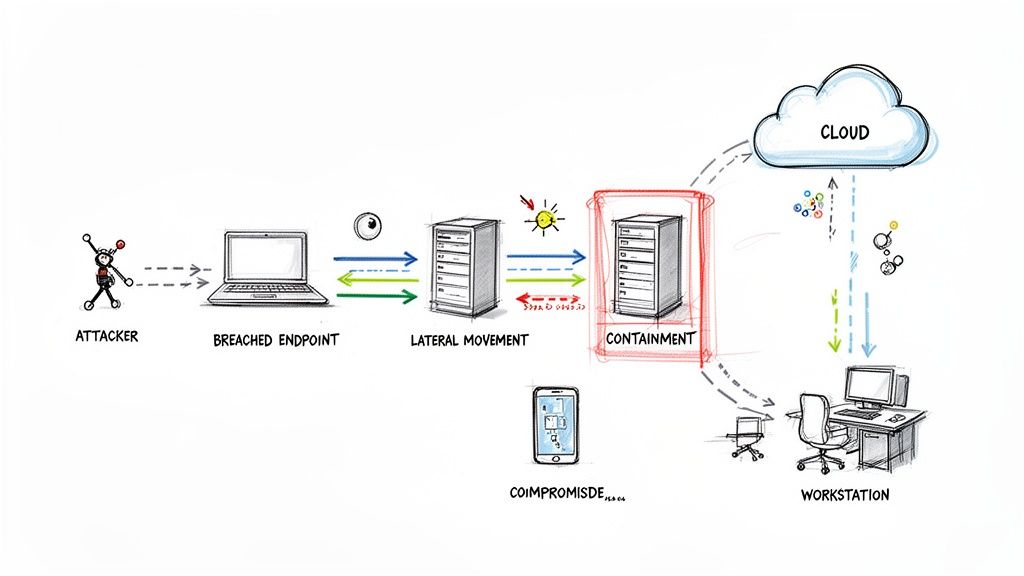
We've seen it happen to businesses right here in the Indianapolis area—a single compromised laptop quickly becomes a beachhead. From there, the attacker launches an assault on servers, cloud accounts, and your most critical data. That’s why your cybersecurity incident response plan template needs to be built for rapid, coordinated action.
The New Battlefield Spans Endpoints and Cloud
The modern attack doesn't just stop at the firewall. It’s common for a hacker to pivot from a user's workstation directly into their cloud-based email, then use those credentials to get into your company's Microsoft 365 or Google Workspace.
Once they're in, they can send malicious emails from a trusted internal account. Imagine them spreading malware or tricking your finance team into wiring money—all while looking like a legitimate colleague. This is exactly why basic antivirus software just can't keep up.
Our SOC-as-a-Service monitoring is built to spot these kinds of subtle, cross-platform moves. For instance, our system might flag an "impossible travel" scenario: an employee's account logs in from your downtown Indy office and then, five minutes later, from a server overseas. That's a classic red flag that an attacker is on the move, and it’s the exact trigger a good response plan uses to spring into action.
Speed Is Everything—Minutes Matter
The window of opportunity to stop an attack is shrinking. The time between a hacker getting in and achieving their goal—whether it's stealing data or launching ransomware—is shorter than ever. A recent analysis of over 750 incidents by Palo Alto Networks' Unit 42 found some chilling numbers.
A staggering 87% of intrusions were multi-faceted, moving between on-premise and cloud systems. Even worse, the fastest 25% of breaches led to data theft in just 1.2 hours.
This is precisely why a pre-approved plan is a game-changer. It empowers your team to act instantly—like shutting down a compromised server without waiting hours for an executive callback. You can stop a small fire before it becomes a company-wide catastrophe.
That hesitation can be the difference between isolating one machine and having to rebuild your entire network from scratch. If ransomware is your biggest worry, our guide on how to prevent ransomware attacks for Indiana businesses is a must-read.
From Initial Access to Lateral Movement
So, how do they actually pull it off? An attacker's journey usually follows a well-worn path.
It starts with the initial compromise. This is how they get a foot in the door, often through a simple phishing email that tricks an employee or a brute-force attack against an exposed remote desktop.
Next, they work on privilege escalation. Once inside, they’re not content to stay a low-level user. They hunt for saved passwords or exploit system vulnerabilities to gain admin rights, effectively turning a basic account into a key to your entire kingdom.
Finally, with more power, they begin lateral movement. This is where they quietly spread across your network, mapping out your servers, identifying other vulnerable machines, and locating your "crown jewels"—the data that would hurt your business the most if it was stolen or destroyed.
This is where a smart, modern network design becomes your best defense. By setting up a properly configured UniFi network with segmented zones and latency-optimized mesh nodes for spotty Wi-Fi in old brick buildings, we can create digital bulkheads. If an attacker breaches one part of the network, we can instantly isolate it, trapping them before they can reach your critical assets. It’s how you turn wasted downtime into protected, billable hours.
Testing and Maintaining Your Response Plan
Look, an incident response plan gathering dust on a server is worth less than the paper it’s printed on. To turn that document into a real shield for your business, you have to treat it like a living thing. An untested plan is a useless one, and in our 17 years of local service, we’ve seen too many of them fail spectacularly right when they’re needed most.
Let's make sure that doesn’t happen to you.

The best part? Testing doesn't mean shutting down your entire operation or spending a fortune. The easiest way to get started is with something we do all the time: tabletop exercises.
Run Drills with Tabletop Exercises
Think of a tabletop exercise as a guided conversation. You get your Incident Response Team (IRT) in a room and walk through a made-up crisis. It’s the perfect way to pressure-test your plan in a low-stakes environment, so you can find the holes before a real attacker does.
Just toss a scenario at them. Something like this:
"Okay, team. It’s 10 AM on a Tuesday. A client just called the front desk saying they got a fishy-looking invoice from us. At the exact same time, our main file server goes dark. What’s the first call? Who does what in the next 15 minutes?"
Right away, you’ll see who knows their role and who’s looking around the room for answers. These dry runs reveal weaknesses in your communication plan and technical procedures without any real risk. The goal is to build muscle memory so that when the adrenaline is high, everyone defaults to the right move.
Train Your People Relentlessly
You can have the most expensive firewall and the best Bitdefender GravityZone setup money can buy, but all of it can be undone by one person clicking one bad link. Your team is your true first and last line of defense. Frankly, an employee who immediately reports a suspicious email is more valuable than any piece of hardware.
Ongoing security awareness training isn't optional; it's essential. This can’t be a one-time thing. It needs to cover:
- Phishing Spotting: How to recognize fake emails, sketchy texts, and malicious attachments.
- Reporting Protocol: A dead-simple way for employees to report anything weird without fearing they’ll get in trouble.
- Password Hygiene: The power of strong, unique passwords and why multi-factor authentication is your best friend.
Threats are always changing, so your training has to keep up.
Keep Your Plan Current with a Review Schedule
Your business changes. Your tech changes. Your plan has to change, too. A plan written a year ago might be dangerously out of date if you’ve since moved services to the cloud or upgraded your network.
We stick to a simple review schedule:
- Annual Full Review: Once a year, at a minimum, give the entire plan a top-to-bottom refresh. Update contact lists, check the playbooks, and confirm everyone’s roles.
- Post-Change Updates: Any time you make a big IT change—installing new server hardware, switching software, bringing on a new key vendor—pull out the plan. Make sure it still makes sense. Our guide on what patch management is and why it matters highlights just how critical these updates are.
This constant upkeep is what turns your plan from a document into a real-time asset. It’s the difference between chaos and control. And while global cybersecurity spending is projected to hit $240 billion by 2026, there's a huge gap between feeling ready and being ready. A recent study found that while 54% of boards feel prepared for a ransomware attack, only 46% of security teams agree. Why the disconnect? A big reason is that a mere 22% of organizations actually offer comprehensive training on new threats. Don’t let that be you.
Take Control Before a Crisis Hits
So, what’s the real difference between a cyberattack being a minor headache and a full-blown catastrophe? It's not the sophistication of the attack—it’s how prepared you are to handle it.
Think of a cybersecurity incident response plan as your business's emergency playbook. It’s what stops the chaos cold, turning a moment of sheer panic and spiraling costs into a step-by-step recovery process. The goal isn't just to fix the technical problem; it's to protect your revenue, your reputation, and your future.
For a healthcare provider in Hamilton County, that means keeping patient data safe and avoiding massive HIPAA fines. If you're a defense contractor along the I-65 corridor, it’s all about meeting stringent CMMC requirements. And for any small business owner in Johnson County, it's simply the peace of mind knowing you won't be wiped out by one bad click.
From Chaos to Control
Waiting for an alarm to go off is the worst time to figure out your fire escape route. A solid, well-rehearsed plan is what separates a temporary disruption from a business-ending disaster. It means your team isn't scrambling and wasting time; they're executing a plan to get you back to work.
We’ve been at this for 17 years, and I can tell you this: the companies that have a plan are the ones still standing after a major incident. It's the single most decisive factor, every single time. When we dissembled a similar client’s failing RAID array, their recovery was fast because the plan was in place.
Here at Finchum Fixes IT, we've helped countless businesses, from Greenwood to downtown Indy, build plans that actually work. We don't just drop off a template. We get in the trenches with you, building a living document that fits your specific operation, bolstered by the right tools like UniFi networking and our advanced SOC-as-a-Service monitoring.
Ready to trade uncertainty for a real strategy? Let's start with a free Security Risk Audit. We'll help you build a cybersecurity incident response plan that ensures your Greenwood business is ready for anything.
A Few Questions We Hear All the Time
After 17 years of helping Indiana businesses, we've heard just about every question in the book. From servers giving up the ghost in Greenwood to the unique Wi-Fi challenges of those beautiful old brick buildings downtown, we've seen it all. Here are the practical answers to the questions that business owners ask us most.
How Often Should We Really Be Testing This Thing?
If you do nothing else, you have to run a tabletop exercise at least once a year. That’s the absolute bare minimum. But let's be realistic—if you're in a fast-paced industry or located anywhere along the Hamilton County growth corridor, you should be doing this quarterly.
You also need to run a test any time your tech environment goes through a major change. Think new network hardware, a big software rollout, or a move to the cloud.
A plan that just sits on a shelf is completely worthless. The single biggest mistake we see is when a business writes a fantastic plan and then promptly forgets it exists. It has to be a living, breathing part of your operations.
What's the Next Biggest Mistake You See?
Chaos. Pure and simple. The second-biggest mistake is not having clearly defined roles. When a real incident kicks off, the last thing you want is a "who's on first?" routine while the clock is ticking.
Every minute of confusion can cost you dearly—some estimates put the figure as high as $9,000 per minute. Without a clear chain of command, your team wastes precious time—wasted tech time that could be billable hours—figuring out who’s in charge instead of actually stopping the threat.
Can't We Just Handle This Ourselves?
You certainly can, but bringing in an experienced partner has some serious advantages, especially if you're dealing with compliance rules like HIPAA or CMMC. Honestly, it's about experience and specialized tools. An outside team has seen this movie before, dozens of times.
They have access to threat intelligence and containment tools—like the kind our SOC-as-a-Service uses—that just don't make financial sense for most small businesses to own. Having that calm, expert voice guiding you through the storm isn't just reassuring; it's how you minimize the damage and get back to business faster, converting downtime into predictable monthly budgets.
Don't wait for a crisis to find out where your plan falls short. The team at Finchum Fixes IT has spent more than 17 years helping businesses across the Indianapolis area build defenses that actually work. Let’s talk—schedule a free Security Risk Audit today, and we'll build a plan to keep your business running, no matter what comes your way.