How to Set Up a Business Network: A Guide for Indy SMBs

If you're reading this, there's a good chance your current network works just well enough to be dangerous. The Wi-Fi drops during a client call. The copier disappears from the network. Somebody's desktop only connects if they jiggle the cable just right. In a lot of Greenwood and Indianapolis buildings, especially older brick offices and renovated warehouse spaces, that isn't bad luck. It's what happens when a business runs on a network that was never designed for business use.
Most owners start by asking what router to buy. Wrong first question. A business network isn't a gadget. It's a utility, like power or plumbing. If it flakes out, your phones, files, cloud apps, credit card terminals, cameras, and remote workers all feel it at once. That's why knowing how to set up a business network matters far beyond IT. It affects revenue, scheduling, customer trust, and how many hours your team burns fighting avoidable tech problems.
Your Network is Costing You More Than You Think
TL;DR
- Start with a plan: Count users, devices, cloud apps, phones, cameras, and future growth before buying gear.
- Build the backbone first: Use a proper router, switch, firewall, and structured cabling before worrying about fancy Wi-Fi.
- Separate traffic: Put staff, guest Wi-Fi, and IoT devices on different virtual networks.
- Secure access: Strong passwords, MFA, firewall rules, endpoint protection, updates, and backups matter more than a shiny router.
- Test the finished network: Verify coverage, speed, segmentation, fail points, and remote access before calling it done.
- Budget like an infrastructure project: A business network needs ongoing support, not just a one-time hardware purchase.
A familiar Southside mess goes like this. A company moves into an older Greenwood building with thick brick walls, keeps the ISP modem in a back office, tosses a consumer Wi-Fi router on a file cabinet, and assumes the problem is solved. Then the accounting team can't stay connected during cloud app logins, sales calls stutter, and the owner starts hearing, "The internet is down again," even when the internet isn't really the issue.
That kind of setup bleeds money in quiet ways. Staff retry uploads. Phones break up. People stop using the conference room because video meetings are unreliable. One person becomes the unofficial cable-jiggler for the whole office. If you're trying to improve efficiency across the business, this fits right in with the bigger operational cleanup covered in this guide to streamlining business operations.
What the problem really is
Most bad office networks aren't failing because the owner bought the wrong single device. They're failing because nobody treated the network like a system. Somebody bought Wi-Fi before thinking about cabling. Somebody added a switch with no plan. Somebody let guest devices share the same network as the office PCs and printer.
A proper setup protects business continuity first. It gives you a stable wired core, clean wireless coverage, room to grow, and enough security controls to keep one bad click from becoming everyone's bad week. That's also why a stronger IT infrastructure strategy for ROI and security usually starts with the network, not the software wishlist.
In real offices, "slow internet" is often bad Wi-Fi design, poor switching, messy cabling, or traffic that was never separated.
What good looks like
A good network should feel boring. Calls work. Files open. Roaming between rooms doesn't kill the connection. New hires can plug in without a scavenger hunt. If the business adds VoIP, cameras, cloud backup, or a second suite, the network should absorb it without turning into a Friday-night emergency.
That's the standard. Not flashy. Just solid.
The Blueprint Planning Your Network for Indiana Growth
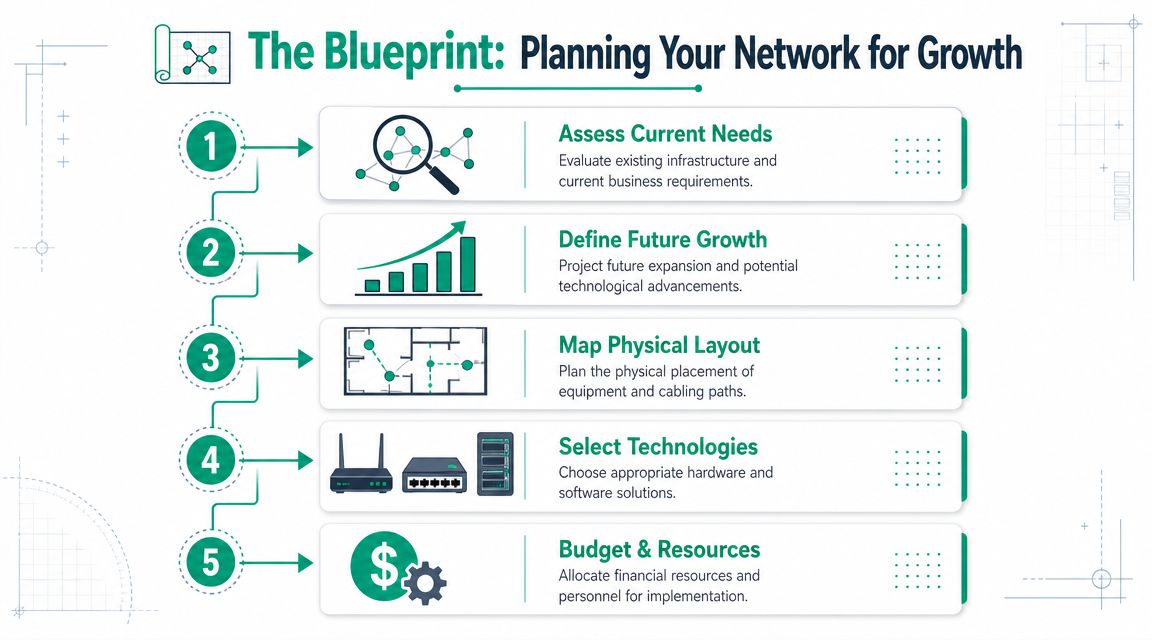
Buying gear before doing discovery is how businesses end up paying twice. A professional network design follows a staged workflow: define business requirements, assess the current state, design the physical and logical topology, and then choose hardware. That sequence reduces costly rework because the design matches real data flows and operating needs, as outlined in Auvik's network design best practices.
Start with business reality
Before you price a router or access point, answer a few blunt questions:
- Who uses the network: Front office only, warehouse staff, hybrid workers, or multiple departments with different needs.
- What rides on it: VoIP phones, cloud apps, large file transfers, security cameras, remote desktop, local servers, guest Wi-Fi.
- What can't fail: Phones, EMR access, scheduling, payment processing, CAD file access, shipping systems.
- What changes soon: New hires, another suite, more cameras, a second location, more cloud usage.
A five-person insurance office in Johnson County needs something different from a machine shop near the I-65 corridor or a growing legal office adding hybrid staff. If your business expects growth, your network should be built with spare switch capacity, stronger wireless planning, and room for segmentation before you need it, not after.
Map the building, not just the wish list
The floor plan matters more than people think. Old brick walls in Greenwood. Metal shelving in warehouse spaces. Long drywall corridors in medical offices. Those all change wireless behavior. Cabling paths, rack location, power, cooling, and where people work should all be settled early.
A simple planning checklist helps:
- Accurately count endpoints. Include printers, TVs, cameras, phones, tablets, scanners, and door systems.
- Mark fixed devices. Desktops, copiers, and workstations should usually be wired.
- Identify dead zones. Break rooms, conference rooms, back offices, and warehouse corners are common trouble spots.
- Define critical traffic. Voice, line-of-business apps, and backups shouldn't compete blindly.
- Set the budget and ownership. Decide who supports it after install.
For businesses building a longer-term technology plan, this Indiana IT roadmap for 2026 is a useful companion read.
Compliance changes the design
If you handle protected health information, the network needs to support HIPAA safeguards, especially around access control, device security, and network separation. If you're a defense contractor or supplier, CMMC expectations push you toward tighter control of systems, users, and documentation. For everybody else, NIST CSF gives a sane framework for identifying risks, protecting assets, detecting trouble, responding, and recovering.
Planning rule: If compliance matters, design the network around access control and documentation from day one. Retrofitting controls later is where costs climb.
Choosing Your Gear Beyond the Big Box Store
Many business owners get talked into buying shiny junk. The shelf at the big-box store looks cheaper because it hides the actual cost. Consumer gear is built for a house. A business network has different demands: more devices, longer duty cycles, cleaner management, better logging, stronger security options, and room to expand.
Historically, business networking grew around two core components: routers for internet access and switches for internal distribution. Microsoft's small-business guidance still reflects that wired-first model, and Cisco explicitly advises using business-grade devices because consumer products may not keep pace as the business grows, as summarized in Microsoft's small business network setup guidance.
What each piece actually does
Here it is in plain English:
- Router: Moves traffic between your office and the outside world.
- Firewall: Enforces security policy at the edge and controls what gets in and out.
- Switch: Connects your wired devices inside the building.
- Wireless access points: Broadcast business Wi-Fi where people work.
- Controller or management platform: Lets you monitor and manage the whole environment without walking room to room.
For many Indiana SMBs, UniFi networking is a practical fit because it gives centralized visibility and cleaner scaling than pieced-together consumer gear. Other business-grade platforms can work too. The point isn't the logo. It's getting equipment meant for business loads and business management.
What to buy for the office you have, not the one you imagine
Don't overspend on features you'll never use. Also don't cheap out on the parts that hurt later.
Look for these things:
- PoE support: Power over Ethernet keeps access points, phones, and cameras cleaner to install.
- Port headroom: Empty switch ports are cheaper than replacing a full switch too soon.
- Managed switching: You need this if you plan to use VLANs, monitoring, or tighter security policy.
- Business Wi-Fi design: Separate access points beat one overworked all-in-one box.
- Centralized firewall controls: This matters once remote access, cloud apps, and vendor connections enter the picture.
If firewall selection is your sticking point, this Indiana small business firewall guide lays out the trade-offs clearly.
Cheap gear usually fails in expensive ways. Not because it explodes, but because it wastes staff time, limits growth, and turns every change into guesswork.
Tough buildings need smarter wireless
Some spaces don't cooperate. Thick masonry, old tenant buildouts, metal racks, and long corridor layouts can wreck signal quality. In those cases, multiple wired access points beat trying to blast the whole office from one corner. In especially awkward layouts, latency-optimized mesh nodes can help fill gaps, but wired backhaul is still the cleaner answer whenever you can get it.
That's the difference between "we have Wi-Fi" and "the office works."
The Build Cabling IP Addresses and Virtual Networks
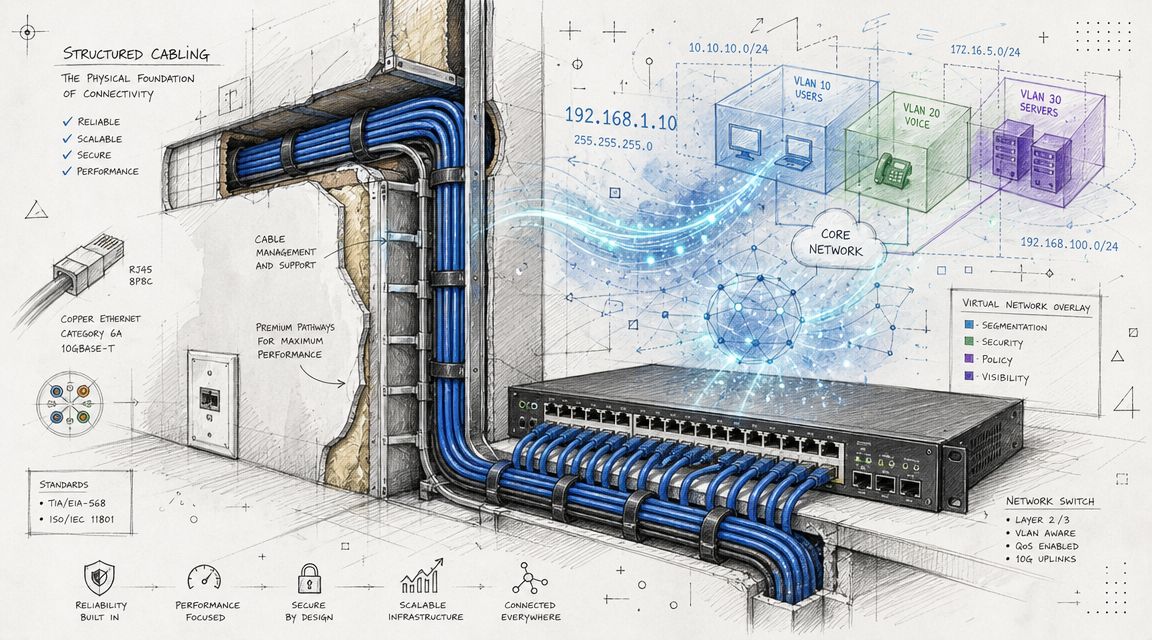
A baseline business network includes an internet connection, modem, router, firewall, and switch. The practical failures usually happen in the physical build. Poor cabling creates trip hazards, random disconnects, and signal problems that undermine the whole setup, as described in this step-by-step business network build guide.
Cabling first, always
If the closet looks like a bowl of spaghetti, the network is already harder to support than it should be. Good structured cabling means labeled runs, clean patch panels, sensible rack layout, and cable paths that don't cross walkways or get pinched behind furniture.
That matters because cable mess isn't just ugly. It slows troubleshooting, causes accidental unplugging, and makes future changes more expensive. If you want a deeper look at the physical side, this overview of structured cabling for business explains why the backbone matters so much.
IP addresses without the headache
Think of IP addressing like office suite numbers. Every device needs its own address so traffic goes to the right place. Subnetting is how you divide the building into sections so not every device is hanging out in one giant crowded room.
You don't need to memorize networking theory to make good decisions. You do need a plan. If printers, phones, cameras, laptops, and guest devices all live in one flat network, troubleshooting gets sloppy and security gets weaker.
VLANs are separate rooms inside one building
This is one of the best tools in a business network. A VLAN lets you create separate digital areas on the same switching hardware.
A simple SMB example:
- Staff VLAN: Office computers, line-of-business systems, internal printers
- Guest VLAN: Internet-only access for visitors
- Voice VLAN: VoIP phones so call traffic stays clean
- IoT VLAN: Cameras, TVs, smart devices, badge systems
- Management VLAN: Admin access for switches, APs, and controllers
That setup gives you control. Guests can't wander into internal devices. Cheap IoT gear doesn't sit beside accounting systems. Voice traffic doesn't fight everything else blindly.
A quick visual helps if you want to see this in action:
Build the wired core like you're planning to stay in business for a while. Wi-Fi should sit on top of that foundation, not replace it.
Fortifying Your Digital Walls Modern Network Security
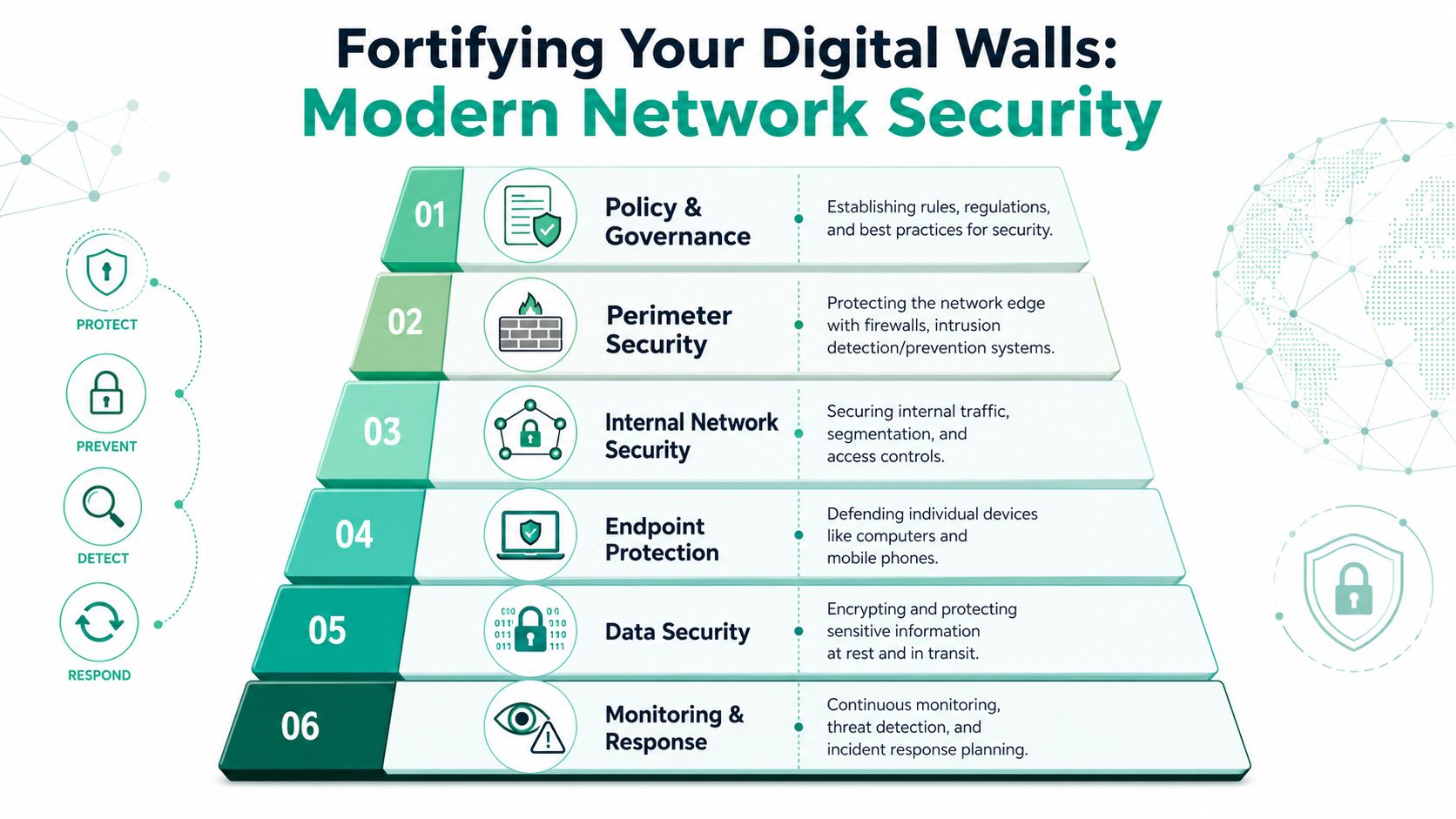
The old approach to security was simple. Buy a firewall, set a Wi-Fi password, install antivirus, and call it a day. That doesn't hold up now. Your staff logs into cloud apps from laptops, phones, home offices, and hotel Wi-Fi. Vendors want remote access. Admin panels sit one stolen password away from a bad afternoon.
According to Verizon's 2024 Data Breach Investigations Report, the human element was involved in 68% of breaches, which is why a secure network today has to focus heavily on identity and access, not just the physical LAN, as noted in this summary of small business networking and security risks.
Zero Trust in plain English
Zero Trust architecture sounds fancy, but the basic idea is simple: never trust, always verify.
That means:
- Users prove who they are: MFA on cloud apps, VPNs, admin portals, and email.
- Devices earn access: Managed laptops get different trust than random personal phones.
- Network access stays limited: Staff don't get broad access just because they're inside the building.
- Vendor access gets controlled: Temporary, logged, and limited to what they need.
If you're still thinking security starts and ends with the office firewall, you're defending the wrong front door.
The stack that actually works
A practical SMB security stack usually includes these layers:
| Layer | What it does |
|---|---|
| Firewall | Filters and controls edge traffic |
| Segmentation | Separates users, guests, phones, servers, and IoT |
| Endpoint protection | Stops malware and suspicious behavior on devices |
| MFA | Blocks many credential-based attacks |
| Patching | Closes known holes in systems and apps |
| Backups | Gives you a recovery path when prevention fails |
For endpoint defense, many businesses use tools like Bitdefender GravityZone because endpoint security now matters just as much as edge security. If an employee clicks a phish and enters credentials into a fake login page, the firewall won't save you by itself.
Don't forget recovery
Security isn't only about blocking attacks. It's also about staying operational when something gets through. That means tested backups, preferably including immutable off-site backups, documented access reviews, and monitoring that catches strange behavior before users notice a full outage.
For companies that don't have internal security staff, SOC-as-a-Service monitoring can fill the gap by watching logs, alerts, and endpoint activity around the clock. Businesses in Greenwood, downtown Indy, and across the south side often need that extra visibility once remote work and cloud tools become normal.
For a broader breakdown of layered defense, this primer on network security for Indiana businesses is worth bookmarking.
Your network isn't secure because the office has Wi-Fi with a password. It's secure when the right people get the right access, on the right devices, for the right reasons.
The Reality Check Testing Budgets and When to Call Us
A network isn't finished when the lights blink green. It's finished when you've tested the parts that usually break in real business use. That means checking coverage, wired performance, guest isolation, remote access, printing, phones, cameras, and fail points before your team discovers them on a Monday morning.
Post-build checks that catch real problems
Use a practical acceptance checklist:
- Walk the office: Test Wi-Fi in conference rooms, break areas, front desk, and back offices.
- Verify wired devices: Make sure desktops, printers, phones, and specialty systems connect where they're supposed to.
- Confirm guest isolation: Guest Wi-Fi should reach the internet, but not internal devices.
- Check voice quality: Place calls during normal traffic, not just after hours.
- Test cloud apps: Open the tools your staff uses daily and watch for lag or dropouts.
- Review admin access: Make sure management interfaces aren't exposed carelessly.
- Simulate a support moment: Can someone identify a bad cable, failed AP, or down port quickly?
If a setup passes those tests, you've got something useful. If not, you don't have a finished job. You have installed hardware.
What it usually costs
A 2025 pricing guide estimates that a typical small business network setup costs $5,000 to $15,000 for most organizations with 10 to 50 employees, with more complex environments going beyond that. The same guide breaks out costs for hardware, structured cabling, professional labor, and ongoing support in this small business network setup cost breakdown.
| Component | Estimated Cost Range |
|---|---|
| Routers, switches, and wireless access points | $2,000 to $5,000 |
| Structured cabling | $2,500 to $6,000 |
| Professional labor and configuration | $1,500 to $3,000 |
| Security appliances and software | $1,000 to $2,500 |
| Typical total setup cost | $5,000 to $15,000 |
Those numbers are useful because they reset expectations. This isn't just buying a router and hoping for the best. It's infrastructure. It also carries recurring upkeep, so the budget needs to include maintenance, security, and support over time.
When DIY stops making sense
Plenty of very small offices can handle a simple build in-house if the needs are basic and the risk is low. But DIY usually stops being smart when one or more of these are true:
- Compliance is in play: HIPAA, CMMC, or customer security requirements demand cleaner controls and documentation.
- Downtime hurts immediately: Phones, scheduling, payment systems, or production work depend on constant connectivity.
- The office is physically tricky: Brick walls, warehouse shelving, multi-suite layouts, or long cable runs need design work.
- You need segmentation and policy control: VLANs, firewall rules, remote access, and secure vendor access take planning.
- Nobody owns support: A network without clear administration becomes everyone's side job.
For businesses in Johnson County that want design, installation, and ongoing management from one local provider, Finchum Fixes IT is one option alongside other managed IT firms in the region. The key is hiring somebody who can handle the full stack, from cabling and switching to Zero Trust policy, endpoint protection, and backup planning.
Build an Asset Not Another Headache
A good network doesn't call attention to itself. Your calls stay clear. Files move when they should. New devices go online without drama. Staff stop wasting half the morning asking whether the internet is down when the problem is a cheap switch, bad cabling, or flat network design.
That's the answer to how to set up a business network. You plan for the business first. You build a wired backbone that can carry the load. You layer in wireless where the people are. You separate traffic so one problem doesn't spread everywhere. Then you secure identity, devices, and recovery so the business can keep moving when somebody clicks the wrong thing or a piece of hardware dies.
Around Greenwood, the I-65 corridor, and the wider Indianapolis market, that approach holds up because the buildings are mixed, the compliance pressures are real, and growth can happen fast. The companies that treat networking like a business continuity asset usually spend less time firefighting and more time getting actual work done.
If your current setup feels patched together, that's probably because it is. Old routers, mystery switches, unlabeled cables, dead spots, and open guest networks don't improve with age. They get more expensive.
If you're in Greenwood, Indianapolis, or anywhere in Central Indiana and want a clear picture of what's slowing your office down, schedule a Free Network Assessment with Finchum Fixes IT. We'll identify bottlenecks, security gaps, and building-specific issues, then show you what needs fixing first so you can stop losing time to preventable network problems.