Port Forwarding Setup Made Simple for Indiana SMBs
Remote access keeps failing for a lot of Indiana SMBs because port forwarding setup is usually treated like a quick router task when it's really a connectivity and security decision. The right approach is to confirm you have inbound reachability, lock the target device to a fixed local address, create the forward and matching firewall rule, then test it from outside your network.
A Greenwood office with an aging file server, a front desk app that only behaves on-prem, and a manager trying to reach it from home. That's a normal Tuesday in Central Indiana. The usual response is, “Open a port on the router.” Then the connection still fails, the ISP line turns out to be behind carrier-grade NAT, Windows Firewall is blocking the service anyway, and now half the morning is gone.
That wasted time costs real money. Business continuity math is simple. Downtime is commonly priced as minutes of outage multiplied by cost per minute, and industry summaries often place average IT downtime around $5,600 per minute, with some later summaries putting it near $9,000 per minute depending on company size and industry, as summarized by Atlassian's cost of downtime overview. If your remote access breaks during payroll, dispatch, billing, or production quoting, those aren't “IT minutes.” Those are billable hours bleeding out.
Why Port Forwarding Still Trips Up Busy Indiana Businesses

A Greenwood office replaces its ISP modem on Friday, and by Monday the owner cannot reach the shop management server from home. The forward is still in the router. The server is still powered on. The problem is upstream. The new modem is doing NAT, the old firewall is doing NAT too, and the server grabbed a different DHCP address over the weekend.
That kind of failure is why port forwarding turns into a business continuity problem fast for Central Indiana shops, clinics, and small offices. Remote access breaks during quoting, payroll, dispatch, or after-hours support. Staff lose time chasing the wrong fix because the router setting looks right while the path to the service is broken somewhere else.
The local version of the problem
A lot of Johnson County networks were built in layers over time. A carrier modem here. A second router added for better Wi-Fi there. Maybe a recorder for cameras, a file share that still supports one accounting workflow, and a front desk PC that somebody had to reach from outside once, so a port got opened and never reviewed again.
I see the same trouble spots over and over:
- Double NAT: The ISP device and the business firewall both translate traffic, so inbound sessions die before they hit the target.
- DHCP drift: The NAS, line-of-business server, or camera NVR gets a new local IP and the forward still points to the old one.
- Half-finished security changes: The service is listening, but Windows Firewall or the endpoint security tool blocks the port.
- Bad shortcuts: UPnP gets turned on, or a device gets dropped into the DMZ host setting just to make it work.
- Wrong testing method: Somebody checks from inside the office, gets a misleading result, and burns another hour on the wrong layer.
One missed detail is enough.
Why busy teams get stuck
Port forwarding crosses several systems at once. The public side has to be reachable. The router has to send the traffic to the right internal host. The host has to keep the same address. The service has to listen on the expected port and protocol. The local firewall has to allow it. If any one of those pieces drifts, the whole thing fails.
That is also why I treat forwarding as a controlled access decision, not just a router task. The better sequence is to verify inbound reachability first, then lock down the target system, then decide whether a direct forward is even the right move. In a lot of SMB environments, a VPN, reverse proxy, or another Zero Trust approach is safer than exposing RDP, SSH, or a web admin page to the internet.
What actually holds up
The setups that last are the boring ones. One public path. One documented target. One reserved internal IP. One clearly defined port and protocol. One matching firewall rule. Then an outside test from a real external connection.
What fails is guesswork. A lot of Indiana businesses do not have time for guesswork, which is exactly why they need a method. If remote access supports revenue, operations, or after-hours response, port forwarding belongs in the same category as backups and failover planning. It is part of keeping the business running, not just getting a green checkbox in the router.
Before You Forward Anything Check Your Connection and Lock the Target
A Greenwood shop loses remote access right before closing. The owner blames the router, then the ISP, then the software vendor. An hour later the problem shows up. The site is behind CGNAT, and the server they planned to expose is still listening on the wrong interface with a loose local firewall rule. That is why I check reachability and hardening before I touch a single forward.
If remote access supports payroll, cameras, ERP, or after-hours support, this is a business continuity call, not a box-checking task.
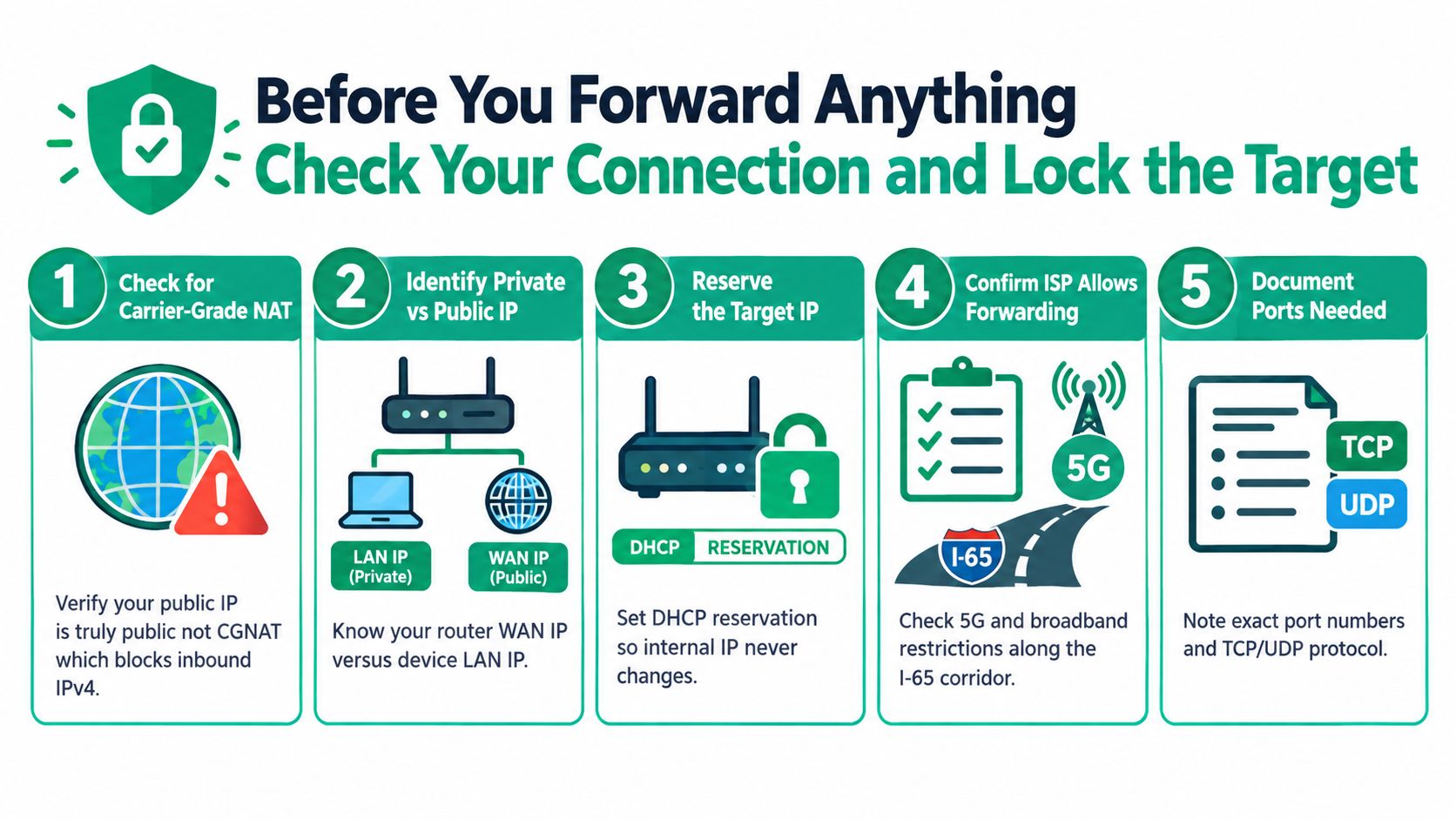
A lot of Central Indiana locations now land on internet service that does not behave the way old port forwarding guides assume. 5G backup circuits, lower-cost broadband tiers, and some rural links can put you behind carrier-grade NAT. If that is your setup, the cleanest port forward rule in the world still will not accept inbound IPv4 traffic. This CGNAT and IPv6 port forwarding overview explains the constraint well.
Check the public side first
Port forwarding depends on one basic fact. Your WAN address has to be reachable from the internet.
Verify that before anything else:
- Open the router or firewall dashboard and record the WAN or Internet IP.
- Check your public IP from a browser on that same connection.
- Compare the two addresses.
- Call the ISP if they differ, or if the WAN address falls into a private range such as 100.64.x.x, 10.x.x.x, 172.16 to 172.31.x.x, or 192.168.x.x.
If you confirm CGNAT, stop there and choose a design that will survive production use. Ask for a public IP. Use IPv6 if the application supports it and you can filter it correctly. Put users through a VPN. Or publish the service through a reverse proxy or bastion host with tighter access controls. For many SMBs, that last group of options is the better answer anyway because it gives you more control over who gets in and what gets logged.
Lock the target before you publish it
Once the connection can accept inbound traffic, pin down the host that will receive it. Give it a static IP or a DHCP reservation. Make sure the service is listening on the expected port and protocol. Confirm the host firewall allows only what the service needs.
That order matters.
On UniFi, I usually start by creating a fixed IP assignment in the client settings so the destination does not drift after a reboot. On Windows Server, these checks tell you quickly whether the host is ready:
ipconfig /allnetstat -ano | findstr LISTENGet-NetTCPConnection -State Listen
On Linux, use:
ip addrss -tulpnsudo ufw status
If the app is not listening internally, the router is not the problem.
I also treat direct exposure as the exception, not the default. RDP, SSH, NAS admin pages, and line-of-business web consoles should usually sit behind VPN, identity-aware proxy, or another Zero Trust control first. A raw port forward is sometimes justified. It is rarely the safest first choice.
Write down the exact requirement
Good forwarding work is boring on paper and reliable in practice. Record the target hostname, fixed internal IP, application, internal port, external port, protocol, source restrictions, and who approved the exposure. If the service is revenue-related or needed after hours, note the fallback plan too. That is what turns a risky one-off change into something your team can support at 9 p.m. on a Friday.
For Indianapolis-area teams cleaning up years of ad hoc addressing, solid IP planning saves real time during cutovers and troubleshooting. Keep this guide on IP address management for Indianapolis businesses handy before you publish anything.
How to Configure Port Forwarding and Firewall Rules Without Guesswork
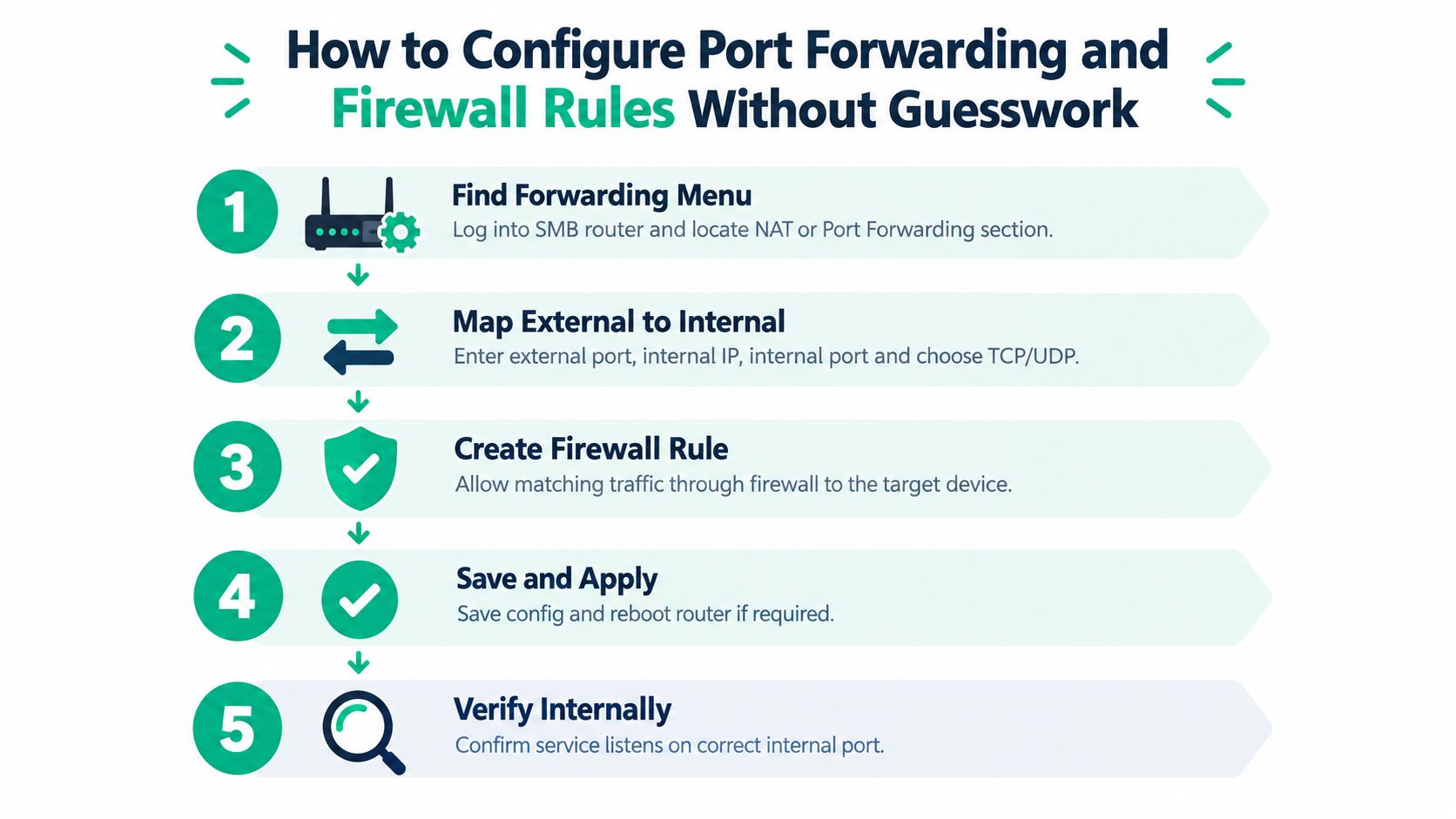
Most SMB routers bury this under Port Forwarding, NAT, Virtual Server, or Firewall Rules. The labels change. The logic doesn't. You need four things to line up: the external port, the internal IP, the internal port, and the protocol. Then you need the host firewall to allow the same traffic.
The actual mapping
On a UniFi gateway, a typical path is Settings, Firewall and Security, then Port Forwarding. On many small business routers from Netgear, TP-Link, ASUS, or Cisco Small Business, you'll see the same fields under a different menu name.
A clean rule looks like this in plain English:
- Name: Human-readable service name
- External port: The port visitors hit from the internet
- Internal IP: The fixed address of the destination host
- Internal port: The port the service listens on
- Protocol: TCP, UDP, or both if the application requires it
If the application listens on the same port you want externally, great. If not, you can translate. For example, an outside request on one port can be sent to a different internal port if there's a good reason. Keep that documented, or the next admin will hate you.
Match the host firewall
The router forward is only half the job. Windows Defender Firewall, Bitdefender GravityZone policy, or Linux firewall rules can still block the service.
On Windows Server, I verify the listener first:
netstat -ano | findstr :3389Get-Service TermService
Then I check the firewall:
Get-NetFirewallRule -DisplayName "*Remote Desktop*"Get-NetFirewallPortFilter -AssociatedNetFirewallRule (Get-NetFirewallRule -DisplayName "*Remote Desktop*")
On Ubuntu or Debian:
ss -tulpn | grep :22sudo ufw allow 22/tcpsudo ufw status verbose
On Rocky Linux or RHEL with firewalld:
sudo firewall-cmd --list-allsudo firewall-cmd --add-service=https --permanentsudo firewall-cmd --reload
If the host is protected by Bitdefender GravityZone, check the applied policy before you assume the router is wrong. Endpoint security products routinely block inbound services by design.
Common Service Forwarding Choices at a Glance
| Service | Default Port | Protocol | Safer Alternative |
|---|---|---|---|
| RDP | 3389 | TCP | Publish remote access through VPN or a hardened gateway on 443 |
| SSH | 22 | TCP | Restrict by source IP or place behind VPN or bastion |
| HTTP | 80 | TCP | Redirect to HTTPS and publish through reverse proxy |
| HTTPS | 443 | TCP | Preferred public entry point with TLS and edge authentication |
For web apps, I'd rather publish 443 to a reverse proxy such as Nginx Proxy Manager, Traefik, or Caddy than expose random high ports to the world. That gives you one clean public entry point, cleaner certificates, and a better path toward Zero Trust architecture.
A lot of phone systems and remote admin products also drag networking into operations. If your team is changing telecom workflows while tightening remote access, a practical guide on how to move your number to Google Voice can help you avoid creating a second mess while solving the first one.
Here's a useful visual if you want a quick reference before touching a live edge device.
Where people create risk fast
The dangerous shortcuts are always the same.
- UPnP: Convenient. Also notorious for creating rules without proper review.
- DMZ host: Almost never the right answer for a business endpoint or server.
- Direct RDP exposure: Hard no for anyone dealing with HIPAA, CMMC, or basic NIST CSF discipline.
- Undocumented exceptions: If nobody knows why the rule exists, it shouldn't stay open.
For Indiana SMBs handling protected data, manual rules beat automatic exposure every time. If you need a stronger firewall baseline before adding public-facing services, this practical guide to firewall management for Indiana SMBs lines up well with that approach.
Field note: The router UI matters less than the discipline behind the rule. Good port forwarding setup is mostly about precision, not brand preference.
Testing Your Forward and Fixing What Breaks Fast
A forward is not working until it answers from the public side.
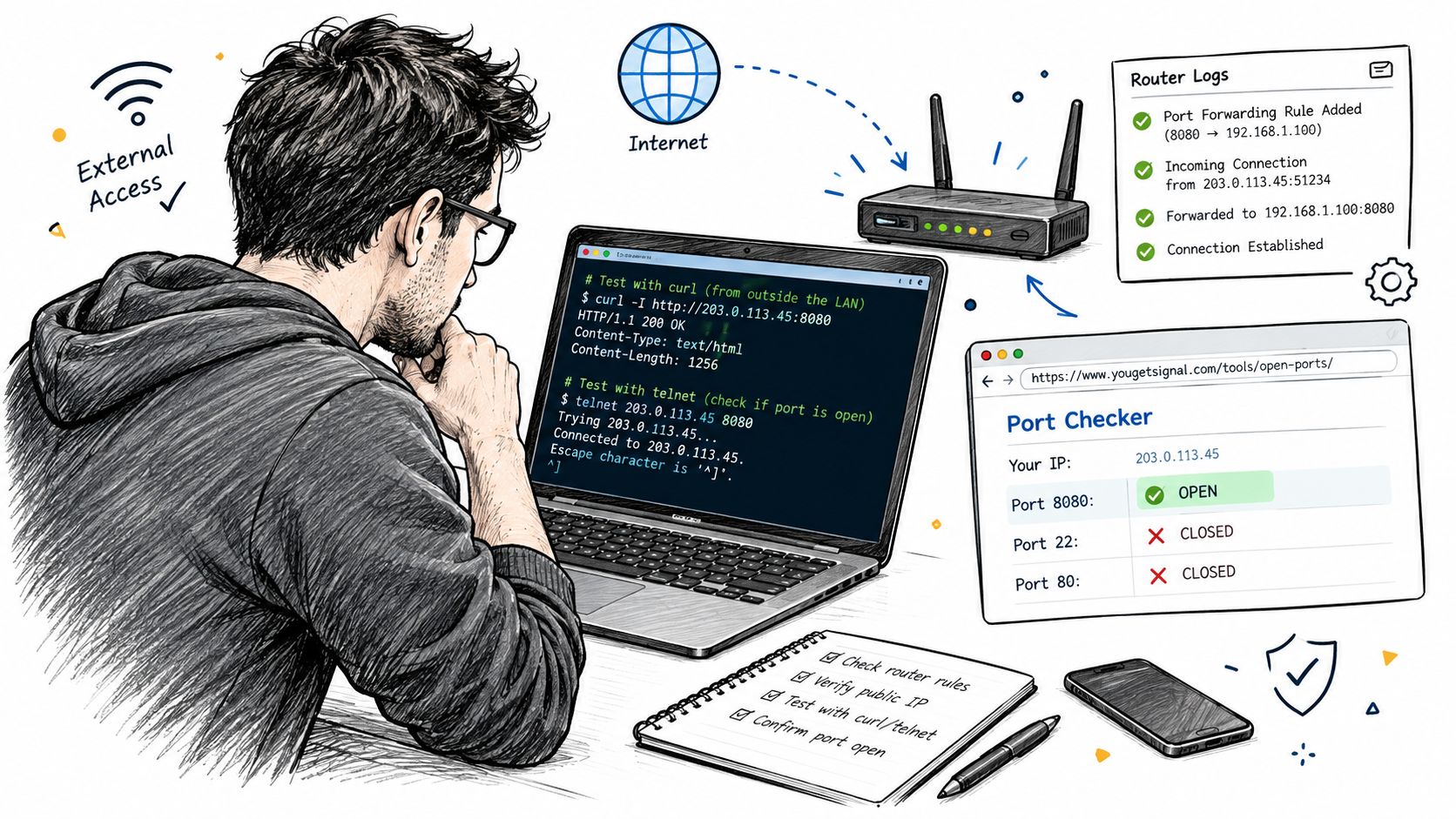
Test from a phone on cellular, a laptop on another connection, or a trusted external host. Internal checks can still mislead you, as noted earlier, so use an outside path and confirm what a real remote user would hit.
Fast external tests
Use the test that matches the service.
For HTTPS:
curl -I https://your-public-endpoint
For SSH:
ssh -vv user@your-public-endpoint
For a generic TCP port:
telnet your-public-endpoint 443
Test-NetConnection your-public-endpoint -Port 443
For Linux diagnostics:
nc -vz your-public-endpoint 443
Then check what kind of failure you have. A timeout usually points to routing, ISP filtering, double NAT, or a missing firewall rule. A connection refused response usually means you reached the host, but the service is not listening on that port. A certificate warning on HTTPS means the path is open, but the app stack still needs work.
The breakpoints that waste the most time
The repeat offenders are rarely exotic.
- The internal IP changed: The rule still points to an old address.
- The service bound to localhost only: The app is listening on
127.0.0.1, not the LAN interface. - Windows Firewall or endpoint security blocked it: The NAT rule is fine, the host policy is not.
- The ISP will not pass inbound traffic: Common on some business internet circuits, and very common if CGNAT was missed earlier.
- Double NAT: The modem or upstream gateway is doing its own routing.
- Wrong public IP or stale DNS: The hostname points somewhere else, or the ISP changed the address.
That last one gets overlooked all the time in small offices around Indy. The port rule can be perfect and still fail because the DNS record has not updated, the ISP swapped the WAN IP overnight, or the office is testing the wrong edge device after a quick hardware replacement.
If the service fails on the server itself, stop editing the router. Fix the app first.
A tight diagnostic checklist
Run this in order.
- Confirm the app is alive: Check service status and confirm the listening port on the target host.
- Verify the bind address: Make sure the service listens on the server's LAN IP or on all interfaces, not just localhost.
- Match the router rule to the host: Compare the current device IP with the NAT target.
- Inspect host firewall policy: Check Windows Defender Firewall, Bitdefender GravityZone, UFW, or firewalld.
- Review edge logs: Look for hits on the rule, denied sessions, or no traffic at all.
- Check the upstream path: Confirm the WAN IP on the firewall matches the public IP seen from the internet.
- Retest from outside: Use the same port and protocol the user will use.
Teams that document this validation step recover faster during an outage and make fewer bad changes under pressure. DevArmor's write-up on an implementation verification process is a useful model for proving the rule, the host, and the path all line up.
If the port still will not behave, this guide to network troubleshooting steps for Indiana SMBs in 2026 gives you a broader fault-isolation path without guessing.
Locking Down Forwarded Ports So You Do Not Invite Trouble
A forwarded port is now part of your public edge. Treat it that way.
For Central Indiana SMBs, this is a business continuity call as much as a security one. If a Greenwood clinic, manufacturer, or property management office exposes the wrong service, the problem is rarely limited to one bad login attempt. It can turn into downtime, cleanup work, insurance reporting, and a long day for whoever has to explain why remote access was hanging off an open port with weak controls.
Security researchers at Monash University found many analyzed port-forwarding services lacked meaningful access control for outside users, which is exactly why every forward needs guardrails from day one, according to this Monash University research summary on port-forwarding security risks.
Start with the basics that busy teams skip under pressure:
- Restrict source IPs whenever the remote users have fixed office or vendor addresses.
- Never expose admin panels, RDP, or firewall management ports directly unless there is a hard business reason and extra protection in front of them.
- Require strong authentication and TLS on the service itself, not just at the router.
- Remove temporary forwards after the project, vendor session, or cutover is done.
- Turn off UPnP and DMZ host settings unless you can defend why they are on.
The better pattern is to avoid publishing the application port to the internet at all. Put a reverse proxy on 443, add identity-aware access controls, and let the app stay private on the LAN or in a segmented VLAN. If your ISP connection started this whole project under CGNAT, that is one more reason to reconsider direct exposure instead of forcing ugly workarounds.
That matters for shops dealing with HIPAA, CMMC, or plain old client security questionnaires. Auditors and cyber insurers do not care that the port forward was quick to set up. They care whether access was limited, logged, encrypted, and reviewed.
A safer design usually looks like this:
- Reverse proxy on 443: Terminate TLS at the edge and keep the internal service off the public internet.
- Zero Trust access controls: Trust the user, device, and session. Do not trust a source network by default.
- Logging and monitoring: Watch for repeated login attempts, odd geographies, and stale rules nobody remembered to remove.
- Backups you can restore: If an exposed service gets abused, recovery speed decides whether the incident stays small.
I usually give clients one simple rule. Open only what you can explain, monitor, and shut off fast.
If your current setup still depends on direct inbound access, review these secure remote access options for Indiana SMBs before you add another forward. In a lot of environments, the best port forward is the one you retire.
Your Next Move Toward Reliable Remote Access in Central Indiana
Busy companies across Greenwood, the I-65 corridor, and downtown Indy tech hubs don't need more router folklore. They need a process that works. Check whether inbound connectivity is even possible. Fix the internal addressing. Map the forward precisely. Test from outside. Then harden what you exposed, or better yet, replace direct exposure with a cleaner access design.
That shift matters because port forwarding isn't a standalone trick. It sits inside your broader cybersecurity, networking, cloud computing, software support, and business continuity stack. The same business that needs a stable remote desktop path today may need latency-optimized mesh nodes next month, immutable off-site backups after that, and custom software development support when old line-of-business tools stop fitting the way they work.
Property managers and distributed office teams run into this all the time. They want remote systems to feel immediate without turning the edge of the network into a free-for-all. Operationally, that's the same instinct behind services like instant document retrieval for property managers. Fast access matters. Controlled access matters more.
If your current setup depends on exposed ports and crossed fingers, there's a good chance a VPN, reverse proxy, or managed secure access model will serve you better. This guide to choosing the best VPN for small business is a practical next read if you're weighing that move.
For businesses in the Greenwood and Indianapolis area, the smart next step is a Free Network Assessment or a Security Risk Audit before the next remote access failure burns another morning.
Finchum Fixes IT helps Greenwood and Indianapolis businesses clean up port forwarding, firewall rules, secure remote access, Wi-Fi design, and the ugly edge cases that cause downtime. If you want a network that's easier to support, safer to expose, and built around predictable monthly IT costs, visit Finchum Fixes IT and schedule a Free Network Assessment or Security Risk Audit.