Identity and Access Management: A 2026 Guide
A controller in a Greenwood office clicks a convincing Microsoft 365 login page. Minutes later, an attacker has access to email, invoices, and payment instructions. The business may avoid a loss, but the near miss still consumes management time, disrupts accounting, and creates questions no owner wants to answer during an audit.
Identity and access management answers four practical questions: which person or system is requesting access, what resource can it use, from which device and context, and for how long? It gives a small Indiana business a way to control employees, contractors, administrators, applications, and machine credentials without buying an enterprise security stack.
The Login Problem That Keeps Wrecking Indiana Businesses
The incident usually begins without warning. A finance employee sees an urgent message, opens a familiar-looking sign-in page, and enters a password. The attacker doesn't need to break through a firewall if the stolen credential works against Microsoft 365, a banking portal, or a remote-access system.
For a company along the I-65 corridor, the operational damage extends well beyond a compromised mailbox. An accounting employee may lose access while IT investigates. A manager may pause payments. A technician may spend billable hours resetting credentials and checking audit logs. If a contractor's account remains active after a project ends, the business inherits another access path that nobody owns.
Practical rule: Treat every identity as an access relationship that needs an owner, a purpose, a scope, and an end date.
Modern identity and access management, or IAM, turns that relationship into a managed control point. It covers identity proofing, authentication, authorization, federation, and lifecycle management, not just the password prompt. NIST Special Publication 800-63 established technical guidance for digital identities interacting with government systems over networks, and its fourth revision was approved on April 28, 2025, superseding the revision first published in June 2017. The framework describes three authentication-factor categories, something a person knows, has, or is, and also addresses enrollment, authenticators, federation, protocols, and assertions. NIST's Digital Identity Guidelines provide a neutral foundation for evaluating IAM controls.
A 25-person shop doesn't need every feature sold to a global enterprise. It does need a reliable answer to these questions:
- Who owns the identity: Is this an employee, vendor, service account, device, or application?
- What can it reach: Can the account read a shared folder, approve payroll, administer backups, or change a cloud tenant?
- What proves the request: Is the login protected by a password alone, a push prompt, a passkey, or a hardware key?
- When does access end: Does a role change or termination automatically remove permissions?
- Who reviews the evidence: Can someone show which administrator accessed a sensitive system and when?
A password investigation also needs disciplined triage. Disable the suspected account, revoke active sessions and refresh tokens, preserve sign-in logs, review mailbox forwarding rules, inspect recent permission changes, and reset connected application credentials. Teams can use this compromised password response guide as a practical starting point.
IAM is therefore a business continuity control. It reduces lockouts, limits the reach of a stolen login, and gives an owner a repeatable process instead of an emergency scramble. That matters to Johnson County business owners who need their staff serving customers, shipping orders, and producing work, not waiting for an improvised security review.
What Identity and Access Management Actually Covers
Credentials remain a direct path into business systems. Verizon's 2025 Data Breach Investigations Report analyzed more than 22,000 security incidents, including 12,195 confirmed data breaches, and found credential abuse in 22% of breaches. The same report attributed 20% of breaches to vulnerability exploitation and found third-party involvement in 30%, which is why IAM must include suppliers and external identities, not just employees. Verizon's 2025 credential-stuffing analysis also found credential stuffing represented a median 19% of authentication attempts in SSO-provider logs, reaching 25% at enterprise organizations and 12% at small businesses.
Microsoft reported that more than 99% of the identity attacks it observes involve passwords and that it blocks more than 7,000 password attacks every second. Its research also recorded 147,000 token-replay attacks, an 111% year-over-year increase, while token theft represented fewer than 5% of identity compromises in that report. Microsoft's 2025 Secure Employee Access Report points to a wider lesson: password controls matter, but sessions, tokens, suppliers, and machine identities matter too.
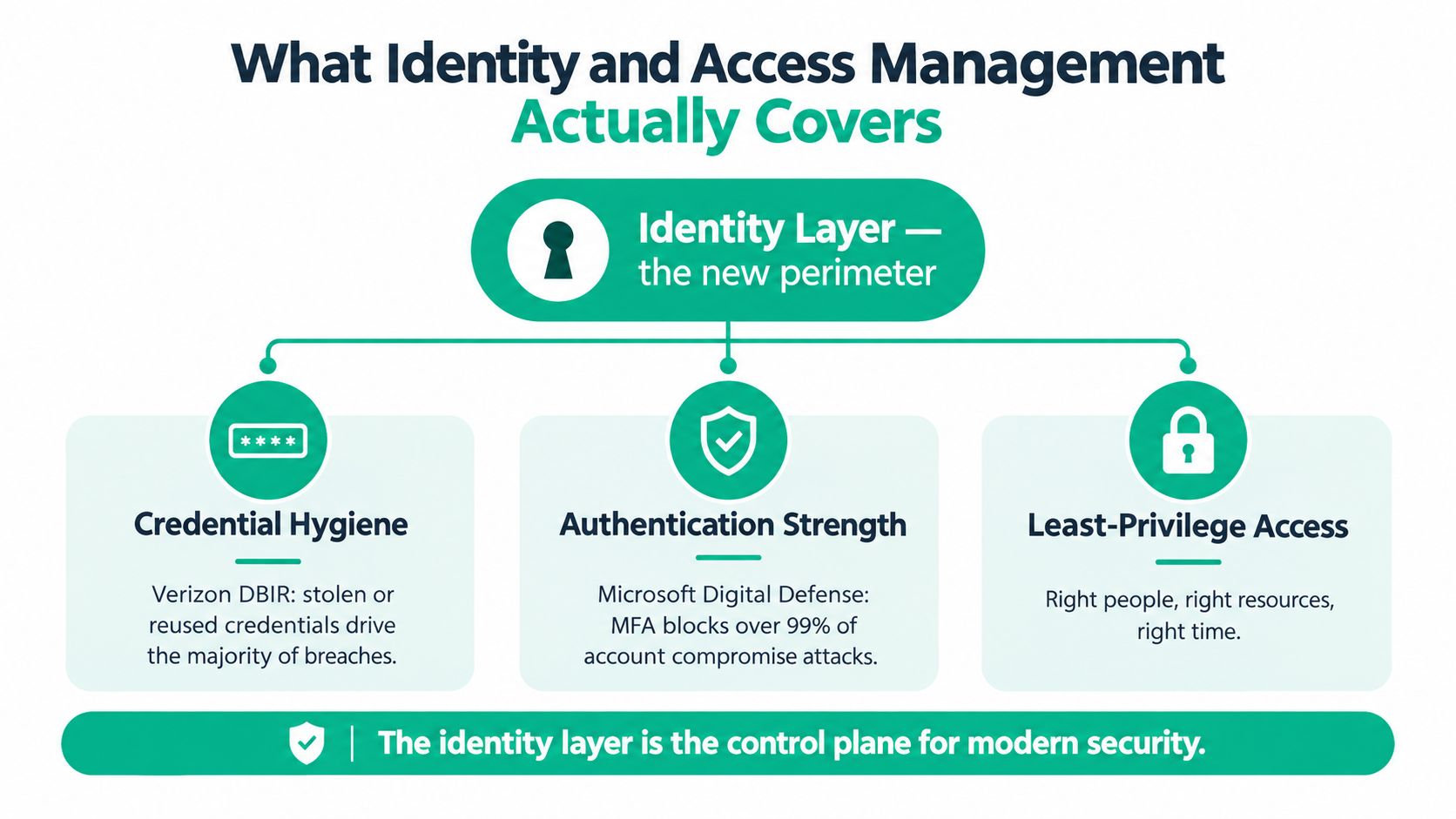
The building blocks of the identity layer
IAM works best as a sequence of connected decisions:
- Authoritative identity sources: A directory such as Microsoft Entra ID or Active Directory establishes the people, groups, devices, and service identities that the business recognizes.
- Authentication: SSO, MFA, passkeys, and security keys verify control of an identity. The method should match the risk of the application and user.
- Authorization: RBAC assigns access through job roles. ABAC adds conditions such as device state, location, or department. Just-in-time access grants higher-level permissions only for a defined task.
- Privileged access management: PAM protects domain administrators, backup operators, cloud administrators, and other accounts that can affect large parts of the environment.
- Lifecycle governance: Joiner-mover-leaver workflows provision new staff, change access when duties change, and remove access when employees or vendors leave.
- Telemetry and analytics: Centralized sign-in logs, session records, and risk signals help identify unusual behavior and support investigations.
Identity management answers who exists and how that identity changes. It handles provisioning, directory synchronization, ownership, and deprovisioning. Access management answers what that identity may do, under what conditions, and how policy enforcement records the decision. A business can have clean employee records and still fail if authorization is too broad.
For an SMB, this distinction prevents a common mistake. Buying SSO without lifecycle governance may make login easier while leaving former contractors active. Turning on MFA without authorization cleanup may protect a user who still has unnecessary access to payroll, backups, or customer records. A sound design connects both sides.
The same principle applies to Active Directory administration. This guide to Active Directory management for Indy SMBs is useful when a business needs to connect directory hygiene with actual permission control.
SSO, MFA, RBAC, and PAM Compared
These four controls solve different problems. An owner deciding what to fund first should avoid treating them as interchangeable products.
Single sign-on reduces password fatigue and gives IT one place to apply authentication policy. It can cut repetitive reset work, especially when employees use Microsoft 365, a CRM, file storage, and timekeeping software. The trade-off is concentration. If the identity provider is unavailable or compromised, many applications are affected, so recovery accounts, logging, and provider resilience matter.
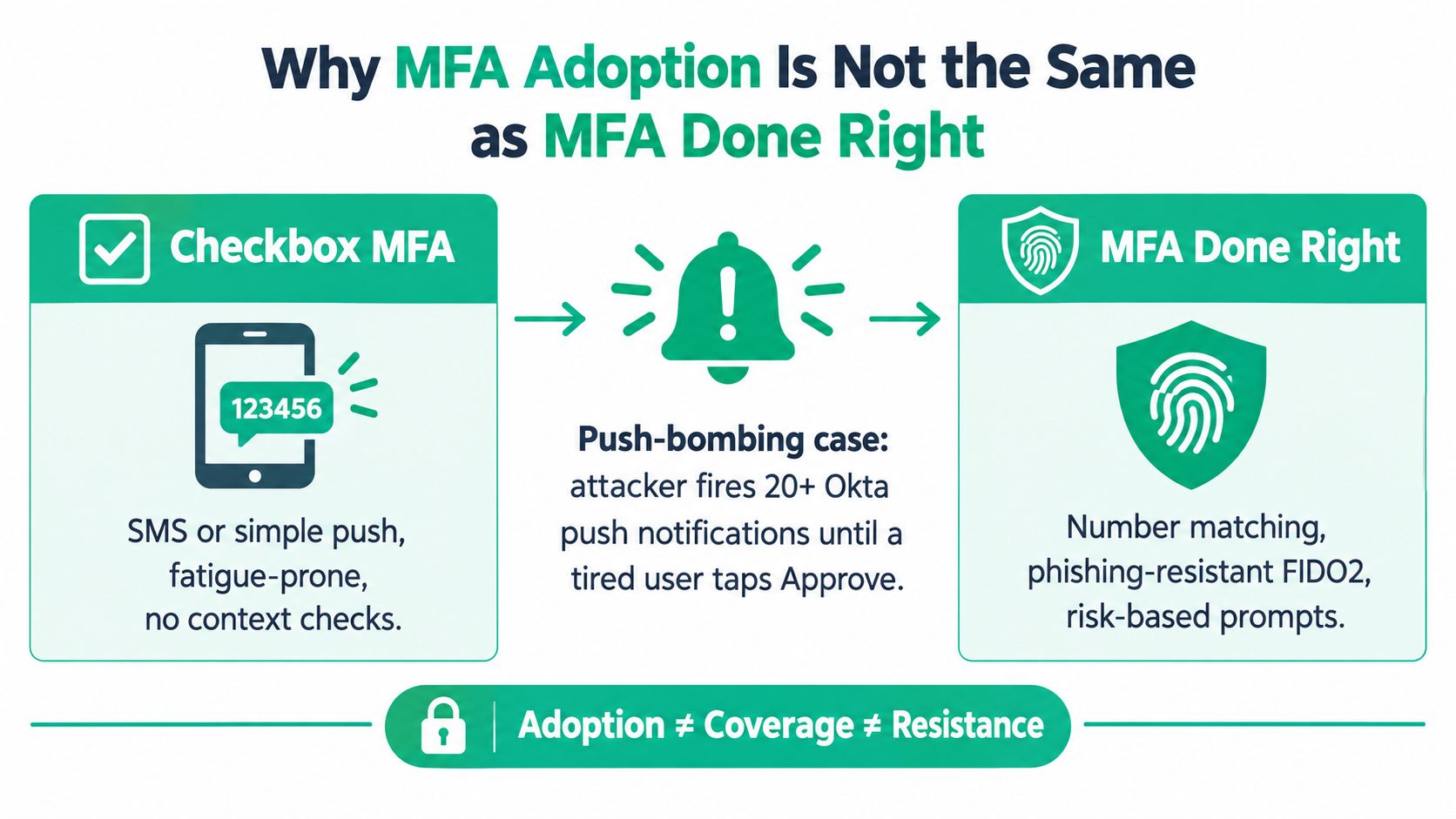
Multi-factor authentication adds proof beyond the password. It is usually the first funded control because it reduces the value of reused credentials, but the method matters. SMS and simple push approvals create more exposure to phishing and fatigue than FIDO2 security keys or passkeys.
Role-based access control fits stable job families. Finance, HR, operations, and sales can each receive documented role templates. RBAC becomes less precise when one employee serves several teams or a seasonal worker needs temporary access. ABAC and just-in-time permissions handle those exceptions better than creating dozens of permanent roles.
Privileged access management limits the accounts that can change servers, delete backups, modify security policies, or approve sensitive actions. A small firm may not need a large vaulting platform for every account, but separate administrative identities, controlled elevation, and recorded activity are worthwhile for high-risk systems.
| Control | Primary Goal | Best ROI When | Friction Points | Typical SMB Cost |
|---|---|---|---|---|
| SSO | One controlled sign-in for approved applications | Staff use several cloud applications and resets consume technician time | Concentrates risk in one identity provider and needs outage planning | Low to moderate |
| MFA | Add a second or stronger authentication factor | Email, VPN, finance, and administrator accounts face credential attacks | Push fatigue, recovery issues, and older applications | Low |
| RBAC | Match permissions to job responsibilities | Departments have repeatable roles and clear data boundaries | Matrixed projects and temporary staff need exceptions | Moderate |
| PAM | Control elevated administrative access | Domain, cloud, backup, and security consoles need tighter oversight | Setup effort, approval friction, and training | Moderate to high |
The funding order is usually MFA first, directory and SSO cleanup second, role design third, and privileged access controls fourth. That sequence changes if a business has a known administrator-account problem or a compliance deadline.
Personal identity hygiene also affects business risk. A plain-language resource on identity theft prevention for consumers can help employees understand why password reuse and exposed personal accounts create workplace consequences.
Why MFA Adoption Is Not the Same as MFA Done Right
Checking an MFA box doesn't prove that the sign-in process can resist modern attacks. Red Canary describes MFA fatigue as repeated approval prompts sent until a user accepts one. Separate reporting citing Proofpoint and Obsidian Security found MFA enabled on 59% of accounts attackers successfully took over in 2025, and MFA failed to prevent attacks in 84% of incident responses studied. Red Canary's identity attack analysis shows why coverage and resistance must be measured separately.
Three failure modes to test
Push-bombing abuses the user's attention. The attacker repeatedly sends prompts, hoping the employee approves one to stop the interruption. Number matching improves the decision by requiring the user to enter a code shown on the legitimate sign-in screen. Conditional access can add device, location, and risk checks, while a rule to deny unexpected prompts gives employees a clear response.
Adversary-in-the-middle phishing uses a proxy that sits between the victim and the actual service. The proxy can capture credentials and session material even when the employee completes a conventional MFA challenge. FIDO2 security keys such as YubiKey or Feitian authenticate against the legitimate site, which makes a look-alike proxy substantially less useful.
Stolen tokens bypass the login step altogether. If an attacker obtains a session token from an unmanaged contractor laptop or infected browser, a password reset may not remove the active session. Administrators should revoke sessions, inspect token and device signals, require reauthentication for sensitive actions, and block unmanaged devices from high-value applications.
A sensible control assignment looks like this:
- Workforce access: Use number matching or a passkey, with clear reporting for denied and unexpected prompts.
- Administrators and finance: Require phishing-resistant FIDO2 or device-bound passkeys.
- Contractors: Use named accounts, managed access conditions, a defined end date, and no shared credentials.
- Legacy applications: Document the exception, isolate the application, and set a replacement plan instead of silently creating a permanent bypass.
- Recovery: Protect break-glass accounts with separate hardware keys and monitor every use.
The practical cost is an interrupted workday, an unavailable accountant, or a healthcare provider forced into a HIPAA incident response. The right MFA method costs less than treating every suspicious sign-in as an unknown emergency. Guidance on how to prevent account takeover attacks can help employees connect the technical control with the fraud scenario it is meant to stop.
A short technical briefing can make the difference between enrollment and understanding:
The operational test is simple. Ask how many privileged accounts use phishing-resistant authentication, how many sessions can be revoked centrally, whether recovery paths are monitored, and which applications still accept legacy protocols. If the answer is only “most users have MFA,” the program isn't finished. Teams can use these business MFA best practices for 2026 when documenting the next control improvement.
Passkeys Without the Hand-Waving
Passkeys can reduce phishing and password resets, but enrollment is the easy part. Recovery determines whether the system remains secure when a billing clerk loses a phone, an employee changes platforms, or a contractor arrives with a personal MacBook.
A synced passkey is backed up through an account ecosystem such as Apple iCloud Keychain, Google Password Manager, or a Microsoft Account. A device-bound passkey stays tied to a protected device capability, such as Windows Hello with a TPM or a managed iPhone platform credential. Synced credentials improve continuity. Device-bound credentials provide stronger control for administrators and finance users.
A rollout that survives real office conditions
-
Inventory support first. Check whether the identity provider, Entra ID, Google Workspace, and important SaaS applications support passkeys and the recovery policies you need. Test the actual browser and device combinations used in the warehouse, office, and remote workforce.
-
Register a recovery pair. Have each user register two independently managed synced passkeys where policy permits. Don't store both recovery methods on the same phone or under the same personal account.
-
Raise assurance for high-risk users. Require device-bound passkeys for administrators and finance staff. NIST's guidance states that AAL2 requires two distinct authentication factors and at least one phishing-resistant option, while AAL3 requires a public-key cryptographic protocol with a non-exportable private key plus two distinct factors. NIST's assurance presentation explains why synced and hardware-backed credentials shouldn't be treated as identical.
-
Build emergency access deliberately. Create a tightly controlled break-glass account, protect it with two hardware keys stored in a fire-resistant bag, and alert on every use. Test the procedure without leaving a permanent password bypass.
-
Write the lost-phone runbook. Verify the employee through a separate channel, revoke the old device credential, confirm the second recovery method, issue a replacement, and record the event. Shared warehouse terminals should use named accounts or a controlled kiosk design, not a communal passkey.
Use Microsoft Entra ID audit logs or Microsoft Graph during validation. A practical check can include Get-MgUserAuthenticationMethod -UserId user@company.example, followed by a review of registered methods and sign-in risk. Don't run commands against an unapproved tenant, and don't treat a successful command as proof that authorization is correct.
Good recovery design can turn a stressful help-desk call into a short biometric tap and documented device replacement. The details in this password and biometrics guide for Central Indiana businesses are especially relevant when staff, contractors, and devices change frequently.
Mapping IAM to HIPAA, CMMC, and NIST CSF
Compliance language becomes useful when it maps to a person, a system, and an outcome. A healthcare office needs to control access to electronic protected health information. A defense supplier needs to restrict controlled information and produce evidence. A general business needs a repeatable method that doesn't leave access decisions in a spreadsheet nobody updates.
NIST Cybersecurity Framework 2.0 places identity and access management in the Protect function under PR.AA. The category covers identities and credentials for users, services, and hardware, identity proofing, authentication, protection of identity assertions, and access permissions. NIST CSF 2.0 gives an Indiana business a practical baseline that can support HIPAA security-risk work and CMMC access-control practices.
| IAM Control | NIST CSF PR.AA | HIPAA §164.312 | CMMC 2.0 Practice | Business Outcome |
|---|---|---|---|---|
| Identity inventory and ownership | PR.AA identity and credential management | Supports assigned access responsibility | AC.L2-1.001 | Fewer orphaned accounts and clearer audit evidence |
| MFA and strong authentication | PR.AA authentication | §164.312(d) person or entity authentication | IA.L2-1.077 | Lower account-takeover exposure and safer remote work |
| Least privilege and RBAC | PR.AA permissions and entitlements | §164.312(a)(2)(iii) access control procedures | AC.L2-1.001 | Smaller ransomware blast radius and tighter data access |
| Session and privileged controls | PR.AA assertion and access protection | Supports technical access safeguards | AC.L2 access-control practices | Administrative actions become attributable and reviewable |
| Joiner-mover-leaver workflow | PR.AA identity lifecycle management | Supports workforce access termination | IA.L2 identity and authentication practices | Faster removal of former employee and vendor access |
| Access reviews and logs | PR.AA verification and monitoring support | Supports audit and investigation evidence | AC.L2 and IA.L2 evidence expectations | Less audit scrambling and faster incident response |
Owners should track the percentage of accounts behind phishing-resistant MFA, median time to disable a terminated user, the percentage of privileged sessions recorded, and access-review cycle time. These are operational measures, not decorative compliance metrics. A rising review backlog tells the owner that permissions are becoming stale. A slow termination process tells the IT partner that the lifecycle workflow needs automation.
The same checklist can support a HIPAA risk analysis, a CMMC preparation effort, or a NIST CSF program. It shouldn't replace legal or compliance advice, but it gives the attorney, assessor, CFO, and managed IT partner a shared artifact. Each control should name its owner, system scope, exception, evidence location, and review date.
For cloud-native applications, the scope goes beyond employees. NIST's zero-trust guidance calls for cryptographically verifiable service identities, authentication for each connection, regular reauthentication, granular service-to-service authorization, and runtime tokens such as JSON Web Tokens. NIST's cloud-native zero-trust guidance supports a design where applications, APIs, devices, and microservices receive separate identities rather than broad network trust.
A Staged Rollout for Small and Midsize Organizations
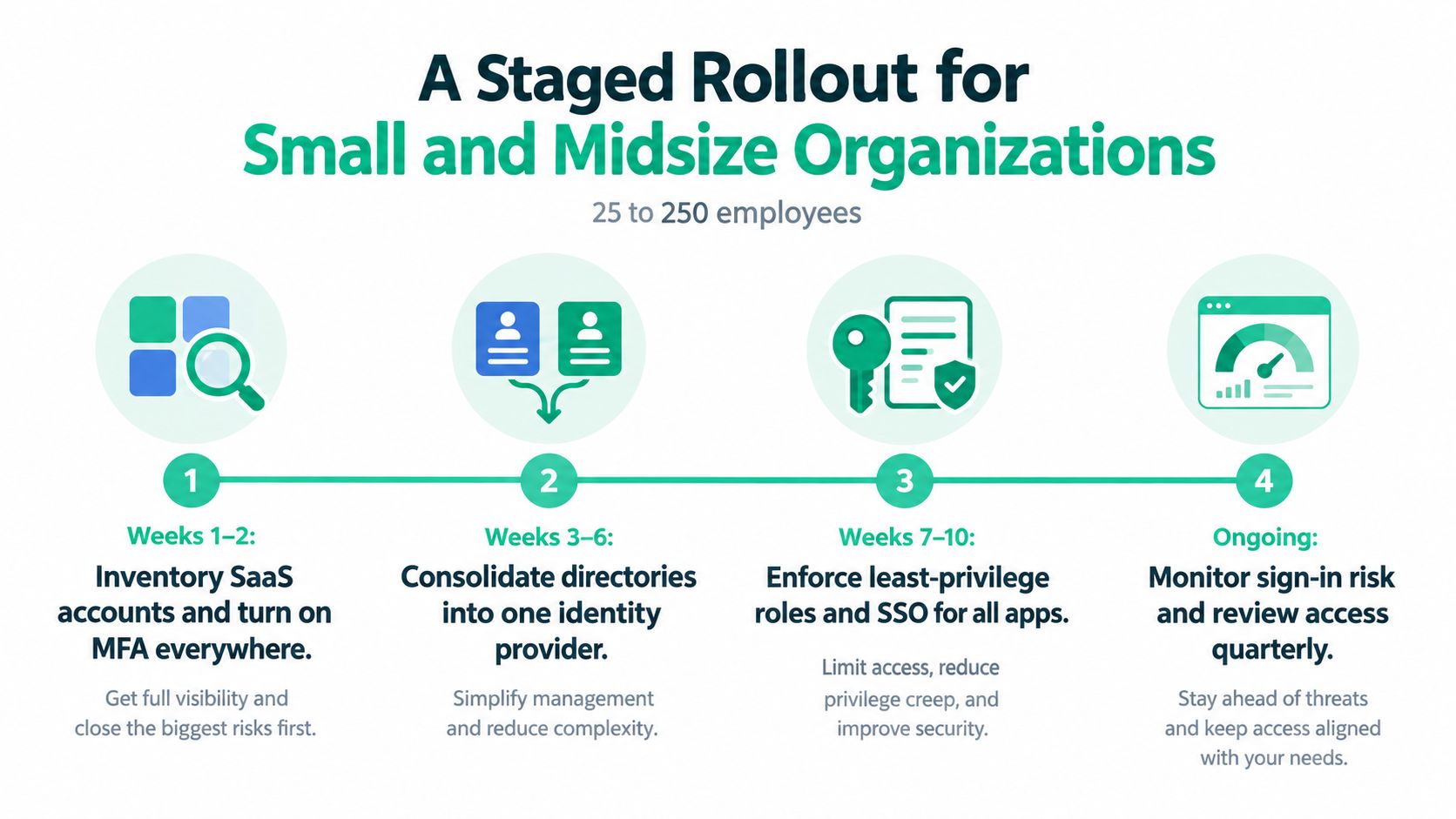
IAM projects fail when the owner receives a giant policy document and no sequence of actions. A workable rollout assigns a person, a system, and an evidence target to each phase. The budget can use low, moderate, or high bands based on user count, application complexity, hardware-key needs, and whether directory cleanup requires remediation.
Phase one establishes the facts
Start with a SaaS and identity inventory. List Microsoft 365, Google Workspace, payroll, banking, VPN, backup, CRM, file sharing, and vendor portals. Identify owners, sign-in methods, administrators, service accounts, and applications that can't support modern authentication.
Turn on MFA across supported systems, prioritizing email, remote access, finance, and administrators. The IT lead owns enrollment, the business owner approves exceptions, and the service desk records recovery procedures. The output is an application register and an exception list, not a claim that every risk has disappeared.
Phase two removes directory sprawl
Consolidate directories into one identity provider where practical. Use SSO for the top applications by user count, then connect lifecycle provisioning through supported integrations. Keep emergency access separate, test an outage procedure, and verify that logs identify the person, device, application, and result.
Phase three makes permissions intentional
Create role templates for finance, HR, operations, and other stable job families. Add attributes or just-in-time access for projects, seasonal workers, and contractors. Review shared mailboxes, file shares, cloud consoles, and backup systems. A denied-request test is valuable: sign in as an intentionally unauthorized role and confirm the application blocks the request.
Phase four protects elevated access
Separate daily-use accounts from administrator accounts. Require phishing-resistant MFA for domain, cloud, backup, and security consoles. Grant task-specific elevation, record critical administrative sessions, review dormant accounts, and alert on changes to recovery settings.
CISA specifically recommends phishing-resistant MFA for privileged accounts because attackers target administrators for their broad access to customer, financial, and discovery data. CISA's phishing guidance also explains why ordinary one-time passwords and push approvals generally don't stop phishing by themselves.
A Hamilton County manufacturer can use this roadmap without adding headcount by assigning application owners to provide access lists and having a managed IT partner handle policy configuration, testing, and evidence collection. The exact schedule depends on directory condition and application support. The important point is sequencing: inventory before enforcement, recovery before passwordless rollout, and least privilege before broad automation.
IAM also fits into a wider continuity plan. Use SOC-as-a-Service monitoring for identity alerts, immutable off-site backups for recovery, and a documented incident workflow. If an office in an older brick building also has unreliable Wi-Fi, pair identity work with UniFi networking, segmented access points, and latency-optimized mesh nodes so staff aren't forced onto unmanaged hotspots during an outage. If a failed storage system threatens records, bit-level data recovery and a tested migration plan belong in the same continuity conversation.
For owners choosing the next project, this Indiana IT prioritization playbook helps connect IAM work to downtime prevention, technician capacity, compliance evidence, and a predictable monthly budget. A managed approach can also centralize endpoint protection through tools such as Bitdefender GravityZone, while keeping IAM decisions tied to actual users, devices, and business roles.
Finchum Fixes IT provides MFA deployment, Microsoft Entra ID identity administration, centralized enrollment and login reporting, directory-based user syncing, and conditional-access policy support for businesses in the Greenwood and Indianapolis area. Schedule a Free Network Assessment or Security Risk Audit through Finchum Fixes IT to identify exposed accounts, excessive privileges, recovery gaps, and the IAM steps most likely to protect your next workday.