Conditional Access Policies Explained: Secure Your Business
A Greenwood contractor gets phished on a Tuesday morning. By lunch, an attacker is testing the stolen password against Microsoft 365, financial files, and remote access. Conditional access policies stop that path by checking the user, device, location, and risk before granting access, turning identity security into a practical business-continuity control.
Along the I-65 corridor, many small businesses still treat Microsoft 365 security as an MFA toggle. That leaves gaps in device-code flows, security-info registration, privileged access, legacy authentication, and licensing coverage. A policy can exist in the portal and still miss the sign-in path an attacker uses at 2 a.m.
A compromised account can create outages, emergency recovery work, and lost billable time. Downtime can cost up to $9,000 per minute, a figure that makes identity controls a financial decision as much as a security decision. The same disciplined approach that protects a downtown Indy tech hub also helps a Johnson County contractor keep crews, invoices, and customer records moving.
What Conditional Access Policies Actually Protect
A Greenwood contractor clicks a convincing invoice link, enters a Microsoft 365 password, and continues working. The attacker now has a valid credential. Without a policy that asks for more than the password, the criminal may reach financial files from an unfamiliar device or location.
Conditional access policies are the digital equivalent of a good bouncer. The bouncer checks identification, confirms membership, notices unusual behavior, and decides whether the person can enter. Microsoft Entra applies the same logic to cloud access. If a user wants a resource, then the user must complete a required action, such as MFA, use a compliant device, or satisfy a location or risk condition. Microsoft documents this as an if-then model in its Microsoft Entra Conditional Access overview.

The controls behind the door
Microsoft Entra operationalizes the decision with grant and block controls. A policy can require MFA for administrators, block legacy authentication, require compliant devices, or respond to risky sign-ins. Those controls support a broader Zero Trust architecture, where a successful password doesn't automatically equal a trusted session.
A practical policy might say:
- If an administrator opens an admin portal, require MFA.
- If a worker accesses company files, require a compliant device.
- If a sign-in carries high risk, require stronger verification or block access.
- If a client uses legacy authentication, block the attempt.
The point isn't to make employees fight security prompts all day. The point is to apply friction where the request looks dangerous and keep routine access predictable. Named locations can also shape that decision, because Microsoft says sign-ins from trusted network locations lower sign-in risk and recommends adding named locations when risk or device controls aren't already using them. The Microsoft identity operations guidance explains that relationship.
For an owner with a small office near Greenwood Park Mall, the business case is straightforward. A stolen password shouldn't let a stranger open payroll, customer contracts, or project bids. Reviewing identity and access management tools for business can help identify which surrounding controls belong in the design.
Practical rule: MFA protects the sign-in event. Conditional Access protects the decision about whether that sign-in is acceptable.
How the If-Then Engine Works Inside Entra ID
Microsoft Entra evaluates each access request against several inputs before applying grant or block controls. The request is matched to the users, roles, applications, authentication context, device state, location, and risk signals covered by the applicable policy. Access is granted only when the required conditions are satisfied.
Three inputs shape the decision
Identity and authentication. Entra can identify the user, role, application, authentication context, and requested action. Requiring MFA for administrators remains a practical baseline because a privileged account can change settings across the tenant. Businesses should distinguish MFA from broader two-factor authentication for business guidance when documenting sign-in requirements.
Device health. A compliant-device condition asks Microsoft Intune or the configured device-management system to verify that the endpoint meets the organization's rules. Microsoft documents that compliant-device, hybrid-joined, and MFA requirements can be combined in one policy. For example, a payroll application can require both a verified user and an approved company device.
Location and risk. The request can be checked against named locations and risk signals. A sign-in from a familiar office network may receive different treatment from one carrying a high-risk signal from an unfamiliar environment. These inputs are useful, but they do not replace testing for device-code flows or security-info registration paths, which can create gaps when policies cover only the usual browser sign-in.
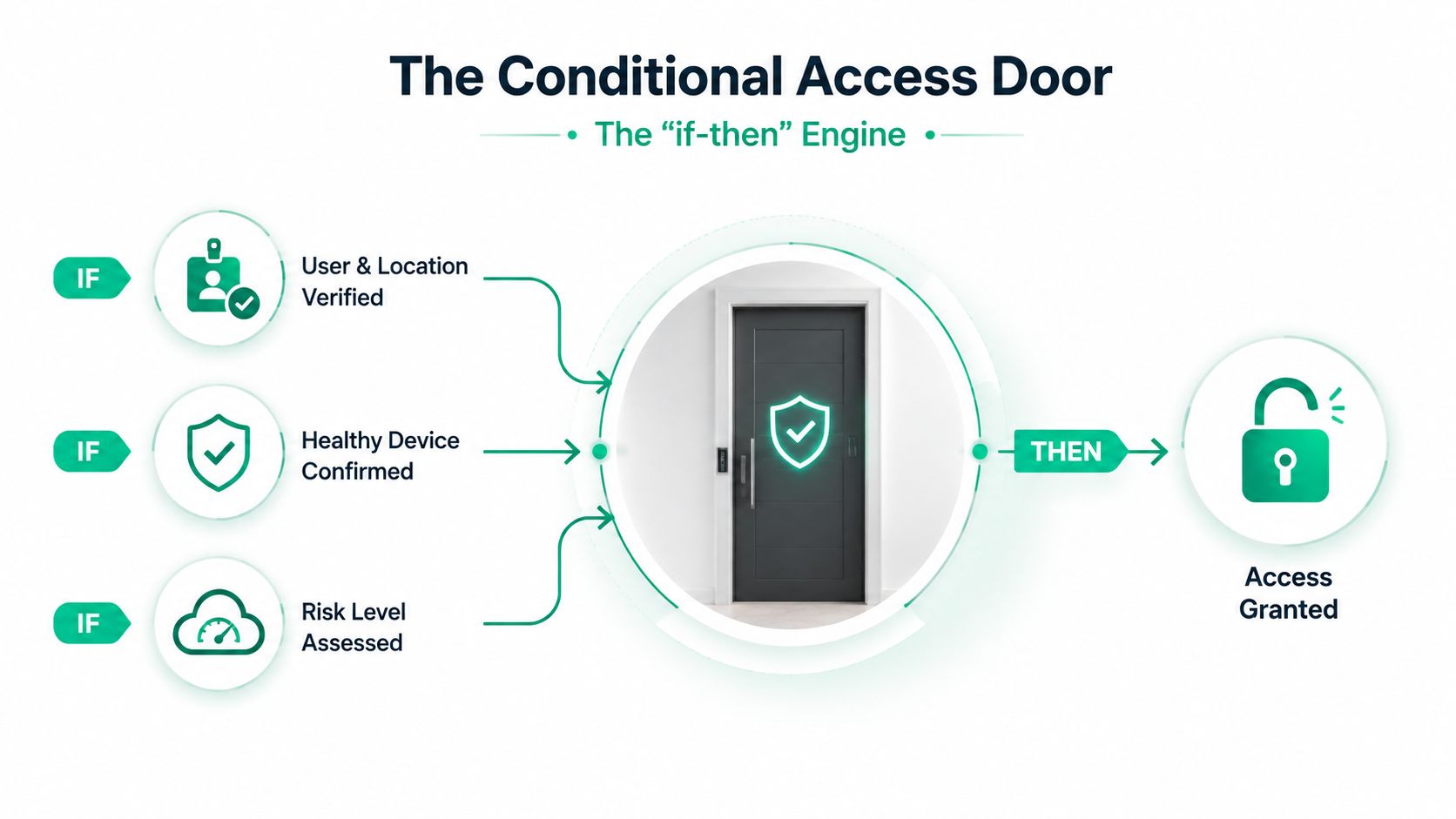
A policy can require MFA and a compliant device together. Microsoft states that when one policy requires MFA and another requires a compliant device, both conditions must be satisfied before access is granted. That combination gives business-critical resources two separate checks instead of relying on either control alone.
Zero Trust evaluates every request
Conditional Access is a Zero Trust policy engine. It treats each access request as untrusted until the configured conditions are met. The practical goal is a clear rule for each access path, not constant prompts for every employee.
Risk-based Conditional Access requires Microsoft Entra ID Premium Plan 2, according to Microsoft's automatic Conditional Access policy announcement. Confirming that license before designing around advanced risk signals prevents a policy that cannot run as intended. Entra sign-in logs show which policies applied, while the insights workbook can review policy impact across time windows ranging from 4 hours to 90 days, as documented by Microsoft.
The result is concrete: legacy authentication can be blocked, administrators can face MFA, and high-risk sign-ins can receive an automated challenge instead of a free pass. A policy review should also check whether licensing, device-code flows, and security-info registration controls match the access routes an Indy business uses.
Deploying Conditional Access from Report-Only to Enforcement
A safe rollout starts with inventory, not clicking. Confirm which Microsoft Entra licenses are assigned, identify administrators and break-glass exclusions, list business-critical applications, and note devices that aren't enrolled or compliant.
Build the first policy
Use this portal path:
- Open Entra admin center.
- Go to Protection > Conditional Access.
- Select New policy.
- Name the policy for its purpose, such as “Business apps, MFA and compliant device.”
- Select the users, groups, roles, cloud apps, and authentication context that should be covered.
- Under Grant, select Require multifactor authentication and Require device to be marked as compliant.
- Set Enable policy to Report-only.
- Save the policy.
Microsoft recommends combining controls such as MFA plus a compliant or hybrid-joined device, while narrowing targeting when appropriate to specific apps, authentication context, or custom security attributes. Don't begin with a tenant-wide block unless you've tested the recovery path and verified emergency access.
Report-only isn't invisible. Microsoft documents that a report-only policy requiring a compliant device can still prompt macOS, iOS, and Android users to select a device certificate, even though compliance isn't enforced. Record those prompts before employees report a “random” login problem.
Validate before enforcement
After the policy runs in report-only mode, review sign-in logs for ordinary users, administrators, mobile devices, remote workers, and application-specific flows. Compare the expected outcome with the recorded result, then adjust exclusions and targeting before changing the policy to On.
Microsoft's troubleshooting workflow is:
Entra ID > Monitoring & health > Sign-in logs > open the event > Conditional Access tab.
That is the exact portal workflow for seeing which policy interrupted a sign-in. Filter by correlation ID, Conditional Access result, username, date, and resource to isolate the event. There isn't a magic terminal command that replaces this portal record. The diagnostic command is the portal path itself.
Policies using only the Require Approved Client App grant setting must be transitioned by March 2026, according to Microsoft's Conditional Access documentation. Treat that deadline as a change-management item, not a last-minute cleanup task. A written change-management process for improving Indiana business ROI keeps policy changes tied to owners, testing, and rollback steps.
Common Misconfigurations That Leave SMBs Exposed
The dangerous assumption is simple: “We turned on MFA, so Conditional Access is handled.” A policy can appear active while missing users, applications, actions, or licensing coverage.
Licensing can create a false green light
Microsoft is surfacing informational messages when some policies protect more users than current licensing entitlements support. That means administrators need to compare policy scope with license scope, especially in a growing Hamilton County company where users and groups change often. Advanced risk-based policies also require Microsoft Entra ID Premium Plan 2, so a design that depends on risk signals needs the matching entitlement.
The login screen isn't the whole attack surface
Security-info registration deserves its own review. If an attacker controls a password for an account without a registered MFA method, an unprotected registration path may allow a new factor to be added before the general MFA rule protects later access. Device-code flows deserve similar scrutiny because they can create a different authentication path from the browser experience.
macOS platform SSO, Windows Hello for Business registration, legacy applications, and custom client flows can also behave differently from the sign-in path an administrator tested. Microsoft describes upcoming enforcement changes spanning March to June 2026, with a separate July 2026 change affecting Windows Hello for Business registration, in its Entra enforcement update. Those changes can alter access outcomes across Entra, Windows Hello, macOS platform SSO, and legacy app paths.
A report-only policy is evidence, not protection. It tells you what would happen, but it doesn't lock the door.
In Central Indiana assessments, the useful question isn't “Do you have Conditional Access?” It's “Which sign-in paths, user actions, and resources does it miss today?” A review of Active Directory management for Indy SMBs belongs beside that policy review because group membership and role assignments affect who gets covered.
Decision Matrix for Choosing the Right Policy
A two-person professional office doesn't need the same policy shape as a healthcare practice, defense contractor, or manufacturer with field devices. Start with the resource and threat path, then select the control that employees can meet reliably.
Conditional Access Policy Selection by Business Need
| Policy Type | License Required | Best For | Compliance Alignment |
|---|---|---|---|
| Basic MFA enforcement | Appropriate Microsoft Entra licensing for the configured control | Broad protection for users and administrators | NIST CSF identity protection, baseline HIPAA safeguards |
| Compliant-device requirement | Appropriate Microsoft Entra licensing plus device-management capability | Businesses handling sensitive data from managed endpoints | HIPAA device and access controls, stronger NIST CSF protection |
| Risk-based access | Microsoft Entra ID Premium Plan 2 | Organizations that need policies tuned to sign-in or user risk | NIST CSF risk-based protection, higher-assurance HIPAA or CMMC programs |
MFA is a sensible starting point, but it isn't automatically the finish line. A healthcare business handling protected health information may need device restrictions so a password and second factor aren't the only evidence behind access. A defense contractor working toward CMMC may need named-location restrictions and tighter controls for privileged users, depending on its documented environment and assessment scope.
For a general business following NIST CSF, risk-based policies can fit the Identify, Protect, Detect, and Respond cycle because sign-in logs and policy results give administrators evidence to review. That doesn't make Conditional Access a compliance certificate. It makes the control easier to map into a broader security program.
Johnson County business owners should also separate office access from remote work instead of assuming the same rule fits both. A Hamilton County company adding employees may need role-specific policies for administrators, finance staff, and contractors. Use narrow exceptions only when there's a documented reason, an owner, and a review date.
The practical choice often looks like this:
- MFA first: Use it broadly for normal user and administrative access.
- MFA plus device compliance: Add it for sensitive files, regulated data, and managed workstations.
- Risk-based access: Use it when the licensing and operating process support reviewing risk signals and responding to them.
- Named locations: Use them to distinguish known networks without treating a trusted network as a complete security boundary.
Troubleshooting Blocked Sign-ins and Reporting Gaps
A blocked sign-in is often a policy doing its job. The problem is finding out which policy, which condition, and which part of the request caused the interruption.
Open Entra ID > Monitoring & health > Sign-in logs. Find the failed event, open it, and select the Conditional Access tab. Microsoft's Conditional Access troubleshooting workflow recommends filtering by correlation ID, Conditional Access result, username, date, and resource.
A quick diagnostic sequence
- Start with the user and resource. Confirm that the employee opened the intended application, not an old bookmark or a separate client.
- Read the policy result. Identify whether the event was blocked, challenged, or allowed under report-only evaluation.
- Check the grant control. Look for missing MFA, device compliance, hybrid join, or location requirements.
- Inspect exclusions. Confirm that the user, role, group, application, platform, or location wasn't unintentionally excluded.
- Test the client path. A mobile app, legacy client, device-code flow, and browser can produce different evaluation results.
Report-only testing can produce confusing symptoms. Microsoft says macOS, iOS, and Android users may see a device-certificate selection prompt when a report-only policy requires a compliant device, even though the compliance requirement isn't enforced. Document that behavior so the service desk doesn't remove the policy to silence a prompt.
After Microsoft's automated policy rollout announced on November 6, 2023, eligible tenants received policies covering areas such as admin portals, per-user MFA customers, and high-risk sign-ins, with 90 days to review, customize, or disable them before enforcement, according to Microsoft's announcement. Classic Conditional Access policies stopped enforcing controls after July 10, 2024. Review those automated and legacy settings during the same log investigation.
Map the result to the business requirement. HIPAA, CMMC, and NIST CSF discussions are stronger when the organization can show which policy protects which resource, role, and access path.
Protecting Indy Businesses from Downtime and Breaches
Conditional Access earns its place in a business plan when it prevents a stolen password from becoming a production outage. A credential incident can force password resets, account review, file-access investigation, customer communication, and recovery work while employees wait for access to return.
That work consumes the same hours a contractor could spend on a project, a clinic could spend serving patients, or a manufacturer could spend fulfilling orders. It also sits beside the broader recovery plan, including immutable off-site backups, endpoint protection such as Bitdefender GravityZone, resilient UniFi networking, and tested data-recovery procedures. Bit-level data recovery matters when a failed drive is involved, while SOC-as-a-Service monitoring helps identify suspicious identity activity before the help desk hears about it.
In our 17 years of local service, the recurring lesson is that security controls must fit the way people work. An aging server in a Greenwood business park, spotty Wi-Fi in an old brick building, or a remote employee using an unmanaged laptop can turn a clean policy design into a frustrating access failure. The managed approach pairs policy scope with endpoint health, network design, user training, and a documented rollback path.
Microsoft Entra sign-in logs provide the evidence to tune the rules. The business owner gets a clearer answer to two questions: who can access sensitive resources, and what happens when the request doesn't look right? That predictability supports business continuity and converts wasted tech time into billable hours and more predictable monthly budgets.

For broader defensive habits beyond identity policy, these Beyond Surplus cybersecurity tips offer useful reminders about common business attack paths. Indiana companies can fold those practices into a business continuity planning checklist, then test whether identity controls support the recovery plan rather than obstructing it.
Finchum Fixes IT configures Microsoft Entra Conditional Access, reviews licensing and policy coverage, and provides local support for Greenwood, Indianapolis, and Central Indiana businesses, with urgent issues averaging under two hours for response. Schedule a Free Network Assessment or Security Risk Audit to find missing sign-in paths, device controls, and registration protections before an attacker does.
Schedule a Free Network Assessment or Security Risk Audit with Finchum Fixes IT to review your Conditional Access policies, licensing coverage, device requirements, and overlooked authentication paths. Greenwood and Indianapolis businesses can get a practical remediation plan that protects access, limits downtime, and keeps staff focused on billable work.