Firewall Management for SMBs: A Practical Guide for Indiana
Almost half of larger enterprises now field more than 50 firewall change requests a week, and 12% deal with over 1,300 weekly requests, according to The State of Firewall Security report from Tufin (report). That's why firewall management isn't a box-checking task anymore. It's a continuity job, and in a Greenwood shop, a bad firewall change can turn into downtime that burns money every minute and wrecks the week.
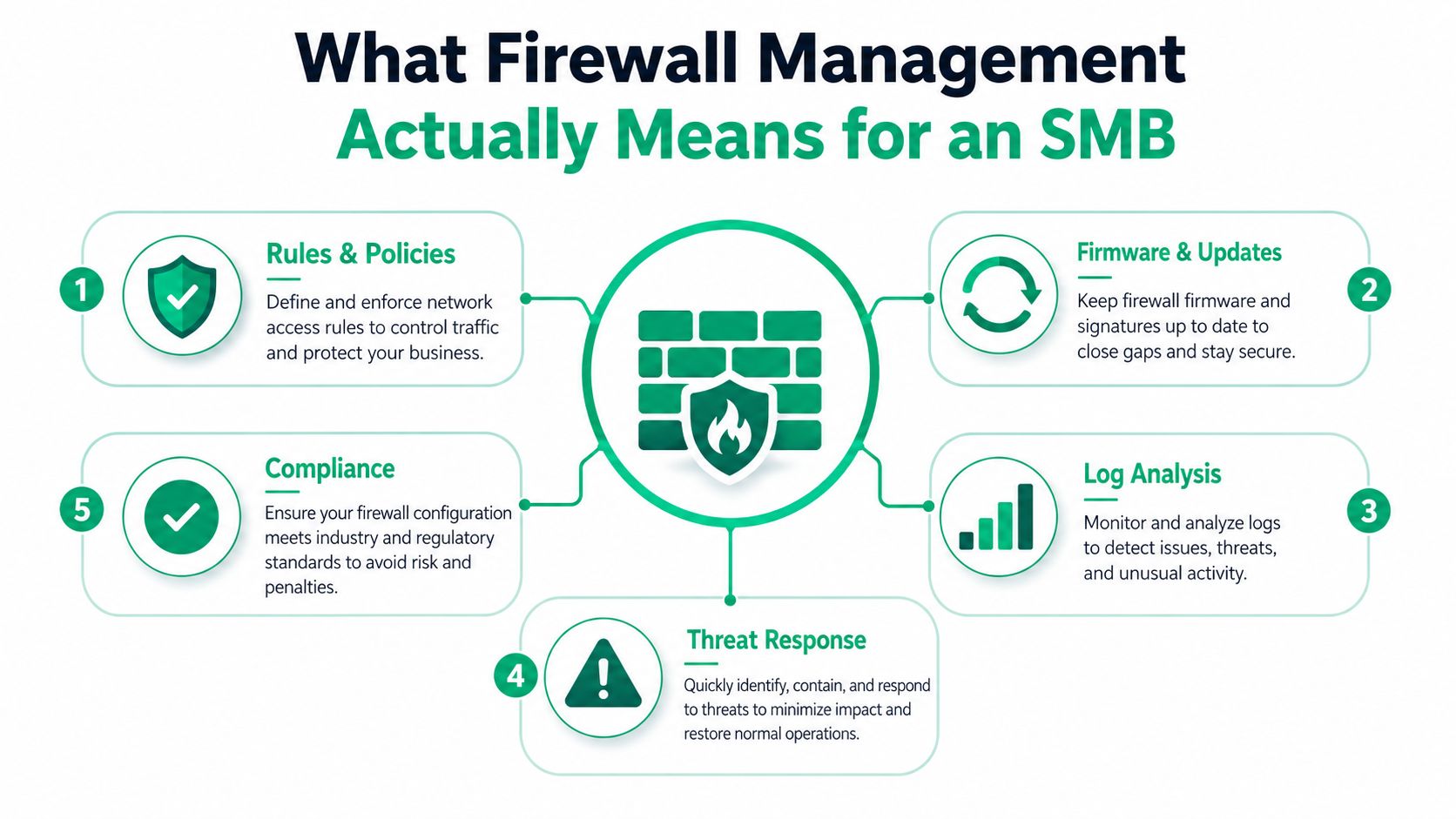
Firewall management is the day-to-day work of keeping firewall rules, firmware, logs, and policies lined up with how the business runs. It means somebody owns the rule base, reviews changes, patches the device, checks logs, and knows what “normal” looks like before something breaks.
What Firewall Management Means for an SMB
A firewall used to be something you bought, turned on, and mostly ignored. That approach breaks fast once the business grows, the cloud gets involved, and the same device has to protect office users, remote staff, SaaS apps, and the vendor exceptions that never seem to go away.
The job is policy governance. The firewall has to reflect what the business allows, what it blocks, and who approves changes when someone says, “We need this port open for payroll,” or “The VoIP vendor needs a new rule by Friday.” As noted in the NIST SP 800-41 guidance linked above, the baseline should be to block by default and allow only what is explicitly approved, because every extra permit widens attack surface and adds admin overhead.
That matters because downtime is expensive. For a Greenwood or Indianapolis SMB, a firewall problem can freeze email, cloud apps, payment systems, VPN access, or production systems. When the firewall is wrong, work stops, and the billable hours do not.
Practical rule: If nobody can tell you who owns the firewall, when the rules were last reviewed, and how changes are approved, the firewall is already unmanaged.
For an Indiana SMB, the question is not whether the firewall is “on.” It is whether it is predictable. A good setup keeps the business running without surprise outages, surprise vendor breakage, or surprise spend that shows up because someone had to rush a change after hours. That is the budget side of firewall management, steady monthly upkeep is usually easier to plan for than emergency recovery.
What to ask your IT person
A business owner in Johnson County does not need to memorize packet flows. You do need to know whether your firewall has a written policy, a named owner, a change log, and a rollback plan. If the answer is vague, that is the problem.
You should also ask whether the firewall still matches the business. A lot of SMBs inherit a box somebody configured years ago and never revisit. That is how old exceptions, old VPNs, and old vendor rules stay in place long after the original need is gone.
If you are trying to decide whether the current setup still fits the business, start with a plain checklist and compare it to the realities of your network. A practical guide like this Indiana firewall guide can help you translate the hardware and service choices into something you can budget and maintain without guessing.
The Four Firewall Types You Will Actually Meet
Most SMBs don't need a lecture on firewall taxonomy. They need to know what's sitting on the rack, what it can see, and what it can't.
A basic packet-filtering router checks traffic against simple allow or deny rules. Stateful firewalls track the connection, so they know whether a packet belongs to an existing session. Next-generation firewalls, like Fortinet, Palo Alto, and Cisco Firepower, add deeper inspection, application awareness, and more control over traffic that would slip through older gear. Cloud-native firewalls, such as Azure Firewall and AWS Network Firewall, sit in front of cloud workloads and control egress, segmentation, and east-west movement inside virtual environments.
| Firewall types at a glance for SMBs | |||
|---|---|---|---|
| Type | Best for | Inspection depth | Example vendor |
| Packet-filtering | Small, simple networks with light traffic | Low | Basic router firewall |
| Stateful inspection | Traditional office networks | Moderate | Cisco, Fortinet |
| Next-generation firewall | Businesses that need app control, segmentation, and tighter policy | High | Palo Alto, Fortinet, Cisco Firepower |
| Cloud-native firewall | SaaS, hybrid, and cloud workloads | High in cloud context | Azure Firewall, AWS Network Firewall |
A 40-person machine shop on the I-65 corridor may be fine with a solid stateful or NGFW setup at the edge. A downtown Indy SaaS startup pushing cloud services through multiple regions usually needs cloud-native controls too, because the perimeter is no longer a single building.
Greenwood retail chains often land in the middle. One store has a FortiGate, another has older gear, and a third store is still using rules written for a different layout. That's where central management matters more than brand loyalty.
One practical way to compare options is to ask what problem each one solves. If your issue is simple internet filtering, a packet filter may be enough. If your issue is application visibility, vendor exceptions, and segmented traffic, you need stronger control.
See a practical Indiana firewall buying guide
The Core Processes That Keep a Firewall Healthy
A healthy firewall depends on five working parts, and each one has a job. Policy creation sets the business rules. Rule hygiene keeps stale, shadowed, and overly broad rules from stacking up. Patching closes known holes. Configuration backups give you a way back when an update fails. Logging and monitoring show whether the device is doing its job or turning into a problem.
A small Greenwood family practice is a good example. Under a default-deny model, the clinic allows only the EHR vendor's approved traffic, then adds a narrow billing exception for the payment portal. Everything else stays blocked. That follows the least-privilege approach outlined earlier in the NIST SP 800-41 guidance and is cleaner than writing permissive rules and hoping nobody notices later.
The five habits that matter
- Policy creation: Write the business reason beside each rule, not just a technical label.
- Rule hygiene: Remove expired exceptions and shadowed rules before they turn into clutter.
- Patching: Apply firmware and software updates when the vendor fixes real vulnerabilities, not when someone “gets around to it.”
- Configuration backups: Save the working config before every meaningful change.
- Logging and monitoring: Keep enough history to answer who changed what, when, and what broke.
Patching is boring right up until a bad version or exploited flaw takes the edge firewall out of service. That is why a patch management routine has to exist outside of memory and goodwill. If you need a clean way to structure that part of the job, this guide on patch management basics for small business environments fits the same operational mindset.
Pro move: Keep a known-good config backup before every patch window. When the change fails, rollback speed matters more than the postmortem.
Logging is where the truth lives. If the firewall blocks something, you want proof. If it allows something bad, you want enough detail to figure out why. Without logs, every incident becomes guesswork.
Metrics and SLAs That Actually Matter
A firewall program is only as good as the numbers behind it. Azure Firewall's metric names are useful because they map cleanly to what any SMB should be watching, even if the firewall vendor is different. DataProcessed, Throughput, SNATPortUtilization, FirewallHealth, and FirewallLatencyPng each point to a real operational question (Azure Firewall monitoring reference).
High SNATPortUtilization means outbound connections are getting squeezed. SaaS apps start failing in ugly ways, usually when someone in accounting or operations is trying to send traffic and the firewall has run out of usable source ports. Rising latency often shows up after a rule change or a traffic spike, and that's when users complain before IT has a clean explanation.
What to watch, and why it matters
| Metric | What it tells you | Business impact |
|---|---|---|
| DataProcessed | How much traffic is flowing | Helps explain load and cost trends |
| Throughput | How hard the firewall is working | Shows whether the device is becoming a bottleneck |
| SNATPortUtilization | Outbound port pressure | Can break SaaS and cloud connections |
| FirewallHealth | Device health status | Early warning for failure |
| FirewallLatencyPng | Response delay | Correlates with slow apps and failed policies |
SLAs should cover more than “we'll look at it soon.” Ask about time-to-detect policy violations, time-to-deploy a new rule, time-to-rollback a bad change, and the firewall's own RPO/RTO. Those terms sound like disaster-recovery language because that's exactly what they are. The firewall can be a single point of failure for a remote workforce, branch office, or cloud-heavy workflow.
A good SLA doesn't just promise monitoring. It tells you how fast somebody will undo a mistake when the business is already hurt.
If a vendor can't answer those questions in plain English, they're selling comfort, not control. That's fine for a demo. It's not fine when the finance team is waiting on access to the ERP.
Why a Flat Network Is the Real Risk and How Zero Trust Fixes It
A Greenwood manufacturer once called with the classic flat-network mess. Accounting PCs, CNC machines, the owner's laptop, and a few shared service systems were all sitting in the same broad VLAN. One phishing email got a foothold, and because there was no meaningful segmentation, the attack moved sideways until the team had a mess on its hands.
The fix was not a fancy appliance first. The fix was a firewall management posture built around Zero Trust architecture. That meant identity-aware policies on the edge firewall, microsegmentation between IT and OT, strict egress allowlists, and TLS inspection exceptions only for approved SaaS that the business needed. It also meant detecting shadowed rules so nobody kept approving broad exceptions just because they were convenient.
The key idea is simple. Zero Trust is not a product you buy, it's a way you manage access. A flat network assumes internal traffic is safe. A segmented network assumes every path needs a reason.
What changed in practice
- Identity-based policy objects replaced broad “any-any” style rules.
- Egress control limited which external services the company could reach.
- Shadowed-rule detection exposed rules that looked active but were never used.
- OT and IT separation kept a problem on the office side from touching machines on the production side.
That kind of control ties directly to continuity and billable hours. If one compromised laptop can't move laterally into critical systems, the business stays open while the incident gets contained. For a machine shop on the I-65 corridor, that can mean the difference between a contained cleanup and a production halt.
The same logic holds for Indiana service firms with cloud apps. Once the network is segmented properly, the firewall stops being a giant allow list and becomes a controlled gate with a clear purpose.
Why VLAN segmentation matters for Indy businesses
Compliance and Audit Readiness Without a Full Security Team
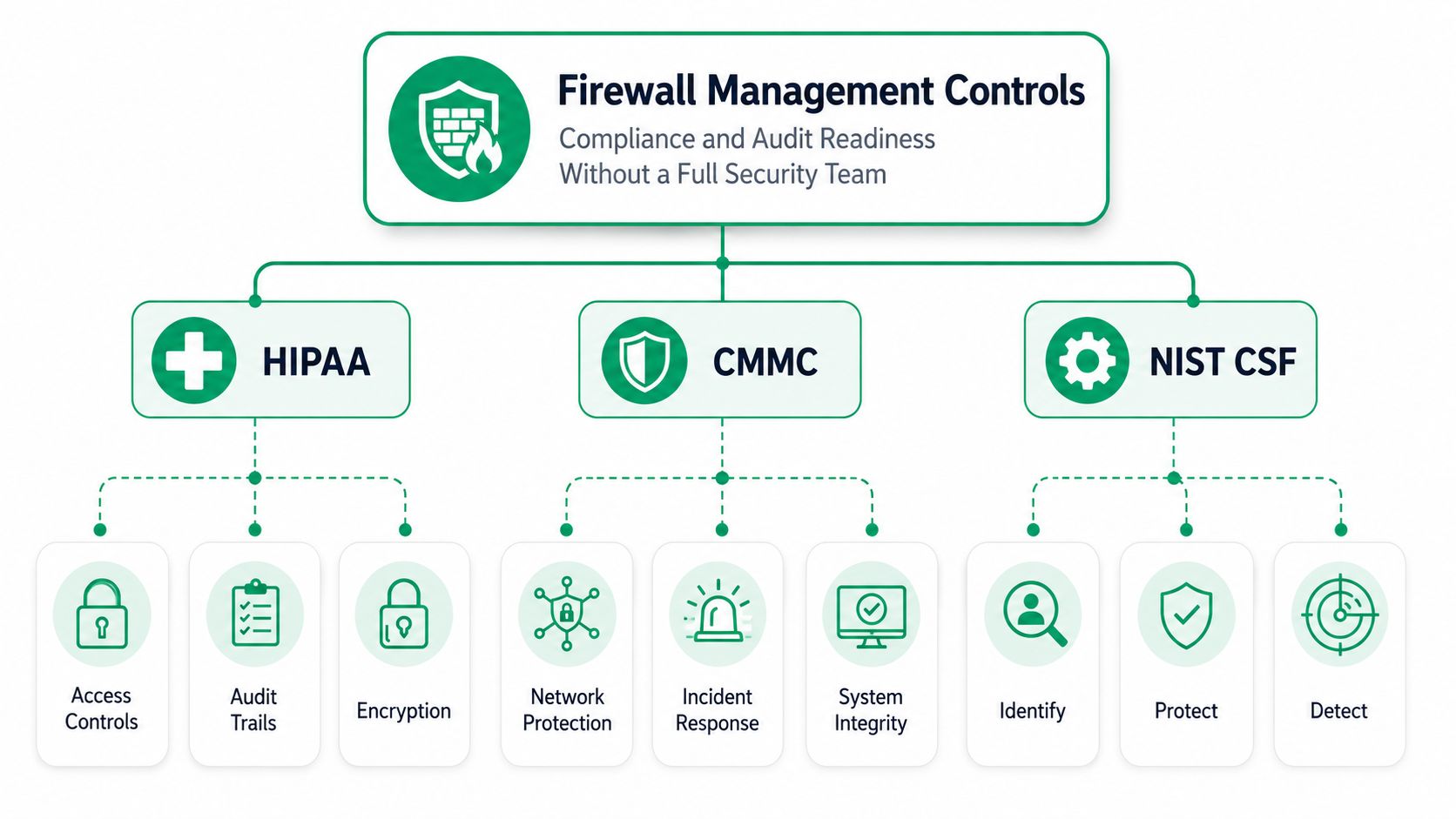
Most Central Indiana SMBs don't need a giant compliance program to get serious value from firewall management. They need a firewall baseline that lines up with HIPAA, CMMC, and NIST CSF, then they need evidence that the baseline is being followed. A clean default-deny policy, centralized logs, and regular rule reviews already cover a lot of the ground auditors want to see.
For a Greenwood dental group, HIPAA means the firewall needs to support documented access controls and audit trails. For a defense contractor along the I-69 corridor, CMMC pushes harder on boundary protection and system integrity. For a general business in Hamilton County, NIST CSF gives the vocabulary for identifying, protecting, and detecting without turning the office into a compliance factory.
What a small team can document
A good partner helps you turn firewall work into evidence. That usually means rule review records, change tickets, log retention, backup proof, and notes showing why a rule exists. It also means mapping controls to the framework without pretending the firewall alone solves everything.
Audit reality: The firewall is rarely the whole control. It's the proof that access is managed, reviewed, and tied back to business need.
HIPAA still wants risk assessment work outside the firewall. CMMC may require boundary controls and response handling beyond the rule base. NIST CSF expects written evidence, not just a working device. That's why a managed firewall relationship is useful for SMBs that don't have a full-time security team. It creates the paper trail without forcing an owner to become a compliance specialist overnight.
This is also where a managed local provider can fit. Finchum Fixes IT handles networking, cybersecurity, and support for Indiana businesses, so it can be part of the stack alongside existing tools rather than a replacement for them. The important part is that the firewall program stays documented and reviewable instead of living in somebody's memory.
Small-business cybersecurity planning for 2026
In-House vs Managed Firewall Service for an Indiana SMB
Running firewall management in-house sounds straightforward until you price the coverage. A senior network engineer doesn't just patch devices. That person reviews logs, handles incidents, manages change windows, writes rollback plans, and stays available after hours when a bad rule cuts off the office. For a 25-person shop, that's a lot of responsibility to pin on one person.
A managed firewall service spreads that burden across people and tools. The useful pieces are SOC-as-a-Service monitoring, immutable off-site backups of firewall configs, quarterly rule reviews, and incident response that doesn't stop at 5 p.m. The firewall itself might still be a Cisco, Fortinet, or Palo Alto box, but the work around it becomes much more predictable.
What a small team should compare
- Coverage: Can someone watch it after hours, or only during business hours?
- Rollback: Is there a tested config backup to restore fast?
- Reporting: Do you get log summaries in plain English, or raw noise?
- Change control: Are new rules documented, approved, and reviewed?
- Tooling: Does the stack connect to Bitdefender GravityZone, SIEM, and SOAR cleanly?
Aberdeen's firewall-management analysis found that a firewall management solution can cut risk by about 3.6 times at the median and produce a median annual ROI of more than 200 times, with annualized business impact dropping from about 1.4% to 8.9% of annual revenue under the status quo to about 0.3% to 3.4% after implementation (Aberdeen analysis). That's not a promise for every shop. It is a strong signal that disciplined management pays for itself when the alternative is slow changes, rework, and preventable outages.
Cisco's Forrester TEI study reported that Cisco Secure Firewall and Firewall Management Center cut firewall-related work by up to 95% for network pros and up to 83% for security pros, while reducing deployment time by 36% and update time by 90% (Cisco TEI study). That kind of reduction is why many 25-person shops should keep the firewall hardware, but hand the day-to-day management to a partner.
If you've got one IT generalist, use a managed firewall service. If you've got a three-person IT team, you can run more in-house, but after-hours coverage still belongs with someone who answers the phone when the change breaks prod. For a Greenwood business owner, predictability matters as much as raw capability.
How to choose the right managed service provider
Your 30-Day Firewall Plan and Common Questions
Start with inventory. In week 1, list every firewall in the environment, who can log in, where backups live, and when firmware was last updated. If you can't answer those questions fast, you already found a risk.
Week 2 is policy cleanup. Move toward default-deny, remove stale rules, and document every exception in plain language. The rule should explain why the business needs it, not just what port number someone typed into the box. Week 3 is monitoring and backup discipline. Put logs where someone will read them, set sane alert thresholds, and make sure the config backup isn't sitting on the same device it's meant to save.
Week 4 ties the firewall to continuity and compliance. Map the rules to HIPAA, CMMC, or NIST CSF where relevant, test failover if the firewall supports it, and schedule a quarterly review. That calendar invite matters more than good intentions, because rule sprawl starts the day the exception gets approved and nobody owns the retirement date.
Questions owners ask most
How often should firewall rules be reviewed? At minimum, quarterly, and also whenever a new application, ISP change, business partner connection, major operational change, or personnel turnover affects access. Temporary rules should have expiration dates.
What if a firewall vendor goes out of business? Treat that as a lifecycle event, not a crisis. Inventory the config, export the rules, document dependencies, and plan a migration before support becomes a problem.
Does a cloud firewall replace a hardware firewall? No. They complement each other. A cloud firewall helps with cloud workloads and egress control, while hardware still matters at the office edge and for site-specific segmentation.
What should a non-technical owner ask this week? Ask who owns the firewall, how fast a bad rule can be rolled back, where logs are stored, and whether the current setup still matches how the business works.
A firewall program is healthy when it can be explained in plain English, changed safely, and restored quickly after a mistake.
That's the whole standard. If the answer is vague, the setup needs work.
Finchum Fixes IT helps Greenwood and Indianapolis businesses tighten firewall management, clean up risky rules, and build a setup that's easier to audit and easier to recover when something breaks. If you want a practical Free Network Assessment or a Security Risk Audit for your business, visit Finchum Fixes IT and get a clear picture of what's exposed, what's outdated, and what to fix first.