Indiana Cloud Migration Plans: Your Step-by-Step Playbook
A lot of Johnson County business owners are running modern companies on surprisingly fragile hardware. The front office looks polished. The shop floor is busy. The staff is working in Microsoft 365, QuickBooks, line-of-business apps, and cloud file shares. Then you open the server closet and find the underlying reality: aging hardware, battery backups past their prime, a switch hanging on by luck, and a loud server that everybody hopes survives one more quarter.
That setup works until it doesn't. Then your day turns into downtime, missed orders, phone calls you didn't want, and payroll spent on people waiting for systems to come back.
Plain truth: A cloud migration plan isn't a tech vanity project. It's a business continuity plan with better uptime, tighter security, and fewer nasty surprises.
[!NOTE] TL;DR
- Old server closets create real financial risk. Downtime can cost $427 per minute for small businesses and $9,000 per minute for large organizations according to Exigent's summary of Atlassian and Trilio benchmarks.
- Good cloud migration plans start with discovery, not moving boxes. You need dependency mapping, app triage, security review, and a staged rollout.
- Not every app belongs in the cloud. Some should move fast, some need rework, and some should stay put.
- Budget discipline matters. Cloud migrations can deliver savings, but poor planning causes overruns.
- Testing and rollback are non-negotiable. Functional, performance, and security testing protect uptime.
- Post-migration optimization is where ROI sticks. Right-sizing, monitoring, and compliance keep waste down and resilience up.
Is Your Server Closet Holding Your Business Hostage
It usually shows up at the worst possible time. Payroll is due, your front office cannot open the shared drive, and the one server in the closet is beeping hard enough for everyone to hear it through the wall. In that moment, the issue is no longer hardware. It is lost time, delayed cash flow, and a business owner stuck making risk decisions with no margin for error.
That pattern is common in Indiana companies that have grown faster than their infrastructure. A former storage room now carries accounting, file storage, remote access, line-of-business apps, and backups. One point of failure ends up carrying half the company.
In Johnson County, that risk gets expensive fast. A manufacturer loses production visibility. A medical practice cannot get to patient records. A contractor cannot dispatch crews or pull project files. The technical problem may start in a server closet, but the business impact hits revenue, service, and reputation.
The cost of waiting
Waiting rarely saves money. It usually delays a decision until the failure is more expensive and the timeline is worse.
For many Indiana businesses, a key issue is concentration of risk. One aging server, one firewall, one internet circuit, or one backup process becomes the weak link for everything built around it. If that setup fails during business hours, staff sit idle, customers wait, and leadership gets pulled into damage control instead of running the business.
Cloud migration plans help shift that risk into a model built for uptime and recovery. The goal is not to chase new technology for its own sake. The goal is to reduce outages, shorten recovery time, control support costs, and stop betting the company on old hardware that is already past its comfortable life.
What a permanent fix actually looks like
A good plan starts with business priorities, not a rushed move to hosted infrastructure. Some systems should move early because they are easy wins. Others need cleanup first. A few may need to stay in place until a replacement is ready.
That matters even more for local businesses dealing with compliance and older line-of-business software. A healthcare office has to protect HIPAA-regulated data. A defense-related manufacturer has to account for CMMC requirements. A company with a custom accounting or operations platform may need to modernize the application before migration makes financial sense. If you are sorting out whether an older system should be retained, rebuilt, or replaced, Doczen's modernization guide lays out those trade-offs clearly.
The permanent fix usually includes a few practical moves:
- Reduce single points of failure: Shift core workloads into platforms with better redundancy than a single office closet can provide.
- Prioritize by business impact: Move the systems that improve uptime and reduce support risk first, not just the easiest servers to copy.
- Clean up weak spots around the migration: Old switching, poor Wi-Fi coverage, inconsistent backups, and loose endpoint security often surface during planning.
- Match the design to your compliance needs: Data handling, access controls, retention, and audit requirements should be part of the plan from day one.
If your migration is tied to an office move, lease change, or broader infrastructure refresh, this guide to a flawless SMB data center migration is a practical reference before production systems are touched.
A cloud migration plan should give you fewer outages, clearer costs, and less dependence on luck. If it does not do those three things, it is not much of a plan.
The Foundation - Discovery Assessment and Strategy
A migration usually succeeds or fails before any server is copied.
The deciding work happens in discovery and planning. That is where teams find the old file share nobody documented, the accounting export that runs at 2 a.m., the vendor VPN tunnel that only one person remembers, and the line-of-business app that stops invoicing if one small dependency breaks. Indiana companies with aging infrastructure run into this all the time, especially when a server closet has grown in place for years without a clean map of what depends on what.
Discovery should answer business questions, not just technical ones
An assessment is not a device count. It should give an owner clear answers about risk, downtime, cost, and order of operations.
Start with four questions:
-
What do you have
Servers, virtual machines, applications, storage, backups, network paths, user access, vendor connections, and any system that supports daily operations. -
What depends on what
Authentication, shared databases, APIs, print services, reporting jobs, scheduled tasks, and data feeds between systems. These hidden links are often what turn a routine move into an outage. -
What outage hurts the business fastest
Phone systems, EMR platforms, ERP tools, quoting systems, production software, and accounting do not carry the same business impact. The migration order should reflect revenue, service delivery, and customer commitments. -
What data needs tighter controls
A medical practice in Indianapolis has HIPAA obligations. A manufacturer supporting defense work may need to account for CMMC. Many Indiana businesses also benefit from using NIST CSF as the reference point for access, logging, retention, and incident response decisions.
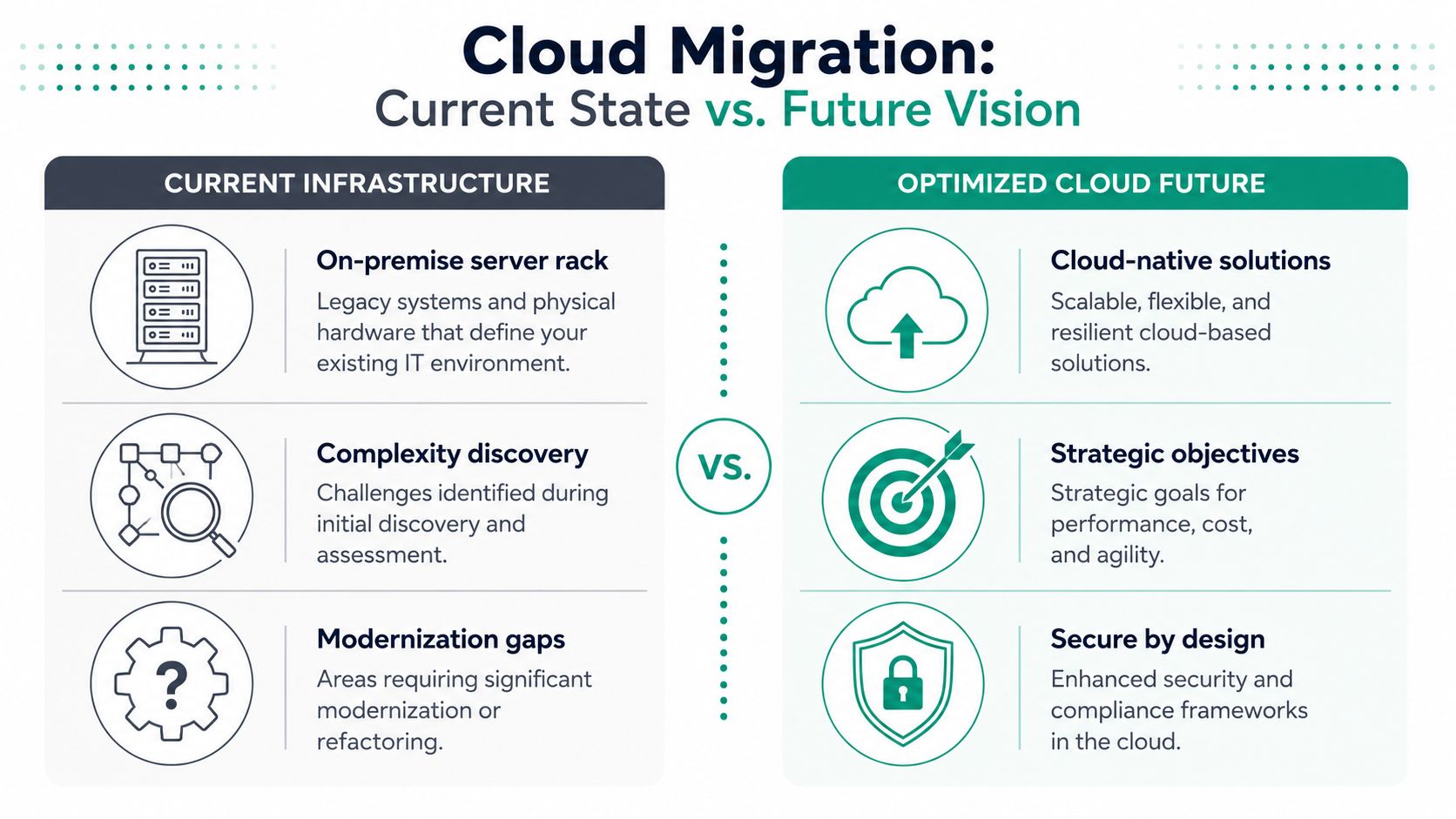
A good discovery phase also exposes business waste. We often find duplicate software, servers kept alive for one report, stale user permissions, and backup jobs nobody has tested in months. Cleaning that up before migration reduces cost and lowers the chance of carrying old problems into a new environment.
Strategy starts with sorting workloads, not moving everything
Every application does not deserve a cloud migration.
Analysts Gartner cited, as summarized by Flexential's review of Gartner's position, recommend evaluating which applications are ready for cloud, which need updates first, and which should stay in place for now. That is the practical call for many Johnson County businesses. Hybrid can be the right answer if a system depends on a local device, has awkward licensing terms, or costs more to rework than it will return in uptime or labor savings.
A simple rule helps here. If an application is poorly documented, tied to old hardware, central to operations, and subject to strict compliance controls, it should not be your first migration candidate.
The 7 Rs are business decisions
The 7 Rs matter because they force a choice about cost, timing, and future value.
| Approach | Plain-English meaning | Good fit |
|---|---|---|
| Rehost | Move it mostly as-is | Stable apps you need off aging hardware quickly |
| Replatform | Make limited improvements while moving | Apps that need a few updates without a full rebuild |
| Refactor | Rebuild it for cloud use | Core software you expect to keep for years |
| Repurchase | Replace it with SaaS | Older custom systems that modern software can handle better |
| Relocate | Move the environment with minimal app changes | Certain specialized platform environments |
| Retain | Keep it where it is for now | Systems with hardware, compliance, or cost constraints |
| Retire | Shut it down | Tools nobody should keep paying to support |
For owners, the question is straightforward. Which path gives the best return with the least operational risk?
Rehost gets you out of failing hardware fast. Refactor can produce long-term gains, but it takes more time and budget. Retain is sometimes the smartest choice because discipline matters more than forcing a cloud answer onto every system.
For teams trying to connect those choices to the broader operating plan, this article on enterprise IT strategic planning is a useful reference.
A business impact analysis belongs in this phase as well. This business impact analysis template for identifying outage tolerance and operational dependencies helps turn vague labels like “mission critical” into something practical for planning.
The Business Plan - Budgeting ROI and Compliance
A Johnson County owner usually asks the same question after the first migration meeting. What does this cost, what does it save, and how much business risk comes off the table?
If the plan cannot answer those three points in plain language, it is not ready for approval.

Budget for the whole move, not just the cloud invoice
A weak business case compares one monthly cloud bill to one aging server. Owners in Indiana know the true cost sits elsewhere too. Emergency hardware replacements, consultant time, after-hours cutovers, backup redesign, software licensing changes, staff training, and lost productivity during outages all belong in the model.
That matters in older buildings and growing offices across Greenwood, Franklin, and the south Indy corridor, where server closets often stayed in service years longer than planned. The cloud may lower capital spending, but migration still creates one-time project costs and ongoing operating costs that need to be priced accurately.
A good budget usually breaks into four buckets:
- One-time migration work: assessment, planning, engineering, testing, cutover, and rollback prep
- Platform costs: compute, storage, backup, security tools, and licensing
- People costs: internal staff time, outside specialists, user training, and support during transition
- Risk and compliance costs: audit logging, policy controls, documentation, retention rules, and vendor review
That is the business case. Not wishful math.
ROI needs hard business inputs
Cloud ROI gets clearer when owners stop asking, “Will cloud save money?” and start asking, “What is downtime costing us now, and what are we paying to keep old systems alive?”
For many Indiana businesses, the strongest return shows up in areas that never sat on the old server invoice:
- Fewer outage hours, which protects revenue, production schedules, and customer confidence
- Less surprise spending on failed hardware and rushed support calls
- More productive staff time because internal teams are not tied up maintaining old infrastructure
- Faster recovery after incidents through better backup and recovery design
- Cleaner growth planning without buying another server every time the business adds users, locations, or applications
For owner-level planning, this guide on real ROI from cloud migration for Indiana businesses gives a practical view of where returns usually show up.
Approval also needs governance. Someone owns the budget. Someone signs off on risk. Someone decides whether compliance requirements justify a more expensive design. In smaller companies, those decisions often sit with the owner, CFO, and operations lead, even if IT builds the plan.
Compliance changes the budget
Compliance is not a line item you add at the end. It affects design choices from the start.
Healthcare groups handling protected health information need encryption, access controls, audit trails, vendor agreements, and retention policies that support HIPAA obligations. Indiana manufacturers and defense subcontractors dealing with controlled data face similar pressure under CMMC. Even companies outside those categories still benefit from mapping controls to a standard such as NIST CSF, because it gives leadership a clearer way to justify security spending.
That has real cost implications. Logging, endpoint protection, identity controls, immutable backups, multi-factor authentication, and documented incident response all add cost. They also reduce the odds of a far more expensive event later.
I usually advise owners to price two scenarios. One covers the cheapest technically workable migration. The other covers the migration that fits their compliance exposure, cyber insurance expectations, customer contract requirements, and recovery targets. The gap between those numbers often leads to the best executive discussion in the project.
Validate the data before you call it done
A migration can stay within budget and still fail the business if records arrive incomplete, reports break, or workflows start using bad data. That risk matters for accounting systems, medical records, inventory platforms, and any line-of-business app the company depends on every day.
Teams that want a practical reference on how to validate data pipelines during migration should review those checks before final approval. Data validation deserves budget, ownership, and sign-off criteria just like security testing.
A short visual can help frame the financial side for non-technical stakeholders:
Security, compliance, and recovery planning belong in the ROI model because they protect uptime, reduce cleanup costs, and make the migration defensible to owners, auditors, and customers.
The Execution Playbook - Staging Testing and Cutover
Friday at 5:00 p.m., the old server is still running in a closet off the back office. By Monday at 8:00 a.m., your team expects email, files, accounting, and line-of-business apps to work without drama. That gap is where cloud migration plans either protect the business or create an outage.
Execution is where discipline shows up. A strong migration is written down, staged, tested, and approved before anyone touches production. For Indiana businesses working around aging hardware, lean internal IT teams, and compliance pressure from HIPAA or CMMC, that structure protects revenue and uptime.
Runbooks beat heroics
A runbook is the play-by-play for the migration window. It names the owner of each task, the order of operations, the test steps, the cutover window, the approval path, and the rollback trigger.
The projects that go well usually look boring from the outside. The checklist is clear. Dependencies are documented. The test environment is close enough to production to expose real problems. Nobody is guessing late at night while users are waiting on Monday morning.
One Johnson County manufacturer we worked with cared less about the cloud itself than about one practical question. Would the plant keep moving? The right answer was a staged sequence. Office systems moved first. Performance and access were checked under normal use. Production workloads moved only after the lower-risk pieces proved out. That approach takes longer than a one-shot cutover, but it reduces the chance that a migration turns into a business interruption.
What the actual move should include
The mechanics matter. So does the sequence.
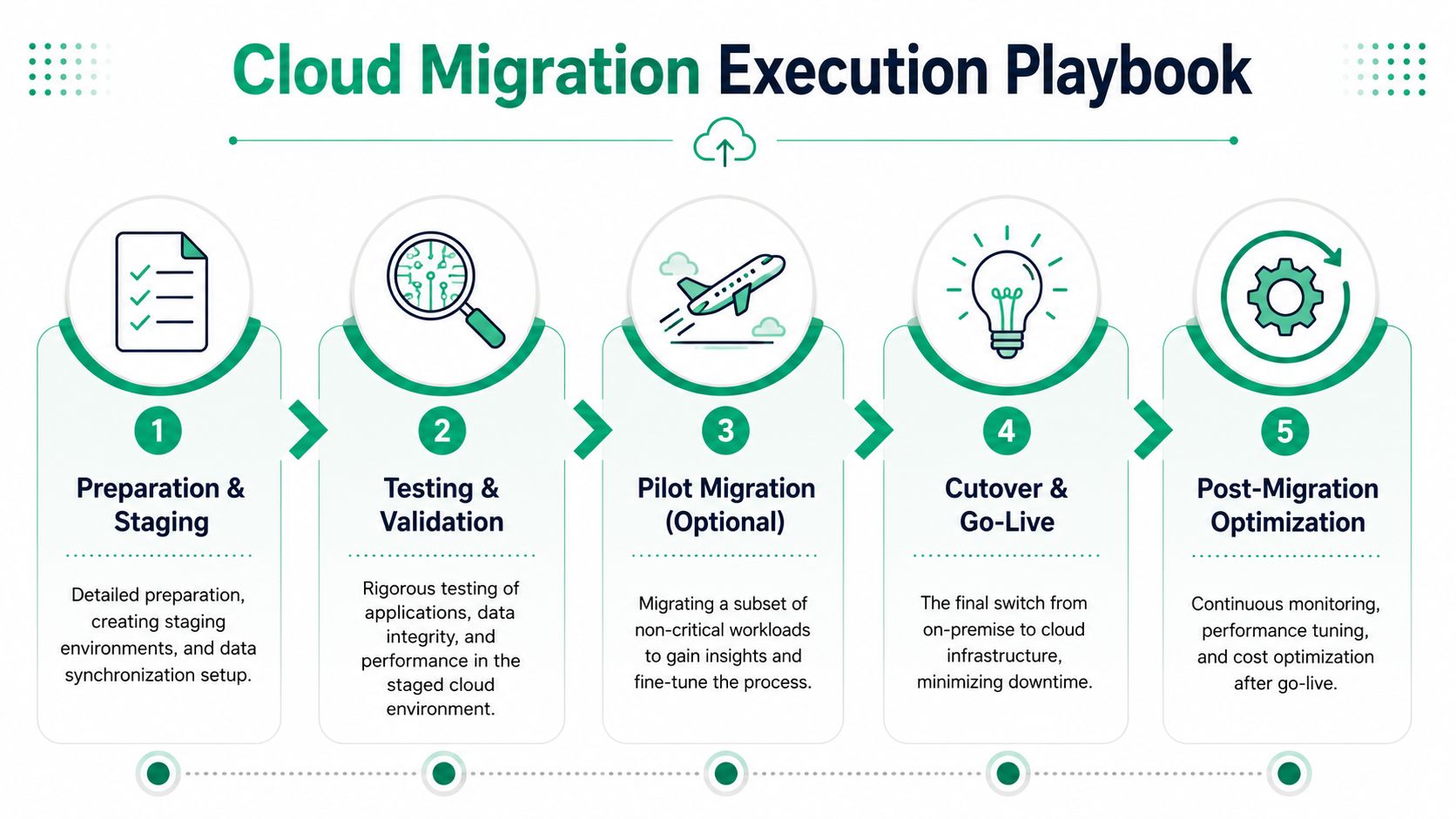
-
Preparation and staging Build the target environment. Set permissions correctly. Sync the right data set. Confirm backups can be restored, not just that they exist. For regulated Indiana companies, this is also the point to confirm logging, access controls, retention settings, and encryption align with HIPAA, CMMC, or customer contract requirements.
-
Validation
Test the things your staff really uses. Logins, reports, printing, integrations, scanners, line-of-business workflows, and any odd process that only shows up during month-end or shift change. Testing and rollback are required safeguards. If the environment passes technical checks but breaks daily work, the migration is not ready. -
Pilot move
Start with a lower-risk workload or a defined user group. That gives the team real performance data, exposes hidden dependencies, and lets leadership judge business impact before the main cutover. -
Cutover
Move production traffic during a controlled window. Keep communications simple. Staff should know what changes, what stays the same, who to call, and when the system is considered live. One person should own the final go-live decision. -
Rollback readiness
If data checks fail, app behavior changes in ways the business cannot accept, or security controls are not working as planned, revert to the prior state. Fast. A rollback plan written in advance protects uptime far better than an argument in the middle of an outage.
“If there isn't a written rollback plan, there isn't a real migration plan.”
Data integrity is part of uptime
A system can be online and still be unusable. If records are duplicated, timestamps shift, reports stop matching, or integrations pass bad data, your team starts working around the system instead of trusting it.
For teams that want a sharp technical checklist for this part, how to validate data pipelines during migration is a useful companion read. It fits the kind of controlled testing mature teams expect before sign-off.
This Indiana-focused data migration best practices guide is also worth reviewing if your project includes sensitive records, legacy databases, or strict recovery expectations. Those projects usually fail on overlooked details, not on the headline plan.
And if a server or storage array is already showing signs of failure before the move, treat that as a project risk now, not later. Waiting on unstable hardware is how a planned migration turns into emergency recovery.
After the Migration - Optimization and Your Next Steps
Monday morning after cutover tells the truth. If logins are fast, files open without delay, and your team is not calling around to find the one person who understands the old server, the migration is starting to do its job. If cloud costs climb, permissions stay sloppy, or backups have not been tested, the project is only half finished.
Post-migration work is where Indiana businesses usually gain or lose ROI. The move gets you out of aging hardware. The next 60 to 90 days determine whether you also get lower support burden, better uptime, and cleaner compliance evidence for HIPAA or CMMC reviews.
Where the value shows up
The first gain is operational. Internal IT staff and outside support teams spend less time dealing with failed drives, firmware issues, overheating closets, and backup jobs tied to old equipment. That time can shift into work that improves the business, like tightening security policies, fixing workflow bottlenecks, and supporting new locations or remote staff.
The second gain is financial.
Cloud costs become manageable when someone reviews actual usage after the move and adjusts it. That means shutting down resources nobody needs, resizing workloads that were overbuilt for safety during migration, and matching predictable systems to pricing models that make sense for a steady workload. If that bill is already drifting upward, review this cloud cost optimization playbook for Indiana SMBs.
Security should be cleaner than it was on-prem
A cloud migration does not fix security by itself. It gives you better tools and fewer excuses.
In practice, the cleanup usually includes:
- Identity controls: multi-factor authentication, role-based access, and policies that limit who can sign in, from where, and to what
- Monitoring: centralized alerts, vulnerability scans, log review, and a clear response process when something looks wrong
- Recovery: tested restores, off-site backups, and recovery targets the business understands
- Network and device cleanup: segmentation, secure Wi-Fi, and endpoint protection tied to written policy instead of tribal knowledge
For businesses in Indiana with medical data, defense contracts, or regulated client records, the cloud starts earning trust. HIPAA, CMMC, and NIST-aligned controls are easier to document when user access is centralized, systems are monitored, and recovery steps are written down instead of stored in one employee's memory.
A strong outcome is simple. Your systems become documented, monitored, and recoverable.
What smart owners do next
Do not rush into more licenses or extra platforms just because the first phase worked. Review what changed. Measure performance, support tickets, user friction, backup success, and monthly spend. Then decide what stays in the cloud, what needs refinement, and what legacy pieces still create risk.
A good follow-up assessment should look at server retirement, backup integrity, internet redundancy, Wi-Fi coverage, endpoint security, identity controls, and the applications that would cost you the most if they failed during a busy week.
For business owners in Greenwood, Johnson County, and the south side of Indianapolis, the practical goal is straightforward. Get off unreliable infrastructure. Keep compliance work from turning into a scramble. Build an environment that supports growth without adding surprise downtime or surprise spending.
If your company is in the Greenwood or Indianapolis area and you're not sure whether your current setup is one outage away from a bad week, Finchum Fixes IT can help you sort it out. Start with a Free Network Assessment or a Security Risk Audit. You'll get a clear view of where your bottlenecks, compliance gaps, and migration opportunities stand before you commit to anything.