Indiana Structured Cabling Contractor Guide 2026

To choose a structured cabling contractor, Indiana businesses should verify standards-based certifications, require a physical site survey, and insist on a written coordination plan with other trades. Just as important, the contract needs clear pricing for future Moves, Adds, and Changes so a cheap install doesn't turn into expensive cleanup later.
A lot of Greenwood business owners start looking for a cabling contractor only after the symptoms get loud. Wi-Fi drops in a brick building off the I-65 corridor. Phones stutter in the middle of a client call. Cloud apps crawl. Staff burn time waiting on file shares, reconnecting laptops, and asking IT why one side of the office always has problems.
That's usually the wrong moment to think about cabling, but it's the honest one. Cabling isn't glamorous. It sits above the ceiling, inside conduits, behind patch panels, and under flooring. But it decides whether your UniFi networking stack runs cleanly, whether your VoIP handsets stay stable, whether Bitdefender GravityZone endpoints can update without interruption, and whether your broader business continuity plan works when the network gets busy.
For local companies dealing with HIPAA, CMMC, or a NIST CSF-aligned security program, weak cabling creates more than inconvenience. It creates instability. And instability spreads. A flaky uplink turns into failed backups, laggy SaaS sessions, dropped cameras, unhappy staff, and rushed support calls that wreck predictable monthly budgets.
Your Network's Foundation Starts with the Right Cabling
A common Southside problem looks like this. A growing company leases space in an older Greenwood or downtown Indy building. The walls are thick, the wiring closet is a mess, and somebody has tried to solve every problem with one more unmanaged switch, one more Wi-Fi extender, and one more random patch cord.
That setup works right up until it doesn't.
Unplanned outages are expensive, and not in a vague way. Network cabling ROI analysis notes that unplanned network outages cost businesses an average of $690,000 per incident, while professional structured cabling projects for mid-sized offices typically cost between $15,000 and $30,000 and can yield a 175% ROI within the first year. That's why experienced owners stop treating cabling as a construction line item and start treating it as insurance against downtime.
What the problem looks like in a real office
In a typical Johnson County office, the visible complaint is Wi-Fi. The underlying issue is often underneath it:
- Old copper runs that were never documented
- Improper terminations inside a crowded rack
- Patchwork additions from previous tenants
- Cable paths mixed with power or routed badly around HVAC and electrical interference
- No labeling discipline, so every future change turns into detective work
When that happens, your managed IT team ends up troubleshooting symptoms instead of fixing the foundation. You can swap access points, reboot switches, and tune wireless channels all day. If the horizontal cabling is bad, the rest of the stack never gets a fair shot.
A bad cable plant can make good network hardware look broken.
If you need a plain-English baseline before talking to vendors, this overview of what structured cabling is and why your business needs it gives the right starting point.
Why business owners should care
Business continuity isn't just about backups and cybersecurity. It starts with whether packets can move reliably from workstation to switch, from switch to firewall, and from firewall to cloud services. That affects everything from SOC-as-a-Service monitoring to immutable off-site backups.
For non-technical owners, the practical test is simple:
| Business symptom | Likely underlying issue |
|---|---|
| Spotty Wi-Fi in one area | Poor backhaul, bad cable runs, or patching chaos |
| Random printer and phone failures | Bad terminations or mislabeled drops |
| Slow cloud app performance | Congestion, cabling faults, or closet sprawl |
| Constant small IT tickets | No clean standard for moves and changes |
When the cabling is right, every other IT decision gets easier. Cybersecurity tools behave better. Cloud adoption goes smoother. Recovery planning is more realistic. Even software development teams benefit because they're not losing time to flaky local connectivity.
Beyond the Blueprint TIA Standards and Future-Proofing
A set of prints can show where drops go and still miss what will cost you money later. I see that in Greenwood tenant buildouts when the general contractor is driving the schedule, ceiling trades are stacked on top of each other, and the cabling scope gets treated like a late-stage pull-and-terminate job. That is how you end up with blocked pathways, cramped telecom rooms, and extra labor bills for Moves, Adds, and Changes after the office opens.
What the standards actually mean on the ground
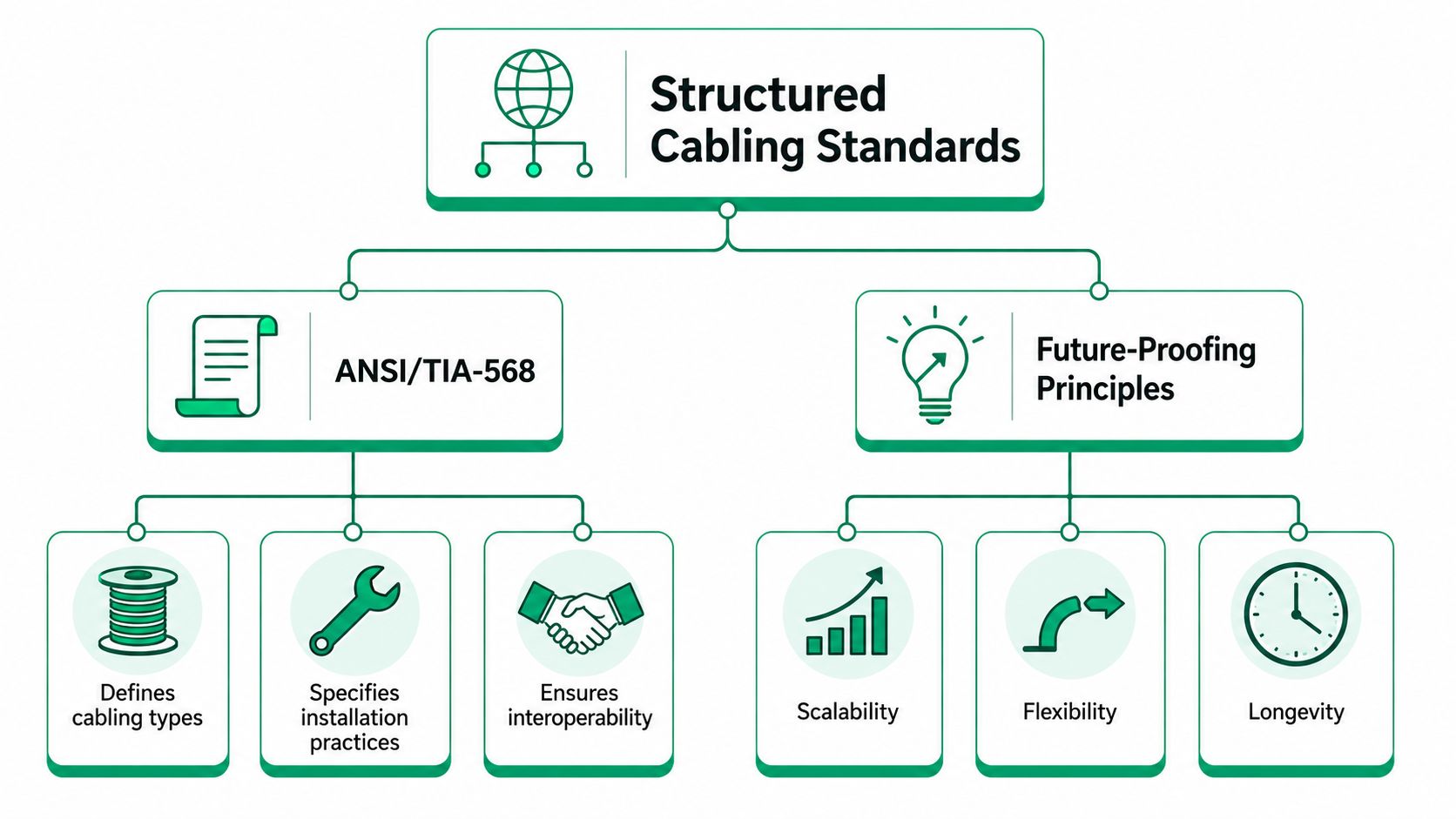
Standards matter because they force discipline into the parts of a project that usually get rushed. TIA-568 covers the cabling topology, media, termination, and testing approach. TIA-569 covers pathways and spaces. TIA-606 covers administration and labeling. TIA-607 covers grounding and bonding. A contractor who follows those rules gives your IT team a system they can trace, test, and change without opening ceilings every time a department moves.
The practical issue is coordination. The GC owns the broader construction schedule. The cabling contractor owns signal performance and documentation. If nobody resolves that handoff early, bad decisions get locked in fast. A wall shifts, the IDF shrinks, ductwork steals tray space, and the cable installer gets told to “make it work.” That usually means tighter bends, longer routes, crowded sleeves, or patching shortcuts that pass inspection today and create service calls later.
The basic structure still matters because every subsystem has a business consequence:
- Entrance Facility sets up carrier handoff and protects your outside service path.
- Equipment Room needs enough space, power, and cooling for core gear to run reliably.
- Backbone Cabling has to support uplinks between floors and closets without becoming the bottleneck.
- Telecommunications Room has to stay accessible, organized, and large enough for future adds.
- Horizontal Cabling affects desks, phones, cameras, access points, and every routine MAC.
- Work Area is where poor labeling turns a simple change order into a half-day troubleshooting call.
A contractor should be able to explain that in plain English to an owner, a facilities manager, and a GC superintendent.
Future-proofing without wasting money
Future-proofing is mostly about reducing expensive rework. It does not mean loading every project with top-tier materials that the business will never use.
For a Greenwood office, that usually means leaving pathway capacity, choosing a cable category that fits the actual application, documenting every run cleanly, and making sure rack layout supports growth. It also means asking how often your staff moves. If your office gets reconfigured every year, MAC costs matter as much as day-one install price. Clean labeling, spare capacity in the closet, and sensible patch panel layout can save a surprising amount of labor over the life of the lease.
Here is where owners often get burned. The GC may optimize for project closeout. The cabling contractor has to optimize for the next five years of service work. Those goals are not always aligned.
| Decision during install | What it changes later |
|---|---|
| Leave spare pathway and rack space | New drops can be added without rerouting existing cable |
| Use a clear labeling and administration scheme | MACs take less labor and fewer troubleshooting visits |
| Choose Cat6A where power, speed, or Wi-Fi backhaul justify it | Better support for higher-performance access points and longer-term switch upgrades |
| Place telecom rooms with real working clearance | Faster service work and less disruption during adds or repairs |
For multi-trade buildouts, preconstruction coordination cuts down on field conflicts. Teams that avoid data center rework with BIM usually catch pathway clashes before ceilings close, which is when cabling change orders start getting expensive.
The tech that matters for the next decade
For many Indiana SMB projects, Category 6 is still workable at the desk. Category 6A is often the better long-term choice for new offices, especially where you expect higher-power PoE devices, newer wireless access points, denser camera layouts, or longer occupancy. Fiber makes sense for backbone links, inter-building runs, and any distance where copper stops being the right tool.
Procurement language used by Indiana agencies has long referenced TIA-aligned cabling and pathway practices for network-capable buildings, and private projects benefit from the same baseline even when they are not bidding public work. The point is simple. Install for the applications you plan to run, not for the office you had ten years ago.
That matters if your broader stack includes managed switching, VLANs, cloud-managed firewalls, door access control, cameras, and wireless designed around modern AP density. A useful planning reference is this guide to Indiana SMB network infrastructure upgrades, because the cable plant has to support the full network design, not sit apart from it.
One field note. A neat rack is not cosmetic. Good pathways, test results, labeling, and room to work are what keep a routine MAC from turning into after-hours downtime and an avoidable invoice.
The Vetting Checklist What to Demand from a Contractor
If you're interviewing a structured cabling contractor in Greenwood, Franklin, or anywhere around Indianapolis, skip the vague questions first. Ask for process. Ask for documentation. Ask what happens when the general contractor blocks access to a riser or when a ceiling grid changes after design approval.
The first sign of a serious contractor is that they don't start with the cable pull. They start with the survey.
Non-negotiables before work starts
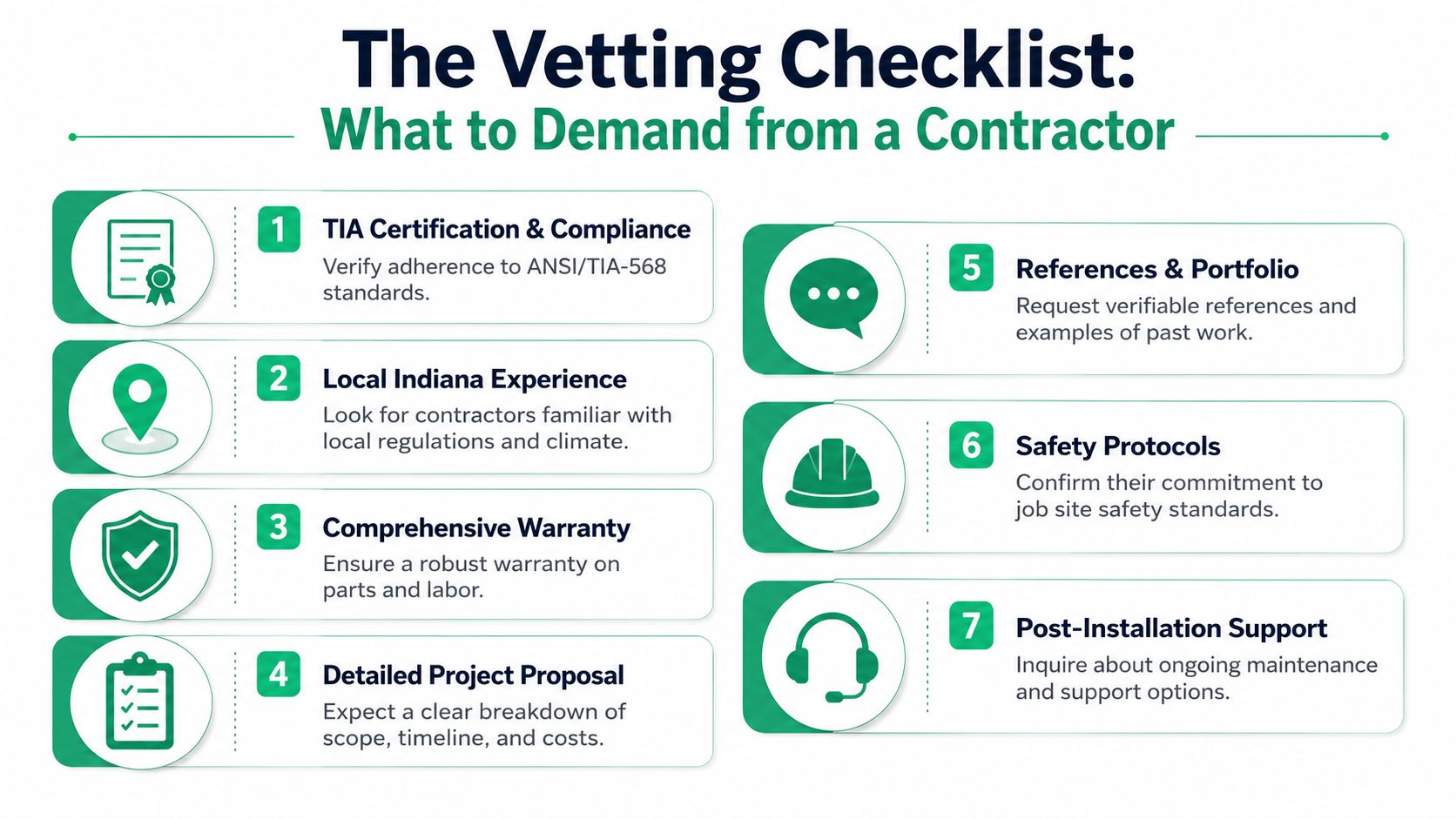
That single paragraph contains most of the difference between a disciplined install and a mess. The site survey should identify trays, conduits, risers, interference risks near HVAC or electrical panels, and access constraints. If the contractor wants to quote from a floorplan alone, that's a warning sign.
Demand these items in writing:
- Physical site survey first. Not a phone estimate. Not a “we'll figure it out on install day” approach.
- Responsibility matrix. It should name who controls access, approvals, pathway readiness, and trade coordination.
- Milestone schedule. Site survey, design approval, pathway infrastructure, cable pull, terminations, testing, labeling, and final documentation should all appear.
- Machine-printed labels. At both faceplate and patch panel, matching the design docs.
- Certified installers for copper and fiber. Especially when Cat8 or fiber is in scope.
- Digital closeout package. As-built documentation, certification results, and patch panel schedules.
The GC conflict most owners miss
The biggest project fights usually aren't technical. They're operational. The general contractor assumes low-voltage can “work around it.” The cabling crew assumes pathways will be ready. Then nobody owns the delay.
That's why vendor management matters more than most office renovation guides admit. A simple set of IT vendor management best practices for Indiana businesses can save a lot of heat between your construction side and your IT side.
Here's the part owners should ask directly:
- Who approves pathway changes on site?
- Who signs off when another trade blocks a route?
- Who owns fire-stopping responsibility?
- Who updates the drawings if field conditions change?
If the answers are fuzzy, the project will get expensive.
A short video can help you spot whether a contractor talks process or just tools.
A basic technical workflow to expect
A competent team should also be able to explain diagnostic and validation work in concrete steps. For example, during cutover or troubleshooting, the workflow may include:
- Switch-side verification using
show interface statusto confirm the port comes up cleanly - Patch validation by moving from wall jack to patch panel and confirming labels match
- Cable certification review to check whether the failed run passed original testing
- Endpoint isolation by confirming the issue follows the drop, not the laptop or dock
- Retest after remediation before the ceiling closes
That's the difference between a network engineer and a geek with a screwdriver.
Red Flags and the Hidden Costs of a Bad Cabling Job
The cheapest quote on day one can be the most expensive quote by month six.
That's especially true when a contractor prices the install aggressively, then makes money later on every small change. One new desk move. One added access point. One after-hours patch. One emergency visit because no one can tell which drop feeds which office.
Why MAC pricing matters more than people think
Recent data indicates that 60% of SMBs underestimate their Moves, Adds, and Changes costs by 300% within the first year because contractors quote “per drop” without clarifying minimum hour charges, travel fees, or after-hours labor multipliers.
That's the hidden tax of a bad contract.
A clean cabling system should make MACs routine. If labels are accurate, patch panels are documented, and pathways have room, adding a user or moving a printer shouldn't feel like exploratory surgery. But when the original contractor leaves behind no order, every tiny change gets billed like an emergency.
Ask for the MAC policy before you sign the install contract, not after your first expansion.
Red flags that show up early
You can usually spot trouble before the first spool comes off the truck.
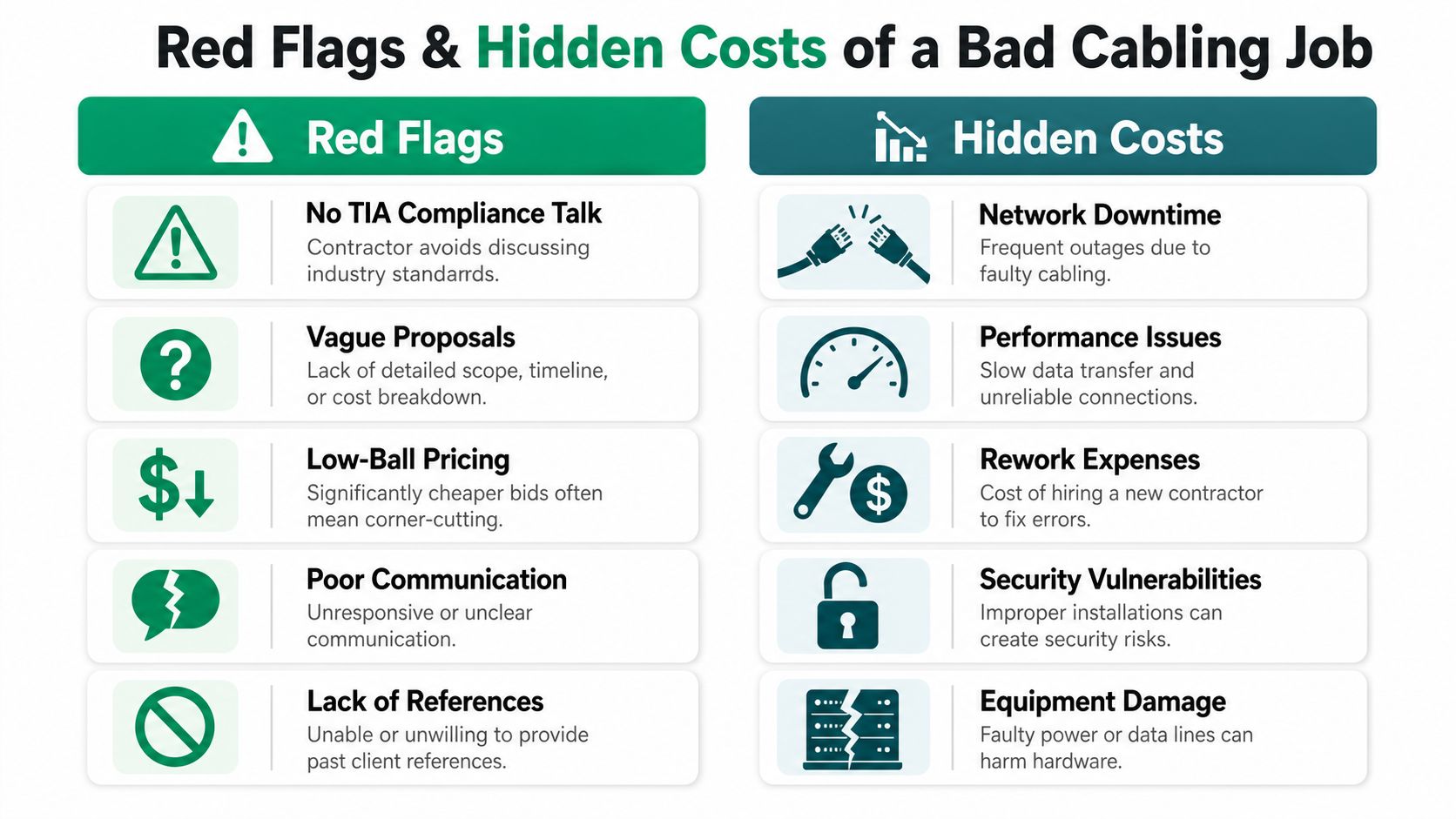
- They avoid standards talk. If they get annoyed when you ask about TIA compliance, that's not a personality issue. It's a quality issue.
- Their proposal is thin. If scope, labeling, testing, closeout docs, and support terms aren't spelled out, you're buying ambiguity.
- They dismiss post-install support. That sounds cheap now. It won't later.
- They can't explain routing decisions. Good installers know why they're using a path, not just where it fits.
- They shrug at business continuity. Cabling affects uptime, security tooling, VoIP quality, and recovery readiness.
A broader read on continuity solutions for MSPs is useful because cabling failures rarely stay isolated. They ripple into backup windows, monitoring gaps, security blind spots, and user downtime.
What bad work looks like when you inherit it
In our 17 years of local service, the ugly jobs are usually the same. Bundles too tight. No right-angle routing where it matters. Handwritten labels peeling off in a hot closet. A fiber uplink with no clear as-built notes. A switch stack feeding business-critical traffic through patching that nobody trusts.
When we've had to troubleshoot these environments, the workflow often starts basic and gets ugly fast:
- Check the port state and error counters.
- Trace the run physically because the label scheme can't be trusted.
- Open the rack and compare patching against whatever drawings exist.
- Tone and retest suspect drops.
- Fix terminations, relabel, and rebuild documentation.
That's exactly why a small issue can swallow hours. If you're wondering whether your current line can just be repaired, this explanation of why businesses should call a pro for network cable splicing gives the right gut check.
Project Stages From Kickoff to Certification
A Greenwood office buildout usually looks calm on paper right up until the trades start stacking on each other. Electricians need the same ceiling space. The GC wants walls closed. Your IT team wants exact drop locations. The cabling contractor is the trade that gets squeezed if nobody pins down sequence and responsibility early.
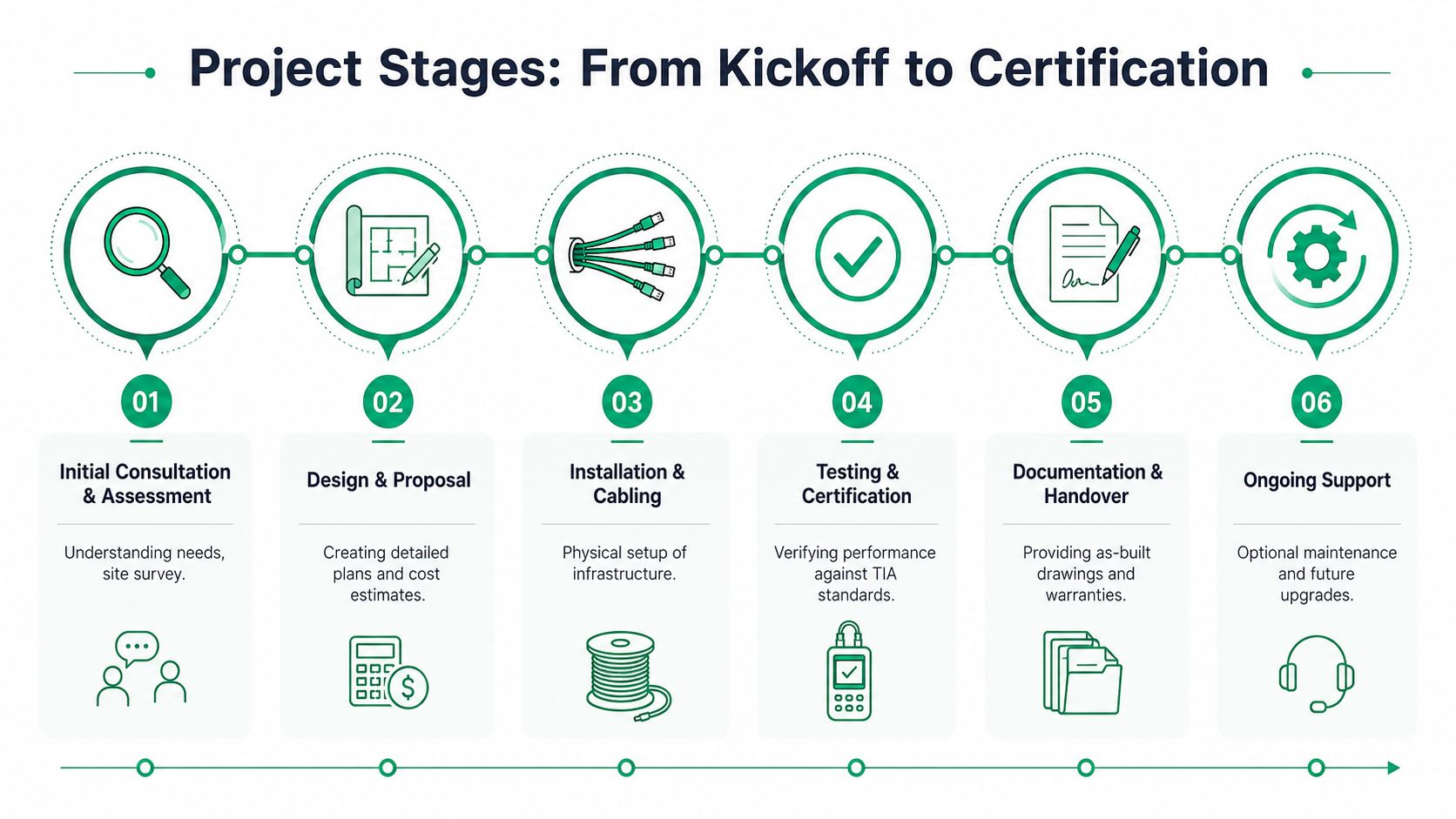
That is why a good project is not just a cable pull. It is a controlled handoff between planning, construction, IT, and final testing.
What happens in each phase
A proper structured cabling project follows a sequence that protects uptime, keeps work areas usable, and reduces the change orders that show up when the GC and low-voltage scope are out of sync.
| Stage | What should happen |
|---|---|
| Kickoff and site survey | The contractor walks the building, confirms room use, ceiling conditions, risers, power proximity, and any active areas that cannot go down during business hours |
| Design approval | Drop counts, outlet locations, rack layout, patch panel counts, labeling format, and cutover windows get approved before material is ordered |
| Trade coordination | Pathways, sleeves, backing, conduit responsibility, access to locked areas, and ceiling closure dates get assigned clearly between the GC, electrician, and cabling crew |
| Pathway build and cable pull | Trays, supports, and routes go in first. Then cable is pulled with bend radius, separation, and fill limits kept under control |
| Termination and labeling | Jacks, patch panels, fiber enclosures, and rack equipment are terminated cleanly and labeled to match the schedule |
| Testing, certification, and closeout | Each run is tested, failed links are fixed, and the owner receives results, as-builts, and panel schedules in digital form |
The trade coordination stage is where commercial jobs often go sideways. If nobody decides who is providing sleeves through fire-rated walls, who owns J-hooks above the ceiling, or when the telecom room is ready for racks, the cabling crew either waits or works around unfinished construction. Both cost money. Both usually land on the owner later as delay or rework.
What good execution looks like on site
Standards still matter in the field, but owners usually see them as outcomes, not code numbers. Good execution means the pathway is serviceable, patching is readable, cable is supported correctly, and the closet can handle the next switch, AP, or camera expansion without turning into a rat's nest.
In a real office project, that shows up in plain ways. The IDF door opens fully. Ladder rack is installed before bundles start landing. Patch panels are not overfilled. Slack is controlled instead of stuffed in the corner. If your contractor leaves a neat closet and records what changed from plan, your future MAC work gets faster and cheaper.
For a broader view of how physical infrastructure ties into switching, wireless, and day-to-day IT operations, this guide to networking and cabling services for your Indy business is a useful companion.
What owners should review before signoff
Do not sign off because the internet works and phones have dial tone. Review the closeout package like you are buying an asset you will have to maintain for years.
- Certification results should identify each cable run and show pass/fail against the specified category or fiber standard.
- As-built drawings should match what was installed, including relocated drops and pathway changes made during construction.
- Patch panel schedules should match faceplate labels in the rooms.
- Rack photos and closet layout should make it clear how core links, uplinks, voice, cameras, and wireless are patched.
- MAC pricing and support boundaries should be clear before final payment, especially if you expect staff moves or a phased expansion.
That last point gets missed all the time. The install price is only part of the cost. If labels are inconsistent, spare capacity was never planned, or the contractor leaves no usable documentation, every move, add, and change takes longer. A simple desk relocation can turn into tracing cables above the ceiling, repatching by trial and error, and paying for after-hours troubleshooting that should have been unnecessary.
The closeout package is part of the job. If the contractor treats testing records, labels, and as-builts as optional paperwork, you will pay for that decision during every future MAC.
A note on related systems
Structured cabling supports more than desktops. It carries traffic for wireless APs, VoIP, cameras, badge readers, printers, file access, and sometimes the storage and backup systems a business depends on during an outage.
We have seen infrastructure rooms where the reported problem was poor Wi-Fi or unstable phones, but the root issue was physical. Bad patching, overcrowded racks, heat, and undocumented changes create failure points that software cannot fix. Clean cabling does not solve every IT problem, but it removes a long list of avoidable ones.
Your Next Step to a Rock-Solid Network in Indiana
Choosing a structured cabling contractor isn't really a wiring decision. It's an operations decision.
You're deciding whether your next office expansion in Greenwood runs cleanly or turns into a trade fight. You're deciding whether your cloud apps, voice systems, Wi-Fi, and security stack sit on solid ground or on years of patchwork. You're deciding whether future changes are routine or expensive.
The biggest lesson for Johnson County business owners is simple. Don't buy a cable pull. Buy a managed process.
The short list that matters
If you remember nothing else, keep these points:
- Demand the site survey. A real contractor wants eyes on the building before quoting final scope.
- Insist on trade coordination. For Indiana SMBs, 70% of office upgrade delays stem from an undefined responsibility matrix between the general contractor and the cabling vendor, and projects without that coordination face an average 18-day delay and 15% budget overrun due to rework.
- Read the MAC terms. Expansion costs can hurt more than the initial install if pricing is vague.
- Require documentation. Labels, certification results, and as-builts aren't optional.
- Think beyond the closet. Good cabling supports business continuity, compliance, and predictable IT budgeting.
What experienced buyers do differently
In our 17 years of local service, the companies that get this right usually aren't more technical than everyone else. They're just more disciplined. They ask harder questions. They push for cleaner handoffs between the GC, electrician, cabling crew, and internal IT lead. They make sure the network foundation supports not just today's users, but tomorrow's phones, cameras, access points, compliance controls, and cloud workloads.
That matters across Central Indiana. Old brick buildings in downtown Indy have one set of pathway problems. Hamilton County growth offices have another. Southside renovations around Greenwood business parks have their own headaches. The contractor should know the difference and plan accordingly.
If your building has spotty Wi-Fi, ugly closet sprawl, unexplained network drops, or a renovation coming up, now's the time to get in front of it instead of waiting for the next outage.
If your business is in Greenwood, Indianapolis, or the surrounding Central Indiana market, Finchum Fixes IT can help you sort out whether your cabling plan is solid before money gets spent in the wrong place. Schedule a Free Network Assessment or a Security Risk Audit to review cabling, Wi-Fi, switching, cybersecurity controls, and business continuity risks with a local team that understands how these projects go in the field.