Inhouse IT Support vs Managed Services for Indiana SMBs
One in-house IT generalist costs roughly $90,000 to $130,000 fully loaded and can realistically support about 23 to 39 computer-dependent employees, so the right answer depends on headcount, compliance load, and after-hours risk, not ideology. For many Indiana SMBs, co-managed IT delivers stronger coverage than hiring one more generalist or outsourcing every decision.
The Greenwood manufacturer with one technician, the Johnson County clinic facing a HIPAA audit, and the south-side law firm staring at a dead server all have the same problem. Technology has become part of daily production, patient care, billing, and client service, but the support model often still depends on one person answering every call.
A sensible decision starts with business continuity. Published summaries of ITIC's 2025 Hourly Cost of Downtime Survey report a median downtime cost of $9,000 per minute for enterprises with more than 1,000 employees, while the reported mid-market average was $2,400 per minute (ITIC downtime cost summary). Your Greenwood company may lose less per minute, but the mechanism is identical. A failed server, locked account, bad switch, or ransomware event keeps productive employees from working.
Which IT Responsibilities Belong Inside Your Indiana Business?
A production line stops after a network switch fails. Your internal employee knows which workstation controls the process, but the outage begins after hours and the required network expertise is unavailable. That scenario makes the decision practical: assign each IT responsibility to the team that can handle it under pressure.
Three operating models serve Indiana businesses along the I-65 corridor.
-
Fully in-house support keeps employees, systems, vendor relationships, and daily decisions inside the company. Choose it when headcount supports multiple technical roles and the business can fund security, documentation, training, and after-hours coverage.
-
Fully managed IT assigns routine support, monitoring, maintenance, cybersecurity coordination, backup oversight, and escalation to an external provider. The business keeps decision authority without carrying every specialty on payroll.
-
Co-managed IT keeps selected duties internal while an outside partner covers defined gaps. An employee can handle walk-up support, account changes, workflow questions, and vendor coordination. The external team can provide SOC-as-a-Service monitoring, advanced cybersecurity, cloud architecture, incident response, after-hours coverage, or migration support.
Co-managed service deserves a serious look. A 25-person manufacturer may gain more resilience from this model than from either extreme. The internal employee understands production workflows, while the external team can respond to a nighttime threat or supply skills a generalist does not have.
Start with exposure, not preference
Use five questions to assign responsibilities:
- Cost: What is the fully loaded cost per supported employee?
- Response: Who handles a production outage outside business hours?
- Expertise: Can the assigned team manage cybersecurity, cloud computing, compliance, networking, and data recovery?
- Scalability: Who supports an office move, acquisition, software rollout, or ransomware event?
- Security: Can the organization Govern, Identify, Protect, Detect, Respond, and Recover under the NIST Cybersecurity Framework 2.0?
Those six functions provide a plain-language test for security coverage. They also expose gaps that a job title can hide.
A downtown Indianapolis technology company and a Hamilton County clinic may need different assignments. Base the choice on operational resilience, not the assumption that employees cost less or vendors always provide safer support. Decide which roles require internal context, which require specialist depth, and which need coverage when one technician is unavailable.
What Inhouse IT Support Actually Costs an Indiana Small Business
Your front office loses internet at 8:10 a.m. Your line-of-business app will not open. Your one internal IT hire is out sick. That is the cost problem most owners miss.
Salary is only the visible piece. The in-house number includes benefits, payroll taxes, health insurance, retirement contributions, certifications, training, laptop and lab equipment, ticketing, remote monitoring, endpoint protection, backup licensing, mobile-device management, and the gap you carry when the technician is on vacation, in a meeting, or off the clock.
Staffing benchmarks put many companies at about one IT professional per 23 to 39 computer-dependent employees, with a fully loaded annual cost of about $90,000 to $130,000 per hire (IT staffing cost benchmarks). For a 25-person company, that usually means one generalist. That can work for day-to-day tickets. It does not give you broad specialty coverage, after-hours response, project bandwidth, and recovery leadership in the same person.
The U.S. Bureau of Labor Statistics reported 689,700 computer user-support specialist jobs in May 2023, with a mean annual wage of $63,640 (BLS computer user-support data). That wage is not the employer's total cost. It does show that support is a real operating function, not a side task for whoever knows printers and passwords.
Put cost beside coverage
Use one math model for every option. Add annual IT labor, tools, training, and on-call coverage. Then divide by user count.
A fully loaded $90,000 hire supporting 25 employees costs $3,600 per supported employee before separate software and infrastructure costs. At $130,000, that reaches $5,200 per employee. Now add the downtime exposure. If one person owns support and that person is unavailable, how many employees sit idle, how many orders stop, and how long can you afford to wait for escalation?
That is why role-by-role planning matters more than the in-house versus outsourced label.
If you compare a managed contract, use the same categories and force the same discipline. Review whether the monthly fee includes endpoint management, security coverage, continuity, service delivery, and projects. If it does not spell out patching, alert triage, backup monitoring, response targets, reporting, after-hours escalation, and project work, the quote is incomplete. This IT support pricing and negotiation guide gives you a clean way to line those items up for your CPA.
Do not compare payroll to a monthly invoice. Compare total annual cost to delivered capacity. If you are also looking at distributed hiring, remote staffing pricing helps separate labor cost from supervision, tooling, and coverage expectations.
Owner's rule: The cheapest IT employee is expensive if the business stops when that person is sick, busy, or asleep.
A 2024 IT budget survey found that small businesses with fewer than 100 employees expected to put 24% of IT budgets toward hardware, while only 33% planned to allocate any funds to internal services. That split creates blind spots. Another switch or workstation does not fix weak documentation, missing backups, or a bad account-compromise process.
For many Indiana SMBs, the strongest answer is co-managed. Keep internal ownership where business context matters. Buy outside depth for security, after-hours response, and specialized project work. The number that matters is cost per supported employee plus the cost of uncovered risk.
Response Time Expertise Scalability and Security Side by Side
The wrong comparison is speed versus cost. The true comparison is failure coverage by role. If your only IT person knows the environment cold but cannot answer at 10:30 p.m., your response model has a hole. If an outside team answers fast but lacks authority over line-of-business systems, you still lose time.
| Dimension | Inhouse IT Support | Managed IT Services |
|---|---|---|
| P1 outage response | Fast when the technician is available and already knows the system, fragile when that person is tied up or off duty | Defined escalation paths, broader after-hours coverage, and more than one responder |
| Expertise | Strong knowledge of users, workflows, vendors, and local workarounds | Access to deeper security, cloud, networking, backup, recovery, and compliance skills |
| Scalability | More users, sites, and projects usually mean more hiring | Capacity expands through a shared team, documented escalation, and specialist access |
| Security posture | Depends on internal process discipline, tool maturity, and who owns incident decisions | Often includes monitoring, endpoint protection, backup review, and security escalation |
Response time only matters if ownership is clear
A fast acknowledgment is not the same as restored operations. Write service levels that assign priority, response targets, communication intervals, escalation ownership, and restoration goals. A practical SLA response-time framework for setting real P1 targets will force that conversation before the next outage.
Here is the rule. Choose internal ownership when business context drives the outcome. Choose external coverage when the risk shows up after hours, crosses specialties, or can spread before one person can contain it.
A technician who knows your UniFi layout may spot a failed access point in minutes. A managed team earns its keep when the same issue ties into controller alerts, switch configuration history, wireless interference, and a second site that is suddenly showing the same symptoms. Weekend shipping problems expose the difference fast.
Expertise has to match the risk
Security work spans Govern, Identify, Protect, Detect, Respond, and Recover, as noted earlier in the article. That is broader than buying a license and hoping alerts stay quiet. Someone still has to review identity controls, endpoint status, cloud access, firewall rules, backups, user behavior, incident ownership, and restoration steps.
Role-by-role thinking beats the usual in-house versus outsourced argument. Keep application ownership, approval authority, and business process knowledge close to the business. Push detection, containment support, backup oversight, and specialized recovery depth to the side with broader coverage.
Bitdefender GravityZone can surface endpoint activity. It cannot decide whether an alert is tied to a compromised admin account, an unsafe script, or a user opening the wrong file. People make that call, and the right people are rarely all on one payroll at a small business.
The practical answer for many Indiana SMBs is co-managed. Put your internal lead in charge of business context and final decisions. Use outside specialists for after-hours incidents, security operations, cloud changes, compliance-heavy work, and recovery engineering.
When a Hack Hits the Walkthrough That Decides Which Model Saves You
A Greenwood manufacturer runs UniFi networking with a mixed Windows and macOS fleet. An employee reports that files have a strange encrypted extension. The first question isn't who caused it. It's whether the business can contain the event before the file server and backup systems become part of the same blast radius.
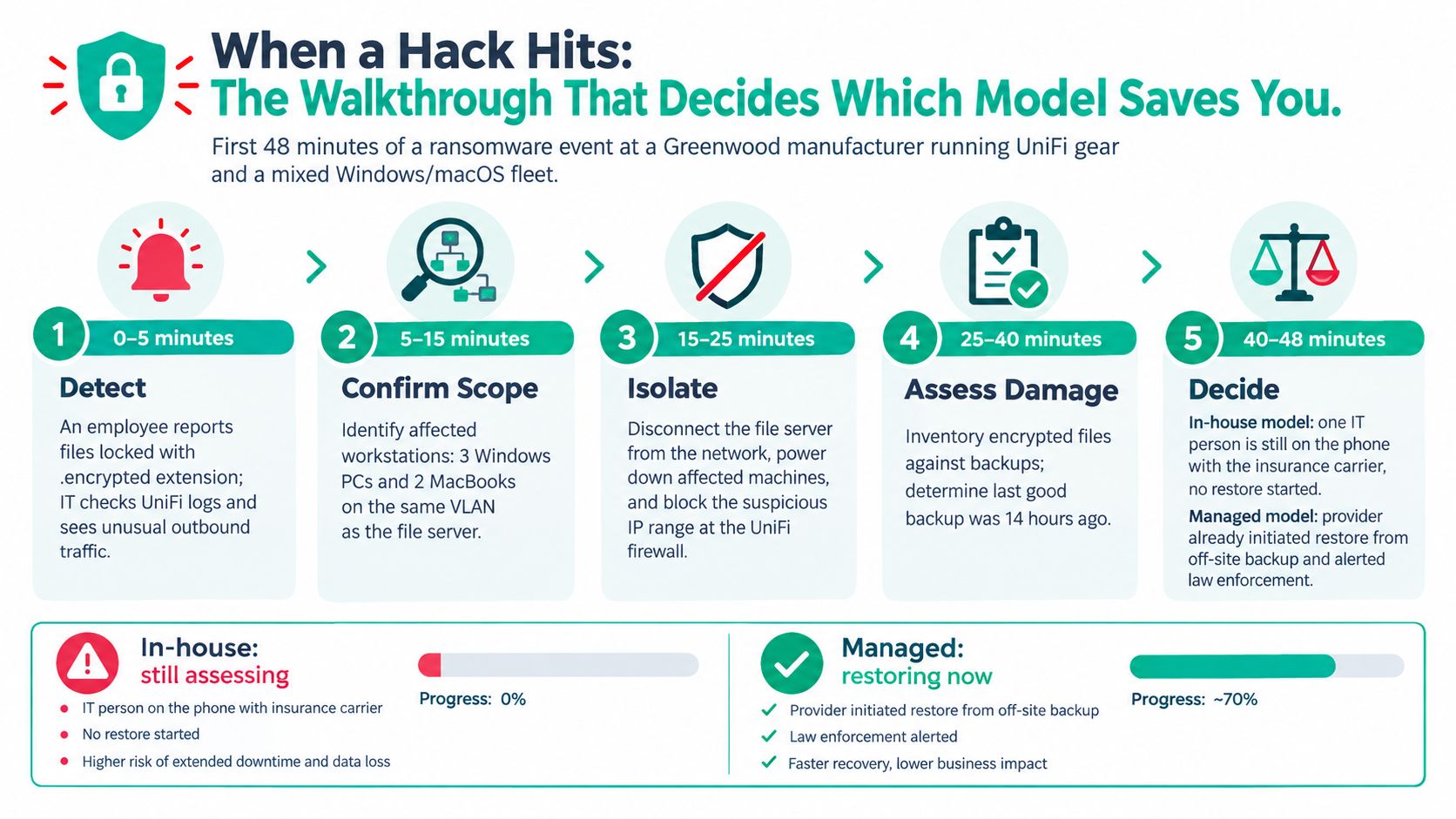
The first 48 minutes need assigned owners
A practical sequence looks like this:
-
Confirm the alert. Review Bitdefender GravityZone detections, UniFi traffic logs, endpoint names, user reports, and the affected file shares. Don't wipe devices before collecting evidence.
-
Isolate affected systems. Disable the compromised switch port or move the endpoint into a quarantine VLAN. On a managed Windows device, an administrator can record the local network state with
ipconfig /all, inspect active sessions withnetstat -ano, and stop network access through the approved endpoint or switch-control workflow. The command output supports triage. It doesn't replace containment policy. -
Preserve evidence. CISA's ransomware guidance recommends determining affected systems, isolating them, taking system images and memory captures from representative devices, and rebuilding in order of criticality. Preserve those images before reinstallation so the team can understand the entry path and support insurance or law-enforcement requirements.
-
Protect the recovery environment. CISA recommends the 3-2-1 backup rule, three copies of important files, two different storage media, and one copy off-site, with automated and tested restoration (CISA backup guidance). An immutable off-site backup prevents an attacker from encrypting every available copy.
-
Restore by business impact. Use a BIA recovery priorities guide to rank the file server, production systems, accounting, email, and secondary applications. Rebuild clean systems, validate endpoint protection, test access, and reconnect only after the environment passes inspection.
-
Document every decision. Record timestamps, affected devices, credentials reset, firewall changes, backup versions, restore tests, and communication. That record becomes the basis for improving the incident plan.
A lone generalist is now containing endpoints, answering the owner, calling the insurer, coordinating a backup provider, checking production dependencies, and rebuilding systems. If the incident starts at 2 a.m., the company isn't just missing a security specialist. It may be missing anyone who can begin recovery.
A backup that hasn't been restored in a test is an assumption, not a recovery plan.
For a practical incident checklist, keep this cybersecurity incident response plan template with your insurance documents and vendor contacts.
The model question becomes clear during the walkthrough. Internal knowledge helps identify what production needs first. External coverage helps preserve evidence, contain the attack, coordinate specialists, and start restoration while the owner is still assembling the facts.
The Role by Role Decision Matrix Most Comparisons Skip
A business doesn't need to choose one label for every IT function. Assign each responsibility according to frequency, required response time, regulatory exposure, and the cost of prolonged downtime.
| Function | Recommended owner | Deciding factor |
|---|---|---|
| Endpoint support | Internal or shared | Daily context and user relationships |
| Account management | Internal | Frequent workflow knowledge and access approvals |
| UniFi network changes | Shared | Internal awareness, external design review |
| Vendor coordination | Internal | Business context and purchasing authority |
| Project management | Shared | Internal priorities, external technical capacity |
| 24/7 monitoring | External | Coverage and alert response |
| Advanced cybersecurity | External or shared | Specialist depth and incident complexity |
| HIPAA, CMMC, and NIST CSF preparation | Shared | Regulatory exposure and evidence requirements |
| Bit-level data recovery | External | Rare skill and specialized equipment |
| Secure cloud migration | Shared | Business continuity and architecture depth |
| Custom automation | Shared | Workflow ownership plus software expertise |
A Greenwood accounting firm may keep user support and Microsoft 365 administration inside the business. A defense contractor should not assume the same employee can also prepare CMMC evidence, monitor identity alerts, and lead a serious incident. A healthcare organization needs HIPAA safeguards tied to access, backups, auditability, and recovery, not a generic antivirus checklist.
The security pressure is concrete. A 2025 survey of 715 SMBs found 86% identified security breaches as their top business or technology threat, 75% said people left their firms vulnerable to hacks, and 37% estimated one hour of downtime at $1,000 to $5,000 (2025 SMB security survey). Those figures make user training, identity controls, endpoint monitoring, and recovery testing part of operations, not optional extras.
Co-managed support keeps the useful context
Internal employees should usually retain walk-up support, workflow knowledge, employee relationships, vendor liaison work, and immediate on-site decisions. An external partner can handle after-hours monitoring, advanced security operations, backup validation, compliance preparation, secure cloud migration, and bit-level data recovery.
That arrangement also protects the company from a single-person dependency. The internal employee doesn't have to become the only person who understands the network, while the external team doesn't have to guess how production, scheduling, or patient workflows operate. A practical comparison of these choices appears in this guide to managed services versus staff augmentation for Indy businesses.
Adding a generalist doesn't automatically reduce risk if the business still depends on one person for every critical decision.
A Simple Scorecard That Tells You What to Do This Quarter
A scorecard only helps if it forces a decision. Rate each question from 1 to 3. Mostly 1s means your current internal setup can probably hold. Mixed scores usually mean co-managed support. Mostly 3s means you need outside coverage now, especially if recovery, compliance, and after-hours support all land on the same person.
- What is the IT budget per employee? Run the math by headcount, not by gut feel. If the budget only covers devices, licenses, and whoever fixes the printer, you do not have enough coverage for documentation, monitoring, security work, and time off.
- How quickly must the business recover? Put a dollar figure on one hour of downtime, then multiply it by a realistic outage. If that number hurts, fund recovery capacity before the next project.
- What compliance applies? HIPAA, CMMC, PCI, and NIST CSF all create work that does not disappear because the team is small. Somebody has to own controls, evidence, access reviews, and policy follow-through.
- Who answers after hours? If your answer is one burned-out employee with a cell phone, score it a 3.
- How much change is coming? Office moves, cloud migrations, custom software, acquisitions, and rollouts chew up time fast. Routine ticket support and project delivery are two different jobs.
Use the scores by role, not as a simple in-house versus outsourced vote. Keep walk-up help, vendor coordination, and workflow knowledge close to the business if those are working. Push security monitoring, backup validation, escalation coverage, and specialized project work to an outside team when internal staff cannot cover them without dropping something else.
The examples make the bands easier to apply. A 12-employee Greenwood accounting firm with light compliance pressure and few projects may keep day-to-day support internal if backups, passwords, and documentation are tested. A 35-employee Johnson County manufacturer with CMMC requirements and production downtime exposure is a strong co-managed fit. A 70-employee Hamilton County healthcare clinic with HIPAA obligations and round-the-clock EHR dependence needs dependable external coverage, even with internal operations staff in place.
Two or more scores of 3 on after-hours coverage, compliance, or recovery means schedule a coverage review this quarter. Do not wait for the next budget cycle.
What to Do Next in Greenwood Indianapolis and the I-65 Corridor
Hamilton County growth, Johnson County business owners, and downtown Indy tech hubs face different workloads, but they share the same decision. Fully in-house support offers direct context. Fully managed IT offers broader coverage and specialty depth. Co-managed IT combines internal relationships with external security, projects, monitoring, and recovery capacity.
The next move is practical. Request a Free Network Assessment or a Security Risk Audit scoped to your Greenwood or Indianapolis business. Review endpoint visibility, backup recoverability, network segmentation, UniFi configuration, identity controls, and downtime exposure, then take the findings to your leadership team.
In 17 years of Indiana service, the businesses that recover fastest are the ones that decide before the incident, not during it. Start with this overview of managed IT services for Indiana businesses, then choose the operating model your actual risk can support.
Finchum Fixes IT can assess your in-house IT support model, document coverage gaps, review immutable off-site backups, and build a managed or co-managed plan for your Greenwood or Indianapolis business. Visit Finchum Fixes IT to request a Free Network Assessment or Security Risk Audit.