Managed IT Services for Manufacturing: Indiana Experts
TL;DR
- Indiana manufacturers still get burned by old-school break-fix IT. A server hiccup, bad switch, or botched patch can stop production fast.
- Managed IT services for manufacturing shift support from reactive repair to proactive monitoring, cybersecurity, backup, and recovery.
- The model has expanded beyond help desk work into network management, cloud computing, disaster recovery, business continuity, cybersecurity oversight, and infrastructure management, according to industry guidance for manufacturers.
- The hard part isn't office IT. It's the IT/OT boundary. SCADA, PLC-connected gear, industrial switches, and plant-floor uptime need production-aware support.
- Good managed service plans reduce chaos, tighten security, and give you a predictable monthly budget.
- If you're in Greenwood, Indy, or along the I-65 corridor, start with a network and recovery assessment before the next outage makes that decision for you.
If you're running a plant in Greenwood, Franklin, or anywhere up the I-65 corridor, you already know the pain. The line doesn't stop because of one dramatic catastrophe. It stops because a switch starts flapping, a server locks up, a backup failed three weeks ago and nobody noticed, or a Windows update hits the wrong machine at the wrong time.
That's why managed IT services for manufacturing matter. Not as a buzzword. As an uptime discipline.
A lot of Indiana shops still treat IT like a fire extinguisher behind glass. Break only in emergency. That works until the ERP can't talk to the floor, scanners fall offline, label printers stall, remote access drops, and your production supervisor starts asking why everyone is standing around staring at dead screens instead of moving parts out the door.
The Southside Problem That Stops Production Cold
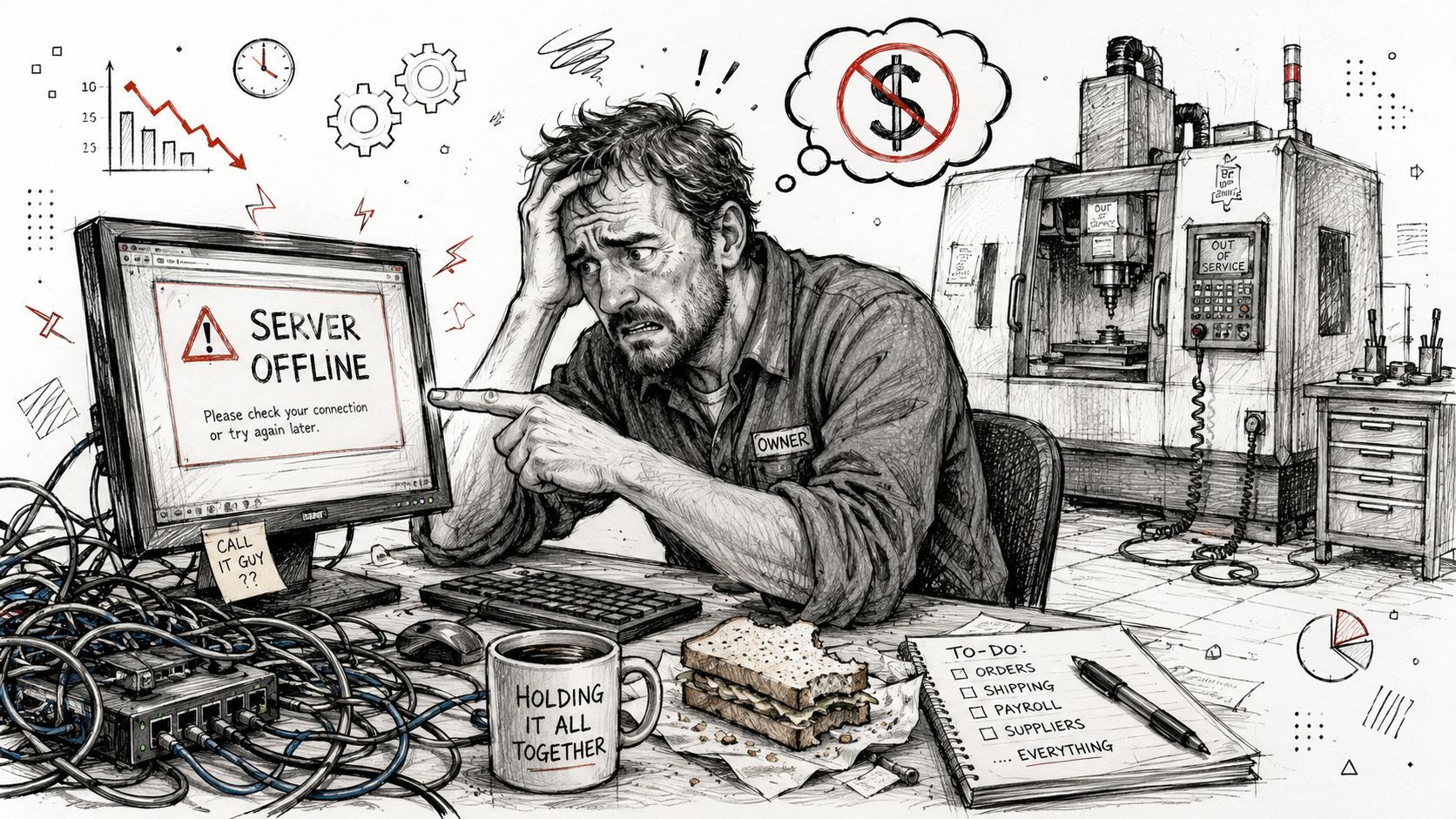
A familiar story plays out in the Greenwood business parks. A manufacturer has an aging on-prem server tucked into a back office, maybe next to spare toner and old network gear. It handles file shares, authentication, maybe a line-of-business application that ties into inventory or production reporting. Nobody's watching disk health. Nobody's checking failed backups. Nobody's getting alerts when the box starts throwing hardware warnings.
Then it finally quits.
Production doesn't always halt because the machines themselves fail. It halts because the systems around the machines stop feeding them instructions, labels, schedules, or data. The office can't release work orders. The floor can't confirm jobs. Shipping can't print what it needs. Management starts making phone calls. The break-fix tech says he can be there later this afternoon.
That's the Southside version of a business continuity failure. Not theoretical. Just expensive, loud, and avoidable.
What the outage really looks like
On paper, it sounds like "the server went down."
On the floor, it looks more like this:
- Operators wait: They can't see the next job, confirm counts, or pull specs.
- Supervisors improvise: They start texting photos, handwriting notes, and bypassing process controls.
- Engineers get pulled off their work: Instead of improving throughput, they're tracing cables and rebooting gear.
- Leadership loses visibility: Nobody knows whether the issue is a dead host, a bad switch, a failed RAID set, or a ransomware event.
Production outages rarely begin as "an IT problem." They become a plant-wide problem within minutes.
The shops that avoid this don't have magic hardware. They have monitoring, tested recovery steps, clean network segmentation, and someone responsible for uptime before things break.
Why break-fix fails manufacturers
Break-fix support fits a law office better than a machine shop. In manufacturing, timing matters more. You can't wait around for someone to diagnose the problem after the line is already down. You need the warning before the failure, not the invoice after it.
That's the difference between reactive support and a managed approach. One shows up after damage is done. The other is built to keep production moving.
What Are Managed IT Services for Manufacturers
Managed IT services for manufacturing give a plant an outside team that handles the daily care of systems tied to production, quality, shipping, and administration. That includes monitoring, maintenance, patch control, cybersecurity, backups, vendor coordination, and user support. In a machine shop or food plant on the Southside, that scope usually reaches further than office PCs. It touches the network closets, wireless coverage between departments, remote access for machine builders, and the servers or virtual hosts tied to ERP, scheduling, and plant-floor reporting.
The service model matters because manufacturing environments mix standard business IT with operational technology. A provider might be responsible for Microsoft 365 and endpoint protection in the front office, then spend the same afternoon tracing packet loss between a production cell and a SCADA-connected system. That is a different job than answering help desk tickets as they come in. It is ongoing operational ownership with agreed response times, change control, and clear recovery procedures.
What manufacturers are actually buying
A manufacturer is buying coverage for the systems that keep orders moving and machines communicating. The provider watches for failed backups, switch errors, storage alerts, unstable VPN sessions, expired certificates, and endpoint issues before they turn into a line interruption. The provider also handles routine work that internal teams often do not have time to stay ahead of, such as patch scheduling around production windows, firewall rule reviews, user onboarding, license management, and documentation.
For Indiana firms that want a plain-language baseline, this guide to managed IT services for Indiana businesses explains the service model well. Manufacturing adds another layer. The IT team cannot treat every asset the same way, because an accounting laptop and an HMI terminal do not tolerate the same controls, reboot schedule, or security policy.
Where generic MSP support falls short in a plant
Small and mid-sized manufacturers run into trouble when a provider knows office IT but has no feel for OT constraints. I have seen providers push updates during production hours, flatten networks that should have stayed segmented, or treat machine vendor access like a normal remote desktop request. Those decisions create intermittent failures that are hard to reproduce and expensive to chase.
Plant support needs a provider that can work around legacy PLC-adjacent systems, coordinate with controls vendors, and document dependencies between SCADA, historians, HMIs, file shares, and line-of-business applications. It also needs discipline. Changes should be logged. Remote access should be limited and reviewed. Maintenance windows should match how the plant operates, whether that means second shift, weekends, or the narrow gap between jobs.
Even switch selection has consequences on the floor. Plants with segmented cells, industrial uplinks, and traffic flowing between IT and OT benefit from understanding managed ethernet switches for industrial networks, because visibility into ports, VLANs, loops, and failures is often the difference between a quick fix and a long outage.
If a provider only talks about email, laptops, and password resets, they are not speaking to the systems that stop your line.
Core Capabilities That Keep Your Plant Running
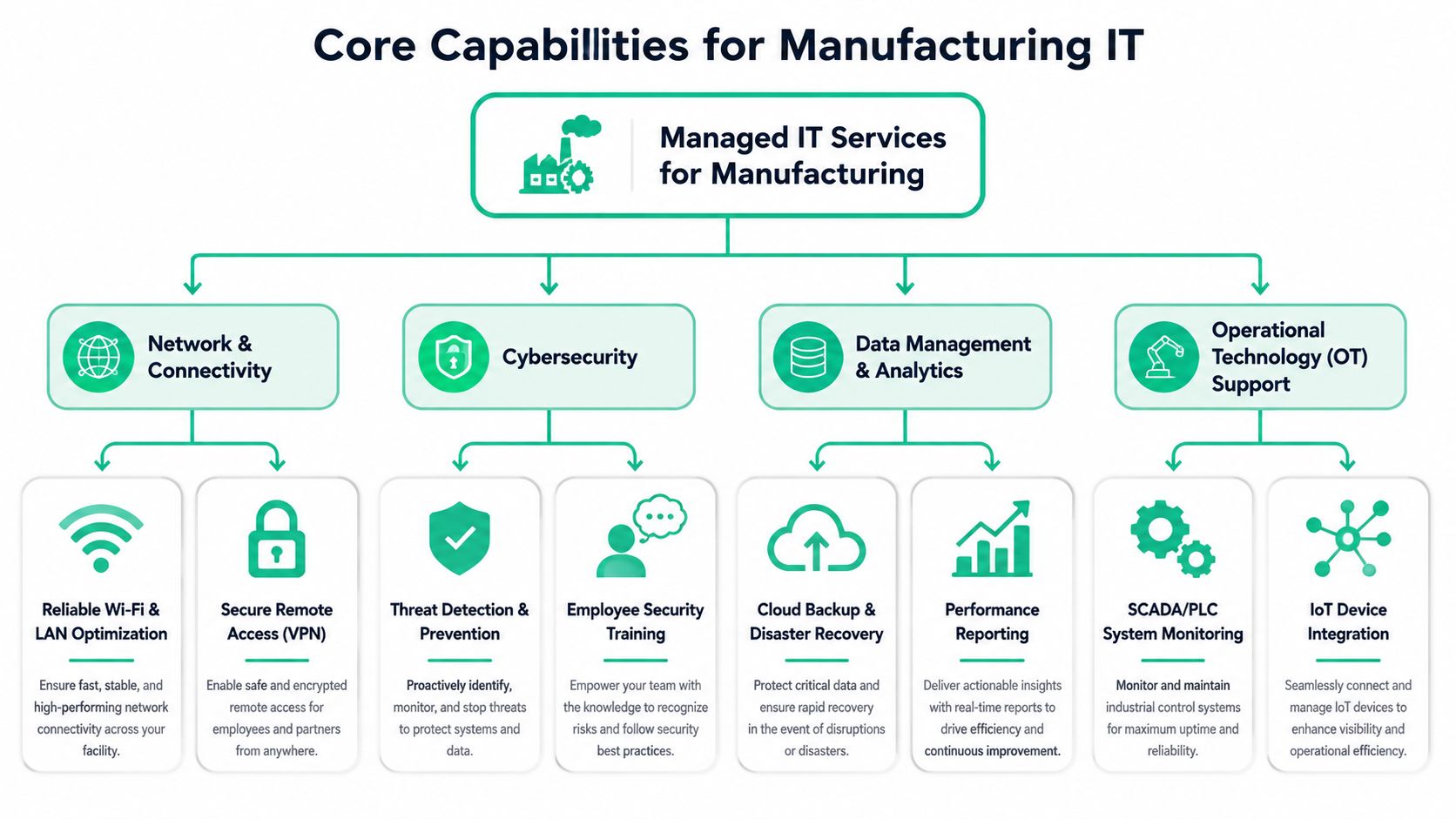
The most effective managed service setups in manufacturing revolve around four control domains: network management and security, cloud computing, disaster recovery and business continuity, and help-desk and end-user support, as described in this manufacturing guide from DataBank. In a plant, those aren't separate silos. They overlap all day.
Network stability on the plant floor
Most line stoppages tied to IT start at Layer 1, Layer 2, or at the handoff between old and new gear. Bad cabling, neglected switch configs, overlapping flat networks, flaky Wi-Fi in an old brick building, and poorly handled vendor remote access all create intermittent problems that are hard to pin down.
In Indiana manufacturing, I'd start with three questions:
- Are office devices and production-connected devices separated properly?
- Do you have managed switching with visibility into port status, errors, and loops?
- Can you identify who changed what when something starts dropping packets or sessions?
A stable plant network usually means segmented VLAN design, access control that matches role and device type, and enough logging to reconstruct events after a disruption. UniFi networking can make sense in some environments for visibility and centralized management, but the bigger issue is design discipline. Good gear on a sloppy flat network still gives you sloppy outcomes.
Cybersecurity that doesn't break production
Manufacturing security has to protect uptime first, then strengthen it. If security controls disrupt operations, people work around them. That's how you end up with shared credentials, open remote tools, and machines no one wants touched.
The better pattern is Zero Trust architecture applied with restraint. Verify users and devices. Limit access by role. Separate administrative activity from daily work. Require controlled remote access for vendors. Monitor continuously with SOC-as-a-Service monitoring so someone catches unusual behavior before it turns into a long weekend rebuild.
For endpoints, tools like Bitdefender GravityZone can fit well when configured around plant realities rather than copied from a generic office template. The framework side matters too. NIST CSF gives most general businesses a solid structure, and CMMC matters if you touch defense contracts anywhere in your customer chain.
A few controls usually make the biggest difference:
- Remote access control: Require approved paths for vendors and maintenance teams.
- Administrative separation: Keep domain admin work off ordinary user sessions.
- Change windows: Patch and reboot according to production schedules, not convenience.
- Continuous monitoring: Watch for failed logins, unusual traffic, and endpoint drift.
Don't let anyone "harden" a production environment without a rollback plan and an approved maintenance window.
Backups that are actually recoverable
A backup report that says "successful" doesn't mean you can restore the system you need, in the order you need it, under production pressure.
Manufacturers need immutable off-site backups, clear recovery priorities, and regular restore testing. ERP, file shares, virtual hosts, engineering data, and license servers rarely carry the same urgency. If you don't define the order up front, the restore turns into an argument while production waits.
I've also seen shops discover too late that the issue wasn't just backup failure. It was storage decay no one was tracking. When you've been around enough server closets and dusty control cabinets, you learn that drives often warn you before they die. Ignore the warnings and you can graduate from routine restore to emergency bit-level data recovery on a failing RAID array.
That's not where you want to be.
Help desk support that understands operations
Manufacturing support fails when the help desk treats every ticket the same. "Printer issue" on the front desk is not the same as "label system issue" on a shipping line. "Can't log in" for HR is not the same as "operator terminal unavailable" at a bottleneck process.
The support desk needs triage rules that reflect business impact. That means:
| Issue type | Normal office impact | Manufacturing impact |
|---|---|---|
| Shared printer outage | Annoying | Can halt labels, packing, or shipping |
| Wi-Fi dead zone | Inconvenient | Can break scanners or mobile workflows |
| User account lockout | Minor | Can stop shift handoff or supervisor approvals |
| Slow file access | Frustrating | Can delay drawings, quality docs, or programs |
If your plant also has safety monitoring tied to connected systems, it helps to understand adjacent technologies like WHS compliance monitoring, because operational support increasingly intersects with safety visibility and real-time alerts.
For a broader view of how infrastructure discipline cuts interruptions, this guide to IT infrastructure management and downtime reduction covers the business side well.
From Unplanned Downtime to Predictable ROI
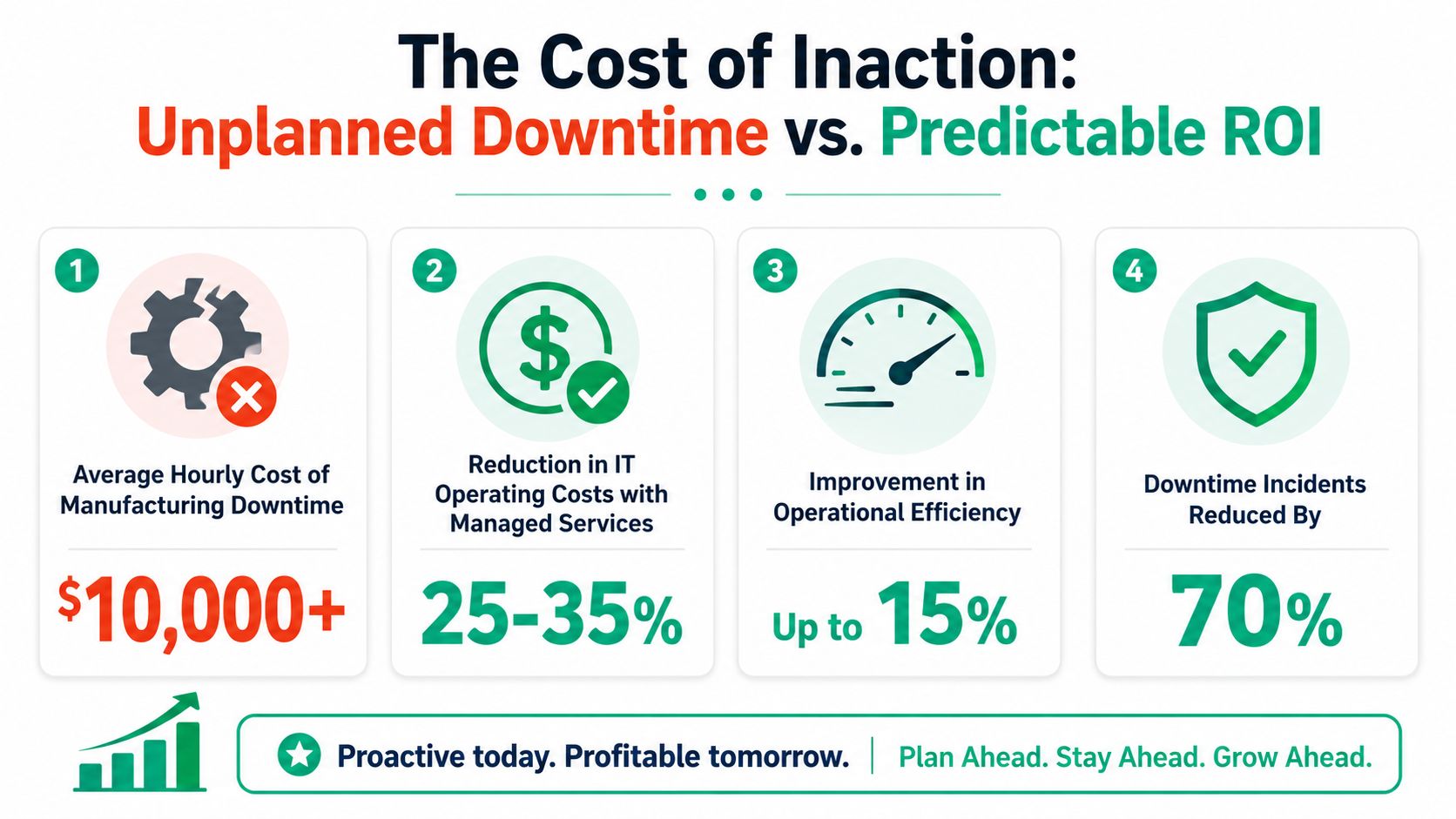
The finance case for managed IT gets simple fast when you tie it to downtime. One avoidable outage can eat far more value than months of proactive support, especially when the outage spreads from one failed system into shipping, quality, and production scheduling.
The market itself tells you this isn't a niche purchase anymore. The global managed services market is projected to reach USD 705.22 billion by 2031, growing at a CAGR of 8.9%, according to MarketsandMarkets' managed services market forecast. Manufacturers are part of that shift because they need help managing complex environments, cybersecurity pressure, and high-uptime operations.
The local budget argument is even more practical. Johnson County business owners don't want surprise invoices, emergency parts hunts, and weekend labor approvals every time a core system misbehaves. They want a monthly number they can plan around.
Where the return actually comes from
The return isn't magic. It usually comes from four places:
- Fewer interruptions: Monitoring catches failing disks, saturated links, expired certs, and backup errors before users call.
- Faster response: Documented systems and remote tooling cut the dead time between alert and fix.
- Less staff distraction: Engineers and supervisors stop wasting hours doing ad hoc tech support.
- Cleaner budgeting: You trade chaotic emergency spend for a recurring operating cost.
A lot of manufacturers also miss the hidden labor drain. Every minute your internal team spends chasing switch ports, rebuilding user profiles, or troubleshooting line-adjacent PCs is time they aren't spending on process improvement, maintenance planning, or customer work.
Business continuity is where ROI gets real
If you don't have a recovery plan, every outage becomes custom work. Custom work is slow, stressful, and expensive.
A written disaster recovery runbook changes that. So do tested backups, spare hardware strategy, and defined restoration order. This IT disaster recovery plan template for Indiana businesses is a good example of the kind of structure manufacturers should have before they need it.
This short video helps frame the uptime mindset from another angle.
When the system works, ROI feels boring. That's good. Boring IT is exactly what most plant managers want.
Finding the Right IT Partner in Central Indiana
A manufacturing company in Greenwood shouldn't shop for an IT provider the same way a retail office in downtown Indy would. You need someone who can handle user support, yes, but also understands production dependencies, maintenance windows, and the difference between a nuisance outage and a line-stopping one.
The first filter is local presence. If a provider says they support Central Indiana but can't explain the challenges of older buildings, mixed infrastructure, and fast on-site response across the Greenwood and Indianapolis area, keep looking.
Questions worth asking before you sign
Ask direct questions. Don't settle for polished sales language.
| Criteria | What to Ask | Why It Matters for Manufacturers |
|---|---|---|
| Local response | How quickly can you be on-site in Greenwood, Franklin, or the south side of Indy? | Some failures need hands on hardware, not a remote session |
| OT awareness | What experience do you have around SCADA, HMIs, machine-connected PCs, or industrial switches? | A provider can be strong in office IT and weak on the floor |
| Change control | How do you handle patching on production-critical systems? | Bad timing can create the outage you're trying to prevent |
| Recovery readiness | How often do you test restores, and in what order do you bring systems back? | Backup without restore testing is guesswork |
| Security model | How do you apply Zero Trust without disrupting operations? | Security has to fit production realities |
| Documentation | Who owns network diagrams, asset lists, and admin procedures? | Tribal knowledge disappears when one person leaves |
| Escalation | What triggers a call versus a ticket update? | Plant leaders need fast communication during incidents |
If a provider can't explain patch timing around production schedules, they haven't spent enough time around manufacturing.
Look for integration thinking, not just ticket handling
Good support firms know Microsoft 365, endpoints, backups, and firewalls. Manufacturing needs more than that. You also want a partner who respects controls integration, machine connectivity, and the handoff between business systems and plant systems.
That's why it helps to understand what real E & I Sales' integration expertise looks like in the controls world. Even if your managed service provider isn't your controls integrator, they need to coordinate cleanly with the people who touch that layer.
For a broader checklist on evaluation, this expert guide on choosing a managed service provider covers the buying side in plain language.
What works and what doesn't
What works in Indiana manufacturing:
- Production-aware support: Planned maintenance windows, rollback plans, and documented escalation.
- Clear ownership: Someone is responsible for patching, alerts, backups, and vendor access.
- Hybrid skill sets: The team can handle servers, security, networking, and line-adjacent systems without panic.
What doesn't:
- All-remote support for everything: Some issues still need local hands.
- One-size-fits-all security baselines: Office policy pasted onto plant devices causes friction.
- Unmanaged growth: New switches, workstations, and remote tools appear over time until nobody knows the actual environment.
One local option in this category is Finchum Fixes IT, which provides proactive monitoring, security, and support as part of its managed services offering for Indiana businesses.
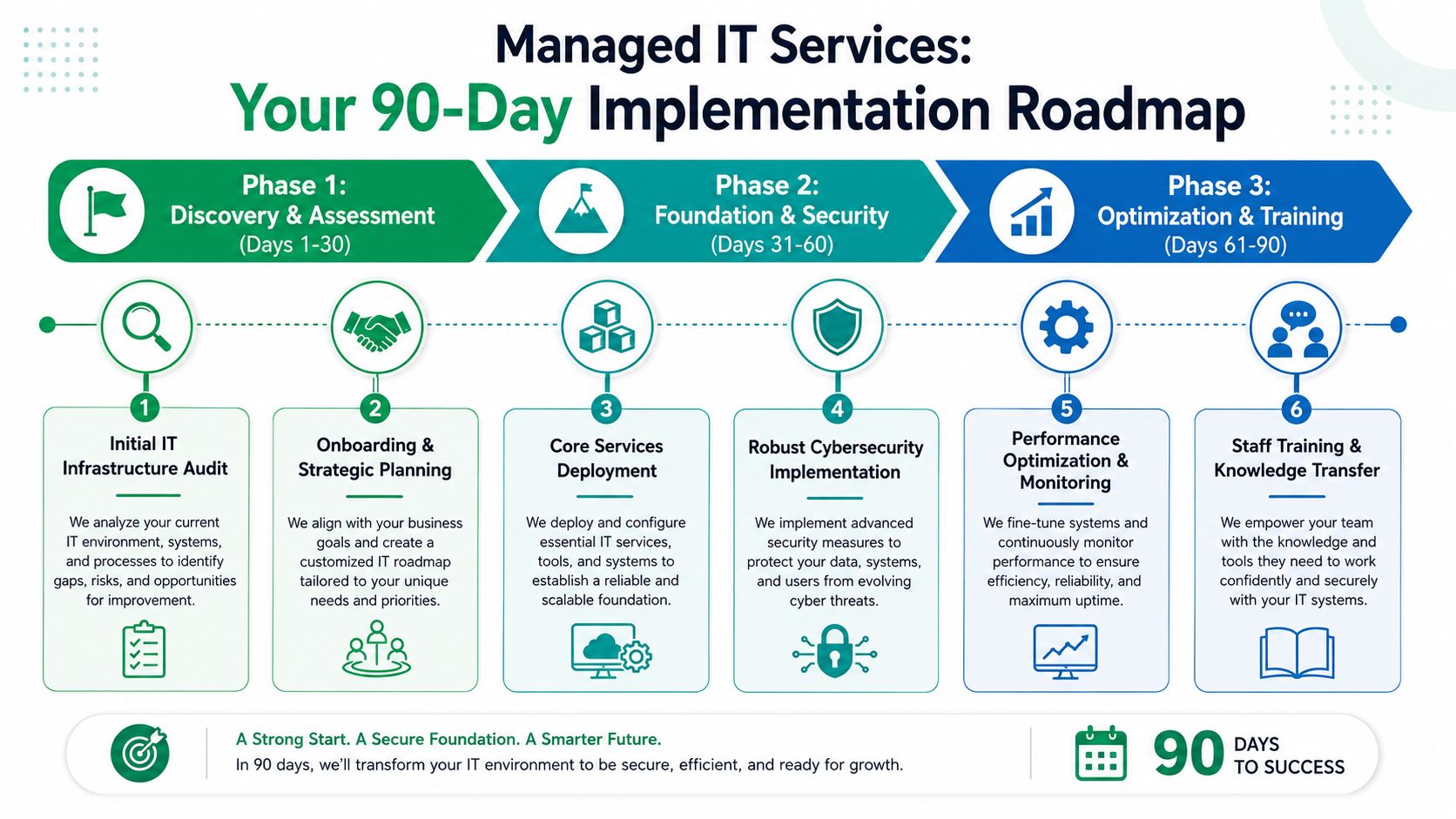
Your 90-Day Implementation Roadmap
Most manufacturers delay the switch because they assume onboarding will create more disruption than it solves. It doesn't have to. A good rollout is staged, visible, and tied to production schedules.
Days 1 through 30
The first month is about discovery and stabilization. Inventory every critical asset. Map servers, switches, uplinks, Wi-Fi coverage, backup jobs, remote access paths, and line-of-business systems. Identify which systems touch production directly and which ones only support the office.
This is also when monitoring goes in. Alerting on disks, host health, failed backups, certificate issues, endpoint status, and core network devices gives you a real baseline. If endpoints need a stronger security layer, a tool like Bitdefender GravityZone is typically deployed.
Days 31 through 60
The second phase is where the obvious risks get cleaned up. Flat networks get segmented. Backup jobs get repaired. Dormant admin accounts get removed. Remote access gets tightened. Wireless dead zones get addressed, often with latency-optimized mesh nodes or better AP placement where old construction blocks signal.
A lot of plants also use this window to sort out process problems masquerading as tech problems.
That can include:
- Cleaning documentation: Asset lists, recovery contacts, warranty status, and vendor access notes.
- Fixing noise in monitoring: Too many false alerts make teams ignore important ones.
- Standardizing support paths: Operators, supervisors, and office staff need simple reporting rules.
The goal in month two isn't perfection. It's control.
Days 61 through 90
The third phase turns support into a long-term operating rhythm. Review incidents. See which alerts mattered. Adjust patch windows. Confirm restore order. Train staff on what changed and what to do during an outage.
Strategy takes on significant importance. If the company is adding a second site, moving systems to the cloud, tightening customer security requirements, or preparing for more formal governance under frameworks like NIST CSF, your roadmap should reflect that.
A practical 90-day plan should leave you with:
- A current asset inventory
- Monitored infrastructure
- Tested backup and recovery procedures
- Defined security controls for users, devices, and remote access
- A support process that matches plant priorities
That's when managed IT stops feeling like an outside service and starts functioning like part of operations.
Secure Your Operations and Get a Clear Path Forward
Reactive IT is a bad fit for manufacturing. It waits for failure, then charges you to deal with the consequences. That model might survive in a low-pressure office. It doesn't hold up when production, shipping, engineering, and customer deadlines all depend on connected systems staying available.
A better setup protects both sides of the house. The office systems people use every day. The plant-floor systems that need stable, careful support without reckless changes. That means stronger network control, production-aware cybersecurity, tested recovery, and help desk triage that reflects operational impact.
If you're also trying to tighten detection and response, this Indiana guide to managed detection and response is worth reading because security monitoring has become part of uptime, not a separate conversation.
For manufacturers in Greenwood, Indianapolis, and the surrounding counties, the next step shouldn't be "wait until something breaks again." It should be a clear assessment of what's fragile, what's exposed, and what needs to be fixed first.
If your company is in the Greenwood or Indianapolis area, schedule a Free Network Assessment or Security Risk Audit with Finchum Fixes IT. We'll review the weak points in your network, backup, endpoint security, and plant connectivity, then give you a practical plan to reduce downtime without disrupting production.