MFA Fatigue Attack Explained and How to Stop It
A month-end close is underway in a Greenwood office. The manager's phone keeps buzzing with Microsoft Authenticator prompts, even though she hasn't tried to sign in. The right response isn't to approve one to make the noise stop. It's to deny the request, report it immediately, preserve the sign-in evidence, revoke access, and move high-risk accounts toward phishing-resistant MFA.
What an MFA Fatigue Attack Actually Looks Like
The office manager is trying to finish payroll when the prompts begin. One arrives, then another, then several more. The screen says someone is attempting to sign in, but the employee assumes a cloud application is malfunctioning or that a coworker needs help. A caller claiming to be from IT then offers an explanation and asks her to approve the next request.
That's the opening an MFA fatigue attack, also called push bombing or MFA bombing, exploits. The attacker already has a valid username and password, often obtained through phishing, password reuse, or a breach. Instead of defeating the underlying cryptography, the attacker repeatedly starts real login attempts and waits for the legitimate user to approve one.
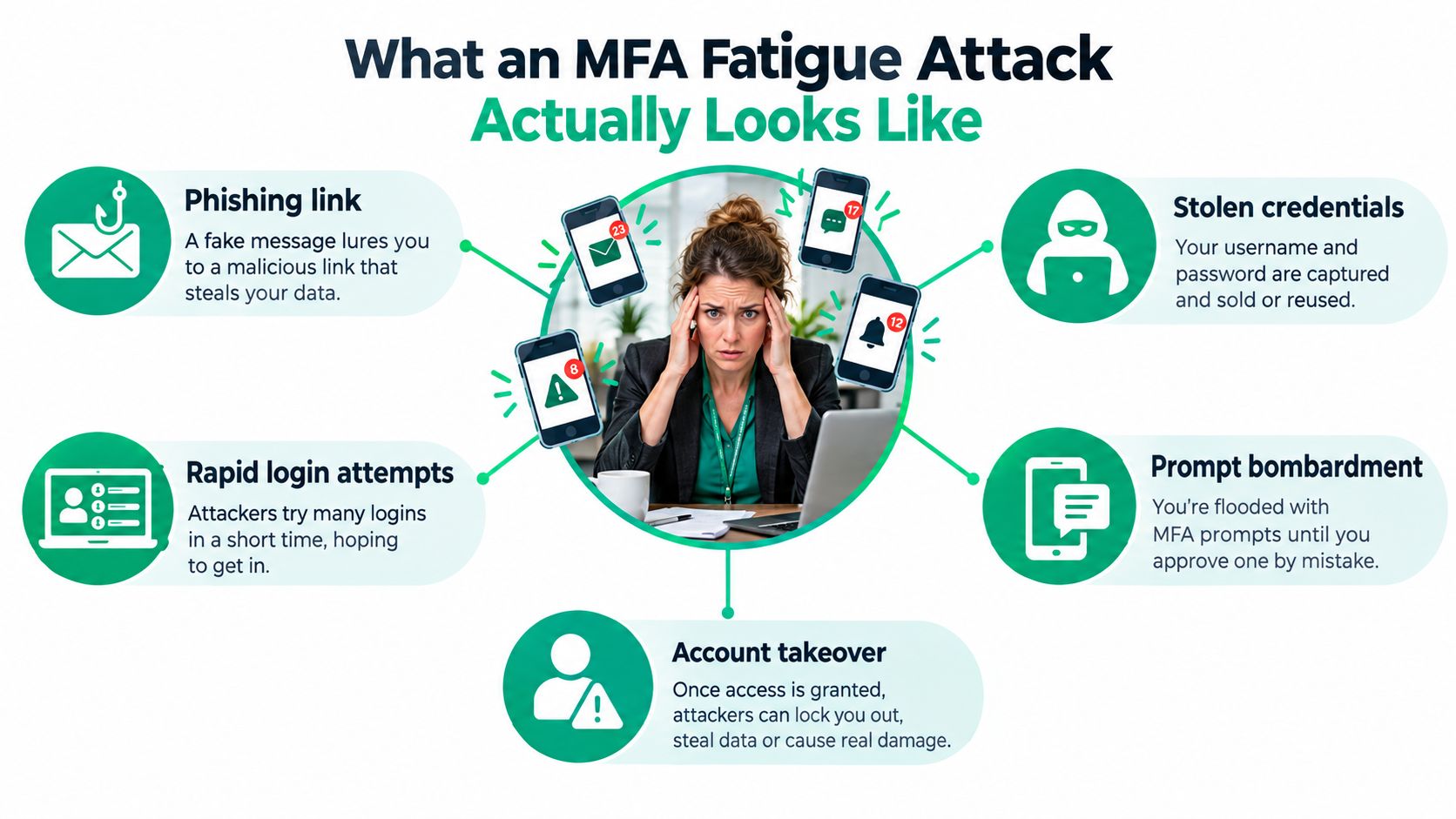
Push-based MFA was designed to be easier and safer than typing SMS codes. The trade-off is that a single Approve button can become a social-engineering surface. The authentication system may be working exactly as designed. The attacker is abusing the person standing between the stolen password and the approved session.
Microsoft telemetry cited 22,859 Azure Active Directory Protection sessions involving multiple failed MFA attempts in December 2021, rising to 40,942 sessions by August 2022, an increase of approximately 79% (The Register reported the Microsoft telemetry). That pattern matters to a receptionist, accountant, or help-desk contractor along the I-65 corridor because those accounts often reach email, payroll, cloud storage, VPN services, and administrative systems.
Practical rule: An unexpected approval request is not an inconvenience to clear. It's a possible sign that someone already knows the password.
A company can still enable two factor authentication and remain exposed if employees treat every prompt as routine. The identity and access management work also needs to cover enrollment, recovery, legacy applications, and privileged accounts. A useful companion for that broader review is this identity and access management guide.
How Attackers Pull Off an MFA Fatigue Attack
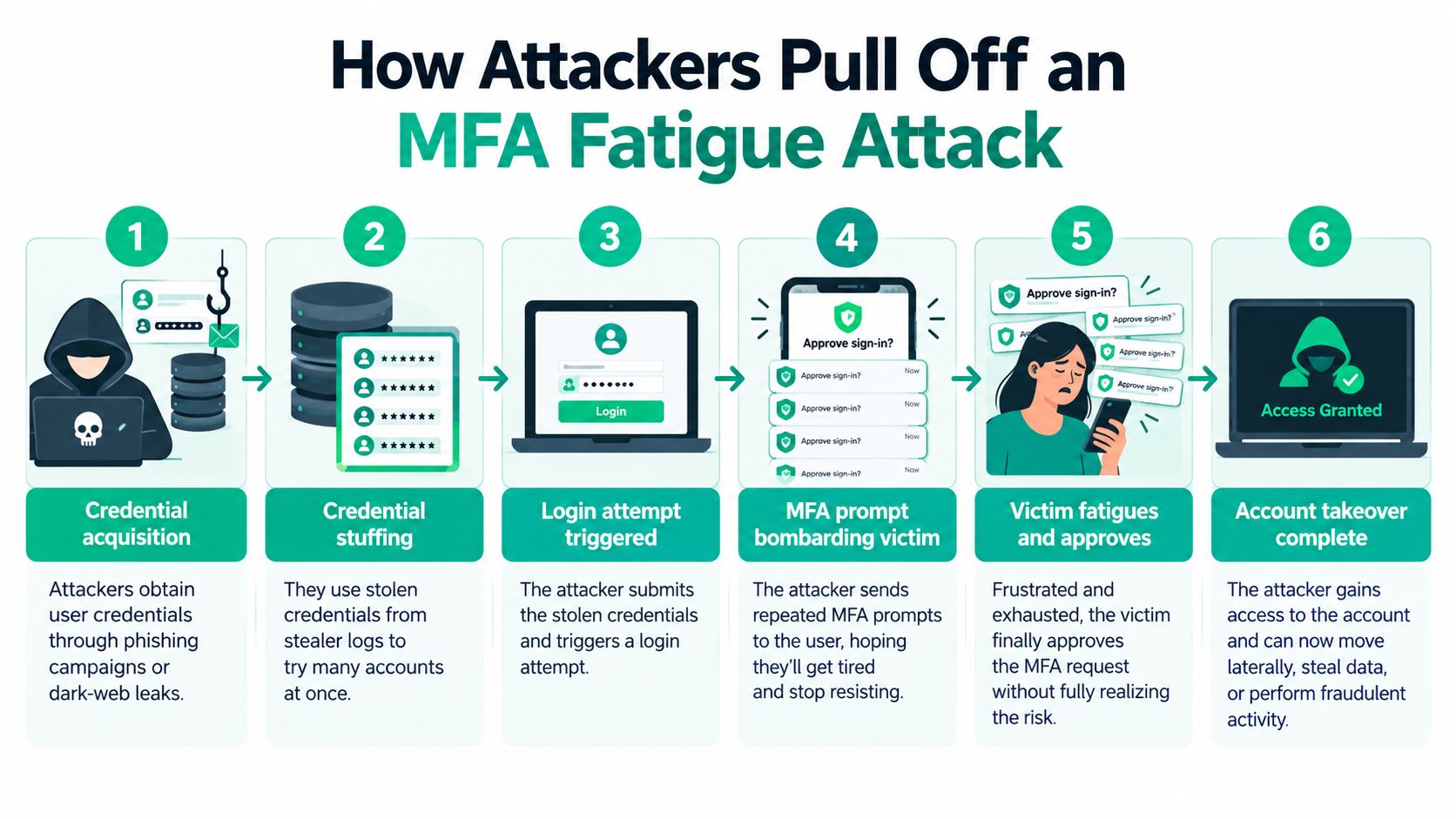
The attack chain is easier to stop when each stage has an owner and a control. Attackers don't need a broken authenticator. They need a valid password, a permissive push workflow, and a person who hasn't been given a clear response path.
The opening stages
Credential acquisition comes first. A phishing page, reused password, data breach, or information-stealer log gives the attacker a username and password. The attacker tests those credentials against Microsoft Entra ID, Okta, Google Workspace, a VPN, or another exposed identity provider.
Identity-provider reconnaissance follows. The attacker learns which authentication methods are available, whether push approval is enabled, and which account or device responds to the request. A login attempt with the stolen password then triggers a legitimate notification on the employee's phone.
Prompt flooding creates the pressure. The attacker repeats the login attempt, generating a stream of notifications. The victim may be working a busy shift, using a shared device, or assuming the prompts come from a broken application. The attacker may add urgency by calling the user or posing as an IT support technician.
Approval completes the initial intrusion. The user taps the button to stop the interruptions, or accepts after a caller gives a convincing explanation. That approval gives the attacker an authenticated session, not merely a chance to try another password.
The enrollment gap
MFA enrollment can create a quieter route around the intended policy. A documented case cited by the British Computer Society describes APT29's MFA self-enrollment abuse. The attacker used a dormant Azure Active Directory account, enrolled MFA, and then accessed an organization's VPN that relied on Azure AD for authentication.
That case is why “MFA is enabled” isn't a sufficient audit statement. Administrators should review dormant accounts, identify who registered each authenticator and when, restrict self-service enrollment for sensitive roles, and inspect VPN and cloud sign-in logs for unfamiliar devices or locations.
What happens after approval
An attacker who gets through won't necessarily stop at the original application. They may create mailbox rules, grant OAuth consent, register another authenticator, reset recovery details, or use VPN and RDP access to reach another system. Password rotation alone may leave active sessions, refresh tokens, or persistence mechanisms in place.
The defensive review should include defense-aware Active Directory attack techniques, particularly where dormant users, service accounts, administrative roles, and legacy authentication intersect. A practical phishing-control review is also available in this business guide to protecting against phishing attacks.
Real-World Incidents That Changed the Conversation
The risk became difficult to dismiss after several high-profile incidents. In March 2022, the Lapsus$ group compromised Microsoft through an employee account and stole proprietary source code. In 2022, Cisco later confirmed that the Yanluowang group combined MFA fatigue with voice phishing to access its corporate environment.
The September 2022 Uber incident showed how quickly a prompt flood and social engineering can work together. After obtaining a contractor's credentials, the attacker repeatedly sent authentication requests and persuaded the contractor to approve one. The resulting access reached internal corporate resources, not just the original sign-in.
These incidents have different details, but the operational lesson is consistent. A stolen password starts the attempt, while an approval workflow and a persuasive conversation finish it. A contractor or junior employee can therefore become a path into systems that support payroll, customer records, cloud administration, and business operations.
Okta reported approximately 113 million attacks targeting MFA during the first 90 days of 2022, describing activity that year as the highest it had observed and significantly above both 2021 and 2020 levels (TechTarget covered Okta's report). Not every event represented a successful fatigue attack, but the volume shows why authentication systems attract persistent hostile activity.
Business continuity lesson: A single approved prompt can turn an identity problem into a cloud outage, a ransomware investigation, or recovery from immutable off-site backups.
Industry defenses changed in response. Number matching replaced a context-free approval with a requirement to enter a displayed number. Rate limiting and stronger approval workflows reduce the chance that an attacker can keep generating prompts without friction, although neither control replaces phishing-resistant authentication.
For a Johnson County business owner, the practical question isn't whether Uber or Cisco had more security staff. It's whether your organization has a defined response before an employee approves a prompt, and whether someone can investigate the account without waiting for the next business day. A documented incident response team plan gives that response a clear owner.
What to Do the Moment a Prompt Feels Wrong
“Never approve an unexpected prompt” is correct, but incomplete. A denial can mean an attacker already has a valid password and is actively trying to authenticate. CISA recommends investigating denied push requests and having employees alert the security team, while noting that number matching reduces accidental approval but doesn't eliminate credential compromise or help-desk impersonation risk (CISA's number-matching guidance explains the limitation).
The response sequence
-
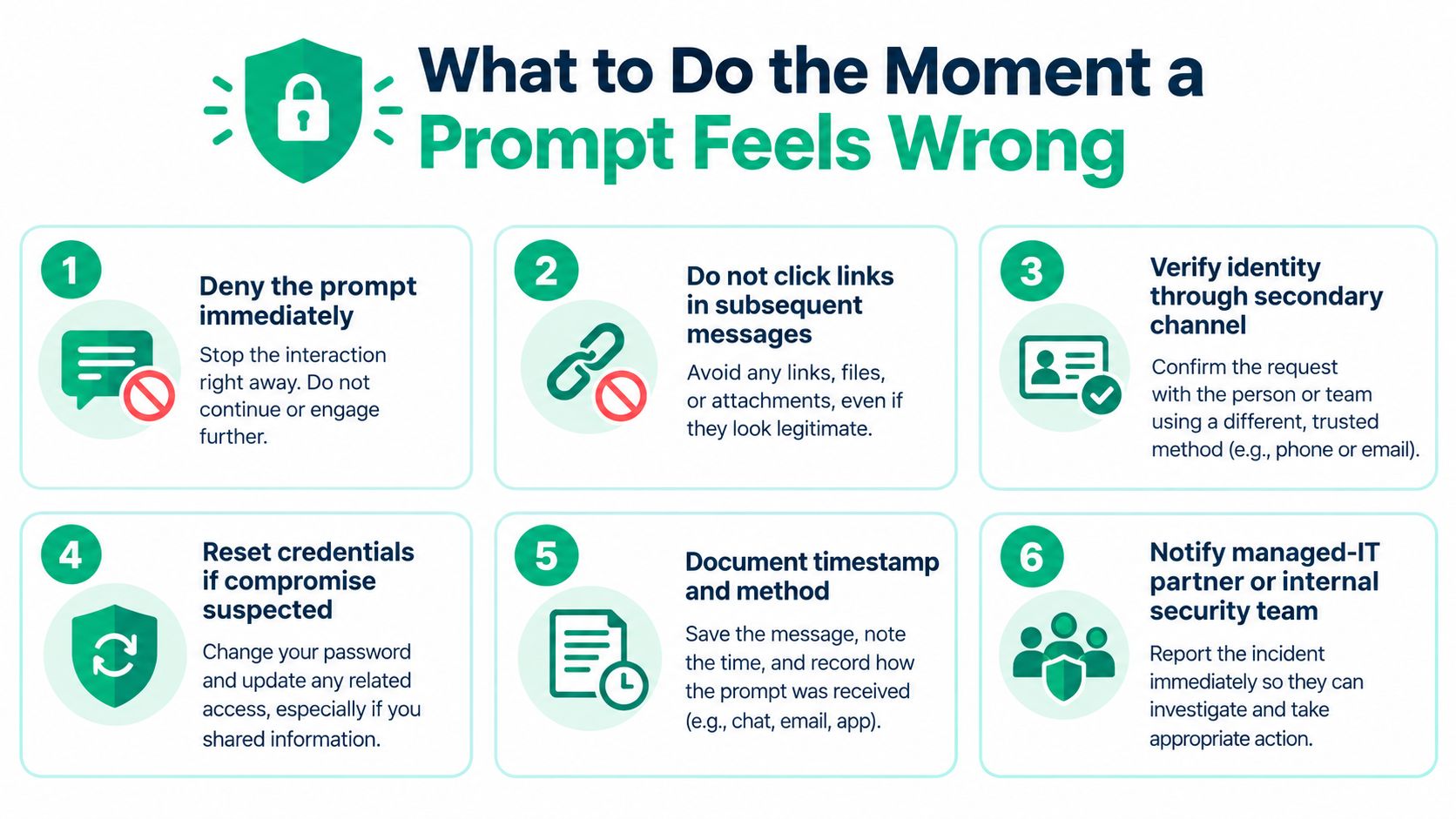
Deny the prompt immediately. Don't approve it to clear the notification, and don't call a phone number supplied in a text, email, or pop-up.
-
Report it within minutes. Use a known security mailbox, ticket queue, managed-IT partner, or internal on-call contact. Set a target response time of under 30 minutes as an internal operating standard, without treating that target as a security statistic.
-
Preserve the evidence. Record the time, application, device, prompt method, and whether the user denied or approved it. Capture the identity-provider event and source-location information before logs rotate or the account state changes.
-
Rotate the credential. Reset the password through a trusted administrative channel. If the same password was reused elsewhere, change those credentials too.
-
Revoke sessions and tokens. In Microsoft Entra, invalidate active sessions and refresh tokens. In other identity providers, use the equivalent session-revocation control. This step matters because a password reset doesn't necessarily terminate an already authenticated session.
-
Inspect persistence. Review mailbox forwarding rules, inbox rules, OAuth grants, recovery methods, new device registrations, and authenticator enrollment. Check VPN, RDP, cloud storage, and administrator activity.
-
Disable and escalate when evidence supports compromise. Temporarily disable the account if an approval occurred, a new authenticator appeared, or suspicious access followed. Bring in legal counsel and cyber insurance contacts when policy conditions, regulated data, extortion, or material business interruption may be involved.
Make the workflow usable
A one-person IT shop in Hamilton County may not have a dedicated SOC. It can still define who receives the alert, what evidence gets preserved, who can disable an account, and when the managed provider takes over. A short runbook should name the systems, after-hours contact, approval authority, and recovery steps instead of telling employees to “contact IT.”
This is NIST CSF work in practical form. Identify the identity assets, protect accounts with stronger controls, detect denied prompts, respond through a rehearsed sequence, and recover access without guessing what happened. A printable cybersecurity incident response plan template can help turn that sequence into a staff-ready procedure.
Number Matching and Phishing-Resistant MFA Done Right
Number matching is a useful stopgap. It changes the action from tapping an uncontextualized Approve button to entering a number displayed by the sign-in process. That makes accidental approval harder because the user must look at the login context and match the code.
It still doesn't prove that the login is legitimate. A caller impersonating IT can tell the employee which number to enter, and a stolen password remains compromised even when the user rejects every prompt. CISA treats number matching as an interim measure when phishing-resistant MFA isn't available, not as the final destination.
Build the migration ladder
Start with an inventory rather than a tenant-wide switch that surprises frontline staff.
- Privileged access: Identify Microsoft 365 administrators, cloud-console users, VPN administrators, backup administrators, and emergency-access accounts.
- Business applications: Include SaaS platforms, RDP, VPN, payroll, file storage, line-of-business software, and applications used by contractors.
- Authentication gaps: Check legacy protocols, application passwords, service accounts, shared accounts, and recovery workflows that may bypass the intended policy.
- User groups: Separate administrators and executives from office staff, contractors, warehouse workers, and shared-device users.
- Recovery design: Create a controlled break-glass path, secure its credentials, monitor its use, and test recovery without making it an everyday shortcut.
CISA identifies FIDO/WebAuthn and public-key-infrastructure authentication as phishing-resistant options. Its guidance describes push MFA without number matching as vulnerable to push bombing and user error, while NIST's Digital Identity Guidelines require cryptographic authentication for phishing resistance (CISA's phishing-resistant MFA guidance explains the distinction).
Put the strongest control where failure costs most
Issue FIDO2 security keys or platform passkeys to high-risk administrators first. Enforce them through the identity provider, verify that legacy applications can't bypass the policy, and retain a controlled break-glass account for a genuine outage. Then move through executives, contractors, remote-access users, and frontline teams as the application inventory allows.
The trade-off is operational. A shared workstation, a warehouse employee, and a remote administrator have different recovery needs. A key that works well for a cloud administrator may be awkward for a rotating shift. Plan spare keys, supervised enrollment, account-recovery verification, and a second approved method that avoids reintroducing weak push approval.
Healthcare organizations can map the control to HIPAA access-control safeguards. Defense contractors can retain evidence for CMMC identification and authentication requirements. Other Indiana businesses can map the same work to NIST CSF identity controls, with audit records showing enrollment, enforcement, exceptions, and recovery events.
Detecting MFA Fatigue in Your Own Environment
Detection starts with identity-provider telemetry, not an employee's memory of how many times a phone buzzed. Watch for repeated MFA challenges against one account, approvals after several denials, unfamiliar source locations, sign-ins outside normal working hours, new device registrations, and newly enrolled authenticators.
Microsoft Entra
In Microsoft Entra admin center, review Monitoring and health, then Sign-in logs. Filter by user, authentication requirement, status, location, device detail, and risk information. Correlate the MFA events with audit logs for authenticator registration, password changes, consent grants, and mailbox or account changes.
A Microsoft Sentinel or Log Analytics search can begin with a KQL-style workflow such as:
SigninLogs | where ResultType != 0 or AuthenticationRequirement == "multiFactorAuthentication" | summarize Attempts=count(), FirstSeen=min(TimeGenerated), LastSeen=max(TimeGenerated) by UserPrincipalName, IPAddress | where Attempts > 1
Treat that as an investigation starting point, not a universal threshold. Your normal sign-in pattern, provider configuration, and log schema determine the useful baseline.
Okta and Google Workspace
In Okta, use the Reports area and system log to correlate authentication events, push denials, successful sign-ins, device context, and factor enrollment. In Google Workspace, open Admin console, then Reporting, followed by Audit and investigation, and review login, 2-Step Verification, and admin events.
The question is always the same: did a user initiate the login, and what happened immediately afterward? A denied prompt followed by an unfamiliar successful session deserves faster handling than an isolated failed login.
| Control | Blocks Prompt Fatigue | Blocks Self-Enrollment Abuse | Phishing-Resistant | Audit Trail Strength |
|---|---|---|---|---|
| Push approval without number matching | No | No | No | Basic prompt and sign-in records |
| Number matching | Reduces accidental approval | No | No | Prompt, sign-in, and denial records |
| Restricted administrator enrollment | No | Helps prevent unauthorized enrollment | No | Enrollment and approval records |
| FIDO2 or WebAuthn | Yes | Helps when enrollment is controlled | Yes | Key registration and authentication records |
| FIDO2 or WebAuthn plus conditional access | Yes | Stronger control across sensitive systems | Yes | Identity, device, policy, and sign-in records |
This evidence supports NIST CSF detection and response activities. It also gives healthcare and defense organizations material for HIPAA and CMMC reviews, particularly when records show who enrolled an authenticator, which policy applied, and how an exception was handled.
For small teams, SOC-as-a-Service monitoring can fill the gap between raw logs and a staffed security operation. The objective isn't to collect every event. It's to spot the combination of prompt abuse, unfamiliar access, and persistence quickly enough to protect operations.
Your First 30 Days of MFA Hardening
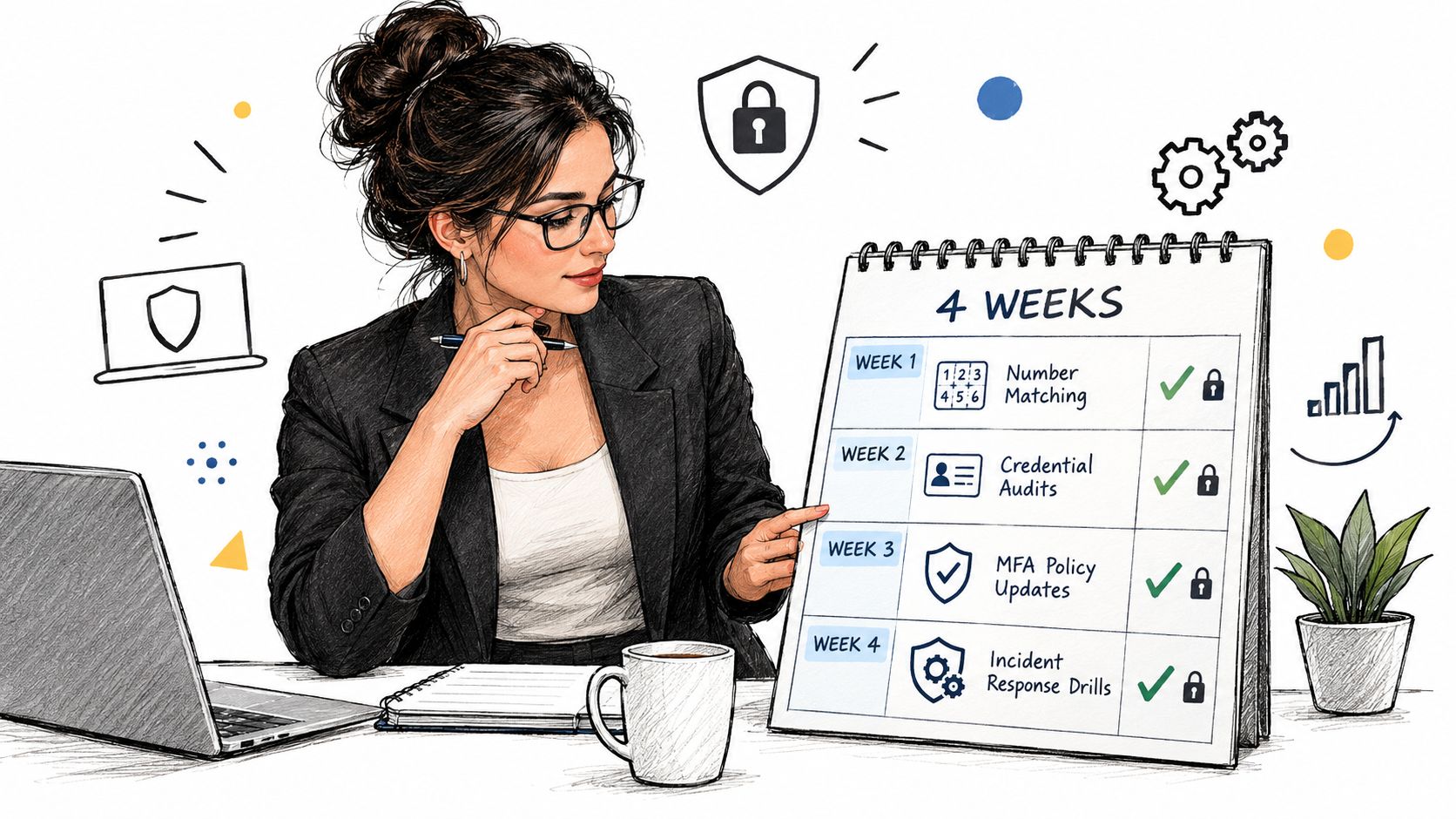
Use the first week to enable number matching where available, restrict excessive push attempts, and identify every remaining one-tap approval path. CISA's updated guidance promotes phishing-resistant MFA, while push bombing remains possible wherever approval-based push authentication is retained (CISA's advisory addresses the direction of travel).
During week two, publish the denied-prompt workflow. Name the recipient, preserve sign-in evidence, require credential and session response, and test the process with a controlled exercise. During week three, inventory privileged accounts and issue FIDO2 keys or platform passkeys to administrators and executives. Review the operating model alongside cybersecurity staffing for identity and access management so ownership is clear even when internal IT is small.
During week four, extend the rollout to contractors and frontline users, then test recovery on shared devices, remote access, VPN, RDP, SaaS, and backup administration. Keep the implementation documented in your MFA best-practices guide.
The business outcome is straightforward. Fewer compromised sessions mean less downtime, fewer non-billable recovery hours, and a more predictable monthly IT budget. That matters whether the company operates in a Greenwood business park, along the I-65 corridor, or inside one of the downtown Indy tech hubs.
Finchum Fixes IT can review your identity provider, endpoint controls, UniFi networking, Bitdefender GravityZone policies, and immutable off-site backups as one business-continuity plan. Greenwood and Indianapolis businesses can visit Finchum Fixes IT to schedule a Free Network Assessment or Security Risk Audit focused on stopping MFA fatigue before it becomes an outage.