Network Design Service: A Guide for Indiana Businesses
TL;DR
- Bad Wi-Fi and aging switches waste billable time long before they cause a full outage.
- A network design service is a business planning exercise, not a shopping list for routers.
- Good design starts with requirements first: apps, uptime targets, acceptable downtime, security, and growth.
- Indiana SMBs often need help with old brick buildings, mixed hardware, remote staff, VoIP, cloud apps, and future AI/video traffic.
- The right deliverables include topology diagrams, VLAN plans, hardware lists, configuration standards, and documentation.
- The wrong provider focuses only on internet speed or device count.
- If you're in Greenwood, Indy, Franklin, or along the I-65 corridor, a Free Network Assessment can show where downtime risk and Wi-Fi pain are hiding.
You can usually tell when a business has outgrown its network before anyone in the office says the word “network.”
The signs show up in daily friction. Staff in a Greenwood office park keep dropping video calls when they move from one side of the suite to the other. A front desk in an older brick building on the south side can't keep cloud apps open without lag. The owner blames the internet provider. The ISP says the line tests fine. Everyone gets annoyed, and work keeps slowing down.
That's the fundamental problem. Poor network design doesn't just create technical noise. It burns paid time, stalls sales calls, interrupts file access, and makes every little issue take longer to diagnose. Then one day a switch fails, a firewall chokes, or the wireless layout falls apart under a busy Monday morning. What felt like “annoying Wi-Fi” turns into downtime.
Your Network is Costing You Money
A lot of Johnson County business owners live with a network that “mostly works.” That phrase gets expensive.
A law office in Greenwood may only notice the issue when document uploads crawl and staff hotspot their phones to finish a filing. A small warehouse in Franklin may notice it when handheld devices lose connection in the back half of the building. A clinic near the I-65 corridor may notice it when VoIP calls crackle at the same time cloud backups kick off. Different symptoms, same root cause. The network was never properly designed for the building, the traffic, or the way the business operates.
What bad networking looks like in real life
The expensive part isn't always the big outage. It's the daily drag.
- Dropped calls: Sales and support teams repeat themselves, lose momentum, and sound disorganized.
- Slow Wi-Fi: Staff stop trusting the wireless and start finding workarounds.
- Random slowness: Cloud apps get blamed when the underlying issue is poor switching, bad access point placement, or congestion.
- No resilience: One failed device can take out phones, printers, file access, and remote users all at once.
Bad network design hides inside “little issues” until one morning it takes down half the office.
Businesses are putting more money into this category for a reason. The U.S. computer network design services market was valued at USD 21.7 billion in 2024 and is projected to reach USD 43.6 billion by 2032, a 9.2% CAGR from 2025 onward, according to P&S Market Research's U.S. network design services analysis. That tells you this isn't niche IT work. It's a core business investment.
Stop guessing and start measuring
If you're not sure whether the problem is bandwidth, latency, Wi-Fi layout, or switching, start by learning how to identify network issues with Fivenines. It's a practical way to think about what users are feeling on the network.
For a business view of the same problem, this guide on optimizing network performance for SMBs in 2026 helps connect technical symptoms to lost productivity.
A good network design service fixes the root cause. It doesn't just swap one access point and hope for the best.
What Exactly is a Network Design Service
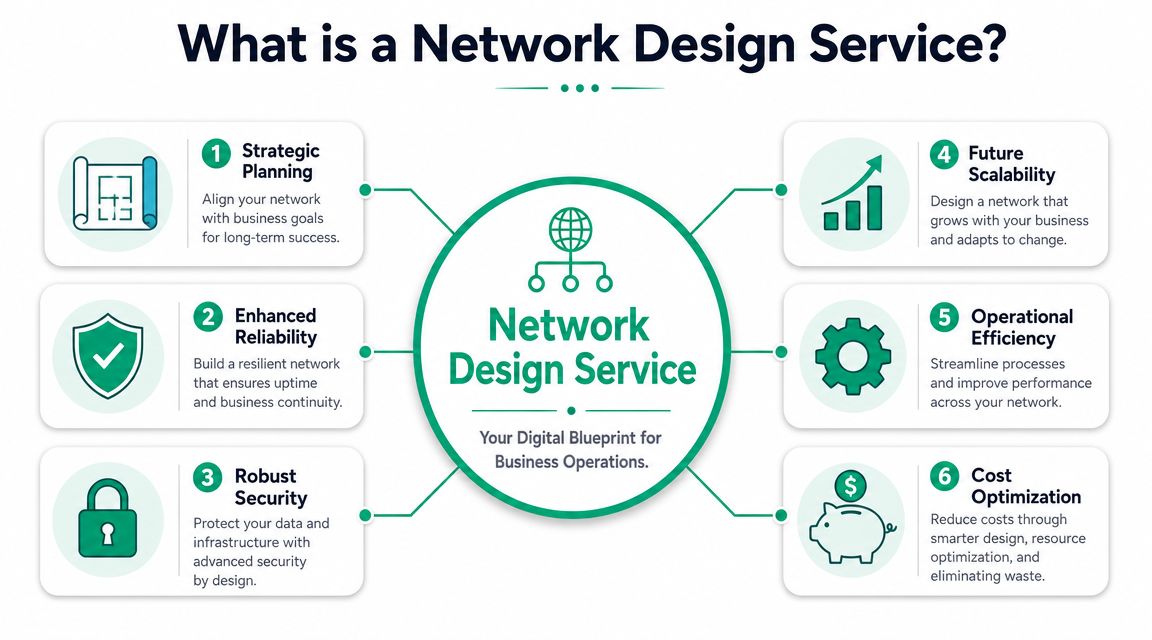
A network design service is the blueprint for how your business systems connect, stay secure, recover from trouble, and grow without falling apart.
Cisco defines network design as the physical, virtual, and logical arrangement of IT infrastructure, and its guidance says the process should start by listing resilience challenges such as security incidents, network issues, and application scaling needs. Cisco also notes, through its discussion of Auvik guidance, that organizations should weigh their cost of downtime when deciding how much redundancy to build into a network. You can read that directly in Cisco's overview of what network design is and how resilience planning fits in.
It's more than picking hardware
Most bad projects start with someone asking, “Which firewall should we buy?” That's too late in the conversation.
A proper design asks questions first:
- How does the business operate? Front office, warehouse, remote staff, guest Wi-Fi, VoIP, cloud apps, cameras, and line-of-business software all behave differently.
- What needs protection? Financial data, medical records, CAD files, and client documents shouldn't all sit on the same flat network.
- What happens during a failure? Some businesses can tolerate a short interruption. Others can't.
That's where design choices like VLAN segmentation, redundant switching, failover internet, and Zero Trust architecture come in. VLANs separate traffic so your phones, guest devices, and sensitive systems don't mingle. Zero Trust means users and devices don't get broad access just because they connected successfully. They get only what they need.
Good design makes security and performance easier
A lot of SMBs treat cybersecurity and networking as separate conversations. They aren't. If your internal network is flat, undocumented, and loosely controlled, security tools have to work much harder.
For leaders thinking through cloud-connected environments, this piece on addressing common cloud security failures is worth a read because cloud risk usually gets worse when the underlying network plan is weak.
The wireless side matters too. A clean design for business Wi-Fi has to account for user density, roaming, coverage overlap, and device behavior, not just raw signal bars. This overview of business Wi-Fi solutions for fast, secure networks for SMBs lines up well with that reality.
Practical rule: If your network diagram fits on a napkin and your business has multiple departments, phones, Wi-Fi, remote access, and compliance obligations, the design probably isn't finished.
The End to End Network Design Process
The best network projects don't begin in a rack. They begin in a conversation about the business.
A technically sound network design service starts by capturing business goals, bandwidth needs, uptime targets, and acceptable downtime windows before any topology is chosen, because the design has to define operational rules and delivery outcomes, not just hardware placement. That requirement-first approach is laid out in CIO Tech's network design overview.
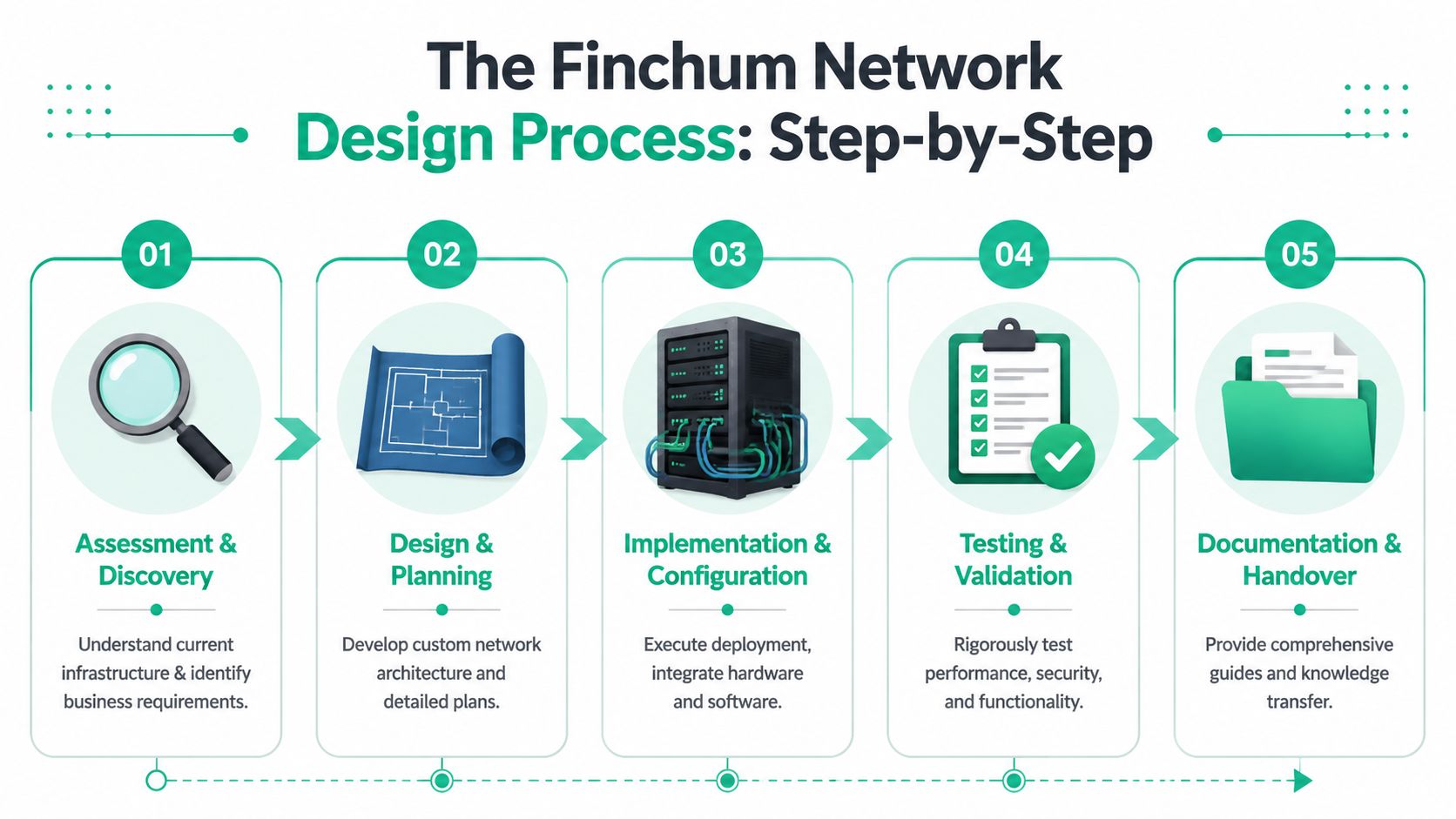
Assessment and discovery
This stage isn't just counting laptops and taking photos of the server closet.
It's where a consultant figures out how your team functions. A medical office has different needs than a machine shop. A defense-adjacent manufacturer may care about CMMC and segmented access to production systems. A clinic may need tighter handling around HIPAA workflows. A general business may align security decisions to NIST CSF controls even if it isn't under a formal mandate.
Useful discovery usually covers:
- Critical systems: VoIP, file access, cameras, cloud apps, backups, and remote access.
- Physical obstacles: Old brick walls, metal shelving, detached offices, odd ceiling heights, and poor cabling paths.
- Failure tolerance: Which systems can go down briefly, and which ones cannot.
Architecture and design
At this stage, the blueprint gets real. The provider defines the logical layout, security boundaries, Wi-Fi strategy, switching stack, failover approach, and management standards.
That often includes a mix of tools and platforms. UniFi networking is common in SMB environments because it gives decent visibility across switches, gateways, and access points. Security layers may include endpoint protection such as Bitdefender GravityZone, MFA, and policy-based access controls. For continuity, many firms also pair the network with immutable off-site backups and SOC-as-a-Service monitoring so one event doesn't become two problems.
A clean architecture should answer questions like these:
| Area | What the design should define |
|---|---|
| Segmentation | Who can reach what, and from where |
| Wireless | Coverage, roaming, guest access, and capacity |
| Resilience | Redundancy, failover, and recovery priorities |
| Operations | Monitoring, alerting, documentation, and change control |
Before rollout, it also helps to review the building itself. If the cabling plant is old, messy, or undersized, network hardware won't save it. Planning for networking cabling services for your Indy business then becomes part of the same conversation, not a separate afterthought.
Here's a quick visual that complements the process:
Implementation, testing, and handoff
Good teams stage equipment before they touch production. They label ports, standardize configurations, document VLANs, and schedule cutovers around business operations.
Testing matters more than is commonly understood. It's not enough for a laptop to connect to Wi-Fi. The team should validate roaming, DHCP behavior, remote access, VoIP quality, policy enforcement, and recovery steps if a device fails.
If you can't hand the next technician a diagram, config standard, and recovery note, the project isn't done.
Final documentation should include enough detail that the business isn't locked to tribal knowledge. That's what separates a mature process from a frantic install.
Deliverables and Pricing Models Explained
Business owners usually ask two fair questions. What exactly am I getting, and how will I be billed?
A real network design service produces assets you can keep and use. It shouldn't feel like paying for invisible labor.
What should be in the deliverables
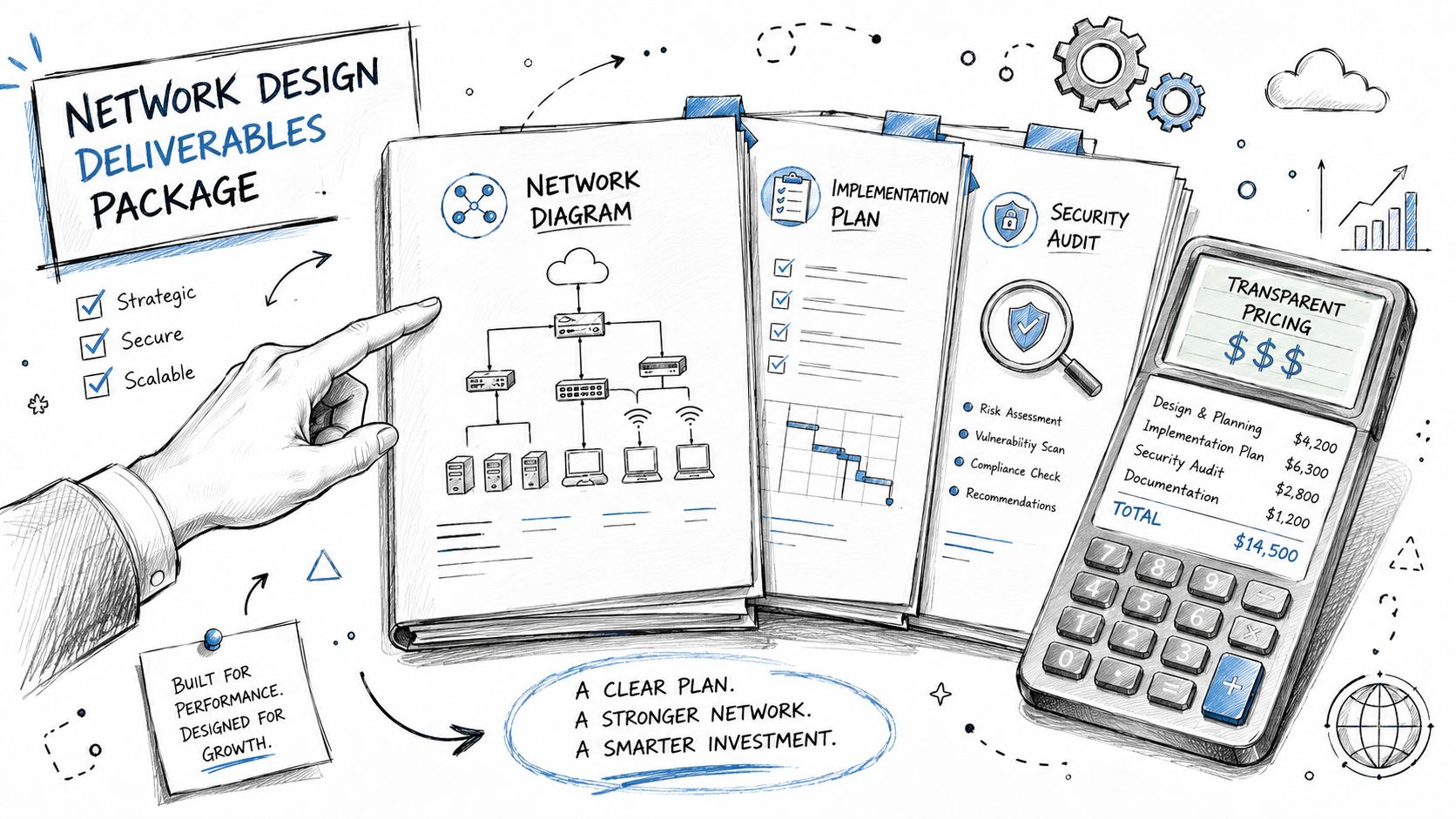
At minimum, most SMB projects should leave behind a packet of documentation that makes future support easier.
Common deliverables include:
- Topology diagrams: Physical and logical maps of how sites, switches, wireless, and internet connections fit together.
- Hardware bill of materials: Recommended firewalls, switches, access points, UPS units, racks, and accessories.
- Addressing and segmentation plan: VLAN layout, subnet purpose, naming standards, and access rules.
- Configuration standards: Port profiles, SSID structure, switch templates, and security baselines.
- Cutover and rollback notes: What changes happen, when they happen, and how to reverse them if needed.
If you've ever priced a website rebuild, you already know that scope changes cost money when the deliverables aren't clear. The same logic applies here. These insights on website costs from Cherubini are useful because they show how documentation and scope clarity shape project pricing in another technical service category too.
How pricing models usually work
Different shops bill differently, but most SMBs will run into three models.
| Pricing model | Best fit | Trade-off |
|---|---|---|
| Fixed project fee | Office moves, redesigns, Wi-Fi rebuilds, structured refreshes | Clear scope matters. Changes can trigger revisions. |
| Managed service or retainer | Ongoing oversight, monitoring, lifecycle planning | Predictable monthly budgeting, but less ideal for one-off jobs |
| Hourly consulting | Small troubleshooting efforts or second opinions | Flexible, but costs are less predictable |
A lot of Indianapolis-area businesses prefer the managed route once they've been burned by reactive support. It turns wasted tech time into a planned operating expense and usually keeps documentation from going stale.
The other cost factor people miss is the cabling foundation. If patch panels, runs, or labeling are a mess, every future change gets slower and riskier. That's why it helps to understand what structured cabling is and why your business needs it before you compare proposals.
How to Choose a Network Partner in Central Indiana
Picking a network partner in Central Indiana isn't just about finding someone who can terminate cable and mount access points.
You need somebody who can look at a Greenwood professional office, a Franklin light manufacturing floor, or a growing Hamilton County satellite location and design around the constraints. Older construction. Weird layouts. Mixed hardware. Compliance pressure. Staff who need the network to work without thinking about it.
Ask better questions
Most proposals sound fine until you ask specific questions.
Try these:
- How do you handle compliance-sensitive environments? A provider should be comfortable discussing HIPAA, CMMC, and broader security alignment such as NIST CSF.
- How do you segment networks? If the answer is vague, that's a problem. Guest traffic, phones, cameras, and business systems shouldn't all live together.
- What happens when we grow? New hires, more cloud apps, more cameras, and remote work all change the load.
A critical point many providers still miss is planning for AI, video, and hybrid-work traffic, not just today's user count. That gap is called out in Innowise's discussion of network design services and modern capacity planning needs. For Indiana SMBs, that matters when deciding whether to move to Wi-Fi 6E/7, add multi-gig switching, or prepare for heavier cloud backup and AI assistant use.
Watch for signs of maturity
A capable partner should talk comfortably about site surveys, heat mapping, VLAN design, firewall policy, switch uplinks, roaming behavior, and documentation. They should also know when not to overbuild.
That last part matters. Some firms oversell gear because bigger hardware feels safer. Sometimes the right answer is a cleaner wireless layout, better switch placement, and proper segmentation. Not a pile of expensive hardware.
Useful signs include:
- They discuss continuity: Backup internet, UPS coverage, failover paths, and recovery expectations.
- They explain the “why”: Not just what box to buy, but why it fits your workflows.
- They plan for operations: Monitoring, alerts, admin access, and handoff standards.
In our 17 years of local service, one recurring pattern has stayed the same. Businesses along the south side often don't need flashy networking. They need documented, resilient networking that survives growth and doesn't crumble when one person leaves.
If you're comparing providers, this guide on how to choose a managed service provider in 2026 gives a good framework for sorting polished sales talk from operational competence.
The right partner doesn't just install hardware. They reduce the number of bad surprises your business has to absorb.
From Plan to Reality Indiana Case Studies
A weak network design usually shows itself during an ordinary workday. A file takes too long to open. A Zoom call freezes. Someone walks from the office to the floor and loses Wi-Fi. In Indiana SMBs, those small failures add up to wasted labor, frustrated staff, and avoidable downtime.
Greenwood legal office with sensitive data and remote staff
A small legal office in Greenwood had a setup I see often. One flat internal network, shared wireless, remote staff connecting through a mix of methods, and no clear separation between firm devices and guest traffic. For a business handling sensitive records, that creates risk fast. It also makes support messy, because one bad device or one bad rule can affect everyone.
The redesign focused on VLAN segmentation, role-based access, and a Zero Trust architecture approach. Office systems were separated from guest access and low-trust devices. Remote access was standardized and locked down. The documentation was updated so the environment could be supported by process, not by whoever happened to remember how it was built.
The payoff was practical. Fewer access problems. Cleaner security boundaries. Lower odds that a compromised laptop or phone could move across the whole office. For a small firm, that means less interruption to billable work and less exposure during staff turnover.
Franklin manufacturing site with dead zones and roaming trouble
A manufacturing site in Franklin had a different problem. The network did not fail all at once. It failed by area. Handhelds worked near one station, then stalled near shelving or machinery. Staff lost time reconnecting, and the blame kept landing on Wi-Fi even when the underlying issue included weak uplinks and poor handoff between access points.
The fix started with a site survey and a redesign of access point placement. The team also checked switching capacity and backhaul so wireless performance was being judged on the full path, not just the radios. In buildings with old construction, metal obstructions, and changing floor layouts, that detail matters.
Local providers like Finchum Fixes IT often handle these scenarios by combining network setup and Wi-Fi support with broader IT operations. The inherent value is not the hardware itself. It is the design discipline behind the install, including coverage mapping, roaming behavior, interference checks, and cutover planning that avoids disrupting production.
A network that works at the front desk but fails on the warehouse floor is still costing the business money.
These are normal Central Indiana situations. Older buildings. Networks expanded one quick fix at a time. More cameras, cloud apps, voice traffic, and now early AI tools competing for bandwidth. Good network design gives owners a system that holds up under real use, supports growth, and cuts the hidden cost of slow work and preventable outages.
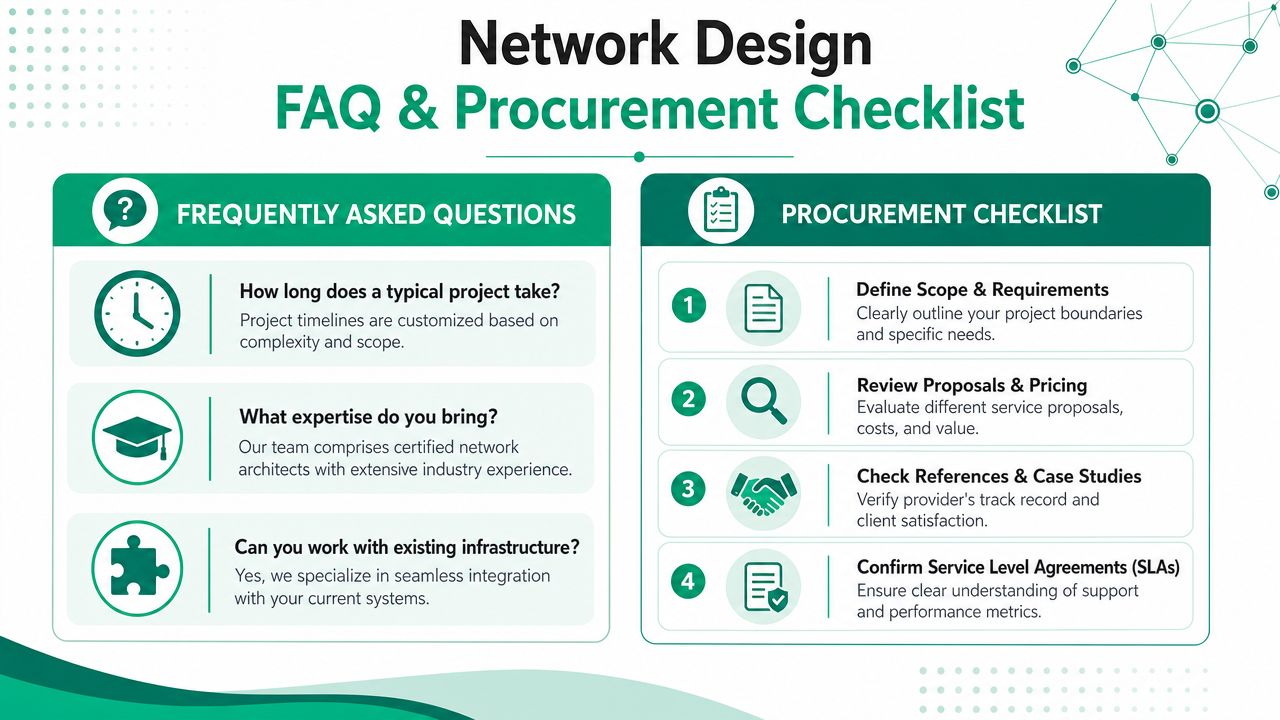
Your Network Design FAQ and Procurement Checklist
By the time most owners look for a network design service, they're already tired of guessing. Good. Guessing is expensive.
FAQ
Will we have downtime during the switch?
Maybe some, but a careful rollout limits disruption. Good teams pre-stage gear, test configs, and schedule cutovers around your operation.
Can you work with existing hardware?
Often yes. It depends on age, supportability, performance limits, and whether the equipment still fits the design.
Do we need to replace everything to fix Wi-Fi?
No. Sometimes the issue is placement, channel planning, uplinks, or segmentation. Sometimes the old gear really is the problem. A survey tells you which it is.
What if we have compliance concerns?
Then the design has to reflect them from the start. That includes segmentation, access control, logging, documentation, and support procedures.
Procurement checklist
Before you ask for proposals, get these basics together:
- List your critical apps: VoIP, EHR, file shares, ERP, cameras, cloud platforms, remote access, backup jobs.
- Define your pain points: Slow Wi-Fi, dead zones, dropped calls, random disconnects, security concerns, poor visibility.
- Know your building reality: Old brick, metal shelving, detached spaces, weak cabling closets, power issues.
- Set business priorities: Faster wireless, cleaner security, better resilience, easier support, room to grow.
- Ask for documentation: Diagrams, hardware list, VLAN plan, security standards, and handoff notes.
- Review support expectations: Monitoring, after-hours help, escalation path, and update process.
If a provider can't turn that information into a clear design, they're not ready for the project.
If your business is in Greenwood, Indianapolis, Franklin, or anywhere around the south side, the next step is simple. Schedule a Free Network Assessment with Finchum Fixes IT and get a straight answer on where your network is wasting time, increasing downtime risk, or falling behind your growth.