What Is Business Continuity Management for Indiana SMBs?
A lot of Johnson County owners don’t ask, “What is business continuity management?” until the day something breaks.
It’s usually not dramatic at first. A storm rolls through Greenwood. Power flickers in an older business park off the county line. The internet drops. Your line-of-business app won’t open. Staff can’t clock in, answer calls, pull files, or process orders. Someone says the backups should be fine, but nobody knows who checks them, how long a restore takes, or what the team does in the meantime.
That’s the gap. Backups are not a continuity strategy. A cybersecurity tool isn’t a continuity strategy either. Business continuity management is the operating plan that keeps your company functioning when the normal way of working stops working.
Your Greenwood Business Can’t Afford Downtime
[!NOTE] TL;DR
- Business continuity management is the practical plan for keeping critical work moving during outages, storms, cyber incidents, hardware failures, and staffing disruptions.
- For Indiana SMBs, BCM matters because downtime hits cash flow, customer trust, and compliance fast.
- Good BCM covers more than backups. It includes priorities, communications, recovery targets, alternate workflows, and regular testing.
- The market for BCM tools is growing quickly because this has become a core business function, not an IT side project.
- A workable plan doesn’t need enterprise complexity. It needs clear priorities, tested recovery steps, and technology that matches your risk.
A lot of Southside businesses still run with one big hidden assumption. The office will be open tomorrow, the server closet will stay cool, the Wi-Fi will behave, and the person who “knows the system” will answer their phone.
That assumption falls apart fast in Central Indiana. Summer storms hit. Winter ice causes power issues. An old switch in a brick building on the south side overheats. A ransomware alert locks users out right before payroll. Along the I-65 corridor, one interruption can ripple through shipping, scheduling, invoicing, and customer service in a single morning.
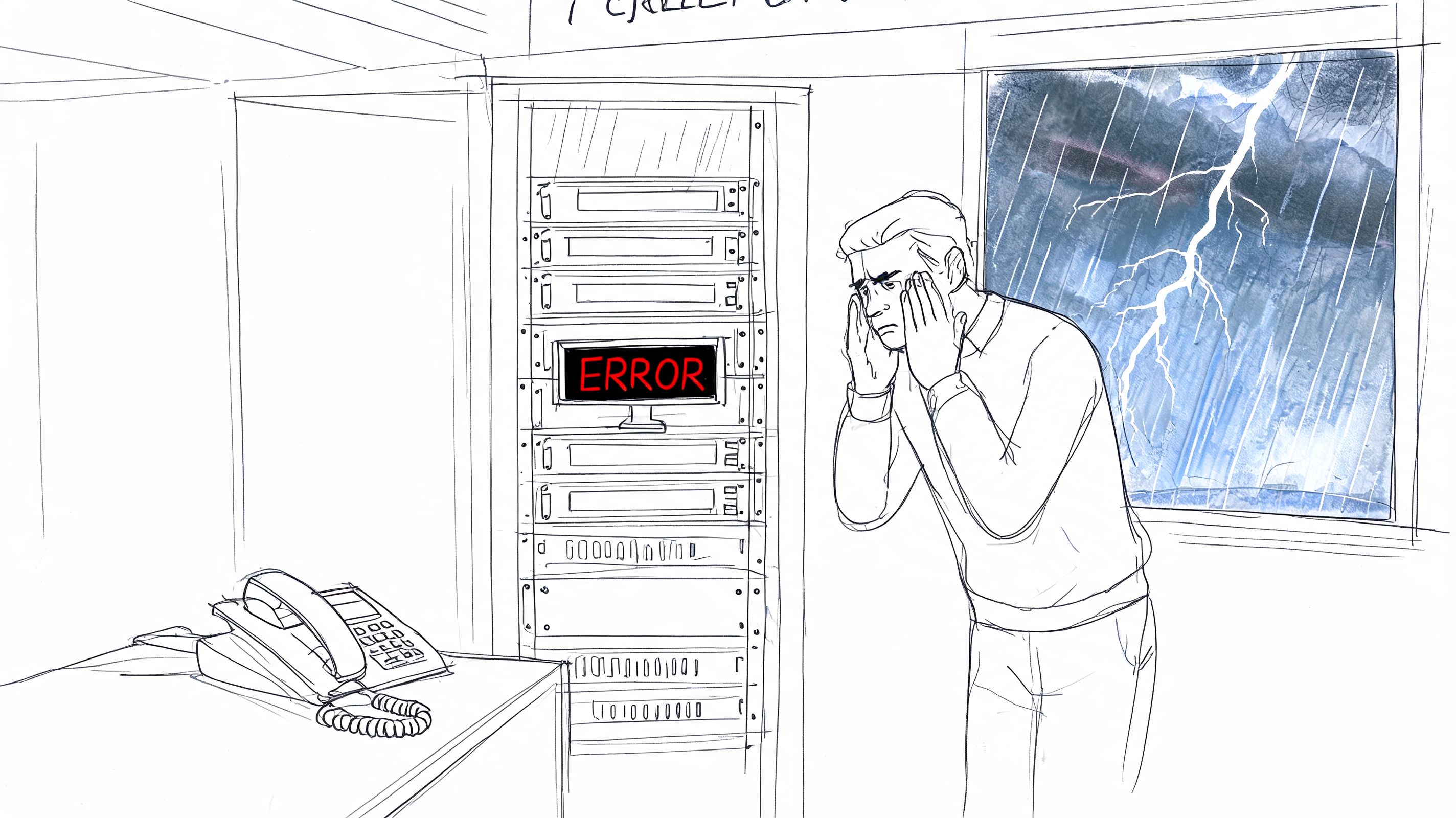
The business problem isn’t just technical failure. It’s stalled revenue. It’s payroll delays. It’s missed appointments. It’s the owner spending prime hours babysitting routers and calling vendors instead of doing work that brings in money. That’s why this topic ties directly to operations and ROI, not just IT.
The broader market reflects that shift. The global business continuity management solutions market is projected to grow from USD 880.3 million in 2024 to USD 3,530.5 million by 2034, at a 14.9% CAGR, according to Market.us reporting on BCM market projections. That kind of growth tells you BCM isn’t a niche policy binder anymore. It’s becoming standard operating discipline.
Downtime hurts cash before it hurts pride
A lot of owners track profit but underestimate interruption risk. If invoices stop going out, card payments stop processing, or dispatch can’t see tickets, the pain shows up in cash flow before it shows up anywhere else. If you want a clean explanation of why healthy-looking businesses still get squeezed, this guide on understanding business cash flow is worth your time.
That’s also why infrastructure matters. If your network, endpoint security, backups, and cloud access aren’t designed around uptime, your team spends too much time reacting. This practical guide to IT infrastructure management and downtime reduction lays out how those pieces fit together.
What owners actually need
Most SMBs don’t need a giant continuity manual that nobody reads. They need answers to plain questions:
- What must stay running first if the office is dark or systems are locked?
- Who makes decisions when normal communications are down?
- How will staff work if the server, internet, or phones fail?
- What data matters most and how quickly must it come back?
- Which vendors and tools are single points of failure?
Business continuity management is the difference between “we have backups somewhere” and “we know exactly how the business keeps moving by noon.”
That’s the actual definition in plain English.
What BCM Is and What It Is Not
If you strip away the jargon, what is business continuity management? It’s the framework a business uses to keep critical operations running during and after disruption. That includes planning, response, recovery, communication, and ongoing improvement.
Think of it this way. Cybersecurity is your lock on the door and the alarm system. Disaster recovery is the crew that repairs the damage and restores your systems after something bad happens. Business continuity management is the full operating plan for how your company keeps serving customers, paying staff, meeting obligations, and making decisions while the problem is still unfolding.
That distinction matters because many owners believe they already “have continuity” when they really have one narrow control. Maybe they have cloud backups. Maybe they bought endpoint protection. Maybe their CPA keeps an emergency contact list. Useful pieces, yes. A complete BCM program, no.
BCM covers the business, not just the machines
A continuity plan looks at the whole operating system of the company:
- People who know critical steps
- Processes that generate revenue or protect compliance
- Technology that supports those processes
- Facilities where work happens
- Vendors and providers that can stall operations if they fail
If your front office can’t access scheduling, your warehouse can’t print labels, and your phones route through one internet circuit, the issue isn’t only “IT is down.” The issue is that the business can’t function in the order it needs to function.
According to FEMA data cited by Invenio IT, 43% of small businesses never reopen after a major disaster, and 29% fail within two years. That’s why BCM is a business discipline, not just a technical add-on. You can review that data in this breakdown of business continuity disruption statistics.
BCM vs Disaster Recovery vs Cybersecurity
A side-by-side view makes this easier.
| Aspect | Business Continuity Management (BCM) | Disaster Recovery (DR) | Cybersecurity |
|---|---|---|---|
| Primary goal | Keep critical business functions operating during disruption | Restore IT systems, applications, and data after disruption | Prevent, detect, and contain threats |
| Scope | People, process, facilities, communications, vendors, technology | Servers, backups, cloud systems, endpoints, network recovery | Endpoints, email, identity, firewalls, access control, monitoring |
| Typical trigger | Storms, outages, ransomware, staff loss, building access issues, supply chain problems | Server crash, data corruption, ransomware, storage failure | Phishing, malware, credential theft, unauthorized access |
| Typical activities | Business impact analysis, communications planning, manual workarounds, alternate locations, continuity roles | Backup restores, failover, rebuilds, recovery runbooks, data validation | MFA, Zero Trust architecture, EDR, patching, email filtering, SOC monitoring |
| Key question | How does the business keep operating? | How do we get systems back? | How do we stop the incident from spreading? |
| Owner concern | Revenue, service delivery, staffing, compliance, customer trust | Time to restore operations and data | Risk reduction and breach prevention |
One reason this gets muddled is that disaster recovery is part of continuity. It’s not separate from it. But it doesn’t cover communication trees, temporary workarounds, vendor dependencies, or what happens if your building is inaccessible even though the server is technically recoverable.
If you want a deeper look at that line, this guide on business continuity vs disaster recovery breaks it down cleanly.
What BCM is not
BCM is not a document you create once and ignore.
It’s not a backup subscription by itself. It’s not “Joe in accounting knows how to reboot the firewall.” It’s not a generic template downloaded years ago with old phone numbers and systems you no longer use.
Plain test: If your owner, ops lead, and office manager can’t explain what happens in the first hour after a major disruption, you don’t have workable continuity.
That sounds blunt because it is. In practice, the businesses that recover cleanly are rarely the ones with the fanciest paperwork. They’re the ones with clear priorities, realistic recovery steps, and tested assumptions.
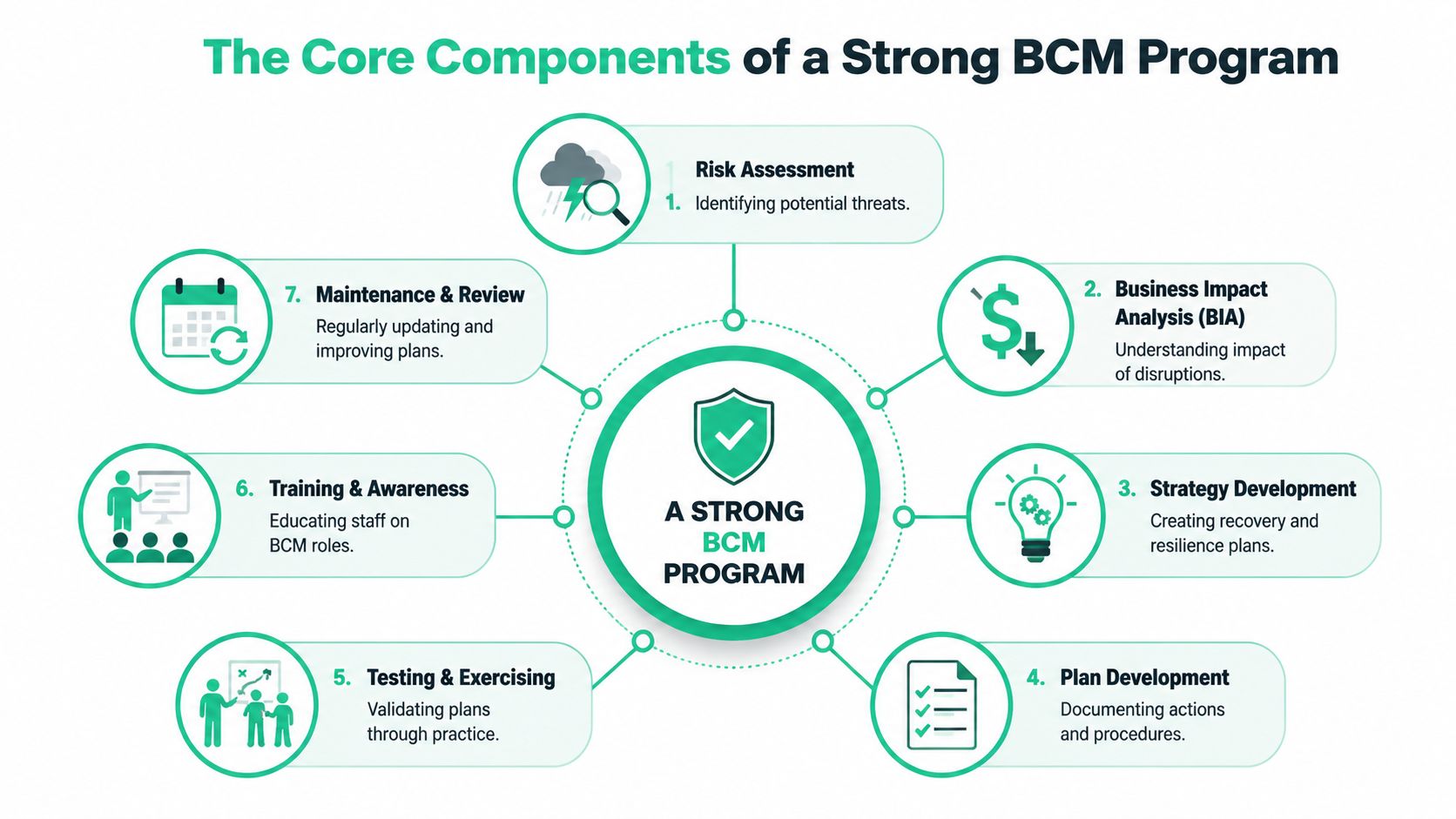
The Core Components of a Strong BCM Program
The phrase sounds broad because it is broad. A strong BCM program pulls together several moving parts, and they have to match the way your company runs. If the plan doesn’t reflect your real workflows, software stack, and staffing patterns, it won’t hold up when something breaks.
The starting point is usually the work that keeps the doors open. For a medical office, that may be scheduling, chart access, and phone continuity. For a manufacturer, it may be ERP access, label printing, and vendor communication. For a contractor, it may be dispatch, estimating files, and mobile connectivity in the field.
Business Impact Analysis
A Business Impact Analysis, or BIA, identifies which functions matter most, what they depend on, and what happens if they stop. During a BIA, a lot of SMBs get honest for the first time. They realize the “important systems” aren’t always the expensive ones. Sometimes the thing that hurts fastest is a simple workflow like payroll approval, card processing, or document access.
The technical value of the BIA is prioritization. According to Protecht’s guide to BCM and BIA alignment, synchronizing IT recovery with business priorities defined in the BIA can reduce mean-time-to-recovery by 40% to 60%.
That matters because restoring the wrong thing first wastes precious recovery time.
Risk assessment and dependency mapping
Once critical functions are ranked, the next step is asking what could interrupt them. In Indiana, that list often includes storms, power instability, internet outages, hardware failure, ransomware, and vendor dependence.
A useful risk review also maps hidden dependencies such as:
- Single points of failure like one aging server or one ISP circuit
- People bottlenecks where only one employee knows a process
- Building constraints such as poor Wi-Fi coverage in older construction
- Third-party gaps like cloud apps without documented fallback procedures
Specific technology choices begin to matter. UniFi networking can help with segmented wireless design and cleaner failover options. Bitdefender GravityZone can strengthen endpoint protection and containment. Immutable off-site backups protect recovery points from being altered by ransomware. None of those tools replace planning, but each one supports continuity when matched to the right risk.
Here’s a quick visual explainer on the broader BCM concept from another angle.
Recovery strategy and documented actions
After the risks are clear, the business needs actual recovery methods. RTO and RPO become relevant.
- Recovery Time Objective or RTO means how fast you need a system or process back.
- Recovery Point Objective or RPO means how much data loss you can tolerate.
For example, a business might tolerate some delay in archived file access but not in order entry. A clinic may need near-immediate access to scheduling but can handle delayed reporting. The right answer depends on the cost of interruption, not on what feels convenient.
The best continuity plans don’t promise perfect uptime. They define acceptable downtime, acceptable data loss, and the exact actions needed to stay inside those limits.
Strong plans also include runbooks. Not vague advice. Actual documented steps. Who calls the ISP. Who approves failover. Where staff access the cloud apps if the office is unavailable. Which systems restore first. Who validates data integrity before users log back in.
Training and review
A plan that lives in a folder is dead on arrival. Staff need role-based awareness. Managers need decision authority. Technical teams need recovery procedures that match the current environment, not the one you had two years ago.
That’s why maintenance matters. Every major change to your network, cloud tools, vendors, or compliance obligations should trigger a continuity review.
The BCM Lifecycle From Plan to Action
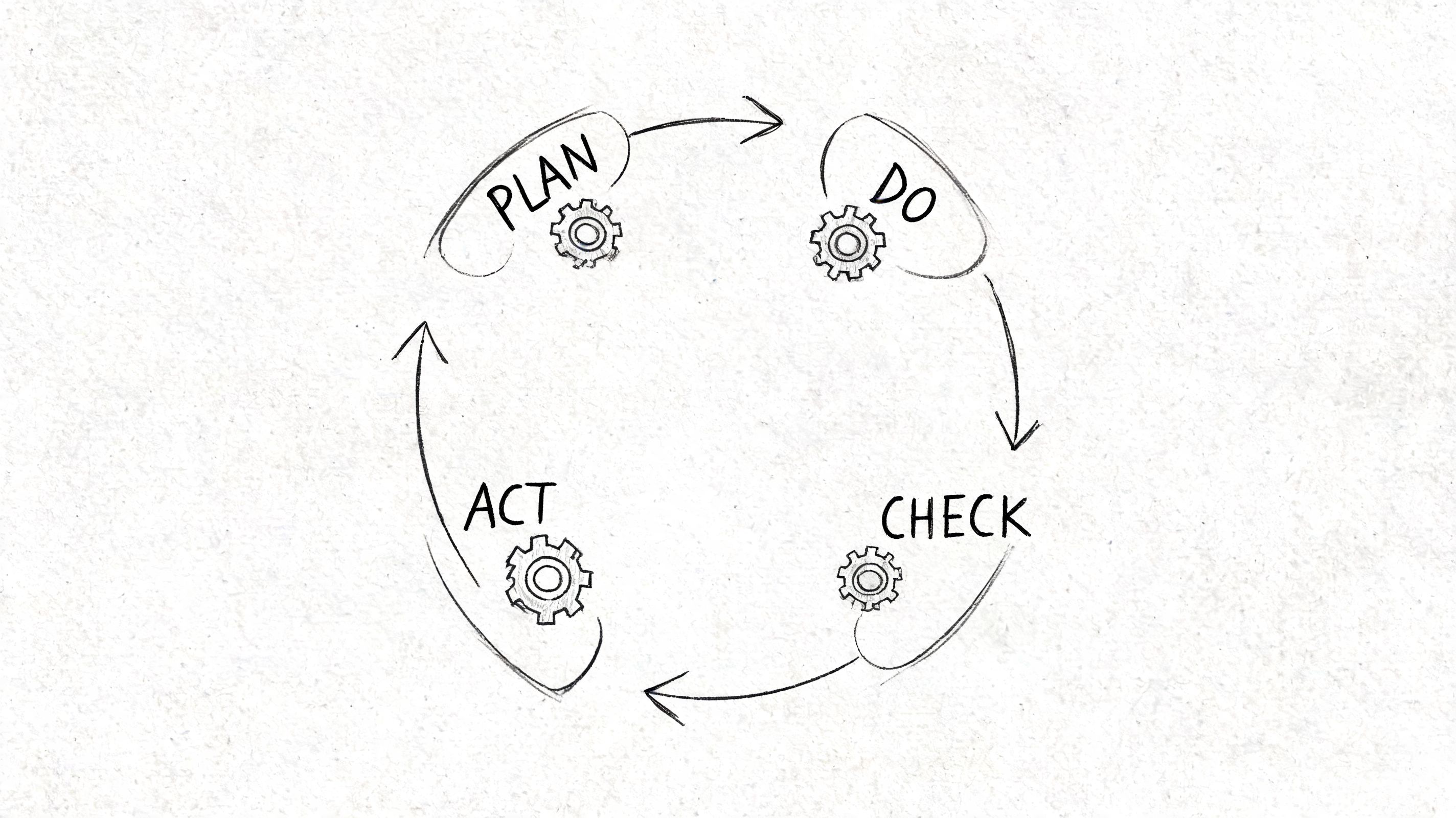
A continuity plan isn’t a one-time project. It’s a cycle. The standard model is Plan, Do, Check, Act, often shortened to PDCA. If that sounds dry, in practice, it's simple. Decide what matters, build around it, test it, fix what fails, and repeat.
Most companies are decent at the first two steps. They discuss risks, buy some tools, maybe document a response plan. The weak point is almost always the third step. They don’t test under pressure, so they discover the holes during the actual outage.
Plan and do
The Plan phase is where you define critical functions, acceptable downtime, key contacts, and fallback procedures. It’s also where compliance comes into view. A healthcare group may need continuity steps that support HIPAA obligations around system availability and protected data handling. A defense-adjacent manufacturer may need controls that support CMMC expectations. Many other SMBs use NIST CSF as a practical frame for identifying, protecting, detecting, responding, and recovering.
The Do phase is implementation. In this phase, technology gets configured to support continuity instead of just existing on paper.
That can include:
- Endpoint defense with Bitdefender GravityZone
- Network resiliency through properly designed UniFi switching and Wi-Fi
- Off-site recovery with immutable backups
- Identity controls built around Zero Trust architecture
- SOC-as-a-Service monitoring to catch suspicious activity early
- Remote work capability so key staff can function even if the building can’t
Check and act
The Check phase is where mature businesses separate themselves from businesses with nice intentions. According to Dataguard’s overview of BCM testing and validation, organizations that conduct regular BCM drills identify gaps in 65% to 75% of untested plans, and semi-annual full-scale exercises can reduce real-incident recovery time by as much as 35%.
That stat makes perfect sense in practice. Testing exposes all the annoying, expensive little truths no one saw in the meeting.
A backup may exist but restore slowly. A generator may not support the full rack. A contact sheet may list former employees. A cloud app may require MFA methods that only work on devices left inside the building.
A cheap mistake in a drill stays a cheap mistake. The same mistake during a live outage becomes payroll loss, customer churn, or a compliance headache.
The Act phase is the cleanup and improvement step. You update runbooks, fix weak links, retrain staff, and adjust the environment. This is also where physical restoration vendors enter the picture. If a burst pipe or roof leak takes out office space, the continuity plan should already identify who handles cleanup and rebuild coordination. Businesses dealing with facility damage often need a practical partner for Restore Heroes commercial restoration style response planning, especially when technology recovery and building recovery must move together.
Testing doesn’t need to be theatrical
A lot of owners hear “exercise” and picture a giant staged event. It doesn’t have to start there.
A useful check cycle can include:
- Tabletop reviews where leaders walk through a ransomware morning
- Backup restore tests against real systems, not assumptions
- Call tree checks to confirm staff can be reached
- Internet failover tests for sites that rely on one carrier
- Application recovery reviews tied to business priority
If you need a practical starting point for the analysis piece, this business impact analysis template is a solid place to begin.
A Practical BCM Checklist for Indiana SMBs
SMBs usually don’t fail at continuity because they’re careless. They fail because the owner is wearing six hats, the internal IT resource is stretched thin, and the plan never gets translated into simple operating steps.
That’s why a checklist works better than a theory lecture. Keep it direct. If you can answer these points clearly, you’re ahead of most companies your size.
According to DRII’s overview of business continuity management, 67% of large enterprises have a tested BCM plan, while only 28% of SMBs do. The most commonly cited barriers are lack of staff time at 54% and high perceived costs at 42%. That tracks with what a lot of Indiana owners already know. The issue usually isn’t that they don’t care. It’s that nobody has turned the work into manageable steps.
Start with the functions that pay the bills
Don’t begin with technology. Begin with output.
Ask yourself:
- What are the top business functions that generate revenue or protect client relationships?
- Which functions must be restored the same day?
- Which can wait until tomorrow without serious damage?
For many Johnson County businesses, the short list looks something like this:
- Sales and intake so new work doesn’t stop
- Billing and payment processing so cash keeps moving
- Scheduling and dispatch so staff know where to go
- Customer communication so clients aren’t left guessing
- File and application access so your team can do the work
If your answer is “everything is critical,” keep pushing. In a real disruption, recovery is always prioritized.
Map the real Indiana risks
A useful continuity plan reflects local conditions, not generic internet advice.
For Central Indiana, that often means looking at:
- Storm-related outages that affect power, internet, and building access
- Aging office infrastructure in older brick buildings with poor Wi-Fi propagation
- Supply chain delays along the I-65 and I-465 corridors
- Single-person knowledge risk when one admin or manager holds key process knowledge
- Cyber events such as phishing, ransomware, and account compromise
- Heating and cooling failures that can knock out networking gear or on-prem storage
A practical risk review should also include the field side of the business. If your crews rely on tablets, cloud forms, or VoIP, a continuity issue may start with mobile access rather than the office server.
Review your data and recovery setup
This part gets technical fast, but the questions are simple.
- Where does critical data live
- How often is it backed up
- Can you restore it
- Is a clean off-site copy protected from ransomware
- Who verifies successful recovery
A lot of owners learn too late that backup success messages are not the same as usable restores.
Look closely at:
- Immutable off-site backups for recovery protection
- Retention policies that match legal and operational needs
- Bit-level data recovery options for damaged drives or failed RAID scenarios
- Cloud application exports if you depend on SaaS platforms
- Device encryption and endpoint management for laptops used outside the office
If data protection is one of your weak spots, this guide to data loss prevention best practices for Indiana businesses is a useful companion.
If your continuity plan assumes “the backups will work,” but nobody has tested a real restore, that’s not a plan. That’s hope with a login screen.
Build a communications fallback
When email is down, many companies discover they have no real communication plan. The owner texts a few people. Someone starts a group thread. Customers get partial information, and nobody knows who’s in charge.
A workable communication plan should define:
- Who declares the incident
- Who informs staff
- Who updates customers
- Who talks to vendors
- Which backup channels are used if normal systems fail
That backup channel might be mobile voice, a secondary messaging app, a cloud-based phone platform, or documented call trees kept outside the main office systems.
Match continuity to compliance
Some industries have tighter continuity expectations than others. The details vary, but the theme stays the same. Regulators and customers expect you to keep essential operations and sensitive data under control during disruption.
Examples include:
- HIPAA for healthcare organizations that need secure access, downtime procedures, and protected data handling
- CMMC for defense contractors and subcontractors managing controlled information
- NIST CSF for businesses that want a structured security and resilience framework
- Contractual requirements from larger partners that expect incident response and recovery discipline
If you serve enterprise clients out of downtown Indy tech hubs or support larger supply chains in Hamilton County growth areas, continuity maturity often becomes part of the buying decision.
Use technology that supports continuity instead of fighting it
Some environments make recovery harder than it should be. Flat networks, unmanaged switches, random consumer-grade access points, old servers without current warranties, and weak endpoint visibility all add friction during an incident.
A stronger SMB stack usually includes:
- Segmented networking with business-grade gear such as UniFi
- Endpoint detection and response through tools like Bitdefender GravityZone
- Documented admin access so one person isn’t the only keyholder
- Cloud identity controls built on least privilege and MFA
- Remote support capability so fixes don’t depend on someone driving in
- SOC-as-a-Service monitoring for earlier detection and cleaner escalation
Keep the checklist short enough to use
The best SMB continuity checklist fits on a few pages and gets reviewed regularly.
A practical version includes:
- Critical functions list
- System priority list
- RTO and RPO targets
- Incident roles
- Vendor contacts
- Backup and restore procedures
- Alternate work methods
- Communication templates
- Test schedule
- Review date after any major change
That’s enough to be useful. More detail can sit behind it in technical runbooks.
When to Partner with a Managed IT Provider for BCM
There’s a point where DIY continuity stops being efficient.
It usually happens when the owner becomes the backup plan for every failure. The office manager knows a little about printers, the controller knows a little about file shares, someone’s cousin set up the firewall years ago, and the “IT person” also handles onboarding, copier calls, and random cable issues. That arrangement works right up until it doesn’t.
Signs you’ve outgrown the informal approach
If any of these sound familiar, it’s time to get outside help involved.
- Your continuity knowledge lives in one person’s head
- You’ve never tested a restore end to end
- Your team loses hours each month to recurring network or device problems
- You’re facing customer or compliance pressure around HIPAA, CMMC, or NIST CSF
- Your business depends on cloud apps, VoIP, and field connectivity, but nobody owns the full picture
- You’re making tech decisions based on what’s cheapest today instead of what keeps operations stable
A managed provider brings two things that are hard to build internally at SMB scale. First, technical depth across networking, cybersecurity, cloud, backups, and recovery. Second, process discipline. Someone owns the runbooks, monitoring, testing cadence, asset records, and escalation path.
What a good provider changes
The biggest value isn’t just fixing outages faster. It’s reducing the number of ugly surprises.
That can include:
- Standardized endpoint protection across all devices
- Zero Trust architecture for identity and access decisions
- Latency-optimized mesh nodes or properly engineered Wi-Fi in tricky buildings
- SOC-as-a-Service monitoring that catches suspicious activity before users notice symptoms
- Backup validation and documented recovery workflows
- Network segmentation that limits blast radius when something goes wrong
For businesses that want a broader overview of the service model, this guide on how to get better IT with expert network management gives a useful outside perspective on managed network support.
The ROI is operational, not theoretical
Business owners don’t need another tech acronym. They need their day back.
Every hour spent chasing a bad switch, troubleshooting spotty Wi-Fi, or figuring out why a cloud login broke is an hour not spent on sales, clients, scheduling, or production. That’s the fundamental ROI case for BCM supported by managed IT. You turn chaotic tech time into a predictable operating expense and a cleaner workday.
There’s also a quality factor. A provider with real recovery experience doesn’t just swap hardware. They understand what happens when storage fails, when a RAID array starts dropping members, when a backup chain is incomplete, or when a ransomware event requires containment before recovery. That’s where details like bit-level data recovery, chain-of-custody handling, and staged restore validation matter.
What to ask before you hire anyone
Don’t buy based on buzzwords. Ask direct questions.
- How do you define critical systems and recovery priority
- How do you test backups
- What monitoring do you provide after hours
- How do you handle incident communication
- Can you support HIPAA, CMMC, or NIST-aligned controls
- What happens if our building is unavailable
- How do you document credentials, vendor contacts, and runbooks
- How do you reduce repeat issues, not just close tickets
If the answers are vague, keep looking.
A strong partner should also show how managed services connect to continuity in plain business terms. If they can’t explain reduced downtime, better recovery confidence, and more predictable budgeting, they’re still talking like a repair shop instead of an operations partner.
If you want a practical look at that model, this article on how businesses grow with managed IT services for small business is a solid read.
Business continuity management isn’t about preparing for one dramatic disaster. It’s about making sure a bad day stays a bad day and doesn’t turn into a bad quarter.
If you’re a business owner in Greenwood, Indianapolis, or anywhere along the Southside, Finchum Fixes IT can help you find the weak spots before they become expensive downtime. A Free Network Assessment or Security Risk Audit gives you a practical look at network stability, backup readiness, cybersecurity gaps, and recovery risk without the fluff.