Network Infrastructure and Security for Indiana SMBs
A Monday morning failure in a Greenwood business park rarely starts with a dramatic breach. It starts with a wireless dead zone, a switch that hasn't been updated, or a server that reboots during payroll. Network infrastructure and security work together to prevent those small weaknesses from becoming lost revenue, locked files, or an expensive emergency.
The direct answer is simple: Indiana SMBs need an inventory-driven network built around reliable switching, properly designed Wi-Fi, hardened firewalls, segmented access, phishing-resistant MFA, monitored edge devices, and tested immutable off-site backups. That combination reduces outage risk, limits attack spread, supports HIPAA, CMMC, or NIST CSF requirements, and turns unpredictable IT emergencies into a manageable operating budget.
The Real Cost of Network Failures in Central Indiana
A Johnson County business owner opens the office on Monday and finds the Wi-Fi crawling. Employees can connect in the front area, but the conference room in the old brick building is nearly unusable. The file server in the Greenwood business park has already restarted twice, and the accounting application times out whenever several people log in.
Nobody sees one catastrophic failure yet. Instead, staff waste time reconnecting, calling vendors, restarting equipment, and waiting for files to open. A sales team misses a customer response, operations pauses a shipment, and the owner starts the week approving emergency repairs instead of managing the business.
That is why infrastructure deserves a financial conversation, not just a technical one. Downtime costs are commonly benchmarked at about $9,000 per minute for many organizations, while some 2026 summaries cite enterprise averages as high as $15,000 per minute, according to Atlassian's downtime cost guidance. The basic calculation is direct:
Downtime cost = minutes of downtime × cost per minute.
A short outage can consume more money than a carefully planned network upgrade. The damage also includes wasted technician time, delayed billable work, frustrated customers, and employees who can't perform tasks that normally take minutes.
Why small failures become large interruptions
Aging hardware creates several connected problems:
- Capacity limits: An old access point may support basic browsing but fail under video meetings, cloud applications, and mobile devices.
- Single points of failure: One unmanaged switch or aging server can interrupt an entire office floor.
- Configuration drift: A temporary firewall exception can remain active long after the original project ends.
- Weak recovery: Backups may exist, but nobody has confirmed that the business can restore critical applications.
A business continuity and disaster recovery comparison helps separate two related responsibilities. Continuity keeps essential operations moving during disruption. Recovery restores systems after the disruption. A stable Indiana business needs both.
The ROI of prevention
Proactive infrastructure management converts wasted tech time into productive work. Predictable monitoring, lifecycle planning, and documented recovery procedures cost money, but emergency downtime costs money without creating anything useful. The question isn't whether an SMB will spend on technology. It's whether the spending produces reliable operations or funds avoidable firefighting.
For companies along the I-65 corridor, that distinction matters. Growth puts more pressure on cloud applications, remote access, wireless capacity, and security controls. A network that worked for a smaller team can become a business constraint long before anyone labels it obsolete.
Core Network Infrastructure Components Explained
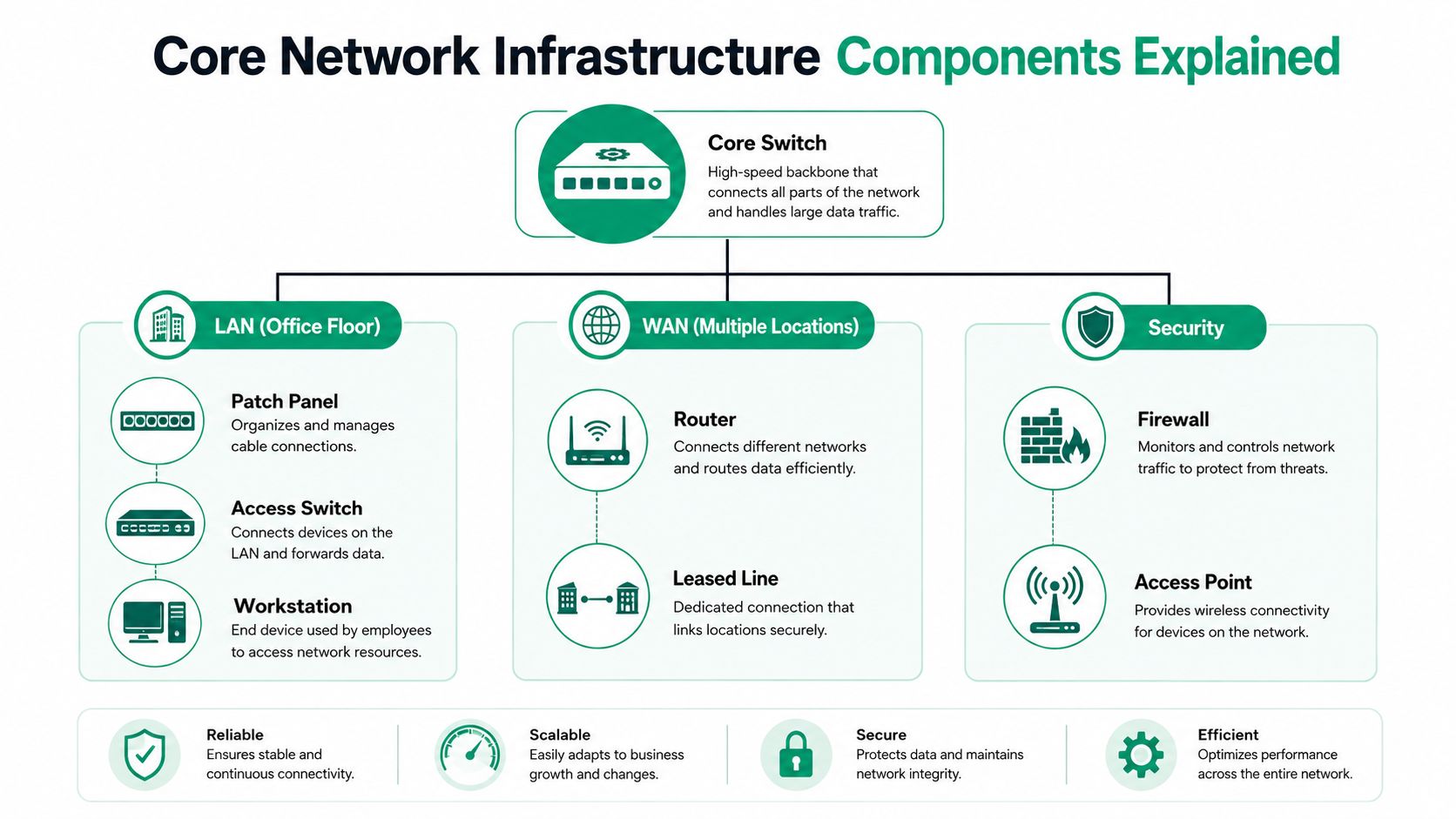
Think of a business network as a transportation system. The LAN, or local area network, moves traffic inside an office. The WAN, or wide area network, connects offices, cloud services, and remote locations. Switches direct traffic within local segments, while routers decide where traffic goes next.
A core switch sits near the center of the design. It connects access switches, servers, wireless infrastructure, and sometimes security appliances. Access switches connect workstations, phones, printers, cameras, and wireless access points. A switch is like a traffic officer directing vehicles onto the correct local road. It doesn't decide the destination for the whole city, but it keeps nearby traffic organized.
Build the LAN before adding complexity
Start with the physical layer. Confirm patch panels, cable labels, rack power, switch capacity, and uplinks. A clean structured cabling design makes future troubleshooting faster because technicians can trace a connection instead of guessing which cable feeds a workstation.
Then separate traffic according to business function. Employee computers, guest Wi-Fi, voice systems, security cameras, and administrative devices shouldn't all share one unrestricted segment. Segmentation gives the firewall and switch infrastructure clearer rules to enforce.
Connect locations with the right WAN design
A company with offices in Hamilton County and a downtown Indy tech hub needs more than internet service at each site. The WAN design should account for application traffic, failover, remote administration, voice quality, and secure site-to-site communication.
Routers act like postal sorting facilities. They inspect the destination and send traffic toward the correct network. A firewall adds policy, deciding which traffic is allowed, logged, inspected, or denied. If those policies are too broad, connectivity may work while security fails.
Treat Wi-Fi as a designed system
Spotty Wi-Fi in an old brick building isn't fixed by placing another access point wherever a user complains. Thick masonry, metal shelving, warehouse layouts, neighboring networks, and poor channel planning all affect performance.
Use a site survey, place access points based on signal and client density, and consider latency-optimized mesh nodes where cabling is difficult. Mesh can solve a physical deployment problem, but poorly planned mesh can also add contention and delay. In a warehouse or historic building, the right answer may combine wired uplinks, carefully placed access points, and targeted wireless coverage rather than a blanket hardware purchase.
Why Zero Trust Architecture Replaced the Old Perimeter Model
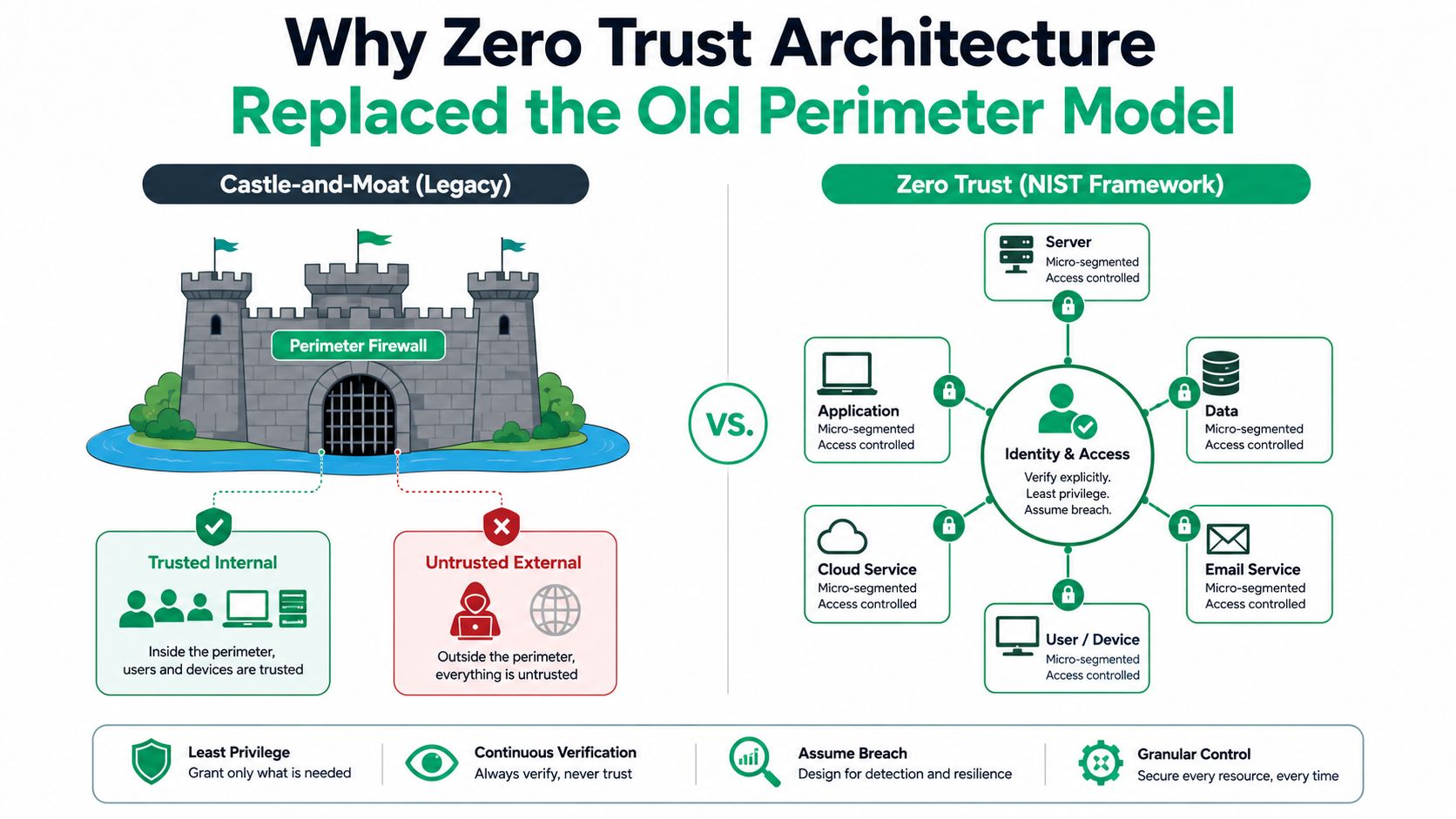
The traditional “castle-and-moat” network assumed that the inside was safe once a user passed the firewall. That model breaks down when employees work remotely, applications run in cloud environments, contractors need access, and branch offices connect through shared services.
NIST Zero Trust Architecture treats the enterprise network as contested rather than trusted. Each access request must be explicitly authenticated and authorized, regardless of where the request originates. This approach moves enforcement from one outer perimeter to policy decisions at each request, which helps reduce the blast radius when an account, device, or segment is compromised. The NIST Zero Trust Architecture publication provides the foundational model.
In practice, Zero Trust doesn't mean buying a single appliance labeled “Zero Trust.” It means combining identity, device posture, application policy, segmentation, logging, and continuous verification. A user on the office network may still need stronger authentication before accessing payroll data. A managed laptop may receive different access from an unmanaged personal device.
Adoption is moving from theory to operations
AlgoSec reported that the share of organizations lacking a SASE solution fell from 40% in 2025 to 27.5% in 2026, while organizations in the Zero Trust learning phase rose from 20% to 31%, as documented in this 2026 network security statistics report. Those figures point to a practical shift. Businesses are redesigning access around identity, segmentation, and visibility instead of assuming internal traffic is trustworthy.
For an SMB, the rollout should be staged. Begin with identity and MFA, then map applications and sensitive data. Next, separate high-value systems from ordinary user traffic and record access decisions. Trying to redesign every policy at once usually creates confusion and exceptions that nobody maintains.
Practical rule: A firewall can control the edge, but Zero Trust controls the request.
Teams planning load and failure tests can also consult the RETRO//STRESS network resilience guide for a structured way to think about resilience testing. For Indiana businesses, the practical starting point is an SMB Zero Trust architecture plan tied to actual users, applications, and devices.
Security Controls That Actually Protect SMB Networks
SMBs don't need every security product available. They need controls that address the ways attackers enter, move, and persist.
Start with multifactor authentication for email, remote access, administrative tools, and cloud applications. Microsoft research found that MFA reduced compromise risk by 99.22% across the full population and by 98.56% when credentials were already leaked. The same research reported a median compromise rate of 0.0079% for MFA-protected accounts versus 1.0071% without MFA, as detailed in Microsoft's MFA research paper. These figures make MFA one of the strongest protection-per-dollar decisions an SMB can make.
Phishing-resistant FIDO and WebAuthn methods deserve priority for administrators and other high-risk users. They bind authentication to the legitimate origin and resist relay attacks more effectively than password codes or push approvals alone.
Choose controls by risk, not by sales pitch
| Security Control | Protection Level | Implementation Effort | Monthly Cost Range |
|---|---|---|---|
| Phishing-resistant MFA | High for account takeover | Moderate | Varies by identity platform |
| Network segmentation | High for limiting lateral movement | Moderate to high | Varies by firewall and switching platform |
| Managed firewall rules and logging | High when maintained | Moderate | Varies by provider and hardware |
| Bitdefender GravityZone | Strong endpoint protection | Low to moderate | Varies by licensing |
| SOC-as-a-Service monitoring | High visibility and response support | Moderate | Varies by coverage and provider |
| Immutable off-site backups | Strong recovery protection | Moderate | Varies by storage and retention |
VPN design requires scrutiny. A VPN can provide necessary remote access, but it becomes dangerous when accounts are unprotected, firmware is outdated, or access remains broad after a project ends. Separate administrative access, enforce MFA, restrict reachable resources, and log successful and failed sessions.
Endpoint protection still matters. Bitdefender GravityZone can help detect malicious activity on workstations and servers, but endpoint software can't compensate for an exposed firewall interface or a flat network. The controls must reinforce each other.
A business without an internal security team can consider SOC-as-a-Service monitoring for continuous alert review and escalation. Understanding the responsibilities involved in a network security engineer job helps owners see why firewall policy, identity, logging, and incident response require ongoing expertise.
For practical Indiana firewall decisions, use a firewall management guide for SMBs. A documented rule review is more valuable than a firewall installed and ignored.
The Edge Device Blind Spot Most Businesses Ignore
Many owners can name their laptops and servers. Fewer can produce a current inventory of every router, VPN concentrator, firewall, DNS service, wireless controller, and load balancer exposed to the internet.
That gap creates a serious problem. A 2026 industry report described nearly 3 billion malicious sessions observed over 162 days while attackers targeted internet-facing infrastructure, according to BlackFog's enterprise network security challenges report. The same reporting highlights recurring weaknesses such as open ports, default credentials, weak firewall rules, and exposed administrative interfaces.
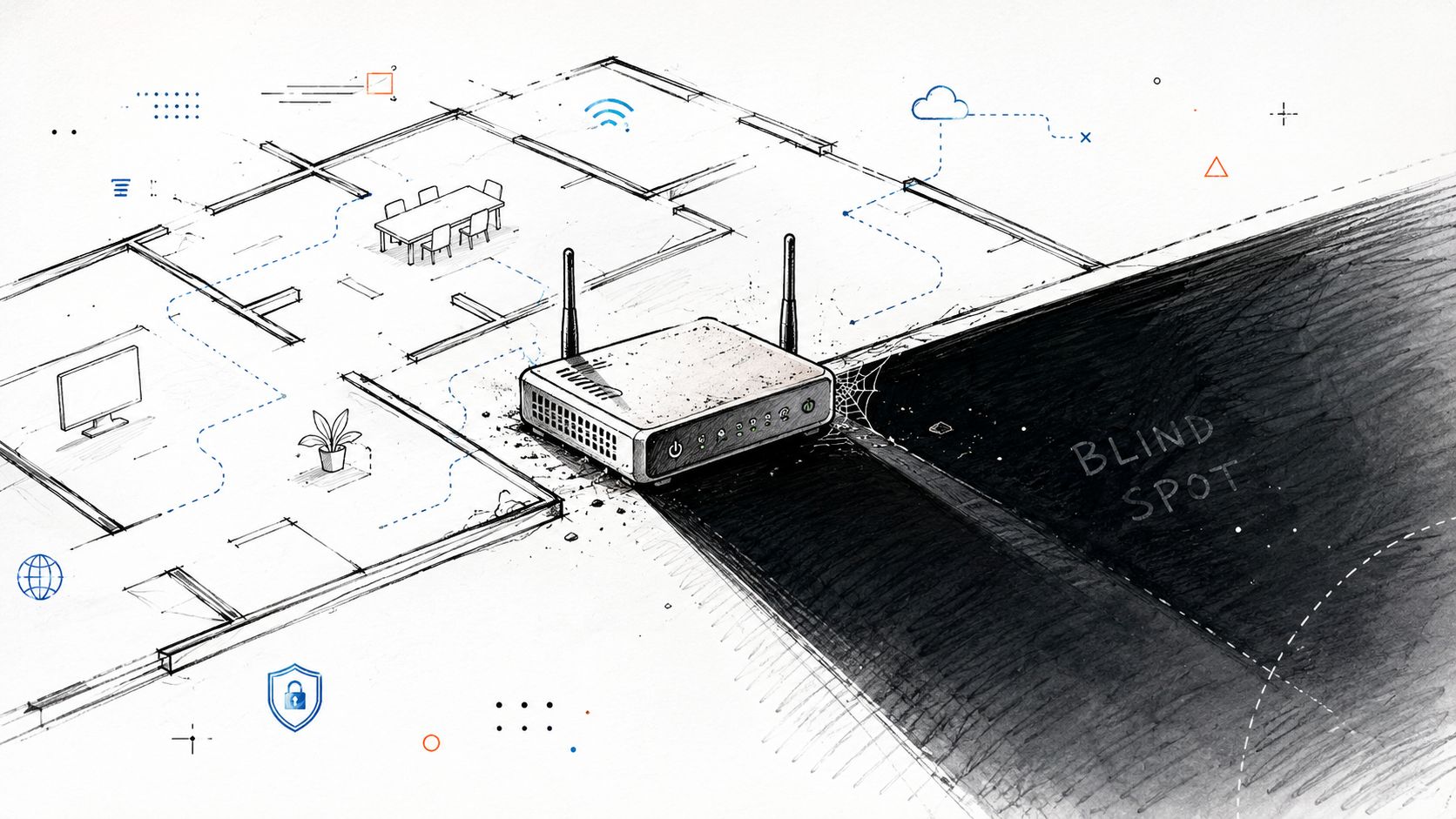
A device can be secure on installation day and risky months later. Firmware changes, temporary rules, staff turnover, vendor access, and new cloud services create configuration drift. Endpoint protection won't detect every problem on the infrastructure layer, especially when an attacker abuses a legitimate administrative interface.
A practical edge inventory workflow
- Identify every device. Export equipment from the firewall, switch controller, wireless platform, and cloud management consoles. Compare the lists with purchase records and physical labels.
- Record ownership and purpose. Document model, firmware, location, administrator, support status, and the business service that depends on each device.
- Review exposure. From an approved management system, inspect listening services with
ss -tulpnon Linux orGet-NetTCPConnection -State Listenin PowerShell on Windows. Don't scan systems you don't own or lack permission to test. - Remove unsafe access. Disable default accounts, close unused services, restrict management to approved administrative networks, and require MFA where the platform supports it.
- Monitor changes. Send firewall, VPN, switch, and authentication logs to a central platform. Alert on new administrative accounts, rule changes, repeated failed logins, and unexpected firmware changes.
- Recheck on a schedule. Compare current configurations with approved baselines. A clean inventory is useful only if somebody maintains it.
The network layer needs the same attention as laptops and servers. A forgotten firewall rule can undermine an otherwise mature security program.
For a visual explanation of how coverage gaps form, this short network infrastructure video provides useful context.
Building Business Continuity and Meeting Compliance Requirements
Security controls protect systems before and during an incident. Business continuity determines whether the company can keep serving customers when those controls fail.
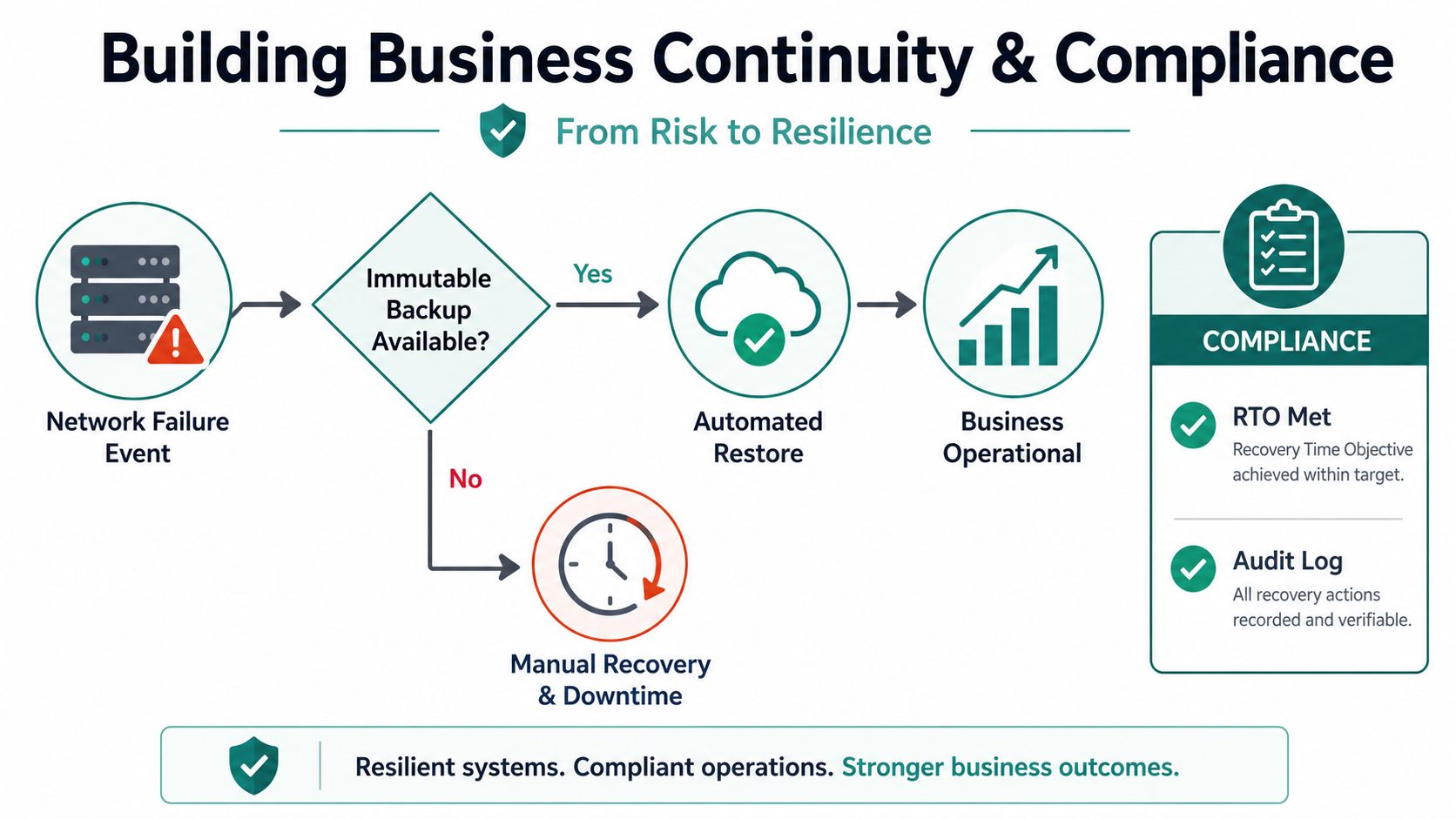
Immutable off-site backups provide a recovery path because separate copies protected from modification can help restore systems after ransomware or corruption. The backup isn't the whole plan. Staff need documented recovery workflows, defined priorities, tested restores, and clear decisions about which applications return first.
Recovery test: A backup that has never been restored is an assumption, not proof.
Map controls to the business environment
A general Indiana business can use NIST CSF to organize risk identification, protection, detection, response, and recovery. The framework gives leadership a common language for discussing security without reducing the conversation to product names.
Healthcare organizations must account for HIPAA, including access control, protection of sensitive information, audit activity, and incident response. Defense contractors often work under CMMC, where access control, system protection, authentication, monitoring, and response need to align with contractual expectations.
Compliance doesn't replace good engineering. A policy document won't compensate for an unpatched VPN or untested backup. Managed IT can connect documented policies to actual devices, users, logs, and recovery procedures so the organization isn't scrambling before an audit.
Calculate the financial case
Use the formula from the earlier section:
Downtime cost = minutes of downtime × cost per minute.
At the commonly used $9,000-per-minute benchmark, a 30-minute interruption represents $270,000 in potential cost, using the Atlassian downtime calculation guidance. Some 2026 reporting cites an average cost as high as $15,000 per minute and nearly $95 million in lost annual revenue for affected organizations, according to ITPro's downtime analysis.
The point isn't to promise that every outage costs the same. It's to give leadership a method for comparing proactive management with emergency loss. If storage media or a failed RAID array becomes the issue, a certified data recovery lab may be appropriate for bit-level data recovery. Prevention remains preferable, but a documented escalation path limits panic when hardware fails.
For Indiana SMBs, this compliance and security planning guide can help connect framework language to infrastructure work.
Your Network Infrastructure Action Plan
Indiana business owners don't need to rebuild everything in one weekend. They need a prioritized sequence that removes the most dangerous unknowns first.
Start with the quick wins
- Inventory edge devices: List every firewall, router, VPN service, switch, access point, DNS service, and load balancer.
- Enable MFA: Cover email, remote access, administrator accounts, cloud applications, and vendor portals. Prioritize FIDO or WebAuthn for high-risk users.
- Test backups: Restore a representative file, application, or system and document what worked, what failed, and who owns the next step.
- Review firewall rules: Remove expired exceptions, unrestricted inbound access, unused accounts, and exposed administrative interfaces.
- Confirm logging: Ensure security-relevant events reach a monitored location rather than staying only on the device.
Plan the medium-term work
Redesign flat networks into sensible segments. Separate guests, employees, voice, cameras, servers, and sensitive applications according to actual business needs. For an old brick building, schedule a Wi-Fi survey before buying access points. For a growing Hamilton County office, review switch capacity, uplinks, WAN failover, and cloud application performance before the next expansion.
Decide where outside expertise fits
In-house IT may handle routine administration, but complex multi-site deployments, HIPAA or CMMC preparation, incident response, advanced data recovery, and continuous SOC-as-a-Service monitoring often need specialized support. Finchum Fixes IT is one local option for managed IT, cybersecurity, network and Wi-Fi design, data recovery, secure migration, software development, and technical support for Indiana organizations.
A Free Network Assessment or Security Risk Audit gives Greenwood and Indianapolis businesses a practical starting point. The deliverable should be a ranked list of exposures, business impact, recommended fixes, and a budget path, not a generic equipment quote.
Finchum Fixes IT helps Greenwood and Indianapolis businesses inventory hidden infrastructure gaps, harden firewalls and remote access, improve Wi-Fi, protect endpoints, and test recovery plans. Visit Finchum Fixes IT to schedule a Free Network Assessment or Security Risk Audit and turn network infrastructure and security into a more predictable business investment.