Top 10 Best Network Security Practices for Indianapolis Businesses
TL;DR: Key Takeaways for Indy Business Owners
- Cyber threats are a major cause of business downtime, which can cost up to $9,000 per minute. This guide outlines 10 critical security practices to prevent that loss and turn wasted tech time into billable hours.
- Essential defenses include Multi-Factor Authentication (MFA), network segmentation based on a Zero Trust model, and regular patch management for software like UniFi and Bitdefender GravityZone.
- Protect your business with a layered strategy: employee security training, Endpoint Detection and Response (EDR), and immutable off-site backups to ensure you can recover from any disaster.
- These practices help businesses meet compliance standards like HIPAA for healthcare and CMMC for defense contractors, converting security from a cost center into a business asset.
Imagine this: It’s Monday morning at your Greenwood business park office. The server that runs your entire operation—billing, customer files, everything—just went down. That aging hardware you’ve been meaning to replace has finally given up. Downtime like this isn't just an inconvenience; it can cost upwards of $9,000 per minute, turning productive work hours into a frantic, costly scramble that brings your business to a screeching halt.
This isn't a hypothetical problem for businesses along the I-65 corridor; it's a daily reality we've seen firsthand in our 17 years of local service. Old brick buildings in downtown Indy often have spotty Wi-Fi that creates security gaps, and legacy systems across Johnson County are prime targets for cyberattacks that can be devastating. Protecting your business requires more than just antivirus software. It demands a deliberate, layered strategy that converts tech headaches into predictable monthly costs and ensures business continuity.
This article isn't about vague tech advice. It's a direct, actionable plan outlining the best network security practices you need to implement now to protect your assets and maintain business continuity. We'll show you exactly how to transform your network from a liability into a secure, reliable asset that drives business forward. You’ll get specific steps for implementing critical defenses like Multi-Factor Authentication, network segmentation, and creating immutable off-site backups that can withstand any disaster. We are going to show you how to convert wasted tech time into billable hours and build a resilient foundation for your company's growth. Let's get to it.
1. Multi-Factor Authentication (MFA): Your Digital Bouncer
Think of your password as the key to your front door. Now imagine a thief steals that key. With just a password, they can walk right in. Multi-Factor Authentication (MFA) is like adding a bouncer who checks for a secret handshake after the key is used. It's one of the single most effective network security practices you can implement to prevent downtime and protect your bottom line.
MFA demands a second (or third) piece of evidence to prove you are who you say you are. This isn't just about what you know (your password); it's about layering it with something you have (a code on your phone) or something you are (your fingerprint). Even if a cybercriminal snags a password from a data breach, they’re stopped cold at the second checkpoint without that physical device or biometric proof.
Key Takeaway: Compromised passwords are the number one cause of data breaches. MFA makes them practically useless to an attacker, directly preventing account takeovers that lead to costly business interruptions.
Putting MFA to Work
For businesses in Indiana, deploying MFA is a direct line to better security and compliance. A healthcare provider in Carmel can use it to protect patient records and meet HIPAA requirements. Likewise, a defense contractor near the I-65 corridor can use it to secure access and work toward CMMC compliance.
Here’s your quick-start guide to rolling it out:
- Prioritize High-Value Targets: Start by enabling MFA on all administrative accounts and any software that touches sensitive data, like your accounting platform or CRM.
- Ditch SMS for Apps: When possible, use authenticator apps like Google Authenticator or Microsoft Authenticator. SMS messages can be intercepted, making apps a more secure choice.
- Plan for Lockouts: Always set up backup authentication methods for your team. This prevents a lost phone from halting business operations.
- Log and Monitor: Regularly check your authentication logs for strange activity, such as login attempts from unusual locations or at odd hours.
While MFA drastically improves security, it works best when combined with strong password hygiene. For a deeper dive into that, check out our guide on the 10 best practices for password management.
2. Network Segmentation and Zero Trust Architecture: Digital Bulkheads
If your entire network is one big, open room, a single breach is like a fire that can burn everything down. Network segmentation is the practice of building digital bulkheads, dividing your network into smaller, isolated zones. It’s a core component of a Zero Trust security model, which operates on the simple but highly effective principle: "never trust, always verify."
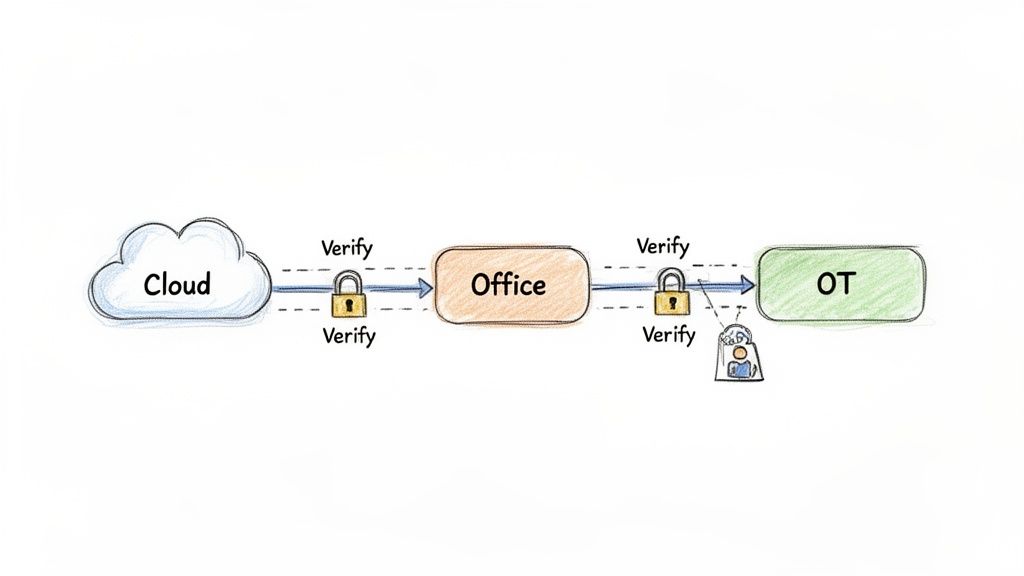
This approach abandons the old "castle-and-moat" idea where everything inside the walls is trusted. Instead, Zero Trust demands verification from anyone and anything trying to access resources, regardless of whether they're inside or outside the network. If an attacker breaches one segment—say, the guest Wi-Fi—they are trapped there, unable to move laterally to critical systems like your financial records. This containment is a cornerstone of business continuity and is one of the best network security practices for limiting the blast radius of an attack.
Key Takeaway: Assume a breach will happen. Segmentation contains the threat to a small, manageable area, preventing a minor incident from becoming a business-ending catastrophe that racks up downtime costs.
Putting Segmentation to Work
For a manufacturing firm along the I-65 corridor, this means isolating its sensitive operational technology (OT) network from the corporate IT network. A healthcare organization in Hamilton County can segment the network holding patient data to meet HIPAA requirements, completely walling it off from general administrative traffic. When we dissembled a similar client’s failing network, we saw how a flat structure allowed a single infected PC to take down their entire production line.
Here’s your quick-start guide to building those digital walls:
- Protect Your Crown Jewels First: Identify your most critical assets—customer databases, financial systems, intellectual property—and build the first segments around them.
- Use Modern Tools: Forget manually managing complex firewall rules. Modern UniFi networking gear and software-defined networking (SDN) make creating and managing virtual segments much simpler.
- Map Before You Act: Before you build a single wall, you must understand traffic flows. Map how your applications and devices communicate so you don't accidentally cut off a critical business process.
- Document Everything: Create and maintain an access control matrix that clearly defines who and what can communicate between segments. This is non-negotiable for troubleshooting and compliance audits required by standards like NIST CSF.
Implementing a full Zero Trust architecture is a journey, not a weekend project. It works best when paired with robust endpoint protection to secure the devices themselves. For a deeper look into that, check out our guide on why Bitdefender GravityZone is our top choice for endpoint security.
3. Regular Security Updates and Patch Management: Your Digital Armor
Imagine your network is a medieval castle. Every piece of software is a door or window. Over time, attackers discover tiny cracks and loose hinges—these are software vulnerabilities. Patch management is the process of systematically repairing every crack and fortifying every weak point before an attacker gets in. It's one of the most fundamental network security practices for a reason.
Unpatched software is a goldmine for cybercriminals. Exploits for known vulnerabilities are often automated, meaning attackers can scan thousands of networks for a single, unpatched application and get inside with minimal effort. Keeping your systems updated closes these well-known entry points, preventing the kind of breach that leads to expensive downtime and data loss.
Key Takeaway: Attackers love the path of least resistance. Regular patching removes the easy entry points they rely on, directly improving your ROI on security by preventing costly breaches.
Putting Patching to Work
For a manufacturing firm securing its systems along the I-65 corridor, automated patch management is essential for business continuity. Similarly, a healthcare provider in Johnson County must meticulously patch its electronic health records (EHR) software to maintain HIPAA compliance. The process isn't just about clicking "update"; it's about control.
Here’s your quick-start guide to a solid patch management strategy:
- Establish a Policy: Create a formal schedule. For instance, deploy critical security updates immediately, but schedule routine functional updates for off-peak hours to avoid disrupting billable work.
- Automate with an RMM: Use a Remote Monitoring and Management (RMM) tool to automate patch deployment. Manually updating hundreds of devices is a recipe for missed systems and wasted time that could be spent on core business tasks.
- Prioritize Ruthlessly: Focus on zero-day vulnerabilities and patches for critical systems first. This includes your firewalls, servers, and any software handling financial or personal data.
- Test Before You Deploy: Always test patches on a small group of non-critical machines. A faulty patch can cause more downtime than the vulnerability it was meant to fix. Have a rollback plan ready.
While crucial, patching is just one layer of defense. To learn more about how this fits into a bigger security picture, check out our guide on what patch management is and why it matters for your business.
4. Endpoint Detection and Response (EDR): Your Network's Private Investigator
If traditional antivirus is a security guard checking IDs at the door, Endpoint Detection and Response (EDR) is a private investigator actively looking for suspicious behavior inside the building. Antivirus relies on recognizing known threats, but modern cyberattacks are masters of disguise. EDR goes beyond simple signature-matching to continuously monitor your endpoints (laptops, servers, PCs) for signs of an active breach.
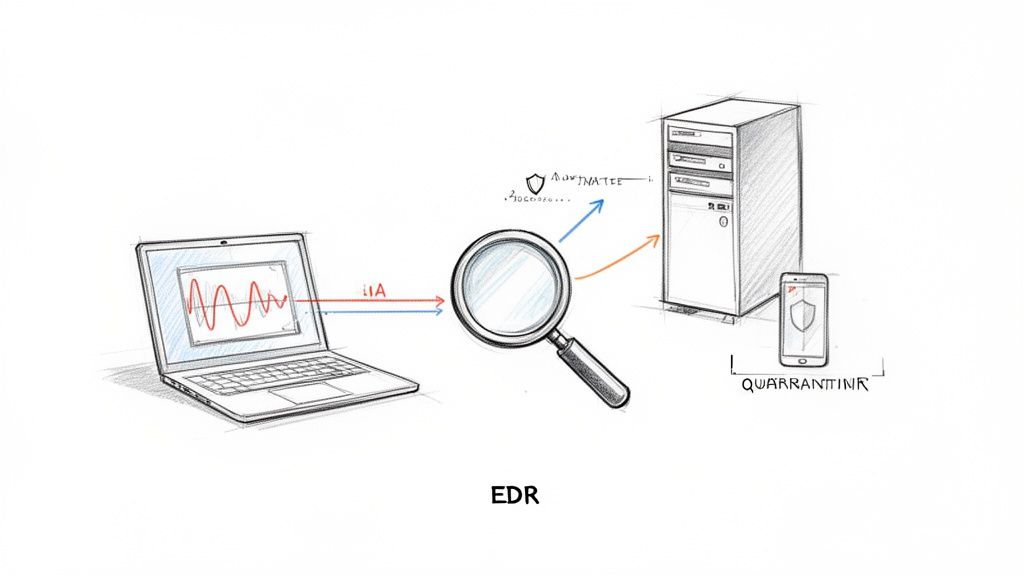
This technology provides real-time visibility, automatically analyzing behaviors to spot threats that slip past front-line defenses. It can detect an attacker trying to elevate their privileges or move laterally across your network. When it finds a threat, EDR doesn't just block it; it gives you the full story of how it got in, what it touched, and how to stop it cold, making it a critical tool in modern network security practices. A managed EDR solution like Bitdefender GravityZone with SOC-as-a-Service monitoring is key to this.
Key Takeaway: Traditional antivirus is not enough. EDR is essential for catching advanced threats, preventing the kind of stealthy attack that leads to prolonged downtime and massive financial loss.
Putting EDR to Work
For businesses across Central Indiana, EDR is the difference between a minor incident and a catastrophic breach. A defense contractor in Greenwood can use it to meet CMMC requirements by actively hunting for threats. Similarly, a healthcare provider on the southside of Indianapolis can use it to instantly isolate a compromised workstation, preventing a data breach and ensuring HIPAA compliance.
Here’s your quick-start guide to implementing EDR:
- Deploy Strategically: Start by installing EDR agents on your most critical assets—domain controllers, file servers, and executive laptops—before rolling it out company-wide.
- Tune for Your Environment: Work with an IT partner to fine-tune detection rules. The goal is to minimize "false positives" so your team isn't chasing ghosts, while ensuring you catch genuine threats.
- Create an Action Plan: Don't wait for an alert to figure out what to do. Establish a clear incident response playbook that details the exact steps to take when your EDR flags malicious activity.
- Integrate for a Full Picture: Connect your EDR solution with your SIEM or other security tools. This centralization gives you a single pane of glass for monitoring and threat hunting.
While EDR is a powerful defense, it’s just one part of a layered security strategy. To understand how it fits into a broader defensive plan, explore these endpoint security best practices for Indianapolis SMBs.
5. Firewall Management and Advanced Threat Prevention: Your Digital Gatekeeper
If your network is a fortress, your firewall is the main gate and the watchful guards all in one. It’s the first line of defense, inspecting every bit of data trying to get in or out. Basic firewalls are good, but modern, advanced firewalls are essential for any business serious about security, acting as a crucial element in a robust network security practices portfolio.
These next-generation firewalls go way beyond just blocking known bad traffic. They use deep packet inspection, intrusion prevention systems (IPS), and application-layer filtering to understand the context of the data. They can spot a sneaky attack hidden inside what looks like normal web traffic, preventing threats before they even touch your servers and cause costly downtime.
Key Takeaway: A poorly configured firewall is like leaving the front gate of your business wide open. Proper management and advanced features are non-negotiable for preventing breaches and ensuring business continuity.
Putting Your Firewall to Work
For a manufacturing facility along the I-65 corridor, this means using a Fortinet appliance to protect its industrial control systems. Similarly, a growing healthcare practice in Hamilton County can use a Palo Alto Networks firewall to enforce HIPAA compliance by controlling which applications can access patient data.
Here’s your quick-start guide to fortifying your digital perimeter:
- Establish a "Default-Deny" Policy: This is the golden rule. Block all traffic by default and only create specific rules to allow what is absolutely necessary for business operations.
- Segment Your Network: Use the firewall to create separate zones for user workstations, servers, and guest Wi-Fi, especially in old brick buildings where wireless signals can bleed. If one area is compromised, the others remain protected.
- Enable Advanced Threat Prevention: Subscribe to and enable threat intelligence feeds, intrusion prevention, and anti-malware services on your firewall. These services automatically update to block the latest known threats.
- Review and Test Rules Regularly: Schedule quarterly reviews of your firewall rule set. Remove old, unnecessary rules and test your configurations to ensure they work as intended. This prevents "rule rot" from creating security holes.
A well-managed firewall is foundational, but it shines brightest when it’s actively monitored. For a deep dive into keeping an eye on your network activity, read our section on Continuous Monitoring & Logging.
6. Employee Security Awareness Training: Your Human Firewall
You can have the most advanced security hardware, but your biggest vulnerability might be sitting at a desk answering emails. Humans are the primary target for cyberattacks. Employee security awareness training turns your team from a potential liability into your first line of defense—a human firewall that protects your company's ROI.
This practice is all about educating your employees on the threats they face daily, from phishing emails to social engineering scams. It teaches them how to recognize suspicious activity and what to do when they see it. Without this training, a single employee clicking a malicious link can bypass your security investments and trigger a costly business shutdown. Regular, engaging training builds a culture where security is everyone's job.
Key Takeaway: Technology can't stop every threat. A well-trained employee who can spot a phishing attempt is one of the best network security practices for preventing a breach and avoiding thousands in downtime costs.
Putting Training to Work
For Indiana businesses, building this human firewall is essential. A law firm in Greenwood can't afford a breach caused by a fake invoice. Similarly, a manufacturing plant on the I-65 corridor needs its staff to recognize threats that could halt production.
Here’s your quick-start guide to effective training:
- Make It Engaging: Ditch boring slideshows. Use real-world examples and interactive modules. Monthly phishing simulations provide immediate, practical lessons.
- Encourage Reporting: Create a non-punitive culture. When an employee reports a suspicious email, thank them for their vigilance, even if it’s a false alarm. This builds trust and encourages proactive behavior.
- Involve Everyone: Security training isn't just for the front lines. C-suite and leadership must participate to show that security is a company-wide commitment.
- Keep It Fresh: Partner with cybersecurity professionals to ensure your training content is current. Threat tactics change constantly, and so should your defense.
While training is crucial for stopping external attacks, it's just one part of a strong internal security posture. To discover more about the most common attack vector, explore our guide on how to protect against phishing attacks and see a real ROI.
7. Data Backup and Disaster Recovery Planning: Your Get-Out-of-Jail-Free Card
Imagine your Greenwood manufacturing firm gets hit with ransomware. Every server, every design file, every single piece of customer data is encrypted. Without a plan, you're faced with two terrible choices: pay a hefty ransom or shut down operations indefinitely. This is where a solid disaster recovery (DR) plan becomes your business's most valuable insurance policy. It's the ultimate undo button for cyberattacks or hardware failures.
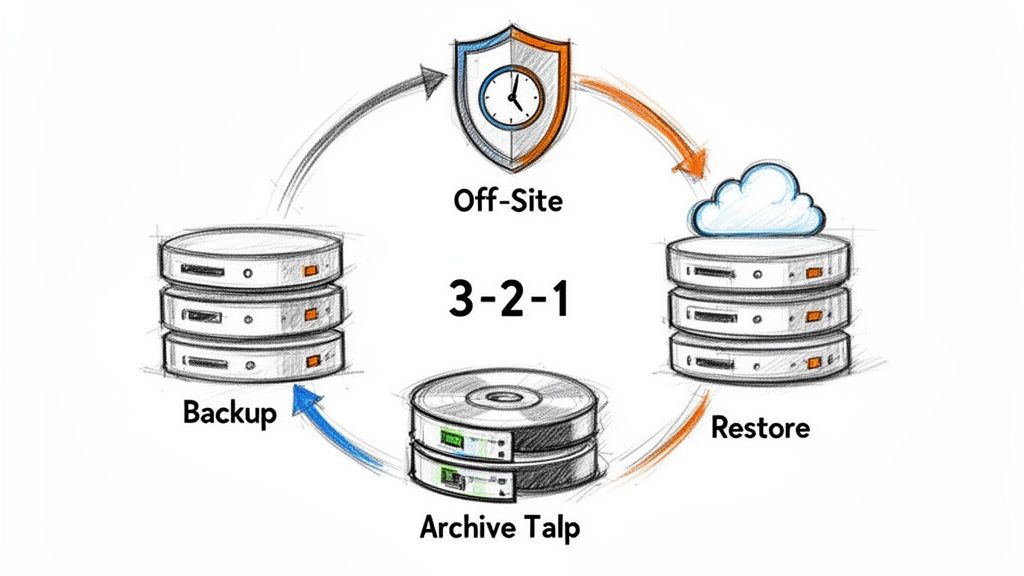
A proper backup strategy isn't just about making copies; it's about building a resilient system that restores your business quickly, turning potential weeks of downtime into mere hours. This involves creating complete, verified copies of your critical data, especially immutable off-site backups that ransomware can't touch. For an Indiana healthcare system, this means recovering from an attack in hours, not weeks, protecting patient data and ensuring HIPAA compliance.
Key Takeaway: A cyberattack or hardware failure is a matter of when, not if. A tested backup and disaster recovery plan is the only thing that separates a minor inconvenience from a business-ending catastrophe.
Putting Backup and DR to Work
Implementing a robust backup and DR strategy is one of the most critical network security practices for any business. It's your lifeline. A financial services firm along the I-65 corridor can use Veeam to create immutable backups, making them impossible for ransomware to encrypt. This ensures their client records are always recoverable.
Here’s your quick-start guide to a resilient backup strategy:
- Implement the 3-2-1 Rule: Maintain at least three copies of your data, on two different types of media (e.g., local disk and cloud), with one copy stored off-site.
- Encrypt and Isolate: Always encrypt your backup data. Keep your backup systems on a separate, isolated network segment so a primary network breach can't compromise them.
- Test, Test, and Test Again: A backup you haven't tested is just a hope. Perform quarterly recovery drills to confirm your data is restorable. Document your Recovery Time Objectives (RTO) and Recovery Point Objectives (RPO).
- Monitor and Alert: Don't let a failed backup go unnoticed. Configure your system to send immediate alerts on any backup failures so you can fix the issue right away.
Beyond backups, having a plan for professional data recovery services is crucial for mitigating data loss. In our 17 years of local service, we've performed bit-level data recovery on failing RAID arrays for clients who thought their data was gone forever, but a proactive plan is always better.
8. Secure Remote Access and VPN Implementation
If your office is your castle, letting employees work from home without a VPN is like leaving the drawbridge down and unguarded. A Virtual Private Network (VPN) creates an encrypted, private tunnel over the public internet, making it one of the best network security practices for any business with a remote or hybrid workforce. It’s the digital equivalent of an armored car for your data.
Without this secure bridge, any data sent from a coffee shop or home office is vulnerable. A VPN, combined with robust authentication, essentially extends your secure corporate network to anywhere your team works. This is crucial for protecting sensitive information, whether it’s a law firm on the I-65 corridor protecting client communications or a manufacturing company enabling secure remote diagnostics for its machinery. This directly prevents breaches that lead to downtime.
Key Takeaway: Hybrid work is the new norm. A properly configured VPN is non-negotiable for protecting company data that travels outside your office walls, ensuring productivity without sacrificing security.
Putting Secure Remote Access to Work
For Indiana businesses, a secure remote access strategy is a direct investment in business continuity. A healthcare organization in Hamilton County can use Microsoft Always On VPN to give staff secure access to patient records while meeting HIPAA requirements. A financial services firm in a downtown Indy tech hub can lock down client data with a zero-trust VPN model.
Here’s your quick-start guide to a secure rollout:
- Layer on MFA: Never deploy a VPN without Multi-Factor Authentication. Combining something the user knows (password) with something they have (a code) is your strongest defense.
- Use Modern Protocols: Stick with modern, secure VPN protocols like WireGuard, OpenVPN, or IKEv2. Outdated protocols like PPTP are notoriously insecure and should be avoided entirely.
- Monitor VPN Logs: Regularly review your VPN access logs. Multiple failed login attempts or access from an unexpected country are red flags that demand immediate investigation.
- Segment Remote Access: Don't give every remote user the keys to the entire kingdom. Segment access based on job role. A sales team member doesn’t need access to the same financial data as your CFO. This is a core principle of Zero Trust.
Implementing a VPN is a foundational step, but its effectiveness depends on proper configuration and ongoing management. To ensure your remote access is truly secure, consider getting a Free Network Assessment from our team.
9. Access Control and Privilege Management: The VIP Room Policy
Imagine giving every employee a master key to every room in your building. It sounds chaotic because it is. Access Control is the digital equivalent of a VIP room policy; it establishes who gets to go where and what they can do once they're inside. It’s one of the most fundamental network security practices for preventing both accidental and malicious damage.
This practice is built on the Principle of Least Privilege (PoLP), a simple but powerful idea: users should only have the absolute minimum permissions needed to do their jobs. A marketing intern doesn’t need access to financial records. By strictly limiting access, you drastically shrink your attack surface. If an employee’s account is compromised, the damage is contained to only what that user could access, preventing a small incident from causing major downtime.
Key Takeaway: If an attacker compromises an account, least privilege ensures they've stolen a key to a single closet, not the master key to the entire kingdom. This minimizes risk and supports compliance standards like NIST CSF.
Putting Access Control to Work
For businesses along the I-65 corridor, implementing strict access controls is a direct path to security and compliance. A healthcare system in Johnson County can use role-based access to protect patient data and meet HIPAA rules. Likewise, a defense contractor downtown can use these controls to prepare for a CMMC audit.
Here’s your quick-start guide to locking things down:
- Audit Your Kingdom: Start with a full access audit. Find out who has access to what and why. You'll almost certainly find employees with permissions they no longer need.
- Enforce Least Privilege: Go through every user account and strip away all non-essential permissions. Base access on job roles, not individual requests.
- Use Privileged Access Management (PAM): For administrative accounts, use a PAM solution. These tools vault and rotate credentials, log every action, and can grant temporary, just-in-time access.
- Automate and Review: Tie access provisioning and de-provisioning to your HR systems. When someone is hired, they get the access they need; when they leave, it's revoked instantly. Conduct quarterly access reviews to keep permissions current.
10. Encryption of Data at Rest and in Transit: Your Digital Safe
If your sensitive data were physical gold bars, you wouldn't just leave them sitting on a desk. You'd lock them in a vault. Data encryption is that digital vault. It scrambles readable information into unreadable ciphertext, making it useless to anyone without the key. This is one of the most fundamental network security practices for protecting information, whether it's stored on a server (at rest) or flying across the internet (in transit).
Modern encryption is so strong that breaking it is computationally impossible. For an attacker who breaches your network and steals a hard drive, encrypted data is just gibberish. This protects your business from theft, unauthorized access, and serious compliance fines under regulations like HIPAA or CMMC. It's a critical last line of defense.
Key Takeaway: If a device is lost or a server is breached, encryption is your last and strongest line of defense, turning a catastrophic data leak into a minor hardware loss and preventing regulatory fines.
Putting Encryption to Work
For a law firm in Johnson County, this means using BitLocker's full-disk encryption on all attorney laptops to protect sensitive case files. For a healthcare provider on the I-65 corridor, it means encrypting patient medical records in their database with AES-256 to maintain HIPAA compliance. This isn’t an abstract concept; it’s a practical safeguard against real-world threats.
Here’s your quick-start guide to locking down your data:
- Enable Full-Disk Encryption: Immediately turn on built-in tools like BitLocker (Windows) and FileVault (macOS) on every company laptop and mobile device.
- Secure Web Traffic: Ensure all your websites and portals use Transport Layer Security (TLS 1.3) to encrypt data in transit. This is what the "s" in "https://" signifies.
- Protect Your Backups: Don't forget to encrypt your backup files. An unencrypted backup is a goldmine for an attacker.
- Practice Secure Key Management: Keep your encryption keys stored separately from your encrypted data. For ultimate security, consider using a Hardware Security Module (HSM) to protect your most critical keys.
While encryption protects the data itself, it needs to be part of a broader security strategy. For more details on protecting data as it moves between systems, check out Your No-Nonsense Guide to Secure Data Transfer for Indiana Businesses.
Top 10 Network Security Practices Comparison
| Solution | Implementation Complexity 🔄 | Resource Requirements ⚡ | Effectiveness ⭐ | Expected Outcomes 📊 | Ideal Use Cases & Tips 💡 |
|---|---|---|---|---|---|
| Multi-Factor Authentication (MFA) | Medium — integration and user rollout | Low–Medium — auth apps/tokens, integration effort | ⭐⭐⭐⭐⭐ — very effective vs credential theft | Significantly reduces account compromise; aids compliance | Admins & remote access; tip: use authenticator apps, start with privileged accounts |
| Network Segmentation & Zero Trust | High — architecture, policy design | High — SDN/NAC, monitoring, ongoing ops | ⭐⭐⭐⭐⭐ — excellent at limiting lateral movement | Reduced blast radius, better visibility, faster containment | Critical systems (OT, healthcare, finance); tip: map traffic and phase rollout |
| Regular Security Updates & Patch Management | Medium — scheduling, testing, coordination | Medium — automation tools, staging environments | ⭐⭐⭐⭐ — strong against known exploits | Fewer vulnerabilities, improved stability and auditability | All environments; tip: prioritize critical patches and test in staging |
| Endpoint Detection and Response (EDR) | Medium–High — tuning, playbooks, integration | High — licenses, staff or managed service | ⭐⭐⭐⭐⭐ — detects advanced/zero-day threats quickly | Faster detection and containment, forensic visibility | Ransomware/high-risk endpoints; tip: integrate with SIEM and tune rules |
| Firewall Management & Advanced Threat Prevention | Medium — rule design and maintenance | Medium–High — appliances, subscriptions, tuning | ⭐⭐⭐⭐ — effective perimeter & application filtering | Blocks external threats, enables secure remote access, traffic insight | Multi-site networks, perimeter defense; tip: use default-deny and audit rules regularly |
| Employee Security Awareness Training | Low–Medium — program design & reinforcement | Low–Medium — platform, time investment | ⭐⭐⭐⭐ — reduces human-triggered incidents | Fewer successful phishing/social attacks; more reporting | All organizations; tip: run realistic phishing simulations monthly and keep content engaging |
| Data Backup & Disaster Recovery Planning | Medium–High — planning, testing, documentation | High — storage, replication, off-site/cloud costs | ⭐⭐⭐⭐ — essential for recovery from outages/ransomware | Faster recovery, minimized data loss, regulatory compliance | Critical-data businesses; tip: follow 3-2-1, encrypt backups and test restores regularly |
| Secure Remote Access & VPN Implementation | Low–Medium — config, policy, user onboarding | Medium — VPN gateways, licenses, monitoring | ⭐⭐⭐⭐ — strong when combined with MFA | Encrypted remote sessions, reduced MITM risk, controlled access | Hybrid workforces and contractors; tip: use modern protocols (WireGuard/IKEv2) + MFA |
| Access Control & Privilege Management | High — role design, PAM, governance | Medium–High — IAM/PAM tools and audits | ⭐⭐⭐⭐⭐ — very effective at limiting privileged misuse | Limits lateral movement, provides audit trails and rapid revocation | Regulated industries & admin accounts; tip: implement least privilege and JIT access |
| Encryption (Data at Rest & in Transit) | Medium — deployment and key management | Medium — key management, HSMs, performance tuning | ⭐⭐⭐⭐⭐ — strong data confidentiality | Protects data from theft and interception; supports compliance | Any sensitive-data environment; tip: use TLS 1.3+, full-disk encryption and robust key rotation |
Stop Guessing and Start Securing: Your Next Step
So, you’ve made it through the playbook of best network security practices. From implementing MFA to segmenting your network with a Zero Trust mindset, we've covered the core strategies for building a digital fortress around your business. But let’s be honest, reading a list and actually deploying a SOC-as-a-Service or configuring latency-optimized mesh nodes are two very different things. The real takeaway isn’t just knowing these terms; it’s understanding that security is not a one-time setup. It's a continuous, active process.
For many Johnson County business owners, the gap between knowing what to do and having the time, expertise, and resources to do it is massive. Your team is focused on growth, not on chasing down the latest patch for your Bitdefender GravityZone or verifying that your off-site backups are truly immutable. This is where the real risk lies. Each unpatched server or poorly configured firewall rule is an open invitation for trouble, and the cost of a breach can easily derail a growing Hamilton County enterprise.
From Theory to Reality: Making Security Tangible
The principles we've discussed, like Zero Trust Architecture and Endpoint Detection and Response (EDR), are practical tools that prevent downtime and convert what would be wasted tech time into billable hours. Think of it this way:
- Employee Training isn't just about avoiding phishing; it's about preventing a single click from costing you $9,000 a minute in operational paralysis.
- Data Backup & Disaster Recovery isn't an IT expense; it's your business continuity insurance policy, ensuring you can recover from a ransomware attack in hours, not weeks.
- Vendor Management is critical. You need to ensure your partners are just as secure. This even extends to the end of a device's life cycle. Ensuring that sensitive information remains protected requires robust secure data destruction methods that comply with standards like HIPAA and NIST.
For over 17 years, we’ve been the team on the ground for businesses stretching from downtown Indy tech hubs to the I-65 corridor. We've seen firsthand what happens when an old server in a Greenwood business park finally fails without a proper backup, and we've built our managed services to prevent those exact disasters. Mastering these best network security practices is about shifting from a reactive, break-fix mindset to a proactive, predictable one. It's about building a resilient organization that can weather any digital storm.
Your Actionable Next Step
Stop guessing if your business is secure. It's time to know for sure. The most crucial step you can take right now is to get a clear, unbiased picture of where you stand. Don't wait for an incident to reveal your vulnerabilities. Take action now to protect the business you've worked so hard to build.
Ready to turn these best practices into your reality? Let Finchum Fixes IT handle the complex technical work so you can focus on your business. We offer a no-obligation Security Risk Audit for businesses in the Greenwood and Indianapolis area, providing a clear roadmap to a more secure and efficient network. Visit Finchum Fixes IT to schedule your audit today.