Network Security Assessment: An Indiana SMB Guide
A ransomware incident usually does not start with a movie-style hack. It starts with ordinary business drift. A file server stays in service longer than planned. Remote access gets set up quickly for one employee, then reused for ten. A cloud app gets approved by convenience instead of policy.
That pattern is familiar across Indiana small and midsize businesses, from older downtown buildings to newer office space off I-65. The risk is not just technical. If systems go down, payroll stalls, invoices wait, customer service slows, and the week gets expensive fast.
A network security assessment gives owners a clear picture of what they have, what is exposed, and what needs attention first. Done right, it is part cybersecurity review, part business continuity planning. It turns vague concerns into a prioritized plan with cost, risk, and operational impact in plain language.
That matters for Indiana companies that do not have time to sort through jargon or chase a national firm that treats every environment the same. A good local assessment should tell you where your real points of failure are, what fixes can wait, and which ones protect revenue, uptime, and trust right now.
Your Biggest Business Risk Might Be in Your Server Closet
A Monday in central Indiana can go sideways fast. The accounting system will not load. The warehouse printer drops offline. Someone cannot reach a shared folder. Your IT person starts tracing cables in a server closet that also holds spare monitors, old phone gear, and a mystery router nobody remembers installing.
That kind of mess is common in small and midsize businesses. It is also expensive, because the problem is rarely just one bad device. It is usually years of small decisions stacking up, office moves, quick remote-access fixes, vendor workarounds, and hardware that stayed in place because replacing it never made the top of the list.
For an owner, the primary risk is interruption. Payroll gets delayed. Orders sit. Customer emails wait. Staff waste half a day working around systems that should have been stable.
Why this hits Indiana SMBs differently
Indiana businesses often run lean. A manufacturer on the south side, a clinic in Johnson County, and a professional office in Hamilton County may all depend on a small IT team, or one outside provider who is juggling support, projects, and security at the same time. That makes it easy for security gaps to hide inside day-to-day operations.
The pressure also varies by industry. Healthcare groups have compliance exposure. Contractors tied to defense work have customer security requirements. Other companies may not face a formal framework today, but they still face the same business question. What happens to revenue if systems are unavailable for a day, or even half a day?
That is why a security assessment should be treated as a business continuity exercise first and a technical review second.
A useful assessment shows what could stop work, how likely it is, and what it will cost to fix before it becomes an outage.
Owners also get better results when they work with someone who understands the local environment. Older buildings in Indianapolis and surrounding counties often have inherited wiring, pieced-together network gear, and internet setups that grew without much planning. A national firm may still produce a polished report, but a local partner is more likely to recognize the practical constraints, budget, staffing, and vendor mix you are dealing with.
What owners usually get wrong
The common mistake is treating security as a product purchase instead of an operating discipline.
A business may already pay for endpoint protection, a firewall subscription, Microsoft 365 security features, or backups. Those tools help. They do not answer the harder questions: which systems still matter, who can reach them, what is exposed from the outside, and which weak point would create the biggest outage if it failed tomorrow.
That distinction matters when owners compare a vulnerability assessment vs. penetration testing for business risk decisions. One finds broad weaknesses. The other tests whether a specific weakness can be exploited. Both have value, but neither replaces the basic work of understanding the environment first.
I usually tell clients to ignore the scary language for a minute and focus on the operational math. If an assessment finds an old firewall, flat network access between office and production systems, and remote logins without proper controls, that is not just a cybersecurity note. It is a list of conditions that can turn a minor incident into a full business interruption.
A solid review should also connect findings to maintenance and follow-through. The guide for service providers on TVM is useful here because threat and vulnerability management only works if someone owns the cycle of finding issues, ranking them, and fixing them in an order the business can support.
That is the primary value for Indiana SMBs. A good assessment does not hand you a dense PDF full of alarms and acronyms. It gives you a practical sequence: what needs attention now, what can wait until the next budget cycle, and which fixes reduce the odds of an expensive outage.
What a Network Security Assessment Actually Is
Consider it a home inspection, but for the systems your business relies on every day. You're not just checking whether the front door locks. You're checking the wiring, the foundation, the windows, and whether water is getting in somewhere unnoticed yet.
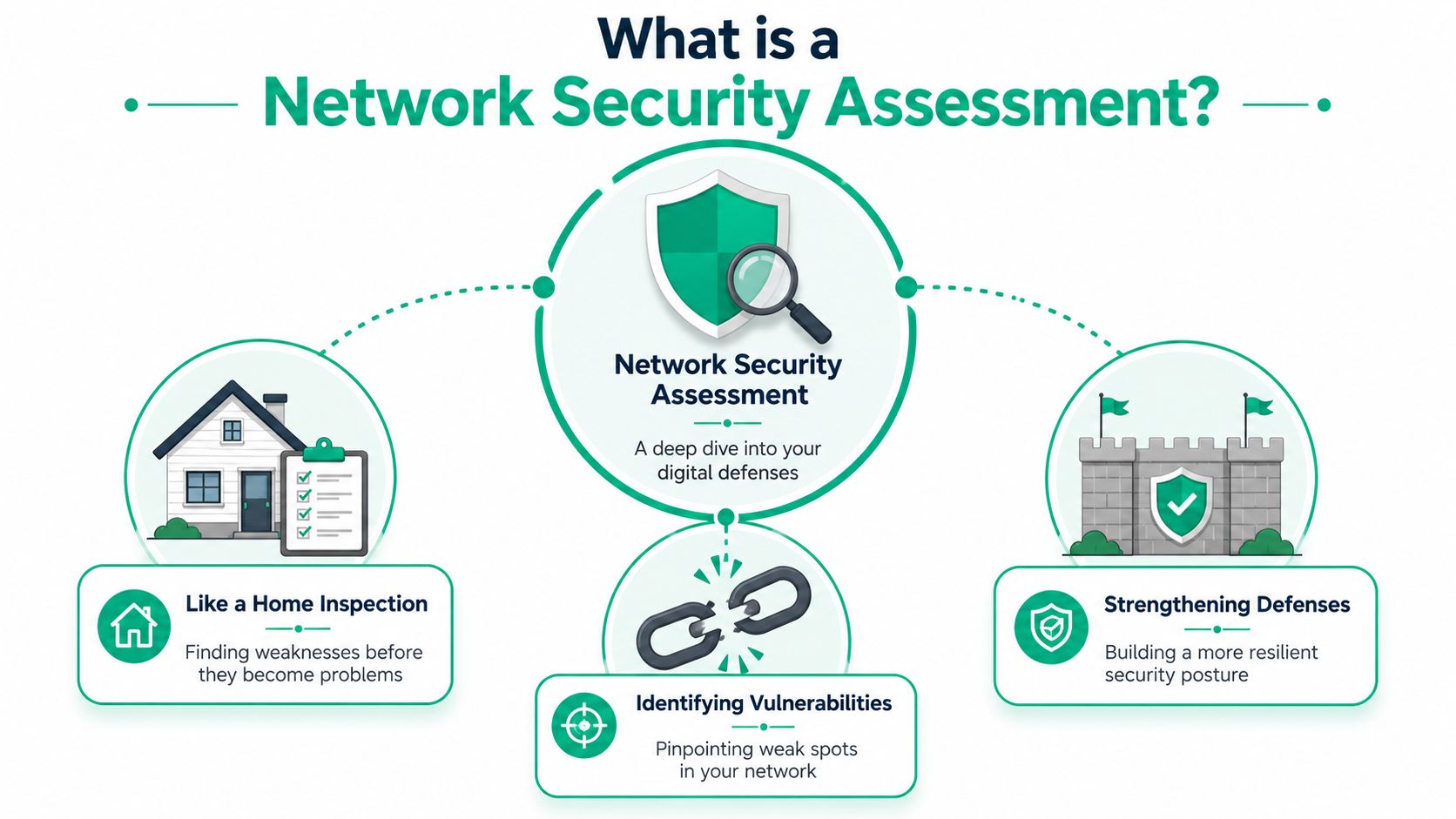
A network security assessment is a structured review of your digital environment to identify weaknesses, misconfigurations, outdated systems, risky access paths, and missing controls. It looks at the network itself, but it also reaches into the systems attached to it, the people using it, and the third parties connecting into it.
It starts with inventory, not scanning
The first serious step is asset inventory and data-flow mapping. Check Point's guidance on how network security assessments start with complete asset inventory and data-flow mapping makes the point clearly. Unknown or unmanaged endpoints, shadow IT, and untracked third-party connections create blind spots attackers can exploit.
That means a real assessment usually maps things like:
- Core infrastructure. Servers, switches, routers, firewalls, VPN appliances, and wireless controllers.
- Endpoints. Desktops, laptops, remote devices, mobile phones, tablets, and shared workstations.
- Wireless and edge gear. UniFi networking gear, access points, guest Wi-Fi, warehouse bridges, and oddball devices that got added over time.
- Cloud and SaaS systems. Microsoft 365, file-sharing platforms, backup systems, remote access tools, and business apps adopted outside formal IT.
- Third-party connections. Vendors, MSP tools, accountants, software integrators, and anyone else with a path into your environment.
If that sounds broader than “check my firewall,” that's because it is.
What it should uncover
A useful assessment doesn't drown you in jargon. It should uncover the issues that create operational risk:
- Exposed services that shouldn't be reachable
- Weak segmentation between office systems, production equipment, guest devices, and sensitive data
- Configuration drift after years of one-off changes
- Old firmware and unsupported systems
- Poor remote access controls
- Shadow IT like unmanaged file-sharing or forgotten SaaS tools
For providers that want a good outside explainer on continuous threat and vulnerability work, this guide for service providers on TVM gives helpful context around how teams move from one-time scans to ongoing management.
A lot of owners also confuse a vulnerability assessment with a full penetration test. They're related, but they aren't the same service. If you want that distinction in plain English, this breakdown of vulnerability assessment vs. penetration testing is worth reading before you buy either one.
If your provider can't explain what's in scope in simple business language, they probably won't explain the findings well either.
The Four Main Types of Security Assessments
Not every business needs the same kind of review. A law office in downtown Indy, a manufacturer near Franklin, and a medical practice in Greenwood can all need security work for very different reasons. The smart move is matching the assessment type to the actual risk.
Vulnerability scanning
This is the quick checkup. Automated tools inspect systems and flag known weaknesses such as missing patches, risky settings, old firmware, weak services, and exposed applications.
It's efficient. It's also limited.
A scanner is good at finding common technical problems. It's not good at deciding whether a finding matters to your business if the context is messy. It won't understand that the old machine in accounting is tied to a critical process nobody can interrupt until quarter-end.
Best fit: Businesses that want a baseline view of obvious technical gaps, especially after growth, office changes, or cloud adoption.
Penetration testing
Pen testing asks a different question. Instead of “what vulnerabilities exist,” it asks “what can be exploited, and how far could an attacker get?”
That's the ethical hack. It's more targeted, more manual, and more useful in more critical scenarios. If you've got sensitive client data, externally exposed systems, or contractual security obligations, this can be the right next layer after a basic assessment.
Configuration reviews
Experienced engineers earn their keep during a configuration review. This type of review looks at how devices and systems are set up, not just whether they're patched. Firewalls, switches, VLANs, Microsoft 365 controls, remote access policies, identity settings, backups, and endpoint protections all matter here.
For a defense contractor dealing with CMMC expectations, this often matters more than a simple scan. For a growing company trying to build toward Zero Trust architecture, it's essential.
A lot of attack paths exist because systems are configured loosely, not because they're dramatically “hacked.”
Policy audits
Some businesses don't have a tooling problem first. They have a governance problem. A policy audit reviews whether your written procedures, access rules, incident response planning, user practices, and compliance controls line up with what your business does.
That matters for HIPAA, CMMC, and broader security frameworks like NIST CSF. If your team says one thing in a policy and does another in practice, you've got risk even if your hardware is decent.
For a practical outside read on this topic, what is attack surface analysis helps frame how all these moving parts add up to real exposure.
Comparison of Network Security Assessment Types
| Assessment Type | Primary Goal | Scope | Best For |
|---|---|---|---|
| Vulnerability Scanning | Find known technical weaknesses | Broad automated review of systems and services | SMBs needing a baseline |
| Penetration Testing | Test exploitability | Targeted manual testing of selected systems | Higher-risk environments and exposed assets |
| Configuration Reviews | Validate secure setup | Firewalls, identity, segmentation, cloud, endpoints | Businesses with complex or aging infrastructure |
| Policy Audits | Check governance and compliance alignment | Procedures, access, documentation, training, controls | HIPAA, CMMC, NIST CSF, and regulated operations |
What usually works best
Most Indiana SMBs don't need to pick only one forever. They need the right sequence.
- Start with visibility if you don't fully know what's connected.
- Move to configuration review if your environment has grown fast or changed hands.
- Use policy audits when compliance is on the table.
- Add pen testing when external exposure or customer requirements justify the extra depth.
If you want a practical local checklist for the broader audit side of this conversation, this IT security audit checklist for Indiana businesses is a solid companion.
The Assessment Process From Start to Finish
A professional assessment shouldn't feel like handing your keys to a stranger and waiting for a scary PDF. It should feel like a well-run project with clear scope, decision points, and a realistic remediation plan.
In our 17 years of local service, we've seen the same fear from owners across Greenwood, Indianapolis, and the surrounding counties. They worry the assessment will be disruptive, overly technical, or impossible to budget. It doesn't have to be any of those things.
Phase one and two
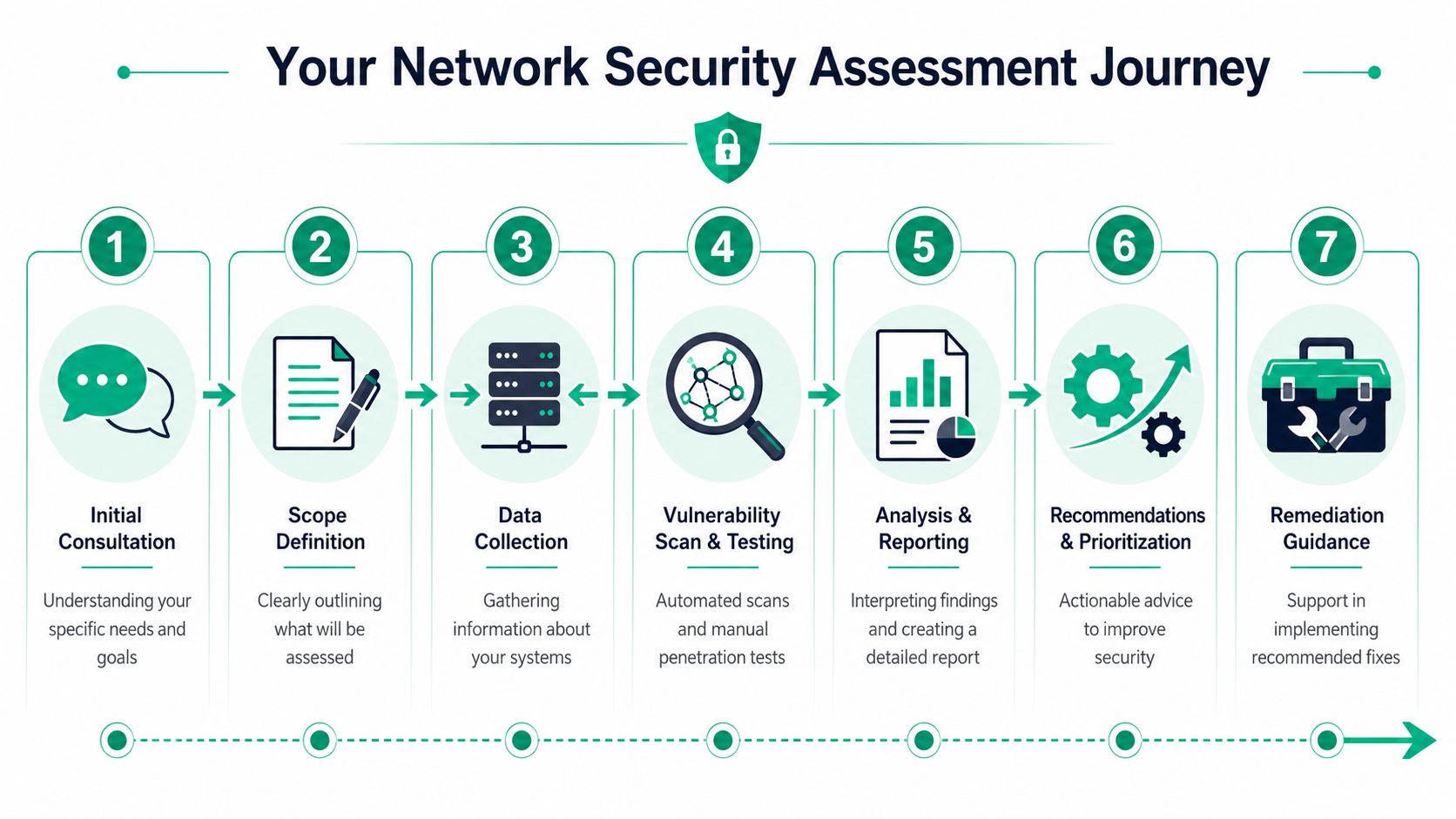
Industry guidance summarized by Panorays says assessments should happen at least annually and again whenever there is a significant infrastructure change, with the typical workflow centered on inventorying assets, testing vulnerabilities, documenting results, and remediating weaknesses in an overview of why network security assessments are now an ongoing discipline. That matches what works in the field.
The process usually starts with scoping and planning. What locations are included. Which cloud platforms matter. Which business systems are critical. Which compliance frameworks apply. A healthcare office, for example, may prioritize HIPAA-related systems. A machine shop may care more about production uptime and remote vendor access.
Then comes discovery and inventory. In this phase, teams identify devices, software, wireless gear, SaaS connections, remote endpoints, and data paths. If the business has grown quickly, this phase almost always finds surprises.
Phase three
Next is testing and analysis. This can include vulnerability scans, configuration review, access review, wireless checks, firewall rule analysis, backup validation, and selective manual testing. If the network includes distributed users, cloud-only systems, or a mix of old and new gear, the analysis matters more than the scan itself.
Practical rule: If an assessment tool spits out findings without business context, it's only half done.
Good consultants also account for business rhythm. Nobody should run disruptive testing in the middle of payroll processing, patient intake, or a busy shipping cycle.
Phase four and five
After testing comes reporting and briefing. Weak providers often lose people at this stage. The report has to translate technical findings into operational language. What's critical. What can wait. What affects compliance. What affects uptime. What belongs in this month's budget versus the next quarter's plan.
The final step is remediation and validation. That means fixing the high-risk issues first, confirming they were fixed correctly, and deciding what needs ongoing monitoring. In some environments, that includes SOC-as-a-Service monitoring, tighter identity controls, immutable off-site backups, segmentation changes, or endpoint hardening with tools like Bitdefender GravityZone.
A useful companion to this conversation is this IT infrastructure audit checklist for 2026, especially if you're trying to align security work with a broader refresh plan.
What a normal engagement feels like
For a typical Johnson County business, the process should feel like this:
- Kickoff call with scope, business priorities, and constraints
- Discovery work across on-prem, wireless, cloud, and remote systems
- Testing and review with minimal disruption
- Executive briefing that separates urgent fixes from longer-term upgrades
- Remediation roadmap with validation after changes
That last piece is where ROI shows up. You reduce surprise downtime, convert recurring fire drills into planned work, and stop wasting staff hours on the same technical friction month after month.
How to Read an Assessment Report
A report isn't valuable because it's long. It's valuable because it helps you decide what to do next.
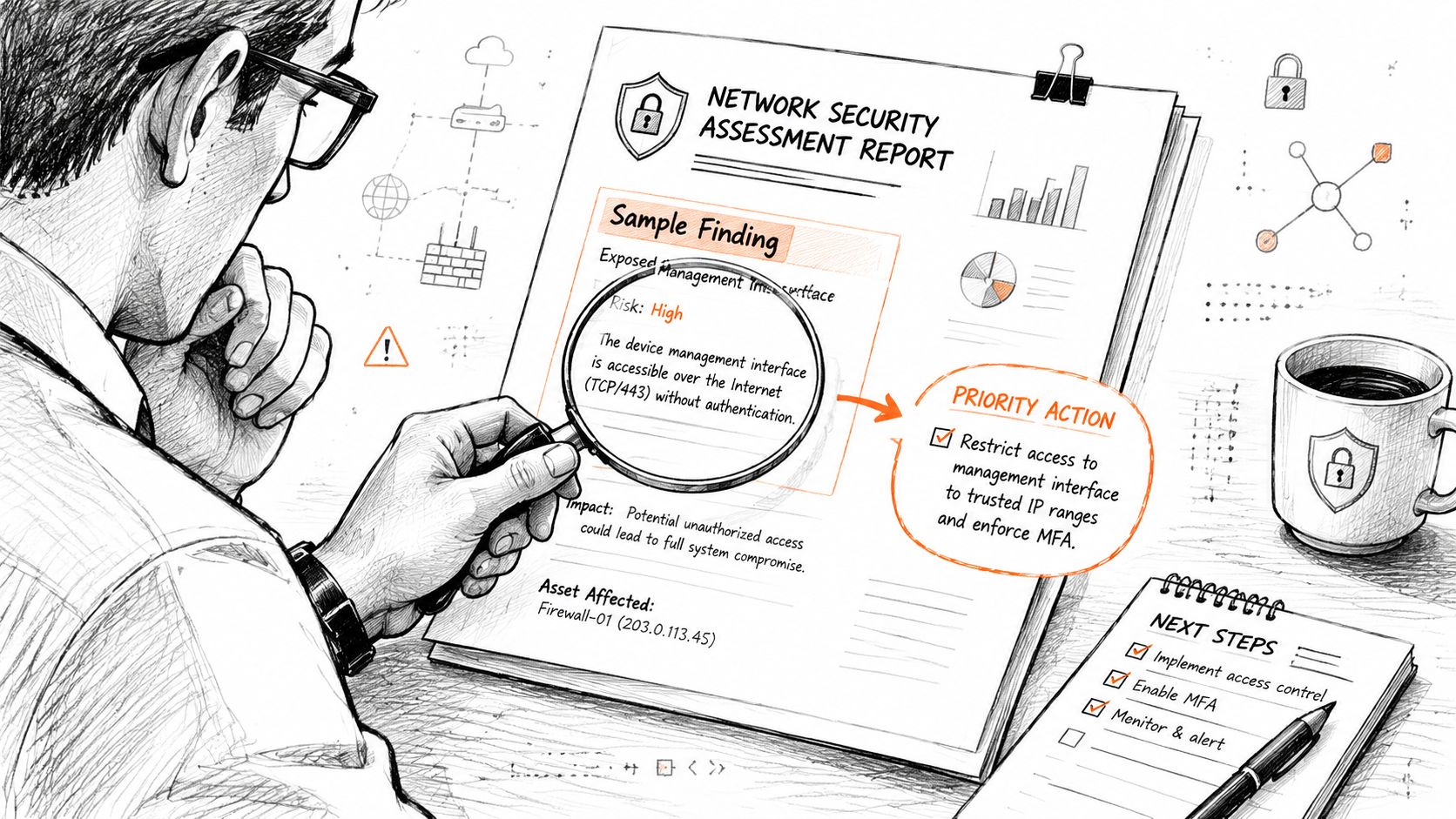
A lot of reports fail business owners because they read like they were written for another engineer. Ten pages of findings with no business context won't help you decide whether to patch, replace, isolate, insure, or budget. The best reports connect technical risk to operational impact.
What a useful finding looks like
Here's a plain-English example:
Finding
Legacy Windows server still handling shared files in the Greenwood officeRisk level
CriticalBusiness impact
If that server is compromised or fails, staff could lose access to shared documents, billing records, and key line-of-business files. That creates downtime, possible data exposure, and compliance headaches depending on the data involved.Recommended action
Isolate the system, confirm backup integrity, patch what can be patched, and build a replacement or migration plan immediately.
That's a useful finding because it answers four questions fast. What's wrong. How bad is it. Why the business should care. What happens next.
What to look for in the report
A strong report usually includes these parts:
- Executive summary that a business owner can read in a few minutes
- Scope statement showing what locations, systems, and services were included
- Prioritized findings grouped by severity and business impact
- Remediation guidance with practical next steps, not just problem descriptions
- Assumptions and limitations so you know what wasn't tested
If your report doesn't prioritize work, it's incomplete. If everything is labeled urgent, nothing is.
That's the same logic used in broader planning. This playbook for prioritizing IT projects in Indiana businesses applies well to assessment remediation too.
Questions to ask before you approve the fixes
Before you green-light remediation, ask:
- What breaks first if we leave this alone for now?
- What's the fastest risk reduction for the least operational pain?
- Which fixes support compliance versus simple best practice?
- Can this be mitigated temporarily while we budget the permanent fix?
- How will you validate that the remediation worked?
Here's a quick visual overview if you want a second format for the same idea:
What to prepare before the assessment starts
You'll get a better result if you have a few basics ready:
- Key people identified so the assessor knows who owns systems, vendors, and approvals
- Critical apps listed including billing, file storage, phones, and specialty software
- Sensitive data mapped loosely so reviewers know what would hurt most to lose
- Recent changes noted like office moves, new SaaS tools, or remote access changes
- Known pain points documented such as slow Wi-Fi, unstable VPN access, or recurring lockouts
A good report should leave you with a sequence. Fix this now. Schedule that next. Watch this area continuously. Replace that old box before it forces your hand.
Choosing the Right Assessment Partner in Indianapolis
There's a big difference between a partner who understands your environment and a vendor who runs a script, drops a report in your inbox, and disappears.
That difference shows up fast in Central Indiana. A local shop that knows older buildings, mixed environments, warehouse Wi-Fi headaches, and SMB budgets is usually going to ask better questions than a national call center reading from a checklist.

What to screen for
SecurityScorecard's learning-center guidance notes that a frequently underserved issue is how often to reassess, especially as cloud, remote, and third-party assets keep changing, in its discussion of why effective network security assessment requires ongoing review beyond the initial project. That matters when you choose a provider. You don't just want someone who can perform an assessment once. You want someone who understands reassessment cadence after real business changes.
Ask direct questions:
- How do you handle cloud and remote assets instead of only on-prem gear?
- Do you review third-party access and shadow IT?
- Can you explain findings to leadership without drowning them in acronyms?
- What happens after the report if we need remediation help?
- How do you tie recommendations to business continuity and not just abstract risk?
Technical depth still matters
Friendly local support is great. It isn't enough by itself.
You want a team that can speak plainly to owners and still understand the underlying stack. That includes Zero Trust architecture, identity hardening, segmentation strategy, SOC-as-a-Service monitoring, backup design, cloud security baselines, and wireless design for difficult spaces. If somebody can't explain why latency-optimized mesh nodes behave differently from a slapped-together extender setup, or why immutable off-site backups matter after ransomware, they may not be the right advisor.
In our local work, we've seen the same pattern over and over. Businesses don't need a “geek with a screwdriver.” They need someone who can connect technical choices to uptime, compliance, staffing, and cash flow.
Price is not the whole decision
The cheapest assessment often costs more later. It misses context. It flags noise. It gives you no remediation sequence. Then your staff burns time trying to sort the report out, or you pay a second provider to explain the first one.
One local option in this space is Finchum Fixes IT, which provides security-focused reviews and remediation support for Indiana businesses and operates with certified staff across Microsoft, CompTIA, and Cisco disciplines. That kind of breadth matters when the work crosses servers, cloud, wireless, endpoint protection, and business continuity planning.
If you're comparing providers, this guide to choosing a managed service provider gives a useful shortlist of what to ask before signing anything.
Choose the partner who can tell you what to fix first, what can wait, and why. That's the difference between a report and a plan.
The right partner should leave you with fewer surprises, cleaner priorities, and a budget you can defend. That's what business owners along the Southside, in downtown Indy tech hubs, and across Johnson County usually want most. Less drama. Less downtime. More predictability.
If you're in Greenwood or the greater Indianapolis area and you're not fully sure what's hanging off your network, what your remote users changed, or where your biggest exposure sits today, a Free Network Assessment or Security Risk Audit is the right next step. Finchum Fixes IT can help you identify the risks that affect uptime, compliance, and day-to-day operations, then turn those findings into a practical remediation plan instead of another dusty report.