Why VLAN Is Used A Guide for Indy Businesses

Your office network can look fine on the surface and still be the reason people lose half a day fighting slow apps, choppy calls, and random disconnects.
That's common in Greenwood office parks, older brick buildings near downtown Indy, and mixed-use spaces along the I-65 corridor. One team is pushing large files. Another is on VoIP calls. Guests are on Wi-Fi. Maybe a camera system or door controller is sharing the same switching fabric. Everything rides together, and when it gets messy, owners usually blame the internet. A lot of the time, the actual issue is poor internal traffic control.
Your Unseen Network Traffic Jam
TL;DR
- VLANs split one physical network into separate logical lanes, which improves performance and basic security without buying separate hardware.
- They reduce broadcast noise, which helps voice, video, and day-to-day business traffic run more cleanly.
- They help isolate guest Wi-Fi, phones, office users, and sensitive systems so one problem doesn't spill into everything else.
- They support compliance efforts by separating traffic for regulated environments like HIPAA and CMMC.
- They are not magic security by themselves. You still need routing rules, firewall policies, and good design.
- For Indiana SMBs, VLANs are often one of the fastest ways to reduce downtime risk and stop wasted tech time.
A Johnson County business owner usually notices the symptom first. The accounting team says the month-end reports drag. Front desk phones sound rough. A conference call drops right when a client joins. Then somebody says, “We probably need new equipment.”
Sometimes you do. Often, you don't.
A lot of those problems happen because every device is shouting into the same room. The office PCs, guest phones, smart TVs, printers, VoIP handsets, cameras, and maybe a few oddball IoT devices are all sharing one flat network. In older buildings around Greenwood and downtown Indy, that setup gets ugly fast because the Wi-Fi already has enough structural challenges without adding unnecessary traffic noise.
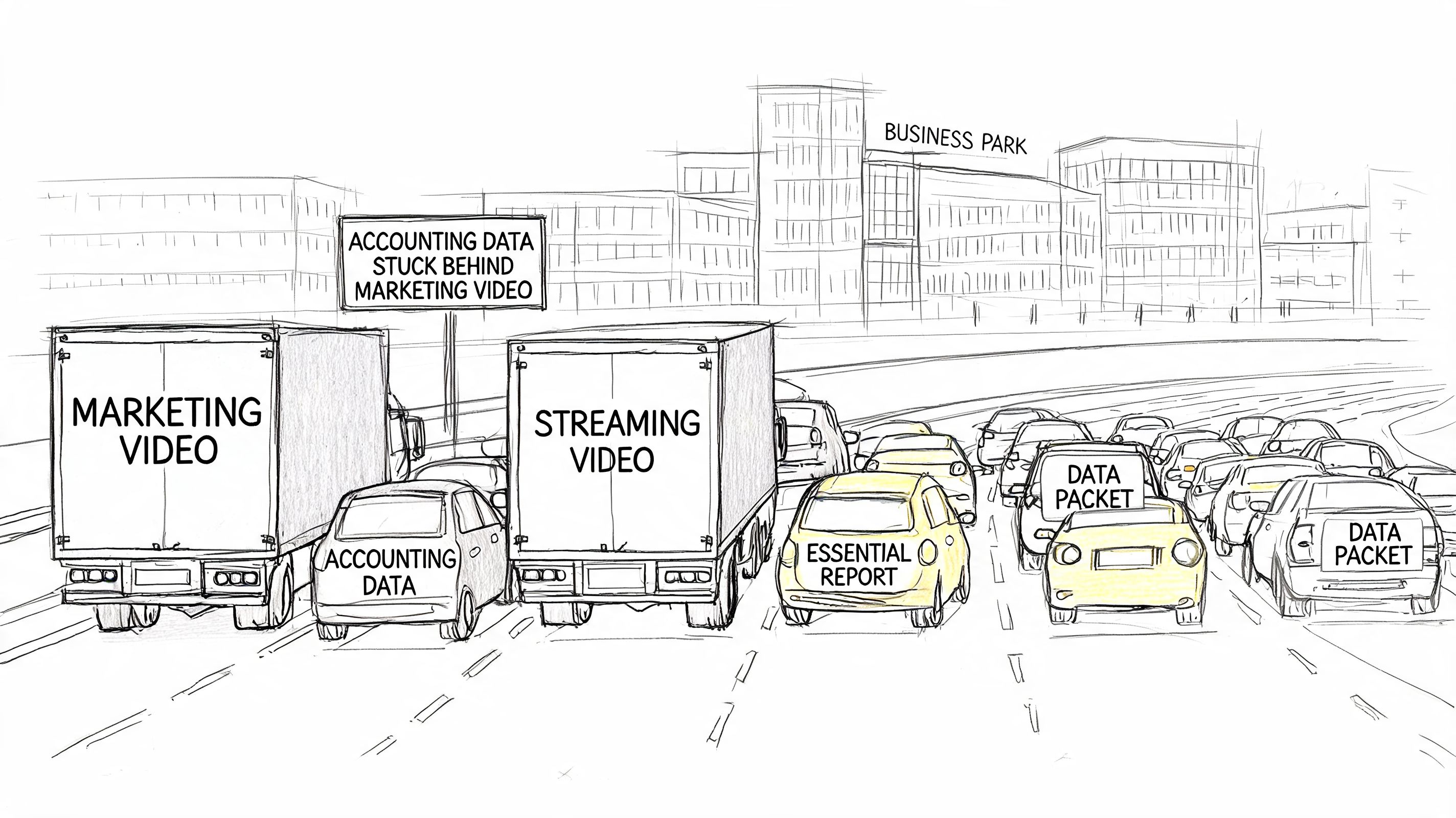
Where the pain shows up first
The first break is usually productivity. Staff wait on apps that should feel instant. Calls get clipped. Shared files lag. If your team loses momentum all day to little tech delays, that wasted time turns into labor cost quickly. For a business owner, that means fewer billable hours, more interruptions, and more reactive support work.
The second break is risk. A defense contractor near the I-65 corridor might need cleaner boundaries before a CMMC review. A medical office in the Indy metro doesn't want guest traffic anywhere near systems tied to HIPAA-regulated workflows. A flat network makes those conversations harder than they need to be.
VLANs are the practical fix
A VLAN, short for Virtual Local Area Network, creates invisible walls inside the same physical network. You can keep voice traffic in one lane, guest Wi-Fi in another, office workstations in another, and sensitive systems in their own segment. You get cleaner traffic flow without rebuilding the whole place from scratch.
That matters for business continuity. Downtime is expensive, and even short disruptions can jam up scheduling, billing, support, and customer communication. VLANs don't solve every network problem, but they often remove a major source of self-inflicted chaos.
If your phones are already suffering from congestion, this guide on how to troubleshoot your office VoIP connection safely gives a useful outside perspective on voice quality issues. For a broader operational view, it also helps to review how to monitor network traffic and prevent downtime before small bottlenecks become a bigger outage.
A slow network is rarely one dramatic failure. It's usually dozens of avoidable little collisions happening all day.
What a VLAN Is Using an I-465 Analogy
Think about I-465 at a bad time of day. Same loop. Same pavement. Very different experience depending on how traffic is organized.
Your office network works the same way. The switches and cabling are the road. The traffic is everything moving over it. Without VLANs, all traffic shares the same logical space. That means accounting data, printers, guest phones, video calls, smart devices, and file transfers all sit in one crowded set of lanes.
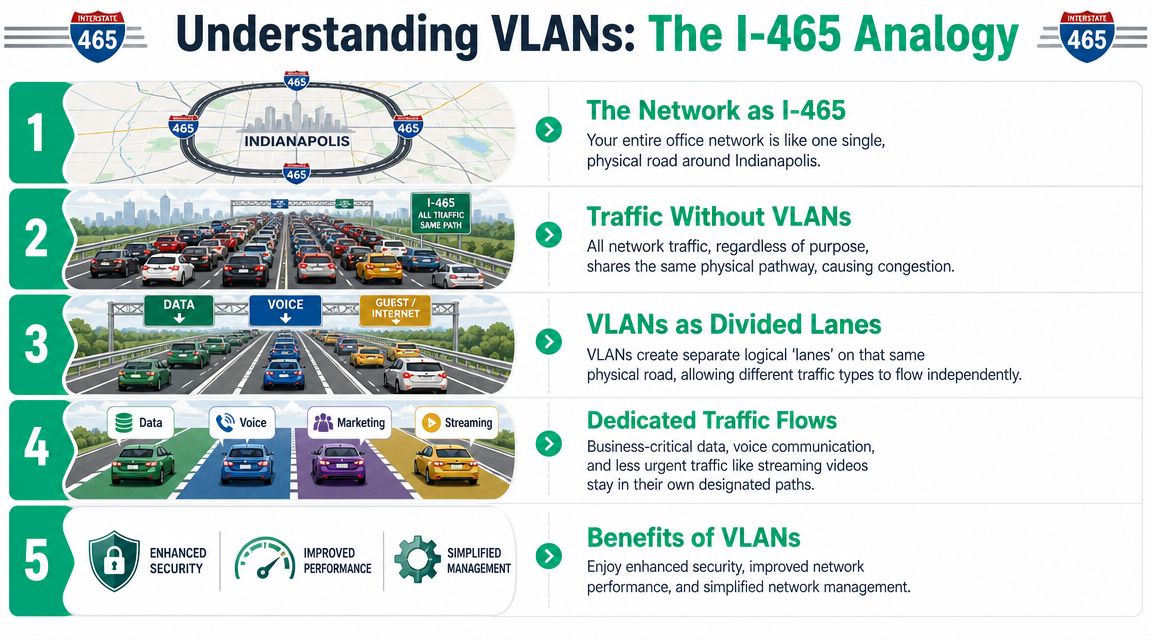
One road, separate lanes
A VLAN doesn't build a new highway. It creates separate logical lanes on the same physical infrastructure.
That's why business owners ask why vlan is used and the answer is usually simple. It organizes traffic so unlike systems stop tripping over each other. Your phones can live in one lane. Office staff in another. Guest Wi-Fi gets pushed to its own service road. Security cameras or badge systems can sit off to the side where they belong.
The term that matters most
The technical phrase is broadcast domain. That just means the group of devices that receive local network chatter.
According to CBT Nuggets' explanation of how VLANs work, VLANs are used to reduce broadcast-domain size and keep Layer 2 traffic local. That matters because broadcast frames still consume switch backplane capacity and end-host CPU time, even when they aren't useful application data. Split one physical LAN into multiple isolated broadcast domains, and you cut unnecessary broadcast traffic, improve efficiency, and make congestion easier to control.
A plain-English example
Here's what that looks like in a small office:
| Network group | Without VLANs | With VLANs |
|---|---|---|
| Accounting PCs | Hear traffic from everyone | Hear only what they need locally |
| VoIP phones | Compete with all office chatter | Stay in a cleaner lane |
| Guest Wi-Fi users | Mix with internal traffic | Stay isolated |
| Printers and IoT | Add noise to the whole network | Contained to their segment |
That doesn't just help speed. It helps control. A noisy device in one segment is less likely to annoy the whole office.
Why this matters to security too
VLANs aren't the same thing as full Zero Trust architecture. They don't replace firewall policy, identity controls, SOC-as-a-Service monitoring, or endpoint tools like Bitdefender GravityZone. But they give you a clean starting point by separating unlike traffic before you apply stricter controls.
If you want the bigger security picture around segmentation, user access, and layered controls, this breakdown of network security for Indiana businesses fills in the parts VLANs don't handle on their own.
Practical rule: If guests, phones, servers, and staff laptops are all sitting in one flat network, the problem isn't subtle. The design is.
The Four Big Business Wins of Using VLANs
The appeal of VLANs isn't academic. It's operational. They help Indiana SMBs clean up traffic, reduce avoidable risk, and get more life out of the hardware they already own.
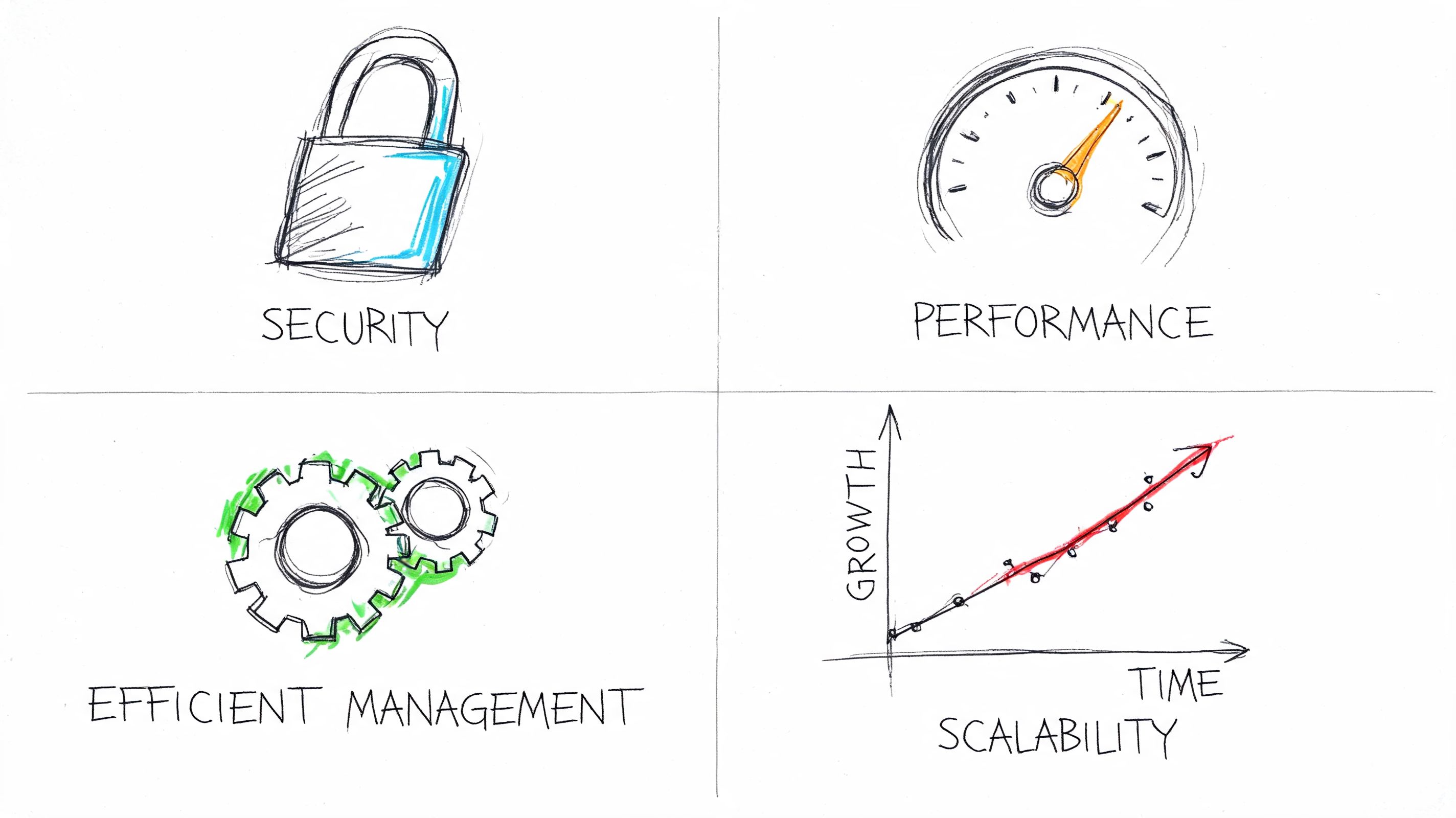
Security and compliance get easier
If you're running a medical office, law firm, manufacturer, or defense-adjacent shop, separation matters. You don't want guest devices wandering anywhere near protected data, production systems, or internal admin traffic.
Lenovo's VLAN overview notes that VLANs let organizations split one physical network into many logical broadcast domains, improving both security and performance without separate hardware. The same source points to the IEEE 802.1Q standard, first published in the mid-1990s, as the milestone that made VLAN tagging interoperable across vendors and helped make VLANs a core enterprise networking tool.
That interoperability matters in real life. It means a business using mixed gear, or moving between vendors over time, can still build a sane segmented design instead of getting trapped in one-off tricks.
For compliance-minded shops, VLANs help support:
- HIPAA separation needs by keeping clinical or office systems away from guest access
- CMMC preparation by isolating project-related traffic from general business use
- NIST CSF alignment efforts by creating cleaner boundaries for asset grouping and control enforcement
Performance improves where users actually feel it
Most owners don't care about broadcast domains as a concept. They care that Teams calls stop stuttering and cloud apps stop hanging.
When voice, video, guest browsing, printers, and bulk file transfers all compete in one flat network, latency-sensitive traffic suffers first. Segmentation gives those services breathing room. In buildings with spotty Wi-Fi or dense tenant use, that's often the difference between “the internet is bad” and “the network is finally usable.”
For a related outside view on how regional firms talk about layered security planning, this article on cyber security for Essex businesses is worth a read. Different market, same core lesson. Clean segmentation supports stronger security operations.
You save money by using what you already have better
ROI gets real here.
A VLAN design often lets a business separate departments, phones, guest access, and device classes without buying separate hardware for each group. That matters if you're already invested in UniFi networking, managed switches, business Wi-Fi, and firewall licensing. You can often solve a traffic problem with design work instead of a rip-and-replace project.
That doesn't mean VLANs are free. Somebody still has to plan them, configure them, document them, and support them. But that cost is usually easier to defend than buying duplicate switch stacks and extra cabling just to create isolation physically.
A strong segmentation plan also pairs better with policy enforcement on the edge. If you're evaluating the traffic control side of the equation, this guide to the best firewall for small business in Indiana is a good next step.
Here's a quick explainer for teams that want a visual view of the business case before they touch production:
Management gets cleaner as you grow
VLANs make changes less painful. A new department, a temporary guest area, an isolated camera network, a separate voice rollout, a segmented tenant floor. Those are easier to handle when your network is organized logically instead of physically.
That's one reason VLANs have stuck around. They solve practical problems well. Not perfectly. But well.
VLANs in Action Local Indiana Business Scenarios
The value of VLANs gets clearer when you look at ordinary business messes instead of textbook diagrams.
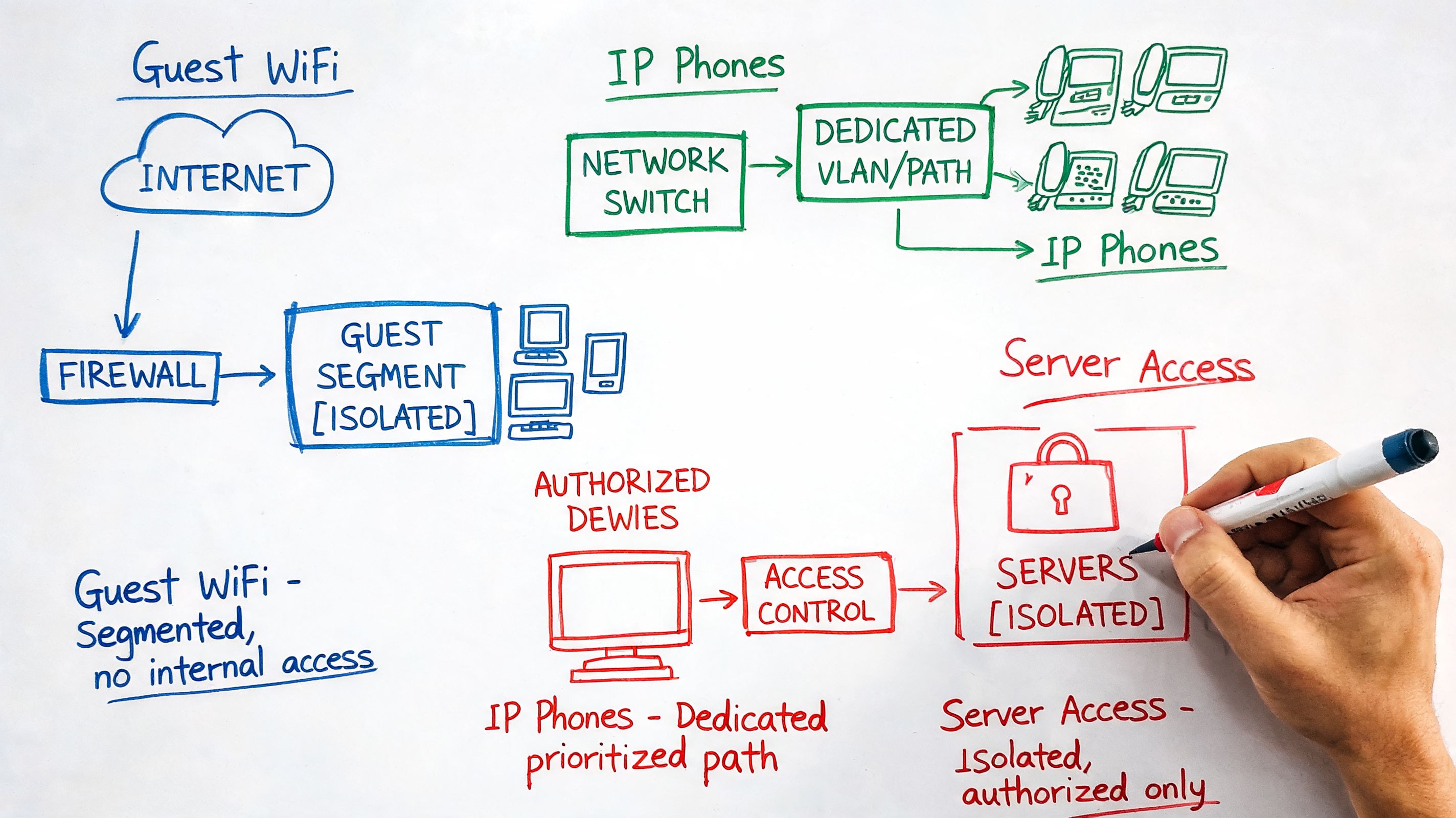
Greenwood manufacturer with office PCs and shop-floor devices
A manufacturing office near Greenwood can have two very different risk profiles under one roof. Front-office users need stable access to email, ERP, file shares, and printers. The floor may have sensors, controllers, cameras, and vendor-managed equipment that nobody wants touching accounting workstations.
Putting all of that in one flat network is asking for trouble. One flaky device can create noise for everyone else. One compromised device can become a pivot point if nothing separates it from business systems.
In practice, the cleaner design is usually:
- Office user VLAN for day-to-day staff systems
- IoT or OT VLAN for shop-floor devices that need stricter boundaries
- Voice VLAN if handsets share the same switching environment
- Guest VLAN for visitors and contractor access
That layout doesn't make the plant invincible. It does reduce the attack surface and contain the blast radius when something odd starts happening.
Downtown Indy law firm with guest access and partner data
Law firms have a different problem. The network is usually smaller, but the sensitivity is higher. Partners, associates, guests, printers, conference room gear, and remote access workflows all overlap.
VLANs support a Zero Trust direction without pretending to be Zero Trust by themselves. Staff groups can be separated by role. Guest traffic stays isolated. Sensitive systems can sit behind stricter inter-VLAN routing and firewall controls. That's a cleaner base for access policy, logging, and SOC-as-a-Service monitoring.
If a visitor can join Wi-Fi in your conference room, that traffic should never land in the same neighborhood as client files.
Hamilton County multi-tenant property setup
Property managers run into this all the time in growing Hamilton County commercial buildings. Multiple tenants share the same physical infrastructure, but each needs privacy and clean separation.
A VLAN-based design gives each tenant a distinct segment while still using common switching hardware upstream. That keeps management simpler than building fully separate physical networks for everyone. It's also easier to expand when a suite changes hands or a new tenant moves in.
The same thinking shows up in other regions too. This piece on addressing common IT problems for Sheffield businesses reflects the same practical reality. Most small-business network pain comes from mixed traffic, old assumptions, and too many devices sharing too little structure.
What these scenarios have in common
None of these organizations need flashy theory. They need a network that keeps people working.
That means:
- Less spillover between unrelated devices
- Cleaner troubleshooting when something breaks
- More predictable performance for voice and cloud apps
- Better footing for compliance and security controls
Those are the reasons why vlan is used in practice. It solves business problems that owners notice.
How VLANs Are Set Up A Peek Under the Hood
A lot of business owners hear “segmentation” and assume it's some black-box magic. It isn't. A VLAN deployment is structured work. Good engineers follow the same sequence every time because disorder in the design turns into outages later.
Step one is creating the lanes
First, the network team defines the VLANs themselves. On managed switching gear such as UniFi switches or other business-class platforms, each VLAN gets an ID and a purpose.
Common examples look like this:
- User VLAN for employee desktops and laptops
- Voice VLAN for IP phones
- Guest VLAN for visitor Wi-Fi
- Server VLAN for core business systems
- IoT VLAN for cameras, TVs, badge readers, and smart devices
Naming matters in this context. “VLAN 30” is less useful than “Voice” when somebody else has to troubleshoot it six months later.
Step two is assigning the right ports
Next come access ports. That just means a physical switch port is assigned to one VLAN so the device plugged into it lands in the right segment automatically.
A receptionist phone and PC may sit at the same desk, but they don't always belong in the same traffic group. A printer in accounting shouldn't necessarily live with guest devices just because it's nearby physically. A smart design beats a lazy one in these scenarios.
For Indiana SMBs that are refreshing switching and wireless infrastructure, managed networking and Wi-Fi design services usually include this exact mapping work, along with SSID assignment, roaming behavior, and documentation.
Step three is carrying multiple VLANs between devices
Then you have trunk ports. These are the links between switches, firewalls, and access points that carry traffic for multiple VLANs at once.
Think of a trunk like a bundled transport line. It needs to know which VLANs are allowed across it, and both ends need to agree. If they don't, devices vanish, phones fail to register, guest Wi-Fi breaks, or a new segment never comes online.
Under the hood: The physical cable can stay the same. The tagging and port role decide whether that link carries one network or several.
Scale isn't the problem. Sloppy planning is.
Standard VLAN numbering supports 4,096 VLAN IDs, which shows how mature and scalable the approach is, as noted by UTEPO's VLAN explanation. In the same discussion, UTEPO explains that keeping broadcast domains limited to one VLAN saves bandwidth and increases network processing capability.
Small businesses won't need anywhere near that count. But the point stands. VLANs are built for orderly growth. They work well when someone plans naming, routing, DHCP scope design, wireless mapping, and firewall rules before clicking save.
Common VLAN Pitfalls and How We Fix Them
In our 17 years of local service, we've seen the same VLAN mistakes over and over. They don't usually fail in dramatic ways. They fail in annoying, expensive ways that waste everyone's morning.
The usual culprits
- Everything left on the default VLAN. That's the classic “it works, so we left it alone” setup. It's easy at first and painful later.
- Trunk mismatches between switches. One side expects tagged traffic, the other side doesn't. Now phones or access points act haunted.
- Allowed VLAN list mistakes. The new VLAN exists, but nobody allowed it across the uplink, so the remote switch never sees it.
- Routing without policy. Teams create multiple VLANs, then allow broad traffic between all of them. That defeats most of the security benefit.
- No documentation. A contractor adds a guest SSID, someone else renames ports, and six months later nobody knows what belongs where.
What the fix usually looks like
We don't start with random changes. We map the current state first, check switch roles, review uplinks, confirm VLAN membership, and trace what should be talking to what. Then we tighten the design in stages so the office doesn't go dark at noon.
A stable fix usually includes:
- Cleaning up VLAN purpose so each segment has a job
- Verifying trunks and allowed VLANs across the switching path
- Reviewing inter-VLAN routing rules so only necessary traffic passes
- Testing voice, Wi-Fi, printers, and line-of-business apps before closing the job
- Writing it down so the next change doesn't recreate the same problem
If your team is already dealing with random disconnects, this SMB guide to troubleshooting network issues is a solid companion read.
FAQ Common Questions About VLANs
Are VLANs the same as subnets
No. They're related, but they're not the same thing.
A VLAN is a Layer 2 separation method. It organizes switching and local traffic domains. A subnet is a Layer 3 IP boundary. In a well-designed network, the two often line up together, but they solve different parts of the puzzle. The short version is this: VLANs separate local traffic groups, and routing decides what crosses between them.
How many VLANs does a small business need
Usually fewer than people think.
A practical starting point for many SMBs is separate segments for staff devices, guest Wi-Fi, voice, and IoT or cameras. Some businesses also add a server or management segment. The right number depends on risk, compliance needs, device mix, and whether your building has one office or multiple tenants.
If someone proposes a giant list of VLANs without a reason for each one, that's not smart design. That's paperwork.
Can I set up VLANs myself
Maybe. But there's a difference between making a VLAN exist and making it work cleanly.
Small setups on business-grade gear can be manageable if you understand tagging, access ports, trunks, DHCP behavior, routing, and firewall policy. The risk is that one bad setting can knock phones offline, break wireless SSIDs, or expose traffic you meant to isolate. DIY is fine for a lab. Production is less forgiving.
Do VLANs solve security completely
No.
They improve organization and baseline isolation. They do not replace firewall rules, endpoint protection, MFA, backups, immutable off-site backups, access reviews, vulnerability management, or Zero Trust policy design. VLANs are one layer in a stack, not the whole stack.
Why vlan is used instead of just buying more switches
Because separate physical hardware for every traffic type gets expensive and messy fast. VLANs let businesses segment traffic on the same core infrastructure. That usually means lower hardware cost, simpler moves and changes, and a cleaner path for growth.
Stop Wasting Time on a Broken Network
If your office Wi-Fi feels inconsistent, your phones crackle when the building gets busy, or you're uneasy about guest traffic sitting too close to business systems, don't keep guessing.
A properly segmented network is about uptime, security, and labor efficiency. It keeps little network problems from turning into lost hours, frustrated staff, and reactive support bills. It also gives your firewall, wireless stack, and security tooling a much cleaner foundation to work from.
For many Indiana businesses, VLANs are one of the simplest ways to turn a noisy, flat network into something structured and dependable. That matters whether you're trying to support VoIP, pass a compliance review, stabilize an old building's Wi-Fi, or make room for growth without replacing everything.
If your business is in Greenwood, Indianapolis, or anywhere along the I-65 corridor, schedule a Free Network Assessment with Finchum Fixes IT. We'll review your current network layout, identify weak spots in segmentation and security, and give you a practical plan to reduce downtime, tighten access, and stop burning staff time on preventable network issues.