Networking Support for Cloud Computing: A Practical Guide
A Greenwood business can be doing everything right on paper, then one cloudy Monday morning the ERP app stalls, phones lag, and someone says the dreaded words, “the internet's down.” When that happens, networking support for cloud computing is the difference between a brief nuisance and a full stop that burns time, payroll, and customer trust. For some operations, downtime can cost up to $9,000 per minute, so the network under the cloud has to be treated like core business infrastructure, not a side project.
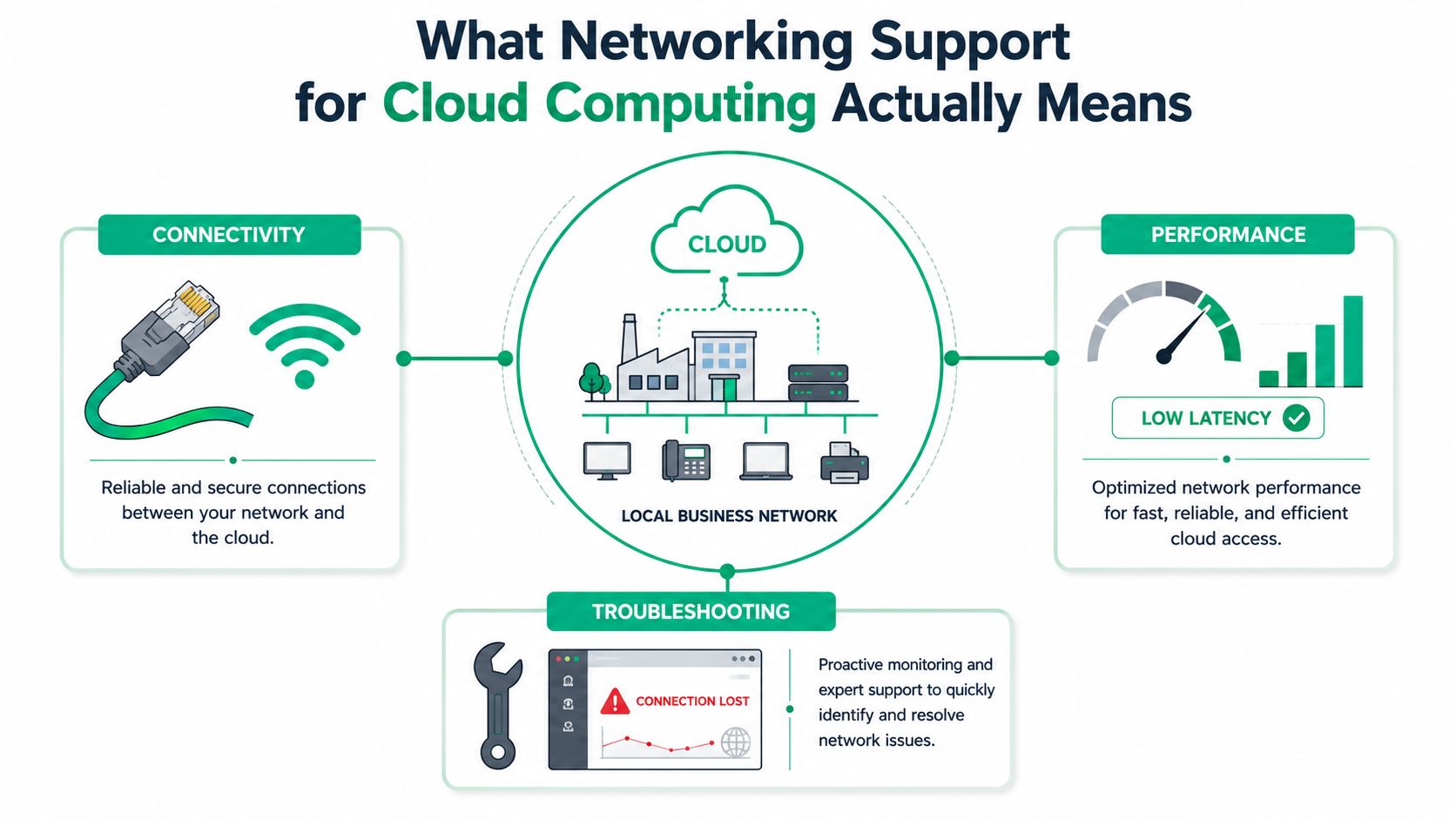
What Networking Support for Cloud Computing Actually Means
A lot of Southside businesses think cloud support means “we moved email and files to Microsoft 365, so we're done.” That's not cloud networking. Cloud computing is the broader delivery of storage, processing, and software, while cloud networking is the part that connects and secures those resources so people can use them, as HPE distinguishes in its definition of cloud networking versus cloud computing HPE's cloud networking overview.
A Greenwood manufacturer with a spotty WAN link can have the fanciest ERP in the world and still grind to a halt if the network drops packets or the VPN chokes. AWS describes cloud networking as using cloud-based services to deploy and manage network changes in software, which is why adding a site or changing a route can happen in hours instead of days or weeks AWS cloud networking. Cloudflare makes the same practical point from the continuity side, noting that distributed cloud infrastructure and centralized software management help organizations keep services available and make changes faster Cloudflare cloud networking.
What has to be working
At minimum, the network must provide connectivity, performance, and troubleshooting support. If the office can't reach the cloud app, the app might as well be off. If traffic is slow, users blame the software, but the issue is often latency, congestion, or a broken path between the site and the provider.
A decent self-audit is simple, if blunt:
- Can users reach cloud apps reliably during busy hours?
- Do voice, ERP, and file sync stay usable at the same time?
- Can someone see and fix a bad route, a failed VPN, or a choking switch port fast enough to stop the ticket spiral?
If the answer to any of those is “not really,” the setup isn't adequately supported. For vendor selection across cloud and connectivity work, the Data-driven partner selection guide is a useful benchmark when you want to compare partners without guessing.
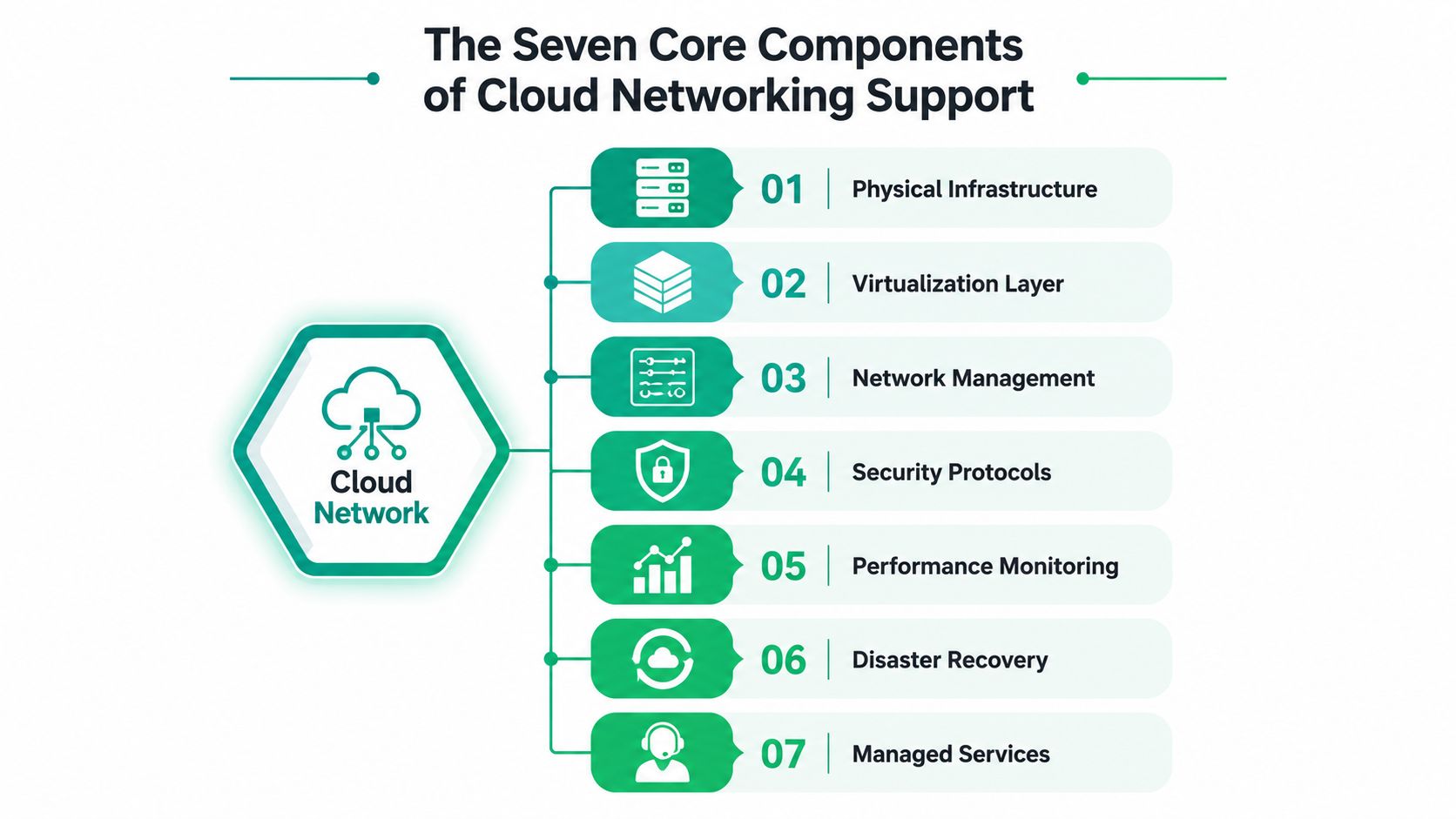
The Seven Core Components of Cloud Networking Support
Most SMBs don't need a whiteboard full of buzzwords. They need a stack that works when a warehouse scanner, a VoIP handset, and Microsoft 365 all hit the same pipe at once. TechTarget's cloud networking guidance puts the core requirements at bandwidth, latency, resilience, QoS, and automation, which is the right starting point for any business in the I-65 corridor that depends on cloud-delivered apps TechTarget on network requirements for cloud computing.
The seven layers that matter
At the bottom is physical infrastructure, which is the cabling, switching, and circuit quality that carry the packets. Microsoft's private-cloud guidance is specific here, calling for 802.1q VLAN tagging, ECN-compliant switches, DCB support via 802.1az and 802.1Qbb, and 1 Gb or 10 Gb Ethernet-class connectivity to keep virtualized traffic separated and predictable Microsoft private-cloud networking guidance).
Above that sits the virtualization layer, where cloud-ready networks use virtual routers, switches, load balancers, and firewalls. Kentik's description of cloud networking is useful because it shows these parts are available on demand and can be managed in-house or by a third party Kentik cloud networking. Then comes network management, which is the control plane, IP planning, policy, and change process.
Practical rule: if you can't name the device, the VLAN, the firewall rule, and the alert that protects the workload, you don't have a cloud network. You have hope.
Security and monitoring deserve their own layers. For healthcare clients under HIPAA, defense-adjacent firms under CMMC, and everyone else aligning to NIST CSF, the security layer has to include segmentation, firewalls, endpoint controls, and clean access paths. In Central Indiana, I usually see UniFi networking for segmentation, Bitdefender GravityZone for endpoint and security control, and SOC-as-a-Service monitoring when the owner wants alerts without hiring a full-time analyst.
The last two layers are disaster recovery and managed services. That's where immutable off-site backups, documented rollback steps, and a human being who knows how to respond at 2 a.m. keep a cloud outage from turning into a business interruption.
SD-WAN, VPN, and Direct Cloud Connectivity Compared
A Johnson County logistics company with one office, one warehouse, and a small remote team does not need the same WAN design as a hospital or a bank. It needs the cheapest path that doesn't become a bottleneck the first time a cloud app gets busy. A simple comparison usually settles the argument faster than a long sales call.
| Option | Typical SMB Cost | Best For | Key Limitation |
|---|---|---|---|
| SD-WAN | Around a monthly subscription model | Multi-site SMBs that need app-aware routing and quick failover | Adds appliance and policy complexity |
| Site-to-site VPN | Often the lowest-cost option, sometimes using existing firewalls | Budget-conscious sites and straightforward cloud access | Can struggle with performance and operational clarity |
| Direct cloud connectivity | Dedicated circuit pricing, usually the premium choice | Workloads that need consistent latency and stable throughput | Higher cost and more setup overhead |
Traditional VPN is still fine when you need a straightforward tunnel and don't have the budget for more. If that's the path you're weighing, the best VPN for small business guide is worth a read before you buy another box based on a sales rep's promise.
What fits a 25-to-100-employee shop
For most Central Indiana SMBs, SD-WAN hits the sweet spot. It gives you application-aware routing, better failover behavior, and a cleaner way to send the right traffic over the right link. VPN is the budget answer, and it's often good enough for a single location or a light cloud footprint. Direct cloud connectivity makes sense later, when one workload needs lower and steadier latency than the public internet can provide.
A useful rule of thumb, based on the shops I've fixed along the I-65 corridor, is this. Start with the design that keeps users productive and tickets low, not the one that sounds impressive in a proposal. A warehouse with two links and one cloud ERP usually benefits more from sane failover than from a premium circuit that no one can justify in the budget meeting.
Building a Hybrid Cloud Network Step by Step
Older brick buildings in Greenwood are rough on wireless, and they are just as hard on network assumptions. Concrete walls, metal shelving, and messy cable paths expose weak designs fast, especially when someone expects the network to behave like a clean office park build. Hybrid cloud networking works best when the local layer is segmented, documented, and simple to troubleshoot under pressure.
Start with segmentation and traffic rules
The first move is 802.1q VLAN tagging. Management traffic, voice, guest Wi-Fi, and cloud-app traffic should not ride the same flat network. As noted in the components section above, Microsoft's private-cloud networking guidance points to ECN, 802.1az DCB, and 802.1Qbb, along with 1 Gb or 10 Gb Ethernet-class connectivity. In practical terms, that means better switches, cleaner separation, and enough throughput headroom to keep congestion from turning into user complaints Microsoft private-cloud networking guidance.
A simple UniFi controller design usually looks like this in practice:
- Management VLAN: IT gear only.
- User VLAN: workstations and standard apps.
- Voice VLAN: phones and call traffic.
- Guest VLAN: internet-only access.
- Cloud-app VLAN: systems that need tighter firewall policy and better monitoring.
For Azure tenant access, keep the firewall rule set narrow, explicit, and documented by source, destination, and purpose. Do not allow all outbound traffic because it is easier. That choice creates a cleanup project later, and the cleanup usually happens during an outage.
Wire the change so it does not break during cutover
DNS and IPAM migration needs careful handling. Inventory the existing scopes, confirm which systems hand out addresses, and map every reserved address before anyone touches cutover night. Run nslookup and traceroute from a client on each side of the hybrid path, then compare the route against the intended design.
Run the slow-app checks before you blame the cloud provider. A bad switch port or a mismatched route table can feel exactly like “the cloud is slow.”
If a cloud app suddenly feels sluggish, start with ping, then traceroute, then nslookup. If you need to go deeper, capture packets on the gateway and compare them with switch port statistics. That is how you separate a provider issue from a local congestion problem without wasting half a day.
For a practical migration template, the Indiana cloud migration playbook is the right reference point when you are turning a design into a cutover packet.
Monitoring, Security, and the ROI of Managed Detection
A cloud network without monitoring turns every complaint into guesswork. When a user says “the internet is slow,” the answer could be a bad WAN circuit, a noisy switch, a firewall rule, or a security event that is chewing up bandwidth in the background. Managed monitoring gives you logs, flow data, and endpoint alerts in one place, which makes the problem measurable instead of mysterious.
What the monitoring layer does
A solid SOC-as-a-Service setup ingests logs, watches for anomalies, and flags early signs of ransomware or credential misuse before they spread. As noted in the definition section, centralized management and distributed availability are key principles, and a monitoring stack needs the same discipline, one console, fast change control, and clear failure isolation. That matters because users feel network pain first, even when the root cause is security.
The ROI is practical. If a technician spends two hours chasing a vague complaint, that is two hours not spent on a billable project, a rollout, or a fix that removes the problem for good. A modest monthly monitoring fee often beats repeated skilled labor spent hunting after the fact, especially in SMB environments where every interruption steals time from several other jobs.
What to ask a vendor
The managed detection guide for Indiana businesses is a useful companion if you want the security side explained in plain English.
- What gets monitored after hours? If the answer is only “servers,” keep pressing.
- Can you tie alerts to NIST CSF categories? If they cannot map their controls, audit season gets messy.
- Do you support immutable off-site backups and recovery testing? Backup files that can be altered are not a real recovery plan.
Monitoring is cheaper than panic. That applies to ransomware, bad VLAN changes, and the “why is VoIP garbled today” mystery.
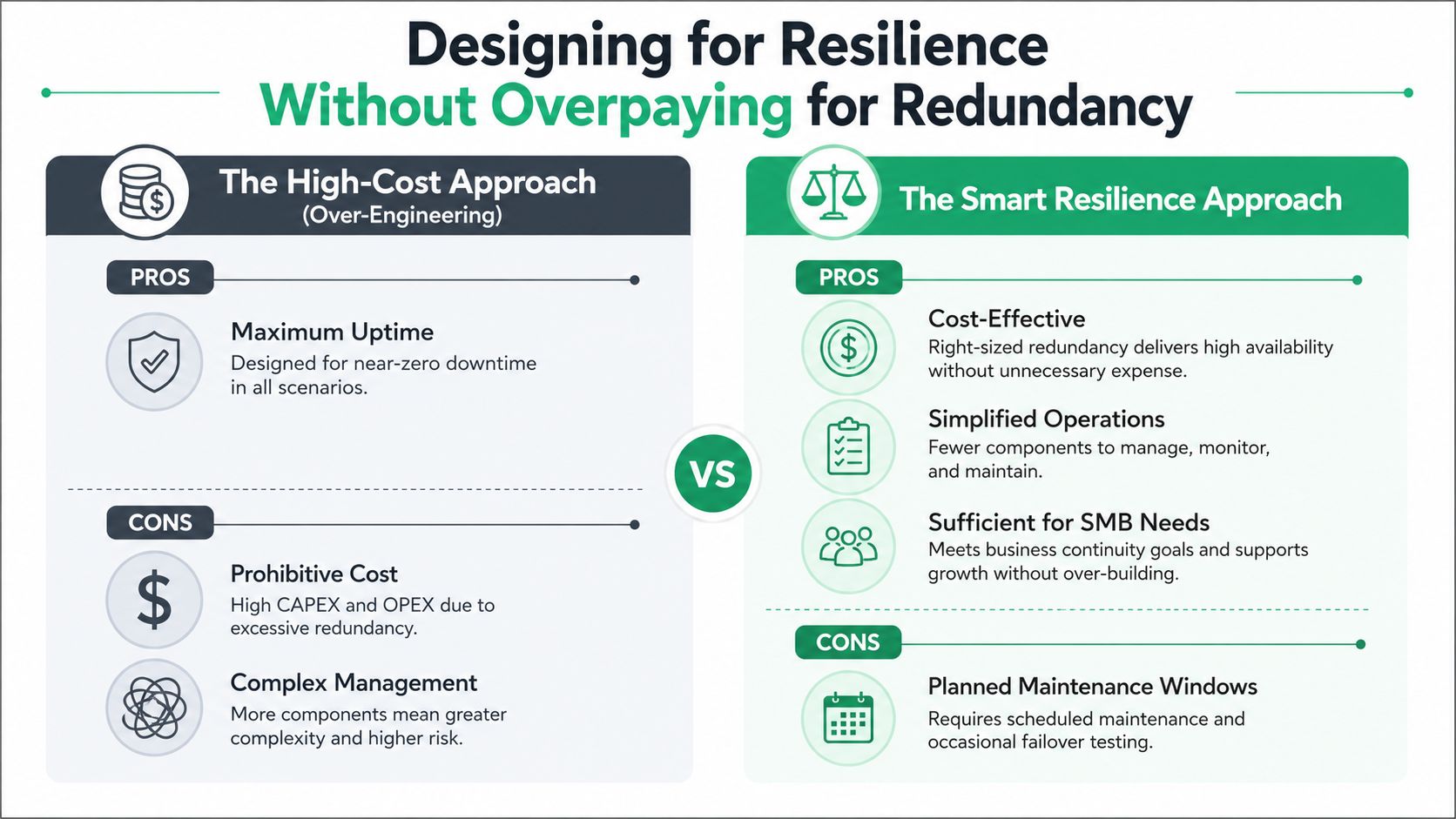
Designing for Resilience Without Overpaying for Redundancy
A Hamilton County retailer once called after a Friday rush went sideways because its cloud POS link started flapping. The owner wanted “the strongest possible design,” which usually means “the most expensive one in the proposal.” What they needed was a design that survived a short brownout, failed cleanly, and didn't drag the whole month's budget into the ditch.
Choose the level of resilience you can live with
The core choice is not “reliable or unreliable.” It's how much complexity you want for the amount of uptime you need. A 99.9 design and a 99.99 design are not the same animal, because every extra layer of redundancy usually adds hardware, contracts, and admin overhead. That's why the right answer for many SMBs is dual-ISP failover, strong monitoring, and a clear manual fallback process, not a giant multi-region architecture that nobody can support cleanly.
The smart model often looks like this:
- Primary link plus backup link: good enough for most offices.
- Automated failover where it matters: useful for VoIP, POS, and ERP.
- Multi-region only for critical workloads: worth it when the business impact justifies the cost and complexity.
Why the cheaper design often wins
A four-minute brownout is annoying. A forty-five-minute outage is a disaster. But if the expensive design adds months of setup, more vendors, and more points of failure, it can create a system that's harder to operate than the problem it was supposed to solve. In practice, most SMBs are better served by a clean failover model and a tested recovery runbook than by over-engineering every edge case.
That's the part vendors skip when they chase enterprise language. They don't usually explain the operational drag, the extra support load, or the time your own staff will spend babysitting a fancy setup that rarely pays for itself.
Vendor Evaluation and Troubleshooting Workflow
A good vendor should speak plainly, show their work, and be able to get on-site in Greenwood quickly when the issue is physical. If they outsource their own NOC, dodge questions about recovery, or can't define bit-level data recovery, you're probably looking at a reseller, not a partner. The managed service provider selection guide is a solid companion for sorting the polished pitch from the operational reality.
What to ask before you sign
Look for Microsoft, CompTIA, and Cisco credentials, but don't stop there. Ask whether they support immutable off-site backups, how they align with NIST CSF, and whether their SLA spells out both response and resolution language in plain English. If a provider can't tell you how they'd handle a corrupt array, a failed link, or a cloud routing issue, they're not ready for production support.
One practical note from our 17 years of local service. In Greenwood and down the corridor, the fastest fix is often not the fanciest fix, it's the one a tech can verify, document, and stand behind the same day.
Troubleshooting in three layers
Layer 1, basic checks. Use ping, traceroute, nslookup, and MTR to see whether the problem is reachability, path quality, or name resolution. That gives you a clean first pass without touching the firewall.
Layer 2, deeper diagnostics. Pull a packet capture, review NetFlow, and check switch port stats for drops or errors. That's where hidden congestion, duplex problems, and loop behavior usually show up.
Layer 3, escalation. Call the ISP if the circuit is unstable, call the cloud provider if the cloud side is failing, and call the managed-IT partner if the issue lives inside the local environment. No one wins by guessing for six hours.
If the command output doesn't match the story from the user, trust the command output first.
A 90-Day Roadmap, Sample SLA, and Your Next Step
The cleanest cloud network projects move in phases. Days 1 through 30 are discovery, baseline testing, and documentation. Days 31 through 60 are the hybrid build, the SD-WAN rollout, and the policy cleanup. Days 61 through 90 are monitoring, tabletop failover testing, and the final handoff to the people who have to live with the system.
A usable SLA starter should say Sev-1 response under 30 minutes, define resolution targets by component, and set a quarterly business review cadence. If you want a contract template to compare against, the managed services agreement guide is a sensible place to start before you sign anything.
The practical goal is simple. Convert wasted tech time into predictable monthly spend, reduce outage risk, and give your team a network they can trust when cloud apps, voice, and security controls all depend on it. For Greenwood and Indianapolis businesses, that usually starts with a Free Network Assessment or a Security Risk Audit so the design matches the building, the workload, and the budget.
Finchum Fixes IT helps Greenwood and Indianapolis businesses build cloud-ready networks, tighten security, and clean up the messy parts of connectivity before they turn into outages. If you need a practical plan for SD-WAN, hybrid cloud, monitoring, or recovery, visit Finchum Fixes IT and schedule a Free Network Assessment.