Remote Monitoring Tools: Boost Uptime & Compliance for SMBs
Remote monitoring tools keep servers, networks, and endpoints under constant watch from one console, then alert you fast and automate fixes before a small fault turns into a shutdown. For Indiana SMBs, that means fewer surprise outages, cleaner compliance records, and less money burned on truck rolls and emergency IT work.
A Greenwood office park with aging servers doesn't need another “we'll get to it Monday” promise. A shop along the I-65 corridor with flaky Wi-Fi in an old brick building doesn't need another reboot-and-pray plan. It needs remote visibility, hard alerts, and a vendor who can spot trouble before staff starts losing payroll time, shipping time, or patient scheduling time.
Quick Answer for Remote Monitoring Tools
Remote monitoring tools let you watch, alert, and often fix IT problems from anywhere, so downtime gets handled before it spreads. In plain English, they keep your servers, network gear, and endpoints from going dark while your staff is trying to do real work.
That matters in a Greenwood server closet full of aging hardware, or in an office off the I-65 corridor where Wi-Fi drops hit phones, printers, and cloud apps at the same time. The cost is not just the outage. It is the lost time spent guessing whether the fault sits in the device, the link, or the application while everyone else waits on email, invoicing, scheduling, or production systems.
Large employers already moved hard in this direction. Gartner-based reporting says 60% of large employers with 1,000+ employees were using employee monitoring software in 2022, with that share projected to hit 70% by 2025 as reported here. The same reporting showed 85% of managers struggled to trust remote productivity, while 87% of employees said they were productive, which shows why monitoring became a visibility issue as much as a control issue.
For Indiana SMBs, the takeaway is blunt. If you cannot see your environment, you cannot protect uptime, and you cannot keep IT costs predictable. That is why I tell Johnson County business owners to treat remote monitoring as a business continuity tool first, and a tech tool second.
If you are comparing options, start with a practical breakdown of network monitoring software features for Indiana businesses, then check whether the tool fits your office, your budget, and your tolerance for downtime. Use the local comparison in top network monitoring tools for Indiana businesses to see which platforms make sense before you sign anything.
Practical rule: if your team only notices a problem after users complain, your monitoring stack is too weak.
The best setups do more than send alerts. They shorten response time, cut guesswork, and stop a small issue from turning into a service-ticket storm in downtown Indy or a full-day outage in a warehouse off the interstate.
Understanding Remote Monitoring Tools
A remote monitoring stack starts with a centralized RMM console, then pulls in two kinds of telemetry. One side uses agent-based collection from endpoints. The other side uses agentless methods like SNMP, WMI, ICMP, Syslog, and sometimes NetFlow so you can track both device health and network-path behavior. WorldMetrics
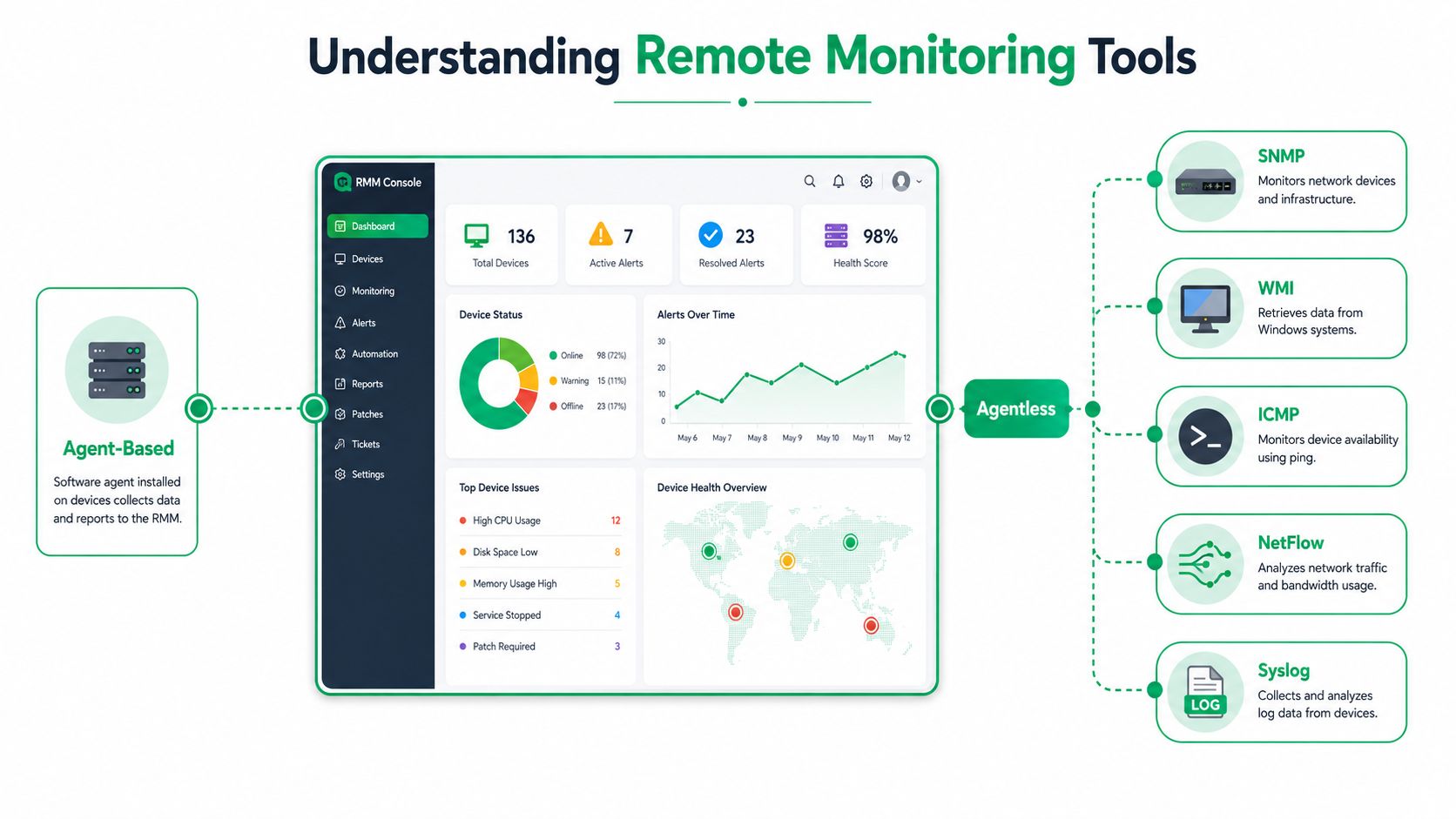
Agent-based and agentless telemetry
The agent side does the heavy lifting. It sits on the endpoint and reports resource usage, service state, and local health back to the console. Agentless polling fills the gaps, especially when you need to check switches, routers, printers, firewalls, or other gear that should not run a full agent. WorldMetrics
That hybrid model matters because one protocol never gives you the whole picture. If latency rises and an endpoint's memory pressure climbs at the same time, you can narrow the fault fast instead of arguing about whether the link, the device, or an app dependency failed first. That is the kind of clarity that keeps a remote repair from turning into an all-day onsite visit. WorldMetrics
Why the technical mix matters
A mature monitoring stack should also track historical trends so baseline drift does not hide in plain sight. In practice, that means you can spot growing packet loss, odd CPU behavior, or a branch-site link that is going soft long before users start calling.
Useful habit: watch the trend lines, not just the red alerts. A clean baseline tells you what “normal” looks like before normal turns into an incident.
Zero Trust architecture depends on this kind of visibility. If the console can see device health, session behavior, and abnormal access patterns, your team can tighten control over what gets remote access and when. During recovery, that same visibility can trigger bit-level data recovery decisions sooner, which matters when a failing device still has a narrow window for salvage.
For teams that want a practical primer on the broader categories, a comparison of key features of network monitoring software can help separate dashboard polish from actual telemetry depth.
Key Features and Benefits for SMBs
A remote monitoring platform should do more than trigger alerts. It should cut downtime, reduce onsite labor, and keep spending predictable. That is the value for a Greenwood shop, a medical office in Johnson County, or a defense-adjacent vendor that still has to meet CMMC, HIPAA, and NIST CSF expectations.
What matters most
AWS's definition of RMM software describes technology that observes and maintains IT infrastructure with remote desktop access, health monitoring, patch automation, and script execution AWS. Those four capabilities separate reactive support from controlled operations.
Here is how I would rank the value for an Indiana SMB:
- Remote desktop access: lets support jump in fast without waiting for someone onsite, which keeps staff productive and avoids lost work time.
- Health monitoring: catches failing services, overloaded systems, and resource pressure before users feel it.
- Patch automation: closes security gaps without turning every update into a manual project.
- Script execution: fixes repetitive issues in bulk, which turns wasted tech time into billable project work.
- Inventory visibility: shows what is in the environment, which matters when you are budgeting replacements and planning upgrades.
For SMBs, this is not about being fancy. It is about keeping one issue from becoming a work stoppage that burns cash. If downtime costs you by the minute, the cheapest outage is the one that never starts.
A rough ROI check makes the point fast. If a failed server in Greenwood takes staff offline, every minute without service costs more than the monitoring fee you are trying to save. That is why I tell local owners to measure the platform against avoided downtime first, then against reduced truck rolls and fewer emergency calls.
Business continuity and budget control
The numbers get real quickly. In many businesses, a long outage can wipe out a day of productivity and force emergency labor at premium rates. A better monitoring stack turns that chaos into a monthly service model with fewer surprises.
It also helps you justify controls for regulated environments. In a healthcare practice, that means audit-ready monitoring and documentation. In a contractor environment, it means tighter oversight that supports CMMC expectations. For general business security, it means better alignment with NIST CSF thinking, especially around visibility, detection, and response.
If you want a practical security checklist for Indiana SMBs, this guide to compliance and security for local businesses is the right place to start.
Bottom line: if your team still relies on users to report problems, you are paying for break-fix work whether you see the invoice or not.
Integrations Security and Compliance
Remote monitoring gets serious when it connects to the rest of the stack. In practice, that means tying it into UniFi networking, Bitdefender GravityZone, and immutable off-site backups, then using those signals for SOC-as-a-Service monitoring instead of letting alerts sit in a dead inbox.
UniFi gives you visibility into the network layer, which matters in old Indy buildings where Wi-Fi problems often look random until you map them. Bitdefender GravityZone gives you endpoint security posture, and immutable backups give you a clean recovery target when ransomware or corruption hits. Put together, those layers help you see whether the problem is a bad access point, a compromised endpoint, or a backup chain that won't restore when you need it.
What to watch for
SentinelOne specifically recommends watching for unsanctioned remote tools like TeamViewer and flagging sessions that start at unusual times or from unusual locations SentinelOne. That's not theory, that's practical defense. If an admin session starts at 2 AM from a place that doesn't match your normal support footprint, somebody needs to ask questions fast.
This matters for HIPAA, CMMC, and NIST CSF workflows because the evidence trail is part of the control. You want logs, timestamps, and a clear picture of who touched what. You also want to know whether the monitoring platform itself is detecting abnormal behavior, not just collecting prettier charts.
For Indiana SMB owners, I'd read the local angle in the same blunt way. A branch office in Hamilton County doesn't need more noise, it needs a control set that tells you when access is wrong, when the session is odd, and when the backup chain is the last safe copy left.
If you want a local compliance-minded lens on the bigger picture, the guide on compliance and security for Indiana SMBs is a good companion to this discussion.
The practical compliance payoff
The payoff is less drama during audits and less guesswork during incidents. If a user account is compromised, or a technician account gets abused, your monitoring stack should make the session visible, the timing obvious, and the response defensible.
That's the level of discipline a regulated business needs. It's also the level that saves time for everyone who has to explain what happened after the fact.
Checklist for Choosing and Implementing Tools
Don't buy a monitoring platform because the dashboard looks polished. Buy it because it can see your environment, support your compliance needs, and reduce the cost of outages. In an Indiana SMB, that means starting with the boring stuff and getting the fundamentals right.
A practical rollout sequence
-
Inventory every asset.
List servers, endpoints, switches, firewalls, hypervisors, and storage systems before you evaluate software. If you don't know what's on the network, you'll miss devices that matter. -
Survey the site properly.
In old brick buildings around Greenwood and downtown Indy, Wi-Fi behaves badly in places people assume are fine. Run UniFi diagnostics and heatmaps so you're fixing coverage problems, not guessing at them. -
Map compliance needs early.
If you touch patient data, think HIPAA. If you support defense work, think CMMC. For general governance, use NIST CSF as the baseline so your tool choice fits the risk. -
Test agent and agentless coverage.
Validate SNMP and WMI against the gear that matters most. Make sure the platform can see both endpoint health and network behavior, not one or the other. -
Pilot endpoint security integration.
Connect the platform to Bitdefender GravityZone or a comparable security stack and confirm alerts reach the people who can act on them. -
Verify the backup path.
Immutable off-site backups should be part of the monitoring plan, not a separate hope and prayer. If the restore path isn't tested, it isn't a plan. -
Document the command environment.
Keep version requirements, such as PowerShell v7 and Python 3.11, in writing so scripts don't break during a change window. -
Budget recurring support.
Treat the monitoring platform and MSP retainer as predictable operating costs. That's how you turn emergency IT into a monthly line item.
The video below is a useful companion if you're comparing implementations and want a quicker visual pass through the process.
For a local checklist that goes deeper on monitoring choices, the article on 10 best practices for network monitoring your Indiana business needs in 2026 is worth using as a working reference.
Simple rule: if you can't describe what the tool watches, what it alerts on, and who fixes it, you're not ready to deploy it.
ROI Examples and Business Continuity
The best ROI story for remote monitoring is prevention. You pay to stop failures, not just to document them after the damage is done. That's a stronger business case than “better visibility,” because visibility only matters if it stops a real outage.
The continuity math
A remote-patient monitoring study cited by McKnight's reported an app that logged older adults' vital signs reduced emergency department visits by 25% and on-site emergency events by 11% across more than 8,000 long-term care residents in more than 100 facilities from 2018 to 2021 McKnight's Senior Living. Healthcare isn't IT, but the continuity lesson translates cleanly. When a remote system catches trouble earlier, people avoid disruptive in-person incidents.
That's the same logic you want in a server room. Automated patching, threshold alerts, and scripted remediation reduce the odds that a bad update or slow hardware failure turns into a full work stoppage. The business wins twice, first by avoiding outage costs, then by reclaiming staff time that would've been spent fighting fires.
Why downtime pressure changes the decision
Local businesses don't have the luxury of long outages. If a critical system stalls, staff time gets wasted immediately, customer trust gets strained, and some teams start improvising with manual workarounds. Those workarounds are expensive because they hide the cost until the month closes.
A better monitoring program gives you cleaner budgeting too. Instead of lumpy emergency calls, you get a steadier service model with fewer surprises. That's how a single prevented outage can help pay for an MSP retainer, while the team spends more time on planned improvements instead of recovery.
If you want a planning template for that side of the house, the guide on your IT DR plan template for Indiana businesses is the right companion piece.
The return on better operations
ROI isn't flashy. It's fewer onsite emergencies, less overtime, and more billable project work because the team isn't buried in emergencies. For a Greenwood office or a Hamilton County firm, that can be the difference between a month that feels controlled and one that feels like triage.
How a Local Partner Helps
A local partner doesn't win by being louder. It wins by showing up fast, knowing the buildings, and understanding how Indiana businesses run. When a server fails in Greenwood, the clock starts immediately, and waiting for a distant call center to escalate a ticket is a bad bet.
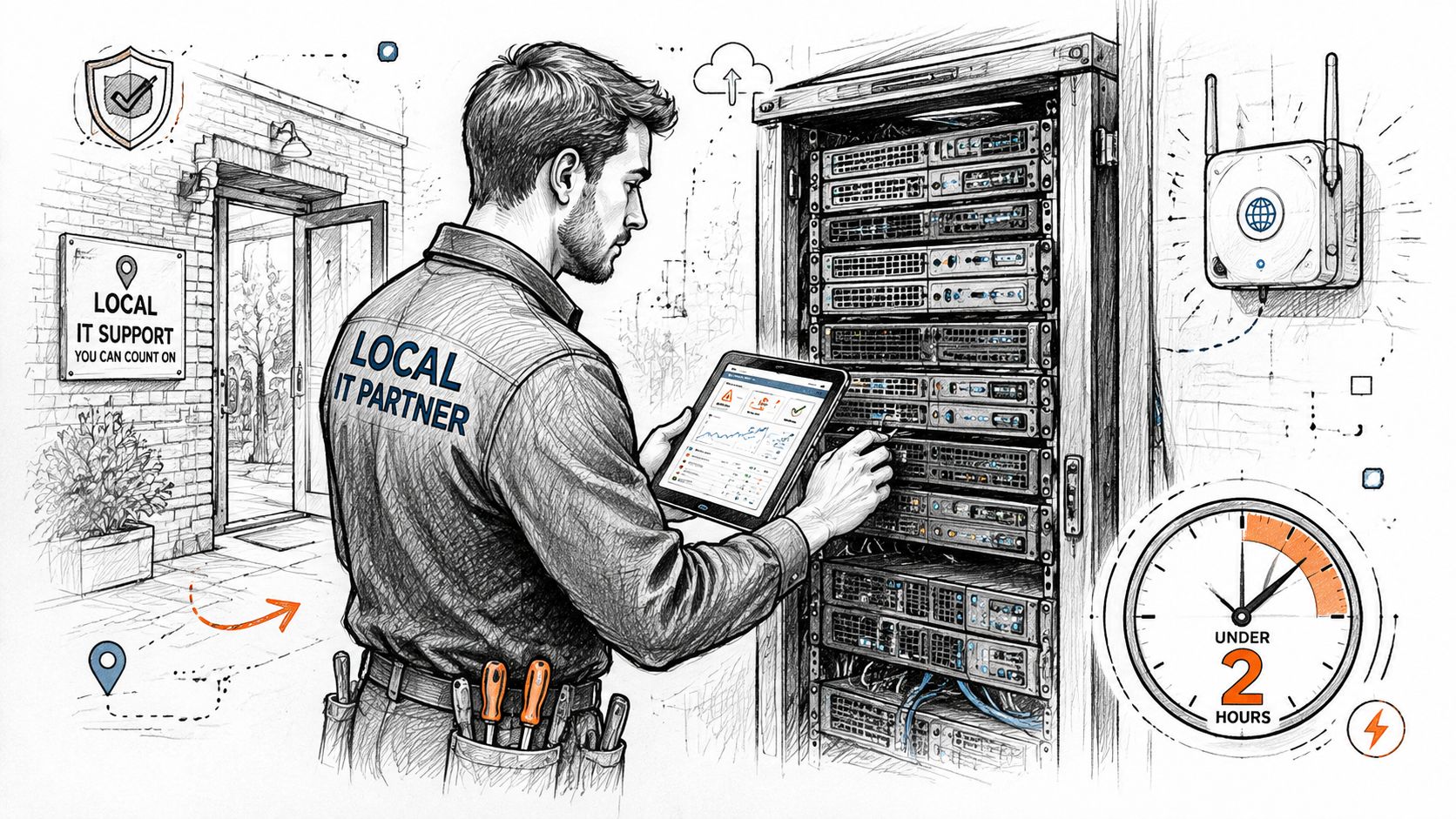
What local response looks like
In our 17 years of local service, we've seen the same pattern again and again. A business outgrows its patchwork setup, the monitoring is weak, the alerts are noisy, and nobody trusts the data enough to act early. That's how small issues sit until they become expensive ones.
When we disassembled a similar client's failing RAID array on-site, the issue wasn't just hardware age. It was a lack of early warning, weak documentation, and no clean recovery path. Local response fixed the immediate problem, but the bigger win came from redesigning monitoring so the next failure was visible long before storage went dark.
Why local expertise changes the outcome
The same goes for branch and office networking along the I-65 corridor. We've built latency-optimized mesh nodes for Johnson County offices where old walls and mixed-use layouts made standard Wi-Fi plans fall apart. We've also rolled out Zero Trust overlays where the business needed tighter access control and cleaner audit records without slowing users down.
Local knowledge matters: if you know the building type, the common failure points, and the budget reality, you can stop guessing and start fixing.
That's also where a managed approach pays off. Finchum Fixes IT's managed services model is built around ongoing monitoring, faster repair loops, and fewer surprise visits. For a local owner, that means less downtime, better documentation, and a support relationship that doesn't need a week of back-and-forth before action starts.
Conclusion and Next Steps
Remote monitoring tools are not a nice-to-have for Indiana SMBs. They're the difference between controlled operations and constant interruption. They help you protect uptime, tighten security, and keep compliance from becoming an afterthought.
The checklist is straightforward. Inventory every asset, test agent and agentless telemetry, verify backups, document the command environment, and make sure the tool fits your compliance profile. If you're in healthcare, pay attention to HIPAA. If you support defense work, keep CMMC front and center. For everyone else, NIST CSF gives you a sane way to structure visibility and response.
The strongest setups are boring in the best way. They catch problems early, reduce onsite intervention, and keep monthly costs predictable. That's what local business owners along the I-65 corridor need, especially when aging hardware, weak Wi-Fi, and messy backups are still common.
If you're in Greenwood, Indianapolis, Johnson County, or Hamilton County, don't wait for the next outage to tell you where the gaps are. Get a Free Network Assessment or Security Risk Audit and find out whether your current monitoring stack is protecting uptime, or just generating alerts nobody trusts.
Finchum Fixes IT helps Indiana businesses build remote monitoring, security, and backup plans that reduce downtime and keep costs under control. If you want a straight answer about what's working, what's missing, and what's putting your network at risk, visit Finchum Fixes IT and ask for a Free Network Assessment or Security Risk Audit for your Greenwood or Indianapolis location.