IT Security Audit: A Guide for Indianapolis Businesses
A lot of Johnson County business owners are in the same spot right now. The office is busy, the Wi-Fi gets flaky in that older brick building, the server is older than a few employees, and everyone just hopes the antivirus icon in the corner means things are fine. That's usually when someone asks, “Do we really need an IT security audit, or is this just another IT bill?”
Fair question.
If your shop depends on email, cloud apps, phones, payment systems, file shares, remote access, or production equipment, you're already running on technology that can stop the business cold when something breaks or gets hit. And downtime isn't a vague inconvenience. It can cost up to $9,000 per minute for mid-sized and large organizations, while small businesses face costs between $137 and $427 per minute according to this downtime cost breakdown. For healthcare, the impact can exceed $600,000 per hour, and manufacturing can hit $260,000 per hour from the same source.
That's why a real IT security audit matters. Not because it sounds advanced. Because it keeps wasted tech time from eating payroll, appointments, shipments, and customer trust.
Your Business Runs on Tech But Is It Secure
Monday starts with a full schedule in Greenwood. Then remote access drags, the copier drops off the network again, and nobody can open the shared drive without calling around. By lunch, the fundamental question is not whether the antivirus icon still looks green. It is whether the business could keep operating if a password got stolen, a server failed, or a backup restore did not work.
That risk is easy to miss in Central Indiana because many shops keep running well enough to hide the weak spots. A medical office can go months without testing file recovery. A machine shop off I-65 can rely on the same aging switch until one bad day takes down production and shipping. A contractor can keep adding cloud apps and remote logins without anyone checking who still has access.
An IT security audit gives owners a clear answer. It checks whether the systems your team depends on can stay available, recover cleanly, and meet the compliance rules that apply to your business. For local companies, that often means more than basic security hygiene. Healthcare groups may need to line up with HIPAA expectations. Defense suppliers and manufacturers may need controls that support CMMC requirements. If those gaps sit untouched, they turn into downtime, lost revenue, and expensive cleanup.
What local owners usually miss
A lot of businesses around Greenwood, Franklin, and the south side of Indy still treat security like a product purchase. Buy a firewall. Add antivirus. Renew Microsoft 365. Hope that covers it.
It does not.
Security depends on daily decisions across cybersecurity, networking, cloud computing, data recovery, software development, and IT support. The weak point is often something ordinary. A former employee still has VPN access. Guest Wi-Fi reaches internal devices. Backups run every night, but nobody has tried a full restore since the system was set up.
A few patterns show up again and again in Central Indiana SMBs:
- Older hardware that still works, until it doesn't. Legacy servers and network gear often stay in place because replacing them feels optional. Then one failure turns into a full-day outage.
- Wi-Fi fixes that create security holes. Older buildings in downtown Greenwood or Indianapolis often lead to extender-based workarounds, shared passwords, and flat networks with poor separation.
- Recovery plans that exist only in conversation. Staff believe backups are covered, but no one can say how long it would take to restore files, line-of-business apps, or Microsoft 365 data.
For a plain-English overview of the basics, myhalo's guide to data security is a useful reference.
If you want a practical local follow-up, the 2026 small business cybersecurity checklist for Indiana companies gives you a good starting point.
Why this matters to the bottom line
Owners usually do not call me because they want prettier documentation. They call after a scare, or because they are tired of losing time to recurring issues that nobody has traced back to root cause.
A good audit improves uptime, cuts avoidable support noise, and helps you spend money in the right order. Sometimes the answer is a new firewall or better endpoint protection. Sometimes the better investment is cleaning up admin rights, fixing backup retention, segmenting Wi-Fi, or documenting recovery steps so one staff absence does not stall the whole company.
That is the business case. More working hours. Fewer surprise outages. Less money wasted on reactive fixes.
What an IT Security Audit Really Means for Your Business
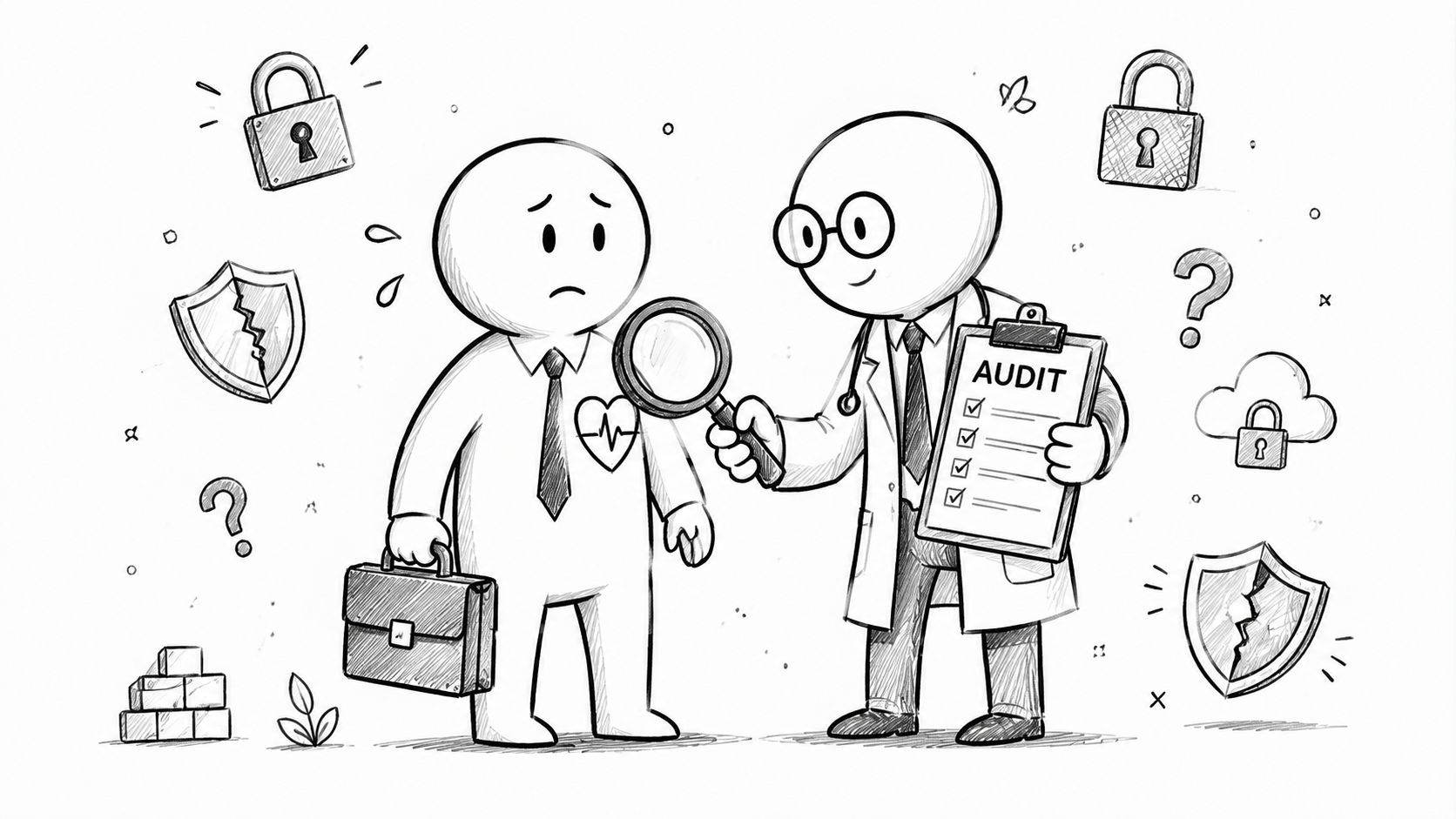
An IT security audit is a lot like a structural inspection before buying a building. A quick walk-through might tell you the paint looks fine. A real inspection tells you whether the foundation is shifting, the wiring is dangerous, or the roof will become your problem the first time Indiana weather gets ugly.
That's the difference between a basic vulnerability scan and a full audit. A scan checks for certain known issues. An audit asks whether your people, policies, systems, and recovery plans can hold up under pressure.
What a real audit is looking for
A proper audit usually checks several layers at once:
- Access control hygiene. Who has admin rights, how remote access is protected, whether MFA is enforced correctly, and whether former staff still have accounts.
- Network exposure. Firewall rules, Wi-Fi security, VLAN design, and whether UniFi networking gear or other edge devices are configured cleanly.
- Endpoint and server protection. Patch status, operating system health, EDR settings, and whether tools like Bitdefender GravityZone are tuned or just installed.
- Cloud and application risk. Microsoft 365, file-sharing settings, email controls, line-of-business software, and custom software development practices.
- Recovery readiness. Backups, restore testing, immutable off-site backups, and whether someone has verified that recovery works.
Why business owners should care
A medical office in Carmel might need an audit that maps clearly to HIPAA obligations. A defense-adjacent manufacturer near the I-65 corridor may need evidence that aligns with CMMC expectations. Many other Indiana businesses won't have one named regulation driving the process, but they still benefit from using NIST CSF as a practical benchmark because it forces clear thinking about identification, protection, detection, response, and recovery.
That business framing matters. If the audit only produces a pile of screenshots and scary jargon, it failed. A useful audit should answer questions owners ask:
| Business question | What the audit should answer |
|---|---|
| Can we stay operational during a security incident | Which systems are critical and what would break first |
| Are we compliant enough for customers and insurers | Where controls line up with HIPAA, CMMC, or NIST CSF |
| Where are we wasting money | Which tech problems create recurring support time and avoidable outages |
| What should we fix first | Which gaps create the biggest operational risk |
Practical rule: If your “audit” never talks to HR, finance, operations, or leadership, it's probably just a scan with a nicer label.
For teams that want to compare their current process against something more formal, this Indiana risk assessment template for cybersecurity planning is useful because it connects technical findings to business decisions.
The Five Phases of a Thorough Security Audit
Most audit problems start before anyone runs a tool. The scope is fuzzy, the wrong people are in the room, and the result is a report nobody uses. A thorough process is more disciplined than that.
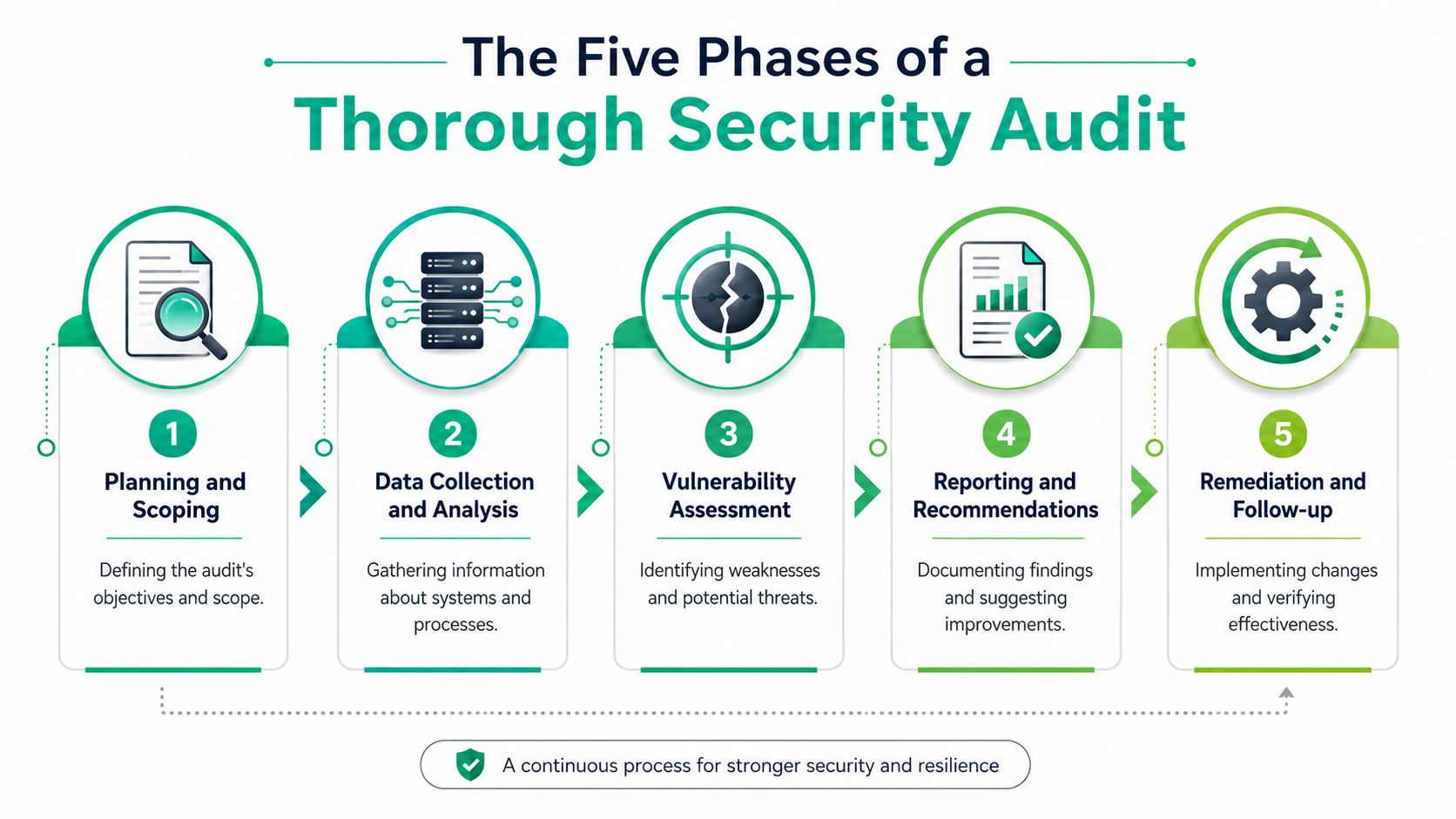
Phase one planning and scoping
A lot of audits either become useful or become theater at this stage.
The scope should name locations, systems, vendors, cloud platforms, remote access paths, compliance needs, and business priorities. For a multi-site company between Greenwood and downtown Indy, that might include a main office, a warehouse, Microsoft 365, line-of-business software, and guest Wi-Fi. For a healthcare office, it may also include HIPAA-related workflows and data handling.
The bigger mistake is treating this as an IT-only meeting. According to Lumos on cybersecurity audits, 2025 to 2026 trends show that 74% of breaches originate from human error or insider threats. That's why HR, finance, operations, and legal need seats at the table. If payroll approves insecure document sharing or a manager keeps bypassing password policy, the firewall won't save you.
Phase two discovery
This phase maps what exists. Not what the old spreadsheet says exists.
Auditors inventory endpoints, servers, cloud tenants, wireless networks, privileged accounts, vendor connections, backup systems, and development workflows if the company builds or modifies software. In modern environments, this also includes remote workers, mobile devices, and any shadow IT that grew unnoticed during busy years.
For networking, elements such as switch layouts, wireless SSIDs, VLAN boundaries, and latency-sensitive areas get reviewed. If you've got old office walls killing signal, a fix may involve latency-optimized mesh nodes and better segmentation, not another random access point from the supply closet.
A more technical local walk-through of that network side is covered in this network security assessment guide for Indiana SMBs.
Phase three analysis and testing
The audit moves beyond paperwork.
Technical review includes configuration analysis, vulnerability scanning, targeted validation, and sometimes controlled testing of likely attack paths. The point isn't to generate noise. The point is to prove whether gaps are exploitable in the environment you operate.
One of the most important checks here is identity control. According to Beagle Security's audit overview, technical security audits that measure MFA enforcement find that organizations below 95% enforcement face a 3.2x higher likelihood of successful credential-based attacks. That's the kind of issue that matters because it ties directly to business interruption.
Here's a quick explainer worth watching if you want a visual overview of how audit work fits together.
Phase four reporting
The best reports are blunt. They rank findings by operational impact, explain what could happen, and tell leadership what to fix first.
A bad report says, “Several endpoints exhibit patch irregularities.”
A good report says, “Remote staff laptops are missing key updates, and a compromised account could move into finance systems because access boundaries are weak.”
Phase five remediation and follow-up
Fixes need owners, dates, and validation. Otherwise the report becomes shelf decoration.
This phase often includes policy changes, firewall cleanup, MFA enforcement, endpoint hardening, Wi-Fi redesign, backup testing, and monitoring improvements such as SOC-as-a-Service monitoring. In mature environments, it can also include Zero Trust architecture changes that reduce default trust between users, devices, and internal resources.
The audit only pays off when findings become working controls.
Types of Audits and What They Uncover
Different audits answer different business questions. A Greenwood medical office trying to satisfy HIPAA needs proof that safeguards are in place and documented. A machine shop bidding on defense work needs to know whether its controls will hold up against CMMC scrutiny. A growing company with recurring outages often needs something more practical first. It needs someone to inspect the environment and show where risk is turning into downtime, rework, or lost revenue.
Internal and external audits
Internal audits are usually the fastest way to catch drift. Your IT staff or managed provider reviews policies, account access, backups, patching, and system changes before small issues become expensive ones. That approach works well for routine review and prep work.
External audits bring distance. That matters more than many owners expect.
Teams in Central Indiana often inherit settings that made sense five years ago and now create real exposure. Shared admin accounts for a legacy app, broad VPN access for former vendors, or warehouse devices sitting on the same network as office systems can start to feel normal. An outside auditor has no attachment to those habits and is more likely to call out what increases the odds of a breach or a production stoppage.
Here's the practical trade-off:
| Audit type | Best use | Main trade-off |
|---|---|---|
| Internal audit | Ongoing review and prep work | Familiarity can hide blind spots |
| External audit | Unbiased assessment and customer confidence | More formal process and more coordination |
| Hybrid approach | Internal prep, external validation | Requires better planning to avoid duplicate effort |
Compliance audits and technical audits
Compliance audits measure your controls against a requirement or framework. For healthcare practices in Johnson County and Hamilton County, that often means HIPAA. For manufacturers, subcontractors, and suppliers tied to federal work, it may mean CMMC. For companies that want a structured baseline without a contract requirement, NIST CSF is often a practical place to start.
Technical audits test how your environment is set up. That includes firewall rules, endpoint protection, privileged access, remote access, backup reliability, wireless separation, logging, and admin workflow. If you run UniFi, the audit should verify VLAN boundaries, guest isolation, and controller settings. If you use Bitdefender GravityZone, the review should confirm the policies are enforced on real devices, not just present in the console.
That difference matters for ROI. A compliance audit can help you keep contracts, pass customer due diligence, and avoid ugly surprises during a formal review. A technical audit helps reduce outages, contain incidents faster, and expose the misconfigurations that cost time every month.
Choosing the right audit for your environment
If your business is using AI in customer service, operations, or internal workflows, governance gets more complicated fast. This primer on navigating AI compliance is useful context because it shows how policy, risk, and accountability can spread beyond the usual security checklist.
A simple way to choose:
- Choose compliance-first if contracts, regulators, cyber insurance, or customer questionnaires are driving the project.
- Choose technical-first if the bigger problem is recurring downtime, weak remote access controls, inherited network sprawl, or unclear admin access.
- Choose external review if ownership or leadership wants a second opinion before approving major security spending.
- Choose a hybrid approach if your internal team can gather evidence and clean up basics, but you still need independent validation.
Owners also get pitched a lot of overlapping terms. An audit is not the same as a vulnerability assessment, and neither is the same as a penetration test. This breakdown of vulnerability assessments versus penetration testing clears that up well.
The right audit is the one that answers the business question in front of you. Are you trying to keep a contract, prevent plant-floor downtime, reduce cyber insurance friction, or stop a small security gap from turning into a week of disruption? Start there, then match the audit type to the outcome you need.
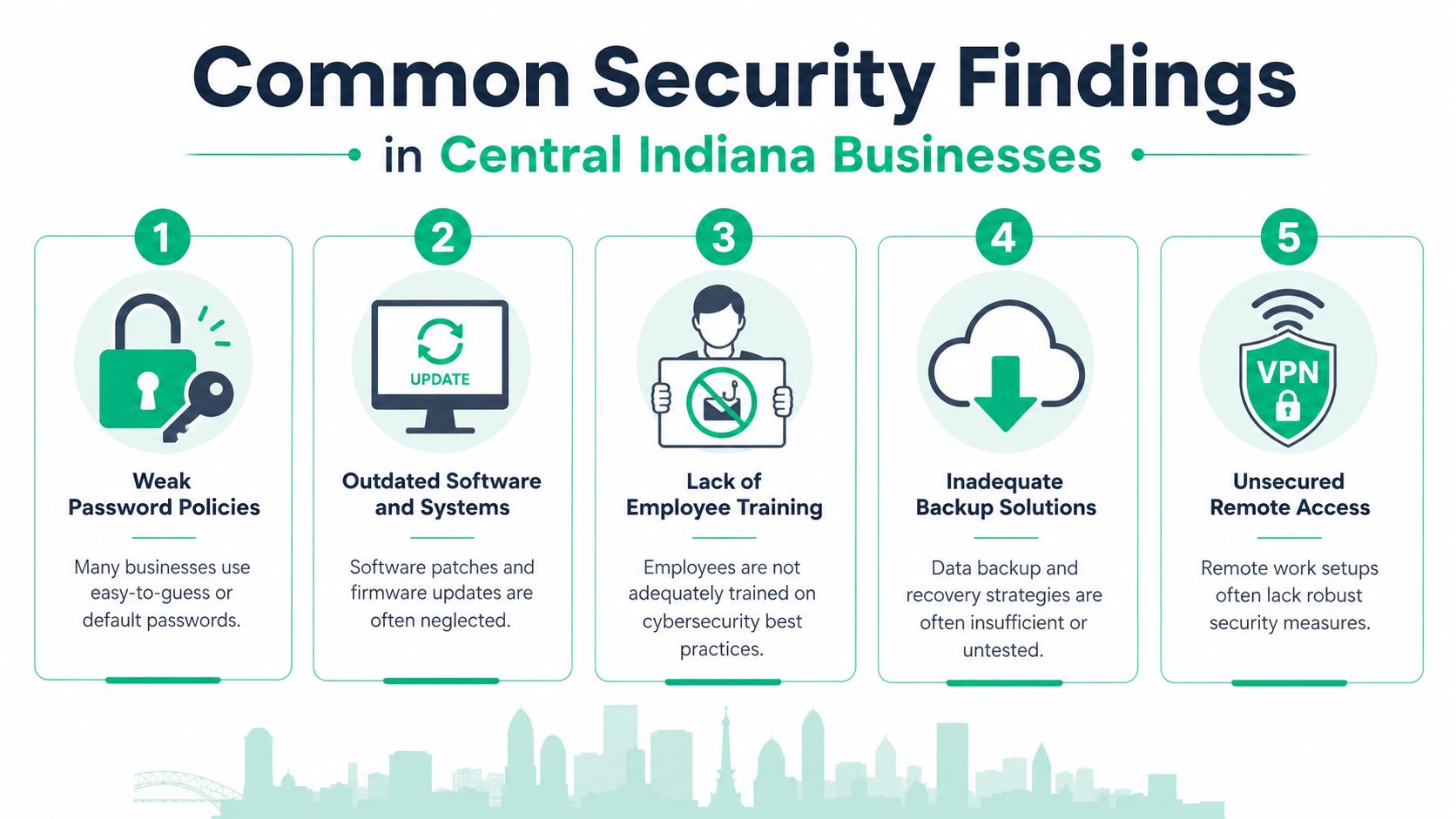
Common Findings in Central Indiana Businesses
In our 17 years of local service across the Indianapolis metro area, the same issues keep surfacing. The software may change. The buildings may be newer in Hamilton County or older along the Southside. The pattern stays familiar. Businesses outgrow the way their systems were originally set up, and nobody gets enough uninterrupted time to re-architect them properly.
Flat networks and quiet spread
A lot of SMBs in Greenwood and along the I-65 corridor still run what's basically a flat network. The office PCs, printers, warehouse devices, Wi-Fi clients, and sometimes even security cameras sit too close together from a trust standpoint. That makes life easy for whoever set it up years ago. It also makes life easy for an attacker once one device gets compromised.
A stronger design uses segmentation and clearer policy boundaries. That can mean separate VLANs, tighter firewall rules, better wireless isolation, and a path toward Zero Trust instead of “everything internal can talk to everything internal.”
Backups that haven't proved anything
This one is the sleeper issue.
A backup job can show green for months and still fail when it's needed. The only backup that matters is one you've restored and verified. According to SentinelOne's digital security audit overview, 60% of small businesses that suffer a data breach without a tested recovery plan close within six months. That's not a backup problem. That's a business survival problem.
Field note: Untested backups create false confidence. That's worse than knowing you have a gap.
The fix usually involves restore testing, retention review, and making sure copies are protected from tampering. For many SMBs, that means immutable off-site backups, documented recovery steps, and proof that core systems can come back in the right order.
Old gear and improvised fixes
The local version of technical debt has a familiar smell. A switch in a closet with no labeling. A “temporary” remote access rule that's been there for years. Firmware nobody wants to touch because the office can't tolerate disruption. Add in spotty Wi-Fi and staff will create their own workarounds fast.
When we dissembled a similar client's failing RAID array, the lesson wasn't just about storage. It was about assumptions. Everyone assumed redundancy meant recoverability. It didn't. We had to combine bit-level data recovery work with a broader review of backup design and server replacement planning, because rescuing the data without fixing the architecture would've been pointless.
A few common findings show up repeatedly:
- Weak admin separation that gives too many users privileged access.
- Patching drift on endpoints, firewalls, and wireless infrastructure.
- Remote access sprawl with old accounts, weak controls, or missing review.
- Cloud permission creep in Microsoft 365 and shared storage.
- Training gaps that let staff click, share, or approve things they shouldn't.
Good audits don't stop at “what broke.” They identify why the environment made the failure easy.
Audit Timelines Costs and Finding the Right Partner
Business owners always ask two practical questions. How long will this take, and how disruptive will it be?
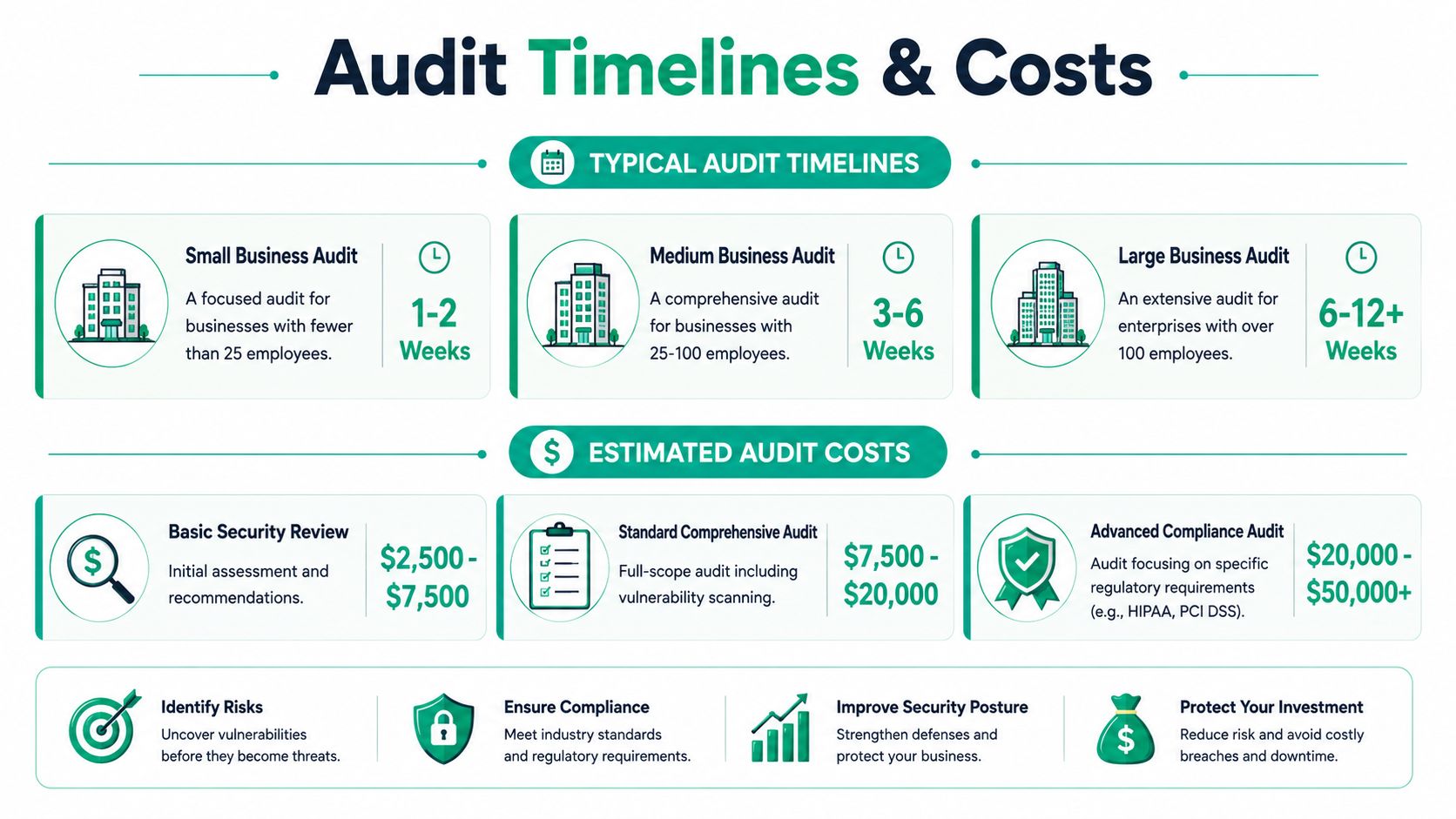
The honest answer is that timing depends on scope, number of locations, compliance requirements, and how messy the environment is. A simple office with a small user base, standard cloud apps, and documented systems moves faster than a multi-site company with old line-of-business tools and years of inherited network changes.
What matters more than a fast quote
A weak partner will try to win the job by making the audit sound tiny. That's usually a mistake. If the process is rushed, the findings will be shallow, the remediation list will be noisy, and leadership will still have no clear idea what threatens uptime.
The better question is whether the provider understands business continuity, not just tools. They should be able to speak clearly about:
- Zero Trust architecture and when it's worth introducing
- SOC-as-a-Service monitoring for companies that need stronger detection without building an in-house team
- Cloud application risk in Microsoft 365 and SaaS sprawl
- Data recovery realities, including restore testing and off-site immutability
- Networking design, from UniFi deployments to wireless coverage and segmentation
A simple vendor scorecard
Use this when comparing providers around Greenwood, Indianapolis, and the wider Central Indiana market:
| What to ask | Strong answer sounds like |
|---|---|
| Do you only scan, or do you audit people and process too | They involve business stakeholders, not just IT |
| Can you map findings to HIPAA, CMMC, or NIST CSF | They can translate controls into compliance language |
| How do you handle recovery validation | They talk about restore testing, not just backup status |
| Can you support remediation | They can help implement and verify fixes |
| Will you explain findings in business terms | They tie risk to downtime, cost, and operations |
If you're screening providers, this guide on how to choose a managed service provider gives a good framework for sorting serious partners from “geek with a screwdriver” shops.
One more thing matters. A good audit partner won't drown you in acronyms to sound smart. They'll explain where money is being lost through interruptions, repeated support work, and fragile systems. Then they'll show how better controls turn that wasted tech time into billable hours and a steadier monthly IT budget.
Your Next Step Toward a Secure Future
Monday starts with a login issue. By lunch, your team cannot reach a file share, a line-of-business app is crawling, and someone is asking whether last night's backup can be restored. That is how a normal workday in Greenwood or Indianapolis turns into lost revenue.
An IT security audit gives you a clear view of where that kind of disruption starts, what it will cost if ignored, and which fixes lower risk without wasting budget. For a Central Indiana SMB, that matters more than getting a thick report full of acronyms. It means fewer outages, less unplanned labor, and fewer surprises during a HIPAA review, a CMMC assessment, or a customer security questionnaire.
Owners usually care about the same outcomes. Keep staff working. Protect cash flow. Avoid preventable downtime. Make compliance less painful.
There is a direct financial case for doing the work. According to BCM Metrics on the cost of downtime and continuity planning, business continuity programs consistently deliver an 8:1 return on investment, meaning every dollar invested in preparation saves eight dollars in recovery costs. For most small and midsize businesses, that is the essential point of an audit. Spend a controlled amount now or pay much more later in emergency support, missed orders, overtime, and reputation damage.
That math gets more serious when your environment has grown one office, one vendor, and one workaround at a time. I see that a lot around the Southside. A company adds Microsoft 365, remote access, a few SaaS apps, maybe a warehouse system or medical software, and suddenly no one has a clean picture of risk. An audit fixes that by turning scattered concerns into a prioritized plan tied to operations and budget.
A secure environment protects more than data. It protects schedules, billing, production, trust, and your ability to grow without technology slowing the business down.
If you're in Greenwood, Indianapolis, or anywhere along the Southside and want a clear picture of your current risk, schedule a Free Network Assessment with Finchum Fixes IT. If you already suspect weak spots in backups, Wi-Fi, remote access, or compliance, ask for a Security Risk Audit built for Central Indiana businesses.