SOC 2 Compliance Checklist: 10 Steps for Readiness
A SOC 2 compliance checklist should inventory risks and data, assign control owners, implement and test safeguards, collect dated evidence, remediate gaps, and operate controls consistently for the selected Type I or Type II scope. The current criteria structure contains 61 individual criteria, with Security required in every audit.
That second fact surprises many Johnson County business owners. SOC 2 isn't a single security certificate or a policy binder. It's an operating discipline built around five Trust Services Criteria, Security, Availability, Processing Integrity, Confidentiality, and Privacy. Security is mandatory, while the other categories belong in scope when they match your services and commitments to customers. The modern five-category structure traces to the AICPA's 2017 Trust Services Criteria revision, with revised points of focus updated in 2022.
Aging server hardware in a Greenwood business park, an exposed server closet, inconsistent employee access, or spotty Wi-Fi in an old brick building can create both audit gaps and expensive downtime. A practical checklist moves from risk discovery to control design, evidence collection, testing, remediation, and audit preparation. Managed IT, cybersecurity, cloud computing, and immutable off-site backups turn that work into business continuity, predictable monthly budgets, and fewer interruptions to billable work. Current industry reporting places the median cost of enterprise downtime at $9,000 per minute, or about $540,000 per hour. That benchmark makes recovery testing a business decision, not paperwork.
A Type I report evaluates whether controls are designed and implemented at a point in time. A Type II report evaluates whether those controls operated effectively throughout a defined observation period. The difference is simple to explain and difficult to fake. A screenshot can support Type I design evidence. Type II requires a reliable trail showing what happened, when it happened, who reviewed it, and how exceptions were handled.
1. CC6.1 Logical and Physical Access Controls
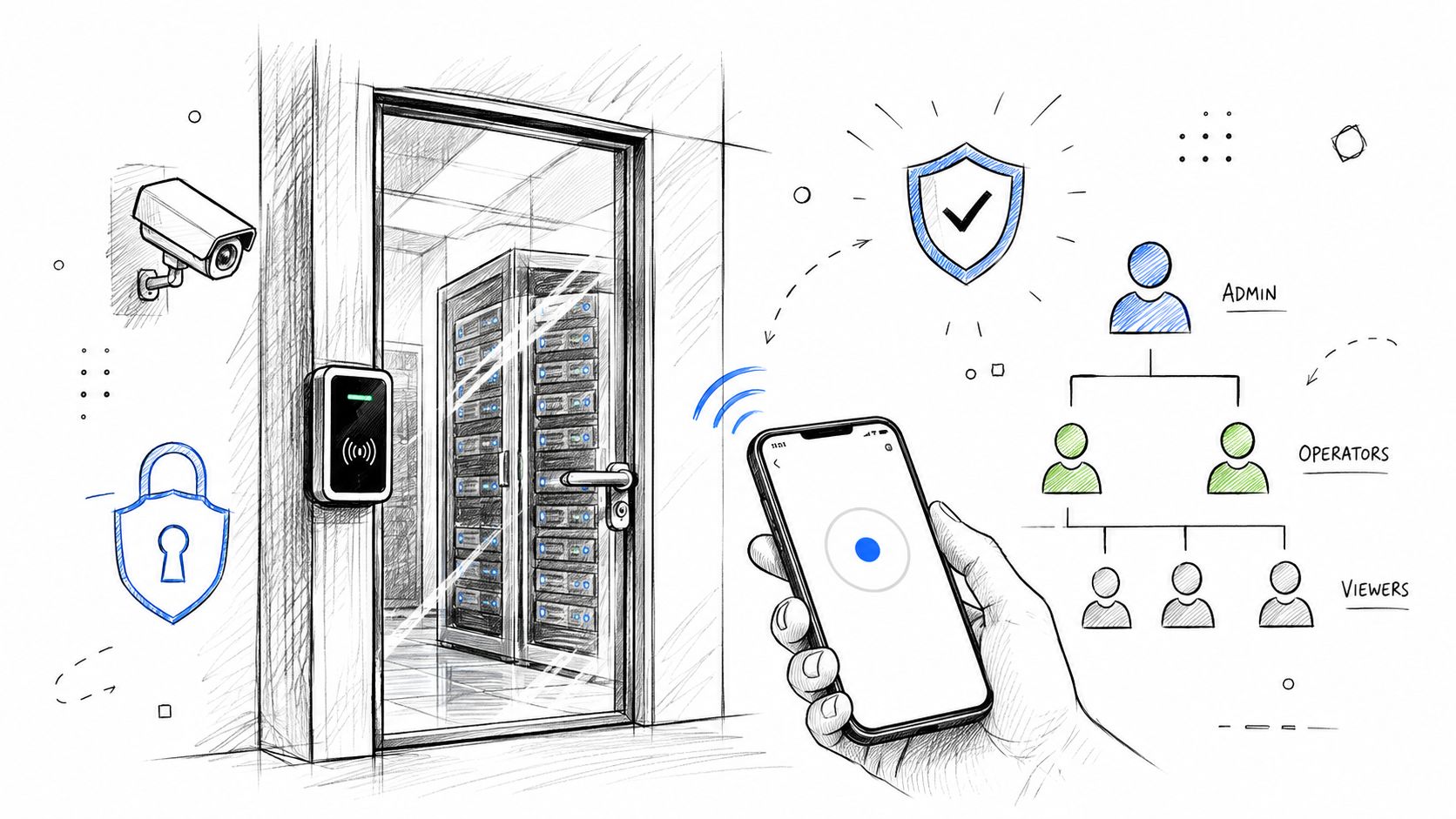
Access control starts with a basic question: who can reach what, from where, and why? CC6.1 covers both physical access to servers, network equipment, and facilities and logical access to applications, cloud platforms, endpoints, and data. In an older brick building along the I-65 corridor, a locked office door may not be enough. A server closet needs controlled entry, visitor records, sensible camera coverage, and evidence that someone reviews those records.
Logical controls should begin with Microsoft Active Directory or Microsoft Entra ID. Remove dormant accounts, separate administrator identities from ordinary user accounts, apply role-based permissions, and require multifactor authentication through Microsoft Authenticator or Okta. Conditional Access can block risky sign-ins, while endpoint tools such as Bitdefender GravityZone add another layer when a compromised account reaches a managed device.
Practical rule: Deploy MFA before waiting for a perfect physical-security project. A strong control that operates today is more valuable than a complete plan that remains unfinished.
Build evidence as part of the workflow:
- Identity evidence: Export current users, groups, privileged roles, MFA status, and terminated-account tickets.
- Physical evidence: Retain badge reports, visitor logs, camera-retention settings, and access-review sign-offs.
- Ownership evidence: Name the person responsible for quarterly reviews and record every exception.
Our local work with Indiana organizations has included secure server-room retrofits and Zero Trust architecture. That architecture assumes a compromised credential shouldn't provide unrestricted access to production systems. Use this Indiana access-control systems guide to connect door security with identity governance, not treat them as separate projects.
2. CC9.1 Data Classification and Inventory
You can't protect data you haven't located. CC9.1 turns a vague data-protection promise into an inventory of servers, cloud storage, developer laptops, backup repositories, SaaS platforms, databases, and service accounts. Downtown Indy tech hubs often have a different problem from established manufacturers. The startup may have shadow SaaS and AI tools handling customer information, while the manufacturer may have undocumented shares and legacy ERP exports sitting on an aging NAS.
Start with four practical classes: public, internal, confidential, and restricted. Then appoint business owners as data stewards. IT can map the systems, but department leaders should decide why a dataset exists, who needs it, and how long the company should retain it. Microsoft Purview can identify sensitive content across Microsoft 365, while Collibra can support broader cataloging and stewardship. AWS tags and Microsoft 365 sensitivity labels help apply handling rules without relying on memory.
A useful inventory records the data owner, business purpose, location, classification, retention rule, backup status, and downstream vendors. Include personal OneDrive accounts, file-transfer services, automation platforms, and AI-assisted tools. Scope should follow data flows and trust boundaries, not the org chart.
For a practical starting point:
- Map high-value systems first: Customer databases, payment information, intellectual property, healthcare records, and production systems deserve early attention.
- Delete unnecessary copies: Data minimization reduces exposure and makes backup validation more meaningful.
- Prove the map is maintained: Save discovery reports, owner approvals, remediation tickets, and updated diagrams.
An inventory also protects continuity. Immutable off-site backups are only useful when they include the data the business needs. Review IT asset management best practices for Indiana businesses alongside the data map so forgotten hardware and SaaS dependencies don't escape the checklist.
3. A1.2 Risk Assessment and Threat Identification
Risk assessments become useful when they change a budget, a workflow, or an ownership decision. A1.2 requires a documented assessment of threats to confidentiality, integrity, and availability. A Greenwood company running a legacy ERP system in a cramped server closet doesn't face the same risk profile as a cloud-native SaaS firm in a downtown Indy tech hub.
Use a living risk register rather than a document that appears once before the auditor. Record the asset, threat, vulnerability, business impact, likelihood rationale, existing controls, treatment decision, owner, target date, and evidence of review. NIST SP 800-30 or ISO 31000 can provide structure. For general business security, map the results to the NIST CSF so executives can see how Identify, Protect, Detect, Respond, and Recover activities connect.
The assessment should include third parties, cloud administrators, break-glass accounts, service accounts, remote access, production deploy paths, and AI tools that process sensitive information. Ask what happens if a vendor is unavailable, a privileged credential is stolen, or a backup administrator's account is compromised.
A risk register earns its place when the CFO can read it and understand why a backup redesign, security project, or recovery exercise deserves funding.
Evidence can include workshop notes, approved risk ratings, vulnerability reports, vendor reviews, management acceptance, and follow-up tickets. Update the register after major infrastructure changes and on a regular governance cadence. Stale risks are an evidence gap because they suggest the company isn't evaluating changing conditions.
Central Indiana examples make the exercise concrete. A logistics firm should examine GPS and dispatch availability. A healthcare provider should connect the assessment to HIPAA obligations. A defense supplier should cross-reference CMMC expectations. Use this Indiana cybersecurity risk-assessment template to turn those conversations into named actions rather than general concerns.
4. CC3.1 Vulnerability Management and Patch Deployment
A patch program fails when it treats every device as equally urgent or when it can't prove what happened. CC3.1 calls for a repeatable process that identifies vulnerabilities, prioritizes them, deploys remediation, and documents exceptions. The practical sequence is straightforward: discover assets, scan them, rank findings by exploitability and business impact, test the fix, deploy it, verify the result, and retain the record.
Nessus and Rapid7 InsightVM can scan servers, network devices, and applications. Microsoft Update for Business and WSUS support Windows patching, while Canonical Livepatch can reduce disruption for supported Linux environments. A small Hamilton County team shouldn't begin by trying to perfect every workstation. Start with production servers, firewalls, email, identity systems, and revenue-producing applications.
Use maintenance windows for predictable work, but create an emergency path for exploited vulnerabilities. A change ticket should identify the affected asset, proposed fix, test result, approver, deployment time, rollback plan, and verification output.
- Prioritize exposure: Internet-facing systems, privileged infrastructure, and systems holding restricted data need closer attention.
- Track exceptions: If a patch breaks a legacy application, document the reason, compensating control, owner, and review date.
- Verify closure: A deployment record without a follow-up scan doesn't prove the vulnerability disappeared.
A known-issues log protects both operations and audit credibility. It shows that the team made a conscious decision instead of ignoring a finding. Keep patch evidence in the same ticketing system used for service work, so wasted technician time doesn't become a separate compliance project. The patch-management practices for 2026 provide a useful operational reference.
5. CC5.2 Encryption and Cryptographic Controls
Encryption protects information when storage media, laptops, cloud accounts, or network paths fall outside your control. CC5.2 should cover sensitive data at rest and in transit, but the control isn't complete until key access, rotation, recovery, and ownership are documented.
For an I-65 corridor business handling healthcare records, payment information, or trade secrets, use BitLocker on Windows devices, FileVault on Macs, TLS for web and API traffic, and managed services such as AWS KMS, Azure Key Vault, or Google Cloud KMS. Bitdefender GravityZone can support endpoint protection and encryption management. Avoid putting encryption keys in the same location as the data they protect.
A sensible implementation sequence looks like this:
- Identify restricted and confidential data from the classification inventory.
- Confirm encryption settings on databases, file servers, endpoints, backups, and cloud storage.
- Restrict key administration to a small, named group or an approved automated service.
- Test recovery without exposing keys in tickets, screenshots, or shared documents.
- Review key-access logs and retain approvals for changes.
Encryption is a control. Key governance is what makes the control defensible.
Evidence should show configuration state, key ownership, rotation settings, access reviews, exception handling, and recovery testing. A stolen laptop may still be a serious operational event, but properly managed full-disk encryption can prevent the device from becoming a readable copy of customer data. For wireless environments, document how pre-shared keys are issued, changed, and removed. This PSK guide for secure business networks helps connect Wi-Fi credentials to the larger access-control program.
6. CC6.3 Segregation of Duties
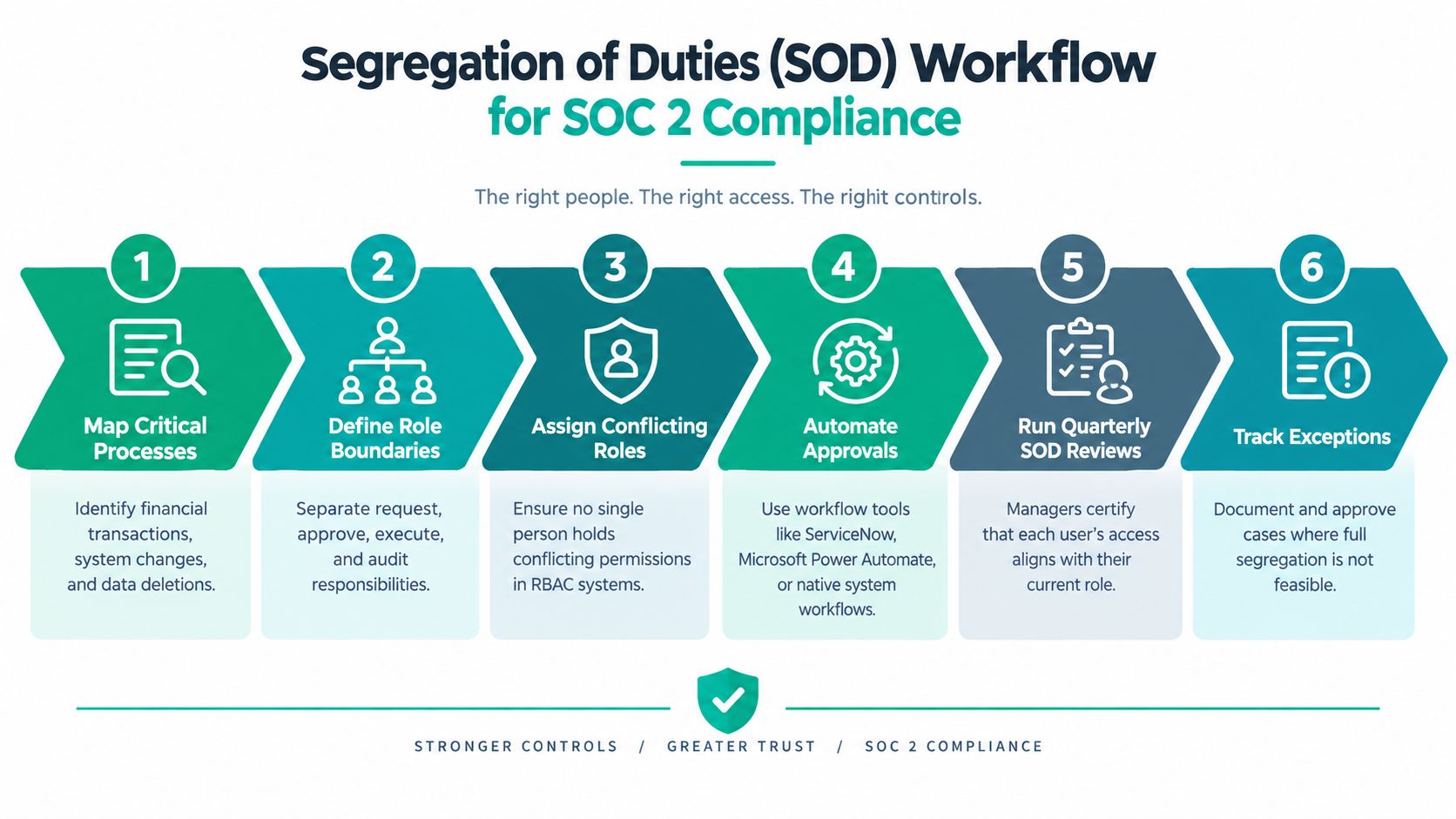
Segregation of duties is where compliance meets fraud prevention and ordinary human error. One person shouldn't be able to request, approve, execute, and reconcile a high-risk transaction. The same principle applies to IT. The administrator who proposes a production change shouldn't be the only person approving it and declaring it successful.
Map processes rather than job titles. Review payment approvals, payroll, vendor creation, user provisioning, privilege changes, data deletion, code deployment, and backup administration. In a small Greenwood distributor, one employee may wear several hats, so perfect separation isn't always practical. The answer is compensating review, independent approval, dual control, and clear evidence of management oversight.
Role-based access control can enforce the basic structure. Microsoft Power Automate, ServiceNow, Zapier, and native ERP workflows can route approvals without burying decisions in email. For production deployments, connect pull requests, code reviews, CI/CD approvals, and deployment logs so the evidence tells one continuous story.
A useful SOD review asks:
- Who requested the action?
- Who approved it, and what authority did that person have?
- Who executed the change or transaction?
- Who independently reviewed the result?
- What happened when the normal approver was unavailable?
Review the matrix regularly and preserve signed exceptions. A business doesn't need a large compliance department to enforce this. It needs management to decide which conflicts are unacceptable, IT to configure the workflow, and department owners to review the resulting records. That structure also supports HIPAA, CMMC, and NIST CSF alignment without pretending those standards are identical to SOC 2.
7. CC2.1 Policies, Roles, and Evidence Ownership
Policies become useful when an employee can follow them and an auditor can trace them to evidence. CC2.1 requires more than polished documents. Establish security, availability, processing integrity, confidentiality, and privacy policies that match the services and commitments in scope. Then name the executive sponsor, control owner, evidence custodian, system administrator, HR contact, legal contact, and audit liaison.
Create an evidence register before fieldwork. Each row should identify the control, artifact, source system, owner, collection frequency, reviewer, storage location, and exception process. Ticket exports, monitoring reports, access reviews, training records, vendor assessments, and change approvals are often stronger than manually assembled screenshots because they reflect normal operations.
Small and midsize Indiana businesses can assign leadership to policy approval, department managers to operational approvals, and a managed IT provider to recurring technical collection. Finchum Fixes IT can support monitoring, ticket records, access reviews, policy maintenance, and escalation while the client retains control ownership and management decisions.
A workable governance calendar includes:
- Monthly operations: Review alerts, changes, incidents, backup results, and open remediation.
- Quarterly governance: Review privileged access, risks, vendors, and control exceptions.
- Annual maintenance: Approve policies, test incident response, test recovery, and reassess scope.
Map overlapping obligations carefully. A healthcare organization can align SOC 2 privacy and security procedures with HIPAA. A defense contractor can cross-reference CMMC practices and NIST CSF functions. The zero-DevOps security policy resource is a useful reminder that governance must reach developers and deployment workflows, not stop at the office firewall.
8. CC6.2 Change Management and Configuration Control
A change that isn't documented is difficult to defend after an outage. CC6.2 applies to patches, firewall rules, software releases, infrastructure-as-code, permissions, database changes, and cloud configuration. The right process doesn't make every change slow. It makes risk visible before someone touches production.
Start with a ticket containing the reason, affected systems, risk, test evidence, approver, maintenance window, rollback procedure, and post-change verification. Low-risk routine work can use a preapproved path. High-risk changes should receive additional review, especially when they affect identity, backups, production databases, or network segmentation.
A Greenwood software company might store infrastructure definitions in Terraform, review them through pull requests, run unit and integration tests, and record the deployment result. A manufacturer on the I-65 corridor may need a more traditional change window because production systems connect to physical operations. Both approaches can satisfy the same control intent when they prove authorization, testing, and traceability.
Don't confuse a successful deployment with a successful control. Auditors may ask whether emergency changes were reviewed after the fact, whether failed changes were analyzed, and whether unauthorized configuration drift was detected. Use Microsoft Intune, Azure Policy, AWS Config, or comparable tools where they fit the environment.
Operational test: Pick a recent change and trace it backward from the system log to the ticket, approval, test result, and owner. If the chain breaks, the process needs work.
Monthly review of failed changes and rollbacks reveals technical debt. It also helps leadership decide whether a managed IT contract, better test environment, or network redesign will prevent recurring outages instead of paying for the same emergency repair repeatedly.
9. CC7.2 System Monitoring and Alerting
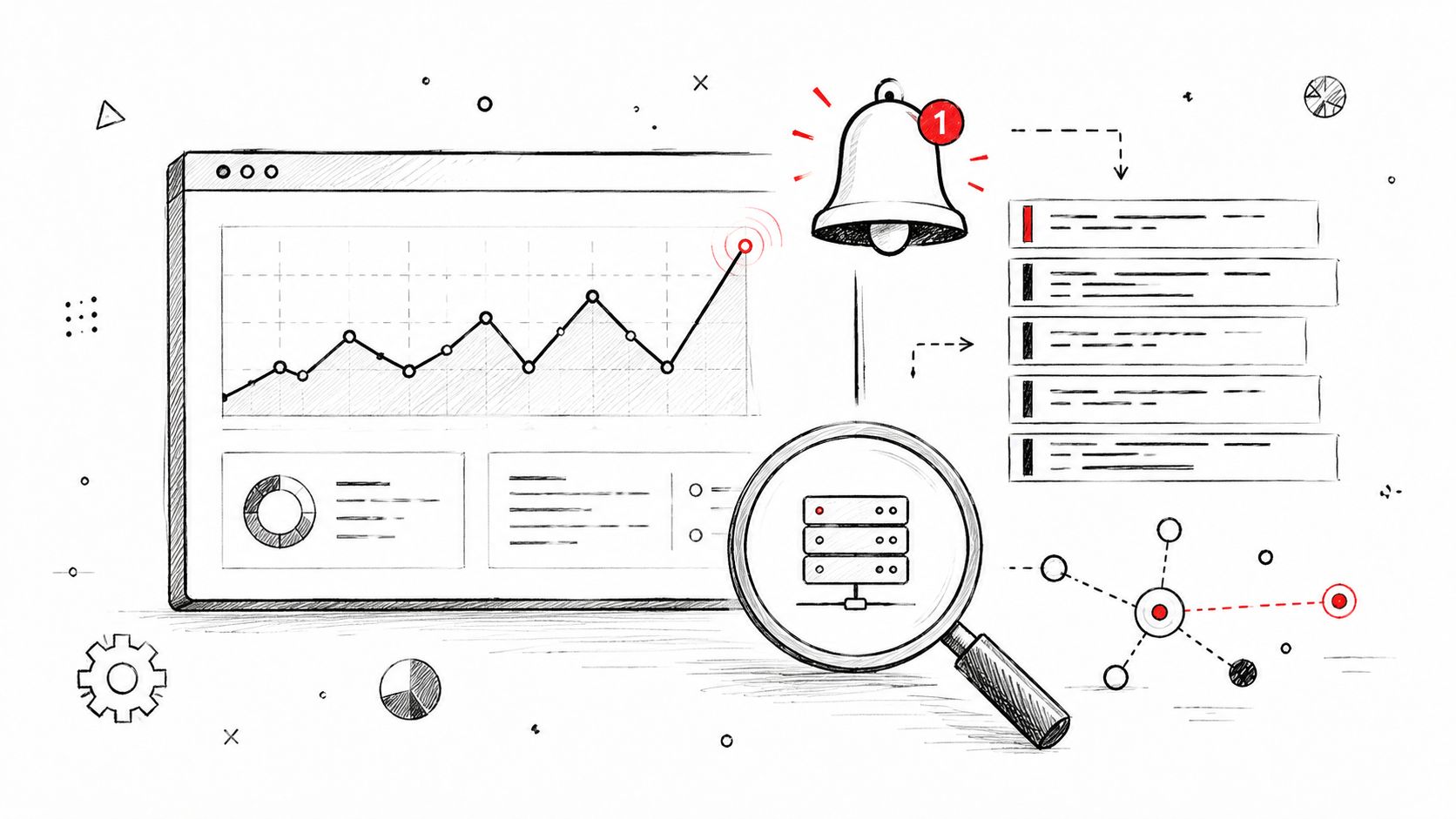
Monitoring should answer three questions quickly: what changed, how serious is it, and who is responsible for the next action? CC7.2 covers system, network, endpoint, and user activity. A quarterly log review won't provide reliable evidence of continuous operation, and it won't help much when an attacker is moving through the environment.
A practical stack might combine Rapid7 InsightIDR or Splunk for SIEM functions, CrowdStrike Falcon or Bitdefender GravityZone for endpoint detection, and network monitoring for bandwidth, availability, configuration drift, and latency. SOC-as-a-Service monitoring can provide after-hours coverage when a small Hamilton County IT team can't staff a security desk.
Tune detections to the environment. Useful alerts may include unusual privilege elevation, impossible travel, mass file access, suspicious RDP, disabled security tools, unexpected backup deletion, or a new service account in production. Send actionable alerts into the ticketing system, assign severity, and define an acknowledgement and escalation process.
Evidence should include:
- Coverage reports: Which servers, endpoints, cloud accounts, and network devices send logs?
- Alert records: What fired, who investigated it, and what disposition was recorded?
- Tuning history: Which noisy rules changed, who approved the change, and why?
- Retention settings: How long are logs available, and can administrators alter them?
Monitoring also protects revenue. Early detection can prevent an account compromise from becoming a production outage or a customer-notification event. Review alert quality regularly. A security team that receives too many low-value notifications will eventually miss the one that matters.
10. CC8.1 Incident Response and Breach Notification
An incident-response plan should work at three in the morning, when the primary administrator is unavailable and the facts are incomplete. CC8.1 requires detection, response, evidence preservation, recovery coordination, and communication. It also requires the organization to understand when legal, regulatory, contractual, cyber-insurance, and customer-notification duties apply.
Write playbooks for ransomware, lost devices, unauthorized access, cloud compromise, vendor incidents, and suspected data exposure. Store them where responders can reach them during an identity outage. Slack, PagerDuty, and Google Docs may support coordination, but keep offline contact details for legal counsel, a forensic firm, cyber-insurance contacts, executives, and critical vendors.
A tabletop exercise should walk through the first alert, account containment, network isolation, evidence capture, executive updates, customer communications, and restoration. Document what the team did, not what the policy says it should have done. Preserve chain-of-custody records for disk images, logs, email exports, and other evidence that may be reviewed by counsel or law enforcement.
The incident register should record the date, affected systems, severity, containment steps, root cause, notification decision, recovery result, and corrective actions. Tie every corrective action to an owner and due date. A missed follow-up is often more damaging to the program than the original alert because it shows the organization didn't learn from the event.
Incident response protects continuity when paired with tested immutable off-site backups. Technical containment limits spread, while communications prevent confusion among employees, customers, and suppliers. Treat both as operational processes, not documents written solely for an auditor.
11. CC4.1 Availability and Resilience
Availability controls must work during a server failure, cloud outage, ransomware event, or power loss. CC4.1 therefore requires demonstrated recovery capability, not only a backup job marked successful. Assign recovery time and recovery point objectives to each critical service, then test whether the business can meet them without relying on undocumented assumptions.
Use the 3-2-1 backup strategy: three data copies, two media types, and one off-site, immutable copy. Veeam, Commvault, AWS Backup, and Azure Backup can automate recovery workflows, but their configuration is not evidence that recovery works. Restore files, applications, databases, and complete systems. Verify access to credentials, encryption keys, licenses, DNS, and network dependencies during the exercise.
A Greenwood server closet is not a separate recovery site if the same storm, utility failure, or building problem could affect both locations. Indiana businesses should evaluate cloud recovery, another data center, or a protected facility, including connectivity and latency. A restored application still fails its business objective if employees cannot reach it.
Maintain evidence of:
- Backup execution: Job results, failed-job tickets, and retention settings.
- Immutability: Object-lock or repository controls that block administrative deletion.
- Recovery testing: Dates, restored systems, results, elapsed time, and lessons learned.
- Business sign-off: Department owners confirming that restored data and workflows function for daily work.
Assign recovery-test remediation to an owner with a due date. Type I can show that these controls are designed and in place at a point in time. Type II requires operating evidence across the audit period, so repeated tests and documented corrections matter.
Recovery testing turns backup spending into continuity planning and protects billable hours by replacing guesswork with a rehearsed procedure. Bit-level recovery may help with failed drives or RAID arrays, while a clean, tested immutable copy usually gives the team a more predictable path. Use the SOC 2 audit preparation checklist to connect recovery evidence with broader readiness work.
11-Point SOC 2 Controls Comparison
| Control | 🔄 Implementation complexity | ⚡ Resource & timeline | 📊 Expected outcomes / Impact | ⭐ Key advantages | 💡 Ideal use cases / Tips |
|---|---|---|---|---|---|
| CC6.1 – Logical and Physical Access Controls | Medium, AD/RBAC design + physical security integration | Moderate, badge readers, MFA, IAM licenses; ~2–4 weeks rollout | High, fewer unauthorized accesses; clear audit trails | Strong regulatory alignment; rapid incident containment | Critical for on‑prem servers and manufacturing; deploy MFA first; quarterly access reviews |
| CC9.1 – Data Classification and Inventory | High initial effort, discovery, mapping, policy | Moderate–High, Purview/Collibra, data owners; weeks→months | High, reduces breach scope, informs controls & retention | Enables targeted protection and faster breach response | Start with high‑value data; assign business owners; use automated tagging |
| A1.2 – Risk Assessment and Threat Identification | Medium, structured workshops and documentation | Low cash cost but time‑intensive; 40–60 hours initial; quarterly updates | High, prioritized mitigations and budget justification | Aligns security with business risk and insurance needs | Use NIST/ISO methods; involve CFO; maintain living risk register |
| CC3.1 – Vulnerability Management and Patch Deployment | Medium, continuous scanning and remediation workflows | Moderate, scanners (Nessus/Qualys), patch automation; ongoing tuning | High, drastically reduced exploitable surface | Automates remediation; provides audit evidence | Start with critical assets; set SLA windows; test patches in staging |
| CC5.2 – Encryption and Cryptographic Controls | Low–Medium, enable encryption and KMS integration | Moderate, managed KMS, endpoint encryption; minor perf overhead | High, protects data at rest/in‑transit; lowers liability | Strong audit proof; unreadable stolen data; transparent UX | Prioritize sensitive data; use cloud KMS; rotate and restrict key access |
| CC6.3 – Segregation of Duties (SOD) | Medium, role definitions + workflow enforcement | Low–Moderate, RBAC tooling, possible staffing; quarterly reviews | High, reduces fraud and single‑person failures | Peer oversight; audit‑friendly; prevents sabotage | Apply to finance/HR/infra; automate approvals; document exceptions |
| CC2.1 – Policies, Roles, and Evidence Ownership | Low–Medium, governance framework and evidence mapping | Low, policy drafting, owner assignments, evidence register; ongoing | High, audit readiness and clear accountability | Turns compliance into repeatable operations; supports MSP use | Build evidence register early; tie policies to owners; review annually |
| CC6.2 – Change Management and Configuration Control | Medium–High, CAB, testing, rollback procedures | Moderate, ServiceNow/Jira, staging envs; 2–3 months to mature | High, fewer outages and predictable deployments | Accountability, rollback plans, safer continuous delivery | Start simple (even spreadsheets); fast‑track emergency changes; pair with automated tests |
| CC7.2 – System Monitoring and Alerting | High, SIEM/EDR deployment, tuning, 24/7 ops | High, licensing, storage, skilled analysts or SOC‑aaS | Very high, detection time reduced from weeks to hours | Real‑time detection; forensic evidence; proactive hunting | Roll out EDR to critical nodes first; define baselines; integrate with ticketing |
| CC8.1 – Incident Response and Breach Notification | Medium, playbooks, roles, communication flows | Moderate, IR team or MSSP, drills, legal/comms coordination | High, reduced dwell time; controlled notifications | Preserves evidence; limits damage; protects reputation | Conduct quarterly tabletop exercises; keep contact list current; include legal/HR |
| CC4.1 – Availability and Resilience (Backup & DR) | Medium, backup architecture + DR testing | Moderate–High, storage costs, immutable copies, quarterly DR drills | Very high, rapid recovery; ransomware resilience; minimal downtime | Immutable backups; defined RTO/RPO; proven recoverability | Implement 3‑2‑1; calculate RTO/RPO; test recovery regularly |
Make the Checklist a Working System
The best SOC 2 compliance checklist isn't a spreadsheet that gets completed and forgotten. It's a working system that connects scope, ownership, control operation, evidence, remediation, and business continuity. The framework's five criteria contain 61 individual criteria in the current structure, but a small business shouldn't blindly implement every possible control. Security is required in every audit. Availability, Processing Integrity, Confidentiality, and Privacy should follow the services, data, and commitments the company makes. The Trust Services Criteria reference provides the foundation for that scope decision.
Use this sequence:
- Select scope and criteria: Identify the service, systems, people, vendors, data flows, and trust boundaries included in the report.
- Assign owners: Give every control an accountable person, a reviewer, an evidence custodian, and an escalation path.
- Inventory systems and data: Include cloud platforms, service accounts, backup systems, AI tools, remote access, and production dependencies.
- Document policies: Match policy language to how the business operates. Don't promise a process nobody performs.
- Implement priority controls: Start with MFA, least privilege, patching, encryption, monitoring, change management, incident response, and immutable off-site backups.
- Collect dated evidence: Save tickets, approvals, logs, access reviews, training records, vendor reviews, recovery tests, and exception decisions continuously.
- Test recovery and response: A backup job and an incident plan need practical exercises, not only signatures.
- Remediate gaps: Assign a due date and owner, document compensating controls, and verify closure.
- Choose the audit path: Use Type I to evaluate control design and implementation at a point in time. Use Type II when customers need evidence that controls operated effectively throughout a defined observation period.
The operational difference between Type I and Type II should shape your preparation from the first week. A Type I project can expose missing policies, weak permissions, and incomplete technical design. Type II adds the harder requirement, consistent operation over time. A screenshot taken just before fieldwork won't replace dated access reviews, recurring log records, approved changes, incident decisions, and recovery tests collected throughout the observation window.
Evidence quality is where many teams create audit theater. Paper compliance means the policy exists but the business can't show named owners, sign-offs, monitoring history, or interval-based testing. Automated controls need continuous monitoring records. Manual controls need attestations and periodic testing. The evidence process should fit normal work, so a ticket closed by the service desk or a cloud report exported by an automated job can serve both operational and audit needs.
Automation can materially change the project economics. A 2026 compliance automation benchmark reported certification completion averaging 3.1 months with automation versus 6.8 months with manual processes, and platform-assisted teams finishing about 40% faster than spreadsheet-driven teams. The same benchmark reported an expected first-certification budget of $35K compared with an actual $84K, a 2.4x gap. Those figures aren't a reason to buy every platform. They're a reason to map controls first, automate repeatable evidence collection second, and avoid paying technicians to rebuild the same audit packet every cycle.
Formal fieldwork also takes planning. A 2026 SOC 2 audit benchmark found typical fieldwork lasting 6 to 10 weeks, with 88% of examinations requiring at least one additional evidence cycle. Access control and user provisioning appeared as an exception area in 51% of cases, followed by change management at 41% and logging and monitoring at 37%. Those results reinforce the practical priorities in this checklist, but they don't replace your own risk assessment.
Small and midsize businesses in Greenwood, Indianapolis, the I-65 corridor, and Hamilton County can start without building a large internal compliance department. A local MSP can handle recurring technical work, endpoint management, network monitoring, patch evidence, access reviews, backup checks, and escalation support while company leaders retain decisions about scope, risk acceptance, privacy, and customer commitments. Finchum Fixes IT can also help with UniFi networking, latency-optimized mesh nodes, cybersecurity, cloud systems, data recovery, and 24/7 technical support. The goal is simple: reduce outages, convert wasted tech time into billable work, and maintain a predictable monthly technology budget.
Before you select an auditor, schedule a readiness review that traces one control from policy to owner, system configuration, dated evidence, exception handling, and business result. If the trail breaks, fix the operating process before fieldwork. When the trail holds, SOC 2 becomes more than a report. It becomes a practical way to protect customer data, keep systems available, and make technology decisions with fewer surprises.
Businesses in Greenwood and Indianapolis can schedule a Free Network Assessment or Security Risk Audit with Finchum Fixes IT to review access, patching, monitoring, cloud dependencies, backups, and SOC 2 evidence readiness. Contact the team to identify the controls most likely to affect downtime, audit results, and your monthly IT budget.