Remote Work Security Best Practices: Your No-Nonsense Guide for Indiana Businesses
The shift to remote work wasn't just a trend for Indianapolis and Greenwood businesses; it became the new normal. While the flexibility is fantastic, it blew the doors wide open for cyber threats. Suddenly, your critical company data isn't just behind the office firewall. It's on home Wi-Fi networks of varying quality, accessed from personal laptops, and a tempting target for opportunistic hackers.
As your local IT and cybersecurity partner right here in Central Indiana, we've seen it all. We know the difference between security theater and the real, practical steps that keep a business running safely. This isn't another boring, academic checklist. This is your grounded, no-fluff guide to the 10 most critical remote work security best practices that will actually protect your business.
We're going to cut through the jargon and give you actionable advice you can use today. This list is a comprehensive playbook, covering everything from essential VPNs and Multi-Factor Authentication to developing a rock-solid incident response plan. Think of it as a direct roadmap for turning your distributed team from a potential liability into a secure, productive powerhouse.
Our goal is simple: provide an actionable roundup of remote work security best practices you can put to work immediately. Let's get your remote setup as secure as your office, if not more so.
1. Implement a Virtual Private Network (VPN)
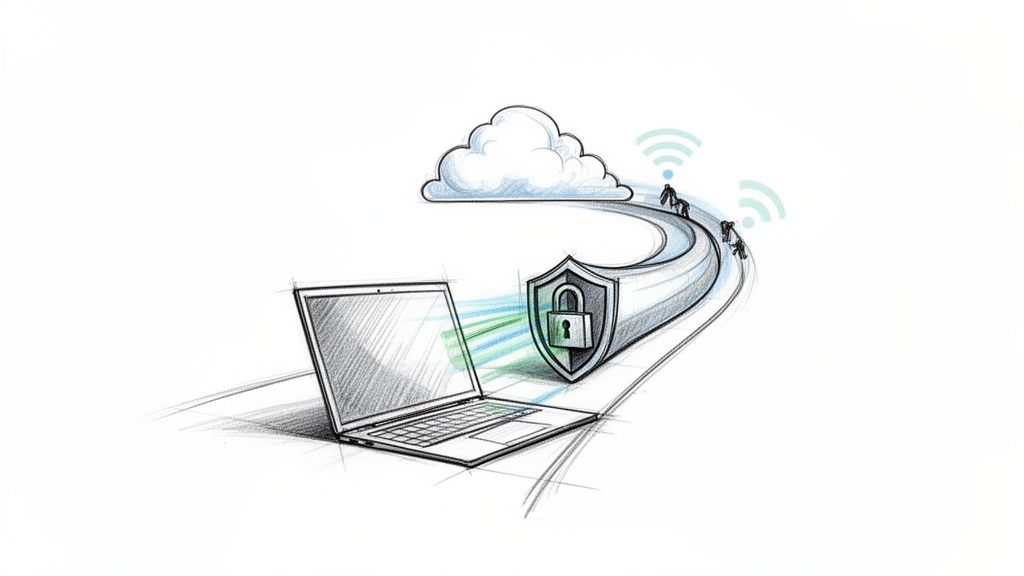
Think of a VPN as your own private, armored tunnel on the public internet. When your team works from a coffee shop, airport, or home, they're using public Wi-Fi—which is about as secure as shouting your bank password across Monument Circle. A VPN encrypts all the data traveling between their device and your company network, making it unreadable gibberish to anyone snooping around.
This isn't just a "nice to have"; it's a foundational element of remote work security. For our clients, like local healthcare practices in Indianapolis, a VPN is a non-negotiable tool for maintaining HIPAA compliance. It’s the digital equivalent of a locked gate, protecting sensitive data from wandering eyes.
Making VPNs Work for Your Business
Implementing a VPN doesn't have to be a headache. The goal is a secure connection so seamless your team barely notices it's there.
- Mandate Its Use: Your remote work policy should be crystal clear: No VPN, no access. Before any employee connects to company email, shared drives, or internal applications, they must be connected to the VPN. This simple rule eliminates a huge amount of risk.
- Choose Wisely: Not all VPNs are created equal. Opt for a reputable business-grade service like Cisco AnyConnect or NordLayer that offers strong encryption. Consumer-grade free VPNs often log user data or lack the robust security features your business needs.
- Layer Your Security: A VPN is powerful, but it's not a silver bullet. Combine it with multi-factor authentication (MFA) for a formidable one-two punch. This layered approach is critical for protecting your digital front door.
Quick Fix: Check your current VPN's settings. Ensure it's configured for "Always On" or has a "kill switch." This feature automatically blocks internet access if the VPN connection drops, preventing unsecured data from accidentally leaking out.
2. Enforce Multi-Factor Authentication (MFA)
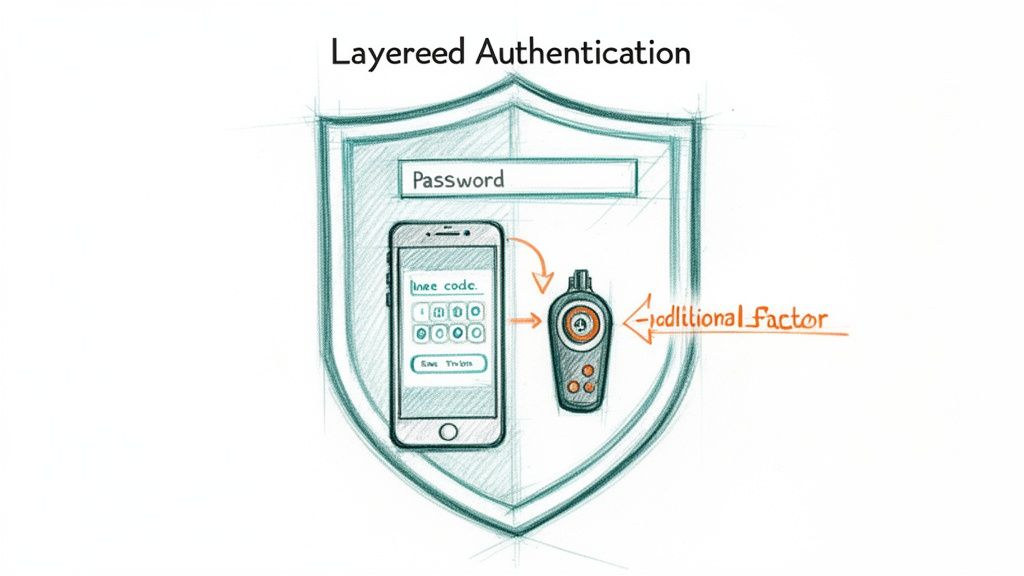
If a password is a lock on your digital front door, Multi-Factor Authentication (MFA) is the deadbolt, security chain, and grumpy guard dog all rolled into one. It demands more than just something a user knows (a password); it requires something they have (a phone) or something they are (a fingerprint). Even if a cybercriminal snags a password, they hit a brick wall without that second piece of the puzzle.
MFA is a cornerstone of modern remote work security because it single-handedly neutralizes the most common attack vector: stolen credentials. For our Indianapolis financial firm clients, it's the bedrock of their compliance strategy. For tech startups in Fishers, it’s the difference between a minor password leak and a catastrophic data breach.
Making MFA Work for Your Business
Rolling out MFA is one of the highest-impact security upgrades you can make, and it's simpler than you think.
- Enforce It Everywhere Critical: Start with the keys to the kingdom. Your remote work policy must mandate MFA for all critical accounts, especially email (like Microsoft 365), financial systems, and cloud platforms. This creates an immediate, hardened perimeter around your most valuable assets.
- Start with Authenticator Apps: Begin with user-friendly authenticator apps like Microsoft or Google Authenticator. They are free, easy to set up, and provide a huge security boost over SMS-based codes, which can be intercepted.
- Use Conditional Access: Be smart about when you challenge users. Modern systems like Microsoft Azure AD allow you to set up rules that require MFA only for high-risk logins, such as from an unfamiliar network or country, while allowing seamless access from trusted locations. It’s security that doesn’t get in the way of business.
3. Manage All Devices (Endpoint Protection & Patching)
If a VPN is your armored tunnel, think of endpoint protection as the highly trained security guard at each end. Your employees' laptops, tablets, and phones are the "endpoints," and each one is a potential front door for an intruder. Mobile Device Management (MDM) gives you the power to enforce security policies, deploy software, and even remotely wipe a lost or stolen device.
This is a core component of any serious remote work security plan. For our local manufacturing clients in Central Indiana, we use MDM to ensure that sensitive designs don't end up on an unsecured personal device. For healthcare organizations, it's an absolute necessity for maintaining HIPAA-compliant control over patient data, wherever it's accessed.
Putting Device Management and Patching to Work
Implementing MDM and a solid patching strategy is about gaining control over your company's digital assets, no matter where they are.
- Mandate Enrollment: Your policy should be firm: if a device is used to access company data, it must be enrolled in your MDM solution. This gives you the power to enforce password requirements, install antivirus software, and ensure the OS is up to date.
- Automate Patching: Outdated software is a welcome mat for cybercriminals. Use your MDM to automate the deployment of security patches. Set a policy for critical vulnerabilities to be patched within 14-30 days. For organizations aiming to streamline this, exploring automated endpoint management with Microsoft Intune can significantly enhance security.
- Separate Work and Play: On personal devices (BYOD), use MDM features that create a secure, encrypted container for work apps and data. This protects your company information without infringing on employee privacy. It also allows you to remotely wipe just the company container if the employee leaves. Discover more in our guide to endpoint security best practices for Indianapolis SMBs.
4. Deploy Secure Password Managers
Let's be honest, asking an employee to remember jS7*!pL@v9#bQ&nZ for their CRM login isn't going to happen. They’ll write it on a sticky note and slap it on their monitor. This is where a password manager becomes your best friend, acting as a digital Fort Knox for your team's credentials.
A password manager securely generates, stores, and autofills unique, complex passwords for every single application. This single tool obliterates the most common entry points for hackers: weak and reused passwords. For our clients, from law firms in Greenwood to tech startups in Indianapolis, deploying a team-based password manager like 1Password is a game-changer.
Making Password Managers Work for Your Business
The goal is to build a culture of security around it. You want your team to see it as an essential tool that makes their jobs easier and more secure.
- Enforce Strong Policy: Your password policy should be baked directly into your manager's settings. Mandate unique, complex passwords of at least 16 characters. Use the tool to block password reuse and flag weak credentials. This isn't nagging; it's automated enforcement that works 24/7.
- Pick the Right Tool: Business-grade solutions are non-negotiable. We often deploy 1Password for its excellent team management. Bitwarden is a fantastic open-source option for budget-conscious businesses, while Dashlane offers advanced sharing controls.
- Train on the Master Password: A password manager is only as secure as its master password. Train your team that this one password is the key to their digital kingdom. It must be long, memorable (think a passphrase), and never shared or written down. Combine this with MFA on the password manager account itself for ultimate protection.
5. Harden Home Network Configurations
Your company's security perimeter used to be the four walls of your office. Now, it’s every employee’s living room. A remote worker’s home Wi-Fi network is a potential backdoor into your business, and that consumer-grade router they bought on sale often has security as an afterthought.
This isn’t about being Big Brother; it's about closing an obvious security gap. For Indianapolis-area accounting firms we work with, this is a must-have for protecting sensitive client financial data. A single compromised home router could lead to a massive breach.
Making Home Networks Business-Ready
A few simple, mandated changes can transform a vulnerable home setup into a respectable first line of defense.
- Change Default Credentials: The first thing a hacker tries is the default router password (
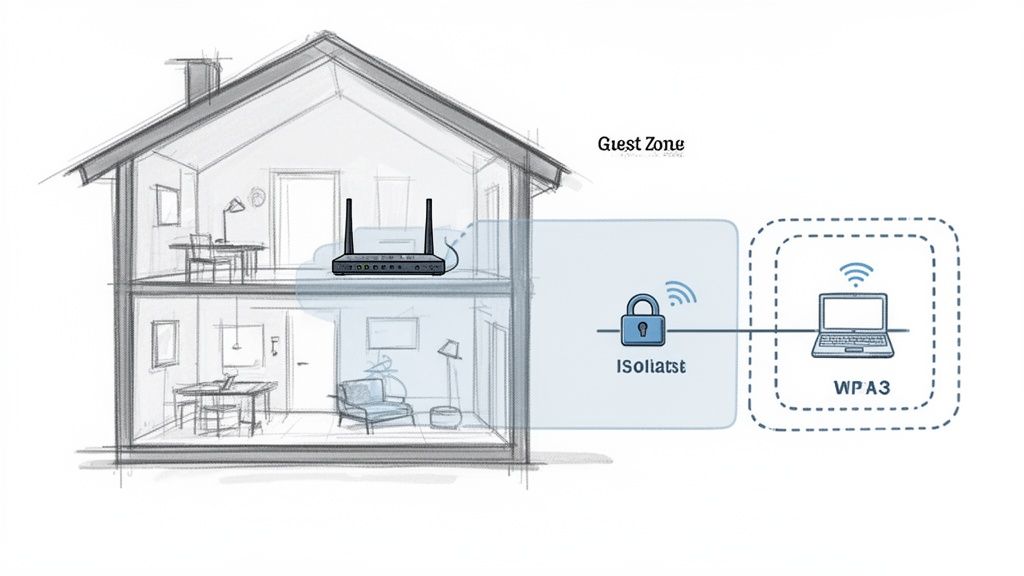
admin/password, anyone?). Your remote work policy must require employees to change the router's admin login and create a strong, unique Wi-Fi password using WPA3/WPA2 encryption. - Create a "Work-Only" Network: Most modern routers can create separate guest networks. Instruct employees to create a dedicated network exclusively for their work devices. This isolates company laptops from potentially insecure smart TVs and other personal gadgets.
- Keep Firmware Updated: Router firmware updates often contain crucial security patches. Encourage employees to enable automatic updates or check quarterly that their firmware is current. This is one of the most effective yet overlooked network security best practices you can implement.
Pro-Tip: Provide your team with a simple, one-page PDF guide on how to update router firmware and change default passwords for major brands (Netgear, Linksys, etc.). This makes a technical task much less intimidating and increases compliance.
6. Conduct Regular Security Awareness Training
Your technology is only as secure as the person using it. You can have digital Fort Knox, but if an employee willingly hands over the keys because they were tricked by a convincing email, all your firewalls are worthless. Security awareness training transforms your team from a potential vulnerability into your first line of defense—a human firewall.
For our clients here in Indiana, a single click on a phishing link can unleash ransomware that brings business to a halt. Regular training and simulated phishing campaigns arm your team to spot and report threats before they cause damage. It's the digital equivalent of teaching your staff how to spot a counterfeit bill.
Making Your Human Firewall Effective
The goal isn't to play "gotcha" with your employees; it's to build a resilient security culture where everyone feels empowered to question suspicious requests.
- Make It Continuous and Engaging: A once-a-year video is a checkbox, not a strategy. Effective training is ongoing. Use platforms like KnowBe4 or Proofpoint to deliver short, interactive modules and run regular, unannounced phishing simulations. Consider incorporating actionable compliance training best practices to boost engagement.
- Create a "No-Blame" Reporting Culture: The worst thing you can do is punish an employee who falls for a simulation. Instead, praise and reward those who report suspicious emails. This encourages vigilance and makes IT a partner rather than a punisher. Your policy should be clear: When in doubt, report it.
- Lead from the Top: Security training isn't just for the front-line staff. When leadership participates and openly discusses the importance of cybersecurity, it sends a powerful message that this is a core business priority, not just an IT problem.
7. Encrypt Data In Transit and At Rest
Imagine your company’s sensitive data is a pile of gold bars. Encryption scrambles your information into an unreadable code, both when it's sitting on a hard drive ("at rest") and when it's zipping across the internet ("in transit"). Even if a thief manages to snatch a laptop or intercept data, all they get is a block of useless digital noise.
This is a core pillar of any serious remote work security plan. For a financial advisory firm in Carmel, it’s the difference between a secure client portfolio and a catastrophic data breach. When we deploy new laptops for our clients, enabling full-disk encryption with tools like BitLocker is step one.
Making Encryption a Standard Operating Procedure
Effective encryption is about building a consistent, layered defense that protects data everywhere it lives and moves.
- Encrypt All Endpoints: Before an employee takes a device home, its entire hard drive must be encrypted. This is non-negotiable. Tools like Microsoft's BitLocker (for Windows) and Apple's FileVault (for macOS) are built-in and powerful. This one step neutralizes the massive risk of physical device theft.
- Secure the Journey: Data in transit is incredibly vulnerable. Mandate the use of secure protocols for email and file transfers. This ensures that information sent from a home office to your servers is shielded from eavesdroppers. For a deeper dive, our guide to secure data transfer for Indiana businesses breaks this down.
- Leverage Cloud-Native Tools: Don't reinvent the wheel. Major cloud platforms like Microsoft 35, Google Workspace, and AWS have robust, built-in encryption features for data at rest. Enable them. They are designed to protect your data in their environment, and using them is often as simple as checking a box.
8. Establish Secure File Sharing Practices
Emailing sensitive files back and forth is the digital equivalent of sending your company’s secret recipe on a postcard. It’s a messy, insecure habit that creates dozens of uncontrolled copies. Secure file sharing platforms give you complete control over who sees what, when, and for how long.
This is a core component of effective remote work security. For our clients, like a Greenwood-based accounting firm handling sensitive tax documents, using a platform like Microsoft SharePoint is non-negotiable for maintaining client confidentiality and compliance. It replaces the chaos of email attachments with a single, controlled source of truth.
Making Collaboration Work Securely
The goal is to make sharing files securely the easiest and most obvious option for your team.
- Set Smart Defaults: Configure your platform (like Microsoft 365 or Google Workspace) so the default sharing option is always "Specific people." This forces the user to consciously decide who gets access, preventing accidental oversharing.
- Use Time-Bombs and Passwords: When sharing files externally, always use password-protected links and set an automatic expiration date. This ensures that a link to a sensitive proposal doesn't live on forever in someone’s inbox.
- Audit and Prune Permissions: Don't let access permissions become a tangled mess. Schedule a quarterly review of who has access to what. Remove permissions for former employees, contractors whose projects are complete, and team members who no longer need access. This regular cleanup is crucial for maintaining security.
9. Create an Incident Response Plan
When a security breach happens, the first few hours are chaos. An Incident Response (IR) Plan is your fire drill for a cyberattack—a step-by-step playbook that turns chaos into a calm, methodical response. It dictates who to call, what to shut down, and how to stop the bleeding before a small problem becomes a company-ending disaster.
For a local Greenwood construction company we work with, their IR plan was the difference between a minor ransomware event and weeks of complete shutdown. Because they knew exactly who to call (us!) and where their clean backups were, we had them operational again in hours, not weeks. This kind of preparation is a core tenet of modern remote work security, especially when your team is scattered across Central Indiana.
Making Your Incident Response Plan Work for You
Hoping a breach never happens isn't a strategy. A solid plan ensures you're ready to act decisively when the worst occurs.
- Assemble Your "Breachbusters" Team: Before an incident, designate an IR team leader. This needs to be someone who can make decisions under pressure. Also, establish a secure, out-of-band communication channel (like a Signal group or a simple phone tree) that won’t be compromised if your primary network goes down.
- Run Fire Drills (Tabletop Exercises): A plan that sits on a shelf is useless. Conduct quarterly tabletop exercises where you simulate a breach, like a CEO's email being compromised. Walk through the plan step-by-step to find the holes before a real attacker does.
- Prepare Your Go-Bag: Don't wait until you're under attack to find a lawyer or a forensics firm. Maintain relationships with legal counsel, cybersecurity insurance providers, and IT partners before you need them. Have breach notification templates drafted and ready to go.
10. Adopt a Zero Trust Mindset
If a VPN is your armored tunnel into the company network, Zero Trust is the bouncer at every single door inside. The old way was "trust but verify." The Zero Trust model flips that on its head: Never trust, always verify. Every single request to access data or an application is treated as a potential threat, even if it comes from inside the network.
This is the future of remote work security. For our Greenwood legal clients, this means a paralegal working from home can access case files but is blocked from touching accounting systems. It contains potential breaches by building digital bulkheads around your most critical data, a process called network segmentation.
Making Zero Trust Work for Your Business
Implementing a Zero Trust framework sounds intimidating, but it's a gradual process. You don't have to boil the ocean overnight.
- Start with Your Crown Jewels: Identify your most critical data—client financial records? Proprietary designs? Start by building a segmented, hyper-secure zone around that data first. Access should be granted on a strict, need-to-know basis and verified every time.
- Identity is the New Perimeter: Your foundation is a strong identity provider like Azure Active Directory or Okta. This system becomes the single source of truth for who is who. Combine this with mandatory multi-factor authentication for all access.
- Log and Monitor Everything: A key principle of Zero Trust is assuming a breach will happen. To catch it, you need visibility. Actively monitor for unusual access patterns. This is where having a local IT partner in Indianapolis can make a huge difference in spotting and stopping an attack before it spreads.
10-Point Remote Work Security Comparison
| Solution | Implementation Complexity 🔄 | Resource Requirements ⚡ | Expected Outcomes ⭐📊 | Ideal Use Cases 💡 | Key Advantages ⭐ |
|---|---|---|---|---|---|
| Virtual Private Network (VPN) Implementation | Low–Moderate — configuration, server selection, split-tunnel tuning; ~1–2 weeks | Moderate — VPN servers/services, bandwidth, licensing; minimal endpoint software | ⭐⭐⭐ — encrypts remote traffic, masks IPs; may reduce throughput | Remote workers on public Wi‑Fi; secure internal access; HIPAA/PCI compliance | Encrypts all traffic, relatively easy enterprise rollout |
| Multi‑Factor Authentication (MFA) / 2FA | Low — straightforward integration with identity providers; quick rollout | Low — auth apps/hardware tokens, identity provider integration | ⭐⭐⭐⭐ — prevents ~99.9% account compromise; reduces resets | Admin/email/financial accounts; cloud services; high‑risk logins | Strong account protection with low operational cost |
| Endpoint Protection, Device Management & Patch Management | High — planning, pilot groups, diverse device policies | High — licensing, management consoles, admin effort, testing environments | ⭐⭐⭐⭐ — visibility, rapid remediation, reduced malware spread | BYOD, distributed endpoints, regulated industries (healthcare, manufacturing) | Centralized device control, automated patching, remote wipe |
| Secure Password Management & Policies | Low–Moderate — vault rollout, training and policy enforcement | Low — SaaS licenses or self‑hosted vault; SSO integration optional | ⭐⭐⭐ — eliminates reuse, reduces credential theft and support tickets | Teams with many shared credentials; SMBs reducing password sprawl | Secure sharing, strong generators, audit trails |
| Secure Home Network Configuration | Low — user guidance and basic router changes; occasional onsite support | Low — guidance only; optional router replacement ($150–400) | ⭐⭐ — reduces local attack surface; protects multiple devices | Remote employees, home offices, companies auditing home setups | Low cost, broad baseline protection for all home devices |
| Security Awareness Training & Phishing Simulation | Moderate — program setup, recurring campaigns and reporting | Low–Moderate — platform subscription, admin time, reporting | ⭐⭐⭐ — measurable drop in phishing clicks; builds security culture | All organizations, especially SMBs without dedicated security teams | Human firewall effect; cost‑effective risk reduction |
| Data Encryption in Transit and at Rest | Moderate — policy design and key management planning | Moderate — KMS/HSM, key lifecycle management, implementation effort | ⭐⭐⭐⭐ — renders stolen data unusable when keys managed properly | Any org handling PII/PHI/financial data; backups and cloud storage | Strong compliance alignment with minimal user impact |
| Secure File Sharing & Collaboration Practices | Low–Moderate — set permissions, retention and sharing policies | Low — SaaS platform subscriptions, admin oversight | ⭐⭐⭐ — reduces accidental oversharing; provides audit trails | External collaboration, regulated document workflows | Granular access control, expiring links, revocation |
| Incident Response Plan & Breach Preparation | High — cross‑functional planning, playbooks, tabletop exercises | Moderate — internal time, retainer for forensics/legal/PR | ⭐⭐⭐⭐ — faster containment, lower regulatory impact, preserved evidence | Organizations with sensitive data or regulatory obligations | Clear roles, repeatable recovery steps, regulatory readiness |
| Network Segmentation & Zero Trust Architecture | Very High — architectural redesign, phased implementation | High — identity providers, segmentation tools, monitoring, skilled staff | ⭐⭐⭐⭐⭐ — contains breaches, prevents lateral movement at scale | Large enterprises, critical systems, remote/third‑party access | Minimizes blast radius; identity‑centric, scalable protection |
Your Next Steps for a Secure Remote Workforce
There you have it—the full playbook. We've covered everything from the non-negotiable fortress of a good VPN to the human firewall built by security awareness training. It’s a lot to take in, but remember this: perfect security is a myth, but proactive security is a game-changer.
The core lesson from these remote work security best practices isn't about buying a single piece of software. It's about building layers of defense. Think of it like securing your home. You don't just lock the front door; you also lock the windows, install a security camera, and maybe get a very loud dog. Each layer makes a potential intruder's job that much harder.
Your Most Important Takeaways
Let's boil it all down. If you walk away with anything from this guide, let it be these three principles:
- Assume Nothing, Verify Everything: This is the heart of a Zero Trust mindset. Don’t automatically trust a device or user. Every request for access should be treated with healthy skepticism and verified, which is why tools like MFA and network segmentation are so powerful.
- The Human Element is Your Greatest Strength (and Weakness): Your team can either be your first line of defense or the easiest way for a hacker to walk in. Consistent, engaging security awareness training transforms your employees from potential targets into vigilant sentinels.
- Preparation is 90% of the Battle: An incident isn't a matter of if, but when. Having a tested Incident Response Plan isn't about being paranoid; it's about being professional. A clear plan turns panic and chaos into a swift, controlled, and effective response.
Pro-Tip: Don't let this list just sit in your browser tabs. Schedule a 30-minute meeting with your leadership team this week. Pick just one high-impact item from our list—like deploying MFA on all critical accounts—and make a concrete plan to get it done in the next 30 days. Small, consistent wins build a powerful security posture over time.
Securing a modern, flexible workforce is an ongoing process, not a one-and-done project. The good news? You don't have to go it alone. For businesses here in the Indianapolis and Greenwood area, having a local IT partner means you get a team that can be on-site when you need it most, providing hands-on help and strategic guidance tailored to the Central Indiana business landscape.
Feeling overwhelmed or just want a professional to double-check your work? That's what we're here for. The team at Finchum Fixes IT specializes in transforming these complex security principles into practical, budget-friendly solutions for Indiana businesses. Visit us at Finchum Fixes IT to schedule a no-pressure consultation and build a security plan that lets you focus on running your business, not fighting off cyber threats.