Secure Your Indiana Business: Door Access System 2026

A lot of Johnson County owners hit the same wall. The front door still runs on a ring of keys, one employee leaves on rough terms, and somebody realizes nobody knows whether a copy exists. Then the calls start. Who still has access. Who opened early. Whether you need to re-key the whole place before Monday.
That's why a door access system belongs in the same conversation as backups, Wi-Fi, endpoint security, and uptime. In old Indiana brick buildings along the I-65 corridor, the lock on the door is only half the story. The other half is network reliability, power stability, and whether someone can support the system after the installer leaves.
TL;DR
- Keys create blind spots: lost keys, staff turnover, and no audit trail make physical security harder to manage.
- Modern access control adds accountability: every access request follows a logged decision process, not guesswork.
- The network matters as much as the lock: many access problems come from connectivity, controller, or power issues.
- Biometrics aren't always the best fit: they can slow high-traffic doors and frustrate shift changes.
- ROI comes from continuity: fewer lockouts, faster credential changes, less wasted admin time, and lower downtime risk.
- Indiana buildings need practical design: thick walls, patchy Wi-Fi, and aging infrastructure punish cheap installs.
Why Your Old Keys Are Costing You Money
A Greenwood shop owner gets a late-night call. A former employee never turned in a key. Nobody knows whether it was copied. The owner now has three bad options. Ignore it and hope for the best, re-key the building and interrupt the week, or start handing out fresh keys and repeat the same mess later.
That's not a lock problem. That's an operations problem.
Traditional keys feel cheap because you buy them once. However, the true cost becomes apparent later in staff turnover, emergency re-keying, after-hours callouts, and the time your office manager burns chasing down who has access to what. There's also no audit trail. If someone enters early, props open a side door, or walks into a room they shouldn't, a metal key won't tell you a thing.
Where keys quietly hurt continuity
The worst part is the uncertainty. A business owner can't revoke a key from a parking lot. They can't check a log from home. They can't tell whether the issue is a security event or just an employee arriving outside normal hours.
A modern door access system fixes that by replacing physical copies with managed credentials and a record of what happened. If someone leaves, access gets removed in software. If a door is used at an odd time, the system records the event. If you're trying to reduce downtime, that matters. Every minute spent sorting out preventable access problems steals time from payroll, production, customer work, and billable labor.
Why the market keeps moving this way
This isn't a niche upgrade anymore. The global door access control market is projected to reach $15 billion in 2029, up from $10 billion in 2023, a 50% increase, driven by mobile credentials and cloud-based management, according to market research on access control growth.
That growth makes sense. Owners want fewer surprises, not more hardware drama.
If you want a broader primer before choosing hardware, this comprehensive guide to access control is a useful outside reference. The practical takeaway is simpler than most vendors make it sound. If your business is growing, rotating staff, or dealing with multiple entry points, keys stop being simple and start becoming expensive.
What works better in the real world
- Fast revocation: remove a card, fob, PIN, or mobile credential without touching the lock cylinder.
- Clear accountability: see who attempted entry and when.
- Less admin waste: stop managing key rings like they're inventory.
- Better fit for compliance: if you deal with HIPAA, CMMC, or even a basic NIST CSF security review, logs matter.
In Southside buildings, especially the older brick ones, the businesses that do best are the ones that treat access control like part of IT infrastructure, not just door hardware.
How a Modern Door Access System Works
Many envision a reader on the wall and an electric strike in the frame. That's only the visible part. The actual system is a control loop.
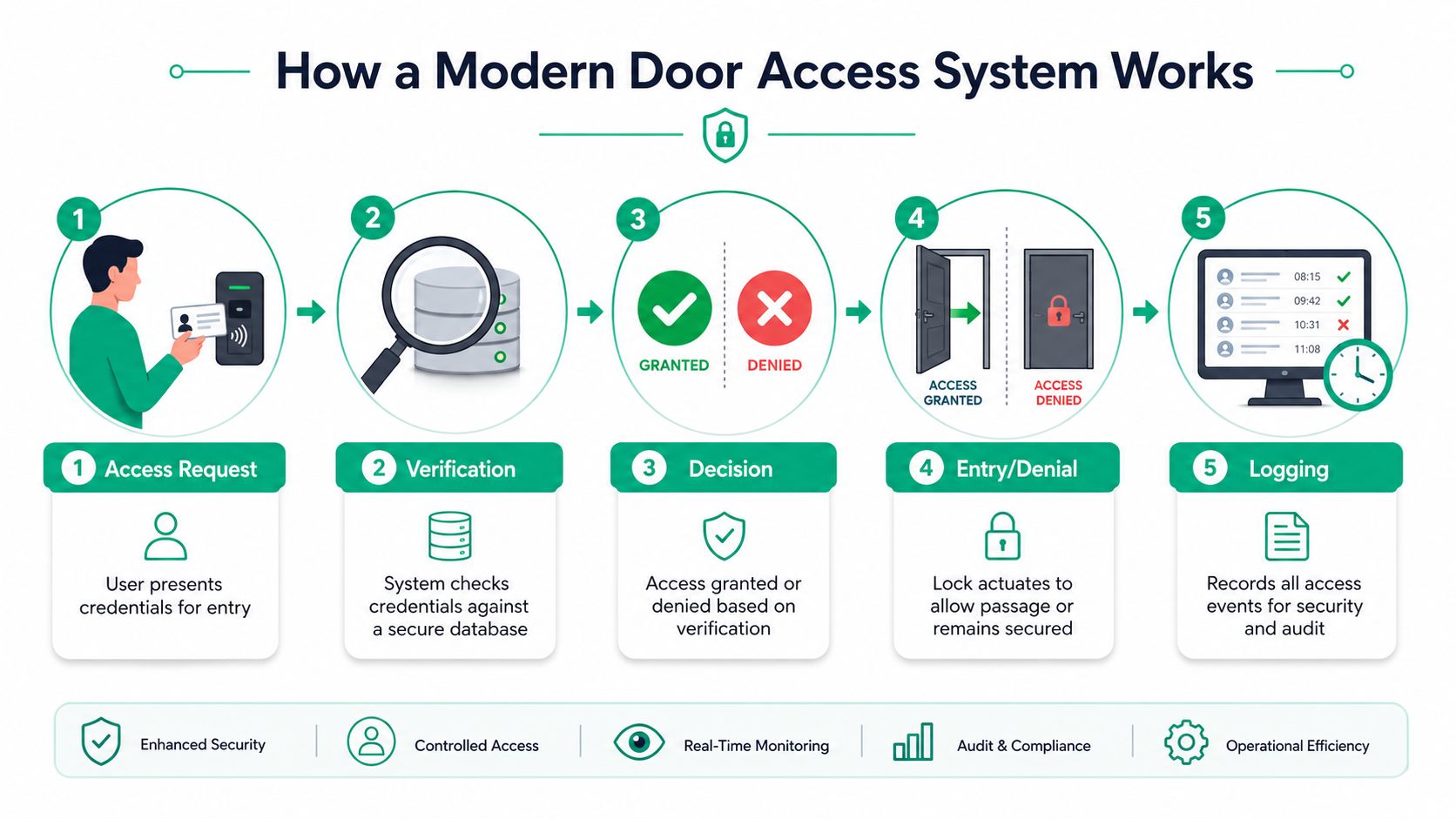
A good way to think about it is a digital bouncer. A person presents a credential. The system checks whether that person is allowed through that specific door at that specific time. Then it either opens the door or keeps it locked. After that, it records the event.
According to Avigilon's explanation of access control basics, the core loop is credential presentation, verification by a controller, authorization decision, and event logging for auditability. That process often includes door position monitoring and request-to-exit sensing to detect forced entry or propped-open doors.
The five parts that matter
-
Credential presentation
Someone uses a card, fob, PIN, phone, or biometric. -
Reader capture
The reader collects the credential data and passes it along. -
Controller decision
The controller checks policy. That's the brain of the system. -
Lock response
If approved, the lock releases. If denied, it stays secure. -
Event logging
The system stores the attempt for review, troubleshooting, and compliance.
That logging piece is what separates a real access system from an electronic deadbolt. You're not just securing the opening. You're documenting the decision.
For another plain-English explainer aimed at security for Perth homes and businesses, Securitec has a decent summary of the same fundamentals. The basics don't change whether the building is in Australia or off Main Street in Greenwood.
Why cloud and control logic matter
The software side determines how easy the system is to run after installation. User provisioning, schedule changes, revoked access, alerting, and remote admin all live there. If you want a local read on that side of the equation, this guide to cloud-based access control for Indy businesses is worth reading.
A short walkthrough helps if you want to see the moving parts in action.
A reliable system doesn't just open doors. It proves why a door opened, why it didn't, and what happened around that event.
Choosing Your Credentials Card Fob PIN or Face
The credential decision is where owners often get sold the wrong thing. Not because the technology is bad, but because the workflow wasn't considered.
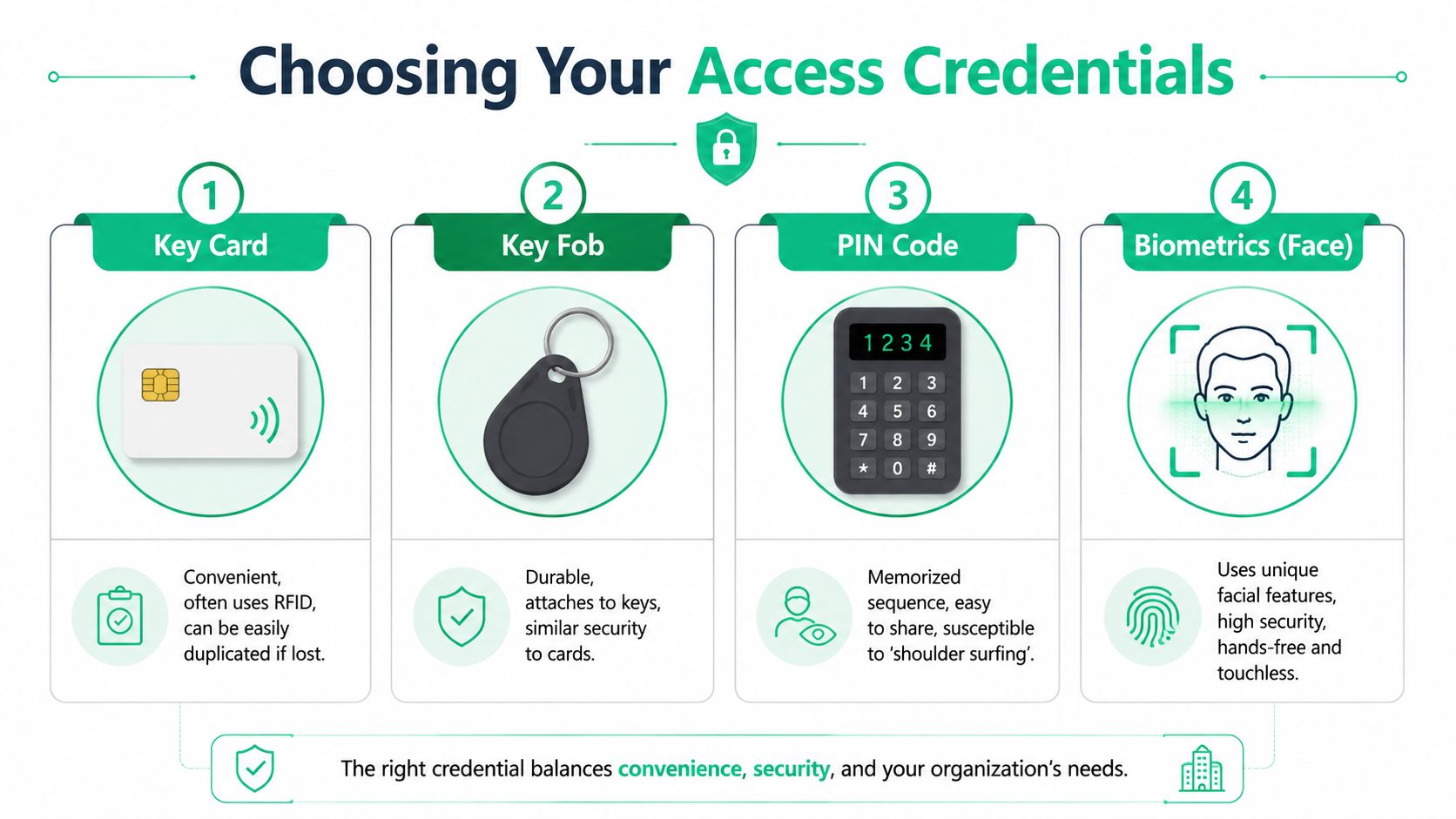
A small office in Greenwood with a handful of staff has different needs than a warehouse near the airport corridor, a dental clinic with HIPAA concerns, or a light manufacturing floor where everybody hits the same entrance before shift start. The best credential is the one people will use correctly without slowing the building down.
Quick comparison
| Credential | Best fit | Main upside | Main drawback |
|---|---|---|---|
| Card | Offices, shared staff environments | Familiar and easy to issue | Can be lost or handed to someone else |
| Fob | Shops, warehouses, rougher use | Durable and easy to carry | Same sharing problem as cards |
| PIN | Small teams, secondary doors | Low hardware complexity | Gets shared and observed |
| Face or fingerprint | Restricted areas | Strong identity check | Can add friction at busy doors |
| Mobile app | Staff already using managed phones | Easy to revoke remotely | Depends on phone habits and app reliability |
What usually works
Cards and fobs are still the most practical default for many SMBs. They're simple, durable, and easy to replace. In busy environments, they also move people through the door quickly.
PINs make sense for low-risk interior areas, shared utility rooms, or as a backup method. They're weak if used alone at a front entrance because employees share codes, write them down, and reuse them.
Mobile credentials can be a strong option when the business already manages phones well. They're especially useful for leadership, IT, and mobile staff who need flexible access changes without swapping hardware.
The biometric trade-off installers skip
Biometrics sound like the premium answer. Sometimes they are. Sometimes they're the wrong fit.
A 2024 NIST study found biometric systems can increase average door access time by 2.2 seconds compared to key fobs, and for a 500-person facility that can add over 18 minutes of cumulative delay per shift change, according to NIST's biometric technology evaluations. That's not a theory problem. That's a line at the door while supervisors wait for people to badge in.
Field note: Use biometrics where identity assurance matters most. Don't put them on your busiest employee entrance unless you've tested the traffic flow.
That's why hybrid designs tend to win. Put biometrics on the server room, records room, or executive suite. Use fobs or cards on high-throughput entries. That gives you stronger control where it matters without dragging down shift changes.
If you're weighing the security and usability side together, this local guide on passwords and biometrics for Central Indiana businesses is a good companion read.
A practical selection rule
Choose credentials based on these questions:
- How fast must people move: front office pace is different from shift-change pace.
- How often does staff turnover happen: high turnover favors fast issuance and revocation.
- What happens if a credential is shared: some doors can tolerate that. Others can't.
- Do you need stronger identity proof: healthcare, regulated work, and sensitive inventory often do.
The strongest security on paper isn't always the strongest system in practice. If people hate using it, prop doors open, or create workarounds, the design failed.
The Tech Behind the Scenes Network and Security
Most access outages don't start at the reader. They start behind the wall, in the closet, or on the switch.
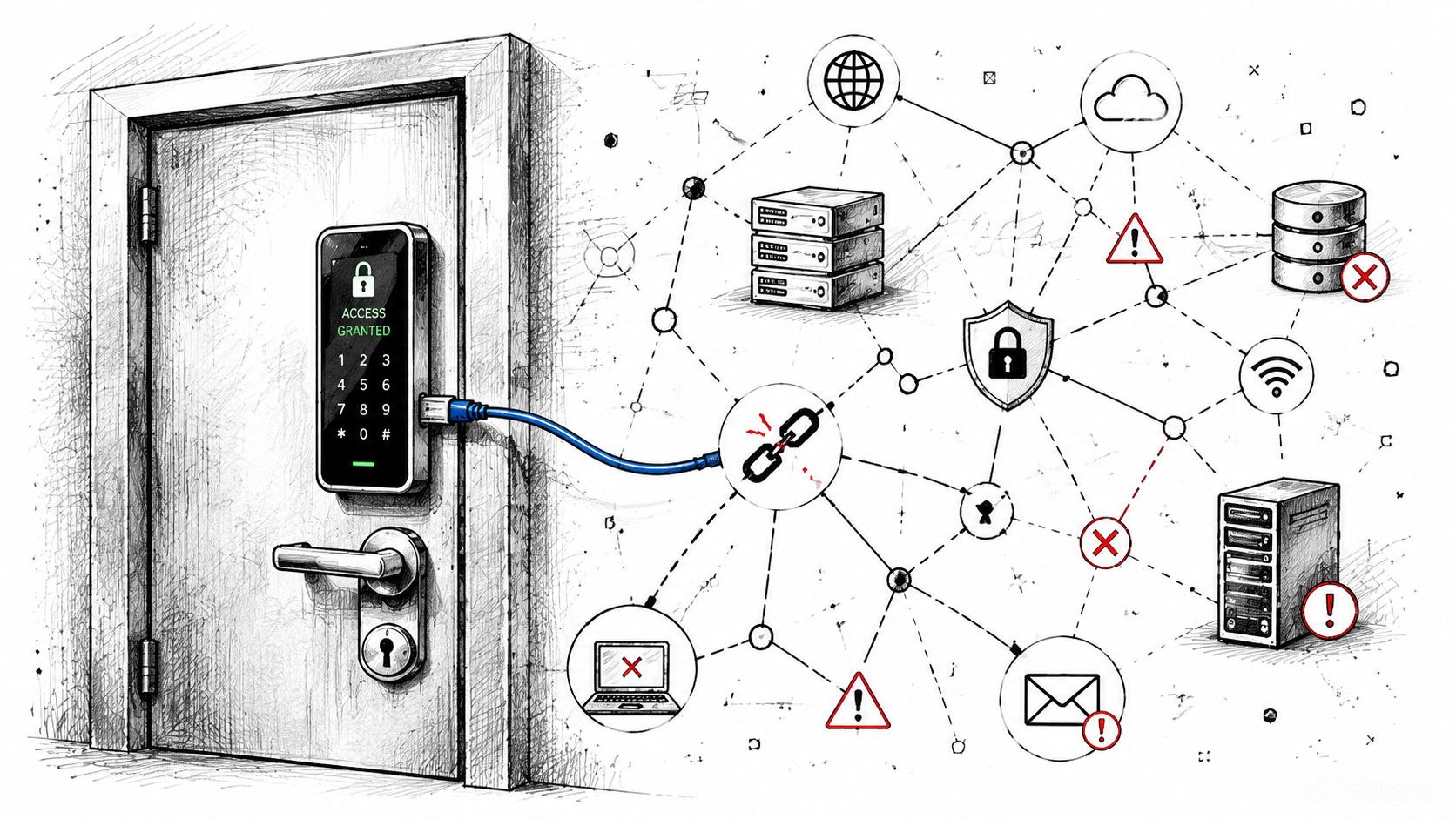
That's where old Indiana construction complicates things. Thick brick, patched additions, old conduit runs, and whatever the last tenant left behind can punish weak Wi-Fi and cheap power design. An installer may get the lock working on day one, but if the controller loses clean connectivity or stable power, the system turns flaky fast.
The parts owners don't usually see
A dependable door access system includes more than readers and strikes.
- Controller: the decision-making hardware that checks credentials and triggers the lock.
- Power supply: keeps the lock and support hardware stable.
- Switching and uplink: carries traffic back to the software platform.
- Segmentation and policy: decides what can talk to what.
- Monitoring: alerts someone before users discover the problem at the door.
One published controller specification shows why hardware details matter. Support for 12/24 VDC input, up to 10 W power consumption, and long-range EPC Gen1/Gen2/Gen2 v2 operation around 900 MHz directly affects cabling, power budgeting, and credential choices, as shown in these controller technical specifications.
Why IT design changes the outcome
Networking discipline matters. A proper deployment accounts for VLAN planning, controller reachability, power resilience, and secure communication between system components. Zero Trust architecture applies here too. Every device and service should have a defined role, limited permissions, and monitored communication paths.
In older buildings around Greenwood and downtown Indy, I'd rather trust hardwired backhaul and properly placed UniFi gear than hope a weak wireless hop behaves forever. Latency-optimized mesh nodes can help in awkward layouts, but they're not a free pass for sloppy design. If the wall construction is fighting you, run cable where you can and reserve wireless for the places it makes sense.
Don't buy a smart lock and assume you bought a system. A system includes power, network path, policy, and support.
If you're thinking about the cybersecurity side beyond the door itself, this outside read on protecting your business from cyber threats is a useful reminder that physical and digital security now overlap. A door controller on a bad network is still a security problem.
What good support looks like
A strong setup should include:
- Network segmentation: keep access control traffic separate from guest Wi-Fi and general office noise.
- Stable switching: avoid bargain switches that behave under light load and fail under change.
- Power planning: know what each controller and lock draws before adding doors.
- Security visibility: tie logs and alerts into your broader monitoring posture when possible.
For a deeper local read, this guide on network security for Indiana businesses explains why secure infrastructure matters long after install day.
Calculating the Real ROI of Access Control
Owners usually ask the wrong opening question. They ask, “What's the system cost?” The better question is, “What does it cost me to keep doing this the old way?”
Keys create repeat labor. Somebody issues them, tracks them, replaces them, chases them down, and panics when they disappear. When there's an incident, somebody has to reconstruct what happened with incomplete information. That's wasted tech time, wasted admin time, and in many cases lost production time.
Where the return shows up
The return on a door access system usually comes from four places.
- Fewer disruptions: no emergency scramble because a key walked off.
- Faster access changes: new hire, terminated employee, vendor access, temporary schedules.
- Better investigations: logs cut down the time spent guessing.
- Cleaner budgeting: maintenance becomes part of planned IT operations instead of random crisis spending.
The biggest ROI factor is continuity. If a door system failure locks out staff, delays opening, or blocks a restricted workflow, the cost stacks up fast. The author brief frames downtime as potentially costing up to $9,000 per minute, which is exactly why owners should care less about shaving a little off install cost and more about whether the system will stay up.
Cheap installs get expensive later
A bargain install often pushes costs into the future. That's when you find out the reader works but the handoff to the network is unstable, the power budget was guessed, or nobody documented credential administration. The invoice looked smaller. The support burden got bigger.
Here's the practical test. If the system saves your office manager from key wrangling, helps supervisors avoid lockouts, and shortens incident reviews, it's paying back in labor even before you count security risk reduction.
The ROI isn't just theft prevention. It's fewer interruptions, fewer emergency fixes, and less time spent babysitting a door.
For Johnson County business owners, that's the business case. You're not buying gadgetry. You're buying fewer surprises and more predictable operations.
The Hidden IT Gap Most Installers Ignore
Monday morning in a Greenwood office. Staff are at the front door, badges in hand, and the reader is dead. The lock hardware is still mounted, the app is still on someone's phone, and nobody knows whether to call the installer, the internet provider, or IT. That confusion is where small businesses lose time.
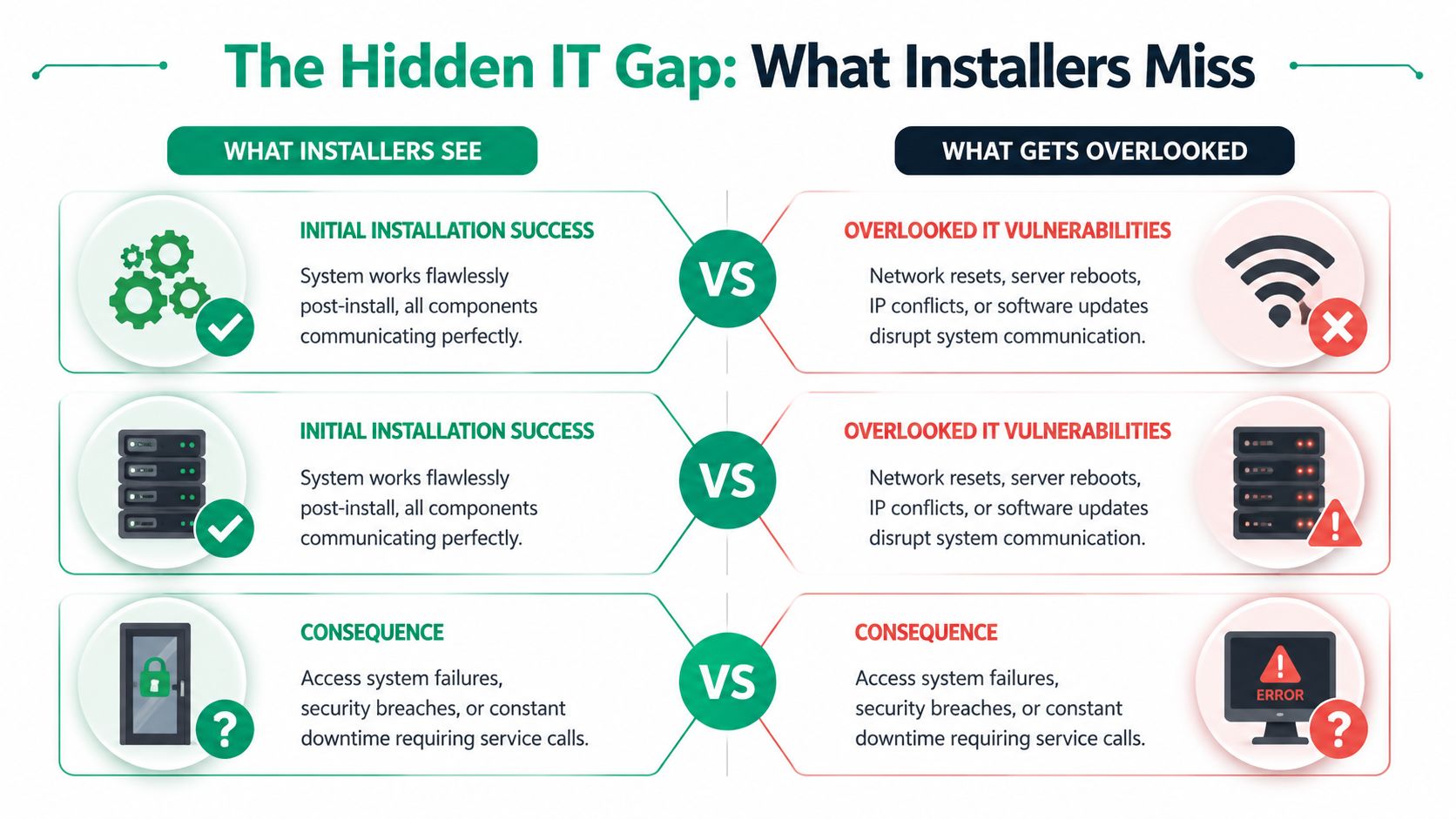
In a modern door access system, the failure often starts behind the reader. A switch port gets disabled. PoE drops under load. A firewall rule changes. Wi-Fi coverage in an old brick corridor was always marginal, and the new reader finally exposed it. The symptom is a door that will not open. The cause is usually sitting in the network, power, or identity stack.
That handoff is where SMBs get stuck. The locksmith confirms the strike and reader are in place. Internal IT may manage laptops, printers, and Microsoft 365, but not the access platform or controller behavior. Meanwhile the building still has to open on time.
Why the failure usually isn't the lock
Field experience backs this up. On newer systems, door trouble often traces to connectivity, power delivery, controller communication, credential sync, or policy changes. Hardware does fail, but far less often than owners expect.
Common failure points
| Problem area | What users see | What's happening |
|---|---|---|
| Wi-Fi instability | Reader drops offline | Weak signal, roaming issues, or interference |
| Power delivery | Door behaves inconsistently | Controller or peripheral power problem |
| Network changes | Access suddenly stops | Routing, authentication, VLAN, or switch-side issue |
| Identity sync | Wrong people have wrong access | Directory or provisioning problem |
Old Indiana buildings make this worse. Brick walls weaken wireless signals. Retrofit wiring gets spliced into whatever was available years ago. Closet power is crowded, unlabeled, or shared with gear that should have been replaced already. A clean install photo on day one does not tell you much about how that system will behave after six months of switch changes and patch cycles.
Why pure install shops leave you hanging
Installers do important work. They mount hardware, pull cable, terminate readers, and get the opening functional. But long-term stability depends on more than door hardware. Someone still has to manage IP reservations, VLANs, PoE budgets, firmware, cloud reachability, and user provisioning.
Identity is usually where the mess becomes visible. A terminated employee still has badge access. A new hire is in Microsoft 365 but missing from the access groups. A manager changes departments and inherits the wrong schedule. If your system ties into Active Directory, this guide to Active Directory management for Indy SMBs explains why user lifecycle work affects physical access too.
The support model that fits SMBs
Most Johnson County businesses do not need a national service contract every time a side door goes offline. They need a support team that can trace the full path. Reader, controller, switch, firewall, Wi-Fi, directory, and policy.
That is the maintenance gap many buyer guides skip. The fix is support that includes network troubleshooting and basic security administration, not just hardware service calls.
If your door system rides on your network, the people supporting it need to know the network.
That approach matters even more in older Greenwood and Indianapolis-area buildings, where access control problems often come from building constraints the install crew does not stay around to manage.
Your Indiana SMB Implementation Checklist
If you're shopping for a door access system right now, don't start with brand names. Start with the building, the workflow, and the failure points.
Start with the building reality
Walk the site and note the problem areas.
- Exterior doors and side entries: who uses them, when, and how often.
- Wall construction: old brick and retrofits change Wi-Fi and cabling decisions.
- Power and closet space: don't assume there's clean room for controllers and switching.
- Critical zones: server rooms, records storage, inventory cages, and executive offices.
If you already use a formal checklist for infrastructure planning, this 10-point IT infrastructure audit checklist for 2026 is a good way to frame the larger environment around the door system.
Match the system to your business rules
Ask these questions before you approve a design:
-
What compliance pressure do you have
Healthcare offices should think about HIPAA. Defense-adjacent firms should think about CMMC. Almost every business benefits from controls that align with NIST CSF thinking around access, logging, and incident response. -
Which doors need speed, and which need stronger identity
Don't put the same control on every opening just because the vendor prefers one stack. -
Who will own users and permissions
If no one can answer that clearly, the system will drift. -
How will support work after install day
Ask who handles controller issues, Wi-Fi issues, provisioning mistakes, firmware updates, and monitoring.
Vet the provider the right way
Don't just ask, “Can you install it?” Ask better questions.
- Ask about networking: can they explain switching, segmentation, and controller communication in plain English.
- Ask about identity systems: can they tie access changes to real user lifecycle processes.
- Ask about recovery: what happens during internet loss, local hardware failure, or power trouble.
- Ask about documentation: if they vanish, can another IT team take over cleanly.
The right door access system for an Indiana SMB isn't the flashiest panel or the fanciest scanner. It's the one that fits your traffic flow, survives your building's quirks, supports your compliance needs, and doesn't create a new source of downtime.
If you're in Greenwood, Indianapolis, or anywhere along the Southside and want a second set of eyes before you buy, schedule a Free Network Assessment or Security Risk Audit with Finchum Fixes IT. We'll review the building, the network, the access workflow, and the support gaps so you can choose a system that stays reliable after install day.