Network Security Solutions Company: Trusted Indiana SMB
If your Greenwood office is still hanging everything off one firewall and a handful of aging switches, you're not alone. A real network security solutions company does more than install gear, it fixes the design, watches the network around the clock, and helps you stay online when the next outage, breach, or bad patch hits.
What a Network Security Solutions Company Actually Does
A lot of Indiana owners think they need “better security” when what they really need is a partner who will own the network outcome. I've walked into Greenwood and I-65 corridor businesses where the firewall was fine, the problem was everything behind it, flat networks, shared admin rights, and no one could tell me who was supposed to notice an intrusion at 2 a.m.
A network security solutions company takes that mess and turns it into a managed system. That means firewall policy, segmentation, secure remote access, endpoint protection, monitoring, incident response, and compliance support all working together instead of as isolated purchases. A good fit can also help with secure Wi-Fi, backup strategy, and the practical parts of software development and cloud connectivity that keep business apps usable for staff and clients.
Product purchase versus outcome ownership
Buying a firewall is a transaction. Hiring a partner is a relationship with accountability. The distinction matters because a mature network security solution is a layered control stack, not a box on a rack, as outlined in enterprise guidance from Check Point's network security overview.
For local buyers, that usually means asking whether the provider will:
- Enforce policy at the edge. Firewalls should block bad traffic and apply rules consistently, not just sit there looking important.
- Limit movement inside the network. Segmentation keeps one compromised workstation from wandering into file shares, production systems, or accounting.
- Verify access every time. Zero Trust architecture and ZTNA force identity checks instead of assuming trust because a user is “inside” the perimeter.
- Watch for trouble continuously. Managed detection, sandboxing, IDS, IPS, and DLP work together to catch suspicious behavior before it spreads.
- Help with continuity. Network attacks can trigger downtime, and downtime is a business problem, not just an IT problem.
A provider should be able to explain what happens when one control fails. If the answer sounds like “the firewall has it covered,” keep shopping.
For a more practical primer on the basics, this Indiana-focused guide to network security is a good companion read. The test is whether the company can show you how it keeps the network usable, visible, and recoverable when something goes wrong.
The Layered Security Stack That Works
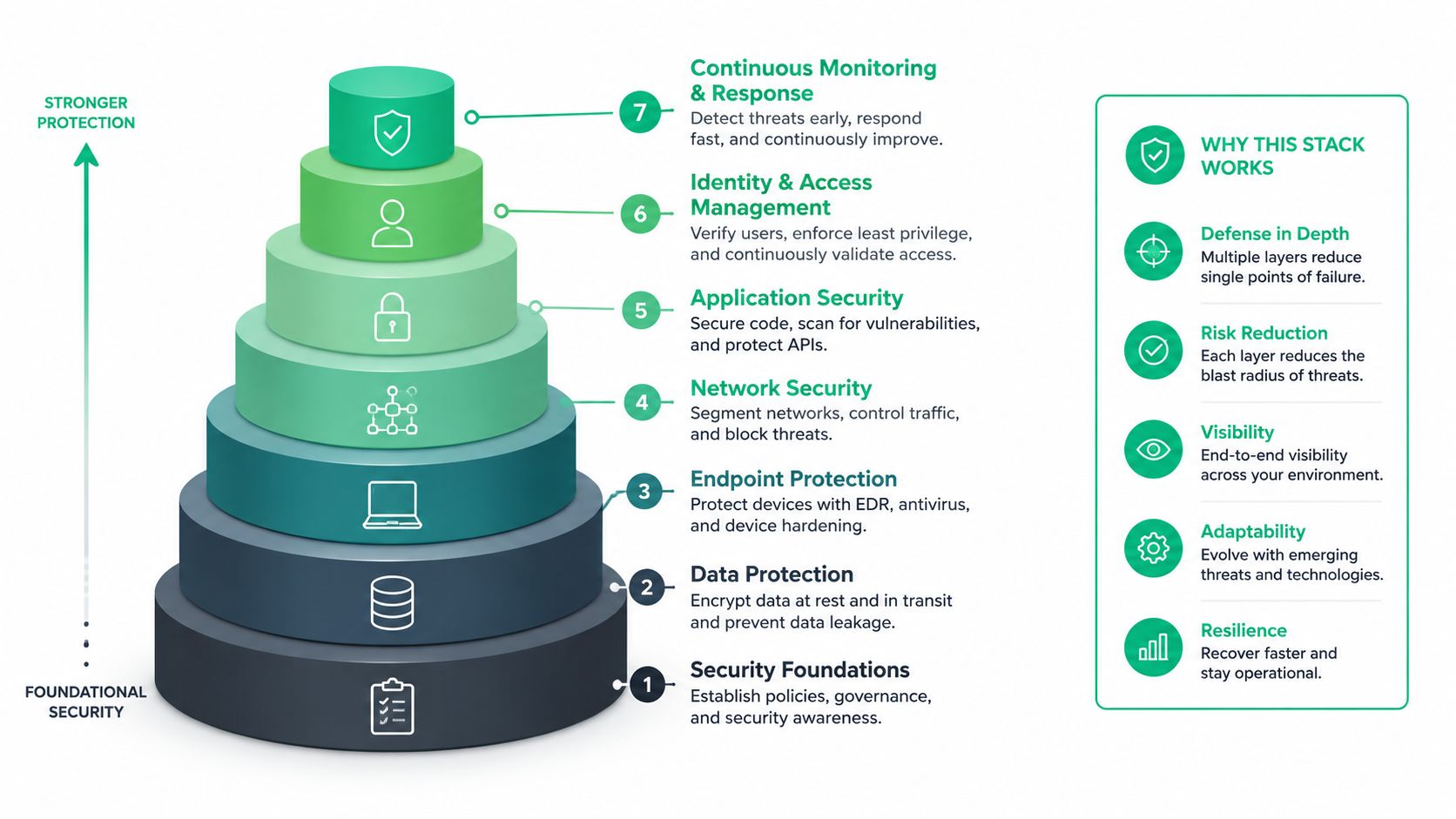
Most SMBs start with a firewall and maybe endpoint antivirus. That part is normal. A usable architecture puts several controls in place so one missed alert does not turn into a full outage, which is why enterprise guidance treats firewalls, segmentation, ZTNA, IDS/IPS, DLP, and sandboxing as connected pieces instead of separate purchases.
Why layering matters more than gadgets
A commercial building in downtown Indy needs a locked front door, interior doors that do not all open together, cameras, and people checking badges at each checkpoint. Network security works the same way. If an attacker gets past the first barrier, segmentation keeps them from roaming freely, and ZTNA forces identity checks every time they try to touch something sensitive.
That order matters in real networks. Firewalls enforce policy at the boundary, segmentation limits lateral movement, and intrusion tools inspect suspicious behavior deeper in the path. The same logic shows up in Check Point's firewall guidance for small business, which is useful if you are trying to separate real control from sales talk.
Where local teams get tripped up
In Greenwood and across Johnson County, I still see businesses trying to protect a flat network with one perimeter box and hope. That creates a huge blast radius. If a laptop gets compromised, the attacker can often move toward file servers, line-of-business apps, or backup targets with very little resistance.
A provider should be able to show how each layer limits that spread. If the answer only points to one appliance, the design is too thin.
- Firewalls. These should enforce policy, inspect traffic, and support modern access models.
- Segmentation. Internal separation should isolate users, guest Wi-Fi, production systems, and administrative access.
- Secure remote access. A vendor should explain how they reduce broad VPN exposure without making employees miserable.
- Endpoint protection. Something like Bitdefender GravityZone can help, but only when it sits inside a larger strategy.
- Monitoring and response. Detection only matters if someone is watching and can act fast.
Shared admin rights make this worse. When several people can change firewall rules, touch switches, or approve exceptions under the same login, there is no clean accountability trail, and incident response gets messy fast. I see that problem less often when teams choose a business router with sane management controls and build from there.
If you are also evaluating network hardware, this small-business router guide is worth a look because weak edge gear can undercut everything else you have paid for. The point is simple, layered security cuts the blast radius when one control slips.
Why Buying More Tools Won't Fix a Broken Network
This is the part vendors skip because it's uncomfortable. Most Indiana SMB risk isn't caused by a lack of products, it's caused by weak design and bad governance. I see flat networks, overused perimeter firewalls, sloppy patching on switches and firewalls, shared admin rights, and no real visibility, especially in fast-growing pockets of Johnson County and Hamilton County.
The problem is usually architecture, not inventory
A company can own five security tools and still be exposed if every device talks to every other device. That's like installing more locks on a house with the windows open. The controls look good on paper, but lateral movement is still easy once someone gets in.
One 2026 industry article pointed out that SMBs sometimes only learn about fraud from the bank, not from their own monitoring, which is a brutal sign that visibility is missing from the design. The same article also notes that segmentation, access hygiene, and monitoring architecture are what reduce lateral movement and improve detection. That lines up with the kind of network upgrade work outlined in this Indiana SMB infrastructure guide.
Shared admin rights make every incident harder
Shared credentials are a mess because they erase accountability. When several people can make firewall changes, touch switches, or approve exceptions under the same login, you lose the audit trail and make incident response slower. In practice, that means longer investigations, more finger-pointing, and more business disruption.
If you can't tell who changed what, you can't tell how the incident started.
The other hidden weakness is visibility. Traditional perimeter thinking assumes the firewall is the whole story, but modern attackers don't stop at the front door. They move laterally, probe backups, test admin paths, and sit until they can do damage.
That's why I push Johnson County business owners to fix the network first and buy tools second. If the design is weak, more software just creates a bigger bill and a false sense of safety. The win comes from cleaning up segmentation, tightening access, and building monitoring that shows you what's happening before the bank calls.
How to Evaluate and Choose the Right Provider
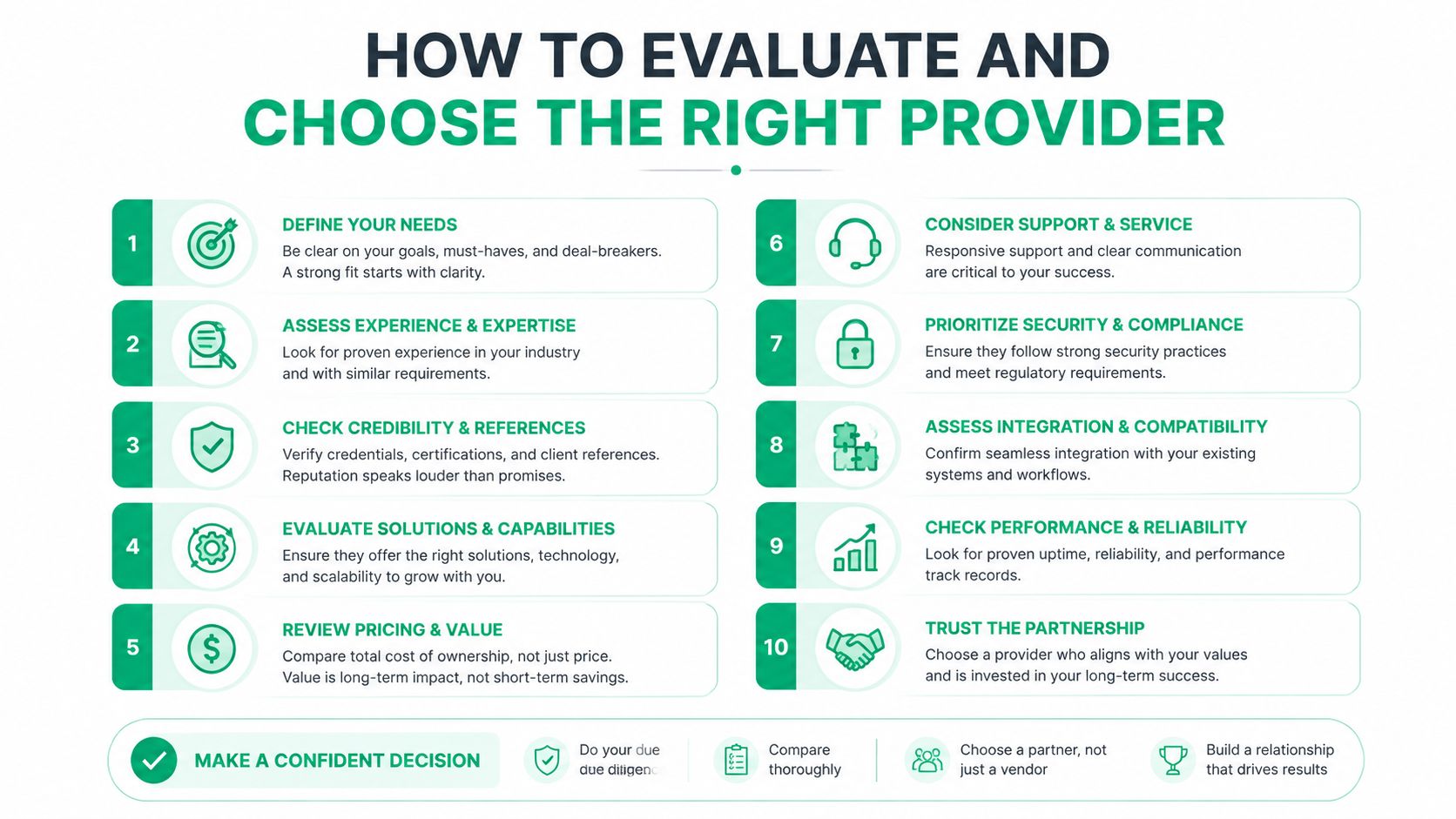
Picking a provider is less about the flashiest proposal and more about whether the team can keep your business moving. If your server room in downtown Indy goes down after hours, you need a company with a real escalation path, not a voicemail box and a next-business-day promise.
Questions that expose the real operators
Start with the basics and don't let anyone dodge them. Ask what their average response time is for urgent issues, whether they provide 24/7 monitoring, and how they handle compliance for healthcare under HIPAA or defense work under CMMC. If they can't answer clearly, that's the answer.
You should also ask about certifications. Microsoft, CompTIA, and Cisco credentials don't guarantee quality, but they do show technical depth. For businesses along the I-65 corridor, local support matters too. You want someone who can be on-site fast when the problem can't be solved remotely.
What good SLAs look like
I'd push for contracts that spell out service expectations in plain language. That includes:
- Critical issue response. Under two hours is a sensible benchmark for urgent problems, especially when a network outage can stop billing, shipping, or patient work.
- Clear escalation paths. You should know who answers first, who owns the incident, and when leadership gets pulled in.
- Predictable monthly pricing. Surprise invoices are bad for budgeting and worse for trust.
- Regular reporting. You need status, risk trends, and remediation progress, not a pile of technical jargon.
If you want a broader buyer's checklist for managed support, this guide to choosing a managed service provider is useful. One practical rule still holds, though, if the proposal is all product names and no operational detail, it's not a partner proposal, it's a shopping list.
Cost Considerations and ROI for Indiana SMBs
Security feels expensive until you price the outage. Industry estimates place downtime costs at up to $9,000 per minute, and that gets ugly fast when customer calls stop, orders stall, or staff sit idle. A breach adds recovery work, legal cleanup, lost trust, and hours of technical effort that could have gone to billable work instead.
Why managed security budgets are easier to defend
The economics are straightforward. Industry reporting based on IBM data says the global average cost of a data breach reached USD 4.44 million in 2025, while the U.S. average reached USD 10.22 million, and that U.S. figure was a 9% year-over-year increase. Those are big-company numbers, but they explain why smaller firms now treat security like they treat insurance and payroll systems. The source context for those figures is summarized in Fidelis Security's market and breach-cost reporting.
Managed security services help because they turn unpredictable emergency spend into a planned monthly line item. That is easier on cash flow, easier to explain to leadership, and far easier to justify than a surprise recovery project after a weekend incident. It also keeps IT people focused on revenue work instead of resetting credentials, rebuilding machines, and chasing repeated problems caused by weak network design.
ROI is mostly about continuity
The return is not just fewer incidents. It is also the time you stop losing to avoidable problems. A cleaner network, better segmentation, and continuous monitoring reduce interruptions that break the workday, and that means more hours spent on customer service, production, or support.
There is also a market signal here. One widely cited estimate valued the global network security market at USD 19.5 billion in 2022 and projected it to reach USD 61.1 billion by 2032, with a 12% CAGR over 2023 to 2032, while more recent estimates still point to strong growth. That does not mean your business should buy every security product on the shelf, but it does show that enterprise-grade protection is now a normal operating cost, not a luxury. The broader market context is outlined in this network security market analysis.
A security spend is easier to defend when it prevents one outage, one breach, or one ugly Monday morning.
If you want to frame the numbers for your own budget, this IT budget planning guide is a useful companion. The key question is whether your current setup protects revenue, or just looks good in a quote.
Real Indiana SMB Security Transformation
A Greenwood manufacturer I worked with had the usual problem set. The server hardware was old, the office Wi-Fi could reach production systems, admin credentials were shared, and the only visibility came from basic firewall logs nobody had time to read. That kind of setup is common, and it's fragile.
From flat network to controlled zones
We started by separating the network into functional zones. Production systems were isolated from office traffic, guest Wi-Fi got its own path, and administrative access was restricted so random endpoints couldn't wander into places they didn't belong. That cut the blast radius immediately, which matters when a single infected laptop can otherwise touch too much.
The team also moved to Zero Trust architecture for sensitive access. Instead of assuming trust because someone was on the internal LAN, each access attempt had to prove identity and fit policy. That sounds strict until you compare it with the mess of broad access and shared credentials.
Monitoring, backups, and recovery discipline
The next step was continuous monitoring with SOC-as-a-Service so alerts didn't sit until the next business day. We paired that with immutable off-site backups, which matters because a backup you can overwrite isn't much of a backup when an attack hits. For their endpoint layer, Bitdefender GravityZone fit the environment well, and secure Wi-Fi got separate guest and internal networks instead of one open pool.
In a similar data recovery engagement, we had to dismantle a failing RAID array to get to the data underneath, and that's the kind of ugly, hands-on work that reminds you why prevention is cheaper than heroics. Bit-level data recovery is possible, but nobody wants to pay for it when a cleaner architecture would've prevented the disaster in the first place.
The result was a much more manageable environment. Compliance conversations got easier, incident detection got faster, and monthly spend became predictable. That's the pattern I've seen again and again across the I-65 corridor, better segmentation, tighter access, fewer surprises.
Your Network Security Hiring Checklist
You don't need a perfect provider. You need one that can prove it knows how to keep your network usable, visible, and recoverable. Use this checklist before you sign anything.
What to verify before you commit
- Layered controls. They should explain segmentation, firewall policy, secure access, and monitoring without hand-waving.
- 24/7 response. If they only work business hours, they're not a fit for critical environments.
- Compliance support. They should speak confidently about HIPAA, CMMC, and NIST CSF.
- Local presence. Greenwood and Indianapolis businesses need on-site help when remote support isn't enough.
- Predictable pricing. Monthly budgeting beats surprise remediation invoices.
- Clear reporting. You should get readable updates, not a wall of technical noise.
- No single-product pitch. One tool is not a strategy.
- Strong access hygiene. Shared admin rights and sloppy account control are red flags.
- Real escalation paths. You should know who owns urgent issues.
- Business understanding. They should care about downtime, continuity, and your actual operations, not just rack diagrams.
If you're comparing providers in the Greenwood or Indianapolis area, ask for a Free Network Assessment or a Security Risk Audit and use the findings to compare proposals apples-to-apples. Finchum Fixes IT can help with network design, cybersecurity, data recovery, cloud support, custom software, and IT support, so if you want a local team that understands both the technical stack and the business pressure, visit Finchum Fixes IT.