Vulnerability Management Process: A 2026 Guide for SMBs
A vulnerability management process is a repeatable loop of inventory, scanning, risk-based prioritization, assigned remediation, and verified closure. It tells a small team what exists, what attackers can reach, who owns each fix, when it's due, and what proof closes it.
What a Working Vulnerability Management Process Actually Looks Like
It's Tuesday afternoon in a Greenwood business park. An office manager forwards a scanner report that's sat untouched for two weeks. The IT generalist stares at hundreds of red findings, a dentist office down the hall can't restart its imaging server, and nobody can say which item matters first.
That pile isn't a scanning failure. It's a triage and ownership failure. A working Vulnerability Management Process turns findings into short, owned decisions that a three to fifteen person team in Central Indiana can finish between help desk calls.
The seven stage loop worth keeping
- Inventory: List assets, software, owners, exposure, and business criticality, then refresh it continuously.
- Discover: Use authenticated scanning, endpoint telemetry, cloud checks, and external monitoring.
- Normalize: Merge duplicates by asset, CVE, and software version.
- Prioritize: Weigh exploit activity, internet exposure, impact, and existing controls, not CVSS alone.
- Assign: Give every accepted finding an owner and deadline.
- Remediate: Patch, upgrade, reconfigure, isolate, or formally accept risk.
- Verify: Prove closure with a rescan or other technical evidence.
That closed loop matches NIST guidance on assessing threat significance and accelerating remediation for exposed, sensitive systems. The finding record should carry detection date, asset, risk rationale, owner, SLA, treatment, change evidence, verification date, and exception expiry.
Practical rule: If a finding has no owner, no due date, and no closure proof, you don't have a program. You have a report generator.
Severity scores mislead busy teams because many critical findings are never exploited, while a modest flaw on an internet facing appliance can get hit fast. In our 17 years of local service, programs rarely die because someone picked the wrong scanner. They die because nobody owned the queue.
Defining Scope Without Painting Yourself Into a Corner
Don't run a scanner until you've written down what's in bounds. For Johnson County business owners, scope means the Greenwood headquarters, a downtown Indy satellite office, remote sales laptops along the I-65 corridor, and the cloud systems those people use every day.
Decisions to settle on one page
Name people, sites, systems, networks, cloud tenants, and third party connections. Note which line of business apps can't restart during production, which UniFi networking gear you control, and which devices belong to a vendor. Assign an owner for each group and set a quarterly review date.
That discipline supports strong IT asset management practices for Indiana businesses, because you can't defend gear you forgot to claim. Inventory quality is often the limiter. In a 2025 endpoint survey, 61% of respondents made vulnerability and remediation their leading priority and 60% named IT asset inventory next, as shown in Gatepoint Research trends in endpoint management.
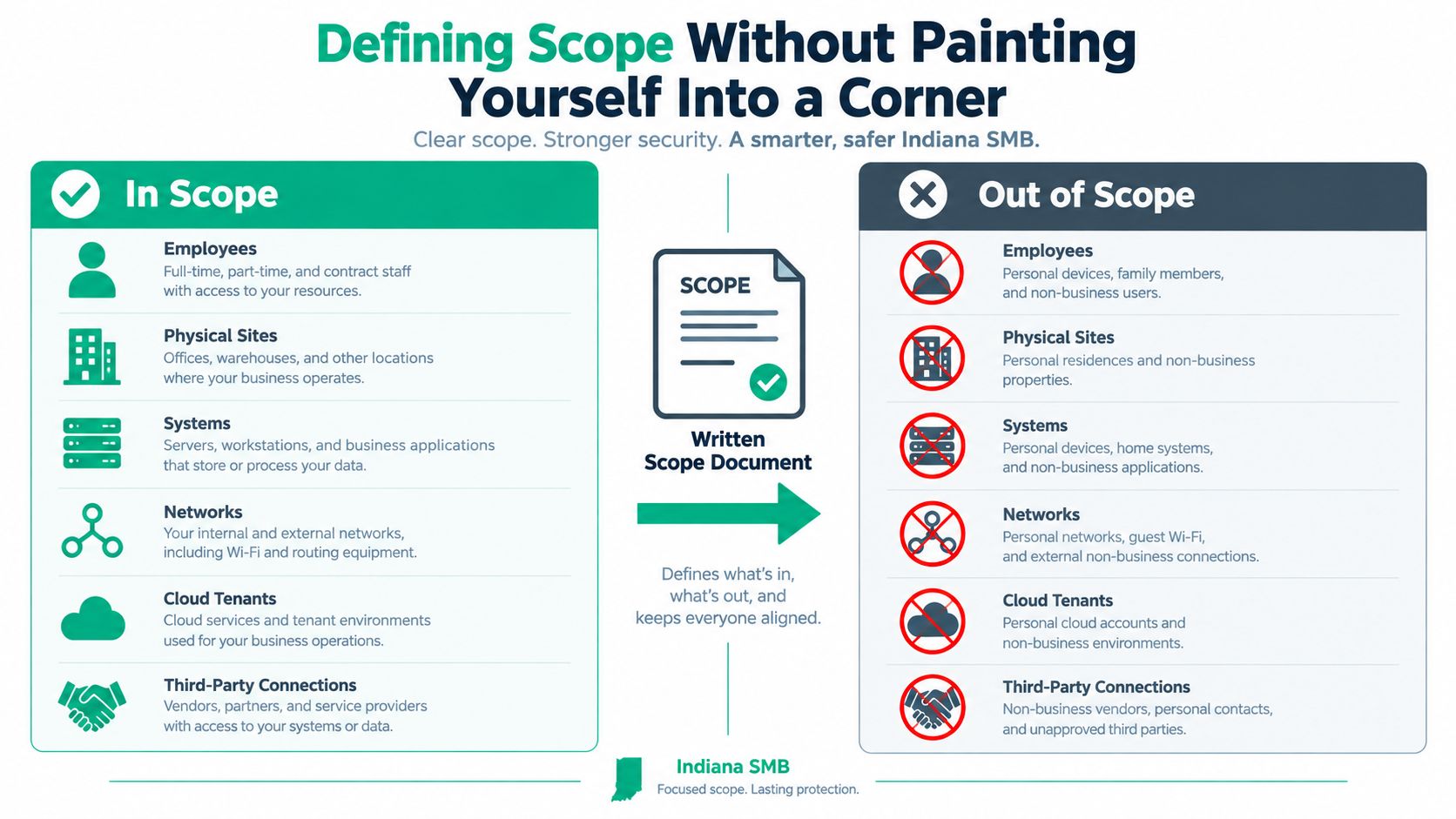
Scope Decisions for a Typical Indiana SMB
| Category | In Scope | Out of Scope |
|---|---|---|
| Sites | Greenwood HQ, Indy office, managed home offices | Employee personal networks |
| Systems | Windows servers, endpoints, firewalls, UniFi switches | Vendor owned copiers on a support contract |
| Cloud | Microsoft 365, Azure AD, company SaaS with business data | Personal shadow SaaS with no company data |
| OT | Managed interfaces bridging IT and shop floor networks | Isolated vendor controlled equipment with no network path |
| Data protection | Backup servers and immutable off-site backups | Retired systems scheduled for decommission |
Watch the edges. Guest Wi-Fi gear, a forgotten firewall interface, unsupported software, and a contractor's remote tool can outweigh dozens of ordinary workstation findings. A tight scope doesn't ignore those items. It flags who can scan them, who can patch them, and when you'll isolate what nobody owns. That's how scope stays honest under NIST CSF without expanding into territory your crew can't service.
Choosing Scanners and Building a Discovery Workflow
Small shops get sold five overlapping consoles and use none of them well. Start smaller. One authenticated scanner that logs into servers and workstations, plus one cloud posture view for Microsoft 365 or Azure, beats a shelf of unused licenses every Monday morning in Hamilton County growth offices.
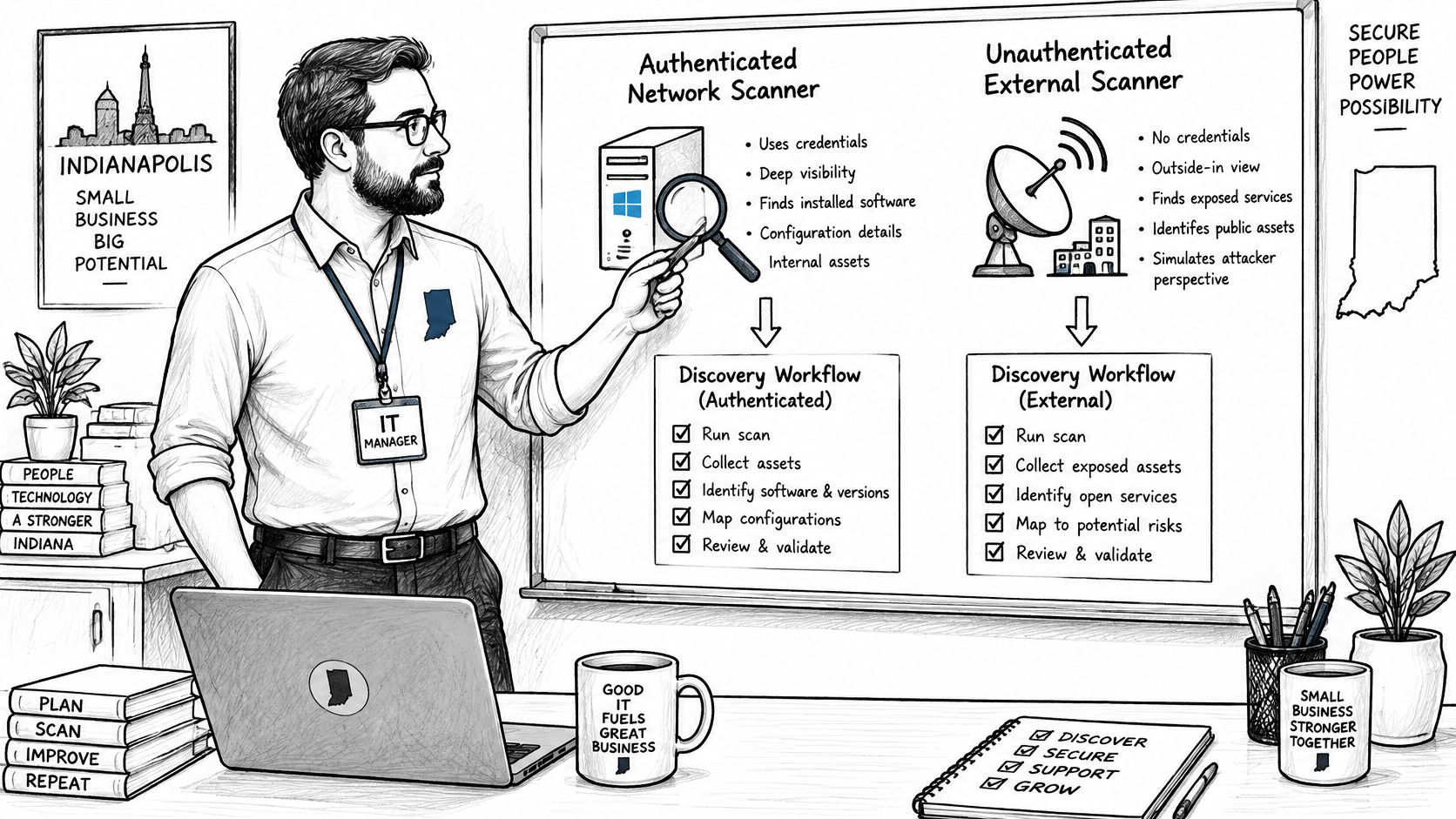
What each category actually sees
- Authenticated network scanning: Tenable Nessus, Qualys, and Rapid7 InsightVM check installed software and missing patches inside Windows servers and network gear.
- Agent based endpoint coverage: Microsoft Defender Vulnerability Management and Bitdefender GravityZone follow laptops that leave the office.
- External attack surface monitoring: Finds forgotten subdomains, old VPN portals, and exposed services before strangers do.
- Cloud posture checks: Read Azure AD, Microsoft 365, and AWS settings for risky configurations.
Unauthenticated scans miss installed software state. Agents help remote staff but won't see a switch with old firmware. External checks find what the internet sees, not what sits behind the firewall. Use two views minimum, then reconcile them against inventory.
If commercial tooling isn't deployed yet, run a quick external validation with nmap -sV --script vuln against your own authorized public systems, save the output, and compare service versions with your inventory. It's a flashlight, not a replacement for credentialed scanning.
The right scanner is the one with working credentials, a set schedule, and an owner who reviews results every Monday.
Managed options fit some teams. Finchum Fixes IT, for example, performs security risk audits and infrastructure reviews that identify vulnerabilities and gaps within this kind of workflow. Pair scanning with testing discipline, including the GoReplay guide to compliance testing for controlled validation practices, and know the difference covered in vulnerability assessment versus penetration testing explained for local teams. Scanning finds known flaws. A penetration test proves attack paths under Zero Trust architecture and SOC-as-a-Service monitoring.
Prioritizing Findings When You Cannot Patch Everything
Treating every CVSS 9 and 10 as equal is how good engineers burn out. In 2020, organizations faced 18,358 new CVEs, including 10,342 rated high or critical, roughly 28 high or critical items a day, according to CISA guidance on reducing risk from known exploited vulnerabilities. A severity queue buries a five person crew before lunch.
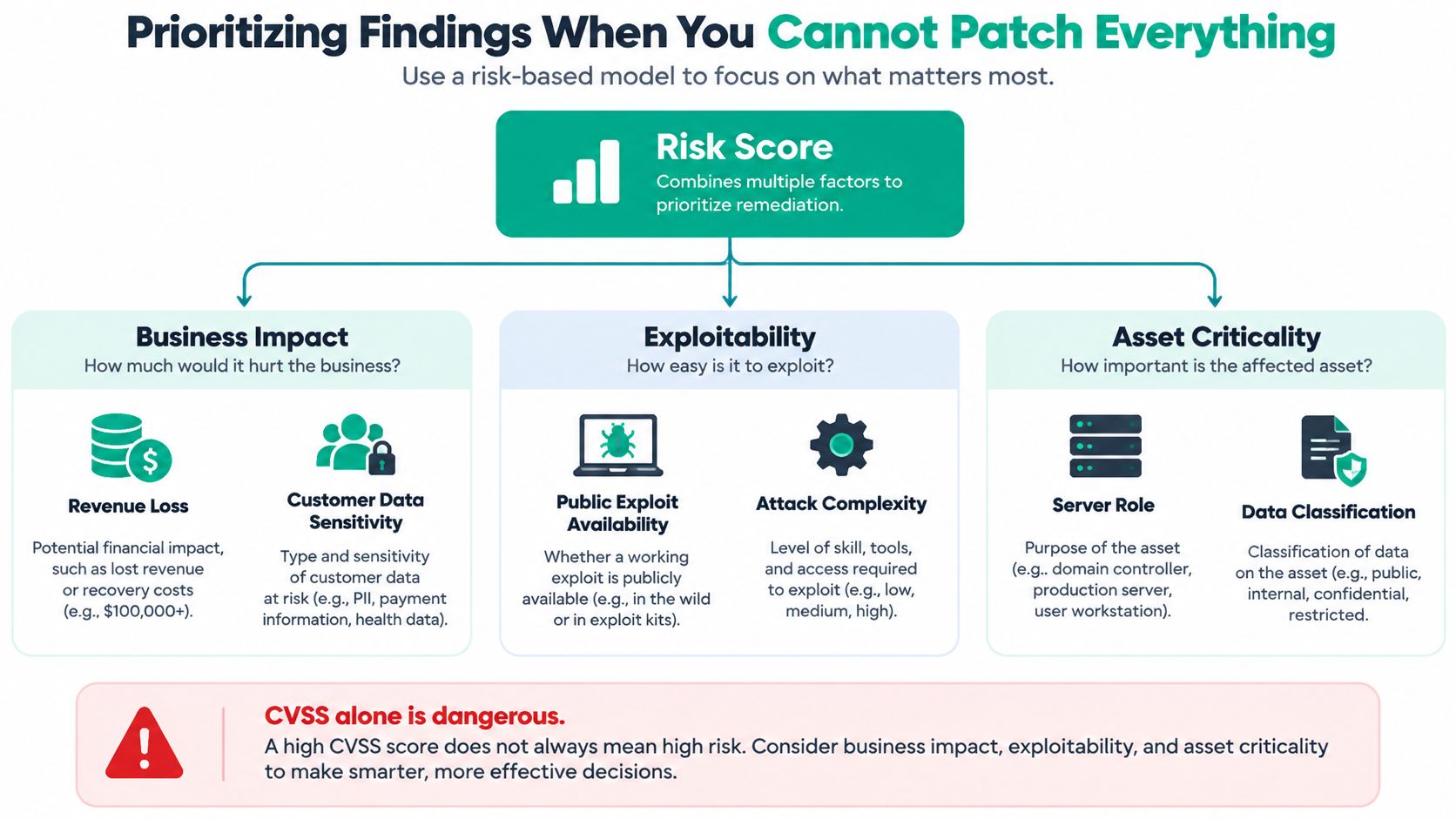
Rank by likely loss, not color
Push a finding forward when it's on the CISA Known Exploited Vulnerabilities catalog, reachable from the internet, supported by available exploit code, sitting on sensitive data, or able to halt billing, production, or patient care. Push it back when it's isolated, low value, blocked by a working compensating control, or would cause more downtime to patch midweek than the exposure justifies.
That restraint matters because recent analysis found only about 1.4% of publicly disclosed vulnerabilities were tied to known real world exploitation in the period studied, as detailed in the Root Evidence Q1 2026 exploitation report. Your question isn't "What's the score?" It's "What reduces our likely loss fastest with the staff and maintenance windows we've got?"
- Patch now: Externally exposed, actively exploited flaw on a critical system.
- Schedule next window: High risk internal system with a clear owner and tested patch path.
- Control and document: Legacy app that can't patch yet. Isolate it, restrict access, name the business owner, and set a review date.
Ownership gaps wreck this step. Ponemon research found 26% of respondents call risk prioritization unclear and 24% report no clear ownership, as shown in the Ponemon report on cyber asset and exposure management. Don't repeat that pattern in a Greenwood manufacturer or county contractor office.
Use the same evidence in your broader risk assessment methodology for Indiana SMBs. A defensible record shows detection date, affected asset, exploit evidence, exposure, data sensitivity, compensating controls, owner, SLA, and exception expiry. That is what a CEO, insurer, or CMMC assessor can review.
Attackers don't wait for your calendar. Among known exploited CVEs, many are used within days of disclosure, so internet facing KEV items should jump the normal patch line. Everything else gets a planned window, a control, or a signed acceptance. No silent backlog.
Remediation Workflow That Survives Contact with Real Work
A Hamilton County professional firm gets a critical alert on its VPN appliance. The normal Tuesday window is two weeks away, attorneys are working remotely, and the appliance is internet facing. Waiting is riskier than acting, so the team opens an out of cycle change instead of arguing with the calendar.
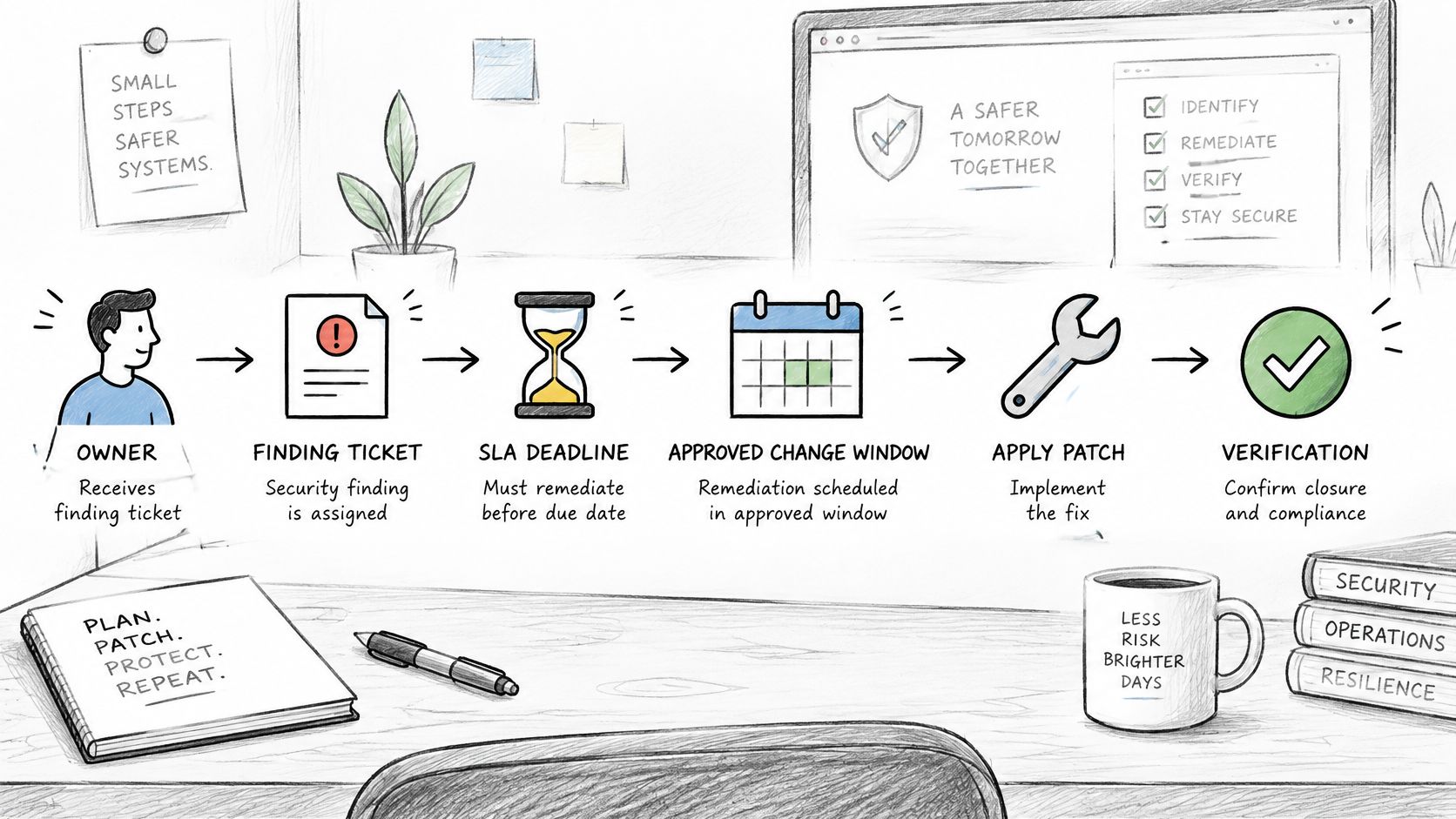
This diagram shows the handoff from ticket assignment through verified closure.
The ticket that doesn't get lost
The engineer names an owner, sets an emergency SLA, backs up the appliance config, and warns partners about a brief disconnect. UniFi management handles switch and firewall firmware where applicable, Microsoft Intune pushes Windows policy, and Bitdefender GravityZone covers endpoint patch tasks. The PSA ticket ties the CVE, assets, approval, and maintenance window together.
That rhythm protects business continuity. Downtime can cost up to $9,000 per minute, so a planned evening change beats an emergency outage with staff idle and appointments rescheduled. Scheduled remediation also converts wasted tech time into billable maintenance hours and a predictable monthly IT budget for Johnson County firms, dental practices, and manufacturers running mixed age servers.
- Assign before patching: One accountable owner, one due date, one asset list.
- Pick the right treatment: Patch, upgrade, reconfigure, isolate, replace, or accept risk in writing.
- Protect the change: Snapshot or back up config, test where you can, and define rollback steps.
- Record evidence: Save version output, installer logs, screenshots of settings, and ticket notes.
The walkthrough below shows how that ticket lifecycle plays out when approvals and verification aren't skipped.
Common failures are boring and expensive. Someone patches without a window, reboots a line of business server at noon, closes the ticket before rescanning, or lets a "temporary" exception live for a year. Align remediation with practical patch management best practices for busy IT teams, and make exceptions expire unless a business owner renews them with compensating controls.
Verifying That the Fix Actually Worked
"Patched" is a claim. Verification is proof. NIST SP 800-40r4 draws a clean line here. Confirm a patch installed and took effect, confirm an added control works as intended, or confirm a vulnerable device was decommissioned, as set out in NIST enterprise patch management guidance.
Four checks before closure
- Version evidence: Record the installed build from the endpoint, server, or appliance.
- Configuration inspection: Confirm the risky service, port, or setting is changed.
- Service status validation: Make sure the application restarted and users can work.
- Targeted rescan: Run the scanner against the asset and confirm the finding is gone.
Three closure types are acceptable when they're documented. A clean rescan works for most patches. Version evidence works when scanning can't run immediately. A compensating control, such as network isolation or a WAF rule, works only when someone tests that the control blocks the exposure.
For development teams shipping internal tools, a Claude Code security audit can add code level review before deployment, but it doesn't replace post change validation on live systems. Auditors for HIPAA, CMMC, and NIST CSF ask for evidence, not confidence.
Closure standard: No rescan, version proof, or tested control means the ticket stays open.
This step also catches failed changes on aging Windows servers and unsupported appliances common around Greenwood and downtown Indy tech hubs. If the patch needs a reboot you didn't get, the finding isn't closed. If isolation broke a label printer on the shop floor, fix the control now, not during an incident.
Metrics, Compliance, and the Path to a Mature Program
Raw scanner counts make weak board reporting. A queue can shrink because you scanned fewer assets, merged duplicates, or closed easy workstation findings while an exposed server stayed open. Track whether exploitable exposure is falling and whether work closes on time.
Seven numbers worth reviewing monthly
- Median time to remediate: Shows speed without hiding behind averages.
- Critical asset scan coverage: Confirms your important systems were checked.
- Authenticated scan coverage: Reveals blind spots in software inventory.
- Findings with assigned owners: Exposes queue neglect early.
- SLA breach rate: Shows whether deadlines are realistic.
- Repeat findings after closure: Catches bad verification.
- Verified closure rate: Proves remediation worked.
Structured processes produce measurable results. CISA reported average remediation time for relevant known exploited vulnerabilities fell from 60 days to 30 days, while participation reached 7,791 organizations by August 2024, as covered in Cybersecurity Dive reporting on CISA performance goals. That's the operational payoff of owners, deadlines, and rescans.
Map those habits to the rules your industry already faces. HIPAA practices need documented risk analysis and follow through. Defense subcontractors need evidence that fits CMMC expectations. General businesses can anchor the work in NIST CSF 2.0, where ID.RA-01 requires vulnerabilities to be identified, validated, and recorded, and ID.RA-05 and ID.RA-06 drive prioritized, tracked responses, as defined in NIST Cybersecurity Framework 2.0 core guidance.
That structure also helps incident response. A KEV listed flaw on a public system shouldn't sit in a patch queue. It should trigger a runbook review, log checks, backup confirmation, and, when needed, isolation. Good records shorten that scramble, whether you're protecting patient data, county contract files, or shop floor systems along the I-65 corridor.
Tie the program together with IT compliance and governance guidance for Indiana SMBs, and review exceptions before they expire. Maturity looks plain from the outside. Assets are known, risky findings move fast, closures are proven, and leadership sees exposure drop month after month.
If your scanner report is longer than your team's week, get a Free Network Assessment or Security Risk Audit built for Greenwood and Indianapolis businesses. We'll identify which exposed vulnerabilities could stop billing, production, or patient care, assign practical priorities, and map the first fixes to your maintenance windows. Start with Finchum Fixes IT and turn that backlog into a short, owned plan.