8 Best Practices for Patch Management in 2026
A Greenwood machine shop that skips a July Windows Server patch doesn't just “take a risk.” It can lose a Friday night production run, spend all weekend recovering, and burn customer trust that's hard to get back. Best practices for patch management keep critical fixes moving on a clear cadence, with staged testing, rollback plans, and severity-based priorities that protect uptime, reduce firefighting, and turn wasted tech time into billable hours.
1. Establish a Documented Patch Management Policy
A patch policy is the part most small teams skip, then regret later. Without one, every update becomes a hallway decision, and hallway decisions are how a Greenwood plant ends up patching a file server at 4:45 p.m. on a Friday because nobody owns the call.
A good policy defines what gets patched, who approves it, how fast each severity tier moves, and what happens when a patch needs to be deferred. That should line up with service-level thinking, including a clear target for critical security fixes, a slower window for routine software updates, and a faster response for emergency or actively exploited issues. It also fits the guidance in Kaseya's patch management guidance, which treats patching as a scheduled process with exceptions that are documented instead of improvised. For a local SMB, that matters when HIPAA, NIST CSF, or CMMC expectations show up in the same week as a production deadline, because the policy has to tell people how to respond before the ticket queue fills up. A written exception process keeps patching tied to governance, not guesswork.
The policy also needs to match the way a business operates. A company with offices along the I-65 corridor, a warehouse near downtown Indy, and a remote bookkeeper cannot rely on memory or verbal approvals.
Keep the policy short enough to use
A one-page summary beats a glossy binder no one reads. Put the hard rules there, then attach the operational details for the people who touch the tools. The summary should read like a service manual, not a legal memo, and it should point staff to a plain-English explanation of why patch management matters when they need to understand the business case.
- Name the owner clearly: Include the person who can approve emergency patches for the I-65 corridor office, the downtown Indy warehouse, or the remote accountant working from home.
- Separate severity tiers: Critical, high, medium, and low need different timelines, not a single loose “patch when you can” rule. A CVSS-driven review helps keep that order consistent when multiple vendors release updates at once.
- Write the rollback rule down: If a patch breaks VPN, printing, or line-of-business software, people need to know who can pull the plug and restore the last known good state.
- Review quarterly: Threats change, vendors change, and your policy should change with them.
- Document emergency deviations: If something gets rushed because it was actively exploited, record the reason and revisit it monthly.
A Johnson County manufacturing firm that set a Tuesday night window from 10 PM to 2 AM had an easier time keeping plants running because everyone knew when patches would land. A Greenwood clinic that wrote HIPAA-aligned steps passed audit with less drama because their evidence was already organized. A tiered rollback plan also kept both teams from turning one bad update into a whole-night outage, which is the kind of failure mode that shows up fast in small environments with shared printers, thin IT staff, and one server carrying too many jobs. Fewer surprises for operations, fewer expensive interruptions for leadership, and a patch process people can follow without making a fresh judgment call every time.
2. Implement Automatic Patch Deployment with Staged Rollout
Manual patching feels controlled until the device count grows and the update queue never really ends. Then someone is burning half a day clicking through prompts while a laptop on the shop floor, in a clinic back office, or under a desk in a Greenwood branch office stays unpatched because nobody remembered it existed.
Practical rule: automate the routine work, stage the risky work, and never push to the whole fleet first.
That staged pattern, test to pre-production to production, matches Canada's patch management guidance, which calls for patching in pilot, core system, and peripheral system stages during off-peak hours, with rollback and backups already in place. It fits the way Central Indiana shops operate, whether that is a POS lane in Noblesville, a production line near I-65, or a server room in downtown Indy that cannot afford a bad update during a shipping wave.
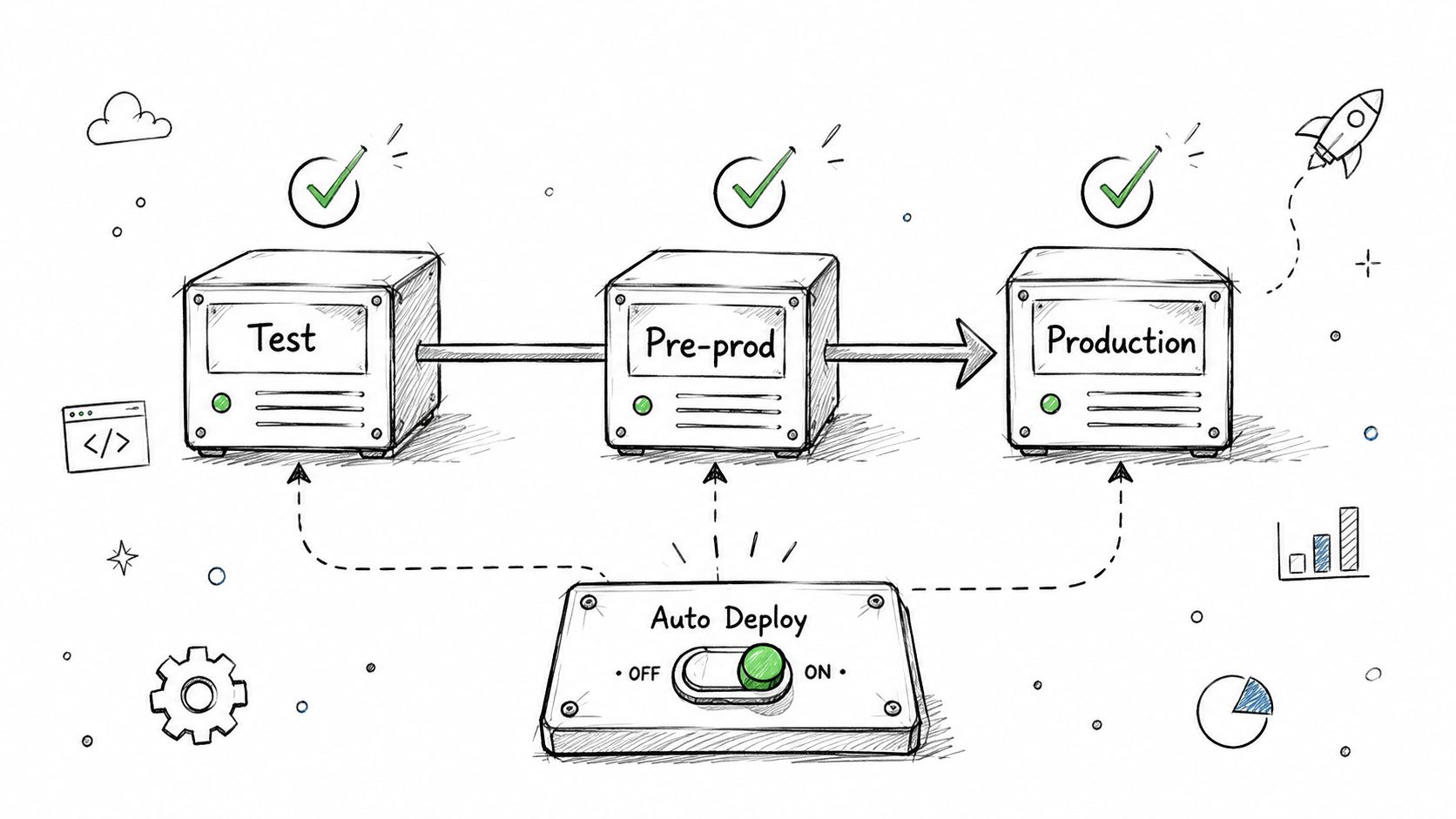
WSUS, Intune, and other policy-driven tools remove the “someone forgot” failure mode, and that matters more than the brand name on the console. The point is consistency. A Hamilton County finance team that moved from manual work to scheduled deployment checks did not need more heroics, it needed fewer repetitive tasks clogging the week. For teams comparing tooling, this patch management software roundup is useful because it shows how different platforms handle approval, reporting, and staged release controls.
Use rings, not all-at-once pushes
Break devices into logical groups, then let the patch prove itself before it reaches production. That matters in mixed environments with Windows laptops, cloud VMs, retail terminals, and old printers that only behave when nobody touches them. In a Central Indiana SMB, I usually want the first ring to be a small set of predictable systems, then a wider ring for staff devices, then the production tier that carries HIPAA, NIST CSF, or CMMC pressure.
- Start with a small test set: Use a handful of representative systems first, not the CEO's laptop.
- Wait before broadening scope: Give logs and performance metrics time to show whether something is off.
- Patch in off-hours: Tuesday through Thursday nights usually create fewer support calls than Monday mornings or Friday evenings.
- Track failures immediately: If an app crashes or a service will not start, stop the rollout and inspect the issue.
- Keep known-bad patches documented: If a vendor release is flaky, exclude it until it has been verified.
That ring structure pairs well with a CVSS-driven review because severity decides speed, while the rollout ring decides exposure. A high score on paper is only part of the story if the affected system sits in the office that handles payroll, intake, or plant scheduling. The rollback path should match the ring as well, so a bad driver update on a handful of laptops does not turn into a full-day outage across the whole site.
I would rather see a patch delayed for a day than watch an office spend the afternoon recovering from a bad driver update. In real shops, automatic should mean controlled, not reckless. That distinction is what keeps managed IT from becoming cleanup duty.
3. Prioritize Critical and High-Severity Patches
A browser update and an actively exploited remote code execution flaw do not belong in the same queue. If a patch closes a live hole that attackers are already using, it needs a faster path than a routine feature update, especially in a Central Indiana SMB where one bad delay can hit payroll, intake, or plant scheduling.
The best prioritization model combines CVSS, exploit intelligence, and business context. Tanium's patch management guidance recommends pairing endpoint visibility with exploit availability and asset criticality, and a practical inventory process like Finchum's asset management guidance for Indiana businesses helps keep that context current instead of buried in a stale spreadsheet. For teams in Greenwood, Johnson County, and downtown Indy, that means a vulnerable domain controller gets handled differently than an isolated training kiosk, even if the vulnerability score looks similar on paper.
Treat active exploitation like an emergency
If an issue is being actively exploited, the normal queue is too slow. Emergency response should bypass routine change control, with only the approvals needed to move fast and safely.
A downtown Indy software company that fixed its Java estate within 72 hours of Log4Shell disclosure avoided the kind of late-night cleanup that destroys morale and eats weekends. A Johnson County healthcare team used a 48-hour rule for a critical RCE and patched 89 servers before the exploit got broader traction. Those examples matter because they show what urgency looks like when the issue is real and the clock is running.
A patch policy without a severity-based approval path is just paper.
For practical triage, start with vendor bulletins from Microsoft, Apple, Adobe, and Cisco, then check vulnerability scanners like Qualys or Tenable Nessus on a weekly rhythm. If a patch is high-risk and business-critical, it needs rapid sign-off. If it is low priority and the system is non-essential, it can wait for the regular window without drama.
The return is clear. Faster triage shortens the window for ransomware, data theft, and downtime that can cost serious money per minute. It also keeps tech staff from spending hours on low-value busywork when they should be hardening the environment and supporting users.
4. Maintain an Inventory of All Systems and Applications
You can't patch what you can't see. That's not a slogan, it's the first operational failure in most weak patch programs, and it's why aging server hardware in a Greenwood business park turns into a hidden liability.
A complete inventory should include operating systems, installed applications, firmware, hardware, owners, and patch status. Kaseya's 2026 guidance calls out the need to cover operating systems, third-party applications, browsers, firmware, remote devices, and cloud infrastructure, not just desktops in the office. That wider view matters in Central Indiana because many SMBs run a mix of on-prem gear, hybrid cloud, and off-network laptops that connect from job sites, client offices, or home Wi-Fi.
Finchum's asset management guidance for Indiana businesses fits here because the inventory has to stay current, not just exist as a spreadsheet nobody trusts.
Make the inventory actionable
A useful inventory does more than count devices. It tells you what matters, who owns it, and how dangerous it is to leave it unpatched.
- Include business criticality: Payroll, production, email, and EHR systems should not sit in the same bucket.
- Track application versions: Unsupported software needs a different remediation path than current software.
- Log exceptions: Air-gapped systems, BYOD devices, and specialty gear should be documented, not forgotten.
- Review quarterly: Devices get added, replaced, and retired faster than many assume.
- Use discovery tools weekly: Shadow IT doesn't announce itself.
A Greenwood manufacturing firm found 23 untracked devices on its first scan and isolated an old Windows XP machine before it became an incident. A Johnson County accounting practice uncovered 47 application versions across workstations and found 12 systems on unsupported software. That's the kind of mess inventory solves before it turns into a breach review.
Good patching starts with a clean map. Without that map, every SLA is guesswork, every report is suspect, and every new device is another blind spot.
5. Test Patches in a Staging Environment Before Production Deployment
Patches are code, and code breaks systems in ways vendor notes do not always predict. A quick install might work on a personal laptop, but it is a bad bet for an EHR, a SQL backend, or a shipping app tied to production in a Central Indiana office off Meridian Street, I-69, or the 465 loop.
A staging environment gives you a controlled place to catch bad interactions before they reach users. NIST SP 800-40r3 treats asset inventory, testing, staged deployment, and verification as core controls that reduce rollout risk, and that matches what happens on real networks. I have seen patches that looked harmless in release notes break printer drivers, database connections, VPN clients, and one-off workflows that only exist because a local clinic or manufacturer has built around them for years.
Test the patch against the systems that actually matter
A staging setup does not need to be large. It does need to resemble production closely enough that the failure modes show up before the business does. If a Greenwood healthcare group runs a certain database build, a specific EHR plugin, and a VPN stack, those pieces belong in the test path too.
- Deploy the patch in staging first: Use a copied configuration or a smaller replica of production.
- Run health checks: Confirm login, file access, service start, and the behavior of critical apps.
- Compare performance baselines: Watch for slowdowns, failed jobs, or abnormal memory use.
- Test vendor dependencies: EHR systems, payment tools, and line-of-business apps often fail where the operating system itself looks fine.
- Keep staging clean: If it doubles as a dev sandbox, the results stop being trustworthy.
A healthcare clinic in Greenwood found a Windows Server patch that broke its EHR database connection before production, which gave the team time to work with the vendor instead of spending the weekend recovering in place. A financial team caught a BIOS update that hurt SSD performance and delayed rollout until they understood the impact. For an IT security review that includes patch testing, validation, and audit trails, see this security audit checklist for Indiana businesses.
I have seen too many patch failures that were really testing failures. The patch was not the whole problem, the process was. Staging catches those breaks while there is still time to roll back, isolate, or defer the change without turning one bad update into a production outage.
6. Monitor and Audit Patch Compliance Continuously
A patch can be approved, pushed, and still leave a hole open if a server ran out of disk space, a workstation never rebooted, or a remote laptop fell off the network before the install finished. In a shop along the I-465 corridor or out near the I-70 and US-31 traffic lanes, that kind of miss is how a routine maintenance window turns into a Friday-night incident.
Continuous monitoring shows what installed, what failed, and what drifted out of compliance after the first pass. Good patch reporting should track mean time to patch, patch compliance rate, outstanding critical vulnerability age, and exception rate and age. It should also tell you which systems keep missing the same updates so you can fix the root cause instead of chasing the same failure every month.
Build the reporting habit
Reports should be plain enough to act on without a meeting. They need to show what is patched, what is not, and who owns the gap.
- Alert on failures fast: High and critical patch failures should trigger investigation within 24 hours.
- Track the full fleet: Servers, workstations, point-of-sale systems, and cloud workloads all need coverage.
- Escalate stale exceptions: Anything deferred too long should be reviewed, not ignored.
- Correlate with incidents: After a security event, check patch status immediately.
- Keep audit history: Store reports for years, not months, if your industry expects traceability.
That evidence matters in regulated environments. A healthcare provider in Johnson County that needs HIPAA proof can pair patch reports with an IT security audit checklist for Indiana businesses and show auditors the full trail, not just a few screenshots. NIST CSF and CMMC reviews look for the same thing, a record that shows the patch landed, the exception was approved, and the gap did not sit open without review.
A clinic or manufacturer can also see the operational value fast. If a patch keeps failing on the same batch of machines, that usually points to disk pressure, a stuck reboot, or a dependency that was missed during rollout. Catching that pattern early keeps the team from treating every failed install like a new problem.
Compliance is not the report, it is the proof behind the report.
The point is simple. If you cannot show what changed, what failed, and what got fixed, you do not have patch control, you have patch hope.
7. Establish a Rollback Plan and Test Recovery Procedures
Every patch plan needs a failure plan. If an update breaks SSL bindings, knocks out VPN access, or disables a line-of-business service, the team needs a clean way back before users start flooding the help desk.
CISA's regression-safe patch sequence is the model worth following, verify standby backups, patch the standby system first, test compatibility, move the patched standby into production, keep the old system available as emergency fallback, and update configuration records after stabilization. For an Indiana SMB with clinics off US-31, offices near I-465, or a warehouse in the U.S. 31 corridor, that sequence keeps a bad patch from turning into a day-long outage. It also fits the kind of documented recovery steps auditors expect under HIPAA, NIST CSF, and CMMC, especially when you can point to a disaster recovery plan template for Indiana businesses instead of a loose checklist in someone's inbox.
Roll back quickly, not creatively
Rollback has to be written down before deployment starts. Once the outage is live, guessing wastes time.
- For virtual machines: Take snapshots right before patching, then keep them for a short retention window.
- For physical servers: Keep previous patch archives or uninstall media in a secure offline location.
- For critical systems: Use active-passive failover when uptime matters more than speed.
- For every platform: Document the exact commands or steps needed to revert.
- Test quarterly: A rollback you have not tried is a guess, not a plan.
The trade-off is simple. Snapshots make recovery fast, but they can hide storage pressure and create false confidence if nobody checks them. Active-passive failover costs more to maintain, yet it is the safer path for systems that cannot tolerate a long repair window.
A Greenwood manufacturer that tested rollback quarterly recovered six VPN failures in 15 minutes when a network patch went bad. A Hamilton County e-commerce team used Hyper-V snapshots and restored a broken SSL binding in 2 minutes. Those recovery times are process discipline, not luck.
Managed service work pays off. When a patch breaks something, the shops with documented recovery steps keep the business moving while everyone else starts searching old tickets for clues. If you support regulated systems or cannot tolerate much downtime, rollback is required.
8. Automate Third-Party Application Patching Beyond the OS
A missed browser update can hurt as fast as a missed Windows patch. In a Central Indiana SMB, that usually shows up in the tools people use all day, Chrome on a receptionist desk in Carmel, Java on an accounting app in Greenwood, Adobe Reader in a plant office off I-70, or Zoom on a sales laptop headed toward Fishers.
OS patching is only part of the job. Most environments still carry browsers, document readers, Java runtimes, meeting apps, and niche utilities that create their own attack paths because no one is watching them closely enough.
Third-party software deserves the same CVSS-driven triage you use for servers and endpoints. A browser zero-day used by staff in HIPAA-covered clinics, a PDF reader flaw on a finance workstation, or an unsigned plug-in inside a vendor portal can be more disruptive than a routine operating system fix. For shops working under NIST CSF or CMMC expectations, that gap matters because auditors and customers both want to see that the full stack is under control, not just the OS.
Kaseya's 2026 guidance calls out third-party applications, browsers, firmware, remote devices, and cloud infrastructure as part of a complete patch program. N-able's guidance also points to third-party products, open-source applications, version sprawl, and exceptions as major pain points. That matches what I see in Indiana SMBs, because leaving Chrome, Java, Adobe Reader, or Zoom behind can undo the work you did on Windows Update.
Patch the user-facing attack surface
Attackers do not care whether the weakness sits in the OS or in an app a user opens every day. They care that it is reachable.
A practical rollout starts with the apps that touch the most users and the most data. Adobe Reader, Java, browsers, and Microsoft Office usually sit near the top, but line-of-business tools can jump ahead if they have internet access or handle regulated records.
- Automate high-risk apps first: Adobe Reader, Java, browsers, and Microsoft Office are still common entry points.
- Review the app inventory: Focus on what is installed broadly and what is exposed to users or remote access.
- Check vendor guidance: Some specialized tools need slower update paths than consumer software.
- Exclude problem children temporarily: If a business app is fragile, stage it before production.
- Warn users about restarts: Off-hours updates cut support noise and reduce lost productivity.
That approach keeps the day-to-day patch load from turning into a support mess. A Johnson County accounting firm that automated Adobe Reader and Java across 40 workstations blocked an RCE path before it became a cleanup project. An Indianapolis marketing agency automated Chrome, Firefox, and Zoom and pushed 47 browser security patches in 6 months without turning the help desk into a fire drill.
The return is plain. Every automatic patch that does not need manual babysitting gives technicians more time for exceptions, cleanup, and the systems that need hands-on care. It also means fewer interruptions, more predictable monthly budgets, and less chance that a vulnerable third-party app will derail the week.
Patch Management: 8-Point Best-Practices Comparison
| Solution | Implementation Complexity 🔄 | Resource Requirements ⚡ | Expected Outcomes 📊 | Ideal Use Cases 💡 | Key Advantages ⭐ |
|---|---|---|---|---|---|
| Establish a Documented Patch Management Policy | Medium, drafting, approvals, governance | Low–Medium, staff time, stakeholder alignment | Consistent patching; fewer ad-hoc outages; audit readiness | Multi-site businesses; regulated orgs; teams needing process | Accountability; predictable schedules; compliance evidence |
| Implement Automatic Patch Deployment with Staged Rollout | High, tool configuration, grouping, automation | High, patch management tools, skilled IT, initial setup time | High coverage; fewer manual errors; faster, consistent deployments | Large/distributed environments; many endpoints; hybrid cloud | Consistency; reduced manual labor; staged safety nets |
| Prioritize Critical and High-Severity Patches | Medium, threat intel integration and triage workflows | Medium, scanners, feeds, rapid-approval processes | Faster remediation of high-risk vulnerabilities; lower breach risk | Regulated/targeted environments; public-facing services | Focused risk reduction; aligns with compliance; faster MTTP |
| Maintain an Inventory of All Systems and Applications | Medium, discovery, normalization, ongoing maintenance | Medium, asset tools, periodic audits, deduplication effort | Eliminates blind spots; enables targeted patching and budgeting | Environments with legacy devices or many locations | Visibility for patch eligibility; faster incident response |
| Test Patches in a Staging Environment Before Production Deployment | High, build/maintain staging, create test plans | High, staging infra (cloud/on‑prem), automation, time for tests | Fewer production regressions; reduced unplanned downtime | Mission‑critical apps (EHR, finance); high-availability services | Catches incompatibilities; confidence in production rollouts |
| Monitor and Audit Patch Compliance Continuously | Medium, integrate dashboards, alerts, reporting | Medium, monitoring tools, alert tuning, reporting cadence | Rapid detection of failures; audit-ready records; drift control | Regulated orgs; environments requiring SLAs and audits | Fast remediation; compliance evidence; trend visibility |
| Establish a Rollback Plan and Test Recovery Procedures | Medium, document procedures, snapshots, drills | Medium, backup/snapshot storage, periodic testing time | Shorter MTTR; predictable recovery from bad patches | Critical infrastructure; legacy systems; SLA-driven ops | Rapid recovery; reduces downtime; supports safe deployments |
| Automate Third-Party Application Patching Beyond the OS | Medium–High, app coverage varies; compatibility handling | Medium, third‑party patching tools, testing for legacy apps | Reduces large attack surface from apps; consistent endpoint security | Organizations using many third‑party apps (office/creative/ERP) | Broad vulnerability coverage; less manual versioning; labor savings |
Stop Treating Patches as Fire Drills, Build a Predictable Cadence
Patch management works best when it's boring. The goal isn't to chase every alert in panic mode, it's to build a rhythm where critical fixes move fast, lower-risk updates move on schedule, and every deployment has a test path, a rollback path, and a compliance record. That's how teams in Greenwood, along the I-65 corridor, and across downtown Indy tech hubs stop losing time to avoidable outages.
The business case is hard to miss. Downtime can cost up to $9,000 per minute, so a missed patch doesn't just create a security gap, it risks revenue, customer trust, and the very hours your team could be billing or using for strategic work. A predictable patch program converts that chaos into a monthly operating rhythm, and it's a better fit for HIPAA-covered clinics, CMMC-aligned contractors, and any small business that can't afford to guess.
Managed services make sense if you've got multiple sites, no in-house Windows admin, cloud and on-prem systems mixed together, or regulated data that needs tighter proof. A partner can keep patching tied to Zero Trust architecture and SOC-as-a-Service monitoring instead of leaving it to whoever's free that week. That's especially useful when firmware, third-party apps, and remote devices all need the same level of attention as the main server rack.
If your patching still depends on memory, sticky notes, and last-minute heroics, it's time to tighten the process. A Free Network Assessment or Security Risk Audit for businesses in Greenwood and the Indianapolis area will show where your patch gaps are, what's still exposed, and how to fix the workflow before the next outage turns into a long weekend.
Finchum Fixes IT helps Indiana businesses tighten patch management, reduce downtime, and keep compliance evidence organized. If you're ready to turn patching from a fire drill into a predictable process, visit Finchum Fixes IT and ask about a Free Network Assessment or Security Risk Audit for your Greenwood or Indianapolis location.