What Is Network Management? a Guide for Indiana Businesses
Network management is the ongoing monitoring, configuration, performance, fault, security, and asset work that keeps a business's routers, switches, Wi-Fi access points, and servers running reliably and securely. It also establishes who responds when something fails, what they're responsible for, and how the business measures whether its technology spending is paying off.
Consider a familiar Greenwood office: the server room feels too warm, wireless connections drop in the afternoon, and employees have learned which corner of the old brick building to avoid during video calls. Nobody calls it an outage. They just keep losing time.
Why Network Management Matters Before Something Breaks
The office manager in that Greenwood business park doesn't need another dashboard. They need the accounting application to open, the front desk to stay connected, and someone other than the bookkeeper to negotiate with the internet provider.
Treat this as an illustrative situation, not a client case study. An aging server and unreliable Wi-Fi might produce similar complaints, but they don't necessarily share a cause. Replacing an access point won't fix an overloaded server, and restarting the server won't resolve wireless interference.
Fix the cause, not the afternoon ritual
A managed approach starts by separating the symptoms. A technician compares wired and wireless performance, examines device health, checks environmental conditions, and matches incidents against logs.
The resulting work might include:
- Server remediation: Address cooling, resource pressure, or failing equipment based on evidence.
- Wireless redesign: Measure coverage and interference before changing access-point placement.
- Ongoing ownership: Assign alerts, escalation, and follow-up to named people.
That's a more durable fix than telling employees to reconnect whenever a call freezes. Nobody can promise a network will never fail again. They can establish a process that detects recurring problems and addresses their causes.
Practical rule: A recurring workaround belongs on the remediation list, not in the employee handbook.
Make continuity a business decision
Downtime costs depend on what your business can't do while systems are unavailable. A healthcare office might lose access to scheduling; a defense supplier might stop processing work; a professional-services team might lose billable time.
Calculate your exposure using affected staff time, delayed work, missed transactions, and recovery expense. Don't borrow an alarming industry-wide dollar figure and assume it describes your Johnson County office.
Proactive system monitoring that prevents costly downtime belongs in that calculation. Preventive work can return interrupted time to client work, while a clearly scoped service agreement makes routine spending more predictable. The useful question isn't whether you bought monitoring software. It's whether someone acts on what it finds.
What Network Management Covers and Where It Started
Think of network management as an air traffic control tower. The tower doesn't fly the planes, but its operators maintain visibility, coordinate activity, and respond when conditions change.
Likewise, network administrators don't perform every task on every employee's computer. They oversee the connections and services those computers depend on, then coordinate changes and repairs.
How remote management became practical
The Simple Network Management Protocol, or SNMP, emerged in the 1980s, was standardized in August 1988, and was described in RFC 1157 in 1990, as documented in the historical account of Internet network management.
The original architecture established a common way to describe management information and exchange it between systems. Instead of visiting each device to inspect its condition, an administrator could collect information remotely.
| Building block | Plain-language meaning |
|---|---|
| Management station | The system administrators use to oversee devices |
| Software agent | Software on a device that exposes management information |
| Management Information Base | An organized description of available device variables |
| Structure of Management Information | Rules for describing that information consistently |
An agent might expose whether an interface is active, how much traffic has passed through it, or whether error counters are climbing. Authorized management software can inspect that information and, where permitted, change management settings.
Why that history still matters
The important inheritance isn't a particular dashboard design. It's centralized visibility, standardized information, remote control, and fault detection.
For an organization along the I-65 corridor, that means a technician can compare conditions across locations without treating every router as a separate mystery. Consistent information also helps distinguish an isolated device failure from a broader service problem.
There's still a boundary worth understanding: seeing a device doesn't mean understanding the entire business service. A router can respond normally while an application remains unavailable.
That's why “what is network management?” deserves a broader answer than “checking whether equipment is online.” Good management connects device condition with service behavior and gives someone responsibility for interpreting the difference.
The Six Components Behind a Managed Network
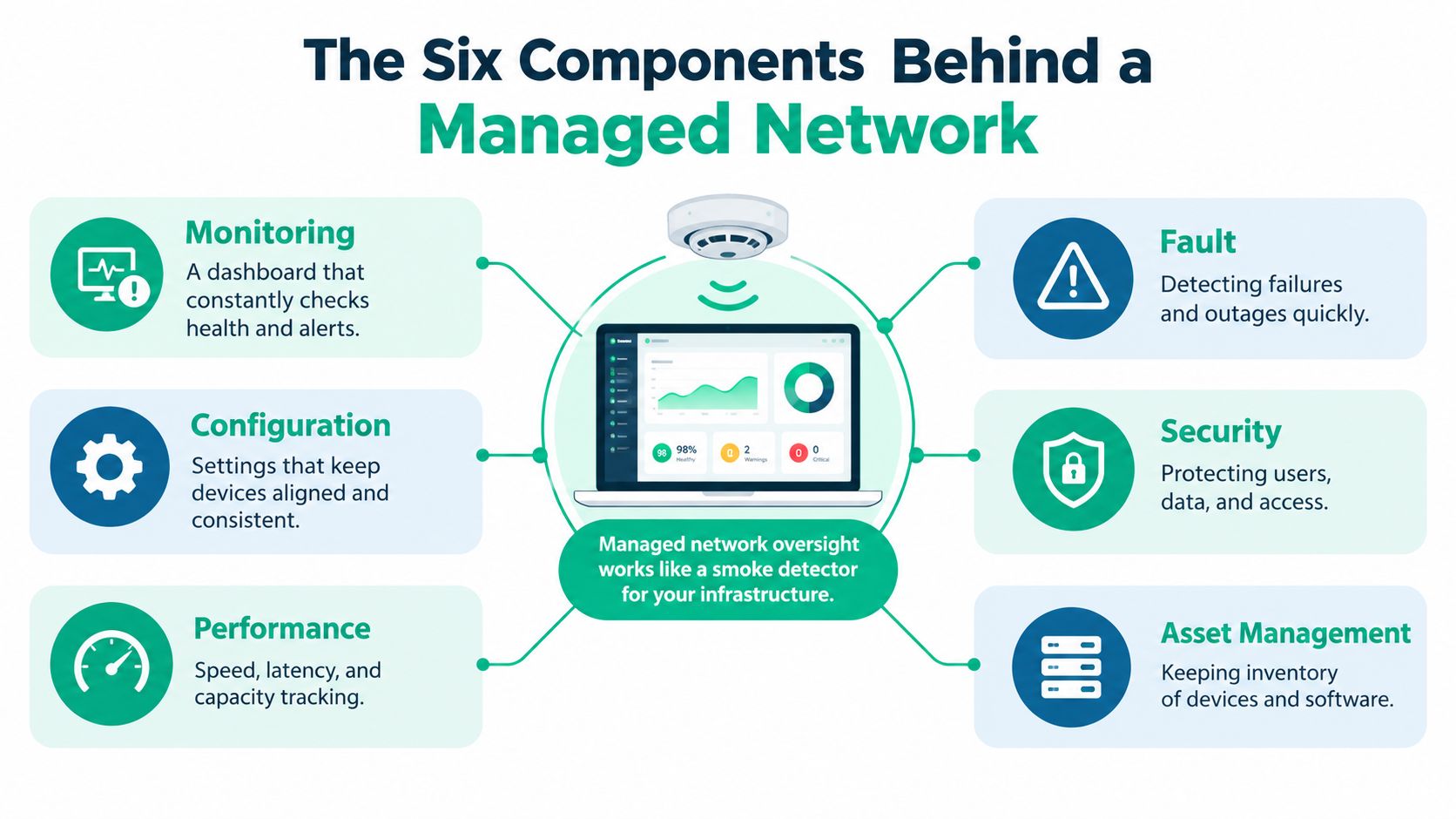
A dashboard tells you what's happening. A smoke detector tells you something needs attention. A managed network needs both, plus someone authorized to investigate and act.
The components below work together rather than as separate product purchases.
What each component contributes
- Monitoring collects operational signals and alerts people when conditions depart from expectations. Availability is useful, but an online device can still perform poorly.
- Configuration management keeps approved settings consistent and records changes. Its practical question is whether the equipment is configured the way the business intended.
- Performance management examines latency, utilization, packet loss, and capacity. It distinguishes “connected” from “working well enough.”
- Fault management handles detection, isolation, escalation, and repair. An alert without a response workflow is just a notification.
- Security management examines access, unexpected connections, suspicious activity, and unauthorized changes.
- Asset management maintains an inventory of devices, software, ownership, and service dependencies.
Modern oversight combines operational conditions with security signals. NIST-related continuous-monitoring guidance describes reviewing alerts and logs for potentially adverse activity, rather than treating monitoring as a simple connectivity check.
Follow an alert through the system
Suppose a switch begins recording interface errors. Monitoring identifies the change, performance analysis shows which connections are affected, and fault management assigns an investigation.
The technician then checks whether a recent configuration change explains the symptoms. Asset records identify the device owner and connected services, while a security review checks whether the change was authorized.
A useful alert ends with a decision, an owner, and a record of what happened.
This connection between components matters more than how many tools appear on a proposal. Separate systems can be appropriate, but someone must reconcile their information.
For a growing Hamilton County office or a downtown Indy team adding cloud services, the practical design question is the same: can the people responsible follow a problem from symptom to cause without losing it between dashboards?
Metrics and Business Value That Justify the Spend
The most expensive network report is the one nobody can use to make a decision. Green status indicators don't tell Johnson County business owners whether employees can serve customers or whether support costs are becoming more predictable.
In a 2025 SMB survey, network outages, difficulty managing multiple vendors, and confusing pricing were each cited by 26% of respondents, according to the SMB survey report. Those are accountability problems as much as technical ones.
Core Network Metrics and What They Reveal
| Metric | What It Reveals | Business Impact |
|---|---|---|
| Mean time to detect | How long problems remain unnoticed | Limits time employees spend discovering and reporting failures |
| Mean time to resolve | How efficiently incidents reach restoration | Helps evaluate interruption and recovery effort |
| Application availability | Whether essential services are usable | Connects support work to business operations |
| Wi-Fi experience by location | Where users experience unreliable service | Directs improvements toward affected work areas |
| Backup-connectivity performance | Whether alternate connectivity supports essential work | Tests continuity rather than assuming it |
| Security-policy coverage | Which assets have required safeguards | Identifies unmanaged exposure and remediation work |
Ask for definitions before comparing reports. Does resolution mean a temporary workaround, restored service, or completed root-cause repair? Those aren't interchangeable.
Throughput also deserves context. A connection's advertised capacity isn't the same as what an application receives. This practical SMB guide to network throughput helps frame that distinction.
Turn measurements into financial decisions
Use your own operating records to estimate interruption costs. Multiply affected employee time by the relevant labor cost, then separately consider lost billable work, delayed orders, and recovery expenses without double-counting them.
Recovered time becomes revenue only when employees can use it for productive work. Faster connectivity doesn't automatically create customer demand or billable assignments.
Website experience is another measurement boundary. If customers complain about a slow site, you can browse the PageSpeed Insights product from Premier Broadband as a related resource, but website performance isn't a substitute for office-network diagnostics.
Finally, require an ownership matrix covering the ISP, cloud provider, firewall vendor, and managed provider. A predictable monthly budget needs explicit inclusions, exclusions, replacement responsibilities, and escalation ownership, not merely a flat invoice.
Security Controls and Access Reviews That Hold Up
Security belongs inside network operations because the people maintaining access and configuration also influence what an attacker could reach. Treating cybersecurity as a separate annual purchase leaves too much daily work undefined.
NIST Cybersecurity Framework 2.0 organizes cybersecurity management into six functions: Govern, Identify, Protect, Detect, Respond, and Recover, as described in the NIST framework publication.
Turn the framework into evidence
Govern establishes strategy, expectations, and policy. Identify covers assets and risks; Protect covers safeguards; Detect covers adverse events; Respond covers incident handling; Recover covers restoration.
For a Greenwood business, useful evidence might include:
- Access safeguards: Documented MFA requirements and approved administrator permissions.
- Network separation: Guest and business networks with reviewed communication rules.
- Endpoint oversight: Bitdefender GravityZone included in the protection plan, with responsibility assigned for reviewing alerts.
- Network administration: UniFi networking with approved configuration records and logging requirements.
- Recovery protection: Immutable off-site backups with verified retention controls and restoration tests.
Immutability should be verified, not assumed from a product label. Review whether protected recovery copies can be altered or deleted during the applicable retention period.
Network segmentation and why it matters provides useful context for separating access according to business need.
Make access reviews routine
Begin with an inventory of employee accounts, administrator identities, VPN access, service accounts, vendor permissions, and cloud roles. Compare each permission against a current job function and document exceptions.
NIST's implementation examples recommend reviewing privileges periodically and when people change roles or leave, revoking unnecessary access, and restricting privileges to the minimum needed.
That's a practical foundation for Zero Trust architecture: make access decisions deliberately rather than treating network presence as sufficient justification.
Evidence matters: Record who approved an exception, why it exists, and when it will be reviewed.
Healthcare practices can map this work to HIPAA security controls, while defense contractors can align evidence with CMMC requirements. Other organizations can organize it around NIST CSF outcomes. None of those mappings makes a business compliant automatically; the applicable obligations and implementation still require review.
Troubleshooting Network Problems Step by Step
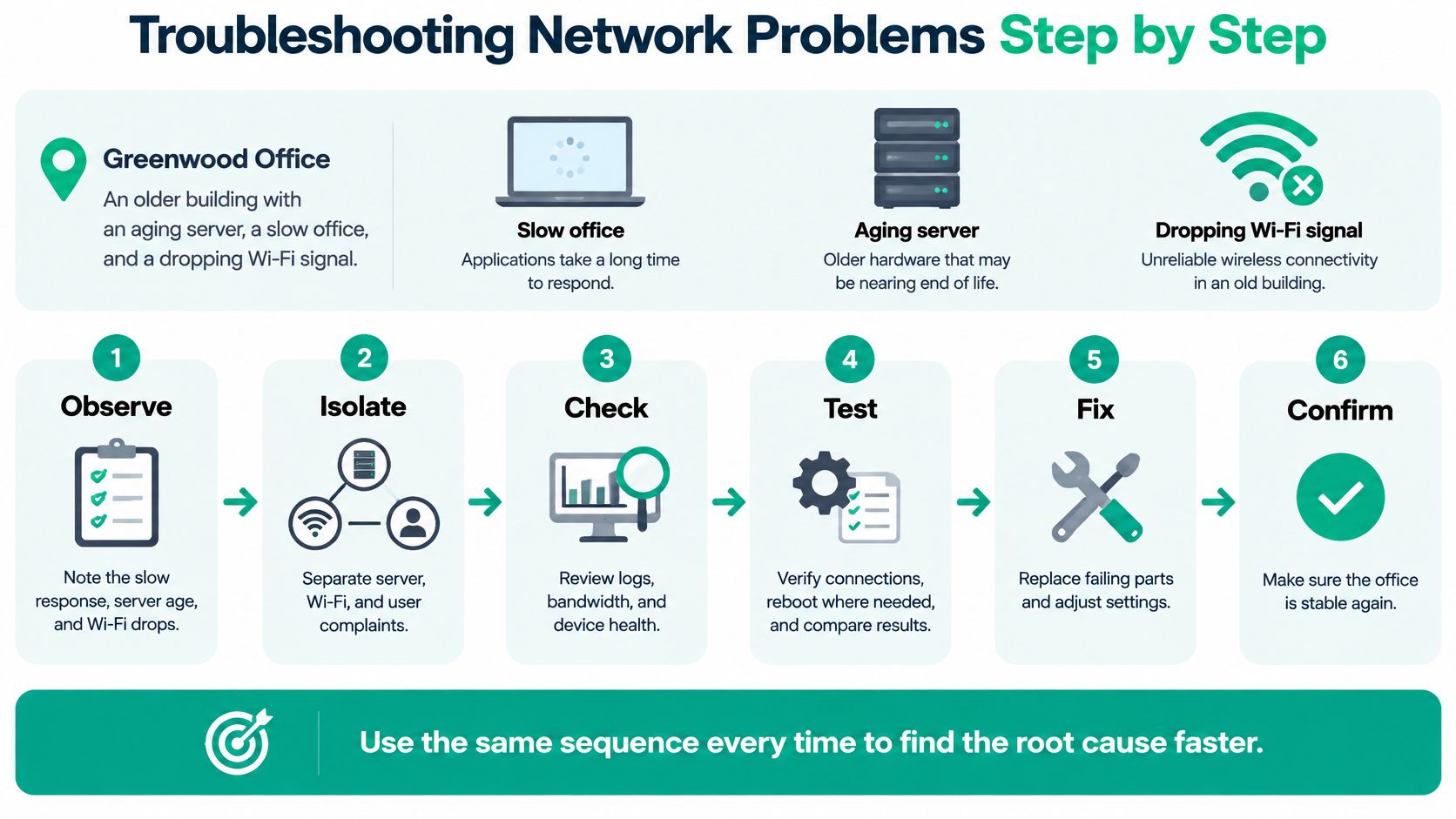
Return to the Greenwood office with the warm server room and unreliable wireless connections. Start by recording who is affected, which application fails, whether wired users experience it, and when it happens.
This visual gives the investigation a repeatable shape.
Work outward from the affected device
- Confirm the local configuration. On Windows, run
ipconfig /alland review the adapter, address assignment, and default gateway. Compare the result with the approved configuration rather than changing settings immediately. - Test the local connection. Use
pingagainst the approved gateway. Compare wired and wireless results, remembering that a device may restrict diagnostic replies. - Separate service failure from connection failure. Check whether the problem affects a single application or multiple services. Have an authorized technician investigate name-resolution behavior without making speculative configuration changes.
- Inspect the outward path. Use
tracertagainst an approved destination and compare observations with WAN circuit status. An unresponsive intermediate hop alone doesn't establish where the fault lies. - Examine wireless and server evidence. In the UniFi controller, review channel congestion and retransmissions. Separately check server resource pressure, interface errors, environmental conditions, and application logs.
- Change, verify, and document. Apply an approved fix, retest the affected workflow, and record the result. Include a rollback plan before changing production settings.
Don't mistake a clue for a verdict
Rising wireless retransmissions alongside channel congestion can suggest interference. Rising WAN latency without local interface errors can point toward an upstream issue, but technicians should corroborate either explanation before replacing equipment.
Keep timestamps consistent across systems so event sequences are useful. The SNMP management specification establishes the underlying model of remotely inspecting or altering device-management information; diagnosis still requires interpreting that information in context.
For another viewing format, the following video accompanies the diagnostic workflow.
Keep the resulting incident record with your network troubleshooting steps for Indiana SMBs. Record the symptom, evidence, change, verification, and follow-up owner so the next technician doesn't restart the investigation from scratch.
Choosing a Managed Partner and Your Next Step
Choose a support model by deciding who needs to own the work, not by comparing tool logos. An internal employee, a repair provider, and a managed partner can all contribute, but their responsibilities differ.
The comparison below highlights the basic choices.
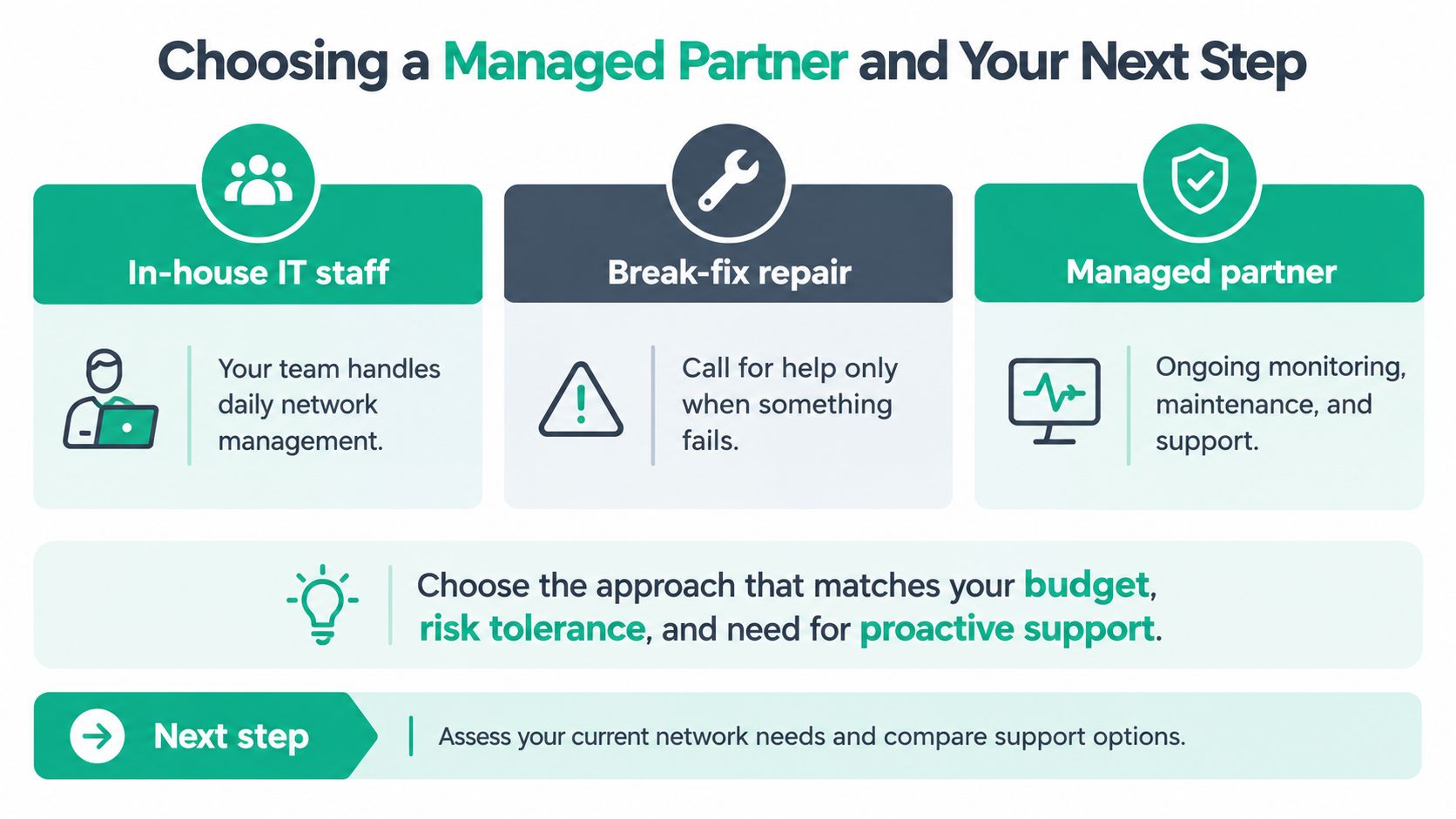
Compare responsibilities before prices
| Decision factor | In-house IT staff | Break-fix repair | Managed network partner |
|---|---|---|---|
| Response | Depends on staffing and availability | Depends on availability when called | Defined by the agreement |
| Monthly budgeting | Payroll plus tools and outside services | Variable incident-driven spending | Recurring scope plus stated exclusions |
| Security coverage | Depends on internal skills and resources | Usually limited to commissioned work | Must be specified and verified |
| Vendor accountability | Internal team coordinates | May remain with the business | Can be assigned contractually |
| Continuity | Requires coverage during absence | Requires a separate preventive plan | Requires documented escalation and recovery duties |
A hybrid arrangement can make sense. An internal IT employee might retain business context while an outside team handles specialized networking or after-hours escalation.
Evaluate the evidence behind the offer
For local support, the Greenwood-based publisher's stated capabilities include network and Wi-Fi design, cybersecurity, repair, data recovery, migration, and software development, with professionals holding Microsoft, CompTIA, and Cisco credentials. Confirm the assigned team's qualifications and the specific services included in your proposal rather than assuming every capability is bundled.
Ask how UniFi administration, Bitdefender GravityZone, immutable backups, and SOC-as-a-Service monitoring would fit your environment. Require clear answers about alert review, change approval, retention, restoration testing, and vendor coordination.
AI features deserve the same scrutiny. In the EMA network observability study, 43% fully trusted AI-driven network-management capabilities, while more than 49% trusted them only partly. My recommendation is to require approval for disruptive changes and permit automation only where actions are tested and reversible.
Use this guide to choosing a managed service provider to organize your questions. Whether you operate near downtown Indianapolis or along the I-65 corridor, request a sample report, escalation process, and clearly defined scope before signing.
Finchum Fixes IT offers networking and Wi-Fi design, cybersecurity, diagnostics, and recovery services for Greenwood and Indianapolis-area businesses. Visit Finchum Fixes IT to request a Free Network Assessment or Security Risk Audit, and bring your recurring outage list, current support agreement, and essential application requirements so the conversation starts with your actual business risks.