What Is Predictive Maintenance? an Indy Business Guide
A lot of Greenwood owners learn about server health the hard way. It's quiet on Friday, everyone goes home, and then a text hits on Saturday morning. The line-of-business app won't open. Shared files are missing. The office VPN won't connect. By Monday, payroll, scheduling, quoting, and customer service are all jammed behind one aging box in a closet.
That's the moment when break-fix stops feeling cheap.
For Johnson County business owners, especially in older offices along the Southside and up the I-65 corridor, the pattern is familiar. Aging server hardware, patchy Wi-Fi in old brick buildings, overworked firewalls, neglected backups, and nobody looking at the warning signs until something falls over. If you're trying to keep staff productive, protect revenue, and satisfy HIPAA, CMMC, or basic NIST CSF expectations, waiting for failure is a bad plan.
Fast takeaway: Predictive maintenance means watching the signals your systems already give off, then fixing issues before they become outages.
TL;DR
- Predictive maintenance means using system health data to spot trouble before servers, networks, or storage fail.
- For Indiana SMBs, that means fewer surprise outages, less weekend panic, and more predictable IT spending.
- In physical operations, predictive maintenance cuts maintenance costs and downtime. In IT, the same mindset applies, but the signals are different.
- Good IT predictive maintenance watches logs, latency, disk health, backup status, memory pressure, and security alerts.
- It works best when tied to business continuity, compliance, and a managed response plan.
- If you're still running on break-fix, start with your critical assets first: servers, switches, Wi-Fi, backups, and firewall.
A lot of companies confuse business continuity with disaster recovery. They're related, but they aren't the same thing. If you want the plain-English version, this breakdown of business continuity vs. disaster recovery for Indiana companies gets it right. One is about keeping work moving. The other is about rebuilding after the hit.
The Weekend Server Crash Every Business Dreads
A Greenwood company with fifteen to fifty employees usually doesn't have an enterprise data center. It has a practical setup. Maybe a server tucked into a utility room, a stack of switches on plywood, a business app nobody wants to touch because “it still works,” and Wi-Fi that got expanded one access point at a time as the building changed.
That setup can limp along for years. Then one hot weekend or one failed drive changes the whole week.
What failure looks like in real life
The owner doesn't call it infrastructure degradation. They call it chaos.
The accounting team can't get into QuickBooks or the ERP. The front desk can't pull customer records. The warehouse scanner drops off the network. Remote staff can't connect. If the company handles protected health information, contract documents, or customer payment data, a plain outage can turn into a compliance problem fast. HIPAA doesn't care that the server failed on a weekend. CMMC doesn't pause because a defense supplier in the Indy orbit had a neglected firewall.
For businesses in Greenwood, Whiteland, Franklin, and the broader Southside, old hardware is still common because replacing it never feels urgent when the machine is technically on. That's the trap. Servers rarely fail with a dramatic announcement. They usually whisper first. Bad sectors. Fan errors. Memory warnings. Growing latency. Backup jobs that “completed with exceptions.” Storage arrays that rebuild slower every month.
The smarter move
What is predictive maintenance? In plain English, it's the practice of looking for those whispers and acting before they become a hard stop.
For industrial equipment, that might mean vibration and temperature sensors. In IT, it means reading the digital warning signs. Disk SMART alerts. Event logs. CPU and memory trends. Packet loss on a UniFi network. Repeated authentication failures that hint at either a security issue or a system under strain. Immutable off-site backups that suddenly take longer than normal to verify. A firewall appliance with rising resource usage. A cloud workload with steady performance drift.
A server crash is rarely the first problem. It's usually the first problem someone noticed.
In our 17 years of local service, that's been the pattern over and over in Central Indiana. The issue that stops production on Saturday usually started showing itself on Tuesday, or last month, or during the last patch cycle nobody reviewed closely enough.
From Reactive Repairs to Predictive Strategy
The easiest way to explain predictive maintenance is with a car.
Reactive maintenance is driving until the engine seizes. Preventive maintenance is changing the oil every set interval whether the engine needs it or not. Predictive maintenance is checking the actual condition and servicing the car when the data says wear is building. That last model cuts waste and lowers risk.
Business IT works the same way.
The three maintenance models
Reactive maintenance is the old break-fix model. Something breaks, then someone scrambles. It feels simple because you don't spend much until failure shows up. The problem is that the outage lands at the worst possible time, and your people stop working while the clock keeps running.
Preventive maintenance is scheduled work. Patch windows, hardware replacement cycles, UPS battery checks, backup testing, firewall review, switch firmware updates. This is far better than waiting for catastrophe, but it can still be blunt. Teams sometimes replace healthy equipment too early or miss assets that are degrading between scheduled checks.
Predictive maintenance is data-driven. It monitors system condition and trends so maintenance happens when the evidence supports it. In industrial research, predictive maintenance decreases maintenance costs by 12%, improves equipment availability by 9%, and extends the lifetime of aging assets by 20% compared to reactive strategies, with overall savings reaching 30 to 40% according to Infraspeak's maintenance research summary. Those numbers come from industrial settings, but the core lesson carries over to IT: acting on real signals beats waiting for damage.
Maintenance strategy comparison
| Metric | Reactive Maintenance (Break-Fix) | Preventive Maintenance (Scheduled) | Predictive Maintenance (Data-Driven) |
|---|---|---|---|
| Trigger | Failure happens first | Calendar or fixed interval | Health data shows rising risk |
| Downtime pattern | Sudden and disruptive | Lower than break-fix, but still possible between checks | Lower because teams intervene earlier |
| Budget behavior | Spiky and hard to forecast | More stable | Most predictable when tied to managed monitoring |
| Labor use | Emergency work, after-hours calls, rushed recovery | Planned maintenance windows | Planned work based on actual need |
| Asset lifespan | Shorter when equipment runs to failure | Better than break-fix | Often longest because degradation gets caught earlier |
| Business impact | Lost productivity, missed sales, damaged trust | Better control, but can still over-service | Better continuity and less wasted tech time |
A lot of owners around Indianapolis don't need more gadgets. They need fewer fire drills. This is why mature SMBs move from break-fix into a managed model with monitoring, patching, backup verification, and lifecycle planning. If you want a practical look at that shift, this article on how managed IT helps small businesses grow without constant emergencies maps it well.
Why break-fix burns money you never invoice
Every hour your office manager spends chasing printer failures, login issues, dropped Wi-Fi, or a server freeze is an hour they're not billing, selling, scheduling, or serving customers. That's wasted tech time. It doesn't show up neatly on a P&L line, but it bleeds out of the business anyway.
A predictable maintenance strategy turns that chaos into a routine operating cost. It's easier to budget. It's easier to assign responsibility. It also lines up better with the way insurers, auditors, and clients increasingly expect businesses to operate.
The Technology That Predicts the Future
Predictive maintenance isn't magic. It's data collection, pattern analysis, and action before the failure lands.
In factories, the raw signals are usually physical. Predictive maintenance works by using real-time condition monitoring data from IoT sensors measuring vibration, temperature, and more to detect anomalies and forecast equipment failure, enabling maintenance at the optimal moment, as explained in L2L's overview of predictive maintenance.
In IT, the physical layer still matters, but many of the useful signals are digital.
The signals that matter in SMB IT
If you manage a server room in Greenwood or a multi-site office stretching from Johnson County into downtown Indy, your “vibration data” might look like this:
- Storage health: SMART warnings, RAID rebuild issues, increasing read/write errors, or snapshots that start taking too long.
- Server pressure: rising memory use, CPU saturation during normal business hours, and recurring service crashes.
- Network degradation: latency spikes, intermittent switch port errors, wireless retries, roaming failures, and WAN instability on a UniFi networking stack.
- Security indicators: endpoint alerts from Bitdefender GravityZone, failed login bursts, suspicious PowerShell behavior, or firewall events that suggest a device is compromised or overloaded.
- Backup drift: jobs that complete with warnings, failed restore tests, replication lag, or immutable off-site backups falling behind.
Those aren't random logs. They're early warnings.
How the stack works
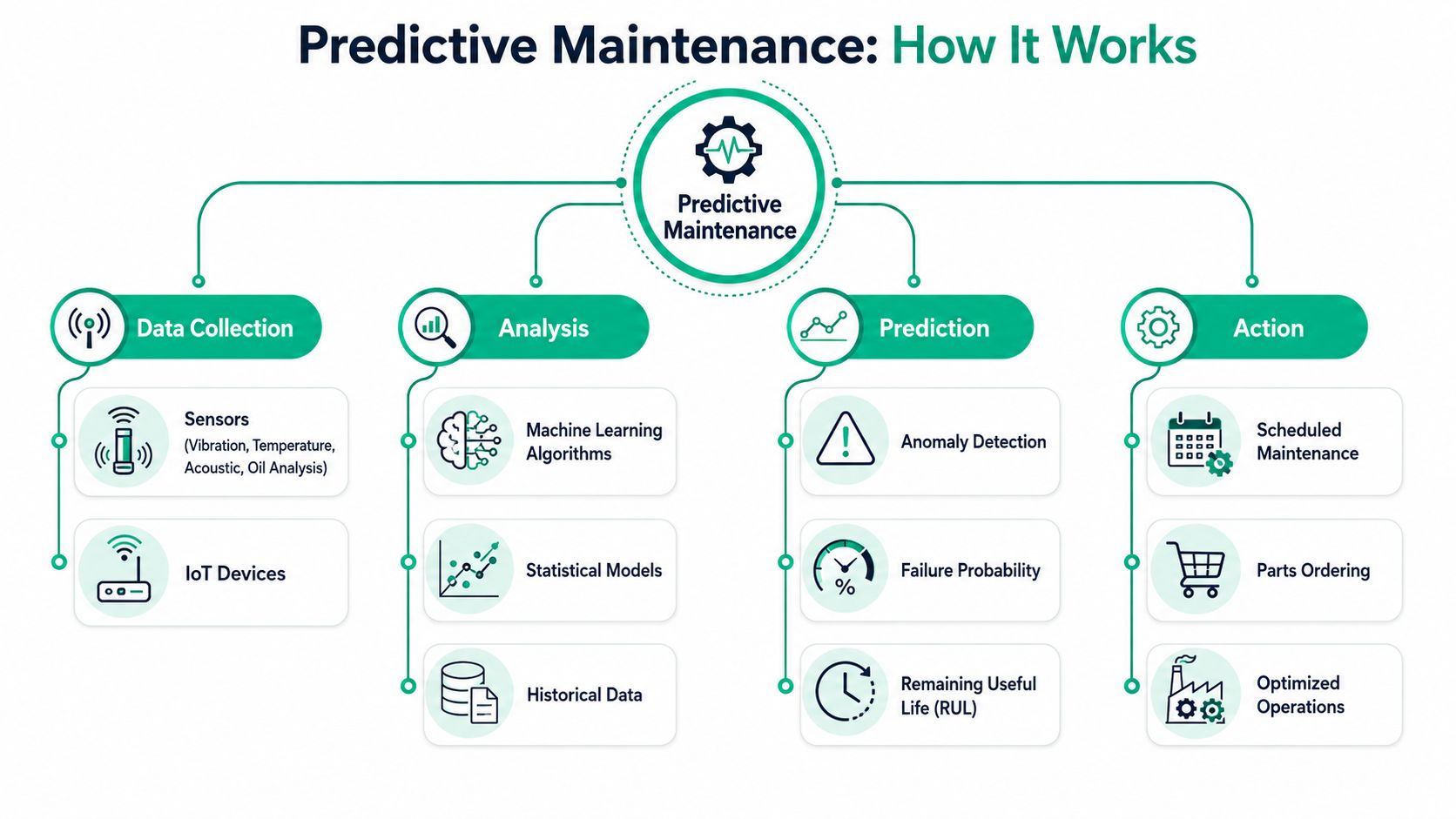
A useful predictive maintenance setup for IT usually has four layers:
-
Collection
Monitoring agents, SNMP, hypervisor metrics, endpoint telemetry, cloud alerts, and log ingestion pull data from servers, firewalls, switches, laptops, SaaS platforms, and backup systems. -
Analysis
The platform compares current behavior to normal behavior. That can be basic thresholding or more advanced machine learning and anomaly detection. For a small business, simple done consistently often beats fancy done badly. -
Prediction
A good system identifies patterns that often come before failure. A storage pool that degrades every month-end close. Access points in an old brick office that choke at shift changes. A domain controller that spikes after every patch cycle. A cloud app with increasing error rates before users start complaining. -
Action
Someone has to do something with the signal. Open the ticket. Replace the drive. rebalance the workload. Move the backup repository. Add latency-optimized mesh nodes. Patch the switch. Adjust Zero Trust architecture policies that are creating friction or revealing hidden device issues.
Practical rule: If your monitoring only tells you what already broke, you don't have predictive maintenance. You have a louder alarm.
For SMBs, this often ties into broader services like SOC-as-a-Service monitoring, backup validation, patch management, and cloud performance reviews. The tools differ, but the principle stays the same. You don't wait for users to become your monitoring system.
If you're curious where machine learning fits without all the buzzwords, this guide to machine learning applications for Indiana businesses does a good job separating useful automation from hype.
Predictive Maintenance for Your Indiana Business
Predictive maintenance gets more interesting when you stop thinking about factory motors and start thinking about the systems your company depends on. Servers. Firewalls. Wi-Fi. Backups. Virtual hosts. Microsoft 365 sync. Cloud line-of-business apps. Even custom software that starts throwing subtle errors before users notice.
That's where a lot of IT projects go off the rails.
Why IT predictive maintenance is different
A common mistake is importing industrial logic directly into IT. Hardware sensors matter for physical devices, but many IT failures show up first in logs, latency, memory leaks, authentication events, queue depth, and service restarts. Applying predictive maintenance to IT is challenging, and models often fail in software-defined environments where the signals are latency spikes or error rates, leading to a 40% project failure rate when teams use mismatched models, according to Tractian's glossary discussion of predictive maintenance in IT-like contexts.
That fits what seasoned admins already know. A failing switch fan is one kind of problem. A virtual machine that slowly exhausts memory because of a buggy update is another. You can't use the same playbook for both.
What this looks like around Central Indiana
In our 17 years of local service, the clearest wins have come from focusing on the assets that create the biggest business interruption when they go down.
A Hamilton County accounting firm during tax season doesn't need an academic lesson on telemetry. It needs the RAID array on the file server to stay alive. When we dissembled a similar client's failing RAID array during a recovery situation, the lesson was obvious. The disks had been warning for days, but no one was reviewing the storage alerts. The next step after bit-level data recovery wasn't just replacing parts. It was setting up storage health checks, backup verification, and alert escalation so the next failure would get caught before the array went critical.
A small healthcare office near Greenwood has a different concern. HIPAA pushes them to think beyond uptime. If the server storing imaging, scheduling, or charting data starts throwing disk errors, the problem isn't just inconvenience. It becomes a confidentiality, integrity, and availability problem. Predictive maintenance in that setting means watching endpoint behavior, backup success, patch status, and access anomalies, then tying those findings back to a broader Zero Trust architecture.
Defense contractors along the I-65 corridor have their own angle. CMMC readiness isn't only about MFA and policies. It also means proving systems are managed, monitored, and controlled. Proactive network health checks, switch log review, firewall configuration drift monitoring, and secure backup validation all support that discipline.
The local bottlenecks that keep repeating
Older Central Indiana buildings create repeatable tech issues:
- Old brick and dense walls: Wi-Fi looks fine on paper but fails in conference rooms, shop floors, and rear offices. Latency-optimized mesh nodes and better access point placement solve the root problem.
- Aging server closets: Poor cooling, dusty racks, and overstuffed UPS units shorten hardware life.
- Mixed-vendor sprawl: One old switch, one newer firewall, consumer access points, and a backup system nobody trusts.
- Cloud drift: Software moved to the cloud, but identity, endpoint policy, and bandwidth planning never caught up.
Good predictive maintenance for IT starts by asking which failure would hurt the business most tomorrow morning.
That's why asset inventories matter. If you don't know what you own, where it sits, who depends on it, and what “normal” looks like, predictive maintenance stays theoretical. A clean inventory is the base layer. This roundup of IT asset management software options for Indiana businesses is useful if your current record-keeping lives in a spreadsheet and somebody's memory.
The Clear ROI of Preventing Downtime
Downtime doesn't only cost repair money. It costs momentum, trust, and productive hours you can't get back. For many businesses, that's the bigger hit.
Owners usually ask the right question after a major outage. Not “What part failed?” but “How do we stop this from happening again?” That's the return-on-investment question. It's about business continuity, not just hardware.
The broad business case is simple. Every minute a critical system is offline can stall quoting, dispatch, scheduling, support, production, and billing. For companies that depend on continuous operations, downtime can cost up to $9,000 per minute. Even when your direct loss is lower, the secondary impact piles up fast. Staff sits idle. Orders wait. Customers lose confidence. Internal teams start creating risky workarounds.
What the numbers say
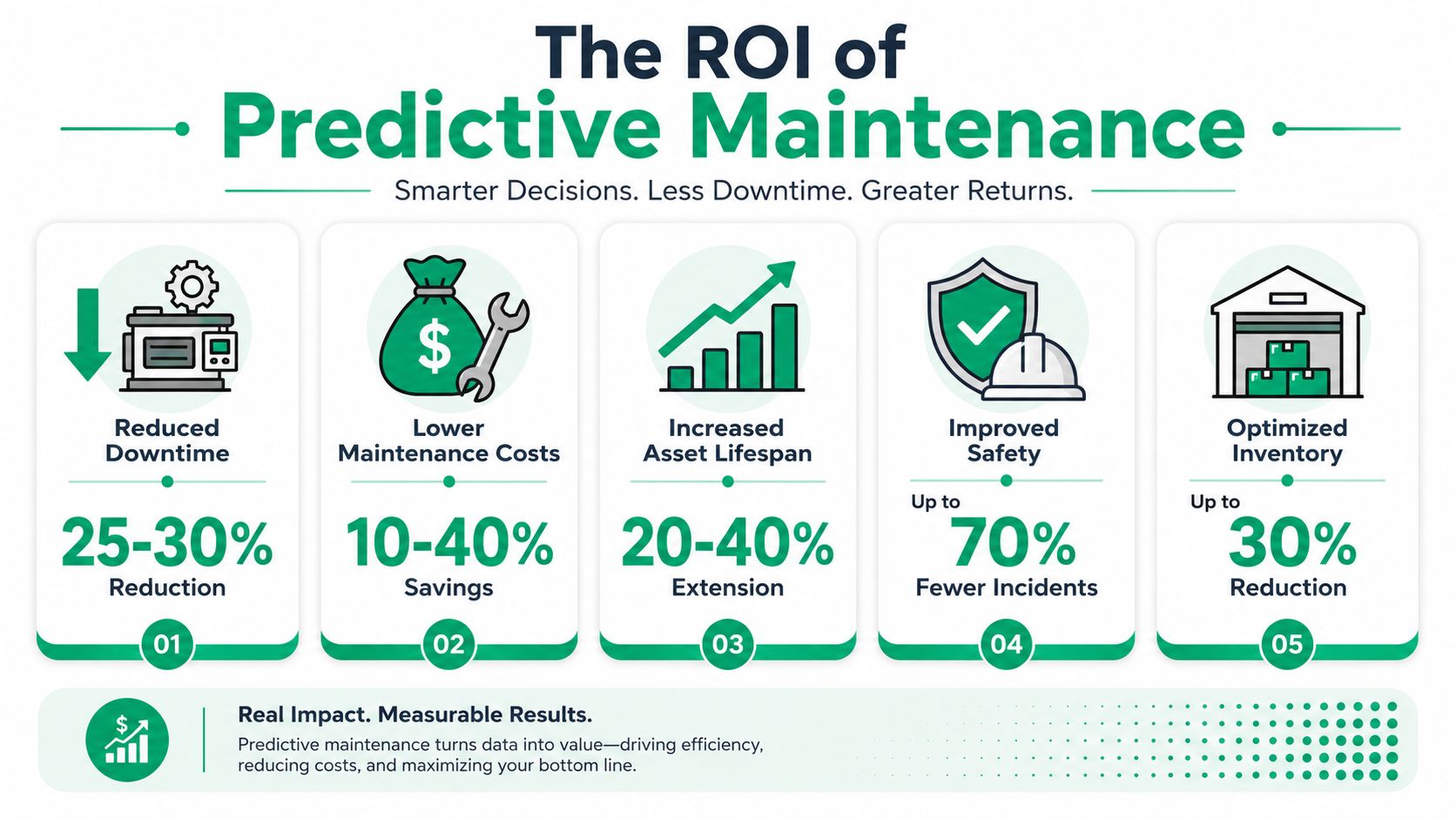
The strongest published ROI data in this space comes from predictive maintenance analytics programs. Businesses that adopt predictive maintenance analytics see an average 10x ROI, a 25 to 30% reduction in maintenance costs, and a 70 to 75% reduction in unplanned downtime, according to ServicePower's predictive maintenance analytics analysis.
For an Indiana SMB, that translates into a few practical outcomes:
- Fewer emergency calls: less after-hours labor and fewer rushed replacement decisions.
- More billable time: staff spend more hours doing the work customers pay for.
- Smoother budgeting: monthly managed support beats random high-cost outages.
- Stronger continuity: systems stay available when demand is highest.
- Better compliance posture: a monitored environment is easier to defend under HIPAA, CMMC, and NIST CSF controls.
Here's a visual snapshot of why this matters.
Turning wasted tech time into predictable spend
Reactive support creates weird accounting. The invoice lands after the pain. The hidden costs stay buried in payroll and missed work.
A proactive model cleans that up. Instead of paying unpredictably for downtime, you fund monitoring, patching, backup checks, endpoint security, cloud administration, and network maintenance on a known schedule. That gives owners a clearer monthly number and gives staff a more stable environment to work in.
It also improves decision-making. When a monitored server starts showing repeated storage warnings, you can replace it on your timeline, migrate workloads cleanly, validate backups, and avoid a panicked purchase. The same logic applies to networking. A degrading switch stack or overloaded Wi-Fi design doesn't need to become a mystery outage. If you're watching the telemetry, you fix the bottleneck before users flood the help desk.
This quick video gives a useful overview of the business case from another angle.
The best ROI in IT often comes from problems your staff never had to notice.
That's especially true in downtown Indy tech hubs, growing Hamilton County firms, and Johnson County businesses adding locations or hybrid staff. Expansion exposes weak infrastructure fast. If your systems only get attention when they fail, growth turns into stress. If your environment is monitored and maintained predictively, growth gets a lot less dramatic.
Your Implementation Roadmap with Finchum Fixes IT
Most SMBs don't need a giant predictive maintenance project. They need a sane starting point, clean priorities, and someone who knows the difference between meaningful telemetry and noisy dashboards.
A workable roadmap starts small and gets disciplined fast.
The checklist that actually works
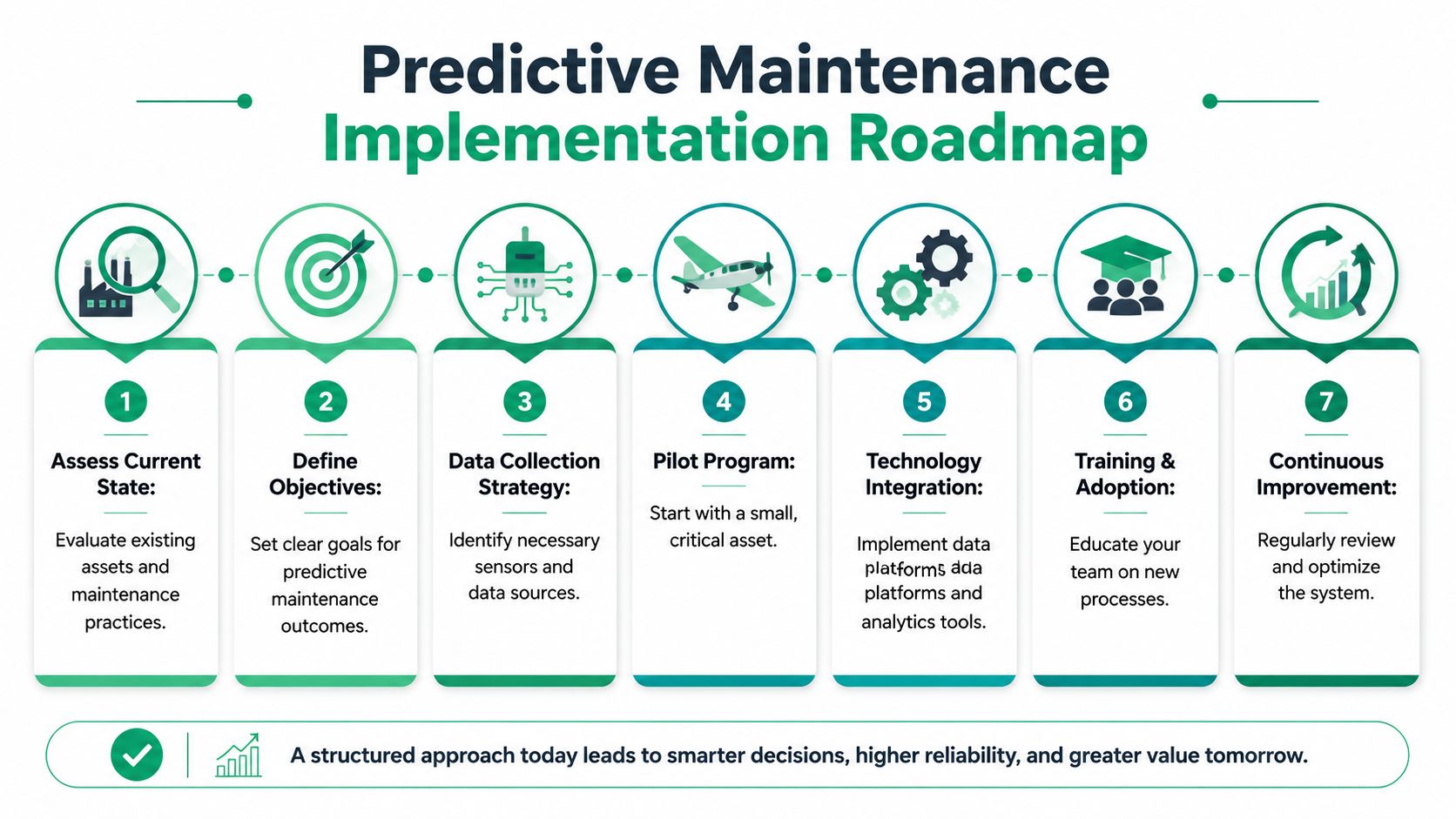
A structured predictive maintenance workflow includes identifying critical assets, collecting sensor data, training machine learning models, and integrating alerts into a CMMS or ERP. That process has produced $30,000 in parts savings and $500,000 in prevented costs in real-world deployments, according to ifm's strategic guide to implementing predictive maintenance.
For IT, the same sequence works with different inputs.
-
Start with critical assets
Don't monitor everything on day one. Pick the systems that would hurt most if they failed. Usually that's the core server, storage, firewall, switches, Wi-Fi controller, backup platform, and identity systems. -
Collect the right signals
Pull health data from logs, hypervisors, endpoint agents, cloud dashboards, and network monitoring tools. Add hardware data where it matters, but don't ignore software telemetry. -
Define normal behavior
Normal for a tax office in March isn't normal for a manufacturer on month-end close. Baselines have to match the business. -
Set actions, not just alerts
Every alert should map to a response. Replace the drive. patch the host. rebalance wireless coverage. verify backup immutability. open a security investigation through SOC-as-a-Service monitoring.
The pitfalls that trip up good teams
Some businesses buy tools and assume that equals strategy. It doesn't.
- Too much noise: If every warning becomes an alert, the team stops trusting the system.
- Bad asset inventory: Unknown devices and stale records make trend analysis weak from the start.
- No ownership: Somebody has to review, escalate, and close the loop.
- Treating compliance separately: HIPAA, CMMC, and NIST CSF controls should shape the monitoring plan from the beginning.
- Ignoring recovery: Predictive maintenance lowers risk, but it doesn't replace immutable off-site backups, tested restores, or bit-level data recovery capability when hardware fails.
A lot of this becomes easier when monitoring, security, patching, backup verification, and vendor coordination live under one operating model instead of five disconnected tools and three different contractors. Businesses that want a more stable setup usually end up exploring managed IT services built around continuous support and monitoring.
If your servers, storage, Wi-Fi, or cybersecurity stack are showing their age, Finchum Fixes IT can help you find the warning signs before they turn into downtime. Businesses in Greenwood, Indianapolis, and the surrounding Central Indiana area can start with a Free Network Assessment or a Security Risk Audit to identify weak points, tighten business continuity, and build a more predictable IT plan. Visit Finchum Fixes IT to schedule the next step.