Server Maintenance Services Explained for Indiana SMBs
A server crash in Greenwood rarely waits for a good time. It shows up when the office is already behind, the only IT person is out, and the phones start lighting up because accounting can't open files or production can't see yesterday's data. Server maintenance services keep that mess from becoming an outage by handling patching, monitoring, backups, security hardening, and recovery planning on a schedule that fits how Indiana businesses run.
Why Indiana SMBs Need Server Maintenance Services
A Greenwood accounting firm doesn't need a theory lesson when the file server dies on a Friday afternoon, the week before a tax deadline. They need the shared drive back, QuickBooks stable, and someone who knows whether the problem is a tired disk, a failed update, or a controller that's been complaining for days. That's the difference between hoping the box survives the weekend and running a planned maintenance program that spots trouble early.
In practice, server maintenance services are the recurring work that keeps on-prem and hybrid servers healthy, secure, and recoverable. That includes patching, backups, monitoring, performance tuning, firmware updates, security hardening, and clean documentation, so the next technician isn't guessing in a dim closet in a Johnson County business park.
Practical rule: If the only maintenance plan is “call someone when it breaks,” you're already paying for downtime, just in a more expensive way.
The local reality matters. Old brick buildings around downtown Indy and Greenwood can be rough on wireless coverage, the I-65 corridor still has plenty of aging server rooms, and a solo IT person going on vacation can leave a business exposed. That's why a lot of owners now look for external help rather than trying to keep every server task inside the building, and why it helps to know what a strong staffing model looks like, even if that model comes from a broader GENTY recruitment SRE hiring resource instead of a local MSP brochure.
The bigger point is cost. Downtime can cost up to $9,000 per minute for mid-market firms, so a four-hour outage doesn't feel like a technical nuisance, it feels like a payroll mistake, a missed shipment, or a client call you can't return. In our 17 years of local service, the cleanest shops weren't lucky, they were disciplined.
What Server Maintenance Actually Covers
A real maintenance visit doesn't start with a shiny dashboard. It starts with a checklist, a console, and a technician who knows what normal looks like before something turns ugly. The work is usually repetitive, which is exactly why it prevents chaos.
Start with patching, not hope
Patching should be treated as controlled change, not a click-and-pray update. Vendor OS, application, and firmware updates should be staged in a test environment first, then verified after deployment with log review, service checks, and rollback readiness, because a patch that breaks dependencies can create more damage than the vulnerability it was supposed to fix.
For hands-on validation, practical checks matter. On Linux, I'd look at dmesg, df -h, and iostat to spot disk errors, storage pressure, or throughput issues. On Windows, Get-WinEvent is useful for tracing update failures, service crashes, and ugly reboot behavior after a change.
Keep backups real, not ceremonial
Backups only matter if they restore. That means daily data backups, the right mix of full, incremental, and differential jobs, and off-site copies that can't be altered by ransomware in the same environment. One maintenance guide recommends testing backups daily or weekly depending on data volume, plus regular restores to test servers, and I agree with that rhythm because backup jobs that never get restored are just expensive false comfort.
Watch the machine before it screams
Daily monitoring should track CPU, memory, disk, network utilization, backup completion, service availability, and hardware alarms. Disk capacity deserves special attention. If a volume gets above 80% full, it's time to investigate, because log growth and backup repositories fill shelves faster than people expect. Storage that looks fine on Monday can become a service outage by Thursday.
Harden the environment and document the work
Security hardening includes account review, segmentation, patch inventory, and tools such as Bitdefender GravityZone where endpoint coverage is part of the environment. Firmware and driver updates belong in the same discipline as OS patches, because a stale controller or NIC driver can look like a “network issue” when it's really hardware behavior.
A good maintenance program also leaves a paper trail. The next technician should know what was patched, what was tested, what failed, and what was rolled back. That discipline exists for a reason, because 41% of server failures are caused by human error like misconfiguration and missed patches, which is exactly why maintenance has to be scheduled and documented instead of improvised. For a broader patch workflow, the patch management guide for Indiana businesses is worth reading once the basics are clear.
Security, Compliance, and Recovery Built Into Maintenance
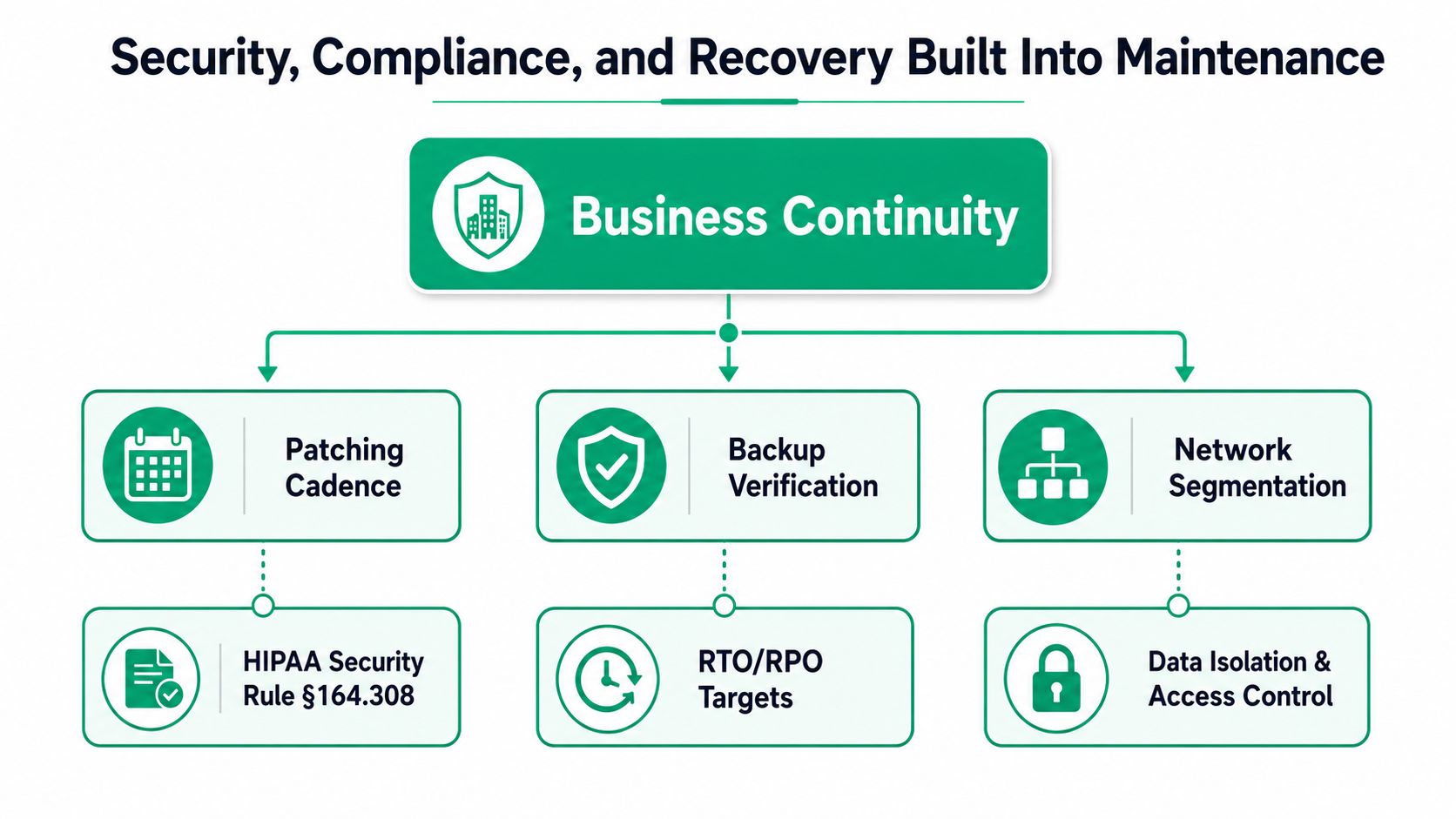
Maintenance that ignores security is incomplete. Maintenance that ignores recovery is dangerous. A server can be patched and still be one phishing email away from a ransomware shutdown if backups aren't validated and segmentation is weak.
Compliance lives in the maintenance calendar
Healthcare practices along the I-65 corridor care about HIPAA, defense contractors around Indianapolis care about CMMC, and most other SMBs should be mapping controls to NIST CSF. That sounds abstract until a missed patch, an exposed admin account, or a bad backup turns into a reportable incident. Good maintenance gives you evidence, not just reassurance.
The breach math is ugly. IBM's 2025 Cost of a Data Breach report put the global average breach cost at USD 4.88 million, which is why patch cadence, backup validation, and segmentation are financial controls as much as technical ones. If the server room is the place where revenue systems, patient data, or project files live, then the cost of sloppy maintenance is never just an IT ticket.
Recovery has to be proven
An immutable off-site backup is useful only if someone has restored from it. That's where tested restores matter more than backup success emails. A backup job can finish cleanly and still be worthless if the data set is corrupt, the credentials are stale, or nobody knows the restore order during an incident.
A backup that hasn't been restored is a hope, not a control.
This is also where SOC-as-a-Service monitoring and Zero Trust architecture fit. Monitoring catches suspicious behavior early, segmentation limits what an attacker can reach, and bit-level data recovery matters when a drive starts failing instead of just disappearing. For a business with mixed workloads, the point isn't fancy terminology, it's reducing blast radius and keeping the lights on.
A practical rhythm works better than a heroic one. Weekly vulnerability scans, monthly restore tests, and quarterly disaster-recovery exercises are realistic for an Indiana SMB that has to keep serving customers while IT gets the work done. If you want a local view of how security and compliance fit into operations, the Indiana SMB compliance and security guide is a useful companion.

Service Tiers, SLAs, and What You Should Expect
A vendor quote can look simple until you read the fine print. One provider says they do server support. Another says they monitor everything. A third says fully managed, which sounds good until you ask what happens at 2 a.m. when the storage controller starts throwing errors.
Break-fix, monitored, and fully managed
The three common tiers are easy to separate once you stop reading the marketing copy. Break-fix is reactive, managed monitoring is proactive, and fully managed pushes most routine tasks into the provider's hands. Those aren't just labels, they reflect how often someone is looking at the environment and how fast they'll act when something drifts.
A solid contract should define response time, resolution time, and uptime expectations in plain English. A 4-hour response promise is weak if the provider won't say whether that means a phone call, a remote session, or an onsite visit. The SLA has to explain the next step, not just the first one. A good template for what to ask is laid out in the managed services agreement guide.
What the market is already doing
A 2024 industry snapshot reported that 68% of server maintenance contracts include 24/7 monitoring, and the same source tied proactive maintenance to earlier detection and lower interruption risk. It also reported an average issue-detection time of 4.2 hours without monitoring, plus a 73% reduction in unplanned downtime when proactive maintenance is used. That's the key difference between seeing the problem and hearing about it from a frustrated office manager.
| Service Feature | Break-Fix | Managed Monitoring | Fully Managed |
|---|---|---|---|
| Monitoring | None or limited | Continuous or scheduled | Continuous |
| Patching | On request | Planned windows | Provider-led cadence |
| Backups | Customer-owned | Checked and reported | Tested and reviewed |
| On-site response | Ad hoc | Defined by contract | Defined by contract |
| SLA credits | Rare | Sometimes included | Often included |
Watch the red flags
Vague response times are a warning sign. So are no runbooks, outsourced NOC coverage with no local presence, and the classic “we know servers” pitch from a one-person shop. In older Johnson County business parks, I'd also ask about post-warranty and third-party coverage, because aging gear doesn't stop aging just because the OEM clock ran out.
Practical takeaway: If the provider won't show you the playbook, assume they don't have one.
Pricing Models and the Real ROI of Maintenance
The best pricing model is the one that matches how the business burns time. A Greenwood manufacturer doesn't want surprise labor bills every time a server acts up, and a professional services firm doesn't want every issue to turn into a debate about hours, travel, and “miscellaneous” work.
Three ways providers bill
The usual pricing structures are per-device monthly, per-user monthly, and all-inclusive block hours. In Central Indiana, those models are usually sold as predictable operational spend rather than emergency repair. That predictability is the point, because surprise repair bills are hard to absorb when the office is already losing productive time.
The local math is simple even when the invoice isn't. A four-hour outage at a 25-employee Greenwood manufacturer can vaporize a full half-day of billable effort, idle labor, and customer service time. I'm not going to invent a precise savings claim, because every shop's labor mix is different, but I've watched owners pay more for one ugly outage than they would've paid for months of maintenance.
ROI shows up in the workday, not just the ledger
Proactive monitoring can detect up to 95% of potential failures before business impact according to the market materials cited earlier, and that's the biggest reason maintenance starts to pay for itself. When a drive starts degrading, when a service is choking, or when storage is creeping toward full, the fix happens on a schedule instead of during a customer call.
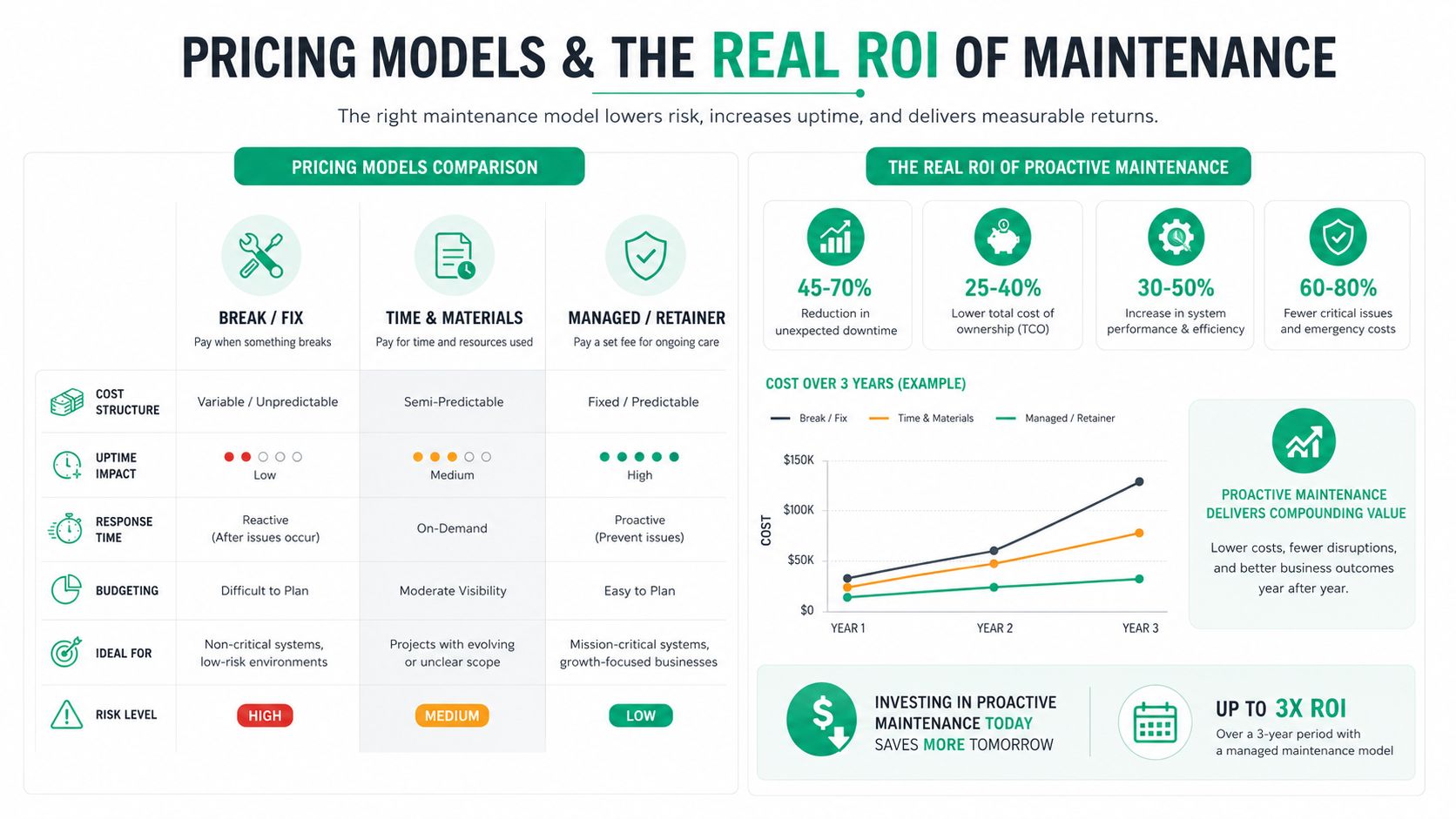
A predictable monthly line item also turns wasted tech time into billable hours. Every hour an owner spends chasing a server problem is an hour not spent on customers, estimates, or operations, and that time rarely shows up cleanly on an invoice. The return isn't flashy, it's fewer interruptions and less mental drag.
For pricing context in Indiana, the managed IT cost breakdown is a useful reference if you're comparing quotes side by side. The important part is that the contract should buy fewer surprises, not just a lower sticker price.
How to Evaluate a Server Maintenance Provider
A decent sales pitch is easy. A good maintenance provider can answer hard questions without dodging. That's the difference between a vendor and a partner.
Questions that cut through the fluff
Ask whether the SLA includes a credit when they miss response or resolution targets. Ask how backups are tested, and whether they can show documented restore success rather than just a completed job report. Ask if you get named technicians with Microsoft, CompTIA, or Cisco credentials, or whoever happens to be free that day.
Also ask what happens when you leave. A real contract should include full documentation transfer, admin handoff, and no hostage data behavior. If the offboarding answer is vague, the rest of the service is probably vague too.
Check the patch and monitoring process
Patching should not be a mystery. Ask how they stage updates, how they verify success, and what the rollback plan looks like if an application breaks after a reboot. Then ask where monitoring data lives, and whether you can see your own dashboards instead of getting a monthly screenshot with no context.
Practical rule: If they can't describe the failure path, they're not ready for the outage path.
The post-warranty issue matters here too. Older servers in Johnson County business parks often need third-party maintenance after OEM coverage ends, and that's where a TPM-style plan can keep the hardware useful while replacement is planned. The right provider should talk plainly about risk, cost, and replacement timing instead of pretending every old box deserves indefinite life support.
Red flags to walk away from
- Vague response language: “ASAP” isn't an SLA.
- No documented runbooks: If the main tech gets sick, what happens next?
- No local presence: Remote is great until someone needs hands on metal.
- No restore evidence: Backup success is not restore success.
- One-person confidence theater: “We know servers” is not a process.
The network security assessment guide for Indiana SMBs also helps when you're checking whether the provider's security story matches their maintenance story.
A Real Greenwood Server Rescue and What It Teaches
A Greenwood professional services firm called on a Thursday evening because their 2018 Dell PowerEdge tower was throwing RAID controller errors and one disk had already reported predictive failure. It was the file server and the QuickBooks server, which meant the whole office was one bad hour away from a very loud Monday. They had a single aging UPS, no off-site backup they trusted, and a part-time IT consultant who could only respond after hours.
The alert hit early enough to matter. The team got onsite in under two hours, swapped the failing drive, confirmed the array state, and restored the previous night's immutable backup to verify the QuickBooks databases before anyone went home. That's what real recovery looks like. Not a promise, a check mark.
What changed after the rescue
The fix didn't end with the drive. The post-incident review turned into a maintenance plan with monthly patch windows, weekly tested restores, and better documentation so the next alert wouldn't depend on memory. They also refreshed the networking with UniFi networking to clean up the spotty Wi-Fi in the brick-walled office, then replaced the expired endpoint suite with Bitdefender GravityZone.
That mix matters because the server problem wasn't isolated. The aging hardware, poor wireless coverage, and stale endpoint protection were all part of the same operational mess. Once the office treated them as one continuity problem, the environment got easier to support and much less stressful to own.
Generic advice falls apart here. A vendor brochure would've talked about “reliable service” and “peace of mind.” The shop needed a drive swap, a verified restore, a patch calendar, and a network that didn't drop accountants whenever the walls got in the way.
A similar pattern shows up in Hamilton County growth corridors and downtown Indy tech hubs all the time. The box isn't just old, the process is old too. When the process changes, the outages get shorter and the owner stops living in fear of the next beep from the rack.
Get a Free Network Assessment for Your Indiana Servers
If your Greenwood or Indianapolis servers are running on hope, stale backups, or a patch routine nobody can explain, it's time to look at the whole setup. A Free Network Assessment and Security Risk Audit can show where patching, monitoring, backups, and compliance are solid, and where the weak spots are hiding before they turn into downtime.
In our 17 years of local service, the same pattern keeps showing up. A failing RAID array in Hamilton County, a neglected backup policy, a server room that nobody wants to touch, and a business owner who just wants a clear answer. If that sounds familiar, start with a no-pressure review and get the facts on the table.
Finchum Fixes IT helps Indiana businesses keep servers stable, recoverable, and ready for audit, with maintenance, security, networking, and recovery work that fits real operations. If you want a practical look at where your environment stands, visit Finchum Fixes IT and ask about a Free Network Assessment or Security Risk Audit for your Greenwood or Indianapolis location.