What is Active Directory Management? A Guide for Indy SMBs
Old server in the back office. Random login failures on Monday morning. A mapped drive that works for accounting but not for operations. Someone leaves the company, and three weeks later their account still opens shared files.
That is the moment most owners start asking what is active directory management, even if they do not use those words.
For a lot of Indiana SMBs, Active Directory is the quiet system holding the business together. When it is clean, nobody thinks about it. When it is messy, the phones light up, staff sit idle, and your team burns half the day on avoidable IT problems instead of serving customers.
Is Your Greenwood Business Running on Borrowed Time
TL;DR
- Active Directory management is the ongoing work of controlling user access, devices, permissions, and security rules from one central system.
- Poor AD management causes login failures, access mistakes, security gaps, and wasted staff time.
- Hybrid setups make this harder for SMBs. 67% of SMBs report hybrid identity management as their top AD struggle, 45% face misconfigurations leading to outages, and SMBs see 3x higher breach rates from unmonitored Entra ID-AD sync issues according to MiniOrange’s Active Directory management guide.
- Good AD management protects uptime, supports compliance, and keeps onboarding, offboarding, and policy enforcement consistent.
- For Johnson County business owners, this is not a “server room” issue. It is a business continuity issue.
A common scene around the I-65 corridor goes like this. Staff walk in, type their passwords, and half of them cannot log in. One person gets in but cannot open the shared drive. Another can print, but only after a reboot. Your office manager says, “It was working Friday.”

That usually points back to Active Directory, or AD. Not because AD is “bad,” but because it has become the control point for logins, permissions, computers, printers, file access, and policy settings across the business.
The problem local firms run into
Indiana SMBs are not just running one simple server anymore. They have Microsoft 365, maybe Entra ID, a line-of-business app in the cloud, a few old on-prem systems, and remote staff connecting from home or from another branch.
That mix creates drift.
A user account gets created one way in the office, another way in the cloud. A permission gets granted quickly and never cleaned up. A server policy meant for staff laptops lands on a machine it should never touch. One sloppy change can ripple through the network.
The business owner does not care what console caused it. The business owner cares that payroll cannot post, intake cannot log in, and the phones keep ringing.
What good management fixes
Active Directory management means someone is actively maintaining the identity system your business depends on.
That includes:
- User access: Making sure each person gets the right access on day one.
- Security controls: Enforcing rules such as password policies, lockouts, and workstation restrictions.
- Device organization: Keeping servers, PCs, and user accounts in the right places.
- Operational stability: Preventing small directory errors from turning into full outage days.
If you want the broader picture of how that fits into uptime planning, this guide to IT infrastructure management and downtime reduction is worth reading alongside your AD strategy.
Your Business's Digital Command Center
If you want the plain-English answer to what is active directory management, use this analogy.
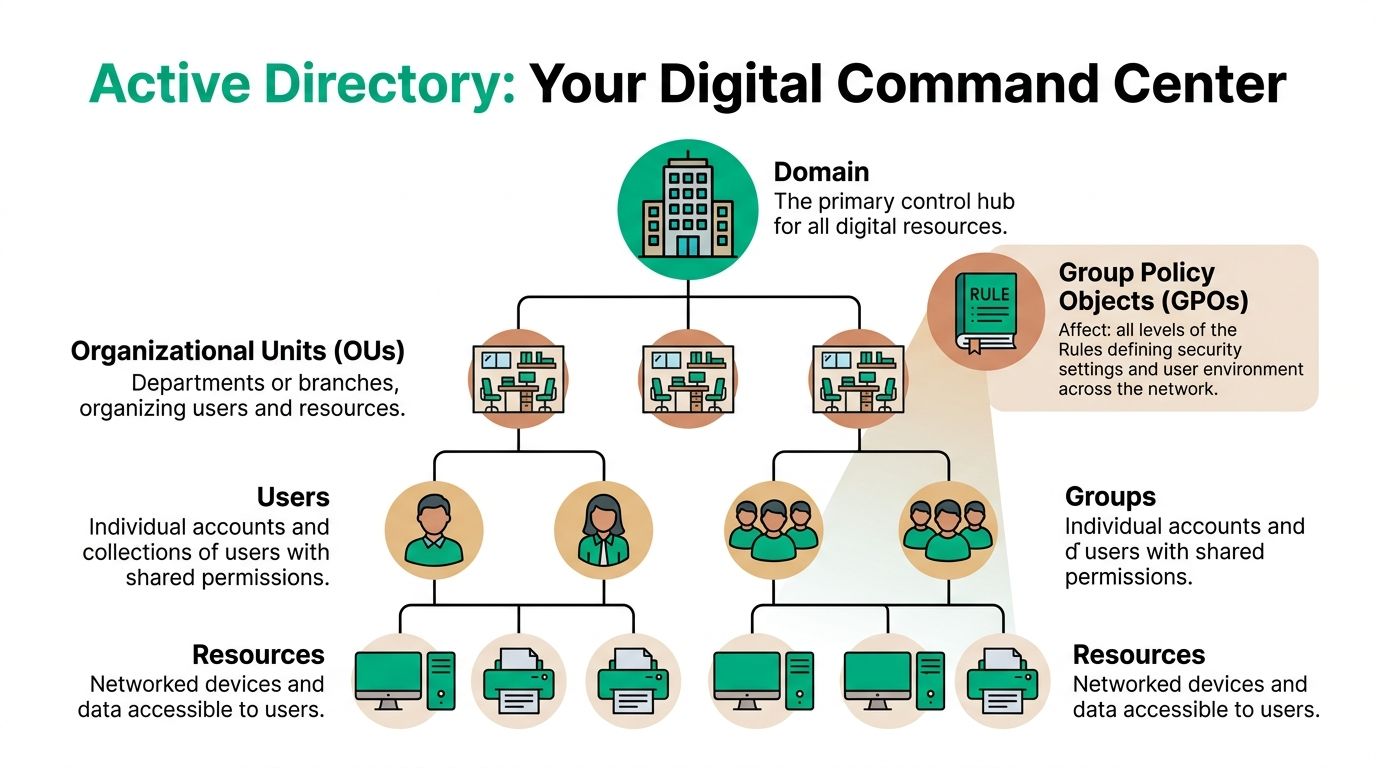
Think of Active Directory as your building’s digital keycard system, front desk roster, and policy manual rolled into one. It knows who people are, what doors they can open, what rooms they can enter, and what rules apply once they get there.
The core pieces that matter to an owner
Here is the structure without the jargon overload.
| AD component | What it does for the business |
|---|---|
| Users | Represents each employee, contractor, or service account |
| Groups | Bundles people together so access is assigned once instead of one by one |
| Computers | Tracks domain-joined devices and lets IT apply settings consistently |
| Organizational Units | Sorts users, computers, and servers into logical containers |
| Group Policy | Pushes security and configuration rules across the environment |
A healthy AD environment lets your team answer simple questions fast.
Who should access accounting data? Which laptops need tighter controls? Which servers should get different security rules than front-desk workstations?
Why Organizational Units matter more than most businesses realize
Organizational Units, or OUs, are the folders and drawers in that filing cabinet. They are not just for neatness.
Best practice is to separate users, computers, and servers into distinct top-level OUs. That makes policy application cleaner and safer. According to Active Directory Pro’s OU design guidance, proper OU design can reduce GPO processing time by 25-35%, while poor design can increase vulnerability exposure by up to 50%.
That matters in the world of business operations.
If your server objects sit in the same policy path as your regular workstations, a rule meant for office PCs can hit production systems. That is how a small configuration decision turns into downtime.
Practical rule: Users, computers, and servers should not live in one catch-all OU called “Company Devices” or “Staff.” That shortcut creates problems later.
The business value of central control
Owners usually notice AD when something breaks. Its true value shows up before that.
A well-managed directory gives you:
- Faster onboarding
- Cleaner offboarding
- Consistent security settings
- Lower risk of accidental access creep
- Fewer weird one-off support tickets
It also reduces dependence on tribal knowledge. If only one person knows why permissions were assigned a certain way, your business has a hidden operational risk. AD management turns that mess into structure.
The Day-to-Day of Keeping Your Network Secure
Most businesses think Active Directory work is just creating usernames. It is not. The critical work is in the routine.
A solid AD process handles the whole employee lifecycle, and it does it the same way every time.
Onboarding done right
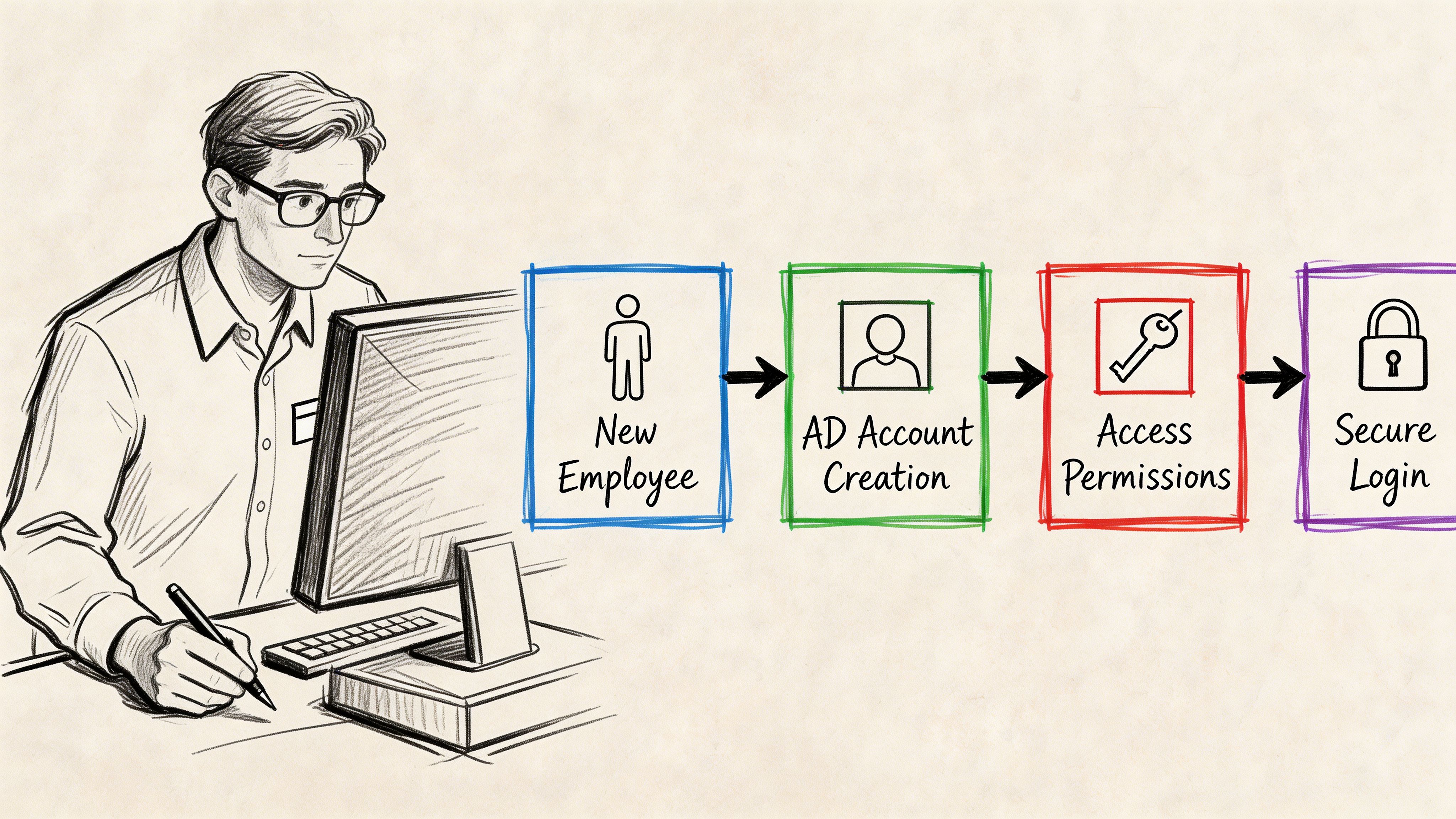
When a new employee starts, AD management should do more than create a username and temporary password.
It should place that user in the right groups, put their device in the right OU, and apply the right Group Policy Objects, or GPOs. GPOs are the network’s rulebook. They control things like screen-lock timing, drive mappings, desktop restrictions, and security settings.
A clean onboarding flow usually includes:
- Create the account with correct naming and attributes.
- Assign group membership based on job role, not guesswork.
- Place the computer correctly so the right policies apply.
- Confirm access to line-of-business apps, shared folders, and printers.
- Document exceptions so custom access does not become permanent chaos.
The same discipline that keeps Active Directory healthy also supports endpoint security. This overview of patch management and why it matters connects the dots well, because identity and patching failures often show up together during an incident.
Offboarding is where the risk gets real
Most owners underestimate this part.
When an employee leaves, delaying account disablement creates a wide-open gap. Their mailbox may still sync. Their VPN access may still work. Saved credentials on a company laptop may still connect to file shares. If that person had admin rights, the risk jumps fast.
Good AD management handles offboarding as an immediate security task, not an HR afterthought.
That means:
- Disable the account
- Remove elevated group memberships
- Block remote access
- Review mailbox and file ownership
- Document what was changed
Tip: The dangerous phrase is “we’ll clean that up later.” Old access rights rarely get cleaned up later.
Monitoring separates stable networks from noisy ones
There is a second half to daily AD work that many SMBs miss. Monitoring.
According to ManageEngine’s guidance on Active Directory health metrics, effective AD management requires tracking seven key metrics, including LDAP bind time, replication latency, authentication success and failure, account lockout events with Event ID 4740, DNS health, FSMO role availability, and domain controller resource utilization.
If replication breaks, one domain controller may know about a password reset while another does not. That causes failed logins, inconsistent policy behavior, and support tickets that look random until someone checks the directory properly.
This short walkthrough helps show the workflow side of AD in action.
Protecting Your Business from Downtime and Data Loss
Many owners hear “directory management” and think admin overhead. That is the wrong frame. AD management is uptime protection.
If the directory fails, people cannot log in, systems stop authenticating, mapped resources disappear, and support teams start firefighting. Your business is not just dealing with an IT nuisance. It is dealing with an operations problem.
Backups that help during a bad day
A standard server image is not the same thing as an Active Directory recovery plan.
AD stores identity relationships, permissions, policy links, and replication data. Restoring the wrong snapshot the wrong way can create a bigger mess than the original outage. That is why mature environments plan for AD-aware backup and recovery, not just general server backup.
Immutable off-site backups matter here. So do tested restores.
If your current process is “we think backup is running,” you do not have a recovery plan. You have hope.
A deeper look at enterprise backup solutions built for uptime is useful if your business depends on shared systems all day and cannot afford identity-related outages.
Replication removes a dangerous single point of failure
Active Directory works best when one box is not carrying the whole business on its back.
Multiple domain controllers let the environment continue authenticating users if one server fails. In practical terms, that can mean one controller on-site and another in a separate location or hosted environment, depending on the business and risk profile.
In our 17 years of local service, we have seen a proper AD restore save the day when a critical server failed at the worst possible moment. The companies that recover fastest are never the ones winging it. They are the ones that tested recovery before the emergency.
Key takeaway: If one failed server can stop every login in your office, your business continuity plan has a hole in it.
What works and what does not
What works
- Separate domain controllers from general-purpose server duties when practical.
- Test restores, not just backups.
- Document FSMO role placement, recovery steps, and dependencies.
- Pair directory resilience with network resilience, including stable switching and Wi-Fi design.
What does not
- Running critical identity services on aging hardware with no fallback.
- Assuming cloud apps remove the need for directory hygiene.
- Leaving recovery to whoever “usually handles the server stuff.”
Securing Active Directory to Meet HIPAA and CMMC Standards
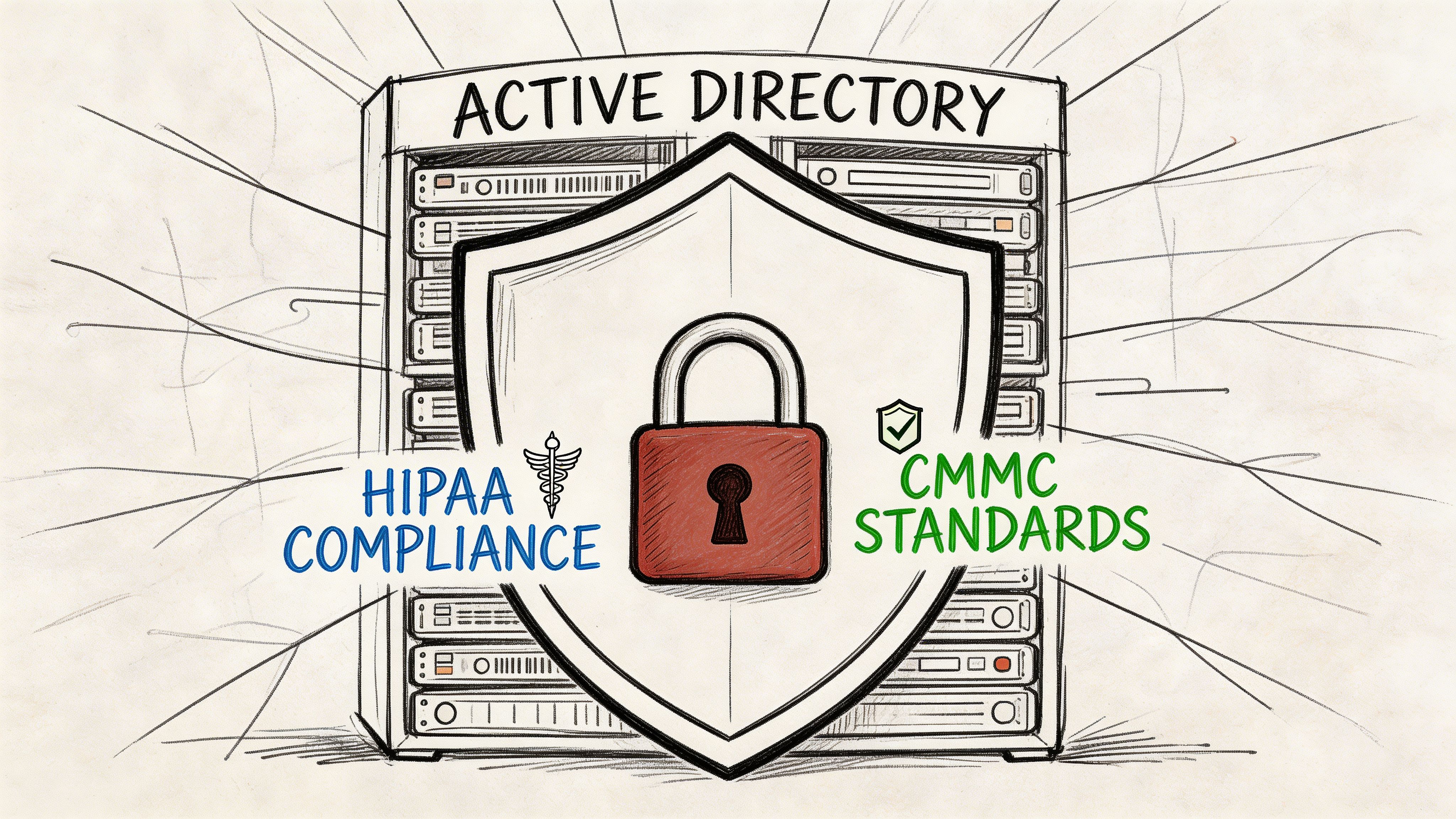
For a healthcare clinic in Hamilton County or a defense supplier near the I-65 corridor, Active Directory is not just about convenience. It is part of the evidence trail for security and compliance.
HIPAA expects controlled access to sensitive information. CMMC expects disciplined access control, account management, and system hardening. NIST CSF pushes the same direction. You need to know who has access, why they have it, and how quickly that access can be changed or revoked.
Least privilege is not optional
One of the most important AD rules is the principle of least privilege. People should have only the access needed to do their jobs.
That sounds obvious. In practice, it falls apart when someone gets temporary admin rights and nobody removes them, or when a staff member inherits access from three old groups that no one reviewed.
Zero Trust architecture starts to become practical here instead of being buzzword-heavy. You do not assume trust because a user is “inside the network.” You verify identity, limit scope, and monitor changes.
Multi-factor authentication is part of that picture too. This guide to multi-factor authentication best practices for 2026 pairs well with AD hardening because identity without MFA is still fragile.
Tiered admin rights stop small compromises from spreading
The stronger control is the administrative tier model.
According to Technology and Strategy’s Active Directory security guidance, this model separates admin rights for Tier 0 production systems, Tier 1 enterprise systems, and Tier 2 user workstations. That separation helps prevent attackers from moving laterally after they compromise lower-level credentials. In industrial environments, this kind of segmentation via dedicated domains can reduce risk by 70-80%, and proper domain controller placement can cut authentication latency by 40ms in multi-site setups.
That matters even if you are not running a factory floor.
If the same admin account manages domain controllers, user laptops, and general server tasks, one stolen credential can travel too far. Tiering contains the blast radius.
Compliance auditors care about process, not good intentions
Auditors look for repeatable controls.
They want to see:
- Account provisioning rules
- Prompt offboarding
- Privileged access separation
- Policy enforcement
- Logging and review
- Recovery planning
For healthcare groups preparing budgets, it also helps to understand the broader financial side of audits. This breakdown of HIPAA compliance audit cost gives useful context for leadership teams weighing security investment against audit readiness.
Practical compliance advice: If your access model depends on memory, favors convenience over review, or leaves admin rights broadly assigned, you are building audit pain into next quarter.
Where local businesses usually get stuck
Johnson County and downtown Indy firms often hit the same wall. They have enough complexity to need real controls, but not enough internal bandwidth to maintain them consistently.
That is where AD drifts:
- Shared admin accounts stick around.
- Old groups never get cleaned up.
- Mergers, moves, and software rollouts create exceptions.
- Cloud sync adds another layer of identity risk.
Good compliance posture is rarely the result of one expensive product. It is usually the result of disciplined identity management, strong policy design, MFA, endpoint controls such as Bitdefender GravityZone, and documented recovery backed by immutable off-site backups.
Your Active Directory Management Checklist
If you want a quick health check, use this list. It is not fancy. It works.
Daily checks
- Review failed logins: Look for unusual lockouts and repeated sign-in problems, especially patterns tied to one department or one server.
- Confirm critical services are authenticating: If staff cannot reach file shares, printers, or core apps, treat that as a directory issue until ruled out.
- Watch for account changes: New admin assignments, disabled users re-enabled, or odd permission changes should be reviewed quickly.
Weekly checks
- Inspect replication health: Make sure domain controllers are staying in sync so password changes and policy updates apply consistently.
- Review Group Policy results: Spot policies that are applying where they should not.
- Check DNS and domain controller health: AD depends on stable name resolution and healthy controllers.
Monthly checks
- Audit admin groups: Remove stale privileged access and confirm named individuals still need elevated rights.
- Review stale accounts: Disable unused users, old test accounts, and forgotten service identities where appropriate.
- Validate OU structure: Confirm users, computers, and servers still live in the right containers.
Quarterly checks
- Test AD backup and recovery: Do not stop at “backup completed.”
- Review offboarding records: Confirm departed staff no longer have access anywhere relevant.
- Evaluate policy alignment: Check whether your current rules still fit HIPAA, CMMC, or your internal NIST CSF goals.
Tip: If this checklist feels bigger than expected, that is the point. Active Directory is a living system, not a one-time setup.
When DIY Active Directory Management Becomes a Liability
There is a point where handling AD internally stops being efficient and starts becoming a business risk.
That point usually arrives unannounced. One capable office manager knows enough to reset accounts. A power user handles group memberships. A general IT person manages Microsoft 365, Wi-Fi, printers, and backup, while also trying to keep AD clean. Nobody owns the whole identity picture.
Then the environment grows.
You add remote staff. You add cloud apps. You add compliance requirements. You add a second site. The same casual process that worked for a small office starts breaking under the weight of real business dependency.
The cost is not just technical
When AD is loose, your company pays in three ways:
- Lost uptime: Staff cannot log in or reach what they need.
- Wasted labor: Managers, admins, and technicians burn hours fixing preventable access problems.
- Security exposure: Misconfigurations and broad permissions create a path for attackers.
That risk is not theoretical. According to Cayosoft’s Active Directory best practices overview, 60% of breaches involve human error, including accidental misconfigurations. The same source notes that in the financial services sector, 74% of breaches in 2025 were caused by basic attacks, system intrusion, and miscellaneous errors that exploited AD vulnerabilities.
If your business runs on payroll systems, shared files, ERP access, customer records, or compliance-sensitive data, those numbers should get your attention.
What smart owners do instead
They treat AD like critical infrastructure.
That means assigning real ownership, standardizing onboarding and offboarding, reviewing privileged access, monitoring health signals, and planning recovery before something fails. In many SMBs, the most practical route is a managed partner that can maintain the environment consistently for a predictable monthly cost.
If you are comparing internal scramble time against outside support, this page on managed IT services for small business growth is a good lens. The core question is simple. Do you want your team doing revenue work, or chasing login fires?
A messy directory steals time in small chunks until the big outage hits. Then everyone notices.
If your business is in Greenwood, Indianapolis, or anywhere across Central Indiana, Finchum Fixes IT can help you find the weak spots before they turn into downtime. A Free Network Assessment or Security Risk Audit is a practical way to review Active Directory health, hybrid identity gaps, policy sprawl, recovery readiness, and the broader security stack around it, including MFA, SOC-as-a-Service monitoring, UniFi networking, and immutable off-site backups.