What Is Server Virtualization Explained for Indiana Businesses
TL;DR: Your Quick Guide to Server Virtualization
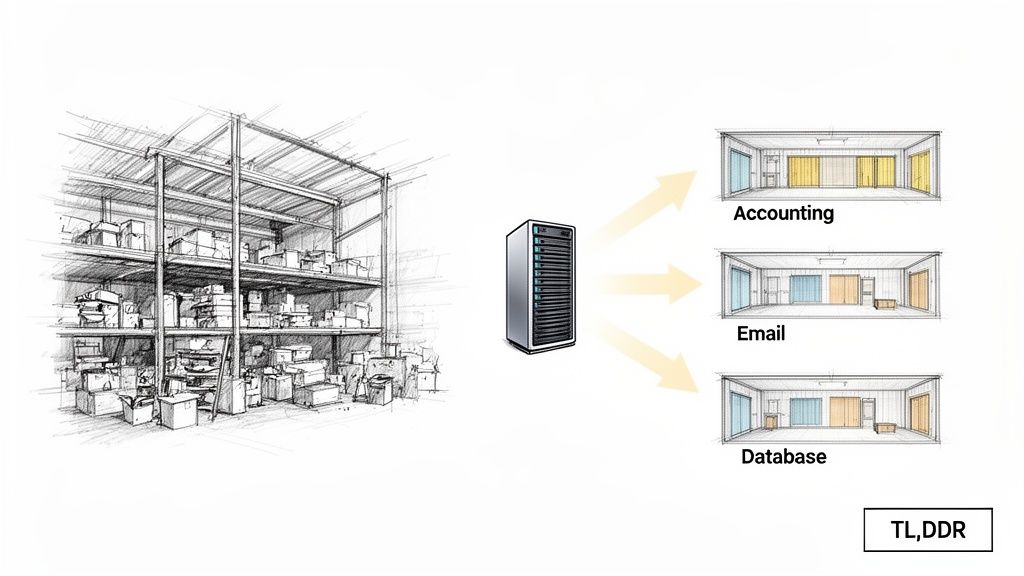
- What it is: Server virtualization takes multiple physical servers (like the ones for accounting, email, and databases) and consolidates them into virtual machines (VMs) running on a single, powerful piece of hardware. This clears out your cluttered server closet and slashes energy costs.
- Why it matters for business continuity: Virtual servers are just files, making them incredibly easy to back up with tools like Veeam. If your hardware fails or you get hit with ransomware, we can restore your entire operation in minutes, not days, preventing downtime that costs up to $9,000 per minute.
- The ROI: This move converts "wasted tech time" into predictable monthly costs. It reduces spending on hardware, electricity, and cooling while making it easier to meet compliance standards like HIPAA or CMMC. This turns a clunky IT liability into a lean, high-performance asset.
Remember that server closet you're a little afraid to open? The one with the tangle of cables and a chorus of humming fans? We see them all the time in business parks from Greenwood to Hamilton County. Imagine taking all those clunky, single-purpose machines and neatly packing their workloads into one powerful, efficient server. That’s the core of what server virtualization does.
It's like turning one big, underutilized warehouse into a collection of individual, secure storage units. Each unit—or virtual server—operates independently, running its own software and applications, but they all share the space and resources of the main building. You get to do way more with way less.
Your Quick Guide To Server Virtualization
From Server Sprawl To Smart Consolidation
For so many Johnson County businesses, the server room is a headache. You've got one machine for your accounting software, another one chugging along running email, and a third dedicated to your customer database. This old-school setup, with one application per server, isn't just inefficient—it's expensive and risky.
Each one of those boxes eats up electricity, kicks out heat, and is a ticking clock waiting to fail.
Virtualization flips that script entirely. We can take all those separate jobs and run them on a single, modern physical server. Right away, you’re buying less hardware, slashing your power bill, and freeing up precious office space.
The Bedrock Of A Rock-Solid Business Backup Plan
The benefits go way beyond just saving a few bucks. Virtualization is the secret weapon for a truly resilient business continuity plan. A virtual server is really just a self-contained set of files, which means we can back it up, copy it, and move it around with incredible speed and ease.
Think about it. We can take a perfect snapshot of your entire server in minutes using immutable off-site backups. If the worst happens—a hardware meltdown, a nasty ransomware attack, or even just a spilled coffee in the wrong place—we don't have to spend hours rebuilding a physical machine. We can spin up your backup copy, often on entirely different hardware, and get you back in business before you’ve had time to panic.
For our clients around the Indianapolis metro area, especially those dealing with compliance like HIPAA, this isn't a "nice-to-have." It's an absolute must for preventing downtime that can cost up to $9,000 per minute.
Key Business Outcomes of Server Virtualization
Let's boil it down. Here's a quick look at what virtualization actually does for your bottom line and your peace of mind.
| Benefit | What It Means for Your Business |
|---|---|
| Cost Reduction | Spend less on hardware, electricity, and cooling. Your IT budget becomes predictable. |
| Increased Uptime | Recover from disaster in minutes, not days. Convert "wasted tech time" into billable hours. |
| Simplified Management | One machine to patch and maintain is far easier than a whole rack. Techs can focus on growth, not just upkeep. |
| Improved Security | Isolate applications from each other. If one virtual server is compromised, the others remain safe. |
Ultimately, virtualization allows your technology to be more flexible and responsive, directly supporting your business goals instead of holding them back.
The Server Closet Problem Haunting Southside Businesses
Walk into just about any business park in Greenwood or along the I-65 corridor, and you’ll likely find it: the server closet. Inside, a rack of maybe five dusty, aging servers hums away, each one dedicated to a single job. One runs the accounting software, another handles email, a third hosts the company database... you get the picture. For too many Indiana businesses, this is the default setup, and frankly, it's a ticking time bomb.
Each of those physical machines is a single point of failure. When the server running your CRM finally gives up the ghost—and after 17 years of local service, we can tell you it's a matter of when, not if—your sales team is dead in the water. Operations grind to a halt while everyone scrambles for a fix, and you're losing money with every tick of the clock. It's a massive risk, especially when downtime can cost a business up to $9,000 per minute.
The Hidden Costs of Server Sprawl
This "one application, one server" model is a silent killer of budgets and efficiency, a drain that many Johnson County business owners don't even see. The problems just keep piling up.
- Sky-High Energy Bills: Every physical server is a power-hungry appliance that runs 24/7. Just by consolidating five of those machines into one, you can slash your data center energy costs by a staggering 80%.
- Wasted Real Estate: That server closet could be a new office, a break room, or much-needed storage. Old hardware takes up a valuable footprint that could be generating revenue instead of heat.
- Endless Maintenance Cycles: More machines mean more things that can (and will) break, need patching, or require updates. This eats up your team's time—or your IT provider's—pulling them away from projects that actually move your business forward.
- Disaster Recovery Nightmares: Trying to back up five separate physical machines is slow, clunky, and complicated. Trying to restore them after a real disaster? Even worse. For a deeper look at this, you can learn more about how modern data backup solutions guarantee business uptime in our other guide.
We see it all the time. When we dissembled a similar client’s failing RAID array, the culprit is almost always just old age. The hardware simply wore out. It’s a predictable point of failure that a virtualized environment completely eliminates.
From Clunky Iron to a Sleek, Powerful Asset
This is exactly where server virtualization flips the script. Instead of wrestling with a room full of outdated hardware, we can completely transform that entire setup into something clean, modern, and powerful.
Imagine taking those five different workloads—accounting, email, database, etc.—and consolidating them onto a single, powerful physical server. Each application still gets its own secure and isolated space, called a virtual machine (VM), but they all share the resources of one highly efficient piece of hardware.
The results are immediate. Your hardware footprint shrinks, your power bill plummets, and your entire IT operation becomes ridiculously resilient. Management is suddenly a breeze. And because VMs are essentially just a set of files, backing them up with tools like Veeam becomes incredibly fast, simple, and reliable. This isn't just an upgrade; it's a strategic move that turns a chaotic, risky liability into a lean, high-performance business asset.
How Server Virtualization Actually Works
So, how do you go from a server closet that sounds like a jet engine to a single, quiet, and powerful machine? It's not magic, but it's close. The secret sauce is a piece of software called a hypervisor.
Think of the hypervisor as the ultimate traffic cop for a computer's resources. The physical server is the highway system, and each virtual machine (VM) is a car driving on it. The hypervisor—and you've probably heard of the big names like VMware ESXi or Microsoft Hyper-V—sits in the control tower. It directs traffic, making sure every car gets its own lane (processing power), fuel (memory), and a clear path to its destination (storage).
Each VM operates in its own completely separate lane, totally oblivious to the other "cars" on the highway. This is the simple but brilliant idea that makes the whole thing work, and it's a game-changer for businesses all along the I-65 corridor.
This picture nails the "before and after." You can literally see the clutter of multiple machines turning into one clean, optimized server.
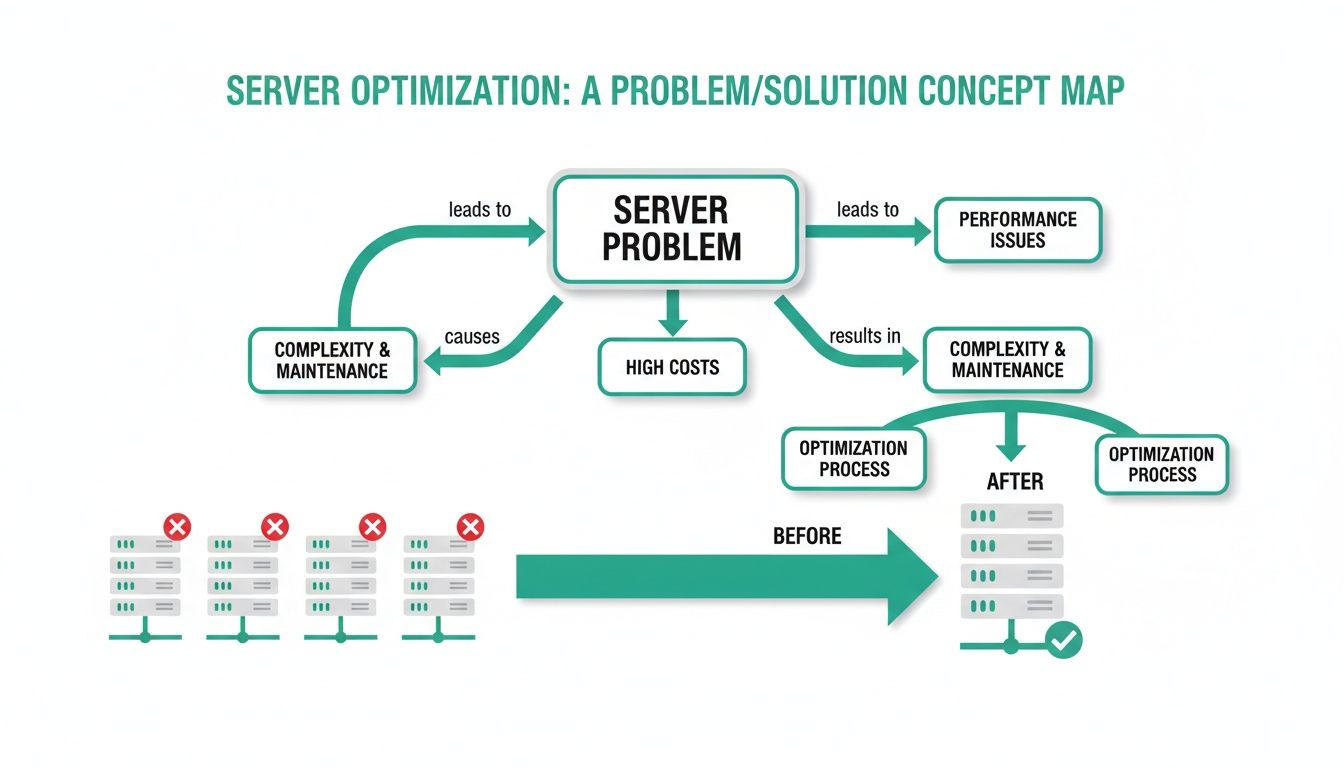
That’s not just a prettier setup; it's a direct line to lower power bills and way less administrative headache.
The Different Flavors Of Virtualization
Just like you wouldn't use a sledgehammer to hang a picture frame, there isn't just one way to virtualize. Different jobs call for different tools.
And this isn't some niche tech trend. The server virtualization market is already huge, sitting at USD 6.66 billion and on track to hit USD 10.66 billion by 2032. The most popular approach, full virtualization, owns over 60% of that market because it lets you run almost any operating system you want, side-by-side, without them ever stepping on each other's toes. That kind of isolation is a must-have for Indiana healthcare providers needing HIPAA compliance or defense contractors navigating CMMC standards. You can get a deeper dive into these numbers in this comprehensive market report.
So, what are your main options? Let's break it down.
Three Types Of Server Virtualization Compared
To make sense of the jargon, here's a quick look at the three main technologies. Each has a different job it’s best suited for, and the right choice can make a world of difference.
| Virtualization Type | How It Works (Simple Analogy) | Best For |
|---|---|---|
| Full Virtualization | It's like giving each application its own private, fully furnished house with all its own plumbing, electricity, and walls. | Running different operating systems (e.g., Windows and Linux) on one server; maximum security and isolation for critical apps. |
| Paravirtualization | This is like a friendly co-working space where tenants know they're sharing the building and coordinate with the manager to use resources more efficiently. | High-performance needs where you can modify the guest OS. Less common now, but still useful in some specialized cases. |
| Containerization | Think of a modern apartment building where everyone has their own secure unit but shares the main plumbing, HVAC, and foundation. | Modern web applications and software development. Incredibly fast, lightweight, and efficient. Think Docker. |
Ultimately, the goal is to match the technology to the task. Full virtualization offers fortress-like security, while containers offer incredible speed.
What This Means For Your Business
Knowing the difference isn't just for the IT nerds—it directly impacts your budget, security, and performance. Full virtualization is the go-to for that mission-critical accounting software that absolutely cannot go down. On the other hand, a tech startup in a downtown Indy tech hub would probably lean on containers to develop and launch its new app quickly.
Over our 17 years serving local businesses, we’ve learned that the smartest solution is often a mix of both. We might put a company's ancient but essential database on a fully virtualized machine for stability, while running their shiny new website in containers on the very same server.
At Finchum Fixes IT, we don’t just plug things in. We look at what your business actually does and design a virtualization strategy that fits. We make sure you get the performance you need and the cost savings you want, all without being tangled up in hardware headaches.
The Real-World ROI For Your Indiana Business
Technical specs are interesting, but let's talk about what really matters to a Johnson County business owner: keeping the doors open and getting a solid return on your investment. How does collapsing five power-hungry servers into one actually affect your monthly budget? And when disaster strikes, how much faster can we really get you back online?
The short answer to both is "dramatically." Downtime is the ultimate budget-killer, with some industry estimates putting the cost as high as $9,000 per minute. Server virtualization is one of the most powerful tools in our arsenal to shrink that recovery time from days down to minutes.
Turning Disaster Recovery From Days Into Minutes
In a traditional setup, a physical server failing is a full-blown catastrophe. We'd have to scramble to find new parts, rebuild the machine from the ground up, install the operating system, and then—if you're lucky—restore your data from last night's backup. The whole ordeal is slow, stressful, and bleeds money.
Virtualization completely changes the game. A virtual machine (VM) isn't a physical box; it's just a neat little package of files. This simple fact makes backing it up and recovering it incredibly fast and reliable.
Using powerful tools like Veeam, we can take immutable off-site backups of your entire virtual server. Think of these as perfect, incorruptible snapshots in time. If your physical server gets blasted with ransomware or has a total hardware meltdown, the recovery process is refreshingly simple:
- We fire up your most recent VM backup on a different physical machine.
- We point your network traffic over to the newly restored server.
- Your business is back online.
That’s it. In our 17 years of experience helping Hamilton County businesses achieve 99.99% uptime, we've seen this exact process turn a potential week-long outage into a minor blip that's fixed in under an hour.
Slashing Costs And Reclaiming Wasted Time
Beyond the "save your business" benefits, the financial ROI is immediate and easy to see. Server consolidation directly attacks bloated operational expenses and converts "wasted tech time" into a predictable, manageable line item on your budget.
- Reduced Energy Bills: Fewer physical machines chugging away 24/7 means a significantly lower power and cooling bill every single month.
- Lower Hardware Costs: Instead of buying five new servers every few years, you're investing in one seriously powerful machine that can do the work of all of them.
- Simplified Maintenance: Patching one server is a whole lot easier than juggling five. This frees up our technicians to focus on helping your business grow instead of just putting out fires.
For businesses that have to meet strict compliance rules like HIPAA for healthcare or CMMC for defense contractors, this simplified approach is a huge win. A virtualized environment is far easier to secure, audit, and manage, making it simpler to prove compliance and dodge those hefty fines.
Meeting The Demands Of Modern Business
This shift to virtualization isn't just a local trend for businesses along the I-65 corridor; it's a massive driver in the North American IT market. The server virtualization software market here is valued at USD 3.18 billion, and it's being pushed primarily by small and medium-sized businesses that need to scale efficiently without breaking the bank. Globally, that market is set to jump from USD 9.0 billion to USD 13.96 billion by 2033 because it directly solves the need to slash hardware costs by getting the most out of every single server. You can learn more about how data center consolidation is fueling this growth.
Virtualization allows a growing business in a downtown Indy tech hub to be just as agile and tough as a much larger corporation. It's a foundational step that prepares your company for whatever comes next, whether that's expanding your team or exploring new tech. To see how this fits into the bigger picture, check out our article on the real benefit of cloud migration for Indiana businesses. It's all about building a rock-solid, cost-effective IT infrastructure that works for you, not against you.
Planning Your Move to a Virtual Environment
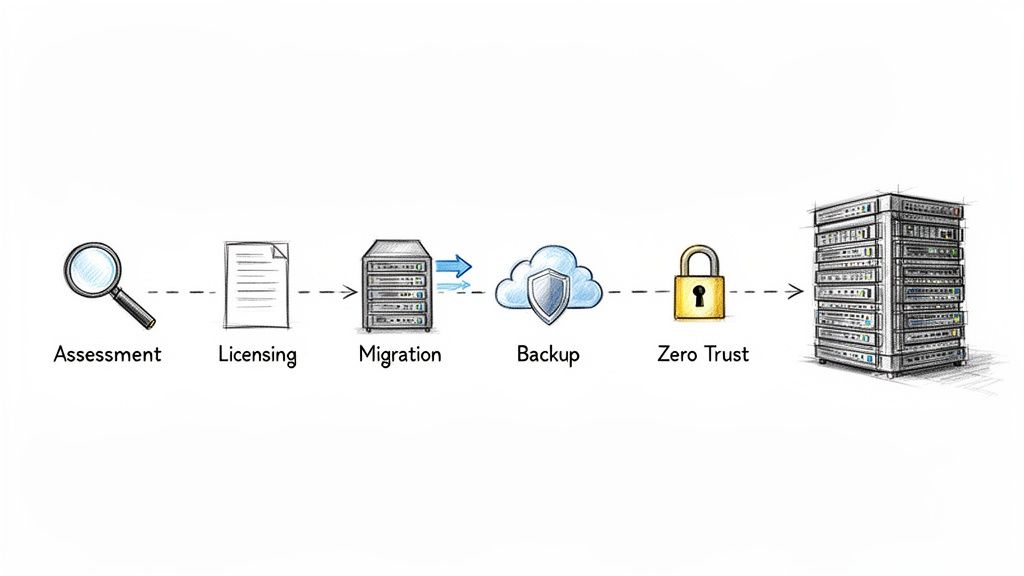
Jumping into virtualization isn't like flipping a switch. For businesses here in Greenwood and across the Indy metro area, a successful move is all about having a solid, methodical game plan. Think of it as a major construction project—a little extra time spent on the blueprint prevents a world of hurt down the road.
With our 17 years of local service, we’ve seen what happens when companies try to wing it. They get tangled up in performance bottlenecks, blindsided by surprise licensing bills, and left with gaping security holes. That's why we’ve built a roadmap that covers every critical step before we even think about unplugging a single server.
Hardware and Licensing: The Nitty-Gritty
First things first, we have to take a good, hard look at your current setup. Does your existing server hardware have the horsepower to run multiple virtual machines at once? We'll dive deep into its processor cores, RAM capacity, and storage speed to make sure it can handle the new load without even breaking a sweat.
Then comes the real puzzle: software licensing. Giants like Microsoft and VMware have some very specific—and often confusing—rules for virtual environments. You can't just drag and drop your old Windows Server license and call it a day; that’s a quick way to get hit with a nasty fine during an audit. We'll help you navigate the fine print to ensure your licensing is not only compliant but also makes financial sense for you.
Data Migration and a Modern Backup Plan
Moving your data is the most delicate part of the whole operation. The goal here is a seamless transition with zero disruption to your business. We map out a detailed migration plan, scheduling data transfers for nights or weekends, double-checking data integrity after the move, and making sure your team can log in Monday morning like nothing ever changed.
A virtual environment also opens up a whole new world of backup possibilities. Since VMs are essentially just files, we can set up powerful solutions like immutable off-site backups using tools like Veeam. This means your backups are locked down, unchangeable, and safe from ransomware, letting you recover in minutes, not days. A sloppy backup plan in a virtual world is a recipe for disaster; we make sure yours is airtight from day one. You can dive deeper into this by checking out our guide to cloud migration best practices for Indiana businesses.
A common pitfall we see is businesses forgetting to re-evaluate their security for the new virtual network. What worked for five separate physical machines won't protect a single, consolidated host.
This is exactly why we build security in from the very beginning. We integrate a Zero Trust architecture, a modern security model that trusts no one by default. Every single access request is verified, which is absolutely critical when you're protecting the central "brain" of your new virtual infrastructure.
This kind of comprehensive planning isn't just a technical checklist; it’s a smart business strategy. The global server market is on track to hit USD 270.75 billion by 2034, with virtualized and cloud environments expected to grab a massive 42.91% of that pie. This explosive growth is driven by businesses just like yours needing to consolidate, lock down their data, and scale without breaking the bank. You can find more insights on this trend from Fortune Business Insights.
As you consider your own move, understanding the different infrastructure models can make a huge difference. Reading up on topics like Multi Cloud vs Hybrid Cloud can provide valuable context for your long-term goals. Our methodical approach ensures your transition is not just a success, but a springboard for your company's future.
Let Finchum Fixes IT Handle Your Switch to Virtualization
Making the leap to server virtualization is a game-changer. It's one of the smartest infrastructure moves any business can make, but let's be honest—it's not something you want to try on a whim over a weekend. Getting it right involves a whole lot more than just installing some new software. You're fundamentally redesigning your IT's central nervous system, and that requires some serious expertise in networking, data management, and cybersecurity.
That's where we shine. At Finchum Fixes IT, we bring big-league knowledge to businesses right here in the Indianapolis area, but with the local, hands-on support you can actually rely on.
Your Local Guides for a Perfect Migration
For over 17 years, we've been helping businesses in Greenwood and up and down the I-65 corridor. We’ve turned countless messy server closets into sleek, powerful, and efficient workhorses. We've also seen the ugly side of a migration gone wrong—crippling performance issues, unexpected software licensing bills that run into the thousands, and downtime that grinds a business to a halt.
Our battle-tested process is designed to sidestep all that drama. We sweat the details so you don't have to:
- Hardware Deep Dive: We start by making sure your physical server is beefy enough to run multiple virtual machines without even breaking a sweat.
- License Wrangling: We’ll navigate the confusing and ever-changing licensing rules from companies like Microsoft and VMware to keep you 100% compliant and avoid nasty audit surprises.
- "No Hiccups" Migration: We map out the entire physical-to-virtual (P2V) process with military precision, ensuring your team can keep working without interruption.
- Security from the Ground Up: We don’t just bolt on security at the end. We integrate a Zero Trust architecture from the very beginning, locking down your new virtual environment against modern threats.
Stop Fixing, Start Growing
We're not just here to sell you a box of technology. We're here to build a rock-solid IT foundation that lets you focus on what you do best: growing your business.
When you work with us, you can finally say goodbye to the constant worry about aging hardware and the money pit it represents. We manage everything from the initial strategy session to ongoing support, all for a predictable monthly cost. This turns your IT from a headache into a genuine competitive edge. You can see everything we bring to the table by looking at our comprehensive IT services.
Ready to trade wasted tech time for more billable hours? The next step is easy.
Let's have a real conversation about what a virtualized environment can do for your business. Schedule your no-pressure, Free Network Assessment with our team today and get a clear picture of what a modern IT strategy looks like.
Got Questions? We've Got Answers.
Even after laying out the plan, it's totally normal for Indiana business owners to have a few more questions rattling around. We get it. This is more than just a tech refresh; it’s a big move for your business. So, here are the straight-up answers to the questions we hear most often from folks in Greenwood and all over the Indy metro.
Is This Virtualization Thing Actually Secure?
This is usually the first question out of the gate, and the short answer is a resounding yes. When it’s set up correctly, virtualization can actually boost your security.
The magic word here is isolation. Think of each of your virtual machines (VMs) as living in its own sealed-off bubble, even though they're all on the same physical server. So, if some nasty malware finds its way onto your email server VM, it's trapped. It can't just hop over and wreck your critical accounting server VM.
This separation is a huge win for modern security. We take it a step further with security tools built for this world, like Bitdefender GravityZone. It lets us wrap specific security policies around each individual VM, creating a much tougher defense than just having a single guard at the main gate of a physical server. For any business trying to meet standards like HIPAA or NIST CSF, this layered approach isn't just nice to have—it's essential.
But What About My Ancient, Can’t-Live-Without-It Software?
You’re not alone. So many businesses we work with along the I-65 corridor are running on older, legacy software that’s absolutely vital but throws a fit if you try to install it on a new operating system. This is actually one of the coolest tricks up virtualization’s sleeve.
We use a process we call a physical-to-virtual (P2V) migration. It’s like we take a perfect digital snapshot of your old physical server—the operating system, the quirky old software, all your data, everything—and gently place that entire snapshot inside a new, secure VM.
From the software's perspective, nothing has changed. It wakes up and keeps chugging along exactly as it did before. The only difference is that now it’s running on brand-new, reliable hardware that's a breeze to manage and back up. After 17 years in this business, I can't tell you how many critical applications we've saved from the hardware graveyard using this exact method.
Okay, So How Is This Different From “The Cloud”?
This one trips a lot of people up, but it's simpler than it sounds. Here’s the best way to think about it: server virtualization is a technology, while the cloud is a service.
Virtualization is the engine that makes the cloud go. It’s the "how" they chop up those giant servers in their massive data centers into smaller pieces they can rent out to you.
You can absolutely use virtualization without ever touching the cloud. When we come in and consolidate your five aging servers onto one shiny new box in your office, that's on-premise virtualization. You own it, you control it.
The "cloud"—think Amazon Web Services or Microsoft Azure—is really just someone else’s gigantic, virtualized server farm that you pay to use. Virtualization is the foundational tool, whether it’s humming away in your server closet in Johnson County or in a data center halfway across the world.
Your business deserves an IT setup that pulls its weight, not one that keeps you up at night. If you’re tired of babysitting old hardware and want a real strategy for cutting costs and improving security, let's talk. Finchum Fixes IT is here to help.