Wireless Network Solutions for Indiana SMBs

Spotty Wi-Fi in a Greenwood brick office isn't usually fixed by buying a faster router. Wireless network solutions combine correctly placed access points, dependable cabling, compatible devices, security controls, and accountable management. The right design keeps critical applications connected and gives someone clear responsibility for preventing, diagnosing, and recovering from interruptions.
The Spotty Wi-Fi Problem in Old Indy Brick Buildings
An accountant in a Greenwood business park moves into the conference room, joins a client call, and immediately starts cutting out. Back at the desk, everything works. Meanwhile, a manufacturer along the I-65 corridor has warehouse handhelds that connect near shipping but struggle behind loaded shelving.
These are representative scenarios, not exotic failures. The useful question isn't whether the router needs more antennas. It's whether the network was designed around the building and the work happening inside it.
A managed approach starts by reproducing the problem, locating its cause, and establishing an acceptance test. That might mean relocating access points, repairing the wired connection behind them, or correcting client behavior. Monitoring and configuration records then help keep the same problem from returning unnoticed.
Diagnose the building before shopping
Old Johnson County masonry and a new Hamilton County office call for different placement decisions. Don't assume a centrally located access point will serve both layouts equally well. Survey the rooms where people work, including closed-door offices, stockrooms, and the awkward corner occupied by the billing team.
Coverage isn't the same as usable service. A laptop displaying a strong connection still needs a reliable path through the switch, firewall, internet connection, and application.
- Location-specific failure: Compare the same device in the problem area and near the access point.
- Application-specific failure: Check whether only the VPN, cloud accounting package, or video platform is affected.
- Busy-period failure: Reproduce the issue when staff and visitors are connected, not after everyone leaves.
Buying rule: Don't approve replacement hardware until the proposal explains what failed and how the new design will prove it's fixed.
Hardware price research still has a place. Browsing access point prices at Godukkan can help distinguish equipment categories, but a catalog price isn't an installed Indiana project budget. Cabling, configuration, support, and suitability need separate evaluation.
For Johnson County business owners, understanding structured cabling is often a better starting point than comparing wireless speed labels. There's no universal shopping list, only a design that fits your operation.
The Four Building Blocks of Any Wireless Solution
Treat business Wi-Fi as an infrastructure system, not an appliance. Its physical building blocks are access points, switching, and a gateway, coordinated through a controller. Ongoing monitoring is the operating layer that makes those components manageable after installation.
The component diagram separates those responsibilities.
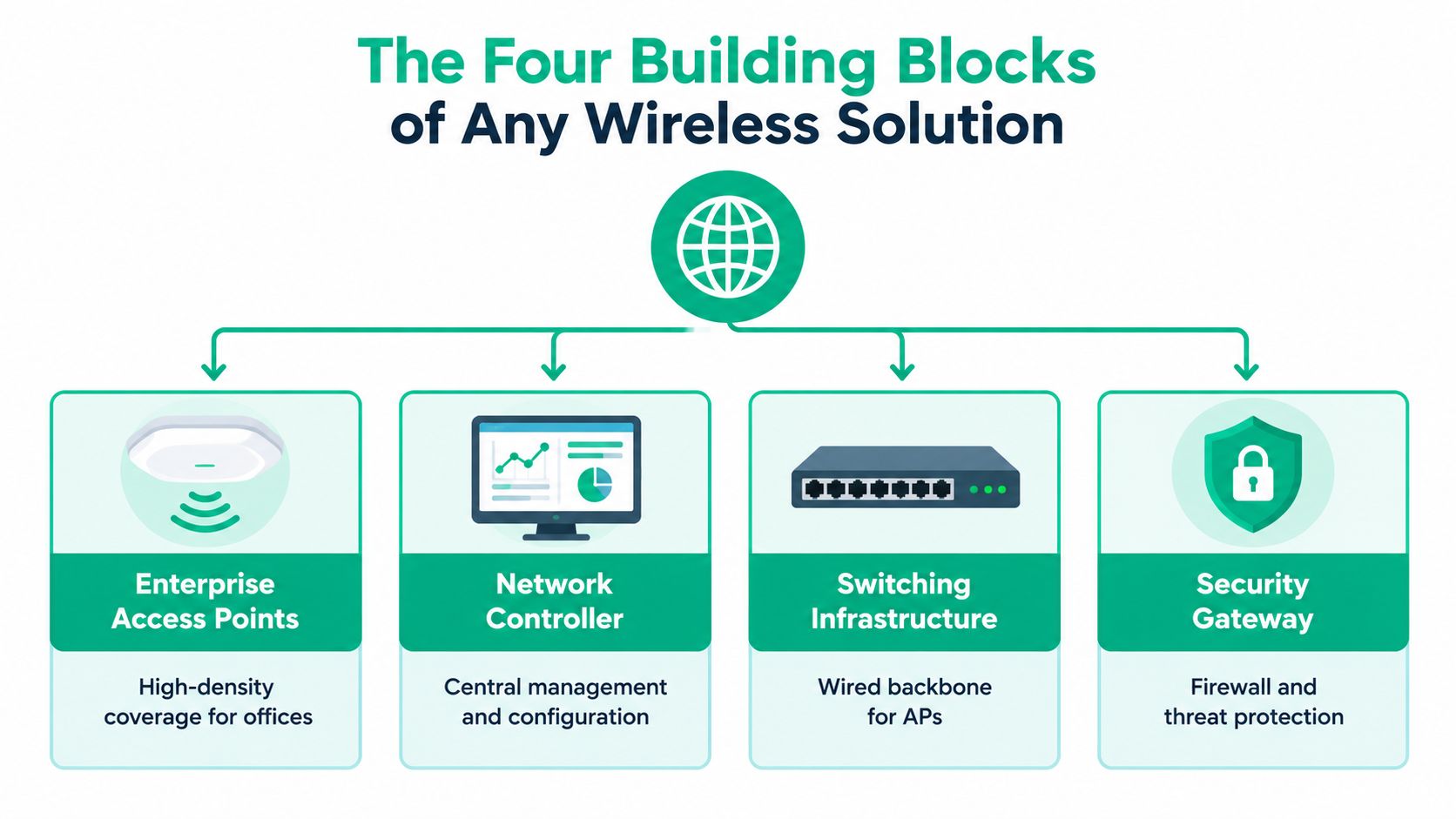
What each component should do
| Component | Practical role | Question for the installer |
|---|---|---|
| Enterprise access points | Connect wireless clients where work happens | What coverage and load tests justify these locations? |
| Network controller | Coordinate configuration and provide administrative visibility | Who owns access and keeps configuration records? |
| Switching infrastructure | Carry access-point traffic and supply compatible power | Have cable condition, uplinks, and power requirements been checked? |
| Security gateway | Enforce boundaries between networks and external services | Which business traffic is allowed, denied, or logged? |
UniFi networking is a common SMB option worth evaluating alongside other enterprise platforms. Ask to see the proposed UniFi Network configuration, administrative ownership, and recovery process. A dashboard screenshot doesn't establish that someone will investigate an alert.
The controller or cloud management plane also deserves scrutiny. Decide who receives notifications, who approves updates, and how administrators regain access if the usual technician is unavailable. Cloud management is convenient, but convenience shouldn't replace an ownership agreement.
Mesh is a routing choice, not a cure
Consumer mesh equipment isn't automatically incapable of serving a small office. The problem is buying it without checking business requirements for segmentation, diagnostics, administration, and recovery.
Latency-optimized mesh nodes deserve consideration where cabling is impractical, such as parts of a historic building or a campus layout. However, a wireless backhaul must itself be surveyed and tested. A warehouse full of shelving isn't an exemption from engineering.
Where cable routes are available, ceiling-mounted access points with wired backhaul are the preferred design starting point. They separate the client connection from the transport path instead of asking another wireless link to carry both responsibilities.
For education and retail buyers, secure Wi-Fi for education and retail is a useful resource to consider when defining visitor-access requirements. Keep that requirement distinct from staff connectivity and operational systems.
A complete proposal should identify the equipment, management platform, transport path, and support owner. “Business-grade Wi-Fi” without those details is just a label.
Wi-Fi 6, 6E, and 7 Without the Marketing Hype
The generation printed on the box matters, but readiness matters more. An access point upgrade should follow a client inventory, application assessment, and infrastructure check. Otherwise, you're buying capability without knowing whether employees can use it.
Use this visual as an orientation to the generations, not as a deployment-specific performance guarantee.
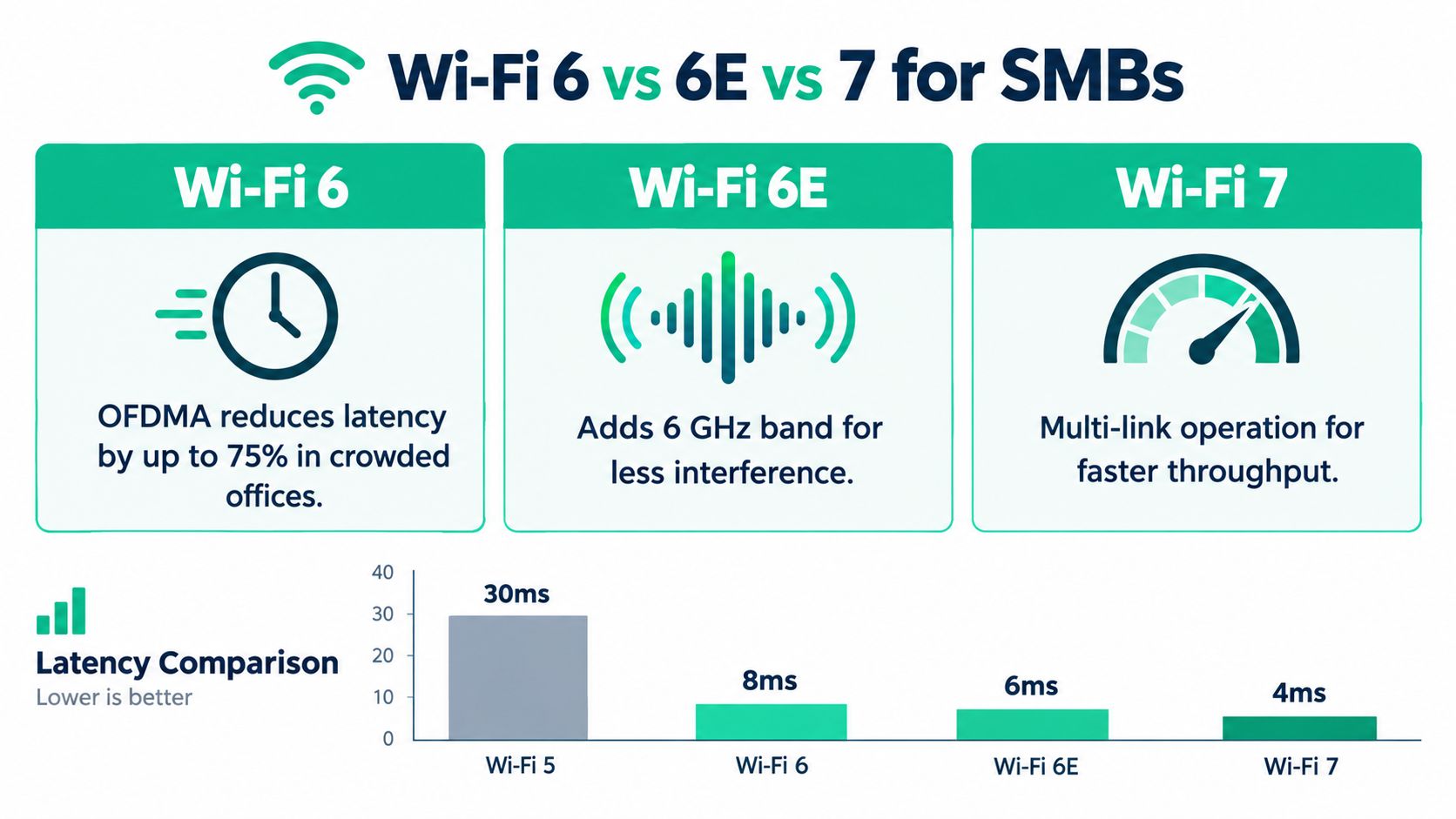
Wi-Fi 6 improves how clients share airtime
OFDMA divides a channel transmission into resource units so multiple compatible clients can be served together. That's relevant to offices with competing handsets, scanners, and cloud-connected devices, not just someone downloading a large file.
In an IEEE evaluation of Wi-Fi 6 OFDMA, median latency fell from approximately 5 ms to below 1 ms under non-saturated conditions, while a combination of uplink OFDMA, efficient buffer-status reporting, and restricted EDCA increased saturation throughput by more than 10%. Those are evaluated conditions, not a promise for every Greenwood office.
Validate the feature with your actual clients. Measure busy-period latency and application behavior rather than accepting a single-device speed test.
Wi-Fi 6E adds spectrum, not universal compatibility
The FCC's April 2020 approval of 1,200 MHz of unlicensed spectrum established the U.S. foundation for Wi-Fi 6E, extending Wi-Fi 6 into the 6 GHz band; only compatible Wi-Fi 6E or newer clients can use it, as explained in Cisco's Wi-Fi 6 and Wi-Fi 6E overview.
That distinction matters more than laptop age. Check the actual wireless adapter and supported bands. A relatively recent purchase doesn't, by itself, establish compatibility.
A newer access point can serve existing clients without giving those clients access to every new capability.
For a visual introduction alongside that distinction, this video offers another way to approach the technology.
Wi-Fi 7 belongs in the evaluation when compatible devices, wired infrastructure, and demanding applications justify it. Don't accept an advertised peak rate as evidence that your accounting software, dental workflow, or warehouse application will improve.
For Hamilton County growth projects, installing suitable infrastructure during construction may justify newer equipment. For an existing office with legacy clients, a staged upgrade may be the more sensible purchase. Match the standard to operational readiness, not the brochure.
Designing the Network So It Actually Works
A useful site survey combines a floor plan with measurements and application testing. Walking a corridor while watching signal bars isn't enough. The technician needs to examine the rooms, client types, interference conditions, and wired paths that affect the proposed deployment.
Survey work should follow the places employees use, not merely the places where mounting hardware is easy.
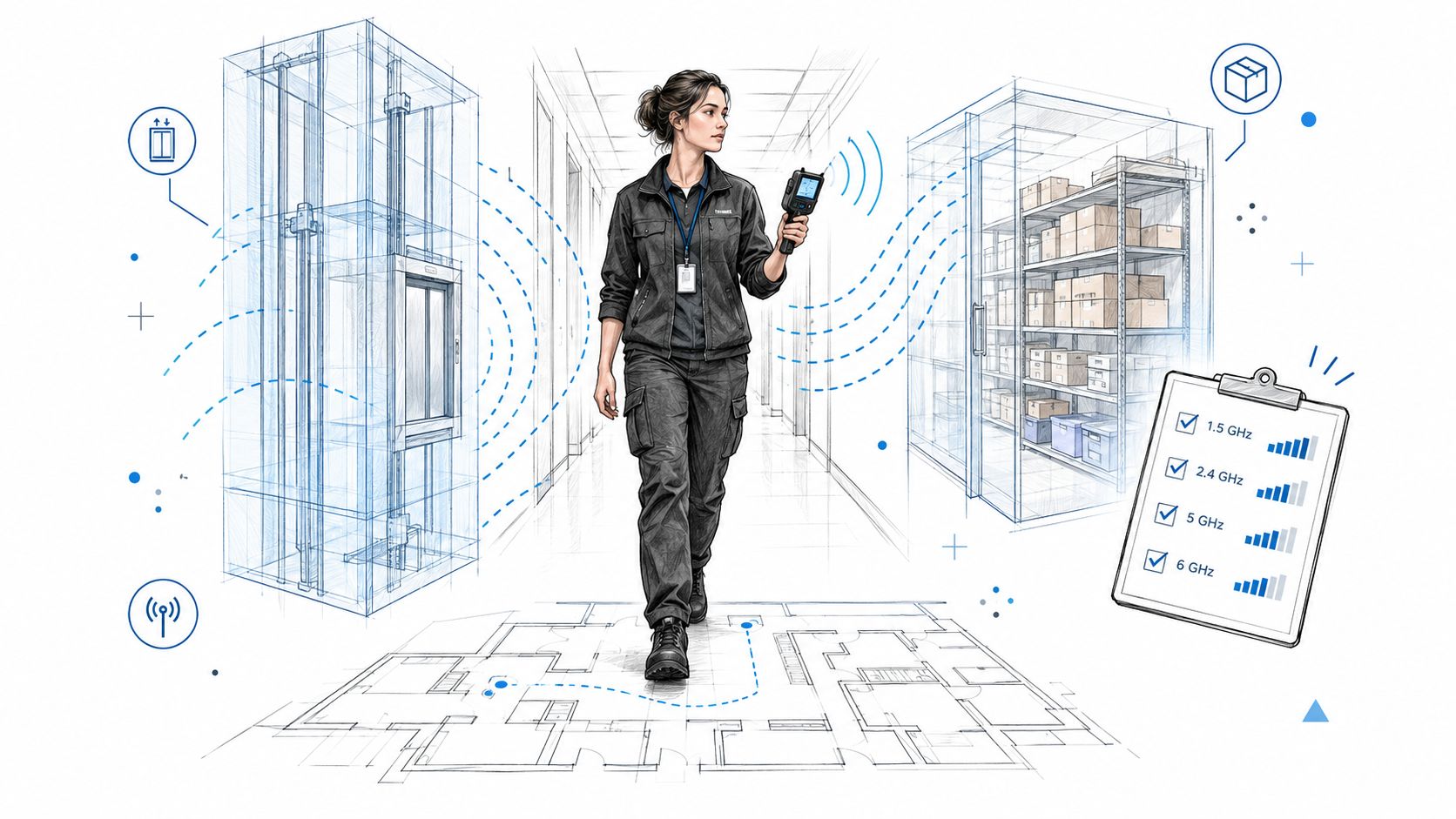
Follow the failure through the network
A repeatable diagnostic workflow beats random configuration changes:
- Record the symptom: Note the application, client, room, and operating conditions when the failure occurs.
- Inspect the client connection: On Windows, run
netsh wlan show interfacesand record the adapter's reported connection details. - Collect connection history: Run
netsh wlan show wlanreportfrom an elevated terminal, then inspect the generated report for disconnect patterns. - Compare paths: Repeat the application test over a wired connection. If it still fails, investigate beyond the radio link.
- Inspect the management plane: Correlate the incident with access-point events, uplink status, and channel utilization.
- Retest the correction: Use the affected application and representative clients in the original problem location.
Map elevator shafts, masonry, stockrooms, and high-occupancy rooms. Test warehouse handhelds while moving through their actual scanning route. A stationary laptop test doesn't establish that a mobile workflow is reliable.
The wireless network site survey guide provides a useful starting point for defining survey scope before accepting an installation quote.
Balance channel width, placement, and backhaul
Wider channels can improve peak throughput, but they consume more spectrum per channel. In Cisco's U.S. comparison, Wi-Fi 6E supports up to seven 160 MHz channels, while the cited 5 GHz comparison provides a maximum of six 80 MHz channels, according to its Wi-Fi 6E technical white paper. Choose width and placement together rather than setting every radio to the widest option.
Don't assume the newer band gives longer reach. The Wi-Fi Alliance's spectrum and operating-class guidance distinguishes indoor low-power operation from standard-power designs requiring Automatic Frequency Coordination authorization.
For new Hamilton County offices and downtown Indy tech hubs, plan cable pathways before ceilings close. In older Johnson County business parks, inspect available routes before deciding where access points belong.
Specify Cat6A where the design calls for it, verify cable installation quality, and match PoE+ switch capacity to the selected equipment's requirements. Check uplinks and firewall capacity too. An expensive radio connected through an unsuitable wired path still leaves employees waiting.
Wireless Security as an Ongoing Operating Model
New access points can create additional administrative work without improving security if nobody owns that work. The relevant question isn't whether the installer enabled encryption. It's who reviews identities, device access, firmware, alerts, and exceptions afterward.
A survey of SMB cybersecurity readiness found that 59% of leaders believed their organizations needed better cybersecurity, while 52% reported lacking the internal training and technical expertise to manage threats. Buying equipment doesn't resolve that staffing gap.
Use the following access categories as a starting point for a documented operating model.
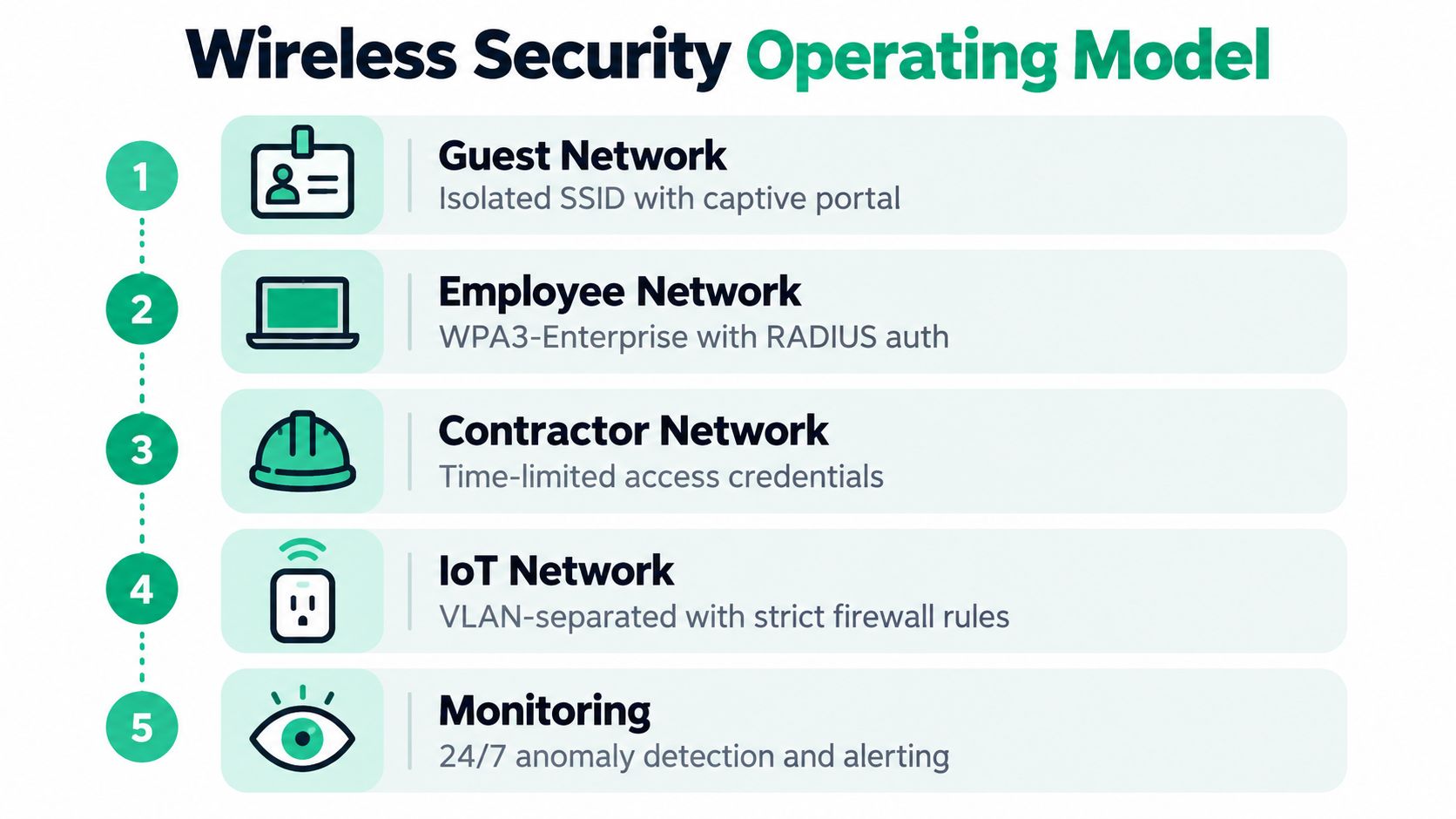
Define access by role
Zero Trust architecture starts from explicit authorization rather than assuming that being connected means being trusted. For wireless design, make the intended access boundaries understandable to both the technician and business owner.
| Traffic category | Recommended policy objective |
|---|---|
| Guest | Internet access without access to internal business systems |
| Employee | Identity-based access to approved applications |
| Contractor | Restricted access that expires when the engagement ends |
| IoT | Only the destinations necessary for the device's function |
| Management | Administrative access restricted to authorized operators |
Use VLANs and firewall policies to enforce these boundaries. A separate network name alone isn't the acceptance test. Attempt a prohibited connection from each category and confirm that the control blocks it.
Evaluate WPA3-Enterprise with RADIUS authentication where client compatibility and identity infrastructure support it. Record exceptions for older equipment, their owner, and their replacement plan.
Turn controls into evidence
NIST CSF 2.0 defines Govern, Identify, Protect, Detect, Respond, and Recover, with governance, identification, protection, and detection operating continuously and incident procedures kept ready.
Translate those functions into named responsibilities. Maintain an inventory, review administrative access, monitor failed authentication, define isolation procedures, and verify recovery readiness. Monthly documented reviews can summarize that continuous work, but they shouldn't substitute for urgent alert handling.
- Endpoint protection: Consider Bitdefender GravityZone as part of the endpoint security stack, with an identified person responsible for investigating detections.
- Monitoring coverage: Evaluate SOC-as-a-Service monitoring when internal staff can't provide the required coverage.
- Escalation: Define which events require immediate investigation, who can isolate a device, and who informs leadership.
Audit reality: A configured control and evidence that the control is maintained are different deliverables.
Healthcare practices evaluating HIPAA, defense contractors addressing CMMC, and general businesses using NIST CSF need controls mapped to their actual obligations. A product purchase doesn't establish compliance.
For local teams defining these responsibilities, the practical wireless network security guide can support the discussion between management and the technical provider.
A Real Indiana Wireless Overhaul and What It Saved
A credible account of an Indiana wireless overhaul needs actual before-and-after records. Without service tickets, recovery logs, and business-time measurements, claiming a named firm saved a particular number of hours would be guesswork. The following Greenwood professional-services scenario is illustrative, not a documented client result.
Consider an office where employees repeatedly troubleshoot wireless and VPN connections instead of serving clients. The owner wants reliable access and a predictable support bill. Replacing the consumer router might be part of the answer, but it isn't the whole continuity plan.
Separate connection repair from business recovery
The proposed overhaul would pair the surveyed wireless design with endpoint protection, controlled access, configuration records, and tested immutable off-site backups. Acceptance would require evidence that staff can complete critical workflows and that the business can restore essential services.
CISA's ransomware guidance recommends restoration from offline, encrypted backups in critical-service priority order and identifies immutable cloud storage as a possible protection mechanism, while warning about misconfiguration costs and regulatory limitations. Immutability isn't a reason to skip restoration testing.
Recovery planning should cover application data, server images where appropriate, and network configurations. Bit-level data recovery belongs to a specialist recovery discussion, not the normal continuity plan. It shouldn't be the fallback strategy for routine business operations.
Measure reclaimed work instead of selling fear
The owner's return-on-investment review should track:
- Interrupted work: Time staff spend reconnecting, restarting equipment, or waiting for support.
- Restoration performance: Whether the agreed priority applications return successfully during testing.
- Recurring expense: What monitoring, maintenance, backup verification, and support the monthly agreement includes.
- Revenue impact: Which interrupted activities could otherwise have produced billable work.
Not every recovered minute becomes billable revenue. For a professional-services firm, however, reducing avoidable troubleshooting can return usable capacity to client work. For a manufacturer along the I-65 corridor, the relevant benefit may instead be fewer interrupted scanning or shipping tasks.
The SMB network performance guide offers a useful companion to that operational review. Approve the project against measurable acceptance criteria, then compare actual support records afterward. That's how an overhaul earns its business case.
Your Pre-Upgrade Checklist Before You Buy
Before approving hardware, establish whether the business is ready to operate it. A U.S. network-resilience survey summarized by Network World found that 91% of IT and business leaders viewed resilience as a strategic priority, while 47% believed an outage would have a major business impact. Your buying checklist should reflect that priority.
Bring these answers to the assessment
- Client readiness: Inventory wireless adapters, supported bands, critical devices, and equipment that can't be replaced immediately.
- Building evidence: Mark failed-call locations, scanning routes, busy rooms, and areas requiring further survey work.
- Infrastructure readiness: Request documented cable, switch-power, and uplink checks.
- Operational ownership: Name the administrator, alert recipient, escalation contact, and person authorized to approve changes.
- Business acceptance: Identify the application that must remain usable and define how you'll test it.
- Migration safety: Require a pilot, rollback procedure, and recovery test before retiring the existing configuration.
Use the Indiana SMB network installation cost guide to frame budget questions around the complete project, not access-point prices alone.
For Greenwood and Indianapolis businesses, the strongest wireless network solutions are the ones your team can operate, monitor, and recover. The highest number on the box doesn't answer any of those questions.
Finchum Fixes IT offers wireless network design, installation, security, and ongoing management for local businesses. Visit Finchum Fixes IT to request a Free Network Assessment or Security Risk Audit for your Greenwood/Indianapolis operation, and bring your floor plan, device inventory, and most disruptive connection problem.