Your Guide to a Managed Services Business in Indiana

A managed services business is a proactive IT partner that handles cybersecurity, networking, cloud systems, backups, software support, and day-to-day troubleshooting for a flat monthly fee. For most Indiana SMBs, that means fewer outages, predictable costs, and staff who get back to revenue-producing work instead of fighting printers, Wi-Fi, and old servers.
If you're in a Greenwood office park staring at a tower server with a blinking amber light, this isn't an abstract IT problem. It's payroll stuck in QuickBooks, orders waiting on a shared drive, and somebody from accounting asking why the VPN is down again. Around Johnson County, I see the same pattern all the time. Businesses don't have a technology problem first. They have a bottleneck problem that shows up through technology.
That Old Server in Your Greenwood Office is Costing You
The Southside version is familiar. A business in a Greenwood business park has a Windows Server box humming in a closet, a backup drive that may or may not be working, and a network rack nobody wants to touch because every cable move seems to break something else. The office keeps running until one Monday morning it doesn't.

That setup drains money long before it fails completely. Aging hardware runs hot, disks throw intermittent errors, and users adapt to bad systems by building workarounds. They save files locally because the shared drive is slow. They text photos of documents because the scanner drops jobs. They reboot the same workstation every day because “that's just what it does.”
What the bottleneck looks like on the ground
A lot of owners think the problem is the server itself. Usually the server is only one part of it.
- Old storage creates fake speed problems. A failing RAID array can make file access look random. One minute it opens in seconds, the next it stalls long enough for staff to call each other instead of using the system.
- Consumer-grade Wi-Fi hides as an internet issue. In older Greenwood and downtown Indy buildings with brick walls, weak access point placement causes roaming problems, packet loss, and dropped calls.
- No monitoring means no warning. If no one is watching disk health, patch status, backup success, and endpoint alerts, small faults stack up until they turn into real downtime.
Practical rule: If your staff has a ritual workaround for a tech problem, your IT is already a bottleneck.
A real managed services business fixes this permanently by changing the operating model. Instead of waiting for something to break, the provider monitors systems, patches endpoints, hardens security, tests backups, documents the environment, and plans replacements before failure day. That's the difference between “call a guy when it dies” and actual business continuity.
Permanent fixes beat repeated rescues
In our 17 years of local service, the clearest pattern has been this. Johnson County business owners often spend more on repeated disruption than they ever would on a structured IT plan. The worst part isn't the repair bill. It's the uncertainty.
A proper cleanup usually starts with a diagnostic workflow, not guesswork:
- Review Windows event logs with
Get-EventLog -LogName System -Newest 50 - Check disk state and storage alerts with
Get-PhysicalDiskandGet-Volume - Validate backup job history and test a file-level restore
- Audit switch ports, Wi-Fi signal overlap, and firewall rules
- Patch the stack, then watch ticket patterns for recurring root causes
If old hardware is part of the issue, replacing capital expense with hardware as a service for Indiana SMBs often makes more sense than squeezing another year out of a dying server.
The Real ROI of Proactive IT Management
Reactive IT always looks cheaper right up until the day it isn't. That's the trap. You don't feel the full cost in one invoice. You feel it in stalled work, missed deadlines, delayed shipments, and employees waiting on systems instead of doing their jobs.
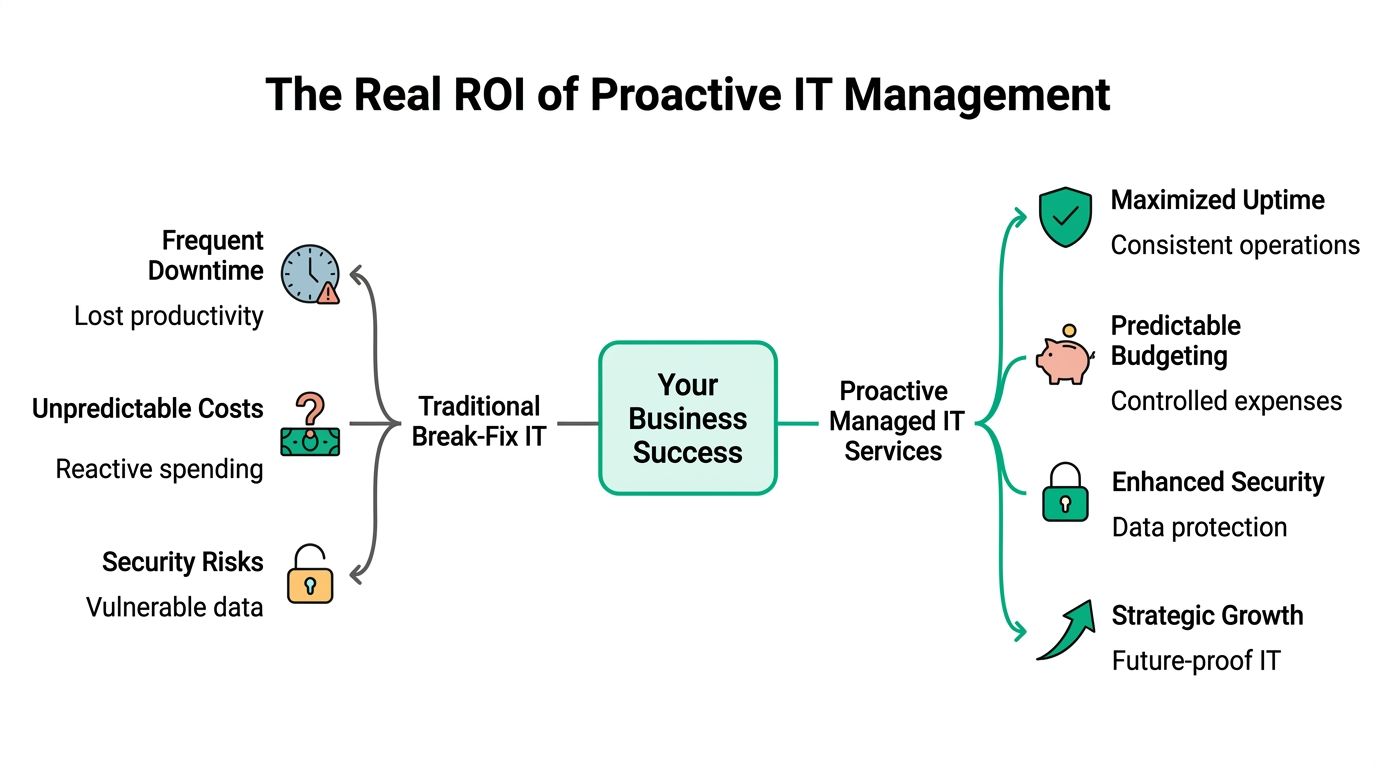
The hard number that gets owners' attention is downtime. Gartner analysis cited here puts the average cost of IT downtime at $5,600 per minute, which is over $300,000 per hour. If you want the upper-end framing used in many boardroom conversations, that's why people talk about losses climbing to $9,000 per minute for certain operations. Either way, the point is the same. Outages are not small events.
Break-fix rewards chaos
The old break-fix model creates a bad incentive loop. Systems degrade unnoticed. Nobody touches them because nobody is being paid to prevent problems. Then something fails, everyone scrambles, and the business pays premium rates during the most expensive possible moment.
That doesn't work well for manufacturers along the I-65 corridor, healthcare clinics trying to stay aligned with HIPAA, or defense-linked shops that need security controls mapped to CMMC. If you're trying to run a steady operation, reactive support is the wrong model.
Where the return actually shows up
Managed services returns usually show up in three places.
| Business outcome | What changes technically | Why owners care |
|---|---|---|
| Less downtime | Monitoring, patching, backup verification, SOC-as-a-Service monitoring | Fewer business interruptions |
| More productive staff | Faster support, cleaner endpoints, stable Wi-Fi, standardized apps | More time spent on customer work |
| Predictable spend | Flat monthly agreement instead of surprise repair invoices | Easier budgeting and forecasting |
Forrester research cited in this managed IT ROI summary says structured IT support helps employees reclaim 120 or more productive hours per year. For a 10-person team, that's over 1,200 hours back in the business. That matters in Greenwood, Franklin, and across downtown Indy tech hubs where every employee wears multiple hats.
A useful budget conversation starts with what you're already losing. If your office spends time rebooting machines, chasing printer failures, recovering from phishing scares, or waiting on line-of-business software to reconnect, you're already paying for bad IT. You're just paying through friction instead of one line item.
If you want a good outside perspective on what strong support looks like in practice, it's worth taking a minute to read 40 41 Tech Solutions client feedback. Business owners often learn more from support experience patterns than from sales pages.
Later, when you're planning next year's numbers, this kind of IT budget planning for ROI and resilience usually makes the managed model easier to compare against recurring disruption.
This short video gives a good visual explanation of why the proactive model beats emergency-only support.
Good managed IT doesn't just fix tickets. It removes the reasons those tickets keep happening.
Core Services Every Indiana Business Needs
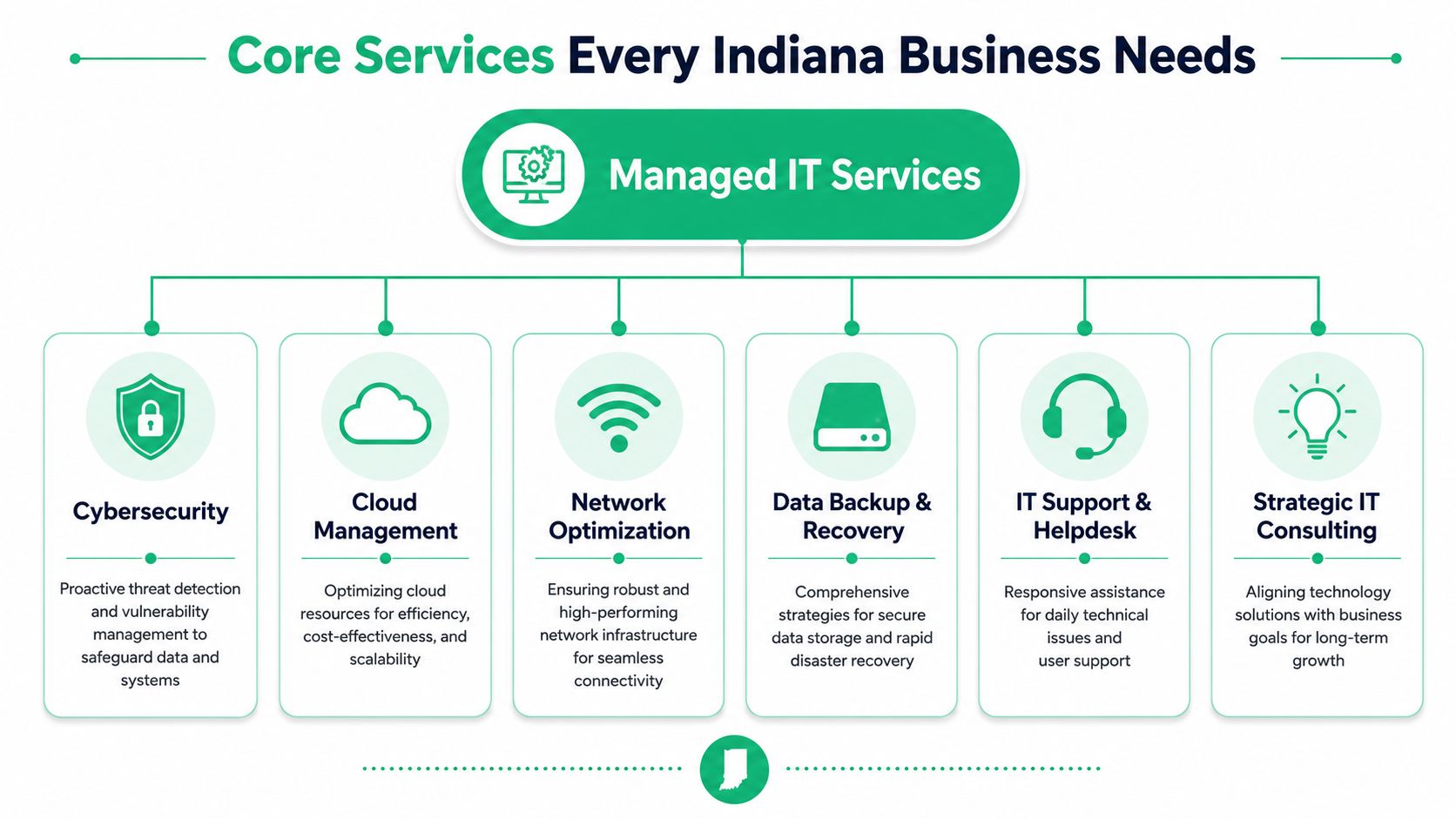
A managed services business shouldn't stop at resetting passwords and swapping a failed mouse. If that's all you're buying, you're buying a help desk, not a business continuity partner.
Cybersecurity that matches the real threat surface
Indiana SMBs need security built around Zero Trust architecture, not blind trust inside the firewall. That means verifying users, segmenting access, enforcing MFA, controlling endpoints, and watching for suspicious behavior continuously.
A practical stack often includes Bitdefender GravityZone for endpoint protection, email filtering, MFA enforcement, vulnerability management, and SOC-as-a-Service monitoring. For companies with higher exposure, Managed Detection and Response matters. This MDR breakdown notes that organizations using MDR reduce attacker dwell time from approximately 207 days to just 24–72 hours, while cutting incident costs by more than 50%.
For general business security, map controls to NIST CSF. For healthcare, map access, logging, and data handling to HIPAA. For defense contractors around central Indiana, align evidence and control maturity to CMMC. Security only works when policy, tooling, and operations line up.
Networking that works in old buildings and growing offices
Spotty Wi-Fi isn't usually a mystery. It's usually bad design.
In old brick buildings around downtown Indy, signal attenuation and poor access point placement kill performance. In newer Hamilton County growth corridors, the bigger problem is often too many devices on a network that was sized for half the headcount. A solid design starts with a site survey, then moves to UniFi networking, VLAN segmentation, guest isolation, proper switch uplinks, and latency-optimized mesh nodes where cabling isn't practical.
A simple network diagnostic path looks like this:
- Check switching health with
show interface statuson managed gear or the UniFi controller dashboard - Inspect roaming behavior to see whether clients are sticking to weak access points
- Review firewall rules so file shares, VoIP, and cloud apps aren't fighting each other
- Measure application latency rather than relying on a generic speed test
If a warehouse scanner works near the front office but drops in the back third of the building, you don't have an internet problem. You have a radio design problem.
Cloud, backup, and recovery that survive the bad day
Cloud computing helps when it's done on purpose. Lifting a mess into Microsoft 365 or Azure without cleanup just relocates the mess. Good cloud management covers identity, conditional access, file permissions, endpoint enrollment, and cost control.
For backup, the phrase to insist on is immutable off-site backups. If ransomware can encrypt the backup set, it isn't a recovery plan. It's a false sense of security. Test restores matter just as much as backup jobs. In one local recovery project, we disassembled a similar client's failing RAID array and moved from triage into bit-level data recovery because the original backup chain had been failing unnoticed for too long.
IT support and software development that remove recurring drag
Daily support still matters. Users need fast help with Outlook sync issues, Teams devices, print queues, permissions, laptops, and mobile access. But mature support teams also look for repeat offenders and eliminate them.
That's where custom tools can help. A provider such as Finchum Fixes IT services can pair managed support with custom web or mobile development when a business process keeps breaking because staff are forcing spreadsheets to do a real application's job. If you're evaluating cloud operations more thoroughly, this article on how to Automate cloud infrastructure is also a useful technical read for understanding where orchestration fits.
How Managed Services Pricing Works
Most Indiana SMBs don't need a complicated pricing spreadsheet. They need a plain answer to one question. What am I paying for, and what does it keep me from paying for later?
The most common pricing model is per user per month. That's usually the cleanest approach because modern work follows people, not just devices. One person may use a desktop, laptop, phone, Microsoft 365 account, MFA, endpoint protection, backup, and remote support. Pricing by user matches that reality better than pretending support is tied to one box under a desk.
What businesses usually see on a quote
This managed IT cost reference says small to mid-sized businesses typically pay $120 to $220 per user per month for fully managed IT services, including core support, cybersecurity, and backup management. That's a useful baseline for owners along the I-65 corridor trying to compare proposals.
Three pricing approaches show up most often:
- Per-user plans. Best for offices where each employee uses multiple devices and cloud services.
- Per-device plans. Common in environments with shared stations, kiosks, or warehouse devices.
- Tiered plans. Useful when one group needs basic helpdesk and another needs stronger security, compliance support, or after-hours response.
What changes the monthly number
A cheap quote usually means something has been excluded. Sometimes that's after-hours support. Sometimes it's backup retention, advanced endpoint security, procurement management, or compliance reporting. Ask what's included before comparing totals.
A stronger pricing conversation includes scope questions like these:
| Question | Why it matters |
|---|---|
| Are cybersecurity tools included? | Security shouldn't be an add-on surprise |
| Are backups monitored and tested? | Backup without verification isn't enough |
| Is on-site support covered? | Some problems still require hands on hardware |
| Are compliance needs in scope? | HIPAA and CMMC work creates extra process and reporting |
There's also a business side to this. Predictable monthly cost lets owners budget for technology as an operating expense instead of gambling on emergency events. That's a better fit for most SMB cash flow.
If you want a local breakdown of what shapes those proposals, this guide on the real managed IT services cost in Indiana is the kind of detail I wish more owners saw before signing a contract.
Five Signs Your Business Has Outgrown Its IT
A Greenwood office usually doesn't decide it has an IT problem during a strategy meeting. It happens at 8:07 a.m. when QuickBooks crawls, nobody can print the pick tickets, and the person who "knows computers" is also trying to answer customer calls.
In Johnson County, I usually see the same pattern. The business added staff, added software, maybe opened a second site in Whiteland or Franklin, but IT stayed stuck in the version that worked five years ago. That's when technology stops supporting operations and starts slowing them down.
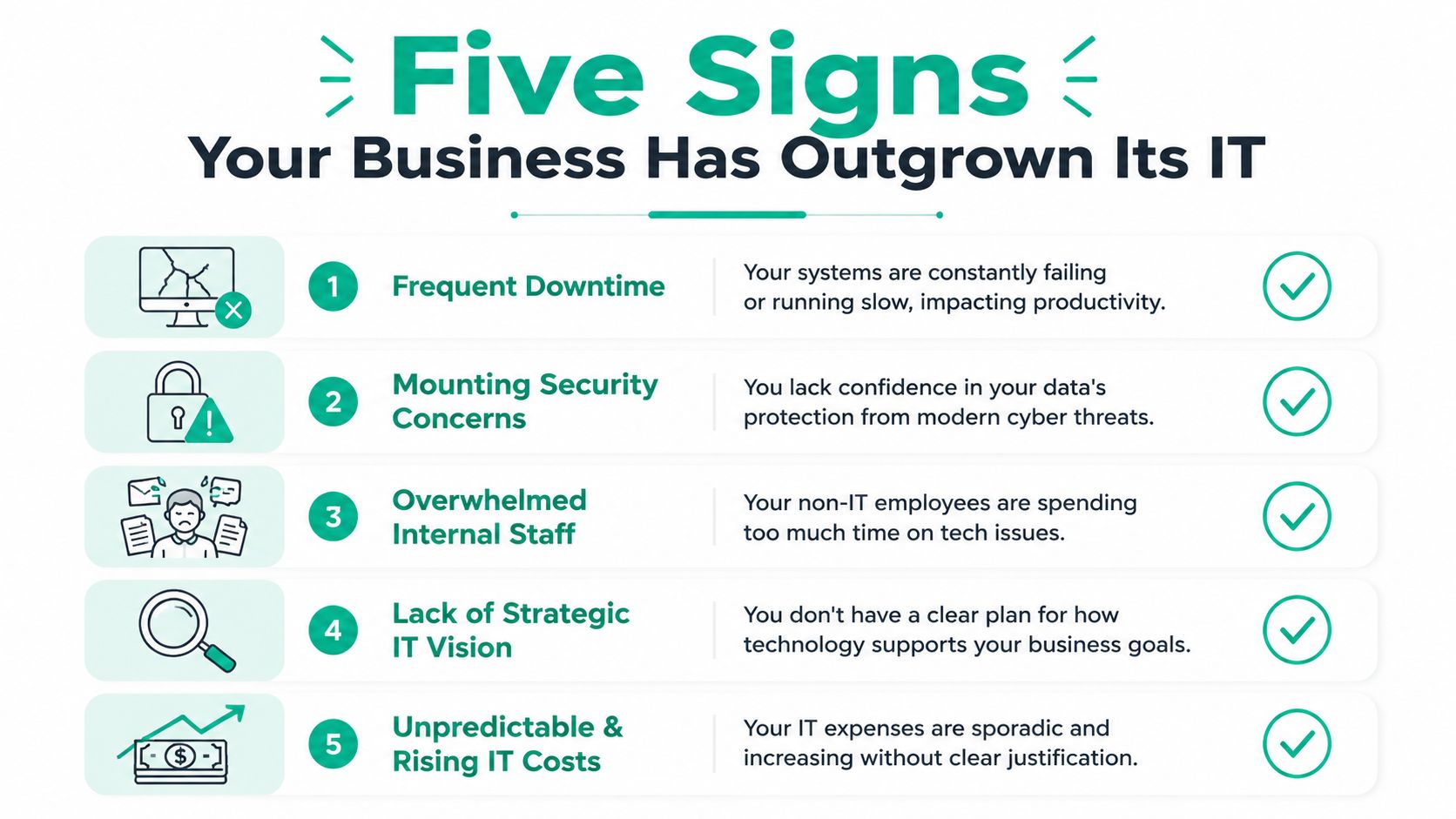
Five signs the current setup has hit its limit
1. Your staff plans around slow technology
If the team already knows the accounting system takes forever after lunch, or the shared files lag every Monday morning, that lost time is part of your operating cost. People rarely put it on a P&L line, but they feel it every day. Slow systems train employees to wait, retry, and work around the problem instead of finishing the task.
2. The wrong people own technical problems
When the office manager resets passwords, the controller calls internet support, or a salesperson is setting up new laptops, labor is going to the wrong place. I see this often in Indiana companies with 15 to 50 employees. It feels cheaper than formal IT support until one of those side jobs gets handled inconsistently, or not at all.
A practical test is simple. If key knowledge lives in one employee's head, your IT has outgrown its current model.
3. Security decisions are being made case by case
A new employee gets access because someone asked. A former employee keeps one app login because nobody came back to remove it. A laptop misses updates because it was out of the office during the last fix. Those are process failures, not one-off mistakes.
The National Cyber Security Centre's guidance on user access controls and account management is useful here because it gets to the root issue. Businesses need defined control over who can access systems, when that access changes, and how it gets removed. If that process is informal, risk climbs fast.
4. Growth has exposed the weak spots
Ten employees can tolerate a lot of improvised IT. Twenty-five employees across a main office, warehouse, and remote staff usually cannot. More devices, more cloud apps, more vendors, and more customer data create more points of failure.
This is also where leadership starts needing better planning, not just ticket resolution. For owners weighing strategy as much as support, understanding fractional CIO models and costs helps clarify when the business needs budgeting, lifecycle planning, and technology direction in addition to day-to-day helpdesk work.
5. Technology purchases are reactive
If hardware gets replaced only after failure, cybersecurity tools get added only after a scare, and software decisions depend on whoever is complaining the loudest, the business has outgrown ad hoc support. That model creates uneven results. One area gets attention while another gets ignored.
At that point, owners need a provider who can do more than fix tickets. They need documented standards, recurring reviews, and someone who can explain what should happen this quarter before a failure forces the decision. This guide to how to choose a managed service provider for an Indiana business is a good next filter if you're trying to separate real operators from firms that only sell helpdesk.
A quick reality check
Look at the last 90 days and answer three questions:
- What problems keep coming back? Repeated Wi-Fi drops, printer failures, VPN issues, login lockouts, and file access complaints usually point to design or policy gaps.
- Who owns the decisions? If nobody is accountable for user access, hardware standards, renewals, backups, and vendor coordination, important work is being missed.
- Can your current setup support how the business operates? Hybrid staff, field users, multi-site operations, and compliance requirements need tighter device and identity management than older small-office setups provide.
Owners usually call after one painful outage. The smarter move is to act while the warning signs are still manageable.
Choosing Your MSP and Understanding the SLA
A lot of providers can talk fast about “full support.” Fewer can explain exactly how service works when a critical system fails at 8:10 on a Tuesday.
The document that matters is the Service Level Agreement, or SLA. That's where response expectations, uptime targets, included services, escalation paths, and accountability live. If the SLA is vague, the relationship will be vague when you need clarity most.
The metrics worth caring about
The best SLA conversations get technical quickly, and that's a good sign. This benchmark reference for managed service SLAs notes that proactive monitoring and patch management can reduce incident frequency by 30–40%, while improving MTTR and FCR, with an infrastructure uptime target of ≥99.9%.
Those terms matter:
- MTTR means Mean Time to Resolve. It tells you how fast problems get fixed.
- FCR means First Contact Resolution. It shows whether the team can solve routine issues without bouncing users around.
- Uptime target tells you whether the provider is managing for continuity or just handling tickets as they arrive.
Ask how they achieve those numbers. A serious MSP should be able to talk through patch cadence, alert thresholds, endpoint policy, backup verification, and escalation workflows without hand-waving.
Questions that expose weak providers fast
In our 17 years of local service, weak MSP proposals usually fail on the same points. They sound polished but get slippery once you ask how delivery happens.
Use questions like these:
- How do you monitor endpoints, backups, and security alerts every day?
- What happens when a patch fails on a line-of-business machine?
- How do you separate standard support from project work?
- What reports will I see each month, and will they tie to business risk?
- Who owns strategy if my company grows, adds a location, or enters a compliance-heavy market?
For owners who need strategic guidance without hiring a full-time executive, it also helps to understand fractional CIO models and costs. Not every SMB needs that level of guidance, but many need more than a helpdesk.
A local fit still matters. A provider who understands Johnson County business parks, old Indy building layouts, and the pace of Hamilton County growth will diagnose faster and design smarter than a remote call center reading from a script. If you want a deeper checklist, this guide on how to choose a managed service provider is a solid starting point.
Ask to see the reporting. If an MSP can't show how they measure health, risk, and response, you're buying promises instead of operations.
The Finchum Fixes IT Commitment to Indiana Businesses
A Greenwood owner usually calls after the same kind of week. The copier lost its scan folder access. QuickBooks slowed to a crawl over VPN. Someone clicked a fake Microsoft 365 email, and now the office manager is asking whether payroll data is exposed. None of those issues look catastrophic on their own. Together, they tell you the business is running on IT that reacts late.
That is the gap Finchum Fixes IT is built to close for Indiana companies.
Local support matters because local businesses do not all fail the same way. A shop off Emerson Avenue with five office staff and a warehouse crew has different pressure points than a medical practice near Franciscan Health or a supplier selling into defense contracts. One needs stable Wi-Fi across metal racks and loading bays. Another needs tighter access controls, audit trails, and documented recovery steps. The right managed services plan matches operations, compliance exposure, and budget instead of forcing every company into the same template.
What competent local support looks like
Competent support starts with visibility. Every workstation, firewall, backup job, and cloud account needs to be documented, monitored, and reviewed by someone who knows what "normal" looks like for that business.
It also means resolving the ticket in front of you without missing the pattern behind it. If the same user keeps losing access to a shared file, the fix may be permissions. It may also be a broken sync process, a server resource problem, or a staff workflow that was never set up cleanly in the first place. Good IT support traces the issue back to the source, then decides whether the answer is a technical change, a process change, or both.
That is where many SMBs in Johnson County get stuck. They are paying for fixes, but not for control.
Finchum Fixes IT keeps the scope practical. The team includes Microsoft, CompTIA, and Cisco-certified professionals handling cybersecurity, networking, cloud systems, data recovery, software development, and day-to-day support. Those services matter because they affect uptime, insurance questions, vendor requirements, and whether your staff can get through a Monday without waiting on a password reset or a frozen line-of-business app.
Why Indiana owners respond to this model
Owners here usually want the same things. Fewer surprises. Clear monthly costs. Faster response when something breaks. Better odds that a storm outage, ransomware attempt, or failed update does not shut down the week.
They also want plain answers. If a server should be replaced in the next budget cycle, say that. If Microsoft 365 is configured poorly, fix it and explain the risk in business terms. If a second location in Franklin or a new office in Indianapolis will strain the current network, map out the cost before it becomes an emergency project.
That is the commitment. Keep systems usable, reduce avoidable risk, and give Indiana businesses a support model that fits how they operate.
If you're in Greenwood or the greater Indianapolis area and your systems feel one outage away from a bad week, start with a Free Network Assessment or a Security Risk Audit from Finchum Fixes IT. You'll get a clear view of where your bottlenecks, security gaps, and downtime risks are hiding, without the usual fluff.