Business Process Automation with AI for Indiana SMBs
If you run a small or midsize business in Greenwood, Franklin, Plainfield, or up the north side toward Carmel, you've probably seen the same mess play out more than once. Someone on your team spends half a day retyping invoice data, forwarding approval emails, chasing missing documents, and fixing avoidable mistakes. The work gets done, but it chews up hours, slows billing, and creates the kind of operational drag that feels normal until you price it out.
That's where business process automation with AI starts to make sense. Not as some giant moonshot project. As a practical fix for work your staff already hates doing.
Coffee-shop version: If a process is repetitive, digital, and full of handoffs, there's a good chance AI can help. If the process is sloppy, undocumented, or loaded with judgment calls, AI will expose the mess before it fixes it.
[!NOTE] TL;DR
- Start with wasted tech time: Manual data entry, approval chasing, and ticket routing drain staff time and can contribute to costly downtime.
- Pick one workflow first: The best first automation target is usually repetitive, error-prone, and already lives in digital systems.
- Use the right tool path: Built-in software features, no-code integrations, or custom development each fit different budgets and complexity levels.
- Pilot before you scale: Define success metrics early, test in a controlled environment, then expand only after the process proves itself.
- Secure it properly: AI workflows need governance, human approval thresholds, and security controls aligned with HIPAA, CMMC, or NIST CSF when required.
- Measure ROI in hours and continuity: Good automation reduces wasted labor, supports predictable budgets, and protects operations from disruptions.
The Real Cost of Wasted Tech Time in Your Indiana Business
A lot of Indiana companies don't have an “AI problem.” They have a wasted-motion problem.
Think about a bookkeeping team in a Greenwood business park. Vendor invoices arrive as PDFs, email attachments, portal downloads, and the occasional phone photo from a field supervisor. One person keys in totals. Another checks line items. A manager approves by email. Then somebody notices a mismatch and the whole thing loops back around. Nobody calls that downtime, but it absolutely hurts business continuity.
When a key process stalls, cash flow stalls with it. Customer updates get delayed. Orders sit. Staff members stop doing the work that earns money and start babysitting paperwork instead. And if an IT failure or app outage hits in the middle of that mess, the cost of downtime can climb as high as $9,000 per minute, which is exactly why good automation has to be tied to resilient systems, backups, and operational discipline.
What wasted tech time looks like on the Southside
In older buildings around the south side of Indy, the problem often isn't just the workflow. It's the environment around it. Spotty Wi-Fi in thick brick offices, aging servers humming in a closet, and line-of-business apps that don't talk to each other make every manual process worse.
Common signs you're ready for automation:
- Your staff rekeys the same data twice: Usually from email into accounting, CRM, or ERP systems.
- Approvals live in inboxes: Somebody always forgets, misses, or replies from a phone with half the information.
- Errors show up late: The team catches bad entries only after a shipment, invoice, or patient record has already moved downstream.
- Your best people handle clerical work: Skilled employees spend time on routing and cleanup instead of customer service, sales, or operations.
One industry roundup says roughly 34% of all business-related tasks already use some form of automation, which tells you this isn't fringe anymore. It's already part of daily work across finance, operations, and customer service, as noted by Zip's business process automation statistics.
Where AI actually helps
AI earns its keep when it can classify, extract, summarize, route, or flag work faster than a person doing the same repetitive task over and over. That might be invoice intake. It might be service-ticket triage. It might be sorting inbound email so your team only sees what needs human judgment.
For shops drowning in inbox traffic, a smaller starting point can be message handling. Tools for AI-powered email replies are a useful example of how AI can reduce repetitive communication work before you touch bigger back-office workflows.
Don't treat automation like a gadget purchase. Treat it like a continuity project. The right setup cuts handwork, reduces avoidable delays, and keeps your team moving when systems get busy or people are out.
Finding Your First Automation Win
The first win usually isn't the flashiest workflow. It's the one that's been annoying your staff for years.
A Johnson County owner will often ask, “What should we automate first?” The honest answer is simple. Don't start with the biggest process. Start with the process that has clear rules, recurring exceptions, and clean enough records to work with.
One practical takeaway from Activepieces on AI business process automation is that the best first projects for SMBs are often not the highest-volume tasks, but the ones with clear exception patterns, measurable delays, and existing digital records an AI can learn from without expensive cleanup.
A simple test for first-project fit
Run each candidate workflow through this filter:
-
Is it repetitive enough?
If the team follows the same broad steps most of the time, that's promising. -
Does it create delays you can see?
Good targets leave a trail. Late approvals, backlog spikes, aging tickets, or stalled orders. -
Are the inputs already digital?
Email, PDFs, forms, CRM records, EHR data, shipping notices, and spreadsheets are all easier than paper-heavy chaos. -
Can a human explain the exceptions?
If your team can say, “Most of these are straightforward, except when X happens,” you probably have a workable pilot. -
Will it reduce downtime pressure?
If the workflow backs up every time a certain employee is out or a location loses connectivity, that's a continuity problem worth solving.
High-value automation opportunities for Indiana SMBs
| Business Function | High-Impact Automation Task | Key Benefit |
|---|---|---|
| Accounting | Invoice intake and approval routing | Fewer manual touchpoints and faster processing |
| Logistics | Freight status updates and exception alerts | Better visibility across dispatch and customer communication |
| Healthcare admin | Patient intake document handling | Cleaner front-desk workflows while supporting HIPAA processes |
| Manufacturing | Purchase order matching and inventory updates | Less delay between receiving, purchasing, and production planning |
| Customer service | Ticket classification and triage | Faster routing to the right team member |
| HR | New-hire document collection | More consistent onboarding and less paperwork chasing |
Those examples hit especially well in Central Indiana. A logistics firm along the I-65 corridor might automate shipment exception handling. A Hamilton County clinic might focus on intake forms and routing while keeping HIPAA obligations in view. A supplier serving Indy manufacturers may get faster value from PO matching than from a giant AI chatbot nobody asked for.
For more grounded ideas, this roundup of business process automation examples for Indiana companies is worth skimming alongside practical guides on streamlining operations with AI.
What not to automate first
Bad first targets have one or more of these traits:
- They depend on tribal knowledge: Only one long-time employee knows how the process really works.
- They span too many systems at once: ERP, CRM, email, shared drives, and a homegrown app can be too much for a first pass.
- They're loaded with judgment calls: If every record needs interpretation, approvals, negotiation, or context, hold off.
- They're sitting on dirty data: Missing fields, duplicate vendors, broken naming conventions, and unmanaged file shares will trip you up.
Practical rule: The best first automation project is boring. That's a compliment. Boring processes are easier to document, test, secure, and improve.
Choosing the Right AI Tools for Your Indiana Business
Tool selection is where a lot of SMBs get sideways. They hear “AI automation” and assume they need a custom platform, a development team, and a six-figure budget. Most don't.
Usually, you're choosing between three paths. Use AI features already inside software you own, connect systems with an automation platform, or build something custom because your workflow is too specific for off-the-shelf tools.
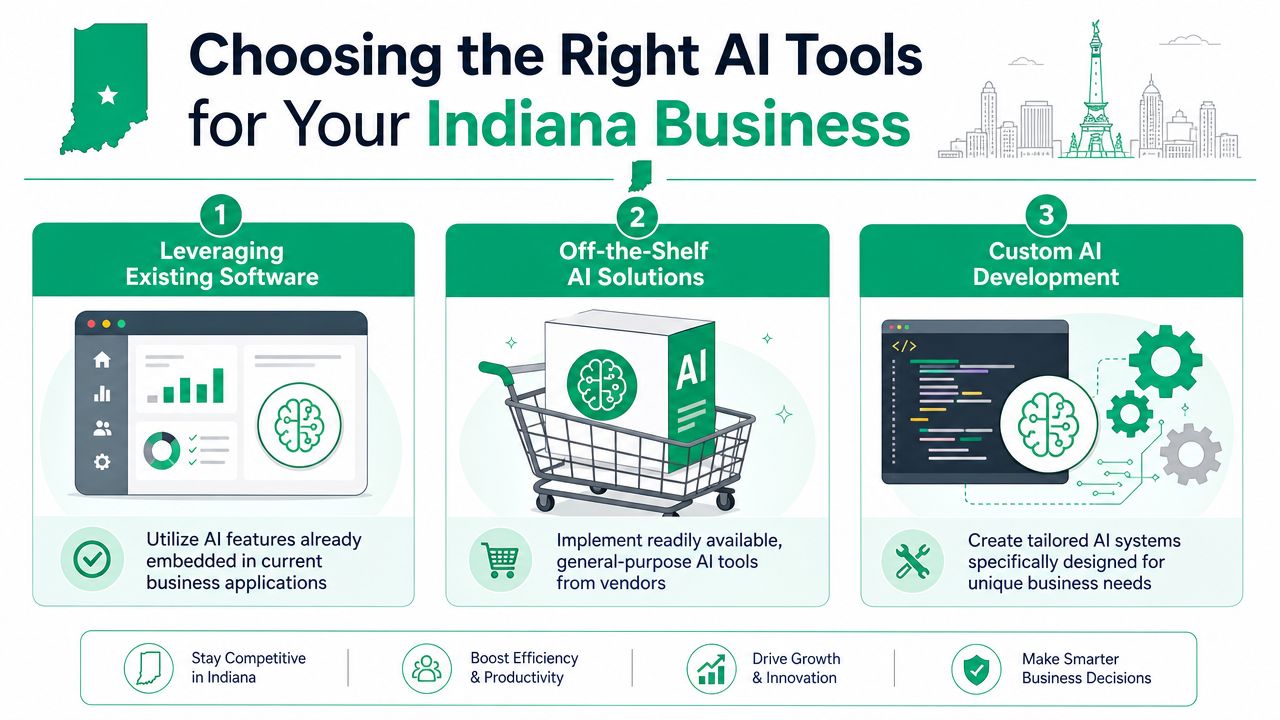
Path one uses what you already have
This is usually the cheapest place to start.
If your company already runs Microsoft 365, a modern CRM, or cloud accounting software, there may already be AI-assisted features for summarization, form handling, inbox management, and approvals. For a downtown Indy office with standard processes and a limited IT bench, this is often the cleanest move.
This path works best when:
- Your workflow already lives inside one main platform
- You need modest automation, not deep orchestration
- Your budget is tight
- You want easier user adoption
Path two connects apps with an automation platform
No-code and low-code tools fulfill this role. They sit between your systems and move data, trigger actions, and call AI services when needed.
For example, a service company could pull email attachments into a document workflow, extract fields, push data into a CRM, and notify accounting. If your environment already includes cloud apps, VoIP, and decent network plumbing such as UniFi networking with stable coverage and VLAN separation, this approach can be strong without becoming unwieldy.
Path three builds around your exact workflow
Custom software makes sense when your process is your competitive edge or your systems are unusual. Think defense suppliers juggling customer-specific requirements, manufacturers with old but critical line-of-business applications, or healthcare groups that need narrow controls around approvals and data handling.
This route takes more planning. It also gives you more control over security, integrations, exception handling, and user roles.
A practical overview of AI automation for small business can help frame where your needs land.
The criteria that matter
A successful rollout needs a clear sequence: process assessment, technology selection, data preparation, pilot implementation, and scaled deployment. The strongest selection criteria include process volume, complexity, error rate, strategic importance, data types, decision complexity, and integration needs, as explained in this step-by-step guide to implementing AI process automation.
Ask blunt questions before you choose anything:
- How many systems have to talk to each other?
- What happens when the AI is unsure?
- Do you need human approval thresholds?
- Will this run securely on your existing stack?
- Can your network and identity controls support it?
If your Wi-Fi drops in parts of the building, your file permissions are sloppy, or your backups are a mess, don't bolt AI onto unstable infrastructure and expect a clean result. Automation rides on the same foundation as everything else. Weak networks, bad endpoint hygiene, and poor identity controls still break the process.
Building Your Pilot Project Without Breaking the Bank
The cheapest automation project is the one you don't overbuild.
In our 17 years of local service, we've seen the same pattern over and over. The projects that work start with one narrow problem, one owner, one workflow, and one definition of success. The projects that go sideways try to “transform the business” before anybody has mapped the basic steps.
A good example is document verification in distribution. Think of a Plainfield warehouse moving shipments all day. Bills of lading, receiving records, and customer paperwork come in from different channels. Staff compare details manually, flag mismatches, and chase follow-ups. That's a good pilot because the task is repetitive, the documents are digital, and the exceptions are visible.
Start with the process map, not the software.
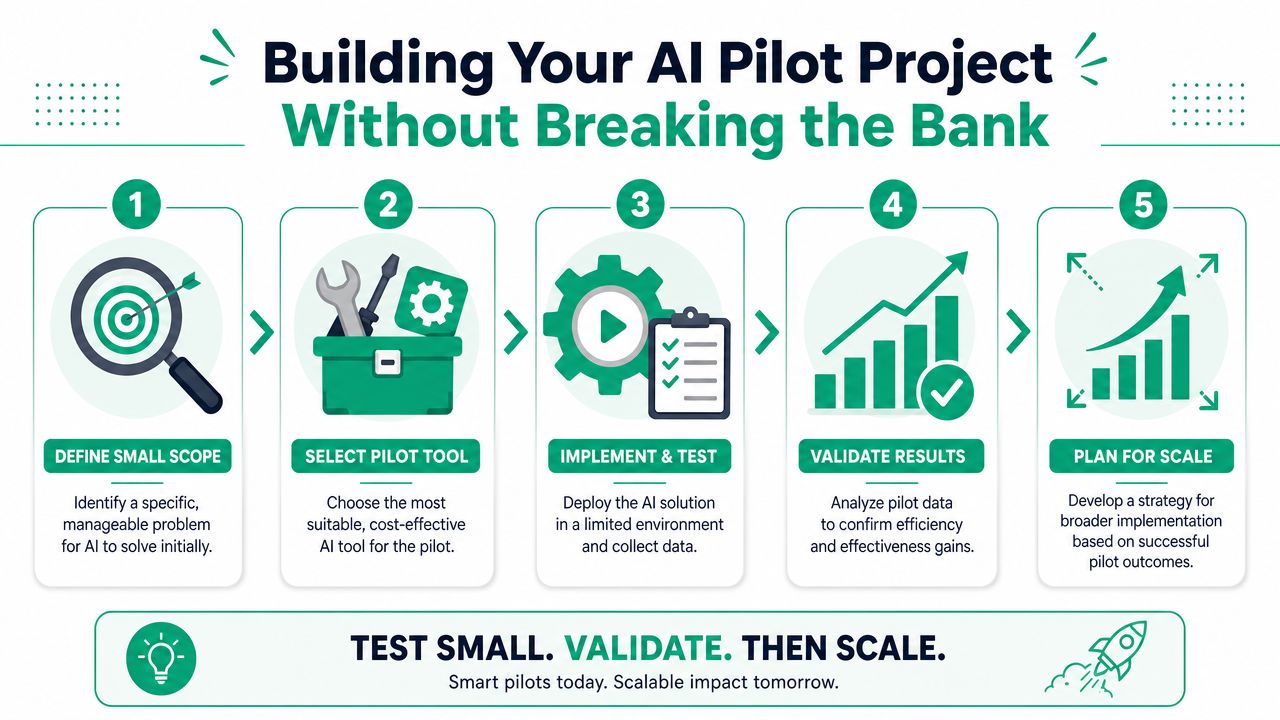
Keep the first scope tight
A pilot should answer one business question. Can AI reduce manual review time for incoming shipment documents without increasing bad exceptions?
That's enough. You don't need to automate returns, customer communication, AP posting, and inventory sync in the same pilot.
Good pilot boundaries usually look like this:
- One workflow only: Invoice intake, intake forms, ticket triage, or document verification.
- One department owner: Somebody has to own decisions when edge cases show up.
- One clear exception path: If confidence is low, route to a human.
- One reporting view: Track the same handful of KPIs every week.
Set the KPIs before the test starts
IBM's guidance is the right mindset here. The strongest automation programs define explicit KPIs such as turnaround time, error reduction, and customer satisfaction before a pilot begins, and a common failure is over-automating instead of focusing on repetitive, rule-based work, according to IBM's view of business process automation.
That means your pilot scorecard should be plain English, not consultant fluff:
- Turnaround time: How long from intake to completion?
- Manual touches: How many times does a person have to intervene?
- Exception quality: Are bad documents getting caught?
- User friction: Does the team trust the workflow enough to use it?
If you want a tactical example, this walkthrough on automating invoice processing for an Indy business shows how small, repetitive document workflows make strong pilots.
Here's a useful explainer if you want a visual overview before building your own process:
Protect production while you test
Don't drop a fresh AI workflow straight into the middle of your busiest week and hope for the best. Use a limited environment, mirrored data where possible, and clearly defined rollback steps.
That's the same discipline used in other IT work. Whether you're rolling out a new firewall policy, latency-optimized mesh nodes, or a line-of-business integration, production safety matters more than speed. A pilot should reduce risk, not create it.
If your pilot doesn't include exception handling, it isn't a pilot. It's a demo.
Securing Your Automated Processes and Staying Compliant
Many SMBs approach this casually, and that's a mistake.
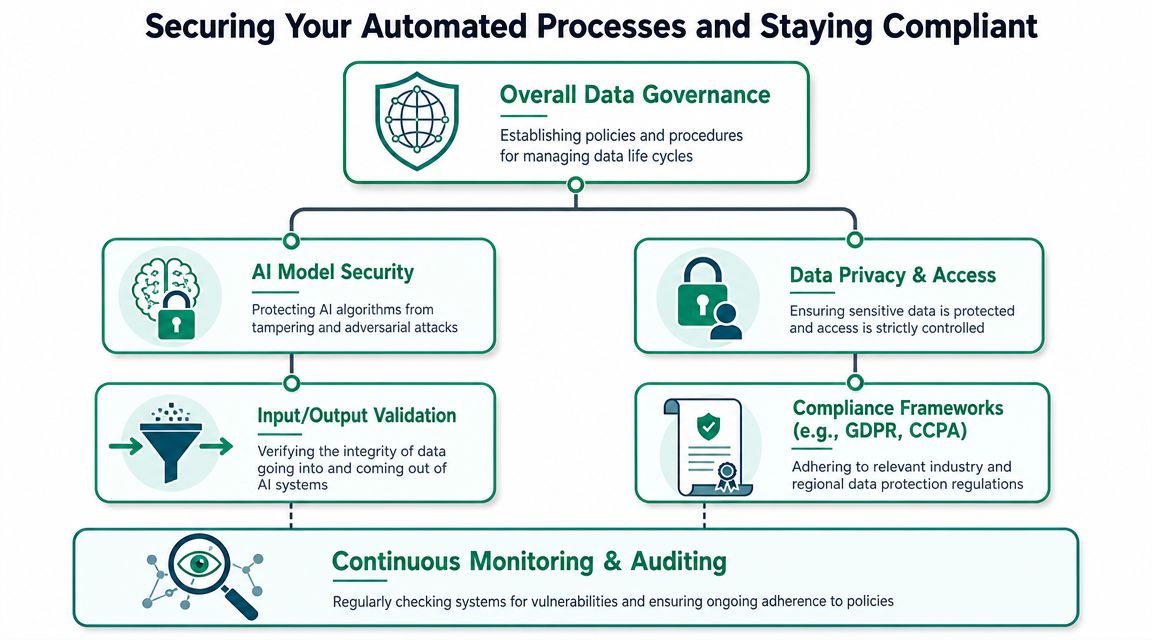
They spend time picking the AI tool, then barely think about what happens after it starts making decisions across multiple systems. That's backward. The hard part isn't getting automation turned on. The hard part is keeping it accurate, auditable, and safe.
Governance matters more than the demo
One of the most useful contrarian points in this space is simple. More AI doesn't automatically create more efficiency. In cross-system workflows, value depends on governance, exception handling, and keeping humans in the loop for judgment-heavy steps. That aligns with Automation Anywhere's discussion of AI business process automation, which notes that many businesses focus on setup and neglect governance, especially auditing AI decisions and defining human approval thresholds.
That matters a lot for Indiana companies with real compliance pressure:
- Healthcare practices: HIPAA means patient data access, logging, and disclosure controls can't be an afterthought.
- Defense contractors: CMMC expectations push you toward documented controls, identity discipline, and stronger access boundaries.
- General SMBs: NIST CSF is still a solid reference point for risk management, access control, and response planning.
What Zero Trust means in plain English
Zero Trust sounds more complicated than it is. It means the system verifies every request, every user, and every action instead of assuming something is safe because it's “inside the network.”
For AI automation, that means:
- Identity checks first: The workflow should know who initiated a request and what they're allowed to do.
- Least-privilege access: The automation gets only the permissions it needs, nothing extra.
- Approval gates: High-risk actions still require a person.
- Audit trails: Every decision, handoff, and override should be reviewable later.
- Continuous monitoring: You need logs, alerts, and follow-up when behavior changes.
This is also where the rest of your security stack comes into play. If endpoints are unmanaged, patching is inconsistent, and remote access is loose, AI will move bad data faster. Strong endpoint security such as Bitdefender GravityZone, SOC-as-a-Service monitoring, multifactor authentication, and immutable off-site backups all support the environment your automation depends on.
Don't forget the infrastructure underneath
I've seen companies obsess over AI prompts while running critical processes on shaky Wi-Fi and old hardware. That's upside down.
If your office has dead zones, your AP placement is poor, or your aging server storage throws intermittent errors, your automation reliability will suffer. The same goes for sloppy file shares and weak backup posture. In one recovery job involving a failing RAID array, the root problem wasn't the application. It was years of neglected storage health and no clean recovery plan. AI can't fix that. Good IT operations can.
A practical baseline is this cybersecurity guide for small companies in the area, your 2026 small business cybersecurity checklist.
Security-first automation isn't slower. It's what keeps one bad rule, one compromised account, or one low-quality model output from turning into an all-day outage.
Measuring Your ROI and Scaling Up for Growth
The payoff from business process automation with AI isn't just “we saved time.” It's that your team stops burning skilled hours on work a system can handle more consistently.
That matters in two ways. First, it converts wasted tech time into productive work, including customer service, sales activity, and billable labor. Second, it supports predictable monthly budgets because you're replacing recurring inefficiency with a managed process instead of paying for chaos in bursts.
Use a simple ROI formula
Keep the math plain:
(Hours saved × hourly value of the employee's time) - automation cost = net gain
That formula won't capture every soft benefit, but it gives owners a useful baseline. Add continuity value on top of that. If the workflow also reduces bottlenecks, key-person dependency, and service interruptions, the return gets more compelling. That's especially true when downtime can get brutally expensive.
A lot of Indiana firms also find that automation projects push them toward better cloud design, which improves resilience and access at the same time. This article on cloud migration benefits that deliver real ROI for Indiana businesses connects those dots well.
Scale only after the first process proves itself
One industry summary says the business process automation market grew from US$8 billion in 2020 and is projected to reach US$23.9 billion by 2029, with about 80% of businesses speeding up automation and 50% planning to automate all repetitive tasks, according to Kissflow's business process automation statistics. That tells you the direction of travel. It does not mean your company should automate everything in sight.
Scale in a sequence that makes operational sense:
- Expand to similar workflows: If AP intake worked, look at related document flows next.
- Reuse the governance model: Keep the same approval logic, logging standards, and review habits.
- Check infrastructure capacity: Network reliability, cloud app performance, and endpoint health all matter more as automation spreads.
- Train the humans around it: The best systems still need supervisors who know when to intervene.
For Johnson County business owners, the smartest move is usually measured expansion, not a giant rollout. One clean pilot. Then one department. Then another. That's how you improve continuity without creating new points of failure.
If you're in Greenwood, Indianapolis, or anywhere along the I-65 corridor and want a practical plan, Finchum Fixes IT offers a Free Network Assessment and Security Risk Audit to help you identify automation-ready workflows, spot infrastructure gaps, and make sure your environment is secure enough to support AI without causing downtime.