Your 2026 Small Business Cybersecurity Checklist
Stop Gambling with Your Business's Future
It's Monday morning at your office in a Greenwood business park. The server that runs finance, inventory, and customer records is locked up. Staff can't log in. Customers are calling. The ransom note on the screen turns an ordinary workday into a business continuity crisis.
That kind of outage doesn't stay in the server room. It hits payroll, sales, scheduling, and reputation. Around the I-65 corridor, we've seen the same pattern for years. Aging server hardware, weak remote access, flat networks, and spotty security policies create openings that attackers know how to exploit. In old brick buildings around downtown Indy and older office parks in Johnson County, the problem often gets worse because the network was patched together over time instead of designed with security in mind.
This small business cybersecurity checklist is built for that reality. Not theory. Not enterprise fluff. Just the controls that keep small and mid-sized businesses operating when something goes wrong. If you handle patient records, payment data, defense contracts, customer files, or need your team to work without interruption, these are the basics that protect uptime and revenue.
We've spent 17 years working with local businesses that can't afford wasted tech time. When we've torn down unstable networks, rebuilt failed backup jobs, or recovered data at the bit level from damaged storage, the same lesson keeps showing up. Security isn't separate from profitability. Security is what keeps your team billing, shipping, selling, and serving.
TL;DR: Your Action Plan
- Start with account security: Turn on MFA everywhere that matters, especially email, VPN, cloud apps, and admin accounts.
- Fix the human side: Train employees to spot phishing, payment fraud, and fake login pages before they click.
- Clean up password habits: Require a password manager and unique passwords for every business system.
- Harden every endpoint: Use modern EDR, patch aggressively, and monitor alerts instead of letting them pile up.
- Make recovery real: Build immutable off-site backups, segment the network, and test your incident response plan.
- Protect operations: Secure remote work, web apps, and vendor requirements so one weak link doesn't shut you down.
1. Enable Multi-Factor Authentication Across All Critical Systems
Monday starts with a fake Microsoft 365 login page. By lunch, one stolen password gives an attacker access to email, password resets, vendor conversations, and invoice approvals. I have seen that chain play out for businesses in Johnson and Hamilton County, and the cleanup always costs more than the MFA rollout they postponed.
Security researchers at JumpCloud found that only 46% of SMBs use MFA, and just 13% require it across most accounts. That gap explains why account takeovers still hit smaller companies so hard. Too many owners are still one reused password away from payroll fraud, wire fraud, or a week of lost productivity.
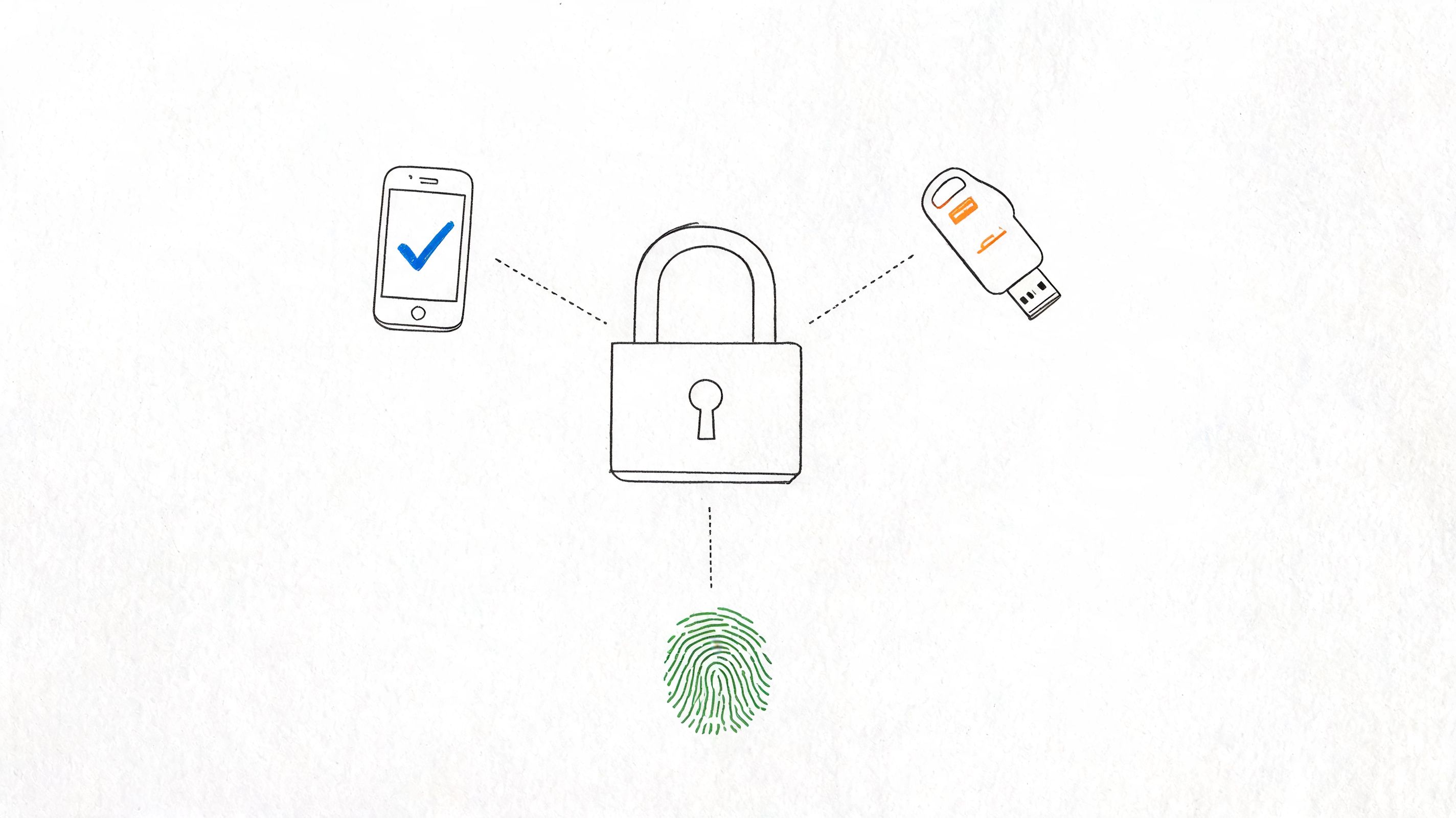
Start with the systems that can stop operations or move money. For a Greenwood accounting firm, that means every mailbox, QuickBooks login, bank portal, and remote admin account. For a contractor, it may be Microsoft 365, remote access, project files, and purchasing systems. The point is simple. Protect the accounts that can disrupt cash flow first.
Where to turn it on first
Email goes first. If an attacker gets one mailbox, they can reset passwords, impersonate staff, and pivot into other systems fast.
After email, secure these in this order:
- VPN and remote access: Require MFA before anyone reaches office systems from outside your building.
- Administrative accounts: Use hardware security keys for owner, executive, and IT admin accounts.
- Financial systems: Protect ACH, payroll, AP, purchasing, and banking portals.
- Cloud apps: Cover Microsoft 365, Google Workspace, SharePoint, OneDrive, and the SaaS tools your team touches every day.
Practical rule: If a system can expose money, client data, or operational access, it gets MFA.
Use app-based authenticators or hardware keys whenever possible. SMS is better than nothing, but it is the weaker option and attackers know it.
If you want the rollout details, Finchum Fixes IT explains the process in this guide to multi-factor authentication best practices for businesses.
A quick visual helps if you're rolling this out to staff:
2. Implement Regular Security Awareness Training for All Employees
Most attacks don't start with a hacker “breaking in.” They start with an employee getting tricked.
Only 48% of small businesses provided cybersecurity training to employees in the past year, while 95% of cybersecurity incidents are attributed to human error. That should get every owner's attention. You can buy good tools, but if your team still clicks fake invoice links and types credentials into spoofed login pages, those tools are playing catch-up.
Training must reflect the actual work your employees perform. Your receptionist encounters different phishing attempts than your controller. Your shop foreman sees different bait than your HR lead. A decent program reflects that.
What good training actually looks like
Don't settle for a once-a-year slideshow nobody remembers by Friday. Train in short, repeatable sessions that use your actual workflows. Show your finance team fake payment change requests. Show your sales team phony shared-document links. Show your leadership team spear-phishing examples that look polished enough to pass at first glance.
Use a simple structure:
- Phishing recognition: Teach staff how to inspect senders, links, attachments, and fake login prompts.
- Reporting habits: Give people one clear place to send suspicious emails without embarrassment.
- Role-based scenarios: Build separate examples for finance, HR, operations, and leadership.
- Executive participation: Owners and managers need the same training because attackers target authority.
The fastest way to improve your security culture is to reward reporting, not punish mistakes that get reported early.
For healthcare practices in Hamilton County, this also supports HIPAA expectations around workforce awareness. For defense-adjacent firms, it fits neatly with CMMC habits. For everyone else, it aligns well with the common-sense side of NIST CSF. Staff should know what suspicious activity looks like and what to do next. That's not red tape. That's operational discipline.
3. Establish a Strong Password Policy and Use Password Managers
An employee leaves on Friday. By Monday, nobody knows which vendor portals, shared inboxes, or banking tools they could still reach. That is not an HR inconvenience. It is a security failure that costs time, creates downtime risk, and turns a simple offboarding task into a fire drill.
Credential theft remains a frequent factor in small business breaches because weak password habits persist. I see the same problems across Johnson and Hamilton County. Reused passwords, shared logins, browser-saved credentials, and a spreadsheet someone swears is “temporary.” Attackers do not need complex malware when a copied password gets them straight into Microsoft 365, QuickBooks, or a line-of-business app.
Set a policy people can follow and your systems can enforce. Long, unique passwords for every account. No reuse. No texting passwords. No emailing credentials. No shared logins unless the software leaves you no other option.
A password manager fixes the operational mess. It cuts reset tickets, gives your team a safe place to store credentials, and makes onboarding and offboarding faster. For small businesses, that matters because wasted admin time is real cost, and every loose credential creates another path to downtime.
Use these rules:
- Require unique passwords for every business system: One password per app, per user.
- Put all credentials in a managed password vault: Tools like 1Password, Bitwarden, or Keeper solve the memory problem without creating bad habits.
- Separate admin accounts from daily-use accounts: Privileged credentials need a tighter vault, tighter access, and tighter review.
- Block unsafe storage: No spreadsheets, sticky notes, browser notes, or passwords sent through email and text.
- Build offboarding around credential control: Revoke vault access immediately, rotate shared credentials, and verify former staff cannot reach key systems.
One pattern stands out after years of working with local companies. The smaller the team, the more damage one shared password can do. In a 10-person business, one exposed credential can touch email, accounting, file storage, and vendor accounts in a single afternoon.
If your process is still informal, fix it now. Start with Finchum Fixes IT's guide to password management best practices for businesses.
4. Deploy and Maintain Updated Endpoint Protection
Attackers don't care whether the device is a front-desk PC, an owner's laptop, or a warehouse workstation. If it can run code and reach your systems, it's a target.
That's why old-school antivirus by itself isn't enough. You need endpoint detection and response, not just signature scanning. A modern EDR platform watches behavior, isolates suspicious activity, and gives you a shot at stopping an attack before it spreads across file shares and cloud sessions.
Small businesses find that products like Bitdefender GravityZone, Microsoft Defender for Business, and SOC-as-a-Service monitoring earn their keep. They give you visibility you won't get from a basic free tool and they tie endpoint events into a larger response process.
What to lock down on every device
A lot of Indy-area businesses still have a few “special” devices that get skipped. The owner's home laptop. The plant floor machine. The spare machine in accounting. That's how breaches slip through.
Your standard needs to cover all of it:
- Full endpoint coverage: Every workstation, laptop, and server gets protection.
- Behavior-based detection: Use EDR, not just legacy antivirus.
- Centralized monitoring: Someone has to review alerts and act on them.
- Aggressive patching: Operating systems and applications need steady maintenance.
If one device is exempt from your standards, that device becomes your weak link.
This matters even more in older buildings with patchy Wi-Fi and ad hoc networking. We've rebuilt plenty of those setups with UniFi networking, cleaner VLAN design, and latency-optimized mesh nodes because a flaky network often hides security blind spots too. When the network is stable, monitoring gets cleaner and response gets faster.
For a local breakdown of what endpoint hardening should look like, see Finchum Fixes IT's guide to endpoint security best practices for Indianapolis SMBs.
5. Maintain Regular Backups with Offline and Immutable Copies
Friday at 4:30 p.m., someone clicks the wrong attachment, the file server starts encrypting, and accounting cannot post payments on Monday. At that point, backups stop being an IT checkbox and become the difference between a bad weekend and a week of lost revenue.
The U.S. Chamber of Commerce notes that many small businesses still fail to back up data consistently, which is why backup gaps keep turning routine incidents into business shutdowns. If your plan depends on a synced folder, a single NAS, or the assumption that Microsoft 365 covers everything, fix that now. Those setups leave plenty of room for accidental deletion, ransomware, and failed restores. For a plain-English small business backup baseline, review the U.S. Chamber of Commerce guidance on protecting company data with regular backups.
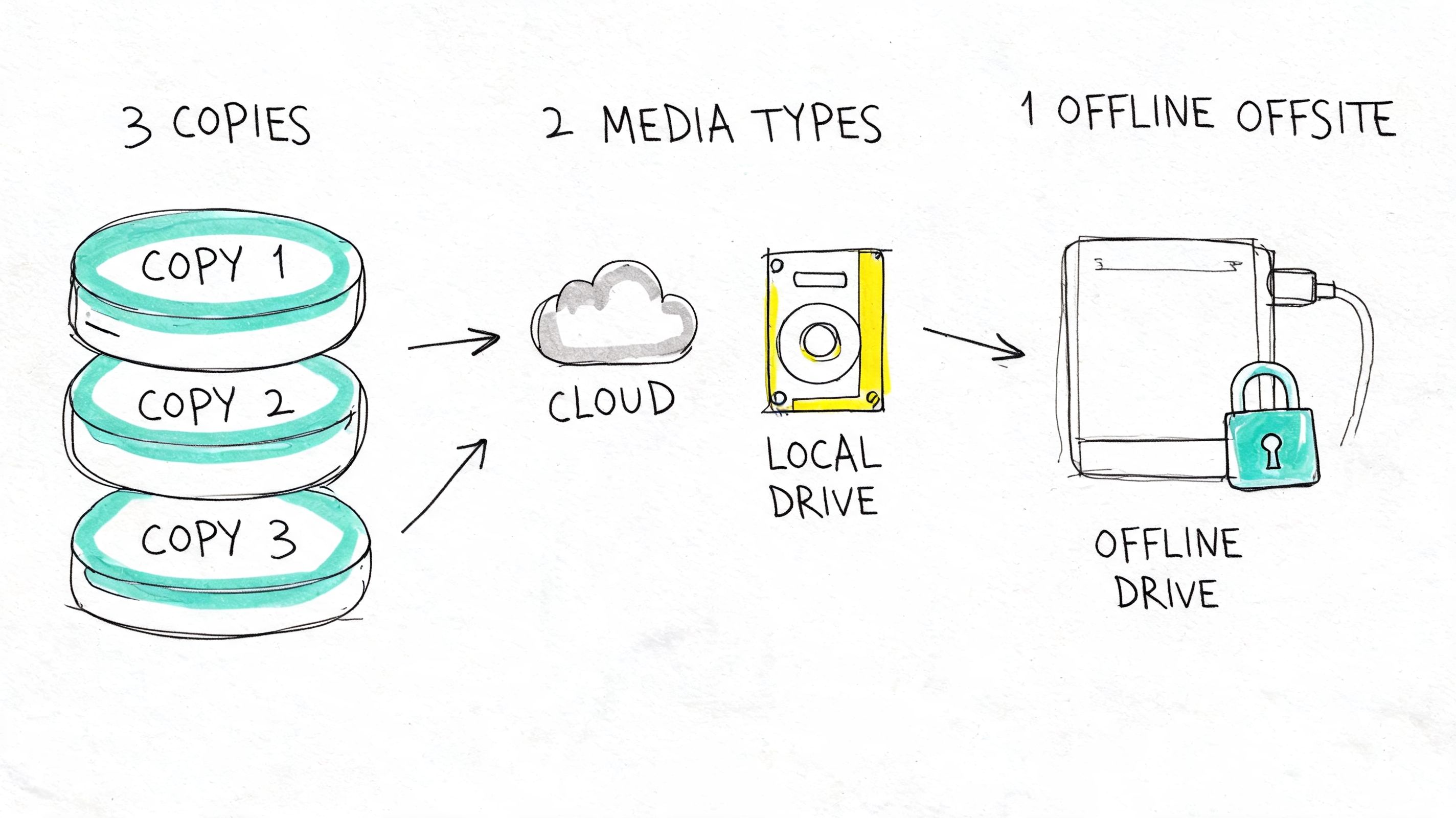
Use the 3-2-1 rule. Keep at least three copies of important data, store them on two different types of media, and keep one copy offsite. Then add immutable storage so even a compromised admin account cannot wipe out your recovery point. For higher-risk systems, keep an offline or air-gapped copy too.
This is one of the fastest-payback controls on the list. Across Johnson and Hamilton County, the businesses that recover quickly after server failure, ransomware, or user error usually made one decision early. They spent money on recovery options before they needed them. That investment protects cash flow, payroll, scheduling, production, and customer trust.
What a real backup system includes
A backup report proves a job ran. It does not prove you can recover.
Set the standard like this:
- Immutable backup storage: Block deletion or encryption of backup data during an attack.
- Offline or air-gapped copies: Keep one recovery path outside the attacker's reach.
- Monthly restore tests: Recover files, boot systems, and confirm the application works.
- Documented recovery order: Restore the systems that drive revenue first, then work down the list.
- Defined ownership: Name who approves restores, who communicates with staff, and who verifies success.
If you run line-of-business software on aging hardware in a Greenwood office park, good backups buy you time when storage fails without warning. If you operate a busy office in Carmel or a shop floor in Franklin, they prevent one hardware problem from becoming a payroll problem.
Backups should protect operations, not just data. Build them around recovery time, recovery order, and proof that the restore works. That is how you turn backup spending into lower downtime and a much smaller financial hit when something breaks.
6. Implement Network Segmentation and Zero Trust Architecture
A flat network is convenient right up until the moment it isn't.
If one infected device can see everything, attackers can move from a receptionist's PC to accounting shares, production systems, and backups without much resistance. Segmentation blocks that lateral movement. Zero Trust takes it further by assuming no user or device gets automatic trust just because it connected once.
This matters a lot in mixed-use environments around Central Indiana. A manufacturer may have office users, CNC systems, vendor remote access, security cameras, and warehouse devices all sharing the same core network. That's asking for trouble.
Start simple and get separation in place
You do not need a giant enterprise project to make this better. Start by splitting the network based on business risk, not office politics.
A practical layout often includes separate segments for:
- Business operations: Standard office devices and general productivity tools.
- Sensitive systems: Finance, HR, servers, and protected data.
- Operational technology: Shop floor equipment, printers, cameras, and specialized devices.
- Guest and unmanaged access: Anyone who shouldn't touch internal resources.
Use VLANs, access control lists, identity-aware policies, and firewall rules that reflect how people work. Then layer in device posture checks and conditional access for remote users. That's the road toward Zero Trust architecture without making the environment unusable.
Segmentation isn't about making the network complicated. It's about making a breach small.
For healthcare groups, this helps isolate systems handling protected health information and supports HIPAA discipline. For firms working with government contracts, segmented access supports the spirit of CMMC. For general businesses, it's straight NIST CSF common sense.
7. Deploy a Web Application Firewall and DDoS Protection
If your website, client portal, booking form, or customer login is public, it's being probed. Constantly.
A web application firewall sits in front of those systems and filters malicious requests before they hit your server. DDoS protection handles floods of junk traffic that can knock a site offline. If your company takes payments, books appointments, collects leads, or gives customers account access, this is uptime protection as much as security.
A Hamilton County business running an online store doesn't need to become a security lab. It needs a shield in front of the web app and clean visibility into what's being blocked. Managed options from Cloudflare, AWS, and Akamai make that practical.
Where businesses get this wrong
A lot of small companies launch a site and stop there. No WAF. No bot filtering. No rate limiting. No review of logs after weird traffic spikes. Then they wonder why the site slows down, the forms get spammed, or customer accounts start seeing strange login attempts.
Cover the basics:
- Put every public app behind a WAF: Not just the homepage. The portal, form, and login pages too.
- Turn on bot and rate controls: Credential stuffing and scraper traffic are common problems.
- Limit direct origin exposure: Don't make it easy to bypass the cloud protection.
- Review alerts regularly: A noisy web edge often tells you something useful.
This is especially important for local service businesses that depend on inbound leads. If the website is down or broken, the phones get quieter fast. That's a business problem, not just an IT problem.
8. Conduct Regular Vulnerability Assessments and Penetration Testing
You can't protect systems you haven't checked.
Vulnerability scanning finds known weaknesses, missing patches, exposed services, and bad configurations. Penetration testing goes a step further and shows what an attacker could do with those weaknesses. Together, they expose the gap between what you think is secure and what's really exposed.
Small and mid-sized businesses often skip this because they assume it's only for large enterprises. That's backwards. Mid-sized firms are often in the toughest spot because clients and insurers expect proof of security discipline, but the company doesn't have a full internal compliance team.
The compliance-cost problem nobody likes talking about
A 2025 SMB cybersecurity checklist discussion from Next Dimension describes a compliance gap for mid-sized businesses. They're too small for full compliance staffing, too visible to ignore, and increasingly pressured by contracts and cyber insurance requirements. That means your small business cybersecurity checklist can't stop at technical controls.
Testing should feed three business functions:
- Risk reduction: Fix exploitable weaknesses before attackers find them.
- Insurance alignment: Confirm your controls match what your policy expects.
- Client readiness: Document security practices for vendor reviews and procurement demands.
If you serve healthcare, manufacturing, logistics, or defense-adjacent customers around Indianapolis, this becomes a sales issue too. Buyers increasingly ask for documented controls, not verbal reassurance. A clean vulnerability management process helps you answer those questions without scrambling.
Good testing also reveals boring but costly issues. Old remote access ports. Forgotten vendor accounts. Misconfigured firewalls. Cloud storage exposed by accident. Those are the kinds of oversights that turn into downtime, insurance disputes, or failed client audits.
9. Establish an Incident Response Plan and Test It Regularly
It is 8:12 a.m. on a Tuesday. Staff cannot open shared files, a manager reports a fake invoice email sent from the controller's account, and your front desk is asking whether systems should be shut down. In that moment, speed matters more than good intentions. A written incident response plan cuts wasted time, limits downtime, and protects cash flow.
Too many small businesses still handle incidents on the fly. The U.S. Chamber of Commerce small business cybersecurity guidance makes the same point in plain terms. Preparation before an incident is what keeps a bad day from turning into a week of lost operations, missed orders, and angry customers.
After 17 plus years working with Johnson and Hamilton County businesses, I can tell you where plans fail. They are too long, too generic, or built for auditors instead of the people who will use them under pressure. Your plan should fit the way your business runs. Who approves shutting down a server? Which systems have to come back first to keep revenue moving? Who speaks to staff, customers, your insurer, and outside counsel?
Build the plan around decisions, not paperwork
Assign roles now. Name one person for technical containment, one for executive communication, one for vendor and legal coordination, and one for documentation. If any of those jobs rely on a single employee, assign a backup.
A usable plan should include:
- Containment actions: Isolate affected systems, disable compromised accounts, revoke sessions, and stop spread fast.
- Evidence handling: Preserve logs, screenshots, and device state correctly. If you need help documenting that chain, these legal admissibility of evidence forms are a useful reference.
- Communication workflows: Prepare internal alerts, leadership updates, customer notices, and cyber insurance reporting steps.
- Recovery order: Restore the systems tied to payroll, scheduling, quoting, inventory, and client communication first.
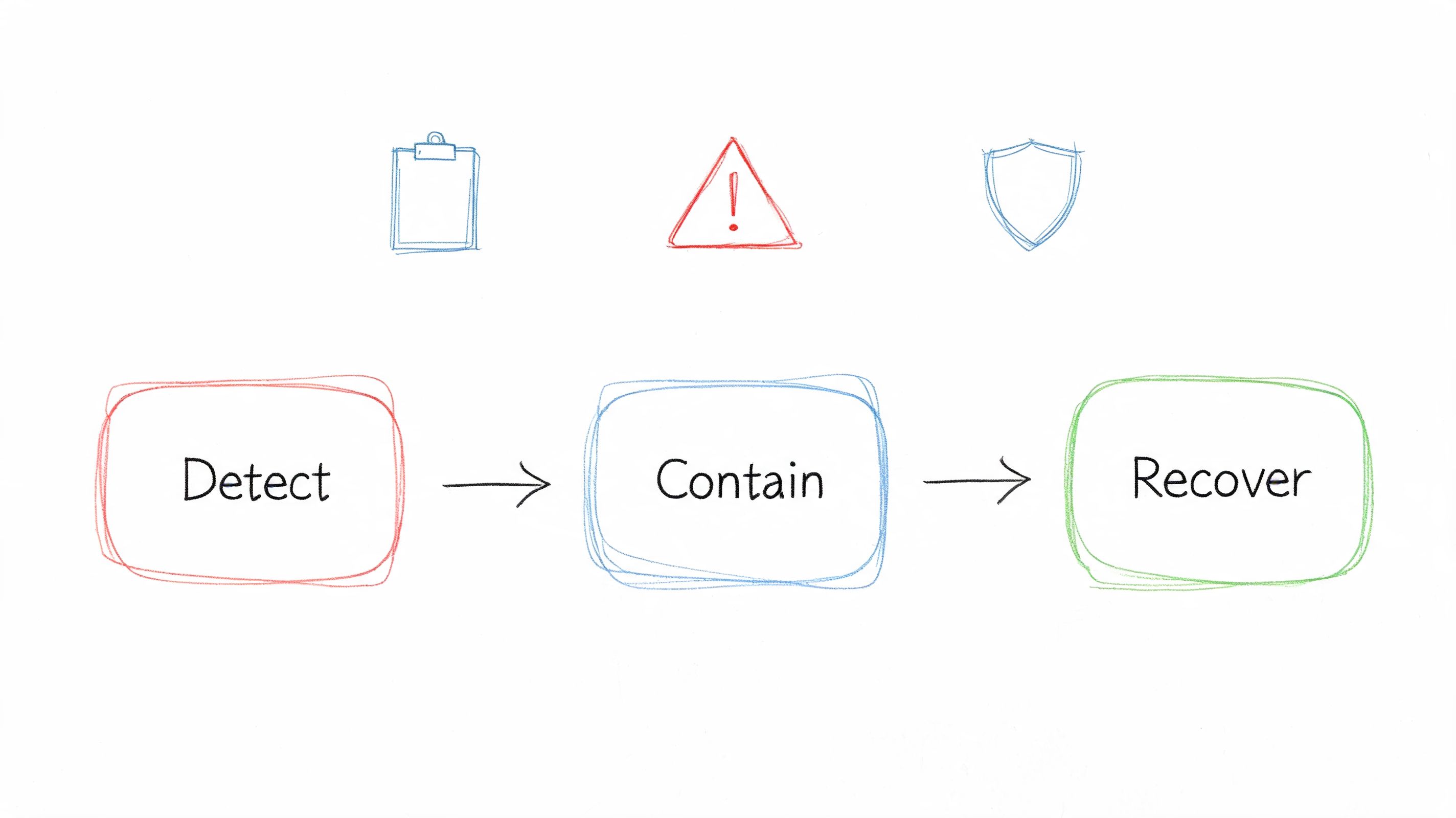
Then test it.
Run tabletop exercises at least twice a year. Use realistic scenarios that match how Indiana businesses get hit: ransomware on the file server, a compromised Microsoft 365 admin account, or a lost laptop with customer data. Time the exercise. Track who hesitated, what access was missing, which vendors failed to respond, and how long it took to make key decisions. That is where the return shows up. Testing exposes process gaps before they become billable downtime.
Finchum Fixes IT has a practical starting point in this incident response plan template for businesses. If your team also supports hybrid staff, pair it with these remote work security best practices for Indiana businesses so your response plan covers off-site devices and accounts too.
10. Secure Remote Access with VPN and Endpoint Security
A controller approves invoices from a hotel Wi-Fi network. A project manager logs in from a personal laptop at a job site. A vendor connects after hours to update line-of-business software. That is normal business now. The problem starts when all three sessions get broad network access with weak login controls and no device checks.
I have seen this play out with Johnson and Hamilton County businesses for years. Remote access shortcuts save a few minutes up front, then cost days of downtime when an attacker rides a stolen password through an old VPN account or an unmanaged laptop. Remote access needs to protect profit, not just provide convenience.
Establish the process using four guidelines. Every remote session must be encrypted. Every user must pass MFA. Every device must satisfy your security standard before it connects. Every account should receive access only to the systems that specific role needs.
Build remote access around least privilege
A VPN is not a security strategy by itself. It is one control. If it drops a user into the full network, you are giving one compromised account too much reach.
Start with the highest-risk remote access paths first:
- Require MFA on every remote login: Email, VPN, admin portals, remote desktop tools, and vendor access all need a second factor.
- Allow only managed devices: Block personal machines unless they meet the same standards as company devices, including encryption, patching, and endpoint protection.
- Limit access by role: Office staff, field staff, vendors, and administrators should each have separate access policies.
- Tighten vendor access: Turn it on only when needed, restrict it to specific systems, and review those accounts on a schedule.
- Keep VPN and endpoint tools current: Old clients, unpatched gateways, and expired policies are common entry points.
For many small businesses, that order gives the fastest return. It cuts the chance that a stolen password turns into a full-network outage, and it reduces the cleanup cost when a laptop is lost or a vendor account is abused.
If your team still uses a traditional VPN, review whether some users should move to app-level access instead of full network tunnels. Zero Trust Network Access fits well for accounting apps, remote admin tools, and cloud-connected line-of-business systems because it exposes less of your environment and is easier to audit.
If your remote setup was assembled in a rush and never cleaned up, fix it now. Finchum Fixes IT lays out the practical baseline in these remote work security best practices for Indiana businesses.
Small Business Cybersecurity: 10-Point Comparison
| Security Control | 🔄 Implementation Complexity | ⚡ Resource Requirements | 📊 Expected Outcomes | 💡 Ideal Use Cases |
|---|---|---|---|---|
| Enable Multi-Factor Authentication (MFA) Across All Critical Systems | Low–Moderate: 1–2 weeks rollout, policy tuning | Low: $0–$5/user/mo; admin time and user support | Strong reduction in account takeovers (≈99.9% blocked); improved compliance | Email, financial systems, admin portals, cloud apps |
| Implement Regular Security Awareness Training for All Employees | Low–Moderate: immediate start, ongoing reinforcement | Moderate: $10–$30/user/year; staff time for training | Lower phishing click rates (~80%); better incident reporting and culture | All staff, remote workers, high-target roles (finance, HR) |
| Establish a Strong Password Policy and Use Password Managers | Moderate: 2–4 weeks policy rollout, months for adoption | Low–Moderate: $3–$10/user/mo; training and admin controls | Fewer credential breaches, reduced reset tickets, less password reuse | Organizations with many accounts; privileged users |
| Deploy and Maintain Updated Endpoint Protection (Antivirus/EDR) | Moderate–High: 1–2 weeks deploy, 4+ weeks tuning | Moderate–High: $5–$15/endpoint/mo; skilled analysts | Faster detection/response (lower MTTD/MTTR); ransomware prevention | Laptops, servers, remote endpoints, regulated environments |
| Maintain Regular Backups with Offline/Immutable Copies | Moderate: 1–2 weeks setup; ongoing testing | Moderate: $50–$500+/mo depending on data; storage & bandwidth | Enables rapid recovery; minimizes ransomware impact; meets RPO/RTO | Critical data stores, databases, regulated records |
| Implement Network Segmentation and Zero Trust Architecture | High: 3–6 months design and phased deployment | Moderate–High: $5k–$50k+; modern networking gear & expertise | Limits lateral movement; reduces breach scope and exposure | Financial, healthcare, industrial control systems, hybrid infra |
| Deploy a Web Application Firewall (WAF) and DDoS Protection | Low–Moderate: 1–2 weeks deploy; ongoing tuning | Moderate: $50–$5,000+/mo based on traffic; dev coordination | Protects against OWASP Top 10, preserves availability during attacks | E‑commerce, SaaS, public websites and APIs |
| Conduct Regular Vulnerability Assessments and Penetration Testing | Moderate: ongoing scans; quarterly/annual tests | Variable: $500–$50k+ per engagement; security vendor expertise | Identifies exploitable gaps; prioritizes remediation; compliance evidence | Production apps, compliance-driven organizations, pre-release apps |
| Establish Incident Response Plan and Test It Regularly | Moderate: 4–8 weeks initial plan; regular exercises | Low–Moderate: $5k–$20k for plan development; cross‑team time | Faster containment and recovery; clearer roles; timely notifications | Any org that must recover quickly or meet breach reporting rules |
| Secure Remote Access with VPN and Endpoint Security | Low–Moderate: 1–3 weeks deployment and testing | Low–Moderate: $2–$10/user/mo; VPN infra and endpoint controls | Encrypted remote access; reduced eavesdropping and unauthorized access | Remote/hybrid workforces, telehealth, distributed teams |
From Checklist to Action Plan for Your Indiana Business
It usually starts on a normal workday. Someone in Greenwood opens QuickBooks and gets an error. A manager cannot reach the shared files. Remote staff keep asking whether the internet is down. By 10:30 a.m., payroll, scheduling, invoicing, and customer communication are all backing up because one weak point finally failed.
A small business cybersecurity checklist matters only if it turns into a ranked plan with owners, deadlines, and budget. After 17-plus years working with businesses across Johnson County, Hamilton County, and the Indianapolis area, I can tell you the companies that avoid long outages do one thing differently. They stop treating security as a pile of best practices and start treating it like uptime insurance for revenue-producing systems.
That shift changes the order of work.
Start with the controls that prevent the fastest, most expensive downtime. Protect logins first. Verify backups can restore. Secure laptops, desktops, and remote access. Separate critical systems so one infected device does not spread trouble across the whole office. Then document who does what, what still needs work, and how the business will respond when something breaks. That gives owners a clear view of risk, gives managers a way to plan spending, and gives insurance carriers and clients evidence that security is being handled seriously.
Small companies are still prime targets, as noted earlier from Qualysec's small business cyber attack statistics. The point is simple. Attackers go where defenses are thin, monitoring is inconsistent, and downtime hurts fast. For a local manufacturer, law office, medical practice, contractor, or retail operation, that usually means real money lost the same day the problem starts.
Cheap tools do not fix that. Good security spending lowers the odds of an outage and shortens recovery when one happens. That is the ROI most owners care about, and they should. Every hour your accounting system is unavailable, every day your files are locked, and every employee pulled into cleanup work cuts directly into margin.
We have seen the pattern up close in Indiana offices and shops. Networks expanded a piece at a time. Old switches stayed in place because they still turned on. Wi-Fi got extended with consumer gear. Backups ran for months without anyone testing a restore. Then one failed drive, one stolen password, or one compromised laptop turned a manageable issue into a week of disruption.
The businesses that recover fastest are not lucky. They prepared before the bad day.
If you run a business in Greenwood, Indianapolis, or along the I-65 corridor, get specific about your next steps. Identify the systems that stop cash flow if they go down. Rank the controls that protect those systems. Assign ownership. Set dates. Fund the work. That is how a checklist becomes an action plan that protects operations instead of decorating a policy binder.
Finchum Fixes IT is one local option if you want outside help turning loose security tasks into a practical remediation plan tied to recovery, downtime prevention, and day-to-day operations.
If your business is in Greenwood or the greater Indianapolis area, schedule a Free Network Assessment with Finchum Fixes IT. A focused review can show you where weak logins, poor backups, aging hardware, and network blind spots are putting operations at risk, then turn that into a practical Security Risk Audit and action plan.