How to Automate Invoice Processing for Your Indy Business
TL;DR
- Manual AP usually breaks in the same places around Greenwood and the I-65 corridor: scattered invoice intake, approval delays, and bad vendor data.
- Manual processing typically costs $15 to $16 per invoice, while automated processing can drop that to as low as $3 for the right volume and setup, according to Resolve's invoice cost summary.
- Good automation is not just OCR. It needs validation, approval rules, exception handling, ERP sync, and a real audit trail.
- The safest rollout is phased: map the current process, pilot a subset of vendors, test integrations hard, then expand.
- Indiana SMBs need systems that are vendor-ready, audit-ready, and resilient enough to keep AP moving when staff are remote, approvers are traveling, or paper invoices still show up.
A lot of Indiana business owners are living the same scene right now. A shared AP inbox is full, paper invoices are stacked on a corner desk, somebody in operations swears they approved that bill last week, and your bookkeeper is bouncing between QuickBooks, email threads, PDFs, and a filing cabinet that should've been retired years ago.
That problem shows up all over Johnson County. Older office space in Greenwood business parks still has mixed workflows. Some vendors send PDFs, some mail paper, some expect portal uploads, and one or two still insist on weird formats that make your staff do cleanup work by hand. Add spotty Wi-Fi in an old brick building or a clunky on-prem file share, and AP turns into a daily interruption machine.
If you want to know how to automate invoice processing the right way, start with this mindset: you're not buying an OCR tool. You're building a resilient back-office system that keeps cash controls intact, cuts approval drag, supports business continuity, and holds up under audit.
Your Manual Invoicing Is Costing More Than You Think
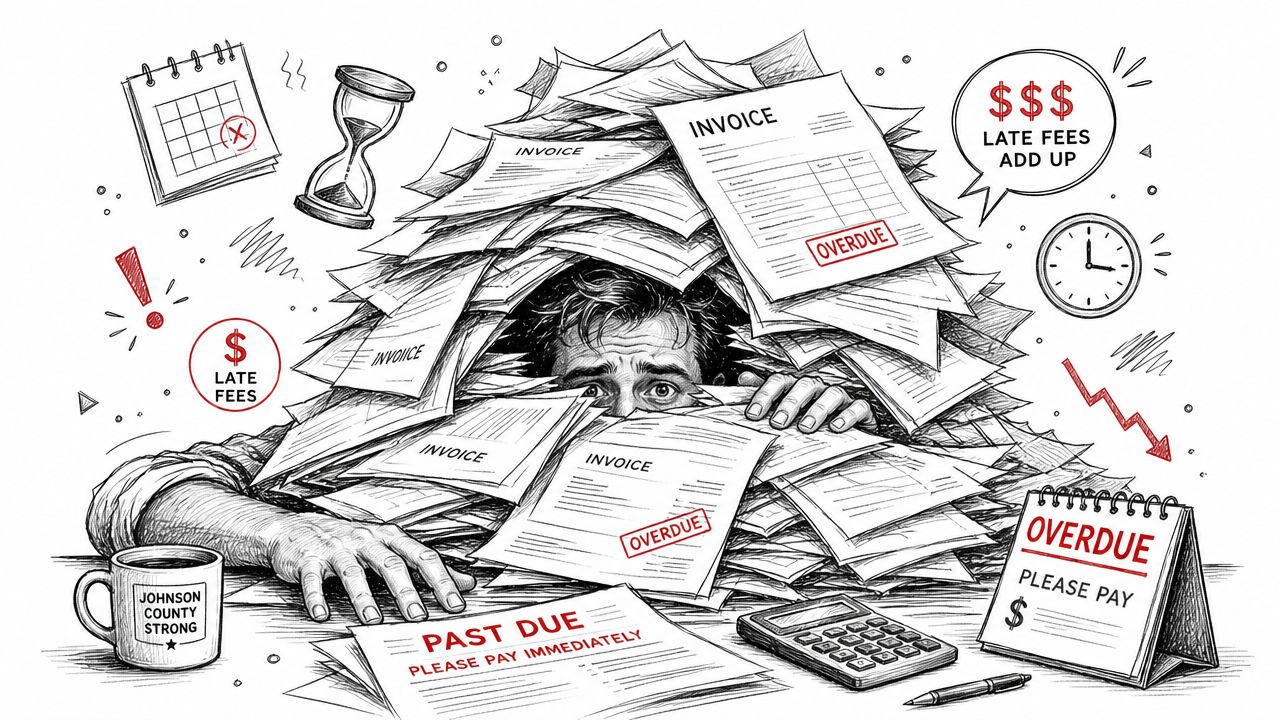
Monday at 10:12 a.m. is when manual AP usually shows its cracks. A vendor calls asking why they have not been paid. The invoice is sitting in someone's inbox, the backup copy is on a shared drive under the wrong customer folder, and accounting is not sure whether the department manager approved it or only replied, "looks fine." I see this pattern in Greenwood and across Johnson County all the time, especially in companies that grew faster than their back-office process.
The hidden cost is bigger than the invoice itself
The true cost is not just labor. It is delay, uncertainty, and control gaps.
Every time a clerk opens an attachment, retypes header fields into QuickBooks Online or Sage Intacct, checks coding against an old email, and forwards it for approval, the business pays for the same invoice multiple times. The first cost is staff time. The second is slower month-end close. The third is the risk of duplicate payment, missed discounts, weak documentation, or an approval trail that falls apart during an audit.
For Indiana SMBs, those problems hit harder than generic software guides admit. A manufacturer in Franklin may need three-way matching against purchase orders and receiving records. A professional services firm in Greenwood may care more about department coding and approval limits. A construction-related business may still get paper invoices from long-time suppliers who are not changing their habits anytime soon. Good automation has to account for all of that.
Practical rule: If one invoice touches email, paper, a spreadsheet, and your accounting system, AP is running on staff memory instead of process control.
The benchmark is changing
More finance teams now expect invoices to move from intake to coding, approval, posting, and archive with fewer manual handoffs. Analysts at Quadient describe that shift as part of a broader move toward touchless AP in their AP automation market outlook.
That matters locally because your competitors are tightening controls while reducing clerical work. The companies getting this right are not just scanning PDFs faster. They are setting up approval rules, duplicate checks, exception queues, ERP sync, searchable records, and layered security around vendor and payment data. If you want a broader view of where these projects fit, this guide to business process automation examples for Indiana companies gives useful context.
What this looks like on the Southside
A common Greenwood setup looks like this:
- Invoices arrive in four places: AP inbox, front desk mail, vendor portals, and direct emails to managers.
- Approval depends on memory: A supervisor approves in email, a plant manager approves by text, and nobody updates the accounting team.
- Data gets entered twice: Once from the PDF, then again during posting or payment review.
- Status is hard to prove: When a vendor calls, staff have to search inboxes and network folders to piece together the history.
That setup is fragile. One person out sick can stall approvals for days. A supplier onboarding issue can send invoices to the wrong address for a month before anyone catches it. A file share outage or internet problem in an older office can leave AP half-digital and half-paper, which is usually the worst combination.
The fix is a system that can handle exceptions without losing control. That means clear intake channels, approval paths by dollar amount and department, a place for disputed invoices to wait, and an audit trail that shows who touched what and when. That is what lowers cost over time. It also gives you a process that still works when staff are remote, approvers are traveling, or a vendor sends the wrong file format on the last day of the month.
Map Your Current AP Process to Find the Bottlenecks
Before you shop for software, map the process you already have. Not the process from your policy manual. Instead, document the workflow your team uses on a Tuesday when three people are busy and a vendor is calling about a past-due bill.
Follow one invoice from arrival to payment
Take a recent invoice and trace every handoff.
Who receives it first? Where is it stored? Who enters the header data? Who checks the PO? Who approves the amount? Who posts it? Who confirms payment? If you can't answer those questions without asking three people, that's your first red flag.
A clean AP map should include these checkpoints:
- Receipt channel: Email, paper, portal upload, or scan-to-folder
- Ownership: AP clerk, controller, department manager, purchasing, or operations
- System touchpoints: Shared mailbox, network share, QuickBooks Online, Xero, Sage Intacct, ERP, or spreadsheet
- Decision points: PO match, coding review, approval threshold, dispute handling
- Exit point: Posted, paid, archived, and searchable
Look for the bottlenecks people ignore
In Hamilton County growth firms and Indy-area companies with multiple departments, approval drag is usually the loudest problem. The more dangerous one is duplicate work. Staff download an invoice from email, save it to a file share, print it for approval, then re-enter the same values into the accounting platform.
Most AP pain isn't one dramatic failure. It's five extra clicks, two missing fields, one unclear owner, and a stalled approval chain repeated hundreds of times.
Use a simple review list:
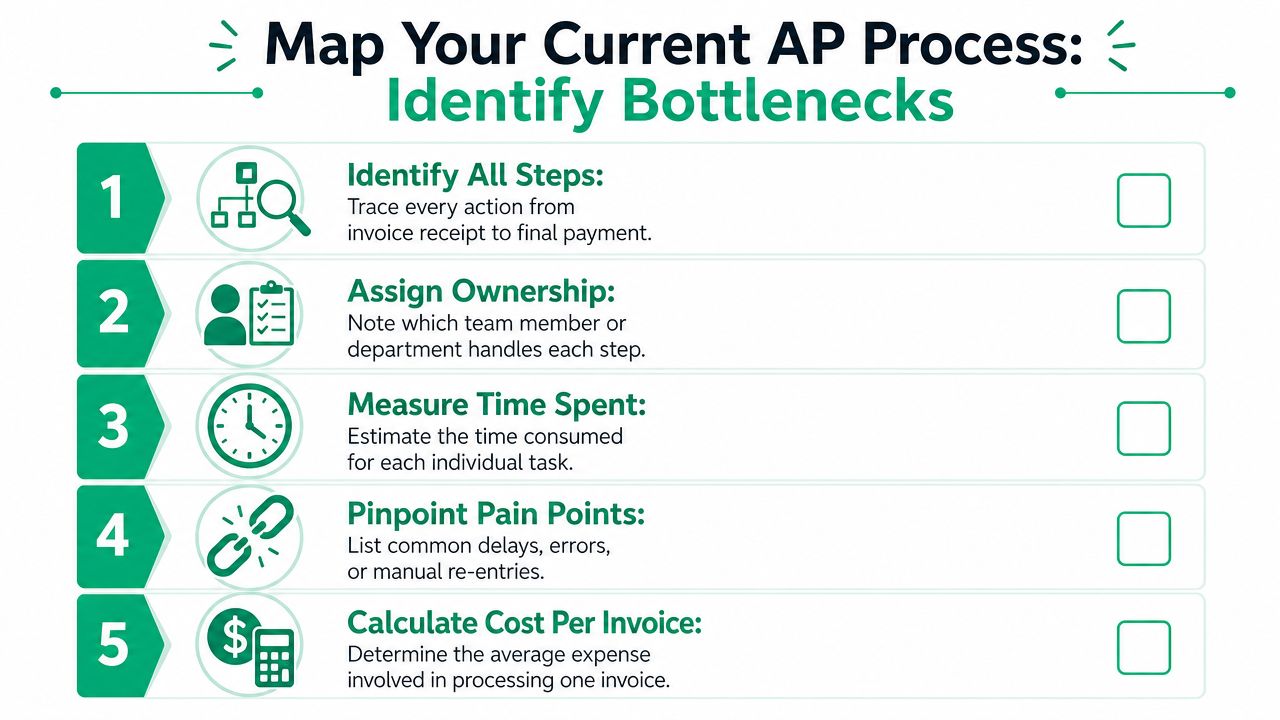
- Identify all steps: Trace the invoice from intake to payment confirmation.
- Assign ownership: Put a name or role on each step.
- Measure time spent: Estimate how long each step takes.
- Pinpoint pain points: Find re-entry, missing approvals, coding delays, and disputes.
- Calculate cost per invoice: Use your own labor and process friction as a baseline.
If you need a structured worksheet for this kind of process review, a business impact analysis template helps frame what happens when AP gets delayed and who feels it downstream.
Don't skip peak periods
Invoice volume isn't flat all year. End-of-month, year-end, and project closeouts hit harder. A process that seems manageable during a slow week can break fast during peak periods. That's why mature implementation guidance recommends measuring current invoice volume, peak periods, and bottlenecks before you automate, then piloting with a subset before scaling.
What to document before you move forward
Keep this practical. You don't need a giant binder.
Document:
- Current intake channels
- Vendor list quality
- Approval thresholds
- PO and non-PO paths
- Common exception types
- Where files are stored
- Which system is the system of record
This exercise usually settles a big debate early. Some businesses think they have a software problem. Instead, they have a workflow problem. Others think they have a people problem. Instead, they have three disconnected systems and no intake standard.
Choosing Your Invoice Automation Technology
A Greenwood manufacturer gets invoices by email, paper mail, and a supplier portal. The controller wants fewer keying errors. The AP clerk wants duplicate invoices caught before payment. The owner wants an approval trail ready for an auditor or lender. One tool rarely solves all three.
That is the selection problem for Indiana SMBs. You are not just buying extraction. You are choosing how invoices get captured, checked, routed, posted, and preserved when something goes wrong.
The three paths most businesses consider
The first path is OCR and AI extraction. It reads PDFs, scans, and sometimes emailed attachments, then pulls fields like invoice number, date, amount, and PO. It fixes manual typing. It does not fix weak approval logic, poor vendor records, or missing exception rules.
The second path is RPA. A bot logs into existing systems and repeats screen-level tasks your staff already performs. I use it in narrow cases, especially when a legacy accounting package has no usable API and replacing it is not on this year's budget. It can work well, but every screen change, field rename, or MFA prompt becomes a maintenance issue.
The third path is a dedicated AP automation platform. That is usually the right fit when the business needs one system for intake control, validation, routing, approval history, exception handling, and accounting sync.
Invoice Automation Tech Comparison
| Technology | Best For | Typical Cost | Key Feature |
|---|---|---|---|
| OCR and AI extraction | Smaller teams with heavy manual entry but simple approvals | Varies by vendor and scope | Pulls invoice data from PDFs and scans |
| RPA | Businesses stuck with older software or awkward legacy workflows | Varies by vendor and scope | Mimics human actions across systems |
| Dedicated AP automation system | Firms that need workflow control, validation, approvals, and auditability | Varies by vendor and scope | End-to-end invoice workflow orchestration |
When OCR is enough, and when it isn't
OCR is a good first step if the main problem is data entry and the rest of the AP process is already disciplined. That usually means a clean vendor master, a small approval chain, consistent invoice formats, and very few disputes.
It starts to break down when invoices arrive through mixed channels, line items need coding review, or suppliers send credits, partial shipments, and revised invoices. OCR can read a total. It cannot decide whether a freight overcharge should route to purchasing, whether a duplicate invoice number is a true duplicate or a vendor reset, or whether a non-PO invoice needs department approval before posting.
For many Johnson County businesses, that is the point where a simple capture tool turns into another inbox for AP to babysit.
RPA works best in narrow lanes
RPA is useful when the workflow is stable and the target system is old but predictable. I have seen it bridge data from vendor email intake into older ERP screens when no other integration path existed.
The trade-off is fragility. If your accounting system gets a UI update, if approvers change steps often, or if your controls require clear field-level traceability, bots become a patch you have to keep repairing. For manufacturers selling into regulated supply chains, healthcare groups watching access controls, and firms preparing for tighter customer audits, that trade-off matters.
Use RPA for a specific gap. Do not make it the core of your AP control system unless you are prepared to maintain it.
Dedicated AP platforms are control systems
A dedicated AP platform earns its keep when the business needs more than extraction. It should support channel-specific intake, confidence scoring, duplicate detection, approval rules by amount or department, ERP posting, and a searchable audit log. It also needs a real exception queue. If an invoice fails a PO match, hits a tax issue, or comes from an unapproved supplier, the system should stop it, assign it, and document what happened next.
Supplier onboarding matters here more than most demos admit. If vendors keep sending invoices to personal inboxes, attaching photos instead of PDFs, or using five versions of their legal name, the software will not save you. Good platforms help enforce intake rules and vendor record standards without creating extra work for AP.
If you are comparing products, ask vendors to show three things live. A clean invoice. A bad invoice with missing fields. A messy invoice from a supplier you have never seen before. Their answer on the third one tells you more than the polished demo.
For another outside perspective, Applied published a useful guide for optimizing AP processes that helps frame vendor questions. If you are also planning workflow changes beyond AP, this article on AI automation for small business growth gives useful broader context.
Buy the system that documents exceptions, approval history, and supplier behavior under pressure, not just the one that reads a clean PDF fast.
Designing a Bulletproof Automated Workflow
A reliable invoice process starts with intake discipline. If invoices enter the business through random inboxes, paper stacks, and ad hoc uploads, automation will move chaos faster.
Start with intake standardization
Create dedicated channels for invoice capture. One AP email address. One scan workflow for paper. One rule for portal submissions. One naming and storage approach. Mixed environments are normal in Indiana SMBs, especially where older vendors still mail paper and larger suppliers prefer portals.
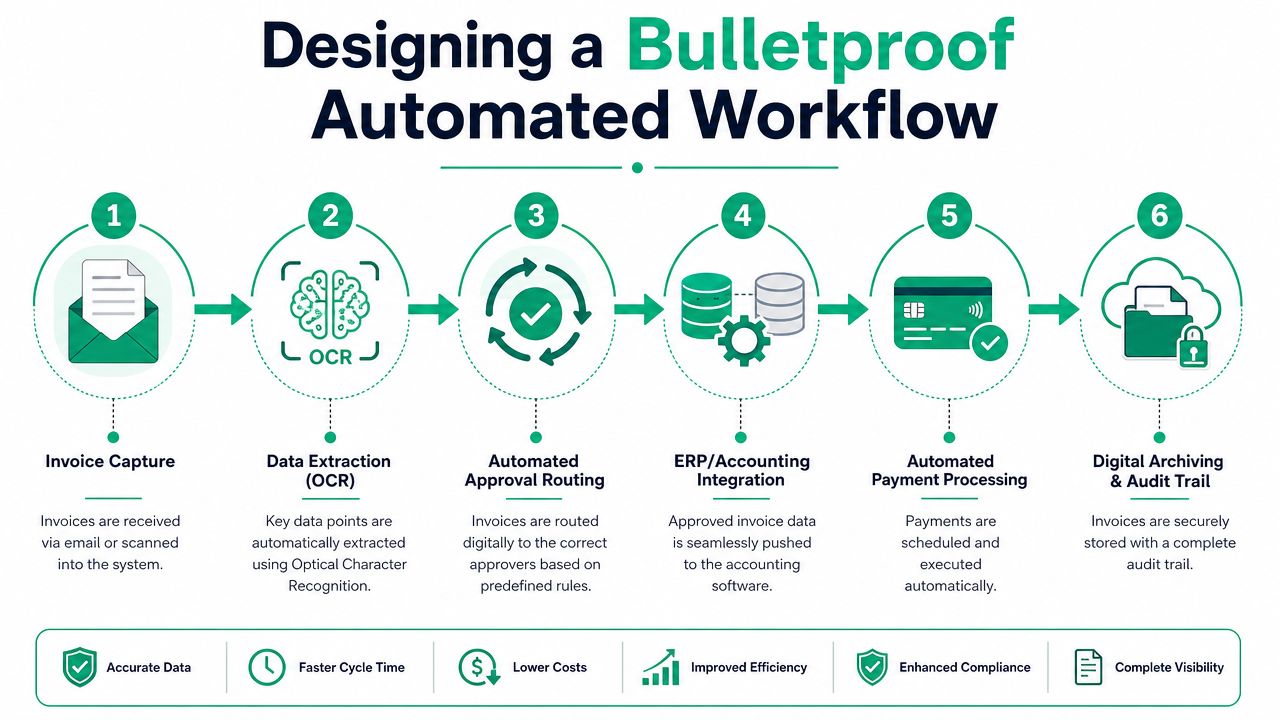
Once intake is standardized, the workflow should follow a strict path:
- Capture the invoice
- Extract the fields
- Validate against vendor data and business rules
- Route for approval
- Sync to accounting or ERP
- Archive with a full audit trail
Good systems separate signal from noise. They don't just read text. They score confidence, check required fields, compare vendors against master data, and route only verified invoices forward.
Validation is where most bad data should die
Field-level validation matters more than people think. Vendor name, invoice number, invoice date, due date, total, PO number, and tax treatment should all be checked before posting.
Good validation rules catch problems early:
- Duplicate invoice checks: Stop the same invoice from entering twice
- Vendor master match: Ensure the invoice ties to an approved vendor record
- Required field enforcement: Block invoices with missing critical values
- Tolerance rules: Flag discrepancies that exceed what your business accepts
- GL coding rules: Suggest or assign coding paths, then route edge cases for review
Field note: The fastest AP teams aren't the ones that automate everything. They're the ones that stop bad invoices before they poison the rest of the workflow.
A lot of businesses stop here and think they're done. They aren't.
Here's a useful walkthrough of the moving parts in action:
Approval routing needs rules, not hope
Approvals should be based on thresholds, department, vendor type, or invoice class. A small non-PO invoice for office supplies shouldn't follow the same path as a capital purchase or a freight invoice tied to an open receiving issue.
Keep routing logic simple enough to manage but specific enough to avoid ambiguity.
A solid approval design usually includes:
- Threshold-based routing: Higher amounts go to senior approvers
- Role-based paths: Operations, finance, and purchasing each see what they own
- Escalation timers: If an approver sits on an invoice too long, route it up or sideways
- Delegation rules: Vacation and travel shouldn't freeze AP
- Mobile approval support: Useful for owners and managers who live on the road between Greenwood, Plainfield, and downtown Indy
Exception handling is the real operating model
Many guides stop at OCR and approvals, but miss the hard part. Real-world automation depends on clear human-in-the-loop rules for disputed invoices, coding failures, and PO mismatches so the workflow doesn't stall, as emphasized in Stampli's guidance on invoice automation exceptions.
That's the piece generic setups usually botch.
Build named exception queues, not one overloaded AP inbox. For example:
| Exception Type | First Owner | Next Action |
|---|---|---|
| PO mismatch | Purchasing or receiving | Review quantity, price, or receipt status |
| Coding failure | AP or controller | Assign correct GL treatment |
| Vendor dispute | AP with department owner | Confirm service, amount, or terms |
| Missing vendor data | AP admin | Update vendor master before posting |
Effective business continuity manifests as follows: If one invoice fails validation, it should not block unrelated invoices. If an approver is out, delegation rules should keep the queue moving. If your accounting platform is unavailable briefly, invoices should wait safely in a tracked state instead of disappearing into email.
A bulletproof workflow doesn't eliminate humans. It gives humans the right work to do, at the right point, with the right evidence in front of them.
Secure Deployment and Phased Rollout
The fastest way to wreck an invoice automation project is to turn it on for everyone at once. The second fastest way is to ignore security and master data quality.
Roll out in phases or prepare for rework
Successful projects use a staged rollout. Teams measure bottlenecks first, pilot a subset of vendors or invoice types, and test accounting or ERP integrations hard before they scale, according to Revolution Data Systems' implementation guidance.
That approach works because it exposes the boring problems early. And the boring problems are usually the expensive ones.
A smart rollout sequence looks like this:
- Pilot trusted vendors first: Choose predictable invoice formats and cooperative suppliers
- Validate master data: Vendor names, terms, coding, and PO references need cleanup
- Test every integration path: Posting, status updates, archives, and approval handoffs
- Train by role: AP staff, approvers, purchasing, and finance need different training
- Expand in waves: Add more vendors, then more invoice types, then more exception scenarios
Security can't be bolted on later
Invoice automation touches financial records, vendor data, payment controls, and often document storage. That means deployment should fit inside your broader security model. For most SMBs, that means role-based access, MFA, logging, encryption, and approval separation that aligns with NIST CSF principles. Healthcare groups should also map any adjacent workflows that may involve protected data to HIPAA requirements. Defense-related firms should think about control evidence and access governance through a CMMC lens.
This isn't abstract. A controller should see more than a department approver. AP should be able to correct coding, but not casually override every rule without a record. If the system syncs with cloud accounting tools, your identity stack needs to be clean and enforced.
The deployment is secure when a bad login, a bad invoice, and a bad approval all fail safely and leave evidence behind.
Local reality check
In local deployments, the weak point is often not the automation software. It's the environment around it. Aging file shares. Inconsistent Wi-Fi. A forgotten service account. Old multifunction printers that dump scans into the wrong folder. Staff using personal email to forward invoices while traveling.
That's why mature projects treat AP automation as part of a larger continuity plan. Zero Trust architecture, endpoint protection such as Bitdefender GravityZone, secure cloud storage, immutable off-site backups for connected records, and SOC-as-a-Service monitoring all make the invoice workflow less fragile.
If your business has struggled with user adoption in other tech rollouts, this guide on change management in IT for Indiana businesses is worth keeping close. Good AP automation is as much about rollout discipline as software choice.
Measuring Success and Keeping Your System Optimized
Once the workflow goes live, you need to watch it like an operations system, not a one-time software install.
Measure the right outcomes
Start with the baseline you mapped earlier. Compare current invoice handling against the old process. Look at cost per invoice, processing time, approval lag, exception volume, duplicate issues, and late-payment headaches. You don't need a giant BI project. You need a dashboard your controller can trust.
Then watch for a second layer of gains. AP staff should spend less time on re-entry and status chasing. Approvers should have fewer “where is this invoice?” interruptions. Finance should have cleaner records at close.
Keep it vendor-ready and audit-ready
A key but often-missed part of automation is making the system vendor-ready and audit-ready. That means standardizing invoice formats where possible, handling mixed intake across paper, email, and portal submissions, and keeping documentation clear enough to prove control quality for finance and compliance teams, as covered in Staple's guide to audit-ready invoice automation.
That work doesn't end at go-live.
Keep tightening these areas:
- Supplier onboarding: Give vendors clear submission instructions and accepted formats
- Exception trend review: If the same mismatch keeps appearing, fix the root cause
- Approval maintenance: Update approvers and delegation rules as roles change
- Archive discipline: Make sure records stay searchable and retained properly
- Infrastructure support: Keep the cloud apps, endpoints, storage, and network healthy
A lot of owners think AP automation is “finance software.” It isn't. It's part of your operating infrastructure. If the network is unstable, if user access is messy, or if your document storage is inconsistent, the process gets shaky again. That's why broader IT infrastructure management and downtime reduction still matters even for a finance project.
The businesses that get the best return don't just automate invoices. They build a workflow that survives turnover, remote approvals, bad vendor submissions, and audit questions without turning into a fire drill.
If you're in Greenwood, Indianapolis, or anywhere along the Southside and want a practical read on where your AP process, network, and security controls are creating avoidable downtime, talk to Finchum Fixes IT. A Free Network Assessment or Security Risk Audit can show you where invoice automation fits into the bigger picture, from cloud accounting integrations and Zero Trust access to resilient document storage and the support systems that keep your business running.