Custom Web Development for SMBs: What
Your website works, but your staff still copies orders from email into spreadsheets, rekeys customer details into QuickBooks, and calls someone when an integration breaks. That's the point where custom web development deserves a serious look. The question isn't whether bespoke software sounds attractive. It's whether owning the workflow reduces downtime, wasted labor, and long-term operating risk.
For businesses along the I-65 corridor, that problem appears in familiar forms. A Greenwood contractor runs scheduling from a Wix site and spreadsheets. A manufacturer near Johnson County keeps wholesale pricing in a shared workbook. A healthcare office in an older brick building struggles with unreliable Wi-Fi while staff juggle intake, scheduling, and insurance checks.
A custom application can fix those bottlenecks, but it also creates obligations. You own the code, hosting decisions, security program, accessibility work, integrations, and maintenance plan. The launch price is only the first line on the total-cost-of-ownership statement.
What Custom Web Development Actually Means
Custom web development means software is written around your workflows, data model, user roles, and integrations. A developer doesn't just activate fields inside Shopify, WordPress, Salesforce, or another vendor platform. The team maps how your business operates, then builds the screens, rules, APIs, permissions, and automations that support that process.
Off-the-shelf software is often the right choice. If your process fits a Shopify checkout, a WordPress content workflow, or Salesforce's standard objects, adapting your team to that structure may be faster and less expensive. The trade-off is that unusual approval paths, specialized pricing rules, or complex integrations can turn configuration into a permanent collection of workarounds.
Custom development gives you owned code, bespoke user experience, and broader integration freedom. It also gives you responsibility for hosting, patching, authentication, backups, monitoring, and roadmap decisions. A custom portal that connects an ERP, payment processor, CRM, and shipping API is an asset only when someone continues to govern it.
A useful filter is simple:
- Choose custom: Your workflow is unusual, regulated data needs careful handling, several systems must exchange data, or customer experience is a meaningful differentiator.
- Choose off-the-shelf: Your process is standard, your content team needs to publish quickly, and speed-to-launch matters more than control.
- Choose a hybrid: Keep marketing content in a managed CMS while custom-building the customer portal or internal operations layer.
For a practical build-planning perspective, the RapidNative production tips are useful because production readiness involves more than generating screens. Indiana owners can also compare the decision against this Indiana guide to custom software versus off-the-shelf tools.
| Dimension | Custom Web Development | Off-the-Shelf Platform |
|---|---|---|
| Workflow | Built around your process | Your process adapts to fixed features |
| User experience | Bespoke screens and interactions | Theme or configuration driven |
| Integrations | Designed for your systems | Limited by connectors and vendor APIs |
| Ownership | You control the code and roadmap | Vendor controls the product roadmap |
| Maintenance | Your team manages updates and security | Vendor handles the core platform |
| Best fit | Differentiated or complex operations | Standard workflows and rapid launches |
Think of custom development as a long-term asset decision, not a short-term design decision. A cheaper launch can become expensive if the software creates accessibility debt, weak security controls, or integrations nobody owns.
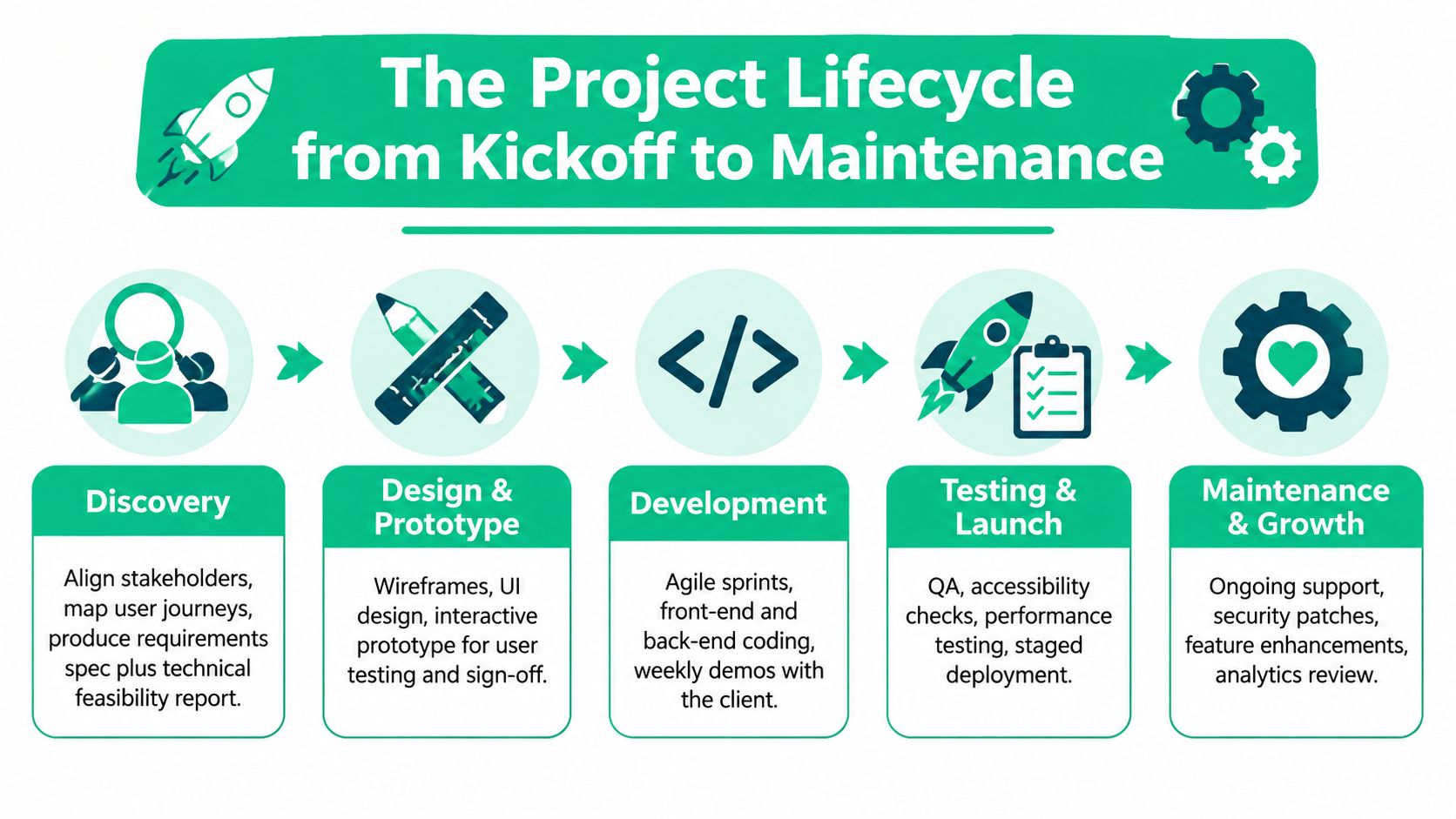
The Project Lifecycle From Kickoff to Maintenance
The project should produce a concrete deliverable at every phase. If the vendor can't tell you what you'll receive, who approves it, and how changes affect scope, you're not looking at a controlled build.
Discovery sets the boundaries
Discovery brings owners, department leads, users, and technical stakeholders into the same room. The team maps user journeys, documents integrations, identifies regulated data, and separates must-have behavior from wish-list features.
The deliverable should include a requirements specification, technical feasibility review, user-role map, and rough budget guardrails. If the vendor skips discovery and starts with design screens, you'll pay later through rework.
Design makes the workflow visible
Design starts with wireframes, not decorative visuals. Users should be able to review how they create an order, approve a request, update a record, or recover from an error before developers build the interface.
High-fidelity mockups, a design system, an interactive prototype, and an accessibility baseline should follow. Keyboard navigation, form labels, color contrast, focus states, and error messaging belong in the design conversation, not in a frantic week before launch.
Development turns decisions into software
Development should run in planned sprints with version control, a staging environment, and regular demonstrations. A sensible workflow uses Git, pull requests, automated checks, and a protected staging site that mirrors production behavior closely enough to expose problems early.
Clients need to see working increments. A biweekly demo, or a more frequent review for a fast-moving build, gives business owners a chance to correct assumptions before those assumptions spread across the application. Teams evaluating delivery discipline can use this Agile project management guide for Indiana businesses as a comparison point.
QA is more than clicking buttons
Quality assurance should cover functional paths, browser behavior, mobile layouts, accessibility, performance, and security. Testers should validate role permissions, failed payments, duplicate submissions, expired sessions, broken API responses, and recovery from partial failures.
For performance, Google's user-centric performance metrics guidance centers field-measurable LCP, INP, and CLS. Teams can supplement those measures with User Timing, Long Tasks, Element Timing, Navigation Timing, Resource Timing, and Server Timing when a checkout, dashboard, or intake workflow needs custom instrumentation.
Deployment and maintenance protect the investment
Deployment includes staging approval, DNS cutover planning, monitoring, backups, and a tested rollback plan. Maintenance then covers dependency updates, uptime checks, security review, content support, feature backlog grooming, and recurring governance meetings.
Many SMBs underbudget maintenance. A realistic plan should reserve roughly 15% to 25% of build cost annually for ongoing work, based on the planning range provided in this brief. That expense buys continuity. Without it, small patches become emergency projects, and emergency projects compete directly with revenue-producing work.
Cost and Timeline Expectations for SMB Builds
A custom build in Greenwood doesn't cost what a brochure site costs in a downtown Indy tech hub. The scope changes the staffing, testing, integration work, and operational responsibility. Anyone quoting a serious application from a page count alone is avoiding the core conversation.
| Project Tier | Budget Range | Timeline | Year-One TCO Multiple |
|---|---|---|---|
| Marketing site with CMS | $15K to $40K | 6 to 10 weeks | 1.5x build price |
| Customer portal or internal tool | $60K to $150K | 4 to 6 months | 1.5x build price |
| Multi-system platform with integrations | $200K to $500K+ | 6 to 12 months | 1.5x build price |
The first tier usually includes a content management system, responsive design, forms, analytics, accessibility work, and launch support. The second adds authentication, roles, dashboards, business rules, and connections to systems such as QuickBooks or a CRM. The third involves orchestration across several systems, more demanding failure handling, data reconciliation, and a stronger release process.
Discovery and design commonly consume 25% to 35% of the build budget, while back-end integrations can account for 20% to 30%, according to the planning ranges supplied for this article. Those percentages explain why a low initial quote often leaves out the work that determines whether the software survives real use.
Hidden line items include content migration, third-party API licenses, accessibility remediation, data cleanup, staff training, hosting, monitoring, and post-launch staffing. Use this web design pricing explanation for small business owners to separate design scope from application scope.
The downtime math matters. A business processing $5,000 per day in orders loses about $830 during a four-hour outage, based on the scenario provided here. Broader downtime benchmarks commonly cited by Gartner and the Ponemon Institute range from $5,600 to nearly $9,000 per minute, as summarized by Atlassian's cost-of-downtime guidance. A reliability investment can look expensive until a portal failure stops orders, dispatch, or billing.
Budget rule: Treat year-one total cost of ownership as roughly 1.5 times the build price, including maintenance, hosting, and minor enhancements.
Choosing the Right Tech Stack for Your Business
Don't select a stack because a developer likes it. Select it because your content team, users, integrations, security requirements, and future support model require it.
A small service company with frequent content changes may do well with WordPress and WooCommerce, provided the team controls plugins, updates, backups, and access. A business that wants a modern content workflow with a custom front end might use Next.js with a headless CMS. That arrangement keeps editors productive while giving developers more control over performance and customer journeys.
A custom single-page application or progressive web application makes sense when the interface itself is the competitive advantage. Think dispatch boards, quoting tools, inventory views, or customer dashboards where staff need fast transitions and rich interaction. A hybrid approach works when marketing content changes often but internal workflows demand bespoke logic.
| Priority | Front-End | Back-End | Hosting | Best Fit |
|---|---|---|---|---|
| Content velocity | WordPress theme or block editor | WordPress and WooCommerce | Managed WordPress hosting | Marketing-led businesses |
| Brand and content flexibility | Next.js | Headless CMS with API services | AWS, Azure, or managed platform | Growing firms with active content teams |
| Workflow differentiation | React SPA or PWA | Node, .NET, or Python services | AWS or Azure | Portals and internal tools |
| Microsoft-centered operations | React or Angular | .NET and SQL Server | Azure | Businesses with Microsoft staff and systems |
| Mixed needs | Next.js or React | Node, .NET, or Python | AWS or Azure | Hybrid public site and application |
Benchmark candidate stacks with realistic workloads. The Builder.io framework benchmarks compare conditions such as slow devices and throttled networks using FCP, LCP, TBT, TTI, and transferred kilobytes. That matters because authenticated pages, data tables, and client-side interactions can behave very differently from a polished demo.
Keep the support model in view. JavaScript is used by 65.6% of developers, and React by 40.6%, according to this 2026 compilation of web development statistics. Those adoption figures indicate broad ecosystems, but they don't eliminate the need for disciplined dependency management, code review, documentation, and ownership.
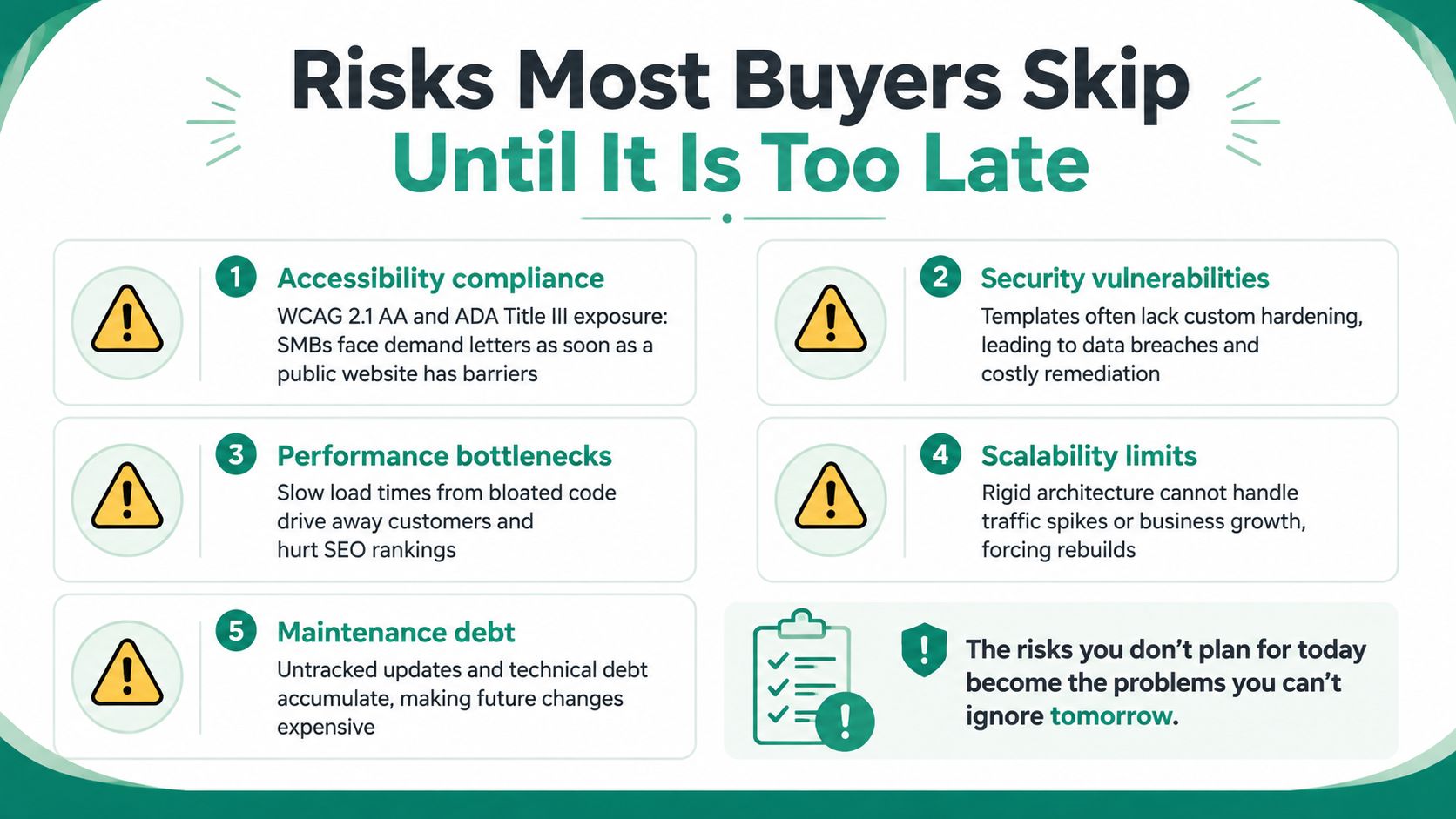
Risks Most Buyers Skip Until It Is Too Late
The template-versus-custom debate usually focuses on launch speed and design flexibility. It often skips the risks that appear after launch, when the original developer is busy elsewhere and your staff is trying to process real orders.
Accessibility is a launch requirement
A public website should be tested against WCAG 2.1 AA and considered alongside ADA Title III obligations. A keyboard trap, unlabeled form field, missing focus state, or inaccessible document can block a customer from completing a task.
Require an accessibility review during user acceptance testing, not after a demand letter. Record the findings, assign remediation owners, and include accessibility checks in the release process.
Security debt accumulates quietly
Unpatched dependencies, weak session handling, exposed administration paths, missing rate limiting, and excessive privileges create predictable weaknesses. Custom code doesn't automatically provide better security. It gives you the opportunity to design security correctly, but someone must make those decisions.
For general business security, map controls to the NIST CSF. Healthcare organizations should connect HIPAA implementation work to NIST SP 800-66 Revision 2, which is intended for use alongside NIST CSF and NIST SP 800-53, as explained in this NIST 800-66 HIPAA implementation guide. Defense contractors need to account for CMMC requirements where applicable.
Integrations rot
Payment gateways, CRMs, shipping systems, marketing tools, and ERPs change. An API endpoint can be deprecated, authentication can change, or a vendor can alter a field without understanding how your workflow depends on it.
Maintain a written integrations register with the system owner, credentials owner, data exchanged, failure behavior, monitoring method, and review date. Put a pen-test budget and dependency-update policy into the contract before signing.
Security also includes recovery. A minimum viable immutable-backup design keeps three copies of important data, places at least one copy offsite, and protects at least one copy with immutability. Separate backup administration, MFA for privileged access, and full restore testing from the immutable copy belong in the operating plan, as detailed in this immutable off-site backup design guidance.
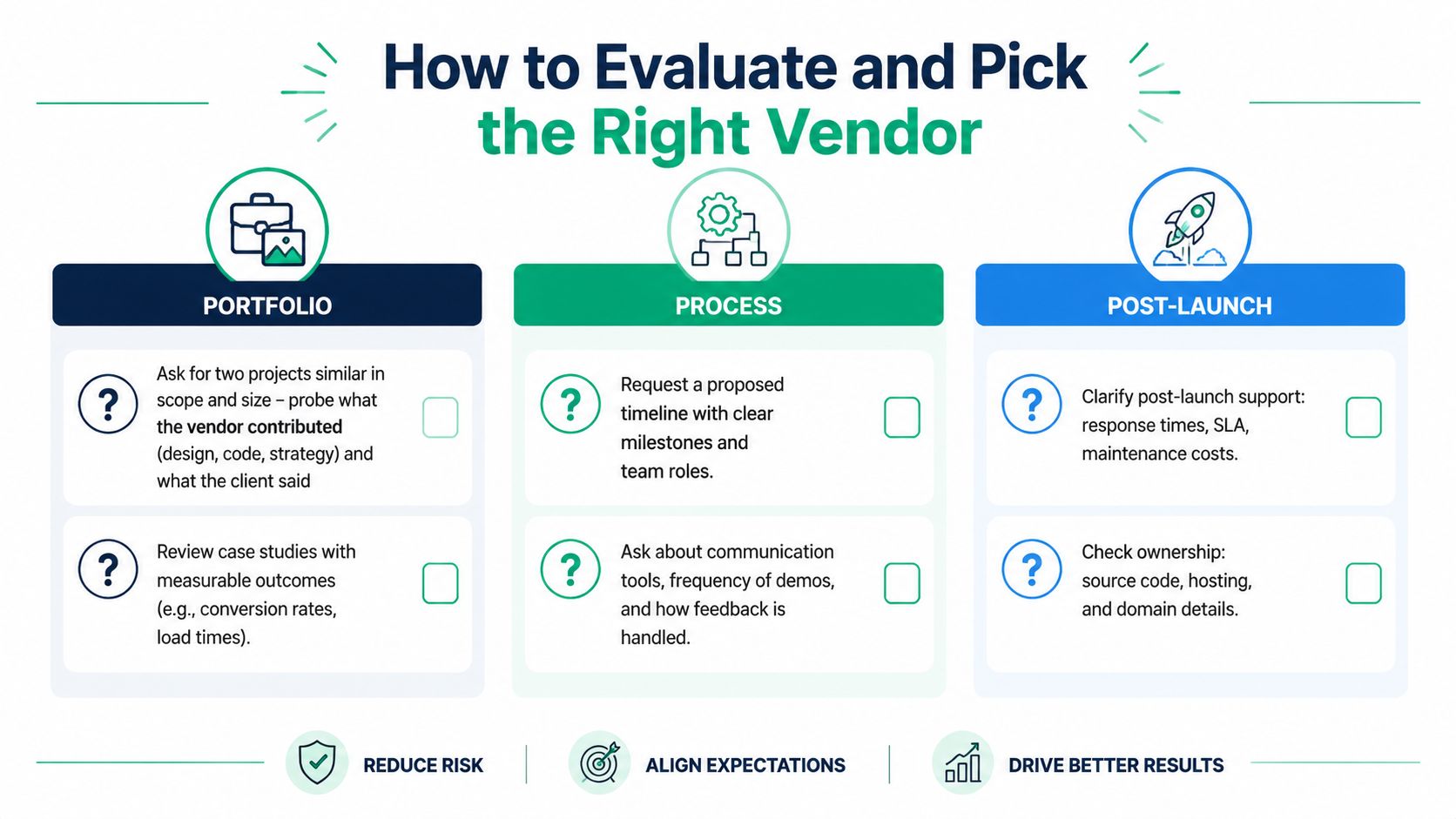
How to Evaluate and Pick the Right Vendor
Start with evidence, not a polished sales presentation. Ask for two projects similar in scope and size, then determine exactly what the vendor handled. Did it own discovery, interface design, back-end development, infrastructure, testing, and post-launch support, or did subcontractors do the critical work?
A strong reference call asks about operational results. Confirm whether the project launched on the agreed date, how defects were handled, how quickly support responded, and who maintained the system afterward. A friendly reference is useful. A reference who can describe release discipline and recovery from a production issue is better.
Read the contract like an operator
Reject vague statements of work. The agreement should identify deliverables, assumptions, acceptance criteria, change-control rules, source-code ownership, hosting responsibilities, security obligations, warranty terms, and support response times.
Watch for these red flags:
- No discovery: The vendor prices screens before understanding workflows.
- Missing IP assignment: You may pay for software without receiving clear ownership rights.
- Capped hours with no scope language: The vendor can stop before the required behavior works.
- One-sided warranty: Defects appear after launch, but the contract treats them as new features.
- Unclear subcontracting: You don't know who handles sensitive code or data.
A real partner assigns a project manager, runs a discovery workshop, demonstrates working software, documents decisions, and offers a post-launch service level agreement. A body shop bids by screen, skips business analysis, hands work across time zones without overlap, and treats communication as your problem.
Use a scoring matrix
Score each candidate against business understanding, technical fit, security, accessibility, delivery process, communication, ownership, and support. Give the categories weights that reflect your risk. A healthcare clinic should weight compliance and auditability heavily. A manufacturer should give integration reliability and ERP experience more influence.
Require a paid pilot or proof of concept before approving the full build. The pilot should test the hardest workflow, not a decorative landing page. Buyers who want a deeper local checklist can review this guide to choosing a software development company in Indianapolis.
Real SMB Use Cases and Your Next Step
A regional home-services company may have a Wix website, spreadsheets for scheduling, and QuickBooks for invoices. A custom portal can let customers request service, let dispatchers assign crews, and push approved job data into invoicing. This is a mid-market custom build, with discovery and integration testing taking much of the calendar. The main post-launch governance task is keeping scheduling, accounting, and notification rules aligned. Payback depends on booking volume and the labor removed from duplicate entry, so the discovery phase should model those hours instead of promising a generic return.
A 40-person specialty manufacturer may need a B2B portal where wholesale buyers log in, view account-specific pricing, place reorders, and track shipments. The application will likely require an ERP integration, role-based access, and careful handling of pricing synchronization. Integration mapping and user acceptance testing consume the most time. After launch, the manufacturer must govern product, pricing, and shipment data ownership. A realistic payback window comes from repeat-order efficiency and fewer sales-support interruptions, not from the portal's page count.
A multi-location healthcare clinic has a different risk profile. Patient intake, scheduling, and insurance verification should move through a workflow that supports HIPAA documentation requirements, audit trails, permissions, and secure recovery. Security design, compliance review, and staff testing usually dominate the schedule. The biggest governance task is reviewing access, vendor changes, and audit evidence continuously. Payback should be measured through reduced administrative handling and fewer scheduling errors, while the clinic keeps patient safety and compliance ahead of convenience.
Custom software can also sit inside a broader continuity plan. A Greenwood business with aging servers may need a staged migration, UniFi networking, Bitdefender GravityZone, and immutable off-site backups before it starts a portal project. A clinic in an old brick building may need latency-optimized mesh nodes and a Zero Trust architecture so the new application isn't undermined by unstable connectivity or excessive internal access. Larger operations may add SOC-as-a-Service monitoring, bit-level data recovery planning, and tested restoration procedures.
The web development market has reached USD 82.4 billion in one 2026 estimate, with a projection of USD 165.13 billion by 2035, while another 2026 estimate places the sector at USD 87.75 billion and projects USD 134.17 billion by 2031, according to Business Research Insights' web development market analysis. Demand is real, but demand alone doesn't justify a custom build. Your workflow, risk profile, and operating plan do.
Finchum Fixes IT provides custom software development, networking, cybersecurity, data recovery, and managed IT support for Indiana businesses. Request a fixed-scope discovery session through Finchum Fixes IT to review your Greenwood or Indianapolis operation and leave with a written estimate, a practical timeline, and clear post-launch responsibilities.