Data Loss Prevention for SMBs: A Practical Guide for Indiana
Data loss prevention is the practice of identifying, monitoring, and protecting sensitive data across endpoint, network, and storage layers. For SMBs, an effective program pairs policy with continuous monitoring, immutable backups, and a managed partner who responds in under two hours.
A manufacturing office off Graham Road can lose an entire morning when an aging file server drops a RAID member, while a medical billing firm near Main Street can lose control of protected information with one misdirected email. In both cases, the technical failure becomes a business problem fast. Staff can't process orders, submit claims, answer customers, or bill for work.
The issue isn't paranoia. It's cash flow. A widely cited downtime benchmark places the median enterprise outage at roughly $9,000 per minute, or about $540,000 per hour, for organizations with 1,000 or more employees, while another benchmark summarizes Gartner's long-running baseline at about $5,600 per minute. The current downtime benchmark summary provides useful context, even though a smaller Greenwood company won't have the same payroll profile as a large enterprise.
This guide treats data loss prevention as a practical 90-day program, not an enterprise software order. It covers the three protection layers, common leak paths, compliance considerations for HIPAA, PCI DSS, GLBA, CMMC, and NIST CSF, plus the point where managed IT should take over daily monitoring and response.
A Tuesday Morning in Greenwood and Why Data Loss Prevention Matters
At 8:17 on a Tuesday, a production coordinator at a manufacturing office near Graham Road opens a shared engineering folder. The folder doesn't open. A second employee tries. Then a third. The server is online, but the files aren't available.
An aging RAID array has failed badly enough to stop normal work. The team starts calling around for a replacement drive, checking whether the last backup completed, and asking who has a copy of the current drawings. Every minute creates a new cost: payroll continues, orders wait, a customer doesn't receive an answer, and someone eventually sends a frustrated update that weakens trust.
That incident is primarily a recovery problem, but it exposes the same weakness that creates data loss events: nobody has a complete, tested picture of where important information lives, how it moves, or who can handle it. A DLP program would not repair a failed disk. It would help classify the drawings, restrict unsafe copying, record access activity, protect backup copies, and give the owner a defined response path.
The business cost hides in ordinary work
A lost hour rarely appears on one line of the income statement. It shows up as idle staff, missed dispatch windows, delayed invoices, overtime, rescheduled appointments, and customers who stop waiting. In healthcare, a billing interruption can also complicate PHI handling. In defense manufacturing, the same disruption may affect CUI and contract obligations.
Practical rule: Treat sensitive data controls as business continuity controls. The right question isn't only, “Can someone steal this file?” It's also, “Can we keep working if this file becomes unavailable or leaves the approved system?”
DLP protects more than customer records. It can cover intellectual property, pricing documents, payroll files, source code, payment data, PHI, and CUI. That makes it relevant to a contractor along the I-65 corridor, a healthcare office serving Johnson County, and a professional-services firm connected to downtown Indy tech hubs.
The rest of the program is straightforward. Define what matters, see how data moves, apply controls at the endpoint, network, and storage layers, then assign people to review alerts and test recovery. That handoff from software to operations is where many SMB programs either become useful or fail.
What Data Loss Prevention Actually Means
NIST defines DLP as the ability to identify, monitor, and protect data in use, in motion, and at rest using deep packet content inspection, contextual security analysis of transaction attributes, and centralized management. NIST's data loss prevention guidance matters because it rules out the single-tool mindset. A firewall alone isn't DLP. Endpoint antivirus alone isn't DLP. A backup appliance alone isn't DLP.
Think of a restaurant. Data in use is the kitchen. A cook handles ingredients, utensils, and orders, so controls belong at the workstation. In an office, that means monitoring actions such as copying files to USB, printing, moving content through the clipboard, or saving a document locally.
Data in motion is the serving line. The meal is leaving the kitchen and moving toward a customer. In business terms, files travel through email, web uploads, FTP, instant messaging, and SaaS applications. Network and secure email controls inspect those transactions and decide whether to allow, warn, encrypt, or block them.
Data at rest is the walk-in refrigerator. Ingredients sit in storage until someone needs them. Business data rests on file servers, NAS devices, endpoints, SharePoint, OneDrive, Google Drive, and backup repositories. Storage controls discover sensitive files, enforce permissions, quarantine unsafe content, and protect approved copies.
Why one layer isn't enough
A network gateway might see an external email but miss a USB copy. An endpoint agent might see a laptop action but miss an overshared OneDrive link. A storage scanner might identify exposed PHI but have no authority to stop a user from pasting it into an unapproved AI service.
That's why the practical model has three questions:
- What is the data? Classify records by business and regulatory sensitivity.
- Where is it moving? Map approved destinations and risky channels.
- What should happen? Choose a warning, block, encryption, quarantine, or review action.
The financial case is just as direct. IBM's 2026 Cost of a Data Breach Report puts the global average breach cost at $4.99 million, a record high and a 12% increase over the prior year. The United States reached an average of $11.5 million, more than double the global figure. IBM also identifies detection, escalation, and lost business costs as the main drivers of the increase.
For an SMB, DLP is therefore a budget control. It reduces the chance that a routine mistake becomes an incident, and it supports continuity when a system or account is compromised.
For broader context, compare this layered approach with why network security matters for Indiana businesses. The point isn't to buy every security product. It's to put the right decision point where the data travels.
How Data Actually Leaves and the Risks Most SMBs Miss
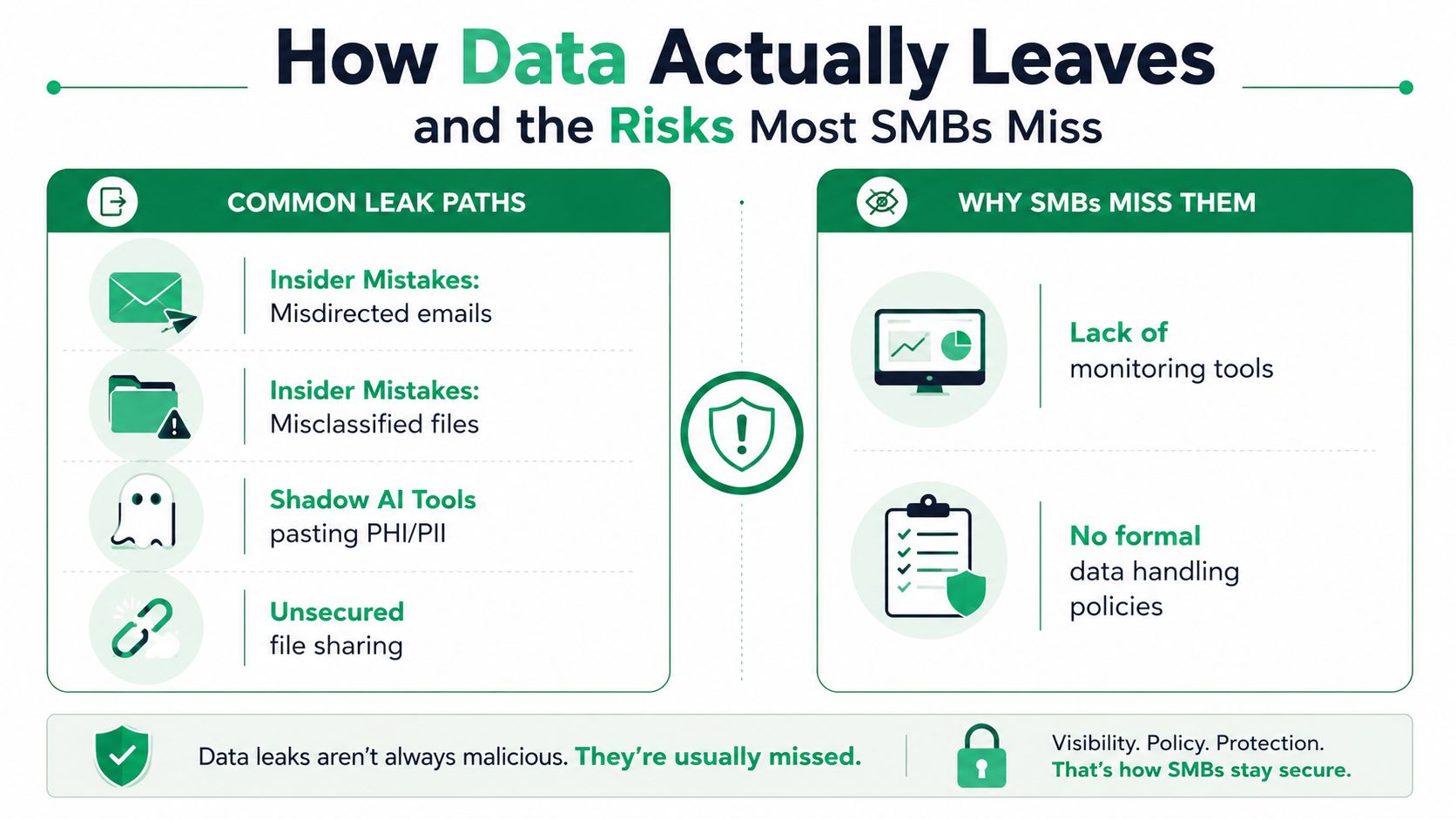
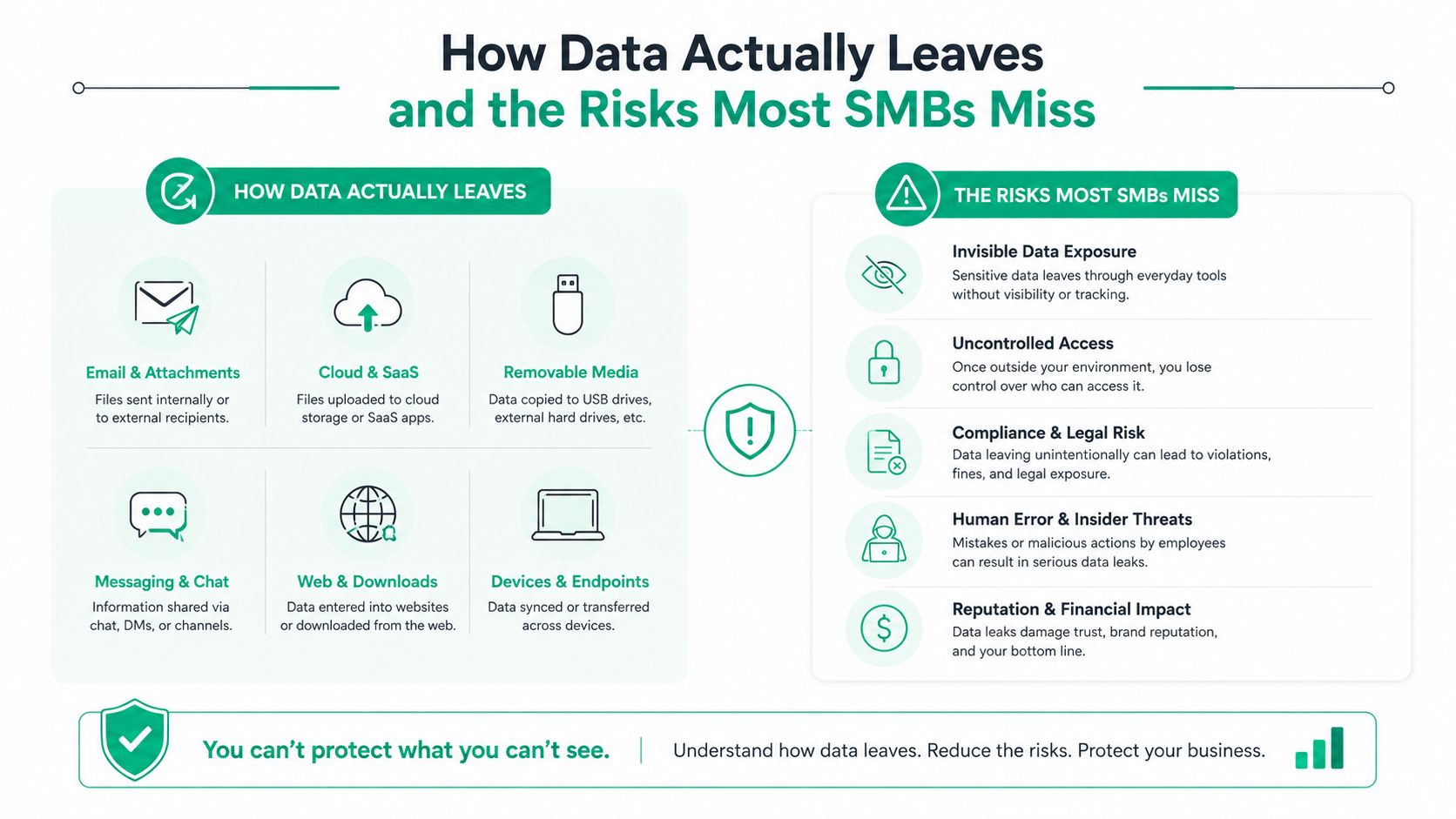
Most leaks don't begin with a movie-style hacker breaking through a locked server room. They begin with normal work performed through an unmanaged path.
A billing employee near Main Street selects the wrong autocomplete contact and sends a spreadsheet to an unrelated recipient. A project manager labels a folder “public” because a vendor needs one document, then shares the entire directory. A staff member pastes PHI or PII into a public chatbot to summarize it. A ransomware process encrypts a file share after an account is compromised. A stolen laptop contains local files with no full-disk encryption.
Each event defeats a different single-layer control.
Four leak paths worth checking first
- Misdirected email: Email filtering may stop malware, but it won't necessarily recognize that a legitimate attachment went to the wrong recipient. Outbound DLP can inspect content and recipient context before delivery.
- Misclassified files: A file server can't enforce a sensitivity label that nobody applied. Discovery and classification must come before strict blocking, or the policy will protect the wrong items.
- Shadow AI tools: Traditional network controls may know that a user visited an AI site but not understand the prompt context or the content pasted into it. AI oversight needs application-aware inspection and a written acceptable-use policy.
- Ransomware and lost devices: DLP can limit copying and flag unusual movement, but it can't replace recovery. Encryption, tested restores, and immutable off-site backups handle the availability side of the problem.
Fortinet's Data Security Report found that only 47% of organizations said their current DLP was effective at stopping sensitive data from leaving the organization. Nearly half reported data loss incidents costing $1 million to $10 million or more. The same research points toward behavioral analytics, real-time visibility, and AI-tool oversight rather than content blocking alone.
That distinction matters for a five-person office as much as it does for a larger company. A block that generates endless false positives gets disabled. A warning nobody reviews becomes background noise. A useful program records the user, device, data type, destination, and business reason, then routes the event to someone who can act.
Retention is part of prevention
A retention policy answers a separate question: how long should the business keep a record, and when should it be deleted? Without that decision, teams accumulate stale exports and duplicate customer files that expand the exposure surface. WorkSignal's guide from WorkSignal on data retention policies is a useful starting point for turning retention into a written operating rule.
Phishing often provides the entry point for ransomware or account misuse. A practical business guide to phishing attack protection and ROI can sit beside the DLP policy, because employees need to know both how to recognize a suspicious message and what data they may send through approved channels.
The Three Layers of a Practical DLP Architecture
A workable SMB architecture follows the data, not the org chart. Endpoint, network, and storage controls each see different behavior, so the design should combine them under a shared policy.
Endpoint controls catch local actions
Endpoint DLP runs on workstations and laptops. It can stop or record copying to USB, movement to a local drive, clipboard transfers, printing, and file movement from an unmanaged device. This matters when employees work from home or on the road, outside the office firewall.
Bitdefender GravityZone can provide the endpoint security foundation, with DLP policies layered around sensitive file types and user actions where the deployment supports those controls. The policy should distinguish a legitimate export to an approved customer from a copy to a personal USB drive. Otherwise, users will treat every alert as an obstacle.
Network controls inspect movement
Network DLP looks at data in motion through email, web, FTP, instant messaging, and other monitored channels. A secure email gateway can warn before an employee sends PHI externally. A firewall can restrict unapproved destinations. Network visibility also helps identify unusual east-west movement inside an office.
In smaller locations, UniFi networking can make the physical network easier to manage, segment, and observe. It isn't a complete DLP platform, but well-designed VLANs, firewall rules, and administrative logging give the monitoring process cleaner signals.
Storage and cloud controls protect the source
Storage DLP discovers sensitive information where it rests. It can enforce access policies across SharePoint, OneDrive, Google Drive, NAS devices, and on-premises file servers. The practical response may be encryption, quarantine, permission correction, or removal of an exposed public link.
Identity controls determine whether those policies hold. Before granting broad access to a file share, review identity and access management tools and confirm that MFA, role-based access, and offboarding are connected to the same process.
| Layer | State of Data | Example Tools | What It Catches |
|---|---|---|---|
| Endpoint | In use | Bitdefender GravityZone, endpoint DLP agent | USB copies, clipboard transfers, printing, local saves |
| Network | In motion | Firewall, secure email gateway, network inspection | External email, web uploads, FTP, messaging |
| Storage and cloud | At rest | SharePoint, OneDrive, Google Drive, file-server controls | Oversharing, exposed files, weak permissions, unmanaged repositories |
The trade-off is management overhead. Three independent consoles create conflicting rules and missed alerts. A managed design should centralize policy ownership, document exceptions, and send only actionable events to the person responsible for response.
Building Your DLP Program in 30, 60, and 90 Days
A 5-to-50-person business doesn't need a giant implementation committee. It needs an owner, a short list of protected data, and checkpoints that produce visible progress.
Days 1 through 30 establish the baseline
Start with discovery. List customer records, payroll, payment information, PHI, CUI, source code, engineering drawings, contracts, and executive documents. Record where each category lives, who uses it, and which destinations are legitimate.
Draft plain-language rules. “PHI may be sent to approved healthcare partners through encrypted email” is useful. “Protect confidential data” isn't. Assign one person to approve exceptions and another to verify the technical setting.
Use the first month for quick wins:
- Encrypt endpoints: Enable full-disk encryption on every supported laptop and desktop.
- Protect backups: Turn on immutable off-site backups and document who can restore them.
- Reduce exposure: Remove public links and stale accounts from cloud storage.
- Record ownership: Put a named employee or managed provider beside every policy.
Days 31 through 60 add enforcement
Move from inventory to controlled testing. Configure Bitdefender GravityZone policies, email DLP rules for outbound PCI or PHI, and MFA on every SaaS application. Begin in monitor or warning mode, then tighten rules after reviewing legitimate business flows.
At this stage, the owner should see a short report rather than a screen full of alerts. Each event should state what happened, who initiated it, where the data was headed, and what action the reviewer took.
Days 61 through 90 prove that people can respond
Tune alerts, test exceptions, and run a tabletop exercise. Walk through a misdirected email, a stolen laptop, a ransomware event, and an employee pasting sensitive content into an AI tool. The exercise should end with assigned actions, not a general promise to “be more careful.”
For defense contractors, CMMC Level 2 guidance requires regular data backups, testing of those backups, and protection of backup confidentiality, mapped directly to NIST CSF PR.IP-4. The CMMC recovery practice overview connects backup discipline to the compliance workflow, not just to disaster recovery theory.
Budget the program in three categories: software, implementation, and ongoing operations. The third category is the one owners often omit. Someone must review alerts, maintain policies, test restores, and keep the written runbook current.
Mapping DLP to HIPAA, PCI, GLBA, CMMC, and NIST CSF
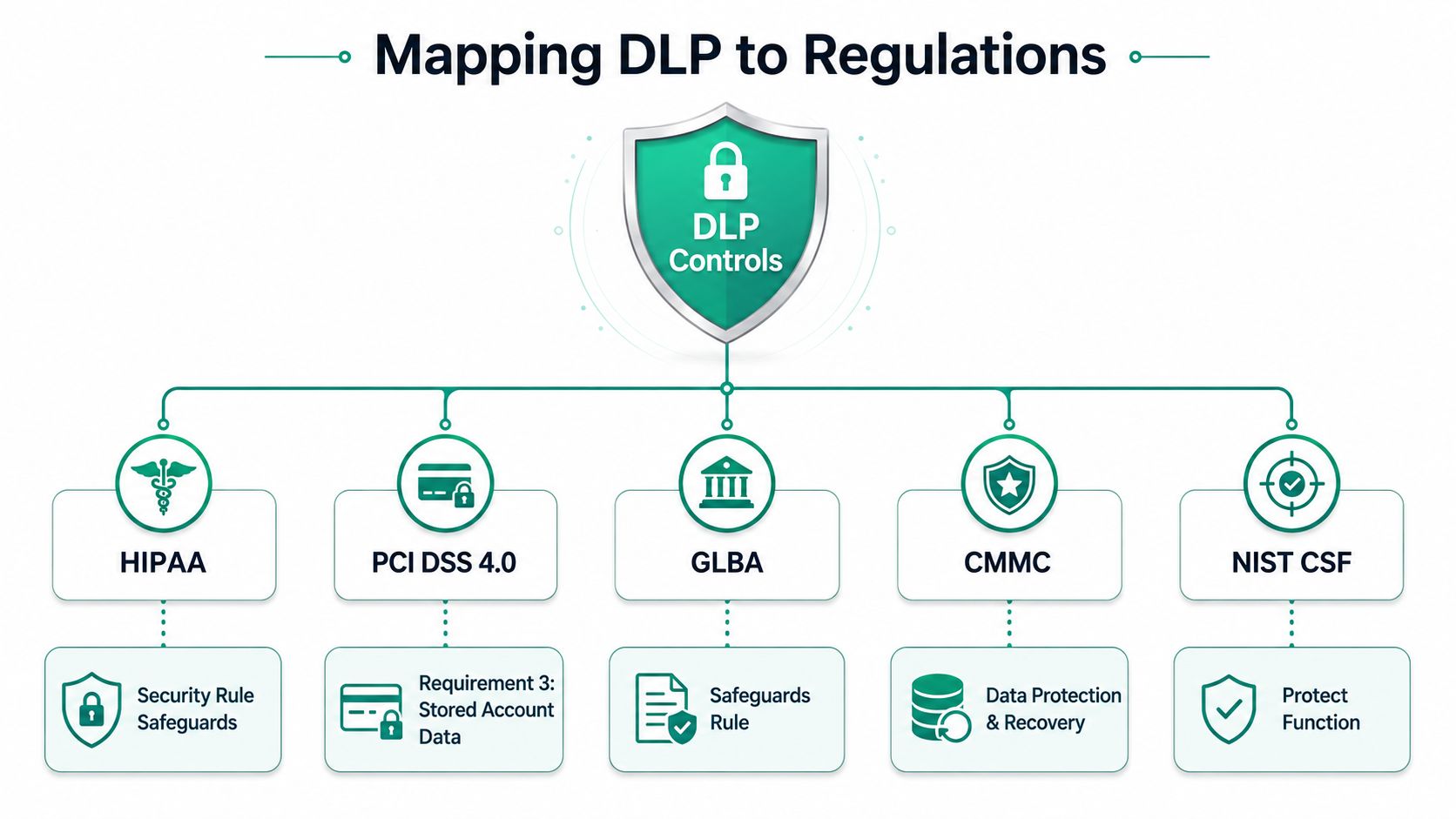
Compliance frameworks don't all use the same language, but their practical demands overlap. They expect businesses to know what sensitive data exists, limit access, protect confidentiality, and demonstrate that controls operate.
For a healthcare office, DLP supports HIPAA Security Rule safeguards by controlling PHI on endpoints, in email, and in cloud repositories. A policy might warn when a billing export leaves the approved domain, require encryption for an external transmission, and log the review. The policy isn't the compliance program by itself. It becomes useful evidence when paired with documented procedures and access reviews.
A business handling payment data should connect DLP to PCI DSS 4.0, especially controls around stored account data. Misconfigured file shares, unrestricted exports, and email attachments can create avoidable exposure. Storage discovery identifies where payment-related files sit, while endpoint and network policies restrict how employees move them.
Financial firms should map controls to the GLBA Safeguards Rule. That typically means documenting protected information, assigning responsibility, managing access, and preserving evidence that security policies are reviewed. The technical configuration should reflect the firm's actual workflow, not a generic template copied into a binder.
CMMC needs recovery evidence too
For defense contractors, CMMC brings CUI confidentiality and backup protection into the same conversation. Backup data must be protected at storage locations, including encryption and secure off-site handling. NIST storage guidance also identifies immutability, locking, minimum backup copy counts, and geographic distribution as important safeguards.
NIST CSF provides the connective tissue for general businesses. Identify sensitive information, protect it with layered controls, detect suspicious movement, respond through a runbook, and recover through tested backups. That structure works for a machine shop in Johnson County even when the company isn't pursuing a formal certification.
IBM's breach analysis makes the operational reason clear. Its 2026 report says detection, escalation, and lost business costs were the main drivers of the increase in breach impact. DLP should therefore produce usable alerts and recovery evidence, not just a compliance dashboard.
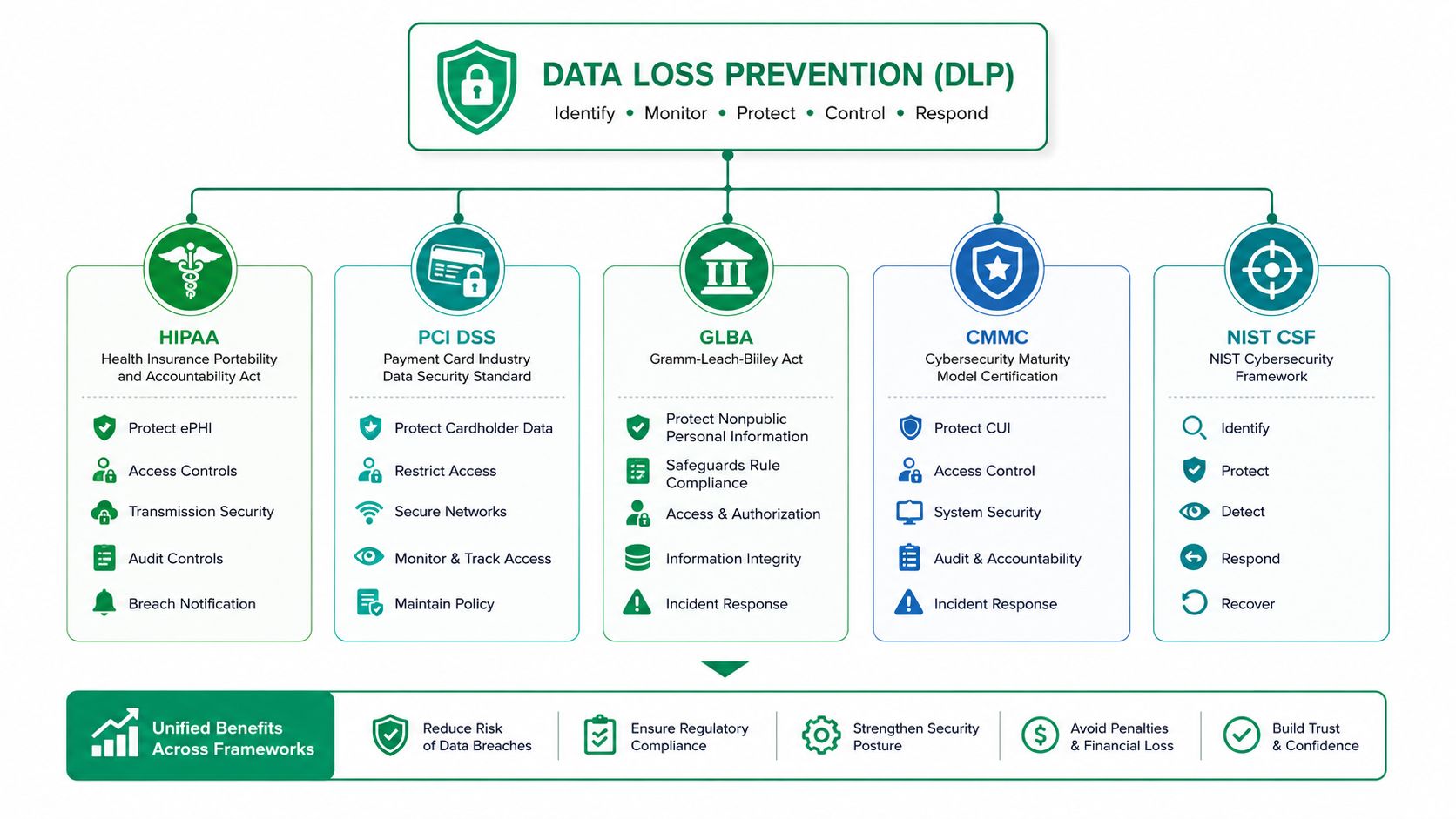
A good audit packet includes the policy, classification scheme, access records, alert decisions, exception approvals, backup reports, restore-test results, and incident notes. Those artifacts give an auditor a trail and give the owner confidence that the controls aren't decorative.
Why Monitoring Beats Software and How to Run It
A DLP license doesn't protect a file while nobody reviews the alert. The program needs staffing, escalation rules, and regular tuning.
A 2025 insider-risk report found that 98% of CISOs said they had a DLP program, but only 6% had dedicated resources to manage it. The report's discussion of control gaps captures the problem clearly. Organizations deploy the product, then leave policy maintenance to people who already have full workloads.
Fortinet's research found only 47% of organizations rated their current DLP effective at stopping sensitive data from leaving. The gap isn't always a missing feature. It's often stale classifications, unreviewed alerts, weak exceptions, and no one with the authority to decide whether an event is harmless or urgent.
A workable operating rhythm
- Daily review: A SOC-as-a-Service team or assigned administrator reviews high-risk events, including blocked external transfers, unusual downloads, and sensitive data sent to unapproved AI tools.
- Monthly tuning: Remove noisy rules, add approved business flows, and check whether users understand warning messages.
- Quarterly access review: Recertify permissions for file shares, SharePoint, OneDrive, backup systems, and administrative accounts.
- After every incident: Update the runbook with the actual timeline, containment decision, notification requirement, and recovery result.
The response target must be written down. A managed partner that responds in under two hours can contain a suspicious transfer while the context is still available. A tool that sends an alert into an unattended inbox can't do that.
Audit preparation also depends on evidence. A practical reference on HIPAA audit evidence requirements can help a healthcare business understand why screenshots alone are weaker than repeatable records, approvals, logs, and test results.
For businesses without a security analyst, a managed detection and response guide for Indiana organizations offers a useful way to separate monitoring, investigation, and response responsibilities. Good monitoring reduces noise. It doesn't eliminate judgment.
Knowing When to Bring in Managed IT and What to Expect
An internal IT generalist can usually handle user onboarding, workstation repairs, routine permissions, and basic backup checks. The handoff point arrives when the business has more than 25 endpoints, hybrid work, regulated data, repeated ransomware scares, or a network that has grown beyond one person's visibility.
That doesn't mean the owner needs an enterprise security department. It means DLP needs a named operator who can review events, maintain policies, test recovery, and coordinate with leadership.
Signs the engagement is healthy
- Structured onboarding: The provider inventories endpoints, identities, SaaS applications, file stores, backups, and sensitive data locations.
- Written service levels: Tickets have documented priority rules and response expectations.
- Quarterly business reviews: The provider explains risks, completed work, unresolved exceptions, and upcoming decisions in business language.
- Current runbooks: Staff know who disables an account, who contacts legal counsel, who restores data, and who communicates with customers.
- Recovery validation: The provider demonstrates that backups can be restored, rather than reporting only that a job completed.
NIST SP 800-209 recommends backup protections beyond replication, including digital signing, immutability and locking, minimum copy counts, and geographic distribution of backup copies. The NIST storage infrastructure guidance is a strong technical reference when comparing backup proposals.
Choose a partner that can explain how endpoint controls, UniFi networking, Bitdefender GravityZone, cloud policies, immutable off-site backups, and SOC-as-a-Service monitoring fit together. Read a practical guide to choosing a managed service provider before signing a contract, and ask who owns the alerts after deployment.
Finchum Fixes IT helps Greenwood and Indianapolis businesses build data loss prevention programs around endpoint security, network visibility, Microsoft 365 backup, data recovery, and tested immutable off-site backups. Visit Finchum Fixes IT to schedule a Free Network Assessment or Security Risk Audit for your business along the I-65 corridor, from Johnson County to downtown Indy.