How to Choose a Managed Service Provider: Expert Guide 2026
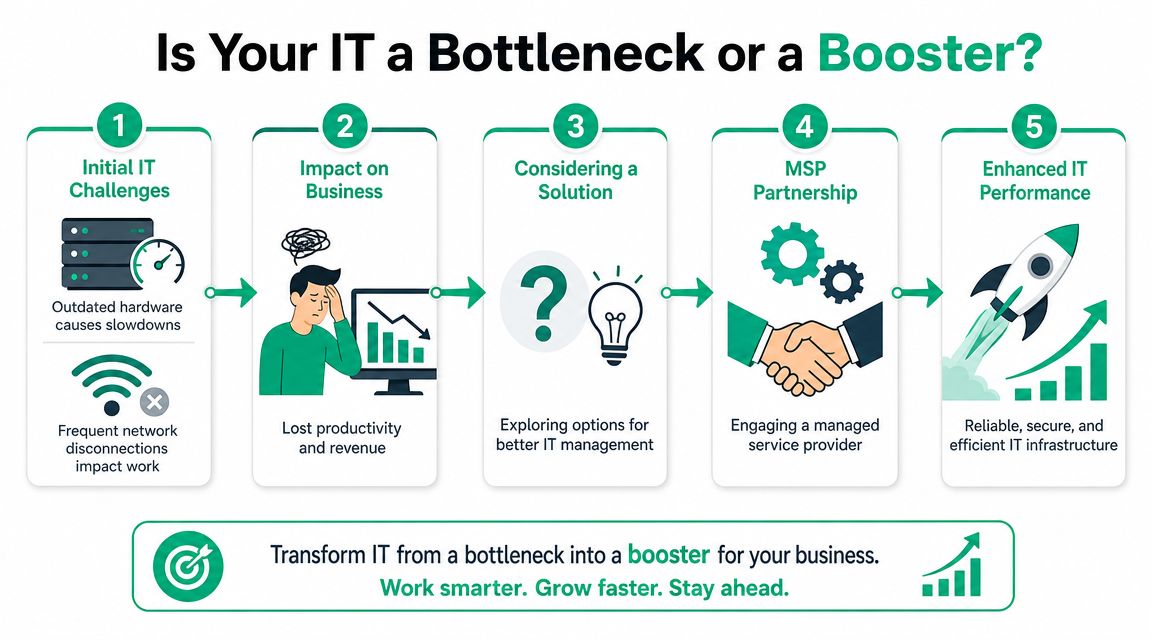
Your office server keeps making that grinding fan noise. The Wi-Fi drops every time a conference room fills up. Your team burns half the morning waiting on printers, file shares, or Microsoft 365 quirks instead of doing the work that pays the bills. Around Greenwood and the southside, I see that pattern all the time, especially in older business parks and brick buildings where the network grew by accident over the years.
That's when owners start shopping for managed IT. Good move. Bad timing if you do it casually.
Choosing an MSP isn't just a tech purchase. It's a business continuity decision. If your systems go down, payroll stalls, orders stall, patient flow stalls, and your staff starts standing around on the clock. The right provider turns random repair bills into a predictable monthly budget and gives you a plan for uptime, security, and recovery. The wrong one gives you slick sales talk, vague SLAs, and a help desk three states away.
Introduction Is Your IT a Bottleneck or a Booster
TL;DR
- Start with your pain points: Document where downtime, slow Wi-Fi, aging hardware, and security gaps are hurting the business.
- Judge MSPs on proof, not polish: Ask for certifications, SLA details, reporting samples, and real operational evidence.
- Push hard on continuity: Backups, disaster recovery, incident ownership, and clear escalation paths matter more than a cheap monthly fee.
- Test local capacity: In Johnson County and the I-65 corridor, fast on-site support still matters.
- Use a decision matrix: Score providers by security, local response, contract clarity, technical depth, and references before signing.
A lot of Johnson County business owners wait too long to ask how to choose a managed service provider. They start looking only after the old server in the back office freezes again or after the Wi-Fi in a downtown Indy brick building gives up during a client call.
That delay gets expensive fast. Downtime doesn't just annoy people. It takes productive employees and turns them into spectators. Every hour your staff spends fighting tech is an hour you already paid for and can't bill, ship, schedule, or collect on.
The market has also changed. One 2026 MSP market analysis from BlueAlly estimated the global managed services market at $424 billion in 2026 and projected it to exceed $1.27 trillion by 2035, with a 12.8% CAGR. The same analysis reported 97% of organizations were using AI/ML in monitoring, up from 66% the prior year. Buyers should read that as a warning. Basic help desk support isn't enough anymore. Mature providers are standing out through automation, security depth, and scalability.
What a bad MSP usually looks like
A weak provider tends to sound great in the first meeting. Then the cracks show.
- Vague promises: They say they'll "take care of everything" but can't explain patching, backup verification, or escalation ownership.
- Thin local presence: They advertise Indianapolis coverage, but everyone is remote and nobody can get to your office quickly when a switch dies.
- Reactive support: They talk about fixing problems quickly instead of preventing them with monitoring, automation, and standardization.
If an MSP can't explain how it prevents downtime, it probably plans to bill you while downtime is happening.
What a strong MSP changes
A solid managed services relationship gives you cleaner systems, fewer interruptions, and clearer budgeting. It also gives you an operating model. That means documented networks, role-based access, Zero Trust thinking, tested backups, and reporting that shows whether support quality is improving or drifting.
For a Greenwood manufacturer, that might mean stable shop-floor connectivity and sane patch windows. For a medical office, it means HIPAA-aware controls and clean user access practices. For a contractor bidding regulated work, it means building toward CMMC and aligning security habits with NIST CSF instead of guessing.
First Map Your Own IT Needs and Business Goals
Before you compare providers, get brutally honest about your own environment. If you don't know where the pain is, you'll buy whatever the salesperson wants to sell.
A lot of Indiana businesses have inherited their IT stack. A little UniFi networking here. A mystery firewall there. Shared admin passwords. Five different backup stories depending on who you ask. Nobody chooses an MSP well from that starting point unless they document the mess first.
Build a one-page reality check
You don't need a giant audit. You need a sharp one-page brief that answers practical questions.
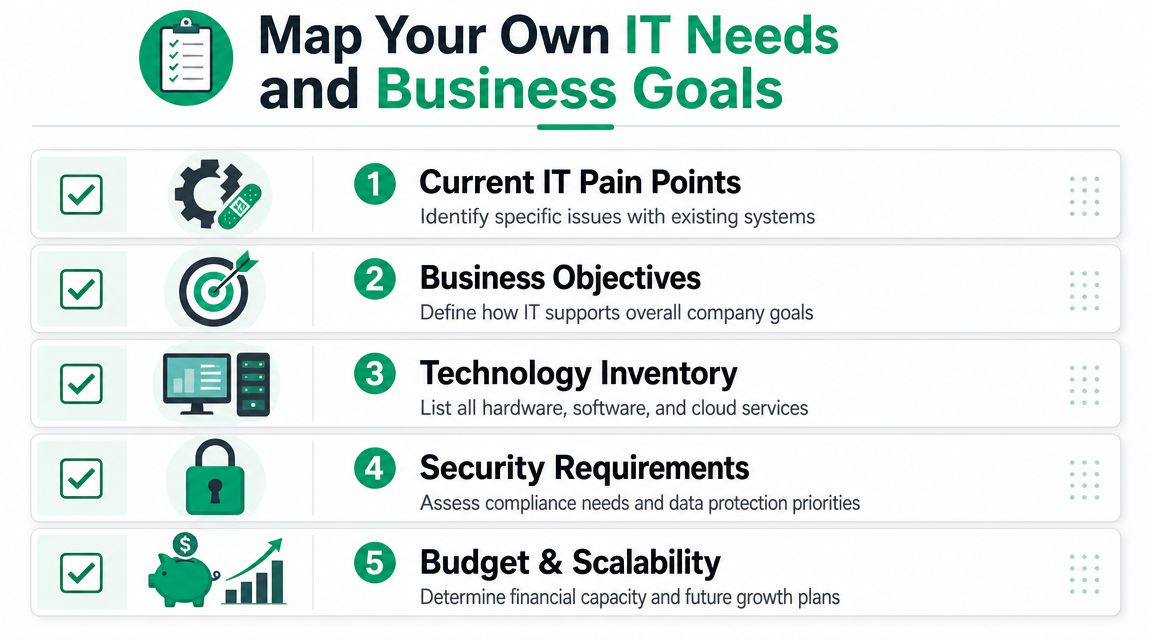
- What's failing today: List recurring issues such as slow line-of-business apps, dead Wi-Fi zones, aging server hardware, flaky VPN access, or repeated Microsoft 365 account lockouts.
- What must stay running: Identify the systems that would stop revenue, scheduling, production, dispatch, or patient care if they went down.
- What you're required to protect: Note HIPAA for healthcare, CMMC for defense-related work, and broader security expectations under NIST CSF for general business operations.
- What you own: Include laptops, desktops, firewalls, switches, access points, cloud apps, backups, and any business-critical software licenses.
- Where growth is headed: A provider fit for one office in Greenwood may not fit if you're adding remote staff, another warehouse, or a second location up the I-65 corridor.
If you want a structured starting point, use a business impact analysis template for Indiana companies. It forces the right conversations before the first MSP pitch deck hits your inbox.
Match IT to business goals, not just pain relief
Some owners only shop for relief. They want the tickets to stop. That's understandable, but it leads to shallow buying decisions.
A better approach is to tie each IT need to a business goal. If you're trying to reduce scheduling delays, the issue might be workstation performance, line-of-business software lag, or poor wireless coverage between exam rooms. If you're trying to open a second office, the issue might be cloud identity, secure access, and standardized device deployment.
Practical rule: If you can't explain why a system matters to revenue, compliance, or continuity, don't let an MSP bundle it into the proposal without a clear reason.
Write down your budget rules
This part gets skipped, then everyone acts surprised later.
You need to know whether you want a fixed monthly agreement, a co-managed setup with your internal IT person, or a narrower support scope focused on security, network management, or Microsoft 365. Also decide where you won't compromise. Some businesses can tolerate slower response on low-priority tickets. Others can't. A law office, clinic, or distribution team with tight turnaround usually needs a tighter support model.
This self-assessment does two things. It keeps you from overbuying. It also keeps you from signing with an MSP that's cheap because it implicitly excludes the things you assumed were included.
Vet Security Compliance and Business Continuity Claims
Cheap IT deals commonly fail at this point.
An MSP can be friendly, local, and responsive and still be dangerous if its security practices are sloppy. If they have broad access to your systems, their weaknesses become your weaknesses. That's why you need proof, not reassuring language.

Ask for evidence you can verify
The UK National Cyber Security Centre guidance on choosing an MSP gives buyers a solid baseline. It advises SMEs to favor providers with recognized certifications such as ISO 27001 or Cyber Essentials Plus, ask for references, and insist on clearly defined SLAs for response and uptime. It also says contracts should spell out incident notification, responsibilities, liabilities, backup and disaster recovery procedures, and termination or review terms.
That's strong guidance because it cuts through branding. Security maturity shows up in documentation, certifications, and process discipline.
When you interview an MSP, ask questions like these:
- Backup design: Do you use immutable off-site backups, and how do you protect backup admin access?
- Monitoring model: Is there true SOC-as-a-Service monitoring, or are alerts just piling up in a queue?
- Identity controls: How do you enforce MFA, role-based access, and Zero Trust architecture for remote users and admins?
- Recovery process: How do you test restores, and who owns the recovery sequence during an outage?
- Compliance fluency: How do you adapt controls for HIPAA, CMMC, or internal policies mapped to NIST CSF?
If they answer with generalities, keep going. A good provider should be able to explain the underlying mechanics in plain English.
Separate continuity from backup marketing
A backup isn't a continuity plan. That's the trap.
I've seen plenty of businesses around Indianapolis discover that "we have backups" really meant "some files sync somewhere." That's not the same as recoverable servers, application states, cloud data, and documented restoration order. In serious environments, you need a provider that understands disaster recovery, not just file retention.
A useful companion read is this Indiana business continuity planning checklist. It helps you pressure-test whether the provider is protecting operations or just checking a box.
A real continuity plan names systems, restore order, decision-makers, communication steps, and fallback procedures. If none of that exists, recovery will be improvised.
Don't ignore insurance and liability language
One more thing most buyers miss. Security vetting isn't only technical. It's contractual and financial.
If an MSP handles privileged access to your environment, ask how liability is managed when something goes wrong. This is also a good moment to understand how errors and omissions coverage works, because policy language and professional liability details can affect how disputes and claims play out after a service failure.
A provider doesn't need to be perfect. No one is. But it does need documented controls, disciplined operations, and a continuity mindset that survives the bad day.
Decode MSP Contracts SLAs and Pricing Models
Monday at 8:07 a.m., your front desk cannot print, your line-of-business app is timing out, and your team is asking whether they should go home. That is a bad time to learn your MSP only covers after-hours emergencies at a premium rate, does not include on-site dispatch, and treats firewall changes as project work. I have seen that exact kind of surprise hit Johnson County companies that thought they were buying support, when they were really buying a narrow service package with a nice sales presentation.
The proposal gets attention. The contract decides how support works.
Understand the billing model before you compare price
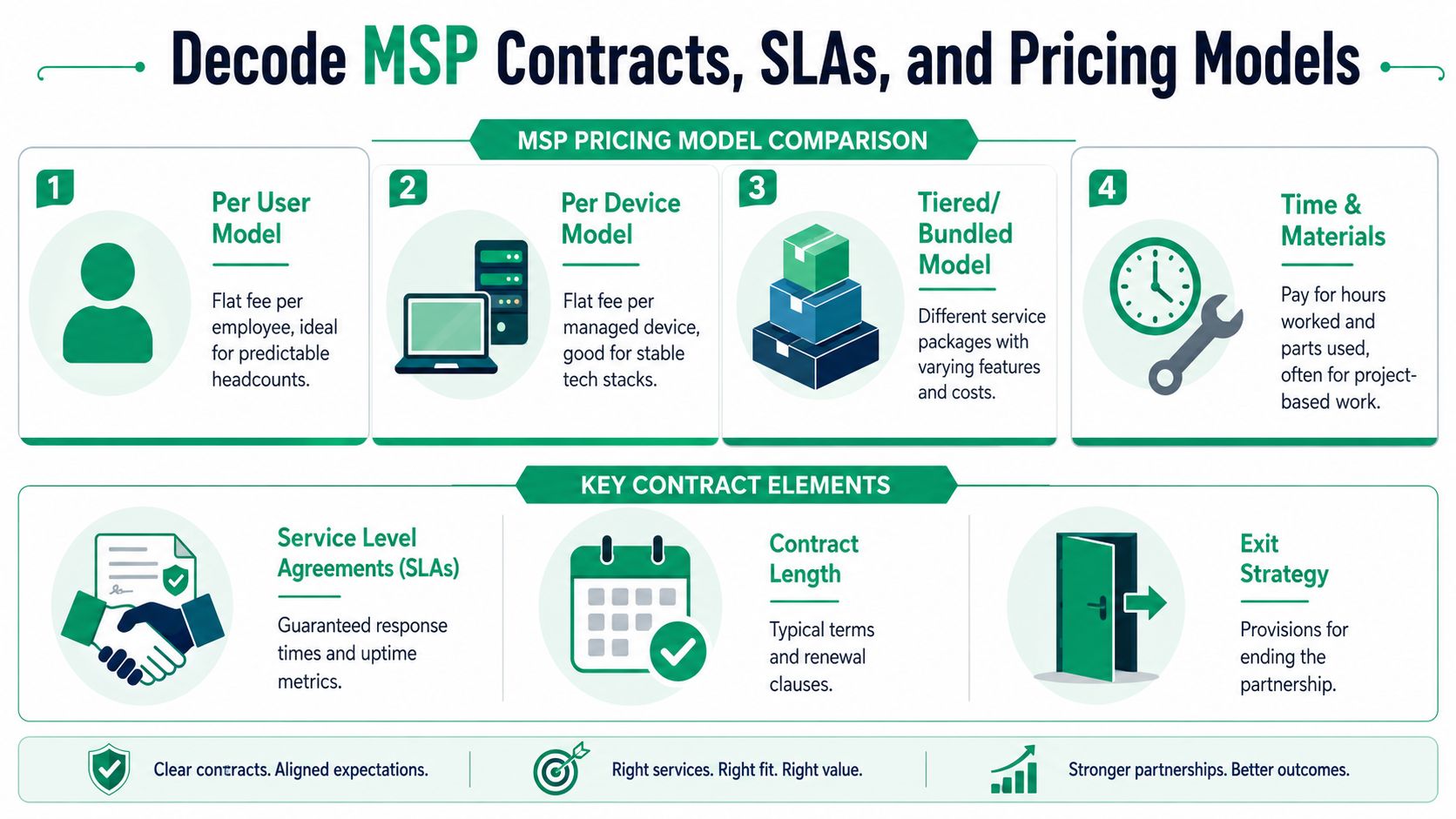
Price only means something after you know what unit is being billed and what work falls outside that unit. Two MSPs can quote similar monthly totals and deliver very different coverage.
| Pricing model | Best fit | Watch for |
|---|---|---|
| Per user | Offices with predictable staffing and heavy Microsoft 365 or cloud app use | Servers, backup, security tools, and project labor excluded from the base fee |
| Per device | Stable environments with fixed workstations, shared terminals, or plant-floor equipment | Weak coverage for users who work across laptops, phones, tablets, and shared systems |
| Tiered or bundled | Businesses that want a defined service package and a clear upgrade path | Bundles that look full but leave out security response, vendor management, or after-hours help |
| Time and materials | Small scopes, occasional projects, or break/fix support | Uneven monthly cost and little incentive to reduce recurring issues |
A Greenwood accounting office with seasonal staffing often does better with per-user pricing because budgeting stays cleaner as people use multiple devices. A Franklin warehouse with fixed stations, barcode systems, and a smaller office staff may get a fairer comparison under per-device pricing. Local context matters. So does operating model.
If the proposal includes software bundles, check whether the MSP is actively pruning unused licenses or just passing through every subscription it can bill. This article on how providers cut SaaS waste in managed services is useful because license bloat inflates monthly spend.
What the SLA should actually say
A service-level agreement should read like an operating document, not a marketing page. If the language stays vague, assume the provider will interpret it in the way that protects its margin.
Review these points line by line:
- Response definition: Does "response" mean a human acknowledged the ticket, or that someone started diagnosis?
- Priority levels: Who decides whether an issue is critical? Your production outage and their help desk queue may not rank urgency the same way.
- Coverage window: Are nights, weekends, and holidays included? If not, what are the hourly rates and minimum billable blocks?
- On-site dispatch: For businesses in Greenwood, Whiteland, Franklin, and the south side of Indy, who can show up, and in what time frame?
- Escalation path: When the first technician stalls, what happens next, and how fast?
- Reporting: Do you get ticket metrics, recurring issue trends, and SLA performance in writing?
For Indiana SMBs, I push hard on local dispatch language. "We serve Central Indiana" can mean anything from a technician in Greenwood to a subcontractor driving from another metro area. If your business depends on scanners, switches, access points, or line-of-business hardware, the contract should state whether on-site labor is included, how dispatch is approved, and whether travel time is billable.
One sentence can save a lot of pain later.
Fine print that burns buyers
The clauses that cause the worst disputes are usually buried below the pricing table.
- Termination and offboarding: The agreement should say who returns admin credentials, exports documentation, transfers backups, and removes remote access tools. It should also give a deadline.
- Data ownership: You should control tenant access, firewall configurations, backups, domains, and admin accounts at all times.
- Project boundaries: Managed services and project work are often separate. The contract needs examples so a basic change request does not suddenly turn into a billable project.
- Tool lock-in: Ask whether security tools, backup platforms, and documentation systems can transfer with you or whether everything disappears when the agreement ends.
- Auto-renewal and rate increases: Multi-year terms, notice windows, and annual price adjustments should be obvious, not hidden in legal boilerplate.
If you want a practical reference while reviewing those clauses, this managed services agreement template guide covers the contract language buyers miss most often.
A quick explainer helps if you're sorting terms internally:
The right contract is specific about labor, coverage, ownership, dispatch, and exit terms. If an agreement stays slippery after you ask direct questions, treat that as operational risk, not legal style.
Assess True Technical Expertise and Spot Critical Red Flags
Marketing teams can make almost any MSP look sharp. The better test is whether their engineers think clearly when you ask about your specific environment.
This matters a lot in Central Indiana because plenty of businesses need both remote support and hands-on help. Southside offices with old wiring, metal racks in warehouse spaces, and stubborn building materials don't care how pretty the sales deck is.
Ask questions that force real technical answers
Try these in the interview.
- Old-building Wi-Fi: "How would you improve wireless coverage in a brick office with plaster walls and conference room congestion?"
- Ransomware recovery: "Walk me through what happens if a file server is encrypted at 8:15 a.m."
- Microsoft 365 hardening: "How do you raise security maturity in a tenant with weak identity controls?"
- Switch failure on-site: "Who can come here, and what would they bring or check first?"
A real engineer will talk about signal attenuation, channel overlap, latency-optimized mesh nodes, access point placement, switch logs, conditional access, MFA enforcement, Secure Score monitoring, backup validation, and recovery order. A weak one will say some version of "we'd take a look."
Verify platform depth, not general confidence
For Microsoft 365 environments, there's a clean way to test substance. A 2026 Microsoft 365 MSP vetting guide recommends starting with written workload and compliance scope, then checking security proof points such as MFA, conditional access, Secure Score monitoring, tooling validation, and SLA reporting. It also says a strong benchmark is whether the MSP can show before-and-after metrics like Secure Score changes, incident counts, and MTTR in reference accounts.
That last part matters. Don't accept "we're great with Microsoft 365." Ask what they measure and what they improved.
If you manage several technology partners, these IT vendor management practices for Indiana businesses can help you compare specialists, generalists, and hybrid providers more cleanly.
Reality check: Bigger doesn't always mean better. Some national MSPs have broad catalogs but thin engineering depth in the tools your business actually uses.
Red flags that should stop the deal
A few warning signs deserve a hard no.
- Suspiciously low pricing: That's often a sign that security tooling, project labor, after-hours support, or on-site response has been stripped out.
- Foggy staffing answers: If they won't tell you where engineers sit or how dispatch works in the Indy metro, assume local response is weaker than advertised.
- No reference depth: General testimonials aren't enough. You want references from businesses with a similar size, compliance profile, or tech stack.
- Tool secrecy: They don't need to disclose every internal detail, but they should be comfortable discussing RMM, PSA, automated patching, backup tooling, endpoint security, and reporting practices.
- Break/fix language: If the sales call is all about how fast they repair things, they're telling you prevention isn't the center of their model.
Technical depth shows up in how they explain systems. Not in how many buzzwords they can stack into a sentence.
Make the Final Choice with a Decision Matrix and Onboarding Plan
A week after signing is when bad MSP decisions usually show up. Tickets sit. Access is still a mess. The new provider blames the old one, and your staff starts wondering why the switch made life harder instead of easier.
That is why the final choice needs two things. A scoring method your leadership team can defend, and a first-30-day plan that proves the provider can capably operate in Johnson County, not just sell here.
Score the finalists with weighted criteria
Gut feel tends to reward the best salesperson. A weighted matrix rewards the provider that can support your business on a bad Tuesday.
Use your shortlist and score each MSP against the factors that matter to your operation. Keep the scale simple. Weight each category from 1 to 5 based on business impact, then score each provider from 1 to 5. Multiply weight by score. The highest total is not an automatic winner, but it gives you a cleaner way to compare trade-offs.
For Indiana SMBs, I recommend six categories instead of a generic five-point checklist. The extra category is local operational capacity. That is often the gap between a provider that sounds polished and one that can get an engineer to Greenwood, Franklin, Whiteland, or the south side of Indy without turning every issue into a remote guessing exercise.
| Vetting Criteria | Weight (1-5) | Provider A Score (1-5) | Provider A Total | Provider B Score (1-5) | Provider B Total |
|---|---|---|---|---|---|
| Documented SLA and service metrics | 5 | ||||
| Breadth of service offerings | 4 | ||||
| Organizational resilience | 5 | ||||
| Security practices | 5 | ||||
| Account-management coverage | 4 | ||||
| Local operational capacity | 5 | ||||
| Grand Total |
Weight the matrix around your real risk
The right weights depend on what breaks your day and what exposes you to loss.
- Healthcare practice: Put more weight on security practices, recovery discipline, and account coverage. You need clean escalation, controlled access, and staff who understand regulated workflows.
- Manufacturer or distributor along I-65: Push SLA performance, organizational resilience, and local operational capacity higher. If warehouse Wi-Fi, barcode scanners, VPN access, or line-of-business systems fail, revenue stalls fast.
- Professional services firm: Weight Microsoft 365 support, account management, and security controls higher if your team runs on email, document systems, Teams, and remote access.
- Multi-site local business: Increase the weight for on-site response and coordination if you have offices, retail locations, or plants spread across central Indiana.
A simple rule helps here. If a category would force overtime, missed orders, or a client-facing outage, weight it high.
Test the winner with an onboarding plan before you sign
The handoff plan tells you how the relationship will work under pressure. Ask the selected MSP to map the first month in writing before the contract is fully executed. If they cannot explain the first 30 days clearly, expect confusion once they have your signature.
A solid onboarding plan should include:
- Credential transfer: Microsoft 365 admin roles, firewall access, switches, wireless controllers, backup portals, domain registrar, ISP account, and critical SaaS logins
- Documentation intake: Network diagrams, warranty status, license inventory, vendor contacts, ISP circuit details, and known problem systems
- Tool rollout: RMM agent deployment, endpoint protection, patching policies, backup monitoring, alert routing, and reporting schedule
- Support workflow: Who can open tickets, what counts as an emergency, after-hours response steps, and who owns escalation on both sides
- Risk register: The initial list of urgent issues, what gets fixed first, what becomes a project, and what stays as accepted risk for now
- On-site expectations: Which issues get a local visit, who dispatches field staff, and what the response area really looks like for Johnson County businesses
I also like to ask one blunt question. “What will you need from us in the first two weeks to keep this from turning into chaos?” Good MSPs answer that fast and specifically.
If you want a practical framework for that handoff, this Indiana business IT roadmap for 2026 helps you line up priorities beyond day one.
The best final choice usually feels boring. Clear scope. Clear ownership. Clear local coverage. Clear next steps. That is what a dependable MSP relationship looks like before the first support ticket ever comes in.
Conclusion Your Next Step Toward Predictable IT
Choosing a managed service provider well means your business stops running on crossed fingers. You get a partner that treats uptime, security, and recovery like operating requirements, not optional extras.
That shift matters around Greenwood, downtown Indy, and the wider metro. Businesses here don't need more tech drama. They need stable networks, secure Microsoft 365, tested backups, fast support, and a monthly plan that makes financial sense. That's how wasted tech time turns back into productive hours.
If you're evaluating providers now, don't settle for the nicest presentation. Ask for proof. Check the contract. Test local response. Score the finalists. Then choose the team that can keep your business moving when the day goes sideways.
If you're in the Greenwood or Indianapolis area and want a second set of eyes before you sign with any provider, Finchum Fixes IT offers a Free Network Assessment and Security Risk Audit built for local businesses. It's a practical way to identify weak spots in your network, backups, Microsoft 365 setup, and response readiness before downtime makes the decision for you.