Generative AI Application Development: A 2026 SMB Roadmap
Generative AI application development for an SMB takes one narrow use case, a measurable KPI ladder, and a hard gate on every output through evaluation, security scanning, and human review. In plain terms, that's how a business moves from 33% adoption in 2023 to 71% by 2026 and avoids treating AI like a toy project.
A Franklin manufacturer buried under RFPs and a Greenwood dental group drowning in patient messages are dealing with the same problem the rest of the I-65 corridor faces, too much repetitive language work and not enough clean process around it. Generative AI application development is the job of wiring a model into that workflow, feeding it the right data, and keeping it honest when the model is wrong or the business gets busy.
What Generative AI Application Development Looks Like for an SMB
Many owners hear “AI app” and picture a shiny chatbot. That's not the actual job. For a 25 to 250 person shop in Central Indiana, generative AI application development means one narrow task, a model behind it, data plumbing that feeds the right context, and guardrails that stop bad output from reaching a customer, a patient, or a proposal.
A Greenwood shop with aging server hardware or a dentist's office with spotty Wi-Fi doesn't need a moonshot. It needs a system that takes repetitive work off the desk, keeps the phones moving, and doesn't become another unmaintained side project. That matters because downtime can cost up to $9,000 per minute, so even a “small pilot” is really a business-continuity decision, not a lab exercise.
The seven moves that keep the project grounded
- Pick a use case that already burns time on text or documents.
- Choose a model strategy, hosted API first unless compliance or data residency says otherwise.
- Design the system, meaning ingestion, retrieval, guardrails, and user-facing workflow.
- Engineer the prompts so the app behaves the same way next Tuesday that it did today.
- Lock down security and compliance for HIPAA, CMMC, and NIST CSF expectations.
- Deploy with MLOps discipline, not just a demo link.
- Measure ROI against a baseline, not vibes.
A useful way to think about it is this: the model is only one part of the product. The rest is network segmentation, identity controls, logging, test cases, and a process for deciding whether the app saved billable hours.
Practical rule: if the AI feature can't be explained in one sentence to a plant manager, a practice administrator, or a CFO, it's probably too broad for version one.
If you want the business-side version of this thinking, the automation lens in business process automation with AI for Indiana companies is a good companion read. The point is simple, start with a job the team already does badly by hand, then build the smallest reliable system around it.
Picking the First Use Case That Will Actually Pay Off
The fastest way to waste money is to ask, “Where could we use AI?” That question invites brainstorming, not ROI. The better question is, “Where does repetitive language or document work already eat billable hours?”
For most SMBs in Greenwood, Franklin, and the rest of the Indianapolis metro, the shortlist usually looks familiar. RFP drafting, intake summarization, ticket triage, internal knowledge search, quote generation, and draft replies to customer messages all have the same pattern, lots of text, clear context, and enough repetition to matter.
A scorecard a small IT lead can run in half a day
Use four axes and keep the scoring blunt:
- Data readiness, do you already have the documents, tickets, or transcripts?
- ROI ceiling, will the saved time matter on payroll or client billing?
- Risk, does a bad answer create compliance, legal, or brand exposure?
- Build effort, can your team ship this without a six-month platform detour?
Weight the score toward ROI and data readiness. Small firms get into trouble when they fall in love with the flashy use case and ignore what they can support. A retrieval-augmented assistant for a Greenwood accounting client is a good example. It replaced 14 hours a week of intake summarization and pushed those hours back toward client work, which is the only kind of “productivity” that shows up on a P&L.
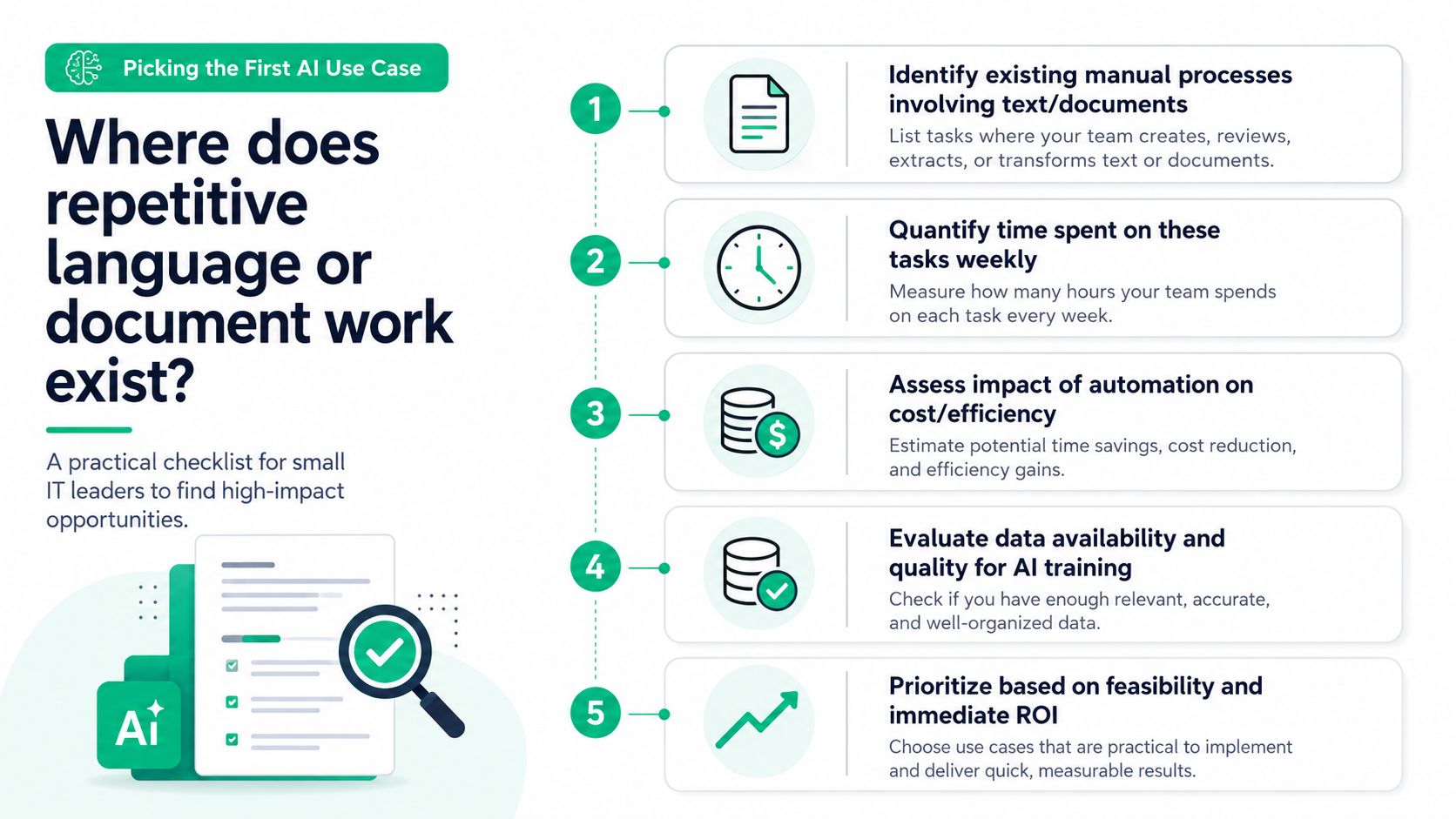
A good one-page checklist for leadership looks like this, and yes, it fits on a single sheet:
- Identify the manual process that uses the most text.
- Count the hours spent every week.
- Mark whether the output needs accuracy, tone control, or compliance review.
- Check whether the data already exists in emails, PDFs, tickets, or forms.
- Estimate whether saving time turns into billable hours, faster quotes, or fewer handoffs.
- Reject anything that depends on clean data you don't have yet.
The team at the top of the local market doesn't win by chasing trends. It wins by cutting a boring, expensive workflow down to size. If a project can't show a path to client service, throughput, or lower admin drag, it doesn't belong in phase one.
For a second example set, the automation ideas in 10 smart business process automation examples for Indiana companies in 2026 are worth scanning. Use them as pattern recognition, not as a shopping list.
Open-Source Self-Hosting Versus Hosted APIs
The build-versus-buy argument gets noisy fast, so here's the clean version. Hosted APIs give you speed, managed uptime, and quick iteration. Self-hosted open-source models give you more control over data residency, tighter compliance posture, and potentially better economics if usage gets heavy enough to justify the stack.
For most Johnson County SMBs, API first is the right default. If the project is under a year old, you're still proving the use case, and the business needs to move now, not after a GPU procurement cycle. Self-hosting makes sense when compliance, IP sensitivity, or unit economics force the issue.
| Factor | Hosted API | Self-Hosted Open-Source |
|---|---|---|
| Cost | Lower initial spend, usage-based | Higher startup cost, lower long-term run cost at scale |
| Latency | Usually predictable, provider-managed | Can be very good if tuned well, but you own the stack |
| Control | Less control over infra and some policies | Full stack control, custom model behavior |
| Compliance posture | Depends on vendor terms and configuration | Stronger fit for sensitive data and enclave-style control |
A self-hosted setup usually means something like Llama 3.x-class models, vLLM or TGI, a UniFi-segmented VLAN, and a GPU box you can maintain. That can work well for HIPAA or CMMC pressure, but it also means you're now in the business of patching, sizing, monitoring, and securing model infrastructure. If your team is already stretched thin, that's not a small trade.
Hosted APIs such as OpenAI, Anthropic, Google, or Azure OpenAI are easier to stand up and easier to support. The catch is governance. Prompt logs, retention policy, and data handling need to be nailed down before users start pasting customer information into the app like it's a private notebook.
A practical rule I've seen hold up in the field is simple. API first for anything under 12 months old. Hybrid for steady-state knowledge work. Self-host only when the business case forces it.
If you want the cost angle from an SMB operator's perspective, cloud cost optimization for an Indiana SMB is the right adjacent read. The decision isn't ideological. It's about owning the right risk at the right time.
Designing the System Architecture for a Production AI App
A real production app looks boring on purpose. That's a compliment. The architecture should make it hard to leak data, easy to observe, and simple to swap pieces without redoing the whole stack.
The flow usually starts with data sources, then ingestion and chunking, then an embedding model, a vector store such as pgvector, Pinecone, or Qdrant, then retrieval, then the LLM inference layer, and finally the user interface or API. The model tier should sit behind Zero Trust segmentation, not on the same open network as file shares, printers, or random internal services.
A useful mental model is latency path. If a Greenwood business bolts an LLM onto an old on-prem file share and a messy document store, the app will feel slow and unreliable before anyone has a chance to trust it. That's why the data path matters as much as the model choice. Clean ingestion, narrow retrieval, and a fast vector lookup usually beat trying to throw a giant model at a dirty file tree.
What belongs in the stack from day one
- Ingestion jobs that normalize PDFs, emails, and tickets.
- Chunking rules that keep context slices readable.
- A vector store with access controls and backup discipline.
- Guardrails that filter unsafe or out-of-policy requests.
- Immutable off-site backups for the data and the app's critical artifacts.
- Managed services where they reduce support load instead of creating it.
A whiteboard check is usually enough to spot bad designs. Ask four questions, where does the data enter, where is it stored, who can see it, and what happens when the model is wrong. If those answers aren't crisp, the architecture isn't ready.
For a practical systems resource on how toolchains fit together, building toolchains with Webclaw is a useful reference point. It's the kind of material that helps a team think beyond prompts and into working application plumbing.
The database side matters too. If the retrieval layer can't find the right records quickly, the app turns into a fancy autocomplete box. That's why schema discipline, index design, and permissions still matter in an AI project, even when the vendor slide deck pretends they don't. The database best practices in this Indiana ROI guide line up with what keeps these systems usable.
A quick visual often helps the team align on the stack, and it's not overkill to walk through the diagram with the people who own support and compliance.
Prompt Engineering Patterns That Survive Contact with Users
Clever prompts are easy to demo and hard to trust. Production prompts need structure, repeatability, and a test harness that catches drift before users do. If a prompt only works when the founder babysits it, it isn't a product feature.
The patterns that hold up are pretty consistent. Use a system prompt to pin tone and boundaries. Put the user's role and the business context in a separate block. Ground answers with retrieval so the model sees only relevant snippets. Force machine-readable output with a JSON schema when the rest of the app needs a predictable shape.
A small evaluation harness is where development efforts either get serious or get sloppy. Run 30 to 50 prompt cases through every change, including edge cases, bad inputs, and awkward wording. The regression suite is the difference between “this looked great in demo” and “this still works after three product tweaks.”
The best prompt isn't the one that sounds smartest. It's the one that fails the same way every time so you can fix it.
A practical before-and-after for an internal knowledge base assistant looks like this. Before retrieval, users got confident nonsense whenever the question touched a policy document or a stale procedure. After retrieval grounding, the assistant stopped freelancing and started answering from the approved material, which pushed hallucinations way down in day-to-day use.
A simple terminal-style check can keep the team honest:
pytest --prompts
That command belongs in the normal release cycle, right next to the rest of your test suite. If a prompt change breaks a known case, the developer should see it before the product owner does.
For a deeper pattern library, the generative AI prompt engineering guide is a good resource to keep nearby. The underrated move is writing the eval set before the prompt, not after. That keeps the team from tuning the output to match a hunch instead of a business requirement.
Security, Privacy, and Compliance Without the Hand-Waving
Security is where AI projects either grow up or get shut down. If the app touches customer records, employee data, or regulated workflows, treat it like an engineering problem with controls, logs, and evidence, not a slide deck with a lock icon on it.
Map the controls to NIST CSF first. That gives most Greenwood service businesses a sane baseline, and it gives HIPAA-covered shops and CMMC-bound contractors a place to anchor stricter requirements. In practice, that means classifying prompt data, protecting the vector store, detecting bad output, responding to incidents quickly, and recovering from mistakes with backup and restore discipline.
The rules that keep the app out of trouble
- Classify prompts and completions before they ever hit the model.
- Redact sensitive data at the edge when the use case allows it.
- Log access and model activity into the same SIEM that already watches Bitdefender GravityZone alerts.
- Separate tenants and sessions so one logged-in user can't see another tenant's data.
- Review vendor terms before any public model touches regulated content.
The “never do these things” list is short and absolute. Don't paste customer PII into a public model. Don't train on user inputs without consent. Don't ship an app with broken tenant boundaries. And don't assume a vendor's policy replaces your own governance.
When a business handles PHI, the HIPAA bar is different from a generic office workflow. When a subcontractor deals with CUI, the CMMC posture matters in a very real way. A defense shop doesn't get to improvise around model training data, and a healthcare practice can't treat de-identification like an optional checkbox.
A mature operating model also needs a release process. Use dev, staging, and prod with separate model endpoints. Wire CI/CD for prompts and eval sets. Run blue/green or canary releases for model swaps. Add feature flags so you can kill a bad prompt without redeploying the whole app.
The dashboard should tell the truth, not flatter the team. Track tokens per request, p95 latency, cost per 1,000 interactions, eval pass rate, user thumbs-up ratio, and guardrail trip count. Pair that with SOC-as-a-Service monitoring that pages on quality drift, not just on server errors. If the model starts answering more slowly or less safely, the alert should fire before the help desk gets flooded.
IBM's training, tuning, and generation/evaluation/retuning lifecycle is the right mental model here because it keeps the app in a loop instead of freezing it after launch. The first version of the system is only the first version. Quarterly review cycles matter because prompt quality, policy, and source data all change.
In real production, that discipline changes economics. A Hamilton County retailer cut cost-per-ticket by 38% after instrumenting the stack around measurement, review, and release control. That's the kind of result that survives budget meetings because it's attached to service delivery, not hype.
When I've handled regulated Indiana clients for years, the same pattern kept showing up. The projects that lasted were the ones where security and evaluation were designed in from the start, not bolted on after someone noticed the logs were missing.
If your team wants a straight-line view of the controls side, the compliance and security guide for Indiana SMBs is a useful complement. This is also where local service businesses usually need help with Zero Trust architecture, endpoint hygiene, and the boring parts that keep the app alive.
Your 90-Day Generative AI Application Development Plan
A 90-day rollout keeps the project honest. It's long enough to build something real, short enough to stop scope creep, and structured enough that finance can see where the money went.
Days 1 to 15
Pick the use case, score the candidate workflows, and define the KPI ladder. Decide what success means in business terms, not just technical terms. If the app is about ticket triage, the point might be faster response, fewer handoffs, or better routing, not just prettier answers.
Days 16 to 45
Stand up the data pipeline, choose API versus self-hosted, and ship a retrieval-augmented prototype behind SSO. If you need a reference for newer workflow thinking, the 2026 guide to AI workflows gives a decent sense of how teams are structuring these systems now. Keep the scope narrow and get real users in the loop early.
Days 46 to 75
Harden security, wire in evals and guardrails, and run a closed beta with internal staff. Prompt regression, access control, and logging either come together or fall apart at this stage. Fix the rough edges before anyone outside the company sees them.
Days 76 to 90
Launch to production, turn on observability, and do the post-launch review. If the app isn't tied to a monthly or quarterly review cycle by then, it's already drifting toward shelfware.
A plain budget envelope for an SMB usually includes infrastructure, model spend, integrations, and contingency. The exact mix depends on the stack, but the budget should be written in business language that the owner and controller can read without a translator.
| Metric | Day 30 Target | Day 90 Target |
|---|---|---|
| Accuracy | Baseline established | Stable against test set |
| Latency | Measured and acceptable | Consistent under normal load |
| Cost per interaction | Tracked by workflow | Predictable and reviewed |
| Deflection rate | Early signal captured | Meaningful business impact |
The final check is simple. If this AI feature can't be run on clean, monitored infrastructure, it's not ready to scale. For Greenwood and Indianapolis businesses, a Free Network Assessment or Security Risk Audit is the smartest first move because the AI app should sit on top of stable plumbing, not fragile wiring.
Finchum Fixes IT helps Indiana businesses build AI features the right way, with clean networks, solid security, and practical deployment planning that fits SMB budgets. If you're in Greenwood, Indianapolis, or anywhere along the I-65 corridor, visit Finchum Fixes IT to schedule a Free Network Assessment or Security Risk Audit and make sure your next AI project starts on infrastructure that won't trip you up later.