Mastering IP Address Management for Indianapolis Businesses

TL;DR
- IP address management stops network chaos before it turns into downtime, security gaps, and wasted staff hours.
- If your team still tracks devices and IPs in spreadsheets, you're one duplicate assignment away from a bad day.
- Strong IPAM gives you a single source of truth for devices, subnets, assignments, and ownership.
- The best setups tie IPAM, DHCP, and DNS together so address records update automatically.
- Regular audits matter. Best-practice guidance recommends reviewing IPAM records at least quarterly, with scans often done quarterly for dynamic pools and at least twice annually for static assignments (LogicMonitor).
- For Indiana businesses dealing with HIPAA, CMMC, or NIST CSF, IPAM helps prove control, accountability, and cleaner change tracking.
- Good IPAM protects business continuity and turns wasted troubleshooting time back into productive work.
A lot of Indianapolis-area businesses are running networks that grew by accident.
A company starts in a Greenwood office park with one internet circuit, one firewall, and a few switches. Then it adds VoIP phones, security cameras, guest Wi-Fi, remote users, cloud apps, warehouse scanners, printers nobody wants to touch, and a second location up the I-65 corridor. Five years later, the network still “works,” but nobody can tell you which device owns which address, what subnet was meant for what purpose, or whether that mystery device in the ceiling is a camera, an access point, or a problem.
That mess costs money fast. When systems go down, staff sit idle, shipments stall, phones fail, and customers wait. The author brief for this piece puts the business impact plainly: downtime can cost up to $9,000 per minute. Even before a full outage, smaller failures eat up real payroll. A tech spends half a morning tracing an IP conflict. Your operations manager waits on the warehouse printer. Your billable team loses an afternoon because Wi-Fi in an old brick building downtown keeps dropping users.
That's where IP address management, or IPAM, stops being nerd trivia and starts looking like basic business hygiene.
Your Network is a Mess and It Is Costing You Money
A logistics company near the south side has handheld devices on the floor, desktops in dispatch, cameras outside, and guest devices coming in and out all day. One morning, a scanner can't connect. Then a workstation loses line-of-business access. Then someone notices the phones are acting strange. The root cause isn't dramatic. Two systems were handed overlapping network space after a rushed change, and nobody had a clean record of what was already assigned.
That kind of failure is common because most network problems aren't glamorous. They come from sloppy records, old assumptions, and tribal knowledge.
What network disorder looks like in the real world
The usual warning signs show up long before a full outage:
- Duplicate assignments: Two devices end up fighting over the same address, and one of them drops offline.
- Unknown hardware: A switch, camera, access point, or rogue device shows up on the network and nobody knows if it belongs there.
- Subnet confusion: Teams reuse address ranges across sites, cloud workloads, or VLANs and create painful overlap.
- Slow troubleshooting: The senior person who “just knows the network” is out, and everyone else is guessing.
- Spreadsheet drift: The document says one thing. DHCP says another. Reality says something else.
Practical rule: If your team has to ask “Who changed that?” every time a network issue pops up, your addressing system isn't under control.
Businesses in Johnson County and across the Indy metro run into this all the time in older buildings with pieced-together Wi-Fi and in newer growth companies that added cloud tools faster than they added process. The issue isn't that the staff are careless. It's that manual tracking doesn't hold up once the environment gets busy.
Why this hits the bottom line
Every hour your internal team spends hunting down an address conflict is an hour they aren't spending on projects that move the business forward. Every outage creates payroll waste. Every avoidable support fire turns your IT budget into a surprise expense instead of a planned operating cost.
IP address management fixes the root issue. It gives your team a reliable record of what exists, where it lives, and who owns it. That means fewer blind spots, faster fixes, and a network that stops tripping your staff during normal business hours.
For a business owner, that's the primary benefit. Less chaos. Less downtime. More predictable operations.
What Is IP Address Management Anyway
Think of IP address management as the property manager for your network.
A good property manager knows every suite number, who rents it, what floor it's on, when it changed hands, and whether the record matches reality. IPAM does the same job for connected devices. It tracks the address space your business uses, records what's assigned, shows what's available, and helps your team avoid conflicts before they happen.
The single source of truth matters
A mature IPAM platform should work as a single source of truth for IPv4 and IPv6 space by continuously tying each address to hostname, MAC address, device type, subnet, switch port, and assignment state, which cuts down on blind spots and manual tracking errors in multi-subnet environments, as described by ManageEngine's IP address manager overview.
That single phrase, single source of truth, is what separates useful IPAM from a prettier spreadsheet.
If someone on your team asks these questions, IPAM should answer them without detective work:
- What is this address assigned to
- Is it static or dynamic
- Which VLAN or subnet owns it
- When was it last seen
- Who approved the change
- What device is attached
That same discipline overlaps with broader inventory control. If you want the bigger picture on tracking hardware and systems, this list of IT asset management software picks for Indiana businesses is a useful companion read.
What IPAM actually does day to day
At a practical level, IPAM usually handles four jobs:
| Function | What it means for your business |
|---|---|
| Discovery | Finds devices and networks that are active so you're not relying on memory |
| Allocation | Assigns and reserves address space in an organized way |
| Monitoring | Shows utilization, stale records, and potential conflicts |
| Integration | Connects with DHCP and DNS so records stay current automatically |
Good IPAM doesn't just document the network. It keeps documentation tied to what the network is actually doing.
That's why IPAM matters so much in multi-site environments around Indianapolis. Once you have a main office, remote users, cloud services, and segmented Wi-Fi, you need something more dependable than “ask Jim, he built it.”
The Real Business Case for IPAM in Central Indiana
Most business owners don't care about IPAM until the day they need it. That day usually arrives during growth, a compliance review, or an outage.
A manufacturer in Greenwood may have production equipment, office systems, cameras, VoIP, vendor access, and wireless clients all sharing one environment. A healthcare practice in Hamilton County may need clear accountability for devices touching patient-related systems. In both cases, IPAM isn't a nice extra. It's part of keeping operations stable and defensible.

ROI starts with fewer outages
The fastest return comes from preventing dumb problems.
When an address conflict knocks a device offline, the damage isn't just technical. Staff stop working. Customers wait. Leadership gets pulled into a problem they shouldn't have to think about. In our local market, that's extra painful because many small and midsize firms run lean. The same person handling infrastructure may also be doing vendor coordination, endpoint support, and security review.
IPAM reduces that drag by making the network understandable again. The team can see what belongs on each subnet, what's free, what changed, and where a problem started. That turns random firefighting into controlled maintenance.
Compliance gets easier when records are clean
For regulated businesses, IPAM also supports the paperwork side of staying in business.
- HIPAA-minded healthcare teams: Need clearer visibility into systems and cleaner accountability during reviews and investigations.
- CMMC-focused defense contractors: Need tighter control over environments, segmentation, and change discipline.
- NIST CSF-aligned organizations: Benefit from stronger asset visibility, better network awareness, and more reliable audit trails.
A lot of “security problems” start as inventory problems. If you don't know what's on the network, you can't secure it well.
That's why IPAM belongs in the same conversation as Bitdefender GravityZone, Zero Trust architecture, SOC-as-a-Service monitoring, and immutable off-site backups. Those controls work better when the network underneath them is mapped and maintained properly.
The market growth tells you this is now mainstream
The business world has caught up to this reality. The global IPAM solution market was valued at $2.8 billion in 2025 and is projected to reach $6.4 billion by 2034, growing at a 9.8% CAGR, according to DataIntelo coverage published by GlobeNewswire.
That doesn't mean every tool is good. It does mean businesses everywhere are treating address management as core infrastructure, not back-room housekeeping.
If you're trying to connect this to the bigger uptime conversation, this guide to IT infrastructure management and downtime reduction is worth your time.
Choosing Your IPAM Deployment Model
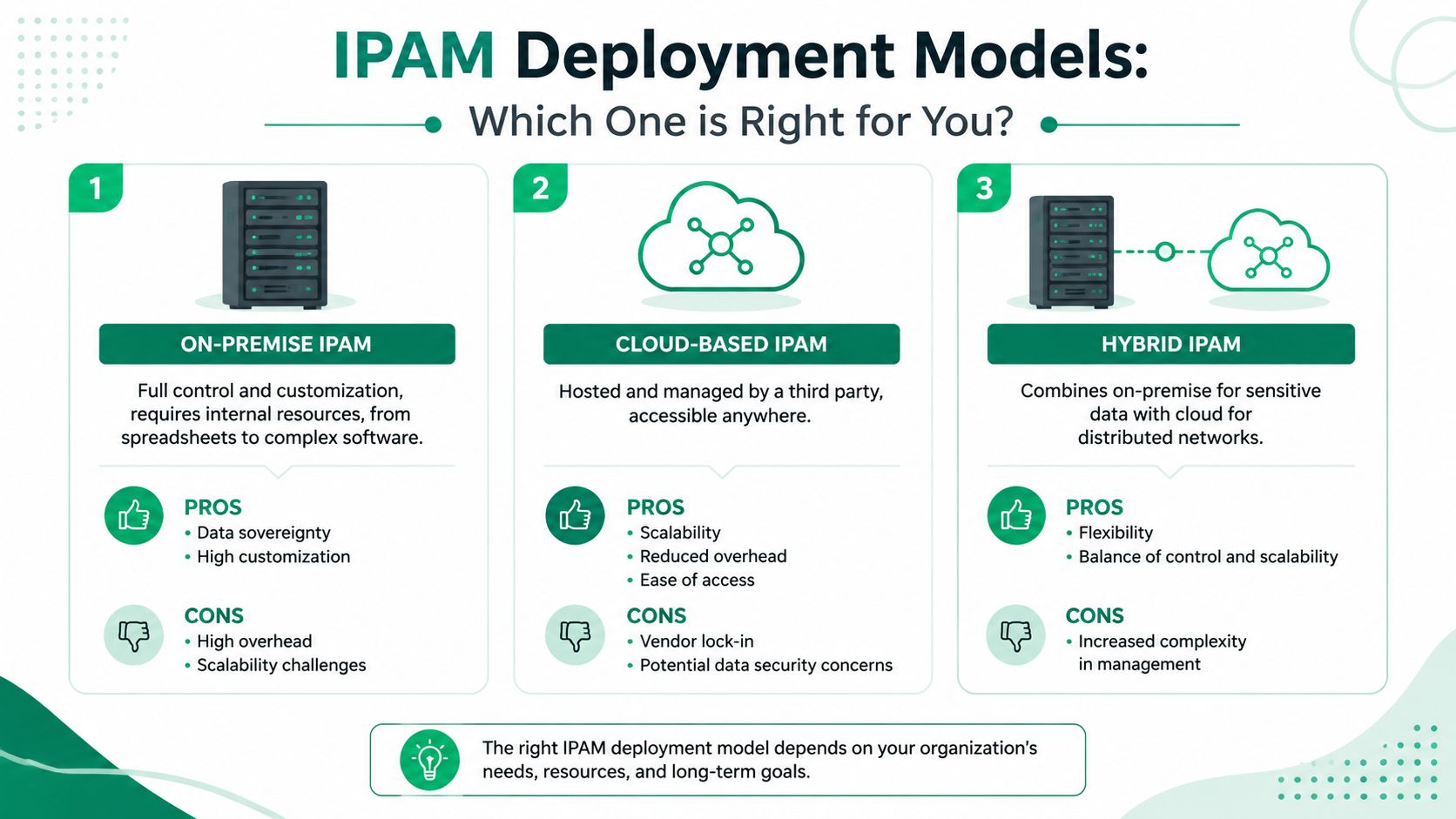
Not every business should deploy IPAM the same way. A ten-person office with one location doesn't need the same approach as a company with remote sites, Azure workloads, UniFi switching, and a growing AWS footprint.
The mistake is picking a model that doesn't match your staff capacity.
The three common approaches
| Model | Best fit | Strengths | Trade-offs |
|---|---|---|---|
| On-premise | Businesses with strong internal IT control requirements | Local control, deep customization, data sovereignty | More upkeep, more internal labor, easier to overcomplicate |
| Cloud-based | Distributed teams and businesses adding cloud services | Easy access, faster rollout, simpler scaling | Dependency on vendor ecosystem, policy review needed |
| Hybrid or managed | Businesses with both local and cloud environments | Balance of control and flexibility, better fit for mixed environments | Requires good design or it becomes two systems pretending to be one |
On-premise works when you actually have the bench
On-prem IPAM can make sense for companies with serious internal network talent, strict change control, or a reason to keep systems close to the server room. It can also become a trap when the tool lands on an already overloaded admin.
A lot of businesses say they want full control. What they really mean is they don't want surprises. Those aren't the same thing. Full control without enough time to maintain the system usually leads back to stale records and side spreadsheets.
Cloud tools fit modern access patterns
Cloud-based IPAM makes a lot of sense when teams are spread across locations or already manage workloads outside the building. The convenience is obvious. Staff can work from anywhere, integrations are often easier, and updates don't depend on someone touching a local appliance.
If your business is actively expanding into public cloud, this guide on cloud migration solutions for Indianapolis businesses helps frame the bigger architecture decisions.
For firms that expect a heavy AWS footprint, this independent guide to selecting AWS partners is useful because it helps non-specialists sort through who understands cloud networking and who just says they do.
Hybrid is usually the honest answer
A frequently under-addressed problem is how to handle IPAM for hybrid networks and cloud without building another silo. Modern tools increasingly focus on allocation across subnets, VLANs, virtual networks, and cloud environments, along with API access for automation tools like Ansible or Terraform, as noted in ManageEngine's IPAM overview for hybrid environments.
That hits home for businesses along the I-69 and I-65 corridors because many of them are in a mixed state. They still have a local firewall and switching stack, but key apps or remote workloads now live elsewhere.
If your addressing system for the office and your addressing system for the cloud don't agree, you don't have IPAM. You have two arguments waiting to happen.
For most small and midsize Indiana businesses, a managed or hybrid-minded approach is the practical sweet spot. You get process, visibility, and expertise without asking your internal team to become full-time DDI specialists.
Integrating IPAM with DHCP and DNS for Automation
IPAM on its own is useful. IPAM tied to DHCP and DNS is where the true operational payoff shows up.
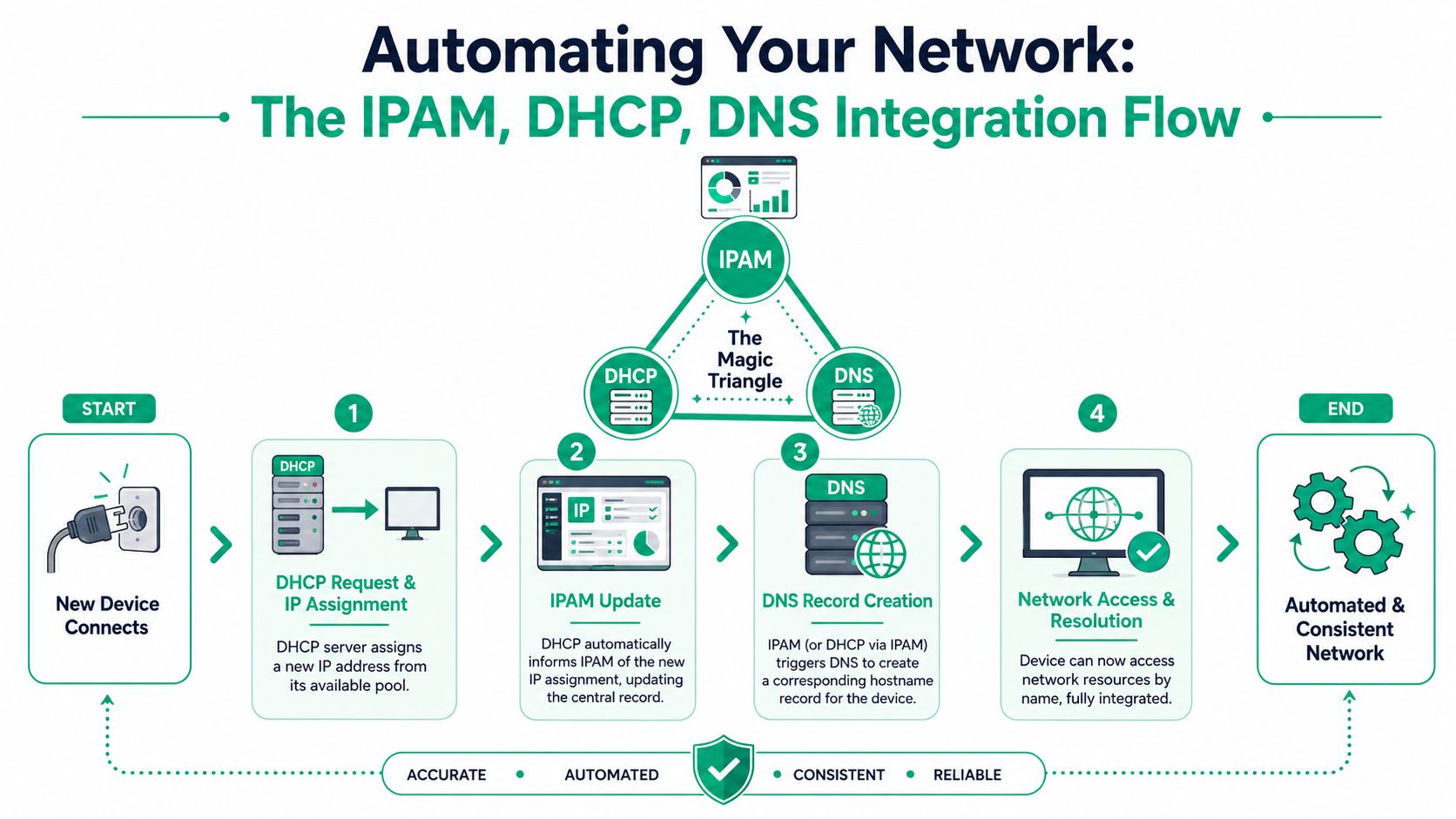
When these three systems work together, the network stops depending on manual updates. A device joins. DHCP assigns the address. DNS creates or updates the name record. IPAM logs the assignment and keeps the inventory current. That chain removes the biggest source of network mess, which is human memory.
What the workflow looks like
In a well-designed office using gear like UniFi networking, the process should feel boring in the best possible way.
- A device connects: Maybe it's a laptop, VoIP handset, scanner, or access point.
- DHCP does its job: The device gets an address from the right pool.
- IPAM updates the record: The assignment is logged with the rest of the network inventory.
- DNS keeps naming clean: The device can be found by name instead of forcing staff to hunt through raw records.
That's the difference between a live system and a dead document.
Structure matters before automation matters
Automation only helps if the address plan is sane. The strongest pattern for modern networks is hierarchical allocation plus automation. Carve address space by site, function, or VLAN, then integrate IPAM with DHCP and DNS so leases, host records, and available-address counts update automatically. That improves scalability and prevents stale records, according to Binadox's guidance on effective IP address management strategies.
In plain English, don't toss devices into random pools.
Use clean boundaries such as:
- Site-based segmentation: Headquarters, branch office, warehouse, remote site
- Function-based segmentation: Servers, user devices, voice, cameras, guest Wi-Fi
- Security-based segmentation: Trusted systems separated from vendor, BYOD, and public-facing segments
A quick refresher on how DNS works in business networks helps if the naming side of this has always felt fuzzy.
A simple outside check can also help when email delivery or reverse lookup issues pop up. The mailX reverse DNS tool is handy for verifying whether PTR records line up with what your systems are supposed to present.
Here's a useful visual walkthrough of the relationship between these services:
Networks become easier to support when naming, addressing, and lease data all tell the same story.
That's not just cleaner engineering. It means the next support call gets resolved faster, and your business gets back to work sooner.
IPAM Best Practices for Security and Compliance
A security review is scheduled for next week. Your IT lead gets asked a basic question: which devices sit on this subnet, who approved them, and are the records current? If the answer lives partly in IPAM, partly in DHCP, and partly in someone's memory, that review gets expensive fast.
That is the true test of IPAM. The software matters less than the operating habits around it.
Audit on a schedule, not on a hunch
Networks drift even in well-run businesses. Printers get swapped. Cameras get relocated. Temporary lab gear sticks around. Old reservations survive long after the device is gone. If no one checks the records on purpose, your source of truth turns into a rough guess.
LogicMonitor's IPAM guidance recommends a recurring review cycle, with regular audits of records and periodic scans for both dynamic and static address use. For a business in Central Indiana, that is not just cleanup work. It is protection against avoidable downtime, failed changes, and ugly surprises during a compliance review.
A workable rhythm usually includes:
- Quarterly record reviews: Confirm that documented subnets, reservations, and owners still match production.
- Dynamic pool scans: Look for abandoned leases, unusual consumption, and pools getting too tight.
- Static assignment checks: Verify fixed-address systems such as printers, servers, phones, and network gear.
- Change logging: Require a ticket, approval, or documented reason for address changes.
Keep it boring. Boring systems are easier to support and easier to defend in an audit.
Use IPAM to support security controls
IPAM helps security teams answer a simple question fast. What is this device, where did it get its address, and should it be here?
That matters during incident response. It also matters on an ordinary Tuesday when a contractor plugs in an unmanaged laptop, a forgotten wireless bridge comes back online, or a scanner starts talking to systems it should never reach. Good IPAM does not replace endpoint security, NAC, switch controls, or DNS filtering. It makes those tools more useful because your team can tie activity back to a known asset instead of chasing mystery devices.
For businesses dealing with HIPAA, CMMC, cyber insurance questionnaires, or customer security reviews, clean address records support the larger control set. They help prove asset awareness, ownership, and change discipline. If you want the broader business view, this small business cybersecurity checklist for 2026 lays out the controls that usually get examined together.
Security teams cannot protect devices they cannot identify. Operations teams cannot support them either.
Don't treat IPv6 as a future problem
A lot of IPAM buyers stop at one question. Does it support IPv6?
That is too shallow. The better question is whether your team has a model for how IPv6 will be assigned, documented, delegated, and audited before a vendor, ISP, or cloud project forces the issue.
A practical approach is straightforward. Standardize subnet sizing, assign site-level blocks with room to grow, and document ownership and policy inside IPAM from the start. The point is not to overengineer it. The point is to avoid a second addressing mess later, right when the business is adding locations, cloud services, or compliance requirements.
Handled well, IPAM becomes part of risk control. It reduces troubleshooting time, gives auditors cleaner answers, and saves your staff from wasting hours on address conflicts and stale records. That is the business case Johnson County owners care about. Less chaos. More predictable operations.
Your IPAM Checklist and When to Call an Expert
If you want a quick gut-check on whether your business is ready for better IP address management, start here:
- Inventory first: List locations, core network gear, servers, printers, phones, cameras, Wi-Fi, and cloud-connected workloads.
- Map by purpose: Separate address space by site, department, VLAN, or security role instead of piling everything together.
- Pick one source of truth: Stop splitting records between sticky notes, spreadsheets, and memory.
- Tie in DHCP and DNS: Manual updates won't hold up for long.
- Set an audit rhythm: Put reviews on the calendar so the system stays trustworthy.
- Plan for compliance: If you deal with HIPAA, CMMC, or contractual security reviews, keep records clean enough to defend.
If that list feels simple, good. The concept is simple.
The execution isn't.
Businesses usually hit the wall. The network has old baggage. Someone hard-coded a printer years ago. There's a VPN nobody wants to break. A cloud workload was spun up outside policy. The firewall rules are full of comments like “temp” from two years ago. That's why many Johnson County business owners do better with outside help. The work isn't just documenting addresses. It's redesigning the environment so it stays stable after the cleanup.
Stop letting network chaos run your schedule. A clean IPAM strategy protects uptime, tightens compliance, and gives your team back hours they can spend on work that pays.
If your business is in Greenwood, Indianapolis, or anywhere along the Central Indiana corridor, Finchum Fixes IT can help you sort out the network before the next outage sorts it out for you. Schedule a Free Network Assessment or a Security Risk Audit and get a practical plan for cleaner addressing, better Wi-Fi, stronger security, and a more predictable IT budget.