Pre Shared Key PSK Guide for Secure Business Networks
A pre shared key PSK is a shared secret that two devices use to prove they trust each other before the network creates separate session keys for encrypted traffic. For Johnson County and I-65 corridor businesses, that matters because one weak shared secret can turn a small Wi-Fi or VPN mistake into downtime, audit headaches, and avoidable support costs.
If you've ever stood in an old Greenwood brick office building while laptops keep dropping off the guest network, you already know the pain. Staff waste time reconnecting, vendors can't get online, and your team gets pulled off billable work to fix something that should've been locked down from the start. In industries that live under HIPAA, CMMC, or a practical NIST CSF program, that kind of sloppy access control isn't just annoying, it's a risk.
The good news is that PSK problems are understandable once you separate the shared secret from the encryption keys that protect traffic. That distinction is the difference between “we think the Wi-Fi is secure” and “we know who's on the network, how they got there, and how fast we can shut them off if something goes sideways.” For SMBs in Greenwood, Indianapolis, and the downtown tech hubs, that clarity helps convert wasted tech time into predictable monthly support and less downtime pressure.
Introduction to Pre Shared Key PSK
A pre shared key PSK is the secret both sides already know before a secure connection starts. In Wi-Fi, VPN, and similar setups, it's used to authenticate devices or peers first, then the protocol creates the separate session keys that encrypt the traffic NIST's pre-shared key glossary entry.
That distinction matters more than most owners realize. People often call it “the Wi-Fi key” or “the VPN key,” but that shorthand hides the underlying model, where the PSK proves identity first and the network derives encryption keys afterward. If you've got a Greenwood business park with spotty Wi-Fi in an aging brick building, this difference can save you from treating every access problem like the same problem.
Practical rule: A PSK should control access. It shouldn't be your whole security plan.
For local decision-makers, this is really a business continuity issue. A shared secret that's easy to guess, easy to reuse, or hard to rotate can create a mess of outages, support tickets, and manual cleanup. That's why a weak PSK is more than a technical flaw, it's a drain on ROI, because every minute spent troubleshooting bad access is time not spent on revenue work.
If you want a broader baseline on why network security matters for Indiana businesses, this local primer on network security fundamentals for Indiana companies is a useful companion. The big idea is simple, secure access should be repeatable, auditable, and easy to manage when the team grows.
Understanding How Pre Shared Key PSK Works
A PSK functions like a pre-agreed password for authentication. Both sides already know the same secret, so the network can confirm they belong there before it creates fresh session keys for the actual connection.
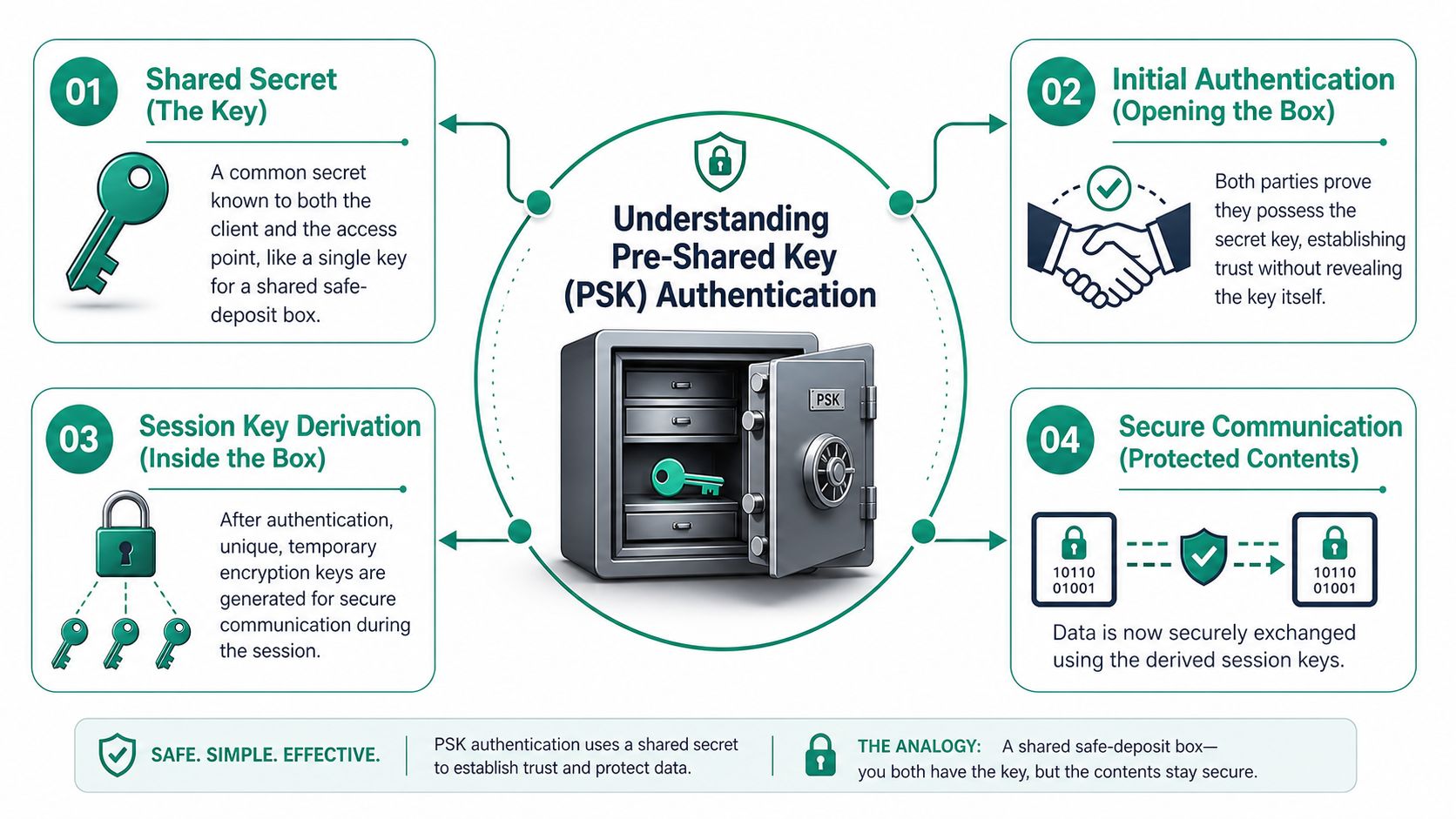
That separation matters in real networks, including a Greenwood business park where one shared secret may be protecting a Wi-Fi segment, a VPN tunnel, or both. Authentication proves identity first. Encryption starts after that, using session keys that are generated for the connection itself.
Wi-Fi and VPN use different paths to the same idea
In Wi-Fi deployments, the passphrase and SSID are used to create the PSK, and the passphrase length is 8–63 characters. The resulting PSK is combined with other information to form a stronger encryption key that protects traffic on the network EnGenius guidance on PSKs.
For an Indiana SMB, that means a single office Wi-Fi password can control access for staff, printers, and guest devices at the same time. If one team member shares it too freely, every device that learned it keeps the same level of trust until you change the key. That is why rotation and segmentation matter, especially in busy multi-tenant buildings where one exposed secret can create support calls across several tenants instead of just one desk.
In IPsec VPNs, the PSK does not encrypt the data directly. It proves the two ends belong together, then IKE or ISAKMP negotiates the actual encryption keys after authentication succeeds weberblog on IPsec PSKs. If your team uses VPNs for branch office connectivity or remote work, that difference affects how quickly you can revoke access and how cleanly you can separate a branch from the rest of the network when something looks off.
For a closer look at how access control fits into modern wireless design, this local guide to network access control for Indy SMBs connects the dots nicely. And if you are also comparing wireless performance, this breakdown on improve gaming with WiFi 7 is a good reminder that speed matters less than clean access rules when a network has to stay reliable.
Security Risks and Attack Vectors for PSK
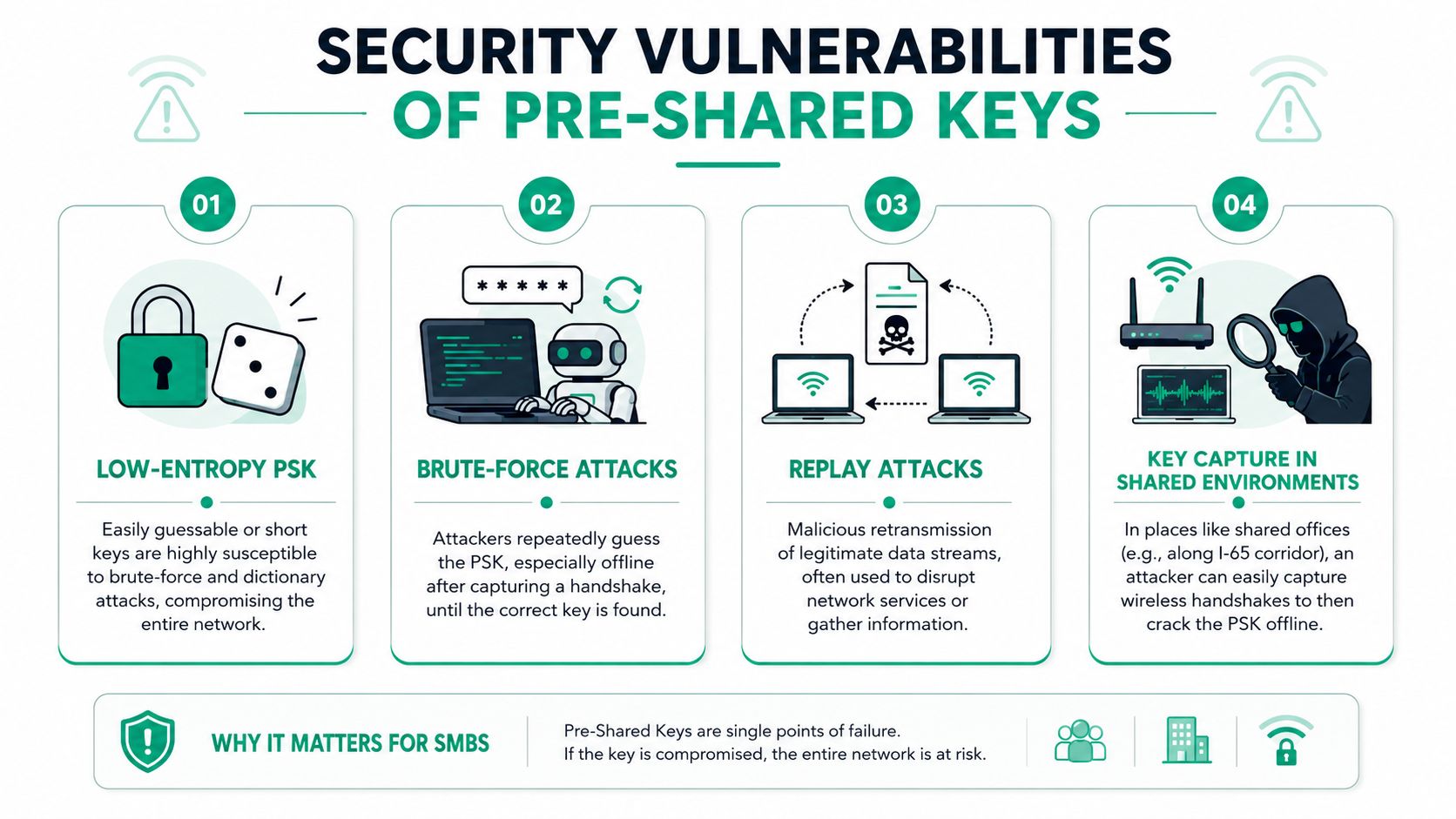
The biggest PSK risk in an SMB is boring, not flashy. Someone chooses a weak passphrase, reuses it across sites, or leaves it unchanged long after the original install. That's exactly the kind of setup that makes brute-force guessing much easier than it should be.
Why entropy and forward secrecy matter
For TLS 1.3 external PSKs, RFC 9257 requires each PSK to come from at least 128 bits of entropy, be at least 128 bits long, and be paired with an ephemeral key exchange such as psk_dhe_ke to preserve forward secrecy RFC 9257. That requirement exists because a low-entropy PSK is much easier to brute-force, and a PSK used without DHE can expose long-term traffic if it's ever compromised.
That principle maps cleanly to SMB Wi-Fi and VPNs. If one shared secret protects an entire office, then one leak can become a broad exposure event. In shared spaces along the I-65 corridor, that risk goes up because attackers can capture handshakes and try to crack weak keys offline later.
A strong PSK helps. A strong PSK plus rotation and ephemeral exchange helps much more.
For a practical overview of threats that hit Indiana businesses, this network threat guide for Indiana businesses is worth a read. It reinforces the same lesson: shared secrets need more than optimism, they need a process.
Initial Configuration on Common Routers
A clean PSK setup starts with the basics. In a Greenwood office park, a shared key that was copied into the wrong SSID can lock out staff, send guests onto the wrong network, and turn a normal morning into a support call pileup. Start by generating a random secret instead of inventing one in your head. On a Linux box, macOS terminal, or Windows environment with OpenSSL installed, use:
openssl rand -base64 32
That command gives you a strong starting point for a secret, and it lines up with Google Cloud's guidance on using cryptographic randomness for PSK generation Google Cloud PSK guidance.
UniFi and Meraki setup paths
On UniFi Network Controller v7, go to your wireless network settings, choose the SSID, select the security mode that uses a PSK, and paste in the generated secret. On Cisco Meraki Dashboard, open the wireless SSID profile, choose the security settings, and enter the shared secret in the pre-shared key field. In both cases, use the 8–63 character Wi-Fi range when the platform asks for a passphrase rather than a raw secret. That range is part of the normal setup guidance for many router and access point interfaces, so it helps to match the secret format to what the device expects.
A quick diagnostic workflow keeps you out of the weeds:
- Check the SSID name. Make sure staff are connecting to the correct network, not the old guest SSID left behind after an upgrade.
- Verify the security mode. Confirm the SSID is using PSK-based authentication, not a mismatched profile.
- Test with one clean device. Connect a known-good laptop or phone before rolling the change to the whole office.
- Watch for repeat failures. If one device works and another doesn't, the problem is usually local config, not the shared secret.
For SMBs that want cleaner router behavior and fewer support calls, this guide to router optimization is a sensible follow-up. For a wider view of building business networks that stay easier to support, see our guide to business Wi-Fi solutions for fast, secure SMB networks. The same logic applies to business Wi-Fi, fix the base config first, then tune the rest.
The point of setup isn't just access. It's repeatability. A network that's configured the same way every time is easier to support, easier to document, and easier to defend when someone asks why staff got locked out on a Monday morning. In a small Indiana office, that kind of consistency also makes it easier to rotate a PSK without disrupting every user at once, especially when the network is segmented so a change in one area does not spill into another.
Comparing PSK and Enterprise Authentication
A shared-key network is easy to set up. That ease is also its weakness. One credential gets one person online, and the same credential can get the whole office online, which means a single leak can spread across every device that uses it.
A Greenwood business park incident makes the risk easier to picture. If one tenant keeps the same PSK on staff laptops, guest access, and a back-office system, a mistake in one area can force a wider shutdown than anyone expected. Segmentation and regular rotation help keep that problem contained.
Side-by-side view
| Method | Security posture | Credential model | Compliance fit | Admin effort |
|---|---|---|---|---|
| WPA-PSK | Good for small, controlled setups, weaker if the key spreads | One shared secret | Often weak for strict accountability needs | Low at first, high when rotating |
| WPA-Enterprise | Stronger because identities are individual | Per-user authentication with RADIUS | Better fit for CMMC, HIPAA, and NIST CSF programs | Higher setup, lower chaos later |
| WPA3-SAE | Stronger cryptographic protection for connection setup | Shared password model with improved handshake security | Strong fit for modern security baselines | Moderate |
The business difference shows up in support calls. With WPA-PSK, one change can affect everyone at once. With WPA-Enterprise, you can revoke a user, role, or device without rebuilding the whole network. That works better for Johnson County businesses that need predictable support and fewer interruptions.
Why the IPsec lesson still matters here
IPsec follows a similar pattern. The PSK handles authentication, but the actual encryption keys are created afterward through IKE or ISAKMP. That matters because learning the PSK does not automatically give an attacker full access, especially when static public IPs are part of the design. The setup still depends on the rest of the controls doing their job.
For Indiana SMBs, that makes Zero Trust architecture more practical than abstract. Identity-based access, stronger logging, and cleaner revocation workflows reduce the chance that one shared secret turns into a week of cleanup. A Greenwood office, whether it is healthcare, defense, or a growing firm near the I-65 corridor, benefits from the same discipline, because the technical choice also shapes how much downtime the business can absorb.
SMB Best Practices for Managing PSKs
The best PSK strategy for an SMB is to treat the secret like a business credential, not a convenience. That means you distribute it carefully, change it on a schedule, and don't let every department or site share the exact same value forever.
What works in real offices
- Use unique secrets where possible. Separate guest, staff, and operations access so one leak doesn't expose every device.
- Rotate on a schedule. Periodic change helps reduce the blast radius if someone leaves with the old secret.
- Segment by site or tunnel. A per-device or per-tunnel PSK keeps a single branch office problem from becoming a companywide problem.
- Transfer secrets confidentially. Don't send them in open email threads or casual text chains.
That lines up with vendor guidance that PSKs should be transferred confidentially, kept long and random, and changed periodically. Some practitioners also recommend unique PSKs per VPN tunnel to limit damage if one key leaks, which is especially relevant for branch office environments where shared secrets are still common and fragile Forcepoint guidance.
A Greenwood law firm or accounting office may not need the same architecture as a hospital, but it still benefits from the same discipline. If a single leaked password can force a service desk scramble, your business continuity plan is already under pressure.
For a broader view on keeping credentials tidy, this small business password management guide fits well with PSK hygiene. The same mindset also pairs nicely with small business risk management, because access control and operational risk always travel together.
Conclusion with Local Assessment CTA
A pre shared key PSK still has a place in a small business network, but it works best when the setup is treated like a controlled access tool, not a free pass. It authenticates first, then helps hand off traffic to stronger session keys for the rest of the connection. That distinction matters because one shared secret can become a single point of failure if it is copied around carelessly.
A Greenwood business park office learned that lesson the hard way after one shared guest Wi-Fi key was reused across several tenants. A small mistake in one suite led to three separate slowdowns in the same quarter, because staff devices, guest devices, and a printer network were all tied too closely together. Once the business park separated those segments and rotated the key on a schedule, the disruption stopped spreading from one area to another.
For Indiana SMBs, that kind of cleanup pays off in ordinary but important ways. Better PSK management lowers the odds of downtime, supports compliance expectations, and reduces the time your staff spends chasing reconnect problems. That is where security turns into business value, fewer interruptions, cleaner budgets, and more time spent on revenue work instead of password firefighting.
If your Greenwood or Indianapolis office still depends on a shared secret that nobody wants to change, it is time to review the setup. A fresh look at Wi-Fi segmentation, VPN access, and key rotation can show whether your network is under control or just getting lucky.
A CTA for Finchum Fixes IT. If you are a Johnson County business owner, schedule a Free Network Assessment or Security Risk Audit today so your Greenwood or Indianapolis network can move toward stronger authentication, tighter segmentation, and less downtime.